
7160-1257 - Accessory Gamber-Johnson - Free user manual and instructions
Find the device manual for free 7160-1257 Gamber-Johnson in PDF.


| Product Type | Vertical Tablet Keyboard Mount |
| Brand | Gamber-Johnson |
| Model | 7160-1257 |
| Compatible With | Gamber-Johnson tablet docking stations and cradles |
| Mounting Method | Attaches between docking station/cradle and motion attachment |
| Keyboard Attachment | 8-32 x 3/8" machine screws or Dual Lock fastener (4 strips) |
| Tray Adjustment | Up to 10° tilt via bottom slot |
| Material | Metal bracket |
| Color | Silver/Black (typical) |
| Weight | Approximately 1 lb (0.45 kg) |
| Dimensions | Approximately 12" x 8" x 2" (30.5 x 20.3 x 5.1 cm) |
| Installation | Attach to dock/cradle using provided hardware; keyboard attaches via screws or Dual Lock |
| Maintenance | Clean with mild detergent and damp cloth; avoid abrasive cleaners |
| Safety Certification | Designed for vehicle use; follow OEM specifications and installer program |
| Warranty | Limited lifetime warranty (typical Gamber-Johnson) |
| Package Contents | Keyboard tray, hardware bag (screws and Dual Lock strips) |
| Country of Origin | USA (likely) |
| Part Number | 7160-1257 |
| Compatibility | Works with most Gamber-Johnson tablet mounts and standard keyboards |
| Disclaimer | Improper installation may cause injury; follow manual and vehicle manufacturer guidelines |
Frequently Asked Questions - 7160-1257 Gamber-Johnson
User questions about 7160-1257 Gamber-Johnson
0 question about this device. Answer the ones you know or ask your own.
Ask a new question about this device
Download the instructions for your Accessory in PDF format for free! Find your manual 7160-1257 - Gamber-Johnson and take your electronic device back in hand. On this page are published all the documents necessary for the use of your device. 7160-1257 by Gamber-Johnson.
USER MANUAL 7160-1257 Gamber-Johnson
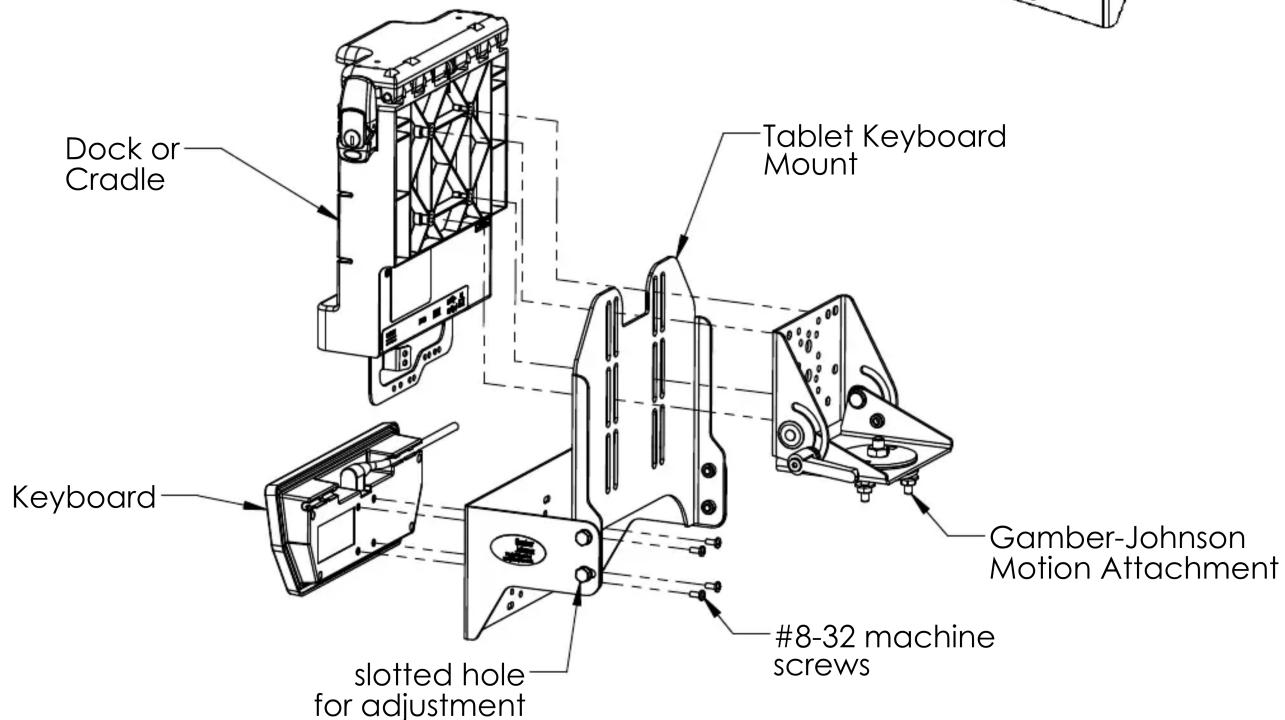
This instruction sheet is for the Vertical Tablet Keyboard Mount only. This mount is designed to be used with Gamber-Johnson tablet docking stations and cradles.
Attaching the Mount
- The Tablet Keyboard Mount attaches between the docking station or cradle and the motion attachment using the hardware provided with the dock or cradle.
- The keyboard attaches using the 8-32 x 3/8" machine screws provided in hardware bag 7120-0714.
- The bottom mounting location on each side of the keyboard tray is a slot which provides up to 10 deg. of adjustment for the tray.

Product Mounting Disclaimer
Gamber-Johnson is not liable under any theory of contract or tort law for any loss, damage, personal injury, special, incidental or consequential damages for personal injury or other damage of any nature arising directly or indirectly as a result of the improper installation or use of its products in vehicle or any other application. In order to safely install and use Gamber-Johnson products full consideration of vehicle occupants, vehicle systems (i.e., the location of fuel lines, brakes lines, electrical, drive train or other systems), air-bags and other safety equipment is required. Gamber-Johnson specifically disclaims any responsibility for the improper use or installation of its products not consistent with the original vehicle manufactures specifications and recommendations, Gamber-Johnson product instruction sheets, or workmanship standards as endorsed through the Gamber-Johnson Certified Installer Program.
© Copyright 2018 Gamber-Johnson, LLC

Attaching Keyboard to Tray with Dual Lock Fastener
The Keyboard can be attached to the tray using (4) 8" long pieces of Dual Lock fastener supplied in hardware bag 7120-0714.
Lock 2 pieces of the Dual Lock fastener together with the release liners toward the outside.
Remove the release liner from one side and attach the Dual Lock strips to the tray surface.
Remove the remaining release liner from the Dual Lock strips and place the Keyboard on the tray surface. The bottom surface of the Keyboard will adhere to the Dual Lock strips.
To remove the Keyboard from the tray, hold the sides of the Keyboard and pull away from the tray. The Dual Lock strips will seperate.
To attach the Keyboard to the tray, press the Keyboard onto the tray, aligning the Dual Lock strips. The Dual Lock strips will mesh holding the Keyboard in place.
Brand : Gamber-Johnson
Model : 7160-1257
Category : Accessory