
BCB 4010 E O31 - Refrigerator HOTPOINT - Free user manual and instructions
Find the device manual for free BCB 4010 E O31 HOTPOINT in PDF.
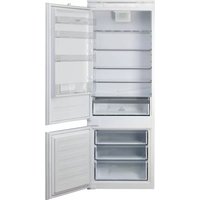


| Product Type | Combined refrigerator-freezer |
| Brand | Hotpoint |
| Model | BCB 4010 E O31 |
| Energy Class | E (EU energy label) |
| Total Net Capacity | Approx. 300 L |
| Refrigerator Capacity | Approx. 200 L |
| Freezer Capacity | Approx. 100 L |
| Freezer Star Rating | 4 stars (****) |
| No Frost Technology | Freezer compartment only |
| Climate Class | N-ST (16°C - 38°C) |
| Dimensions (H x W x D) | 177 x 54 x 54 cm |
| Weight | 51 kg |
| Power Supply | 220-240 V ~ 50 Hz |
| Annual Energy Consumption | 241 kWh/year |
| Noise Level | 39 dB(A) |
| Shelves Material | Glass (adjustable) |
| Door Reversibility | Yes (user changeable) |
| Special Features | Bottle rack, egg tray, salad crisper |
| Defrost Method | Automatic in refrigerator, manual in freezer (if not No Frost) |
| Cooling Agent | R600a (isobutane) |
| Spare Parts Availability | Authorized service centers |
| Manual Languages | Multiple (including EN, DE, FR) |
Frequently Asked Questions - BCB 4010 E O31 HOTPOINT
User questions about BCB 4010 E O31 HOTPOINT
0 question about this device. Answer the ones you know or ask your own.
Ask a new question about this device
Download the instructions for your Refrigerator in PDF format for free! Find your manual BCB 4010 E O31 - HOTPOINT and take your electronic device back in hand. On this page are published all the documents necessary for the use of your device. BCB 4010 E O31 by HOTPOINT.
USER MANUAL BCB 4010 E O31 HOTPOINT
THANK YOU FOR BUYING AN HOTPOINT-ARISTON PRODUCT
In order to receive a more complete assistance, please register your product on www.hotpoint.eu/register

Before using the appliance carefully read the Safety Instruction.
PRODUCT DESCRIPTION
FIRST TIME USE
Wait at least two hours, after the installation, before connecting the appliance to the power supply. Connect the appliance to the power supply it starts the operation automatically. The ideal storage temperatures for the food are preset in the factory.
After turning the appliance on, you must wait for 4-6 hours for the correct storage temperature to be reached for a normally filled appliance. Position the antibacterial anti-odour filter in the fan as demonstrated in the filter packaging (if available). If the audible signal sounds, it means that the temperature alarm has intervened: press the button to switch off the acoustic alarms.
CONTROL PANEL
1.1. Freezer and refrigerator compartment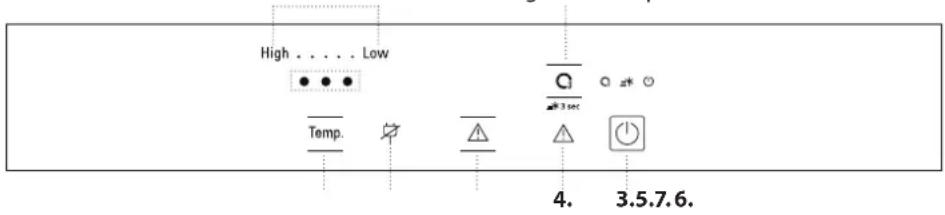
temperature indicator
- Fast cool - "Active Oxygen" button
- On/stand-by
- Alarm indicator
- Turning off the sound alarm
- Black out alarm indicator
- Temperature button
"ACTIVE OXYGEN" FUNCTION
Through the emission of a small quantity of ozone, this function enables a reduction in the proliferation of bacteria and microorganisms inside the refrigerator and limits bad odours. When the function is activated, a coloured light will appear on the device, according to the following cyclical features:
- Green light: ozone emission phase
- Blue light: antibacterial and anti-odour action phase (without ozone emission)
To deactivate the function, simply press the O3 button on the control panel.
Note: when the Active Oxygen function is activated, a faint odour might be perceived inside the refrigerator (the same odour that sometimes accompanies a thunder storm due to the ozone produced by the lightning): it is absolutely normal.
Note: Disabling the function optimizes energy consumption. Keep the bottle rack grid in the upper parts of the compartment to optimize the function.
FAN*
The Fan improves temperature distribution inside the product, allowing better preservation of stored food and reduction of excess humidity. By default, the fan is switched on. You can turn the fan on/off by pressing for 3 seconds the buttons indicated. The temperature indicator will flash and a sound signal is activated once if the fan is OFF, or the temperature indicator will flash and a sound signal is activated twice if the fan is ON. If the ambient temperature exceeds 27°C , or if drops of water are present on the glass shelves, it is essential that the fan is on to ensure the proper preservation of the food. Deactivation of the fan allows energy consumption to be optimised.
Note: the fan restarts automatically after a power cut or after turning off the appliance. Do not obstruct the air intake area with food items.

ON/STAND-BY
Press the button for 3 seconds to turn the appliance off. Press the button again briefly to reactivate the appliance.
Note: this does not disconnect the appliance from the power supply.
FREEZER AND REFRIGERATOR COMPARTMENT TEMPERATURE
It is possible to set a different temperature of the appliance by pressing the "Temp." button.
LEDs lit Set temperature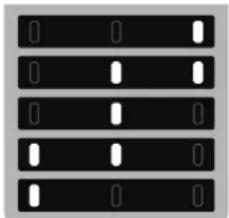
High
Low (colder)
Medium-low
Medium
Medium-high
High (less cold)
3 sec FAST COOL
Press the button O/σ for 3 seconds before placing a large quantity of fresh food in the refrigerator compartment. When the function is turned on the icon light up. The function turns off automatically after 36 hours, or manually by pressing the button again for 3 seconds.

TURNING OFF THE SOUND ALARM
To turn off the sound alarm, briefly press the ⚠️ button.
HOW TO STORE FOOD AND BEVERAGE
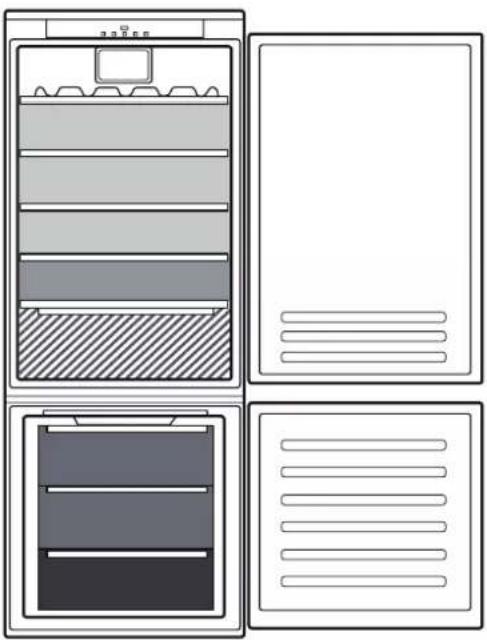
Legend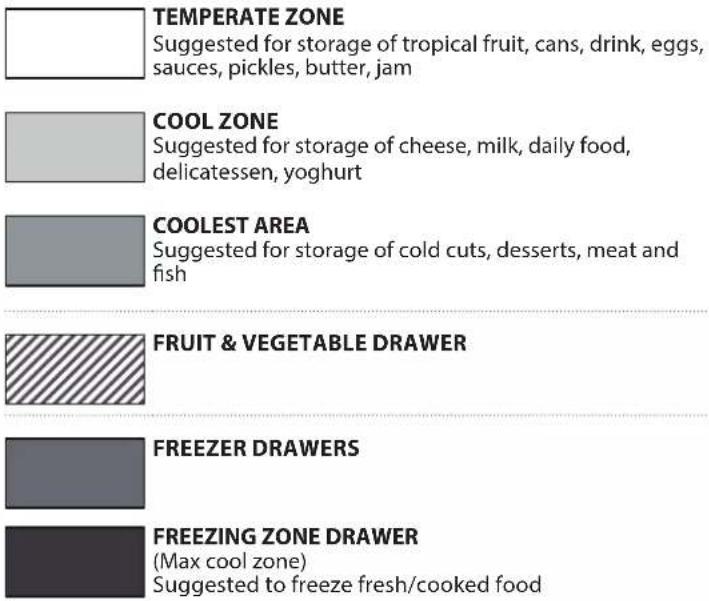
HYGIENE GRID*
The Fruit & vegetable drawer is equipped with the Hygiene grid. Thanks to the special design of this component, fruits and vegetables are not in contact with the natural leakages (such as drip loss and moisture from vegetables) that drop below the Hygiene grid. The Hygiene grid is treated with Microban SilverShield® technology that reduces harmful bacteria by up to 99.9% on the surface of the crisper grid, for enhanced preservation of fruit and vegetables**.
The hygiene grid can be removed to be washed when dirty, simply by raising it and pulling it out. It can be washed by hand, with water only or with common neutral detergents for dishes. It can also be washed in the dishwasher. After cleaning, dry it before putting it back into place.
** Independently tested by IMSL (Industrial Microbiological Services Ltd, UK) using ISO 22196
What to do if... Possible reasons Solutions
| The control panel is switched off, the appliance does not work. | There may be an appliance power supply problem. | Check that:there is not a power outage;the plug is properly inserted in the power socket and the mains double-pole switch (if present) is in the correct position (i.e. allows the appliance to be powered);the household electrical system protection devices are efficient;the power cable is not damaged. |
| The inside light does not work. | The light may need to be replaced. • Contact the authorised Technical Assistance Service. | |
| The appliance may be in On / Stand-by mode. | Turn the appliance on by briefly pressing the button (see On/ Stand-by function). | |
| The temperature inside the compartments is not low enough. | There could be various causes (see "Solutions"). | Check that:the doors close properly;the appliance is not installed near a heat source;the set temperature is adequate;the circulation of air through the ventilation of the appliance is ensured. |
| There is water on the bottom of the refrigerator compartment. | The defrost water drain is blocked. | Clean the defrosting water drain (see section "Cleaning and Maintenance"). |
| The front edge of the appliance, at the door gasket, is hot. | This is not a defect. It prevents condensation from forming. | No solution is necessary. |
| The red icon is flashing and a sound signal is activated | Door open alarmIt is activated when the refrigerator compartment door remains open for a prolonged period of time. | To turn the sound signal off, close the open door of the product. |
| The red icon is flashing, a sound signal is activated and the icon is activated. | Blackout alarmIt is activated when there is a prolonged interruption to the power supply which has caused an increase in temperature in the freezer compartment.Note: until the blackout alarm is deactivated, you cannot set a different temperature for the product. | Turning off the sound signal. Check the condition of the food before consuming it. After pressing the button, the temperature display will again show the temperature set. If the freezer compartment has not yet reached the optimal temperature for the preservation of the food, the freezer compartment temperature alarm may activate (see freezer compartment temperature alarm). |
| The red icon is lit up (without flashing), a sound signal is activated and the temperature indicators is flashing. | Freezer compartment temperature alarmThe freezer compartment temperature alarm indicates that the compartment is not at the optimum temperature. This may occur: when using for the first time, after defrosting and/or cleaning, when freezing large quantities of food or when the door to the freezer does not close completely. | To turn off the sound signal, briefly press the "Turn off sound alarm" button (the temperature indicators will stop flashing). When the optimum temperature conditions have been reached, the red icon will automatically turn off. If the freezer compartment temperature alarm continues, contact the Authorised Technical Assistance Service. |
| The temperature indicators for the refrigerator compartment are flashing as shown in the figure: | Malfunction alarmThe alarm indicates the malfunction of a technical component. | Call the authorized Technical Assistance Service. |
* Available only on certain models

You can download the Safety Instructions, User Manual, Product Fiche and Energy data by:
- Visiting our website docs.hotpoint.eu
- Using QR Code • Alternatively, contact our After-sales Service (See phone number in the warranty booklet). When contacting our After-sales Service, please state the codes provided on your product's identification plate.

Thank you for purchasing a Hotpoint-Ariston product.
www.hotpoint.eu/register

High
Low (colder)
Medium low
Moderate
Medium high
HYGIENE GRILLE*
www.hotpoint.eu/register

Carefully read the safety instructions before using the appliance.
PRODUCT DESCRIPTION
FIRST USE
High
Low (colder)
Medium low
Medium
Medium high
Legend
MODERATE ZONE
Recommended for storing tropical fruit, cans, drinks, eggs, sauces, canned vegetables, butter, jams

COLD ZONE
Recommended for storing cheese, milk, dairy products, delicatessen, yogurt

COLDEST ZONE
Recommended for storing cold cuts, desserts, meat, and fish

FRUIT AND VEGETABLE DRAWER

FREEZER DRAWERS

FREEZING ZONE DRAWER
high
Temperature setting
Low (colder)
Medium low
Medium
Medium high
Explanations
MODERATE ZONE
Cold
Low (cold)
Medium low
Medium
Medium high
High (less cold)
3 sec
FAST COOL
Description
MODERATE ZONE
Low
Low (colder)
Medium low
Medium
Medium high
High (warmer)
3 sec FAST COOL
Legend
MODERATE TEMPERATURE ZONE
Set the temperature
Low (colder)
Medium low
Medium
Medium high
High (warmer)
3 sec FAST COOL (QUICK COOLING)
Designation
MODERATE ZONE
High
www.hotpoint.eu/register

High
HYGIENIC SHORT*
High
Low (colder)
Medium-low
Medium
Medium-high
HYGIENE GRILLE*
High
Low (colder)
Medium-low
Medium
Medium-high
Legend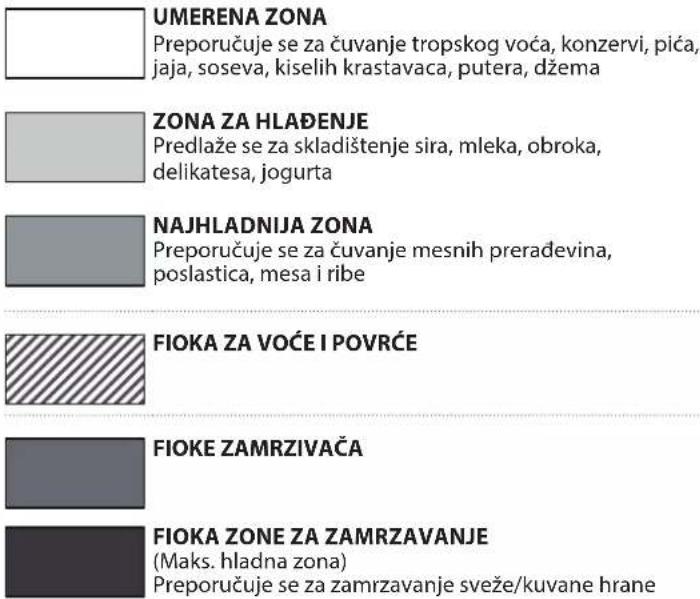
HYGIENE MESH*
The fruit and vegetable drawer has a hygiene mesh. Thanks to the special design of this component, fruit and vegetables do not come into contact with natural drips (such as dripping and vegetable moisture) that fall below the hygiene mesh. The hygiene mesh is treated with Microban SilverShield® technology, which reduces harmful bacteria by up to 99.9% on the surface of the fruit and vegetable compartment, for improved preservation of fruit and vegetables**.
The hygiene mesh can be removed for washing when it gets dirty, simply by lifting and pulling it out. It can be easily washed by hand, with water only or with a common neutral dish detergent. It can also be washed in the dishwasher. After cleaning, dry it before putting it back in place.
** Independently tested by IMSL (Industrial Microbiological Services Ltd, UK) using the ISO 22196 standard
TROUBLESHOOTING
What if... Possible causes Solutions
www.hotpoint.eu/register

High
Low (cooler)
Medium-low
Medium
Medium-high
HYGIENIC RACK*
High
HYGIENIC RACK*
- THANK YOU FOR BUYING AN HOTPOINT-ARISTON PRODUCT
- PRODUCT DESCRIPTION
- FIRST TIME USE
- CONTROL PANEL
- ACTIVE OXYGEN" FUNCTION
- FAN
- ON/STAND-BY
- FREEZER AND REFRIGERATOR COMPARTMENT TEMPERATURE
- SEC FAST COOL
- TURNING OFF THE SOUND ALARM
- HOW TO STORE FOOD AND BEVERAGE
- HYGIENE GRID
- THANK YOU FOR PURCHASING A HOTPOINT-ARISTON PRODUCT
- HYGIENE GRILLE
- FIRST USE
- LEGEND
- MODERATE ZONE
- COLD ZONE
- COLDEST ZONE
- FRUIT AND VEGETABLE DRAWER
- FREEZER DRAWERS
- FREEZING ZONE DRAWER
- TEMPERATURE SETTING
- EXPLANATIONS
- FAST COOL
- DESCRIPTION
- MODERATE TEMPERATURE ZONE
- SEC FAST COOL (QUICK COOLING)
- DESIGNATION
- HYGIENIC SHORT
- HYGIENE MESH
- TROUBLESHOOTING
- HYGIENIC RACK
Brand : HOTPOINT
Model : BCB 4010 E O31
Category : Refrigerator