
EOS C300 Mark II PL - Camcorder CANON - Free user manual and instructions
Find the device manual for free EOS C300 Mark II PL CANON in PDF.


| Product Type | Professional Cinema Camcorder |
| Brand and Model | Canon EOS C300 Mark II PL |
| Lens Mount | PL (Cinema) |
| Sensor | Super 35mm CMOS, 8.85 million pixels (effective: 8.85M) |
| Recording Resolution | 4K DCI (4096×2160) up to 60 fps, Full HD up to 120 fps |
| Recording Format | XF-AVC (MPEG-4 AVC/H.264) |
| Storage Media | Dual CFast 2.0 and SD slots |
| Dimensions (W×H×D) | 149 × 132 × 167 mm (without lens) |
| Weight | Approx. 1.7 kg (body only) |
| Power Supply | Canon BP-A60 battery (14.4V) or AC adapter |
| Battery Life | Approx. 2 hours (with BP-A60, 4K recording) |
| Viewfinder | 0.46-inch OLED electronic, 1,040,000 dots |
| LCD Screen | 3.5-inch touch screen, 460,000 dots |
| Main Functions | Proxy recording, pre-recording, interval, scene detection, digital stabilization, dual slot, time code, 12G-SDI output |
| Maintenance and Cleaning | Clean the sensor with a blower and appropriate cleaning kit; wipe the body with a soft dry cloth |
| Safety | Do not expose to moisture, shocks, extreme temperatures; use Canon-approved batteries and chargers |
| Spare Parts and Repairability | Interchangeable PL mount lenses, BP-A60 batteries, chargers, SDI cables, CFast media; repair by Canon authorized center |
| General Information | Lightweight cinema camera with PL mount, ideal for professional productions |
Frequently Asked Questions - EOS C300 Mark II PL CANON
User questions about EOS C300 Mark II PL CANON
0 question about this device. Answer the ones you know or ask your own.
Ask a new question about this device
Download the instructions for your Camcorder in PDF format for free! Find your manual EOS C300 Mark II PL - CANON and take your electronic device back in hand. On this page are published all the documents necessary for the use of your device. EOS C300 Mark II PL by CANON.
USER MANUAL EOS C300 Mark II PL CANON
Thank you for purchasing the Canon EOS C300 Mark II PL. For full details about using the camera, please refer to the supplied EOS C300 Mark II Instruction Manual* (hereafter, simply "Instruction Manual"). This booklet explains how to use a PL lens and details applicable restrictions and other main differences from the explanations in the Instruction Manual.
* The instruction manual for the model with an EF lens mount. Most of the information in that manual applies also to this model (with a PL lens mount).
Attaching and Removing a PL Lens
The precautions to follow when attaching/removing a PL lens are the same as explained for an EF lens. Refer to Preparing the Lens in the Instruction Manual.
Names of Parts
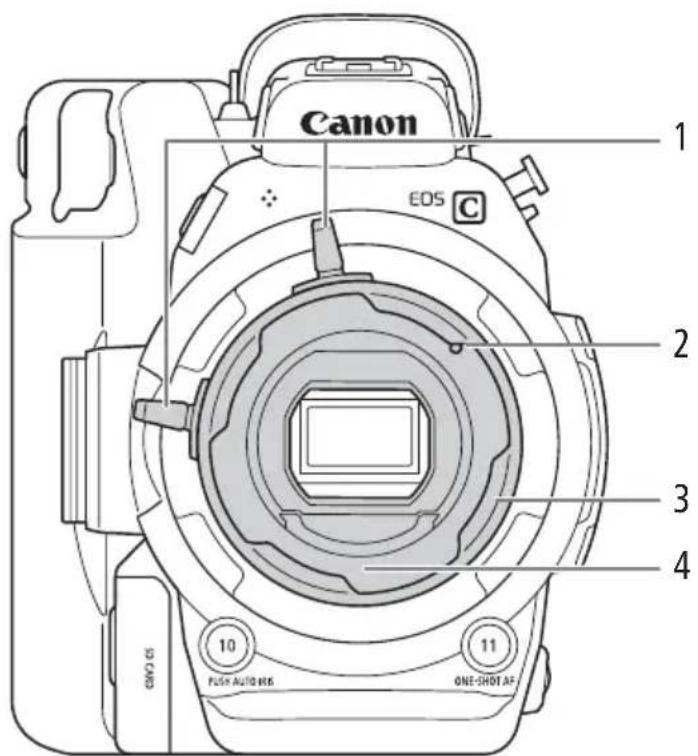
1 Bayonet ring handles
2 PL Lens index pin
3 Bayonet ring
4 PL Lens mount
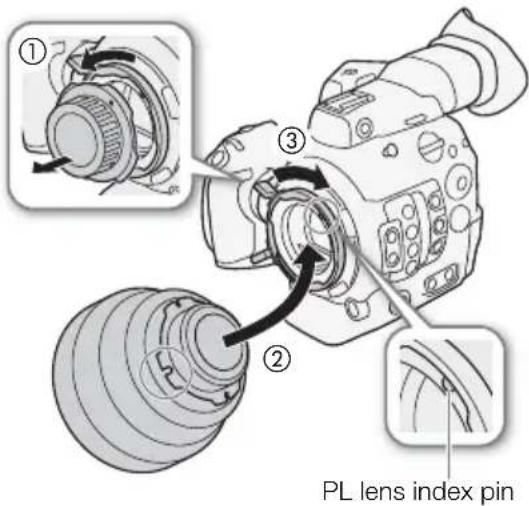
Attaching a PL Lens
1 Holding a bayonet ring handle, turn the bayonet ring counter-clockwise to remove the camera's body cap.
- Remove also the dust caps from the lens.
2 Attach the lens to the camera aligning a groove on the lens with the PL lens index pin on the mount.
3 Turn the bayonet ring clockwise to fix the lens in place.
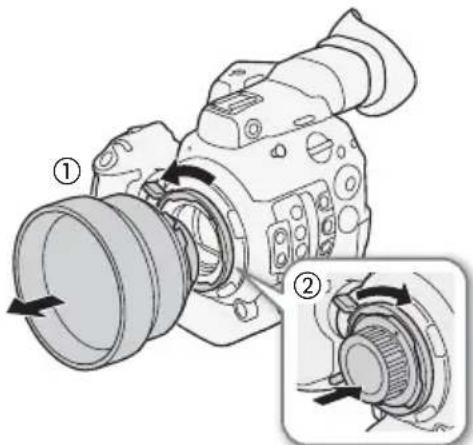
Removing a PL Lens
1 Holding a bayonet ring handle, turn the bayonet ring counter-clockwise to release the lens.
- Remove the lens and replace the dust caps.
2 Replace the body cap on the camera and turn the bayonet ring clockwise to fix it in place.
natural_image
Diagram of a DSLR camera showing two views of the lens and gear assembly (no text or symbols present)Camera Functions Not Available when Using a PL Lens
When a PL lens is attached to the camera, the following functions will not be available.
- Aperture adjustment
- Focus functions except for manual focus and two focus assistance functions, peaking and magnification.
Unavailable Menu Settings
The following submenus and settings will not appear in the menu. Refer also to Menu Options in the Instruction Manual.
- The following submenus under [Camera Setup]: [Light Metering], [AE], [Iris], [Focus], [Periph. Illum. Corr.], [Chromatic Aberr. Corr.].
- The following settings under [Picture/Terminals Setup] ➤ [Custom Display 1]: [Light Metering], [Focal Length], [Focus Mode], [Iris], [Lens].
• [Assistance Functions] ➤ [Focus Guide].
- [System Setup] menu
- The following functions for assignable buttons ([◀ System Setup] ▶ [Assignable Buttons]): [One-Shot AF], [AF Lock], [Focus Guide], [Face AF], [Face Det. & Tracking], [Tracking], [Push Auto Iris], [Iris Mode], [Iris +], [Iris -], [AE Shift +], [AE Shift -], [Backlight], [Spotlight].
- The following options under [ System Setup] ➤ [Custom Function]:
[Camera Control Dial]/[Grip Control Dial] ➤ [Iris], [Retract Lens].
- [ System Setup] ➤ [Firmware] ➤ [Lens].
Assignable Buttons
In addition to the unavailable functions for assignable buttons mentioned above, the default function assigned to the following assignable buttons will be [(NONE)]. That is, at initial values, pressing the buttons will have no effect. Still, you can use them as assignable buttons by assigning a function to them.
For the location of the buttons, refer to Names of Parts in the Instruction Manual.
- PUSH AUTO IRIS button / Assignable button Camera 10
- ONE-SHOT AF button / Assignable button Camera 11
- FOCUS GUIDE button / Assignable button Grip 1
Onscreen Displays
The following onscreen displays (icons and indications) will not appear on the screen. Related information will also not appear on the various status screens. Refer to Onscreen Displays, Displaying the Status Screens in the Instruction Manual.
- Focal length • Lens error warning
- Focus mode • Various focusing frames
- Face detection and Face AF • Aperture value
- Light metering mode • AE shift
Browser Remote
The following Browser Remote functions are not available.
- Aperture and AE shift adjustment
- Focus adjustment (including manual focus)
- Zoom adjustment
- Lens information (when live view is turned off) and the aperture value will not be displayed
Remote Controller
The following buttons and dials on the optional RC-V100 Remote Controller will have no effect on the camera.
• AF button and FOCUS dial
• AUTO IRIS button and IRIS dial
• ZOOM dial
Other Restrictions
- The aperture value will not be displayed on the rear panel.
- No lens information will be recorded in the camera data part of the clip's metadata or displayed as part of it.
Additional Specifications
The following specifications only add information relevant to the C300 Mark II PL camera model. For the full list of specifications, refer to Specifications in the Instruction Manual.
- Dimensions (W x H x D)*
Minimal configuration with thumb rest: 149 x 183 x 188 mm (5.9 x 7.2 x 7.4 in.)
Configuration with grip unit and grip belt: 190 x 183 x 188 mm (7.5 x 7.2 x 7.4 in.)
- Weight * Camera unit only: 2,000 g (4.4 lb.)
Camera with grip unit and monitor unit**: 3,315 g (7.3 lb.)
Camera with grip unit, bracket, handle unit and monitor unit**: 3,665 g (8.1 lb.)
* All measurements and weights are approximate.
** Working configuration includes also battery pack (BP-A30 x1), recording media (CFast card x2), and unit cables (x2).

NOTES
- You can have the lens mount of an EOS C300 Mark II PL camera replaced by an EF lens mount with Cinema Lock. After the replacement, the Dual Pixel CMOS AF function has to be adjusted at a Canon Service Center* (for a fee) before you can use the camera's autofocus functions or the Dual Pixel Focus Guide. For details, consult the retail dealer from whom you purchased the camera or contact a Canon Service Center.
* Except for cameras for which this adjustment has been performed previously.
natural_image
Diagram of a DSLR camera showing two views of the lens and gear assembly (no text or symbols present)natural_image
Diagram of a DSLR camera showing two views of the lens and gear assembly (no text or symbols present)natural_image
Diagram of a DSLR camera showing two views of the lens and gear assembly (no text or symbols present)natural_image
Diagram of a DSLR camera showing two views of the lens assembly (no text or labels present)natural_image
Diagram of a DSLR camera showing two views of the lens and gear assembly (no text or labels)PL 镜头标记销