Allwatch V - Smartwatch Allview - Free user manual and instructions
Find the device manual for free Allwatch V Allview in PDF.


| Product Type | Smartwatch |
| Brand | Allview |
| Model | Allwatch V |
| Dimensions | 42 mm x 42 mm x 10 mm |
| Weight | 40 g |
| Display | 1.3-inch TFT LCD, 240x240 pixels |
| Battery Capacity | 300 mAh |
| Battery Life | Up to 7 days typical use |
| Charging | Magnetic charging cable |
| Water Resistance | IP68 (1.5m for 30 minutes) |
| Connectivity | Bluetooth 5.0 |
| Compatibility | Android 4.4+, iOS 8.0+ |
| Sensors | Heart rate monitor, accelerometer, gyroscope |
| Main Functions | Step counter, heart rate tracking, sleep monitoring, call and message notifications, remote camera control, music control, sedentary reminder |
| Activity Modes | Walking, running, cycling, skipping rope, badminton, basketball, football |
| Care and Cleaning | Wipe with a soft, dry cloth; avoid harsh chemicals |
| Safety Precautions | Do not use while charging; remove if skin irritation occurs; keep away from children under 3 years |
| Spare Parts | Replacement straps, magnetic charger |
| Repairability | Battery and strap replaceable; display not user-repairable |
| General Information | Manufacturer: Allview; Model: Allwatch V; Compliance: CE, RoHS |
Frequently Asked Questions - Allwatch V Allview
User questions about Allwatch V Allview
0 question about this device. Answer the ones you know or ask your own.
Ask a new question about this device
Download the instructions for your Smartwatch in PDF format for free! Find your manual Allwatch V - Allview and take your electronic device back in hand. On this page are published all the documents necessary for the use of your device. Allwatch V by Allview.
USER MANUAL Allwatch V Allview
natural_image
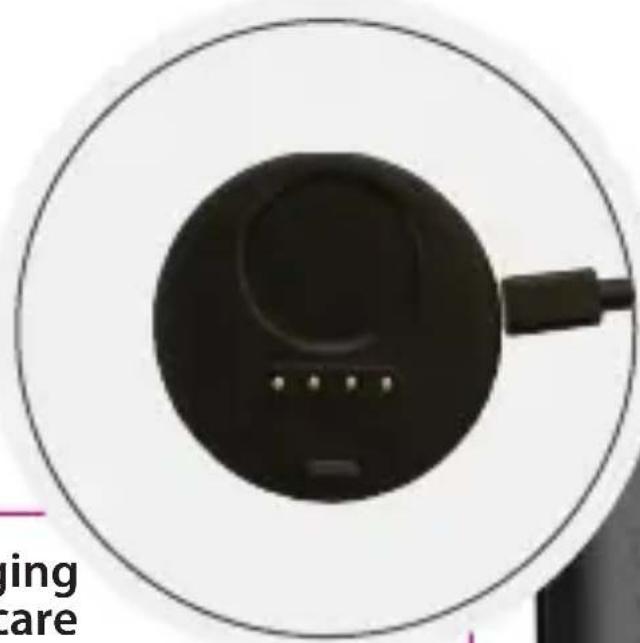
Close-up of a black circular device with a cable, no visible text or symbols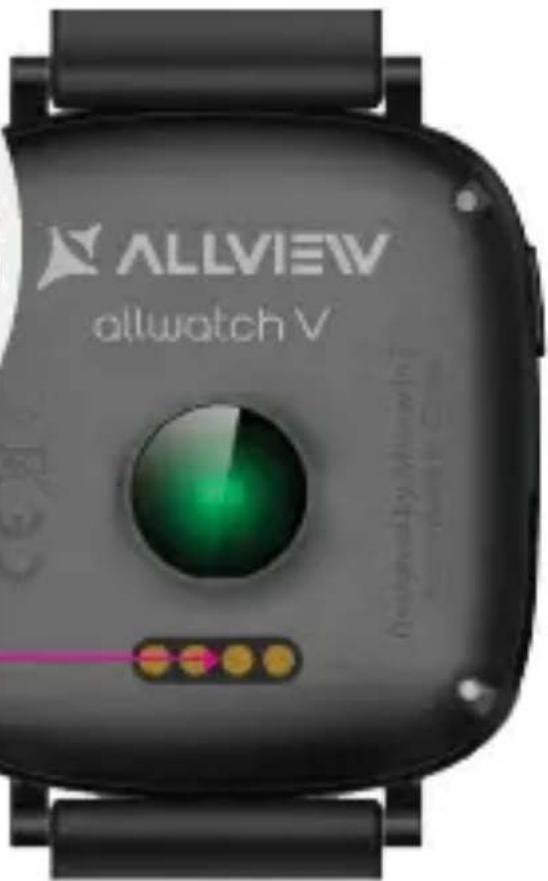
Charging Încărcare зареждане Aufladen Carga Töltés Ładowanie заряд
fig. 1
SPECS / ХАРАКТЕРИСТИКИ / SPEZIFIKATIONEN / ESPECIFICACIONES / MŰSZAKI JELLEMZÖK / SPECYFIKACJE / SPECIFICAȚII / ТЕХНИЧЕСКИЕ ХАРАКТЕРИСТИКИ:
| General/ General/ Общи/General/ Általános/ Ogólne/Генеральная/ General | Language/ Limba/ Език/Sprache/ Nyelv/ Język/язык/ Idioma | EN, RO, BG,DE, HU, PL,RU, ES | |
| Dimensions/ Dimensiuni/размери/ Größe/ Méretek/Wymiary/Габаритные размеры/Dimensiones | Dimensions/ Dimensiuni/ Размери/Größe/ Méretek/ Wymiary/Габаритные размеры/ Dimensiones | 42x40x9.4mm | |
| Weight/ Greutate/ терло/ Gewicht/Súly/ Waga/ вес/ Peso | 38.9g | ||
| Display/ Ecran/ Дисплей/Bildschirm/ Kijelző/Wyświetlacz/ дисплей/Pantalla | Type/ Tip/ Вид/ Art/Típus/ Typ/ Тип/ Tipo | LCD colorful/LCD color/LCD цветен/LCD bunt/ Színes LCD/Kolorowy LCD/ЦветЖК-дисплея/LCD colorido | |
| Resolution/ Rezoluţie/ Резолюция/Auflösung / Felbontás/ Rozdzielczość/Разрешение/ Resolución | 240x240px | ||
| Dimensions/ Dimensiuni/ Големина/Größe/ Méretek/ Przekątna ekranu/Габаритные размеры/ Dimensiones | 1.3" | ||
| Touchscreen / Ecran TactilТъч скрийн /Touch-Screen/Érintőkijelző/Ekran dotykowy /Сенсорный экран /Pantalla táctil | Capacitive/ Capacitiv/Капацитивен/Kapazitiv/ Kapacitív/Pojemnościowy/ емкостный/Capacitivo | Yes/ Da / Да / JaIgen / Tak / Да / Sí | |
| 2.5D | Yes/ Da / Да / JaIgen / Tak / Да / Sí | ||
| Processor/ Procesor/Процесор/ Prozessor/Feldolgozó/ Processor/процессор/ Procesador | Processor type/ Tip procesor/ Вид/Prozessortyp /Processzor típusa/ Typ procesor/Тип процессора/ Tipo de procesador | ARM® CortexTM M0Nordic 51822 | |
| Alert/ Alertă/ Известия/Alarm/ Riasztás/ Alarmy/сигнал тревоги/ Alerta | Alert types/ Tipuri alerta/Начин на известяване/Benachrichtigungstypen/Riasztás módja/ Typ alertów/Типы предупреждений/ Tipo de alerta | Vibrations, sound/Vibratii, sunet/Вибрация, звук/Vibrationen, Geräusche/Rezgés, hang/Wibracje, dźwięk/Вибрации, звук/Vibración, sonido | |
| Data/ Date/ данни/ Daten/Adat/ Dane/ Данные/ Datos | Bluetooth | Yes/Da/Да/Ja/Igen/Tak/ Да/ Sí V4.0 LE | |
| Characteristics/Caracteristici/ХарактеристикиCharakteristik / Jellemzök/Charakterystyki/Характеристики/Caracteristicas | Metal body/ Corp metal/Метално тяло/ Metallkörper/Aluminium burkolat/Metalowa obudowa/Металлическое тело/Cuerpo de metal | Yes / Da / Да / JaIgen / Tak / Да / Sí | |
| Characteristics/Caracteristici/Xaрактеристики/Charakteristik/Jellemzók/Charakterystyki/Xaрактеристики/Características | Heart Rate monitoring/ Monitorizare ritm cardiac/ Herzfrequenz-Überwachung / Следене на сърдечната честота/ Pulzusmérés/ Monitoring pulsu/ Контроль сердечного ритма/ Monitoreo de frecuencia cardíaSteps monitoring/ Monitorizare pasí/ Преброяване на стъпките/ Überwachung der Schritte / Lépésszámláló/Licznik kroków/ Мониторинг шагов/ Monitoreo de pasos | Yes / Da / Да / Jalgen / Tak / Да / Sí | |
| Calories monitoring/ Monitorizare calorii/ Следене на калориите/ Kalorienüberwachung/ Kalóriamérés/Licznik kalorii/ Мониторинг калорий/ Monitoreo de calorías | Yes / Da / Da / Jalgen / Tak / Da / Sí | ||
| Sport activities/ Activități sportive/ Отбелязване на спортни дейности/ Sportliche Aktivitäten/ Sport tevékenységek/ Aktywność sportowa/ Спортивные мероприятия/ Actividades deportivas | Yes / Da / Da / Jalgen / Tak / Da / Sí | ||
| Watch/ Ceas/ Час/ Uhr / Óra/ Zegar/ часы/ Reloj | Yes / Da / Da / Jalgen / Tak / Da / Sí | ||
| Sleep monitoring/ Monitorizare somn/ Надлюдаване на сън/ Schlafüberwachung/ Alvás figyelés/ Monitoring snu/Mониторинг сна/ Monitoreo del sueño | Yes / Da / Da / Jalgen / Tak / Da / Sí | ||
| Call notification/ Notificare apel/ Известия за обаждане/ Anrufbenachrichtigung/ Hívás kijelzés/ Powiadomienia o połączeniach/ Вызов уведомления/ Notificación de llamada | Yes / Da / Da / Jalgen / Tak / Da / Sí | ||
| Message notification/ Notificare mesaj/ Известия за съобщения/ Benachrichtigung/ Üzenet kijelzés/Powiadomienia o wiadomościach/ Уведомление о сообщении/ Notificación de mensaje | Yes / Da / Da / Jalgen / Tak / Da / Sí | ||
| Call feature/ Functie apelare/ Функция за обаждане/ Anruffunktion / Hívás funkció/ Funkcja dzwonienia/ Функция вызова/ Función de llamada | Yes / Da / Da / Jalgen / Tak / Da / Sí | ||
| Magnetic charging connector/ Conector încărcare magnetic/ Магнитен заряд за свързване/Magnetladeanschluss / Mágneses töltő csatlakozó/Magnetyczne złącze ładowania/ Магнитный зарядный разъем/ Conector de carga magnética | Yes / Da / Da / Jalgen / Tak / Da / Sí | ||
| Remote camera control/ Control cameră tel la distanță/ Дистанционно управление на камерата на телефона/ Remote-Kamerasteuerung / Kamera távoli vezérlés/Zdalne sterowanie aparatem w telefonie/ Удаленное управление камерой/ Control remoto de la cámara | Yes / Da / Da / Jalgen / Tak / Da / Sí | ||
| Watch control app/ Aplicație control ceas/Следене на приложенията/ Uhrenkontroll-App/ Óra vezérló alkalmazás/ Aplikacja sterująca zegarkiem/ Приложение для управления часами/ Aplicación de control de reloj | Yes / Da / Da / Jalgen / Tak / Da / Sí | ||
| Compatible OS/ Sistem de operare Compatibil/ Съвместимост на операционна система/ Kompatibles Betriebssystem/ Kompatibilis operációs rendszer/Kompatybilność systemu operacyjnego/ Совместимая OC/ Sistema operativo compatible | Android | ||
| IP Grade/ Grad IP/ IP клас/ IP-Klasse/ IP Szabvány/ Stopień ochrony IP/ Klacc IP/ Grado de IP | IP54 | ||
| Battery/Acumulator/Батерия / Batterie / Akkumulátor / Bateria / аккумулятор / Batería | Type/ Tip/ Вид/ Art/ Típus/ Typ/ Тип/ Tipo | Li-pol 130mAh | |
| Lifespan/ Functionare/ Продължителност/ Lebensdauer/ Múködésidő/ Żywotność/ Продолжительностьжизни/ Duración | Up to 3 days/ Până la 3 zile/ До 3 дни/ Bis zu 3 Tage / Akár 3 nap/ Do 3 dni/ до 3 дней/ Hasta 3 dias | ||
| Charger/ Încărcător/ Заряд/ Ladegerät / Tõltés/ Ładowarka/ зарядное устройство/Cargador | 5V/>0.5A(not included/ nu este inclus/ не включено/ nicht enthalten/ nem tartozék/ brakw zestawie/ не включено/ no incluido) | ||
| Box content/Continut pachet/Окомплектовка/ Packungsinhalt/A doboz tartalma/Zawartość opakowania/Содержимое коробки/Contenido de la caja | Watch, user guide, USB cable, magnetic connector/ Ceas, manual, cablu usb, conector magnetic / Часовник, ръководство за потребителя, USB кабел, магнитен конектор/ Uhr, Bedienungsanleitung, USB-Kabel, Magnetstecker/ Óra, használati útmutató, USB kábel, mágneses csatlakozó/ Zegarek, instrukcja obsługi, przewód USB, złącze magnetyczne/ Часы, руководство пользователя, кабель USB, магнитный разъем/ Reloj, guía del usuario, cable USB, conector magnético | ||
Safety measures
IMPORTANT! Please read carefully the instructions below and apply them as such.
- safety while driving: It is recommended to not use the device while driving.
- For an optimal compatibility with the device, make sure that the phone is upgraded and has the latest soft version.
- Our company reserves its right to modify the content of the product without making it public. These modifications will be displayed on the company's site, at the product section to which these modifications are made. The content of the web user guide may differ from the one that comes with the product, but the first one shall be considered upgraded and valid.
- Pin order to consult the updated list of compatible ALLVIEW models, please visit www.allviewmobile.com/allwatchv
Precautions and warnings regarding health and safety
- Prolonged usage of the ALLVIEW Allwatch V watch may cause skin irritations.
- If you notice any type of allergic symptoms (i.e. redness, swelling, itching), take of the device.
- If the allergic symptoms persist or get worse, please consult a doctor as fast as possible.
- Set the band adequately on your wrist and do not tighten more than necessary, in order to avoid blocking the blood flow.
- At certain time intervals, take off the device, in order to let the skin breathe.
- The ALLVIEW Allwatch V watch IS NOT a medical device, and as such we do not recommend its usage as a treatment, diagnosis or for a prevention purpose.
- Do not leave near children or pets. The device contains small components that can be easily swallowed.
- This product has an in-built battery. Do not expose to direct fire – may cause explosions and other dangers. Do not carelessly throw the product or put it in fire.
• The product may produce heat because of long-term usage or exposure to direct sunlight. In this case, immediately stop the usage.
- It is not recommended to use the product in environments with temperatures as lower than -20^ , or higher than 60^ ; otherwise, it may cause errors.
- If the product has been in contact with liquids, do not connect to the charger.
- We do not take responsibility for the situations in which the product is used in another way than the one it was intended for.
- Accessories: Only the accessories approved by the manufacturer can be used.
- Approved services: In order to avoid any issues that may appear with services that are no longer accepted by S.C. Visual Fan S.R.L. (because S.C. Visual Fan S.R.L. reserves its right to cease collaboration with any formerly-accepted service, existent on the warranty certificate on the launching date of the product lot), before taking a product to the service, please consult the updated list of the existent accepted services from the Allview website at the "Support & Service – Authorized Service" section. For more details about the product, go to www.allviewmobile.com
- If you open up the device and try to repair to by yourself, you will lose the product's warranty.
- All applications provided by third parties and installed in this device, may be modified and/or stopped at any moment. Visual Fan Ltd will not be responsible in any way for modifications of the services or content of these applications. Any request or question regarding third party applications may be addressed to owners of these applications.
User guide for Allwatch V
Charging: Place the magnetic charging cable on the back of the watch (fig. 1), the connect it to a charging adaptor or USB port of 5V/500mA (ex. laptop, USB adaptor, external battery). On the device screen will appear a battery icon which will warn that the device is charging.
Starting/Stopping - to start/stop the watch you must press, for 7 seconds, the button from the left.
Gesture control: Place the watch on your hand and fix the strap comfortably on your wrist, so that it is not too wide or tight. Make sure that the battery is fully charged before using it. The device is activated through gesture control as follows:
- touchscreen
- raising of the hand
- wrist rotation
User guide of the menu
The Allwatch V device has a multitude of functions and movement sensors for a more precise monitoring of your activity.
1. Menu navigation
- When the watch is in stand-by – tap the left button or press twice on the screen for activation
- Accessing the menu is made by gliding to the left/right
- Accessing the submenu is possible by tapping on the desired feature.
• Tap for confirmation
- Returning to the menu is made by tapping the button on the right
- S tand-by mode – after 10 sec of inactivity, the screen will automatically enter in stand-by mode, or you can tap the button on the left.
2. Details about the menu features
For more details regarding the watch's features, go to www.allviewmobile.com
Downloading the app
Search the "ALLWATCH V" app in Google Play™ or scan the QR code from the box to download and install the app. Account settings: Open the "ALLWATCH V" app and login with your account. If you do not have an account already, register with a new account.
Connecting (Pairing devices)
- Login in the "ALLWATCH V" app account and follow the steps for pairing the watch with the smartphone.
- You will receive a pop-up notification in which the Bluetooth activation on your phone is requested up, then select the device that you want to pair and confirm. A pairing request will appear on the watch – accept by pressing the green tick.
- When the pairing is successfully done, the message "Connected" will appear on the watch, and on the phone "Pairing succeeded".
- To use the watch in phone mode (answering a call/rejecting a call/conversation) you must
long press the button on the right until you hear a sound signal and you see the icon:
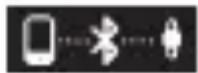
Afterwards, access the Bluetooth Settings from your phone and connect to Allwatch V.
When the connection is successful, yǒu will see on the watch the icon:
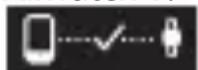
FAQ
Q: App failed to pair with Allwatch V
- Check if your phone network and Bluetooth settings are turned on.
- Make sure that the band is not connected to another account or smartphone device.
- Make sure your smartphone's OS is using either Android 4.3 or higher
Q: App failed to synchronize data:
- Check if your phone network and Bluetooth settings are turned on. Both the phone network and Bluetooth need to be on at the same time for data synchronization.
- Check if your band is near your phone.
- Make sure that your band is connected with your phone and the Allwatch V app.
Q: Not receiving notifications:
- Make sure the notifications settings are turned on.
- Your smartphone must be within Bluetooth range of your Allwatch V device.
Q: Reset/restart your device:
- To reset your device, go to the Allwatch V device's APP screen. Select the Settings option, then select reset. Note that resetting your device will make the device revert back to factory settings.
- To restart your device, go to the Allwatch V device's APP screen. Select the Settings option, then select restart. Note that restarting your device will still retain your current activity data.
Q: Battery not charging:
- Make sure the connected power source is working.
- Make sure the Micro-USB is firmly connected to the charging dock.
- Make sure the charging dock is connected in the correct orientation with the device.
DECLARATION OF CONFORMITY NO. 1537
We, S.C. Visual Fan S.R.L., with the headquarters in Brasov, 61, Brazilor St., CP 500313 Romania, registered at the Trade Commerce Brasov under no. J08/818/2002, CUI RO14724950, as the importer, assure, guarantee and declare on our own responsibility, according to the provisions from article 4 HG no. 1.022/2002, regarding the regime of the products and services, which can be harmful for life and health, security and labor protection, that the product ALLWATCH V from ALLVIEW, does not jeopardize the life, health and labor protection, does not produce a negative impact over the environment and is in accordance with:
- Directive no. 2011/65/UE, modified by 2014/8/UE regarding the usage restrictions of certain dangerous substances in electric and electronic equipment
- Directive regarding the radio and telecommunication equipment RED 2014/53/CEE (HG 487/2016)
- Directive 2014/35/UE regarding the assurance of users of low voltage equipment
- Directive regarding the electromagnetic compatibility 89/336/CEE, modified by Directive 92/31/CEE and 93/68/CEE (HG982/2007); RoHS: EN50581:2012; 2014/30/EU(HG 487/2016)
- The safety requests of the European Directive 2001/95/EC and the EN 60065:2002/A12:2011 and EN 60950-1:2006/ A1:2010 /A11:2009/A12:2011 standards, regarding the level of decibels emitted by the sold appliances.
The product has been assessed according to the following standards:
Health: 2014/35/EU; EN 50360:2001, EN 50361; EN 62209-1 : 2006
Safety: 2014/35/EU; EN 60950-1:2001+A11:2004; EMC EN 301 489-01 V1.6.1 (09-2005); EN 301 489-07 V1.3.1 (11-2005); EN 301 489-17 V1.2.1 (08-2002)
Radio spectrum: 2014/35/EU; EN 300 328 V1.7.1 (10-2006)
The evaluation procedure of the conformity was made according to Directive 2014/53/CEE, the documentation being stored at S.C. Visual Fan S.R.L., Brasov, 61, Brazilor St., CP 500313, Romania and will be offered at request. The evaluation procedure for the conformity of the product has been realized with the participation of the following bodies: Telefication bv.
The product has the CE mark on it.
The declaration of conformity is available at www.allviewmobile.com.
Brasov
02.05.2018
Director
Cotună Gheorghe

Măsuri de siguranță
- Safety measures
- Precautions and warnings regarding health and safety
- User guide for Allwatch V
- User guide of the menu
- Menu navigation
- Details about the menu features
- Downloading the app
- Connecting (Pairing devices)
- FAQ
- Q: App failed to pair with Allwatch V
- Q: App failed to synchronize data:
- Q: Not receiving notifications:
- Q: Reset/restart your device:
- Q: Battery not charging:
- DECLARATION OF CONFORMITY NO. 1537
- Măsuri de siguranță
Brand : Allview
Model : Allwatch V
Category : Smartwatch