UAX220-Mic - Hi-Fi System Digigram - Free user manual and instructions
Find the device manual for free UAX220-Mic Digigram in PDF.


User questions about UAX220-Mic Digigram
0 question about this device. Answer the ones you know or ask your own.
Ask a new question about this device
Download the instructions for your Hi-Fi System in PDF format for free! Find your manual UAX220-Mic - Digigram and take your electronic device back in hand. On this page are published all the documents necessary for the use of your device. UAX220-Mic by Digigram.
USER MANUAL UAX220-Mic Digigram
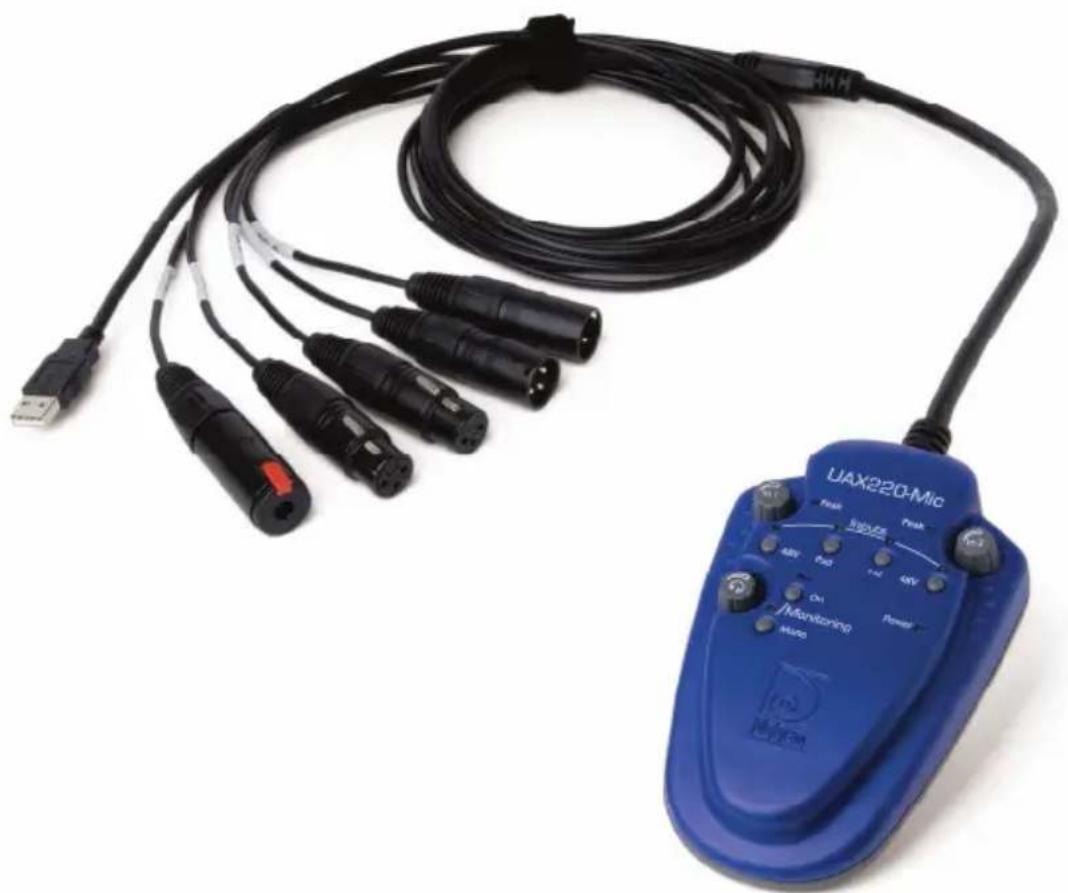
Professional USB Audio Interface
natural_image
Blue UAX220-Mic medical device with attached cable and multiple connector cables (no visible text or symbols on main body)User manual
For technical support, please contact your supplier
www.digigram.com

Digigram
Digigram S.A.
Parc de Pré Milliet, 38330 Montbonnot - FRANCE
Tel: +33 (0)4 76 52 55 01• Fax: +33 (0) 4 76 52 53 07• E-mail: info@digigram.com
Digigram Inc.
2000 North 14th Street - Suite 530, Arlington, VA 22201-USA
Tel: +1 703 875 9100 • Fax: +1 703 875 9161 • E-mail: input@digigram.com
Digigram Asia Pte Ltd.
60 Albert Street - #19-11OG Albert Complex Singapore 189969, Singapore
Tel: +65 6291 2234 • Fax: +65 6291 3433 • E-mail: info_asia@digigram.com
Table of Contents
INFORMATION FOR THE USER....4
IMPORTANT NOTICE....4
CONTENTS OF THIS PACKAGE....5
FEATURES......5
Main hardware features....5
UAX220-Mic: Additional hardware features....6
Software features....6
HARDWARE REQUIREMENTS......6
Supported operating systems....6
HARDWARE INSTALLATION....6
SOFTWARE INSTALLATION......6
HOW TO CHECK THE INSTALLATION....7
Under Windows....7
Under Mac OS X....8
Under Linux 8
CONTROLS 9
Manual controls....9
Software controls....10
Control Panel under Windows....10
Mac OS volume Control Panel....12
CONFIGURATION....13
UAX Manager....13
Control Panel under Windows....13
Control Panel under Mac....14
SPECIFICATIONS....15
Configuration....15
Inputs....15
Outputs....16
Connectors....16
Audio specifications....16
Analog audio performance....17
Environments....17
APPENDICES....18
Schematic diagram UAX220v2 & UAX220-Mic 18
XLR-3 connector pinout....18
Headphone connector....18
Copyright 2005 - 2010 Digigram. All rights reserved.
No portion of this manual may be reproduced without prior written consent from Digigram. The copyright protection claimed here includes photocopying, translation and/or reformatting of the information contained in this manual.
While every effort has been made to ensure accuracy, Digigram is not responsible for errors and omissions, and reserves the right to make improvements or changes in the products and programs described without notice.
Digigram and the Digigram logo, UAX220v2 and UAX220-Mic are registered trademarks or trademarks of Digigram S.A.. All other trademarks are property of their respective holders.
INFORMATION FOR THE USER
This device complies with part 15 of FCC rules. Operation is subject to the following two conditions: (1) This device may not cause harmful interference, and (2) This device must accept any interference received, including interference that may cause undesired operation.
This equipment has been tested and found to comply with the limits for a CLASS B digital device, pursuant to Part 15 of the FCC Rules. These limits are designed to provide reasonable protection against harmful interference in a residential installation. This equipment generates, uses, and can radiate radio frequency energy and, if not installed and used in accordance with the instructions contained in this data sheet, may cause harmful interference to radio and television communications. However, there is no guarantee that interference will not occur in a particular installation.
If this equipment does cause harmful interference to radio or television reception, which can be determined by turning the equipment off and on, the user is encouraged to try to correct the interference by one or more of the following measures:
* reorient or relocate the receiving antenna
* increase the separation between the equipment and the receiver
* connect the equipment into an outlet on a circuit different from that of the receiver
* consult the dealer or an experienced audio television technician.
Note: Connecting this device to peripheral devices that do not comply with CLASS B requirements or using an unshielded peripheral data cable could also result in harmful interference to radio or television reception. The user is cautioned that any changes or modifications not expressly approved by the party responsible for compliance could void the user's authority to operate this equipment. To ensure that the use of this product does not contribute to interference, it is necessary to use shielded I/O cables.
IMPORTANT NOTICE
This device has been tested and found to comply with the following standards:
• International: CISPR22 Class B
• Europe: EMC 89/336/CEE (1992) specifications.
• United States: FCC Rules-Part 15-Class B (digital device).
CONTENTS OF THIS PACKAGE
Thank you for purchasing a Digigram UAX220v2 or UAX220-Mic USB audio device.
The UAX220v2/UAX220-Mic package consists of the following components:
* a UAX220v2 or UAX220-Mic
* the user's manual at hand.
* a carrying case
Feel free to visit our web site www.digigram.com to get more technical information, consult FAQs, and discover our complete and updated audio product line.
FEATURES
UAX220v2/UAX220-Mic is a stereo audio interface for USB ports (compatible with USB ports 1.1 and 2.0). It is powered via USB, and does not require any driver installation (as it is compatible with the USB Audio specification 1.0).
Main hardware features
- 2 balanced analog mono line inputs *, with a maximum input signal of +22 dBu for UAX220v2, +10 dBu for UAX220-Mic
- 2 balanced analog mono line outputs **, with a maximum output signal of +10 dBu
- Switchable -12 dB input signal level attenuator for UAX220v2, -20 dB for UAX220-Mic
- Switchable zero-latency direct hardware monitoring of the inputs on the outputs
Note: the input monitoring is mixed on the output with the sounds played by the application.
- Possibility to switch the input monitoring to mono mode "left channel + right channel"
- Possibility to record both inputs mixed
- 1 stereo headphone output on female 14 " jack with knob for gain adjustment
• A/D and D/A conversions up to 24 bits/48 kHz
UAX220-Mic: Additional hardware features
- 2 balanced * analog mono mic/line inputs with a maximum input level of +10 dBu
- 2 knobs for left and right input gain adjustment, from +20 dB to +55 dB with switchable -20 dB input attenuation
• Left and right 48 V phantom power switches for static microphones
Software features
UAX220v2 and UAX220-Mic comply with the USB Audio specification. Therefore, and depending on the operating system used, they are compatible with WDM DirectSound, ALSA, and CoreAudio. Furthermore, it is possible to use a third-party ASIO driver (Asio4all, Ploytec).
HARDWARE REQUIREMENTS
• A USB port (standard 1.1 or higher)
• Minimum Apple Macintosh configuration: PowerMac G3, G4 or G5 with 128 MB RAM
• Minimum PC configuration:
Pentium III (or equivalent), 256 MB RAM.
Supported operating systems
- Windows XP
- Mac OS X
- Linux
HARDWARE INSTALLATION
Connect the UAX220v2/UAX220-Mic to the USB port (USB 1.1 or 2.0) of your computer. It will then automatically be detected by the operating system and its driver will also be automatically installed.
Note: If you have several USB peripherals connected to your computer, they may consume more energy than the USB port can provide. In this case, disconnect some of these peripherals.
SOFTWARE INSTALLATION
Your UAX220v2/UAX220-Mic does not require any driver installation, because it meets the USB Audio 1.0 standard, which is supported by your operating system (Windows XP, Mac OS X, Linux).
HOW TO CHECK THE INSTALLATION
Once the UAX220v2/UAX220-Mic is connected to the USB port of your computer, you can check the accessibility of its inputs/outputs as described hereafter.
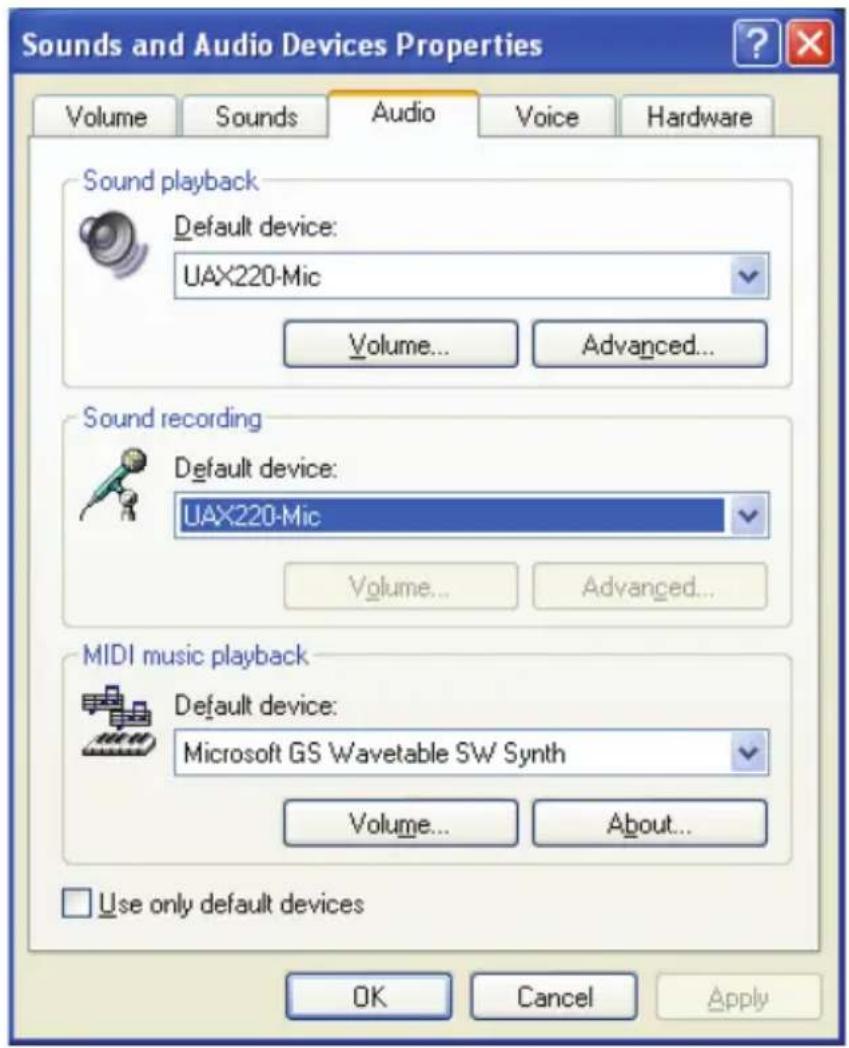
Under Windows
Go to
The UAX will be displayed like this:
text_image
Sounds and Audio Devices Properties Volume Sounds Audio Voice Hardware Sound playback Default device: UAX220-Mic Volume... Advanced... Sound recording Default device: UAX220-Mic Volume... Advanced... MIDI music playback Default device: Microsoft GS Wavetable SW Synth Volume... About... Use only default devices OK Cancel ApplyUnder Mac OS X
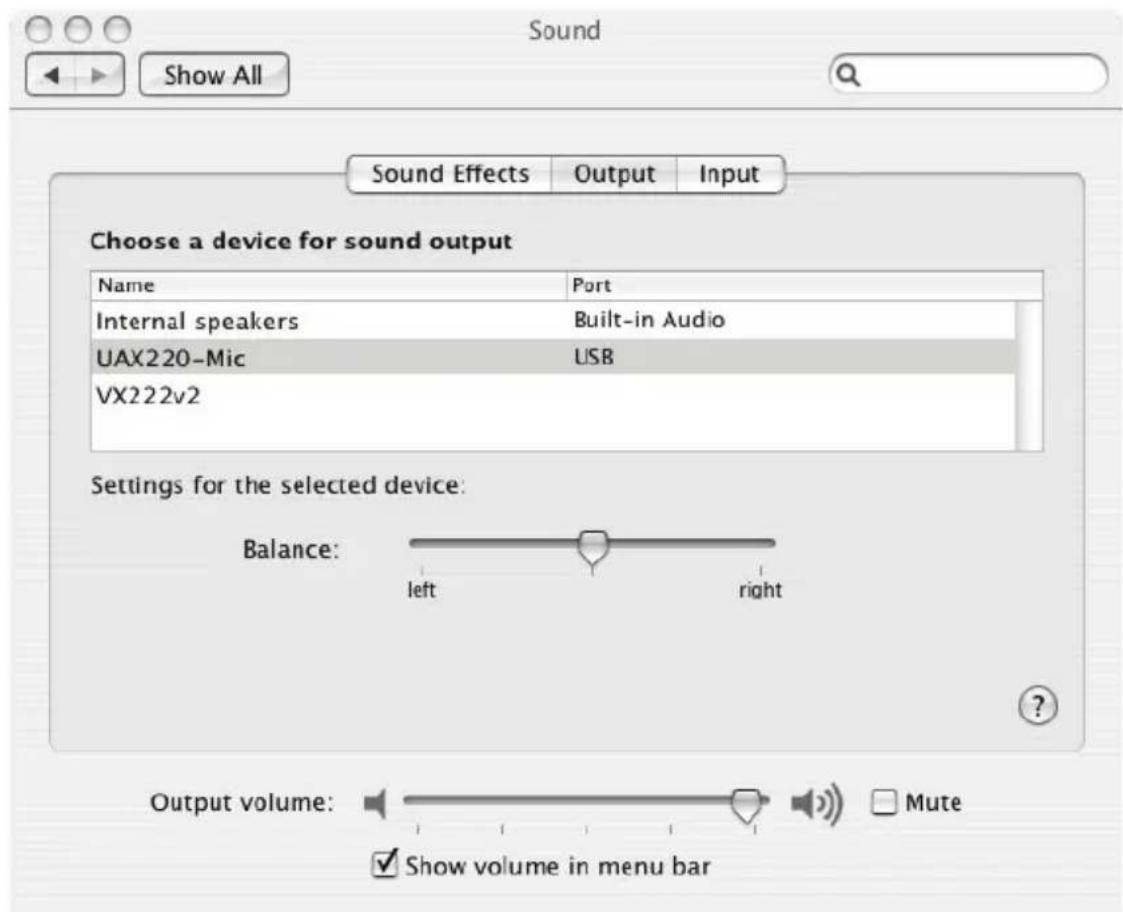
Go to
text_image
Sound Show All Sound Effects Output Input Choose a device for sound output Name Port Internal speakers Built-in Audio UAX220-Mic USB VX222v2 Settings for the selected device: Balance: left right Output volume: Mute ✓ Show volume in menu barUnder Linux
The parameters of the UAX220v2/UAX-Mic are accessible from the audio application of your choice.
CONTROLS
UAX220v2 and UAX220-Mic feature switches and faders for manual controls as well as adjustments via software.
Manual controls
- 48V (UAX220-Mic)
These two switches (one per input channel) allow enabling/disabling the 48 V phantom power for condenser microphones. This power supply is activated on a channel when the corresponding LED is lit.
• In1 and In2: (UAX220-Mic)
These two knobs allow adjusting the analog gain on each input, from +20 dB to +55 dB. The “Peak” LEDs light up when the input level is too high.
- Pad
This switch permits to attenuate the analog input signal level by -12 dB for UAX220v2, -20 dB for UAX220-Mic. The attenuation is active when the corresponding LED is lit.
• 1+2
This switch allows adding up the left and right input channels. The summation is active when the corresponding LED is lit. The signal arising from the summation is then available on the left and right channels to be recorded, and/or to be sent to the outputs, if the monitoring is activated.
- Monitoring On
This switch allows sending the input monitoring signal to the outputs (modified by the various input adjustments)
- Monitoring Mono
This switch allows monitoring on the summation of left and right channels on the outputs. The summation is active when the corresponding LED is lit.
Digital recording of the stream played
With “Monitoring Mono” activated and the “Monitoring On” disabled, the UAX allows to record the played stream without passing through the analog inputs/outputs. This makes it possible, for example, to record an Internet broadcast using an application such as Windows Media Player.
• Headphones out level adjustment
The knob marked with a headphones symbol allows adjusting the audio level on the headphones output. This setting does not affect the line outputs.
Software controls
Control Panel under Windows
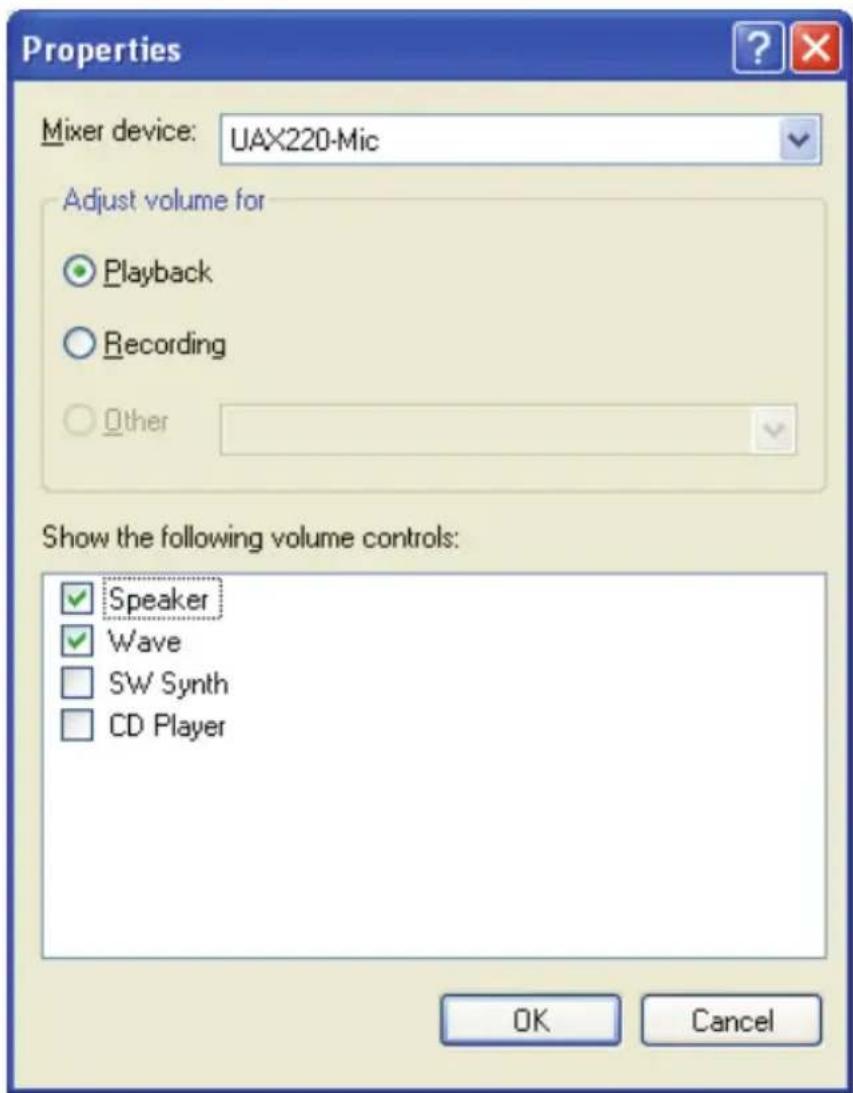
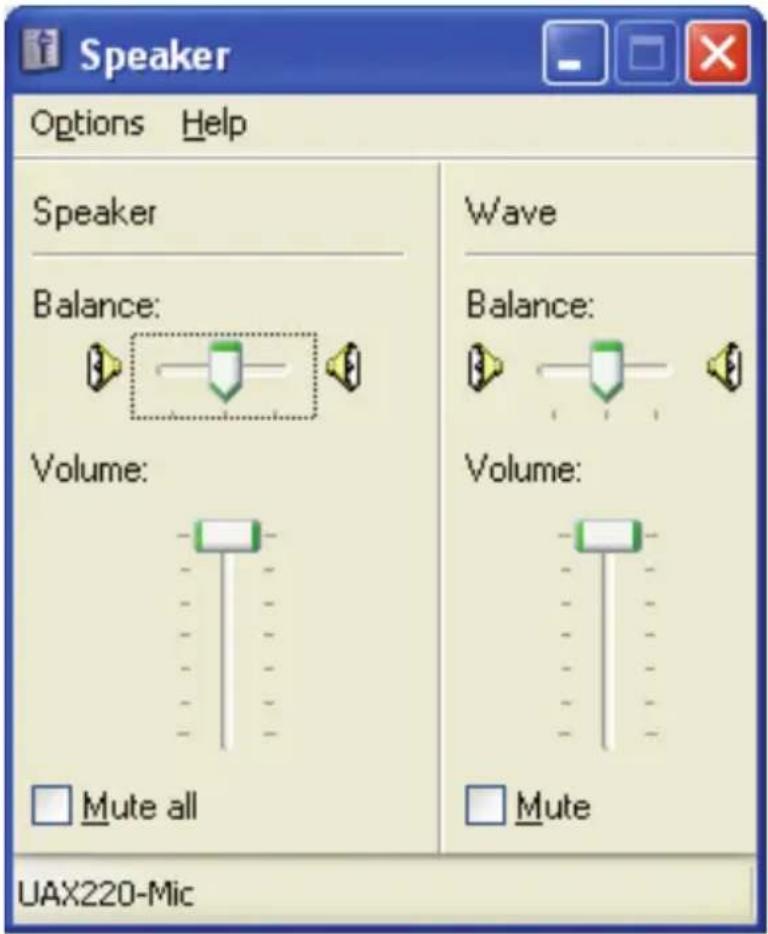
To control the levels of your UAX220v2 or UAX220-Mic, use the Volume Control application. To open this application, double-click onto the loudspeaker icon in the Windows task bar. In case this icon is not displayed in the task bar, go to
On the 'Volume' tab, check the box "Show volume icon in the task bar".
The UAX220v2/UAX220-Mic offers Volume and Mute controls for the outputs. These controls are not available for the inputs.
text_image
Properties Mixer device: UAX220-Mic Adjust volume for ○ Playback ○ Recording ○ Other Show the following volume controls: ✓ Speaker ✓ Wave □ SW Synth □ CD Player OK Cancel'Loudspeaker' volume control
The fader ‘Loudspeaker’ modifies the analog output gain of the UAX220v2/UAX220-Mic. The applied gain varies from -60 dBr to +10 dBr, by steps of 1 dB. These controls are applied to both line and headphones outputs.
The check box 'All mute' in the loudspeaker section allows muting/unmuting the outputs of your UAX220v2/UAX220-Mic.
text_image
Speaker Options Help Speaker Balance: Volume: Mute all Wave Balance: Volume: Mute UAX220-Mic'Wave sounds' volume control
The volume and mute controls are applied to the audio stream read by the application. Therefore it is a digital gain adjustment.
Mac OS volume Control Panel
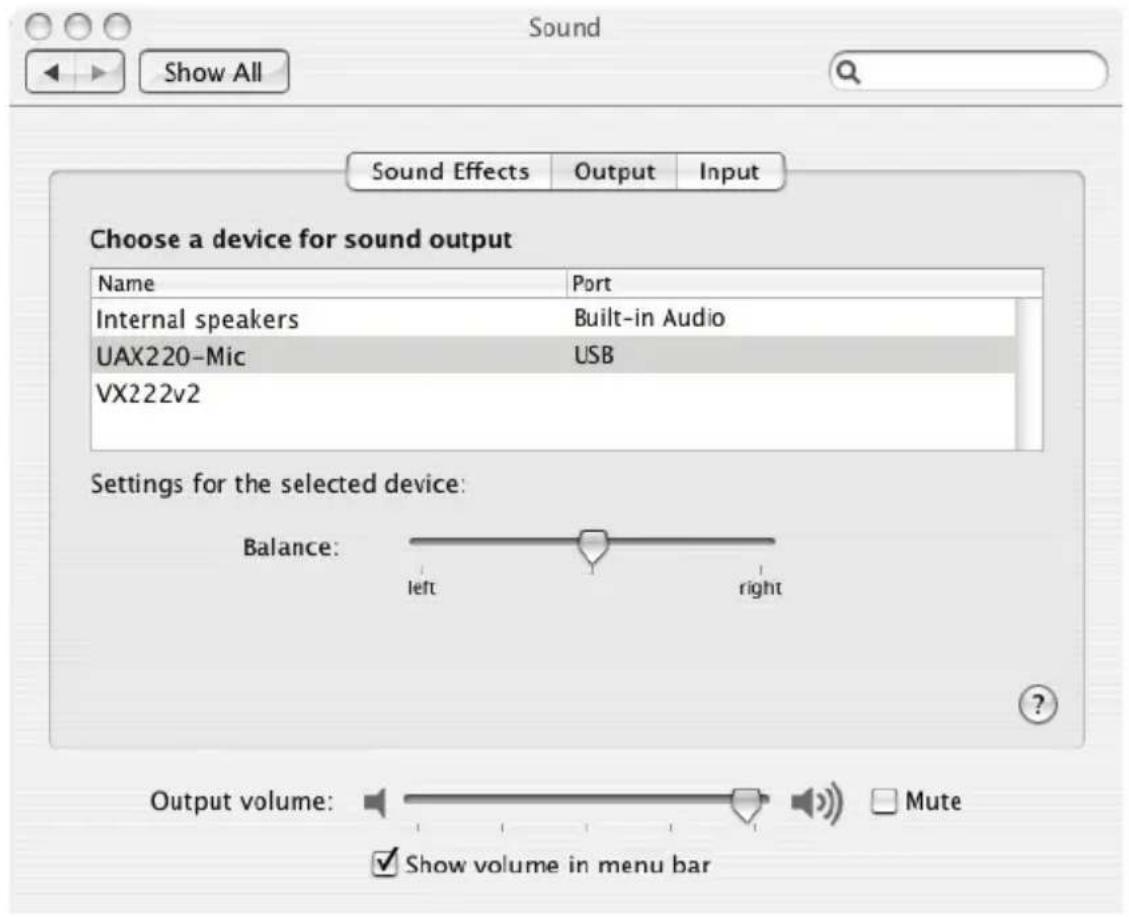
The fader 'Output volume' modifies the output level of the D/A converters of UAX220v2/UAX220-Mic.
The 'Mute' checkbox next to the volume control allows to mute/unmute the UAX220v2/UAX220-Mic outputs.
text_image
Sound Show All Sound Effects Output.Input Choose a device for sound output Name Port Internal speakers Built-in Audio UAX220-Mic USB VX222v2 Settings for the selected device: Balance: left right Output volume: ✓ Mute ✓ Show volume in menu barCONFIGURATION
UAX Manager
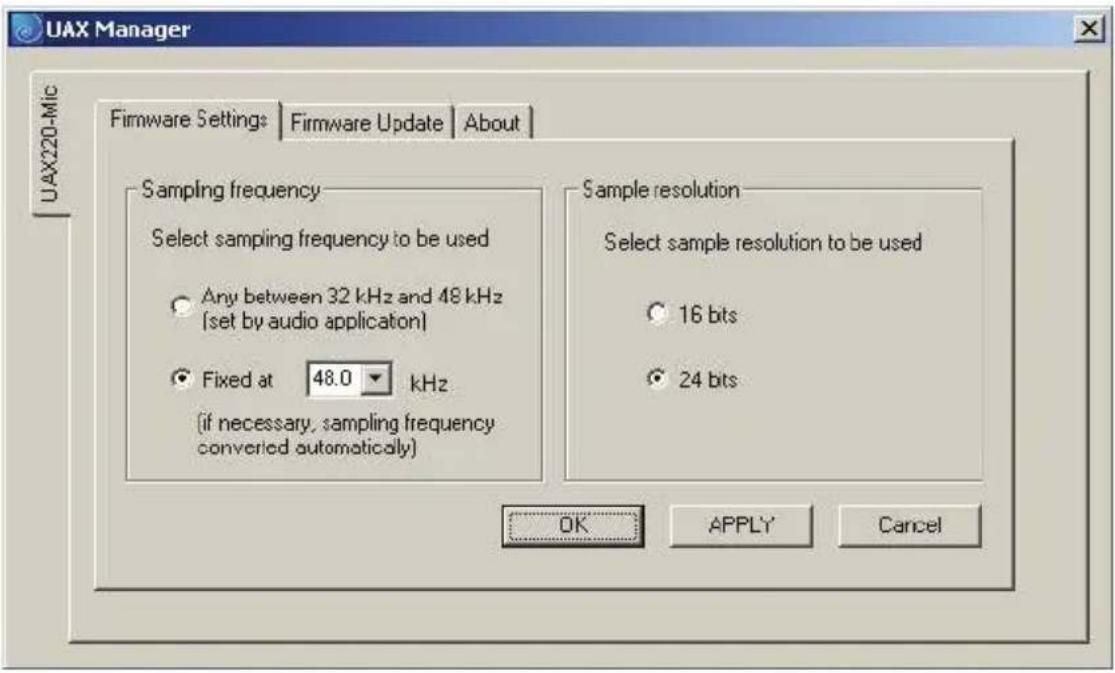
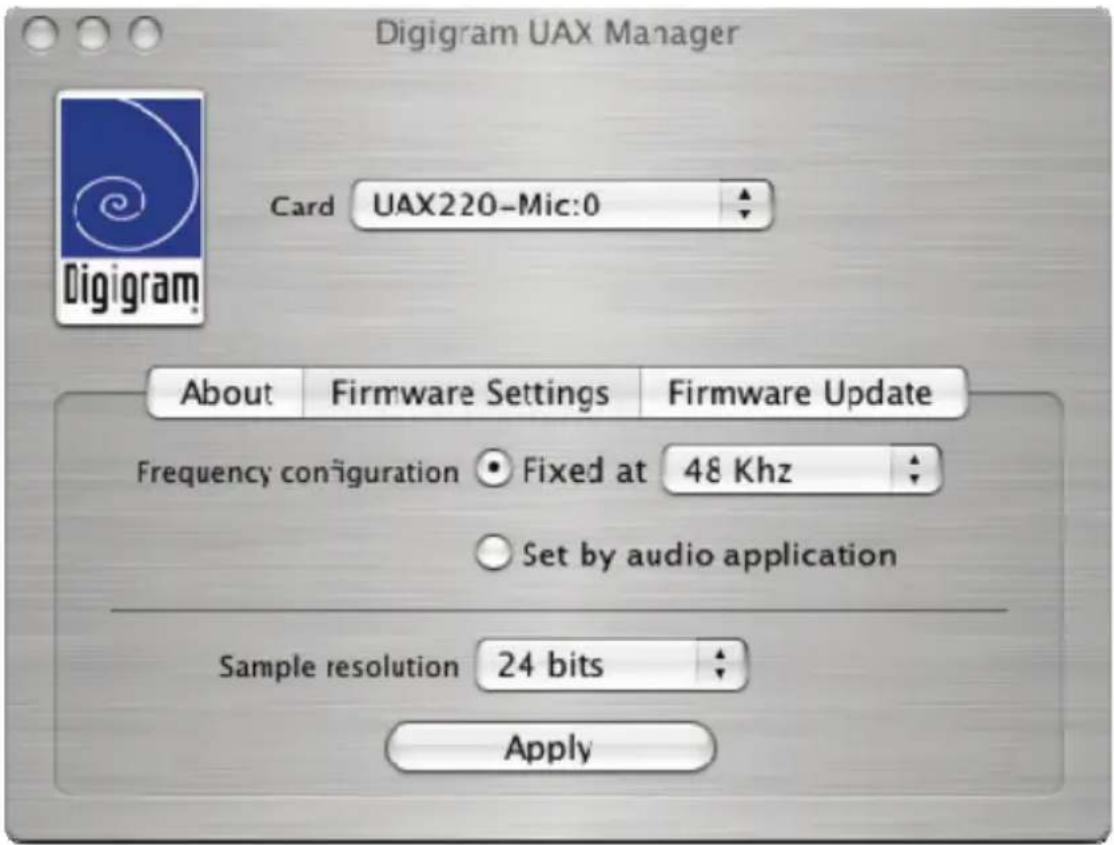
The UAX Manager application (available on the Digigram web site) allows UAX220v2/UAX220-Mic to
- either work at a fixed frequency (32 kHz, 44,1 kHz or 48 kHz), or at the frequency defined by the application
• to process the samples at 16 or 24 bits.
Default factory setting is: frequency fixed at 48 kHz, 24-bit sample resolution.
In the “sampling frequency set by audio application” mode, if the frequency of the application is other than 32 kHz, 44,1 kHz or 48 kHz, then the UAX works at 48 kHz and sample rate conversion is performed by the audio layers of the operating system.
In the “Frequency fixed” mode, sample rate conversion is performed by the audio layers of the operating system if the frequency of the application and the frequency of the UAX are different.
UAX Manager under Windows
text_image
UAX Manager Firmware Settings | Firmware Update | About | Sampling frequency Select sampling frequency to be used Any between 32 kHz and 48 kHz (set by audio application) Fixed at 48.0 kHz (if necessary, sampling frequency converted automatically) Sample resolution Select sample resolution to be used 16 bits 24 bits OK APPLY Cancel UAX220-MicUAX Manager under Mac
text_image
Digigram UAX Manager Card UAX220-Mic:0 About Firmware Settings Firmware Update Frequency configuration ● Fixed at 48 Khz ○ Set by audio application Sample resolution 24 bits ApplyUAX220v2 & UAX220-Mic
User manual
SPECIFICATIONS
CONFIGURATION
| UAX220v2 | UAX220-Mic | |
| Bus/Format USB 1.1, compatible 2.0 | ||
| Size | 144 mm X 87 mm X 34 mmIntegrated USB cable: 1.5 mIntegrated audio cable: 0.75 m | |
| Power consumption | 500 mA max. | |
| Operating:temp / humidity(non-condensing) | 0°C / +50°C • 5% / 90% | |
| Storage: temp / humidity(non-condensing) | -5°C / +70°C • 0% / 95% | |
INPUTS
| UAX220v2 | UAX220-Mic | |
| Analog line inputs (mono) | 2 balanced* | 2 balanced **mic/linewith:- professional high-quality preamps- switchable 48 Vphantom power supply(mono) |
| Maximum input level/impedance | +22 dBu** / >10 kΩ | +10 dBu / >10 kΩ |
| Maximum sensitivity*** | - | -45 dBu |
OUTPUTS
| UAX220v2 | UAX220-Mic | |
| Analog line outputs (mono) | 2 servo-balanced *** | |
| Maximum output level / impedance | +10 dBu/<100 Ω | |
| Programmable output gain | by steps of 1 dB, from -60 dBr to +10 dBr* *** | |
| Other outputs | 1 stereo headphones out with dedicated output stage and level adjustment knob(Maximum output power/minimum load: 2*40 mW / 32 Ω) | |
CONNECTORS
| UAX220v2 | UAX220-Mic | |
| External connectors | Standard USB type Afor connection with computer 2 Neutrik^TM XLR-3 female for line inputs 2 Neutrik^TM XLR-3 male for line outputsLocking 14" Neutrik^TM cable jack, female, for headphones output | |
AUDIO SPECIFICATION
| UAX220v2 | UAX220-Mic | |
| Sampling frequencies available | 32 / 44.1 / 48 kHz | |
| A/D and D/A converter resolution | 24 bits | |
| Supported audio formats PCM (8, 16 et 24 bits, full-duplex) | ||
| Operating modes | Either selected by application or user-selectable at a fixed resolution(modes selected via UAX Manager application) | |
| Monitoring | Zero latency direct monitoring through DSPMixed with playback to line and headphone outputs | |
| Monitoring control On/off and mono/stereo | ||
UAX220v2 & UAX220-Mic
User manual
ANALOG AUDIO PERFORMANCE
Measurements done at Fs=48 kHz unless stated otherwise, with filter on the 22 Hz-22 kHz range
| UAX220v2 | UAX220-Mic | |
| Frequency response (record + play) | 20 Hz - 20 kHz: ±0.2 dB | |
| Channel phase difference: 20/20kHz | <0.2°/2° | |
| Dynamic range (A-weighted) | Input: >104 dB Output: >104 dB | Input: >100 dB Output: >104 dB |
| THD + noise 1 kHz at -1 dBfs | Input: <-98 dB Output: <-97 dB Loop: <-93 dB | Input: <-93 dB Output: <-97 dB Loop: <-92 dB |
| Crosstalk (Analog in or out) | 1 kHz: <-110 dB 15 kHz: <-95 dB | |
| Number of mic inputs | 2 analog mono with switchable 48V phantom power supply | |
| Programmable mic gain | +20 to +55 dB by knob with switchable -20 dB input attenuation | |
| 48 V power supply | - | 2*5 mA max |
| Equivalent Input Noise, A/D-D/A at 48kHz, G=+50dB | <-125 dBu | |
ENVIRONMENTS
| UAX220v2 | UAX220-Mic | |
| Supported operating systems | Windows XP, Windows 2003 Server, Mac OS X, Linux | |
| Management | Depending on the host operating system's implementation of the USB Audio specification: DirectSound, Core Audio, ALSA | |
| Additional management | Digigram np SDK through Virtual PCX Third-party Asio driver | |
APPENDICES
Schematic diagram UAX220v2 & UAX220-Mic
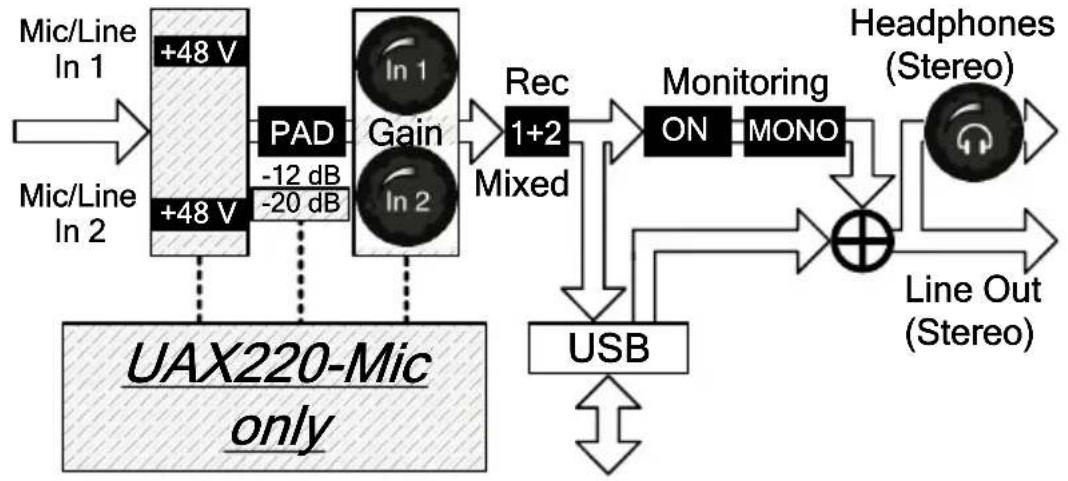
flowchart
graph TD
    A["Mic/Line In 1"] --> B["+48 V"]
    C["Mic/Line In 2"] --> D["+48 V"]
    B --> E["PAD -12 dB -20 dB"]
    D --> E
    E --> F["Gain In 2"]
    F --> G["Rec 1+2 Mixed"]
    G --> H["Monitoring ON MONO"]
    H --> I["⊕"]
    I --> J["Headphones (Stereo)"]
    J --> K["Line Out (Stereo)"]
    L["UAX220-Mic only"] --> M["USB"]
    M --> I
XLR-3 connector pinout
| Pin # Signal | XLR-3P | XLR-3P | |
| 1 | Ground | 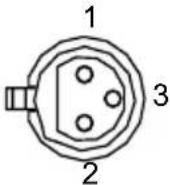 | 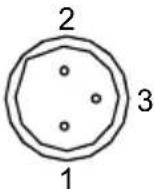 |
| 2 Positive signal ('hot pin') | |||
| 3 Negative signal ('cold pin') | Female | Male | |
Headphone connector
| Contact Signal | |
| Sleeve | Ground |
| Tip | Left channel |
| Ring | Right channel |