
ALP-AES67 - Soundcard Digigram - Free user manual and instructions
Find the device manual for free ALP-AES67 Digigram in PDF.


| Product Type | Professional multi-channel soundcard with AES67 connectivity |
| Bus Interface | PCI Express x1 (low profile, compatible with x2, x4, x8, x16) |
| Dimensions | 168 mm x 69 mm x 20 mm |
| Weight | Approximately 100 g (estimate) |
| Power Consumption | +3.3 V / +12 V: 0.4 A / 0.3 A |
| Audio Channels | 64 playback & 64 recording channels at 44.1/48 kHz; 32 at 88.2/96 kHz; 16 at 176.4/192 kHz |
| Audio Formats | PCM 16, 24, 32 bits |
| Sampling Rates | 44.1, 48, 88.2, 96, 176.4, 192 kHz (configurable via Windows Device Manager) |
| Network Connectivity | 4 x Gbps RJ-45 Ethernet ports (2 on main board, 2 on expansion board) |
| Network Protocols | AES67, RAVENNA, ST 2110, ST 2022-7 (redundancy), PTP |
| Embedded Routing Matrix | 128 x 128 internal routing matrix for flexible signal distribution |
| Main Functions | Multi-channel audio playback and recording, low latency, multi-card support, embedded web server for AoIP configuration |
| Driver Support | Windows: WASAPI, DirectSound, ASIO (32/64-bit); Linux: ALSA |
| Operating Systems | Windows 10 64-bit (20H2 and later), Ubuntu 20.04/22.04, Debian 11/12, RHEL 9 |
| Maintenance and Cleaning | Handle with ESD precautions; clean with a dry cloth; no liquid cleaners |
| Safety Precautions | ESD-sensitive; avoid transporting card installed in PC without securing mechanism; ensure proper grounding |
| Certifications | Designed to comply with EMC Directive 2014/30/EU and FCC Rules Part 15 Subpart B (certification in progress) |
| Environmental Conditions | Operating: 0°C to +50°C, 5% to 90% humidity (non-condensing); Storage: -5°C to +70°C, 0% to 95% humidity |
| Box Contents | ALP-AES67 soundcard with low-profile bracket, expansion card for 2 Eth ports with low-profile bracket, standard height bracket, flat ribbon cable |
Frequently Asked Questions - ALP-AES67 Digigram
User questions about ALP-AES67 Digigram
0 question about this device. Answer the ones you know or ask your own.
Ask a new question about this device
Download the instructions for your Soundcard in PDF format for free! Find your manual ALP-AES67 - Digigram and take your electronic device back in hand. On this page are published all the documents necessary for the use of your device. ALP-AES67 by Digigram.
USER MANUAL ALP-AES67 Digigram
UserManual ALP-AES67

Professionalmulti-channelsoundcardwith AES67connectivity
June,2024
| Author | Date | Status |
| SBT | 04/06/2024 | Released |
TABLEOFCONTENTS
1 INTRODUCTION....4
2 IMPORTANT NOTICE....5
3 BOX CONTENTS....6
4 GENERAL CHARACTERISTICS....6
4.1 Main hardware characteristics....6
4.2 Main software characteristics....6
5 REQUIRED CONFIGURATION....7
5.1 Required hardware configuration....7
5.2 Necessary software configuration under Windows....9
5.3 Necessary software configuration under Linux.... 11
6 HARDWARE INSTALLATION....12
6.1 Preparing the card.... 12
6.2 Installing the card in the PC....13
6.3 Internal LEDs....14
7 SOFTWARE INSTALLATION UNDER WINDOWS....15
7.1 Very first installation....15
7.2 Updating the driver version....16
7.3 Updating the firmware....16
7.4 Verifying the card installation.... 16
7.5 Adjusting the internal latency of the card....19
7.6 Replacing a card....20
7.7 Changing the order of installed cards....20
8 UNINSTALLING THE DRIVER UNDER WINDOWS....21
9CONFIGURINGTHECARDUNDERWINDOWSVIATHEALP-XMANAGERAPPLICATION....22
9.1 Installed ALP cards....22
9.2 Sampling clock....22
9.3 Input and output vu-meters....23
9.4 Firmware update procedure....24
9.5 Creating, saving and loading setting sessions....26
9.6 Keyboard shortcuts....26
10 ASIO CONTROL PANEL for Windows....27
11 ALP-AES67 principles....29
11.1 Embedded routing matrix....29
11.2 Clock....29
CONFIGURATION OF THE AoIP PARAMETERS....30
12.1 General settings.... 31
12.2 PTP settings....32
12.3 ASIO Clock....33
12.4 Session sinks.... 37
12.5 Ins / Outs....39
12.6 I/O Router....39
12.7 Statistics....40
12.8 NMOS....41
12.9 System....42
13 SPECIFICATIONS....43
13.1 Configuration....43
13.2 Audio characteristics....43
13.3 Connectors....43
13.4 Development environment....43
14 APPENDICES....44
14.1 LEDs....44
14.2 Connectors....46
1INTRODUCTION
ThisdocumentdescribestheinstallationanduseoftheDigigramPCIExpressALP-AES67cardunder WindowsandLinux.
ThiscardispartoftheALP-Xprofessionalsoundcardsrange.
Copyright2024Digigram.Allrightsreserved.
NopartofthismanualmaybereproducedwithoutthepriorconsentofDigigram. Thisreservationincludes photocopying,translatingand/orreformattingtheinformationcontainedinthismanual.
Everythingpossiblehasbeendonetoensurethegreatestaccuracy,howeverDiagramcannotbeheldliable foranyerrororomissionandreservestherighttomakemodificationsandimprovementswithoutprior notice.
DigigramandtheDigigramlogo,ALP-AES67aretrademarksorbrandnamesofDigigramDigital.Allother marksareownedbytheirrespectivecompanies.
2IMPORTANTNOTICE
Certifications
Theproductiscurrentlybeingcertified.
Thisproducthasbeendesignedinaccordancewiththefollowingstandards:
• EMCDirective2014/30/EU.
- FCCRulesPart15,SubpartB.
Toensurecompliancewiththestandardslistedabove,thefollowingrulesmustbefollowed:
- Thecablesuppliedmustnotbemodified.
- The additional cables used must have their respective shielding connected at each end.
Caution

Anelectrostaticdischarge(ESD)candamagethecardcomponents.Takethe followingprecautionstoavoidsuchdamagewhenhandlingthecard:

Connectthecardandeverythingenteringintocontactwithittotheearthpotentialbyprovidinga conductivesurfaceanddischargepaths.Taketheseprecautionsasaminimum:
- Unplugallpowerandsignalsources.
- Placethecardonanearthedconductiveworksurface.
- Connecttotheearthpotentialusingananti-staticstraporbyholdinganearthedobject.
- Earthallthetoolsenteringintocontactwiththecard.
GiventheshortenedlengthofthePCIEXPRESS TM connectorandtheresultinglackof mechanicalstability, westronglyadviseagainsttransportingthecardsinstalledina computer, unlessitschassisorcasehasadeviceforholdingthecardfirmlyinplacetoavoid materialdamage.
3BOXCONTENTS
ThankyouforpurchasingaDIGIGRAMsoundcardintheALP-Xrange.
Theboxcontains:
- TheALP-AES67soundcardequippedwithalow-profilebracket(79.2mm),
- Theexpansioncardfor2Ethportsequippedwithalowprofilebracket (theexpansioncardcanbelinkedtothemainboardviatheflatriboncable).
- astandardheightbracket(fullheight:120mm)thatcanbefittedinsteadofthelowprofile one, and thatreceivesthefourEthports
4GENERALCHARACTERISTICS
ALP-AES67isalowprofilePCIEXPRESS operateinPCIe®x1,x4,x8orx16slots.
TM x1soundcard.Itcanbeinsertedintoandtherefore
4.1 Mainhardware characteristics
- LowprofilePClex1
- TwoGbpsEthportsofthemainboard(PCleslot).
- Twoadditionalportsontheexpansionboard.
- Themainboardandtheexpansionboardcanhavetheirownlowprofilebrackets.
- Themainboardandtheexpansionboardcanusethesamestandardheightbracket.
• Inter-cardsynchronisation
4.2 Mainsoftwarecharacteristics
- 64 playback channels&64 recording channels at 44.1 and 48 kHz 32 playback channels&32 recording channels at 88.2 and 96 kHz 16 playback channels&16 recording channels at 176.4 and 192 kHz. Simultaneous acquisition and playback in PCM (8, 16 and 24 bit)
- TheavailableEthportscanbeusedinswitchorredundantmode
- Lowlatencymulti-cardandmulti-applicationsdrivers -Wasapi/DirectSound, and ASIOunderWindows -AlsadriverunderLinux
- "ALP-XManager"applicationinstalledwiththeWindowsdriver
- EmbeddedWEBserverforconfigurationofthenetworkandstreamparameters
5REQUIREDCONFIGURATION
5.1 Requiredhardwareconfiguration
TherearenoparticularhardwarerestrictionsintermsofPConusingtheALPcardanditsdriver.The PCcanhavestandardheightorlowprofilePCIecardslots.
APCIEXPRESS TM (PCIe®)x1,x4,x8orx16slotmustbeavailabletopluginthecard.
The processing power and memory required depend mainly on the operating system and the applications used on the PC.
Note: The driver of the card report to the OS that it does not manage the Sleep mode. As a consequence, the PC should not go to sleep mode.
IncasethePCgoestosleepmodeunderWindows,pleaseproceedasfollowstodisablethesleep mode.

ThewindowssleepmodeforthePCIebusmustbedisabled.
GotoWindowsSettings,System,andselect"Power&sleep".
SelectNever"fortheoption"Putthecomputertosleep".
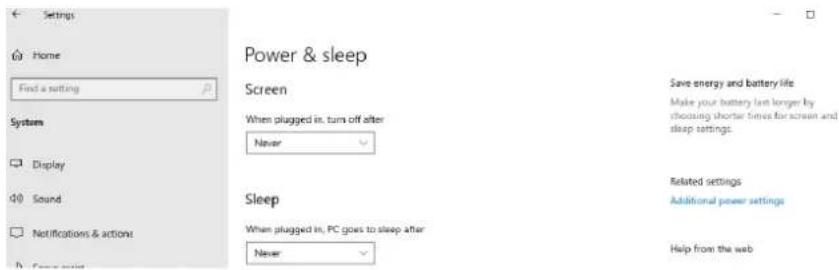
Onthesamewindow, clickon "Additionalpowersettings".
 | Clickon“Changeplan settings”infrontof “Balanced(recommended)” | |
 | Select“Changeadvanced powersettings”. | |
 | Select“PCIExpress”,“Link StatePowerManagement”, andselect“Off”forthe setting.ClickonOktovalidate | |
5.2 NecessarysoftwareconfigurationunderWindows
ALPcardsoperateunderWindowsfrom64-bitversionsofWindows10fromversion20H2.
TouseyourALP-Xcard,youmustinstallthedriverincludedintheinstallationkit"ALP-XKit". Download the latest version from the digigram website from the ALP-AES67 card support page. ThisdriversupportsalltheALPcards.
The"ALP-XKit"installerisusedtoinstallthefollowingcomponents:
- a64-bitWDMdriverofferingtheWASAPIandDirectSoundapplicationinterfaces,
- an ASIO driver (32 bits and 64 bits), with its "ALP-X ASIO Settings" configuration interface. Installing this component is optional,
- the "ALP-X Manager" application, which serves to adjust/view the ALP-X cards settings.. Installing this component is optional.

InyourWindowssystem,Itmaybenecessarytoallowtheapplicationstoaccesstheinput audiodevicesofthesoundcards. Pleaseproceedasfollows:
- GototheWindowsSettings, and select Privacy.
- Select"Microphone"
- Activate the option "Allow apps to access your microphone" as shown here-after:


Itisalsonecessarytohavethe"WindowsAudioEndpointBuilder"runningunderWindows sothattheWASAPIaudiodevicescanbeused..OnsomeWindowssetups,thisservicemay notbeactivatedbydefault.
Tocheckthis, gototheComputerManagementpanel, Services, and browsetotheline WindowsAudioEndpointBuilder.

DoubleclickonWindowsAudioEndpointBuildertodisplayitsproperties.
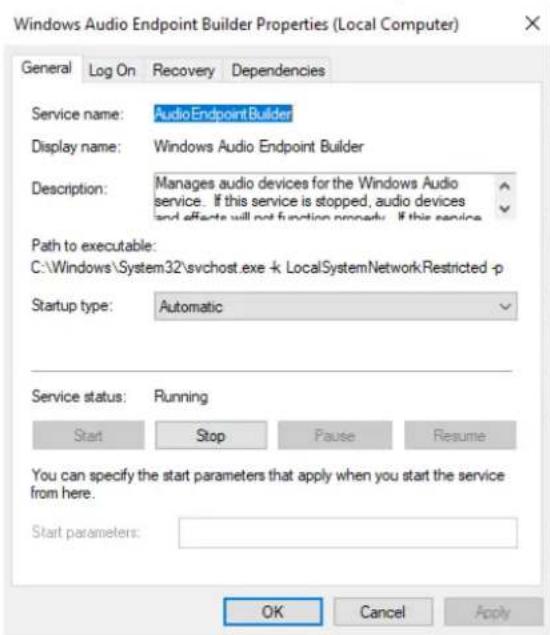
From the "Servicestatus" section, if the displayed status is not running, click on Start and then OK. Click on Cancel otherwise.
5.3NecessarysoftwareconfigurationunderLinux
ALPcardsaresupportedunderthefollowingLinuxdistributions,fromthementionedversions:
Ubuntu:
20.04 - kernel 5.15
22.04 - kernel 6.5
Debian
11 - kernel 5.10
12 - kernel 6.1
RHEL 9
kernel 5.14
IncaseyouneedtorunthedriverunderanotherLinuxdistribution,pleasecontactDigigramtoget thesourcecode.
In caseyouexperienceissuesforcompiling/runningthedriveronyourLinuxdistribution,we proposeaservicetoprovideyouwiththeappropriatedriver;pleasecontactDigigram.
6HARDWAREINSTALLATION
GiventheshortenedlengthofthePCIEXPRESS ™ connectorandtheresultinglackofmechanical stability, westronglyadviseagainststransportingthecardsinstalledinacomputer, unlessitfeatures aspecificdeviceforholdingthecardfirmlyinplacetoavoidmaterialdamage.
Thecardmustbeinsertedinthecomputerbeforeinstallingitsdriver.
6.1 Preparingthecard
Beforeattachingthecardinthecomputer,makesurethecardhastherightbracket(lowprofileor standardprofile).
Standardheightconfigurations
Bydefault, the card is delivered with the standard profile bracket mounted.
Lowprofileconfigurations
Thecardcanbeusedwithorwithouttheexpansionboard.Theexpansioncarddoesnotneeda PCIeconnector,butoccupiestheslotofaPCIecard,anditcanbeinstalledoneithersideofthe ALP-AES67board.
 | Onthebackofthecard,unscrewthe4screws holdingthetopradiatorinplace. Gentlyremovetheradiator. | |
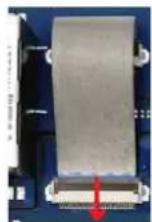 | Liftupthebrowncoveroftheconnectoron themainboardtoremovetheribboncable fromthemainboard. | |
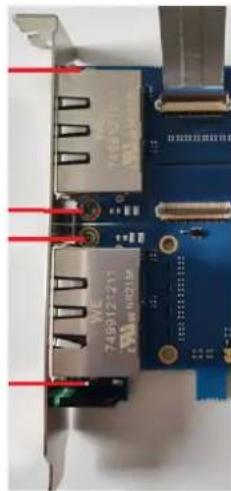 | Unscrewthe4screws,andremovethe standardprofilebracket,andremovethe bracket. | |
 | Installthelowprofilebracketonthemain board,andscrewit.Ifyouneedtousetheexpansionboard, installtheotherlowprofilebracketonit. | |
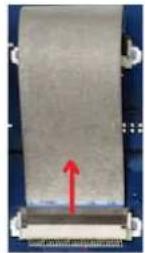 | Ifyouneedtousetheexpansionboard, gentlyinserttheribboncableonthe connector(bluesectionoftheribboncable faceup)andclosetheclipthatholdsthe connectioncableinplace. | |
 | Positiontheradiatoronthemainboard,and screwitonthebackofthemainboard(4 screws). | |
 | Onthetable,placetheexpansionboardbelow themainboard, | |
6.2 InstallingthecardinthePC
InsertthecardintheavailablePCleslotandpresstopositionitfirmly. Incasethecardisusedwithitsexpansionboard, andwithlowprofilebracket,
- placetheexpansionboardbelowthemainboard,

- placetheminthePC(onlythemainboardisinsertedaPCIeslot).
Tightenthescrew(s)fixingthebracket(s)tothechassisorlockthecard(s)usingthedeviceprovided forthispurposeonyourcomputer.
ThecardsmustbefirmlyattachedtothePCchassis.
6.3InternalLEDs
TheALPcardfeaturestwointernalLEDsontheedgeofitsmotherboard,asshownbelow.Thestate oftheseLEDscanbeseenwhenthePCcoverisopen.

Ifthecardanditson-boardfirmwareareinitialisedcorrectly,LED1mustbelitsolidgreen,andLED2mustflasheverysecond(1Hz).
IfLED2flashesfaster(twicepersecond-2Hz), this mean that the firmware version that has been uploaded to the card is corrupted, and the card is running the backup factory firmware version. It is then necessary to install the appropriate firmware version.
7SOFTWAREINSTALLATIONUNDERWINDOWS
IMPORTANT
Toinstallthesoftware,youmusthaveadministratorrightsonthecomputer.
Please visit the Digigram website at www.digigram.com to obtain them most recent driver.
ShouldyouuseaspecificapplicationdevelopedorinstalledbyaDigigrampartner, this may mean using as specific driver version. In this case, confirm with your applications supplier which driver version to use.
Anydriverdownloadedfromourwebsitehastobeunpackedbeforeinstallingit.Doubleclickonthe downloadedfiletostarttheauto-extractionutility.Youcanchoosethedefaultdestination (temporaryWindowsfolder)orselectanotherone.
7.1 Veryfirstinstallation
- SwitchoffthecomputerandinserttheALPcard(s)inanavailablePCleslot.
- Restartthecomputer.
- ClickonCancelifthe"Newdevicedetected"wizardappears.
- DoubleclickontheALPdriverinstallationfile"ALP-XKitvxx.exe"
 | ClickonNexttocontinuewiththe installation. |
| Clickon"Iagree"tocontinuewiththe installation. | |
 | Inthiswindow,selectthecomponentstobe installedinadditiontothecarddriver.ALP-XManager:applicationusedto configurethesettingsoftheALPcard(s) installed.Somesoftwareprogramsmayhavebeen designedwiththeALPcardsettings controlsbuiltin.Inthiscase,itmaybe recommendednottoinstalltheALP-X Managerapplication.ALP-XASIOSettings:thisapplicationis usedtoconfiguretheASIOdriversettings.Thereisnoneedtoinstallitif noapplicationreliantontheASIO interfaceisused. |
 | Thedriverisinstalledbydefaultinthefolder "C:\ProgramFiles(x86)\Digigram\ALP-X". Tochangethisfolder,clickonBrowse and selectanewdestination. ClickonInstalltocontinuewiththe installation. |
 | Thedriverandselectedcomponentsare beinginstalled. |
7.2 Updatingthedriverversion
If you want to install anewdriver version, double click on thenew driver installation file "ALP-XKit vxx.exe" (seethedetailed procedure in the herein above chapter "Veryfirst installation").
7.3 Updating the firmware
TheALPcardfeaturestwoon-boardfirmware:the"AES67"dedicatedfirmware,andtheboard firmware.UpdatingthefirmwarecanbedonefromtheAVS-Monitorapplication(seechapter Firmwareupdateprocedure).Bothfirmwarecanbeupdatedfromthisapplication.
7.4 Verifying the card installation
Oncethedriverandcardhavebeeninstalledaspertheprocessdescribedhereinabove,youcan verifythatthecardisinstalledcorrectlyandworkingproperly.
7.4.1 Presenceofplaybackandrecordingdevices
TheaudiodevicesexposedbythecarddriverarevisibleontheWindowsSoundpanel.Toopenit,rightclickontheloudspeakericonintheWindowstaskbarandselect"Sounds":

Theaudiodevicesexposedbythecarddriverarevisiblefromthe"Play"and"Record"tabs.

IfthecarddevicesarenotlistedintheWindowsSoundcontrolpanel:
- MakesurethatthecardisinsertedcorrectlyinthePCIslotandscrewedtothecomputer chassis.
- Try to uninstall the ALP-X Kit (from the Windows control panel, Applications) and re-install it.
PlaybacktoanoutputdeviceoftheALP-AES67canbetestedbyrightclickingonthisdeviceandselecting"Test".TheVU-metermustthenshowmodulation.

If several cards are installed, their devices have the same names (ALPPLAY and ALPREC), but then are of the card associated with each device differs (different card name, no index for the
firstcard, and index starting from 2 for the following card so fthes a memodel). In the example below, the first card in the PCIe slot enumeration order is an ALP-AES67, the second card is an ALP442e, and the third card is an ALP882e.
| Firstcard:ALP-AES67 | Secondcard:ALP442e | Thirdcard:ALP882e |
| ALPPLAY1-2DigigramALP-AES67ALPPLAY3-4DigigramALP-AES67...ALPPLAY63-64DigigramALP-AES67 | ALPPLAY1-2DigigramALP442eALPPLAY3-4DigigramALP442e...ALPPLAY7-8DigigramALP442e | ALPPLAY1-2DigigramALP882eALPPLAY3-4DigigramALP882e...ALPPLAY15-16DigigramALP882e |
7.4.2 Carddetected by the Digigram ALP-X Manager application
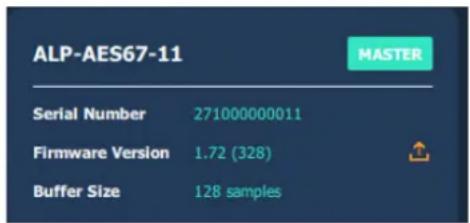
TheALP-XManagerapplication, installedwiththedriver,isusedtocontroland/orviewtheALPcard settingsviaagraphicinterface.Thisapplicationcanbelaunchedfromtheshortcutcreatedonthe desktoporfromthestartmenu,Digigramgroup.Thecardmustappearasbelowifitanditsdriver areinstalledcorrectly.NotethatamaximumofeightALPcardscanbedisplayedandhandledin ALP-XManager.
7.4.3 Cardavailability under ASIO
If the ASIO driver forthecard has been installed (option to be selected during the installation procedure), thenthe card must be detected and displayed in the ASIO control panel. The control panel can be opened from the ASIO-based software application.
AllthepresentALPcardsmustbelistedinthe"ACTIVECARDSGROUP"selectionlist.

7.5Adjustingtheinternallatencyofthecard
Theinternallatencyofthecardisdeterminedbythedurationofsamplebuffersthecardexchanges withthePCforplaybackandrecordingaudiostreams.Bydefault,thisdurationis32samplingclock periods(0.67msat48kHz).
Thelowertheinternallatency, the lowertheglobalatency of the card. However, a very low latency may lead to "choppy" audio on slow PCs. In this case it is necessary to increase the internallatency.
Theinternallatencyofthecardcanbechangedbyelectingthepropertiesofthecard,fromthe WindowsDeviceManager:

RightclickontheALPcard, andselectProperties, Advanced. The following window is displayed:

Withaudioprocessingtimelog: Thisoptionistobeusedonlyfordebugging purposes(debugview).Donotactivateit unlessrequestedbyDigigramtechnical support.
Stats: Thesedisplayedvaluesareonlyfor technicalinvestigationpurposes.
Internalbuffer:Sizeofthebuffers exchangedbetweenthecardandthedriver. Thesizeisexpressedinsamples(ex:at48 kHz, avalueof48correspondsto1msbuffer). Valuesarefrom10samplesto384samples. Itimpactsthelatencyofthedriver.
Internalbufferquantity:Definesthe numberofbuffersusedbythedriver.This parameterdoesnotimpactthelatency.
Pre-filledPlaybackbuffers: Thisparameters should not be modified. It impacts the latency of the driver.
Samplingrate: Selectthesamplingrate of the ALP-AES67 card. The ALP-X Manager application must be closed before selecting a newsampling rate value.
Selectthenewvalue, andclickon "Ok".
ThePCmustberestarted.
7.6Replacingacard
IfanALPcardhastobereplacedbyanotherone,itisstronglyrecommendedtoproceedasfollows:
- TurnoffthePC.
- Removethecardtobereplaced.
- RestartthePC.
- GototheWindowsDeviceManager, and select "Sound, video and game controllers". From the "View" menu, select "Show Hiddende devices". Select the ALP card that washidden and select "Uninstall".
- TurnoffthePC.
- Insertthenewcard.
- RestartthePC.
7.7Changingtheorderofinstalledcards
If several ALP cards are installed, and you want to move cards from ones lot to another, it is strongly recommended to proceed as follows:
- TurnoffthePC.
- Removethecardstobemoved.
- RestartthePC.
- GototheWindowsDeviceManager, and select "Sound, video and game controllers". From the "View" menu, select "Show Hiddende devices". Select the ALP card that were hidden and select "Uninstall".
- TurnoffthePC.
- Insertthecardsintheappropriateslots.
- RestartthePC.
8UNINSTALLINGTHEDRIVERUNDER WINDOWS
ProceedasfollowstouninstallanALPdriverversion.
Pleasenotethatuninstallingaversionmustbedonepriortotheinstallationofanotherversion.
 | FromWindowsStartmenu,openthe"Settings"panel |
[23KY] AppsUninstall, defaults, optional features features | Clickonthe"Apps"icon. |
Apps & featuresOptional featuresApp execution aliasesSearch, sort, and filter by drive. If you would like to uninstall or move an app, select it from the list. Sort by: Name √ Filter by: All drives √5D apps found Sort by: Name √ Filter by: All drives √5D apps found 3D Viewer 16.0 KBMicrosoft Corporation 8/4/2022ALP-X Kit 145 MB 3D Viewer 16.0 KBMicrosoft Corporation 8/4/2022ALP-X Kit 145 MB 9/20/2022 9/20/2022 | FromthelistofinstalledApps&features,selectALP-XKit. |
| Modify Uninstall | ClickonUninstall.ThiswillremovealltheALP-X...components |
Apps & features
9CONFIGURINGTHECARDUNDERWINDOWS VIATHEALP-XMANAGERAPPLICATION
This application can be launched from the short cut created on the desktop for from the start menu, Digigram group.
9.1 InstalledALPcards
When the application is launched, the window below is displayed and shows all the ALP cards installed in the PC.
Ifanotherviewisdisplayed,clickontheicontodisplaythelistofALPcardspresentand detected.
The following settings are displayed for each ALP card detected:

- itsserialnumber,
• theon-boardfirmwareversion, - the size of buffers exchanged between the driver and the card (see Adjusting the internal latencyofthecard).
9.2Samplingclock
ThesamplingclockofthecardisconfigurablefromtheWindowsDeviceManager.TheALP-X Managerapplicationmustbeclosedbeforechangingthesamplingclockvalue.
OpentheWindowsdeviceManager,selecttheitem"Sound,videoandgamecontrollers",andright clickonyourALP-AES67cardtoopenits"Properties"controlpanel.Selecttheappropriatesampling frequencyvalues.
SelectOKtoapplythechanges.Youwillbepromptedtorestartthecomputer.
ClickontheclockicontodisplaytheclocksettingsofeachpresentALPcard.

9.3 Input and output vu-meters
Clickontheicontoaccessthe"I/OMonitor"view.

This view display the vu-meters for all input and output channels.
Inputvu-metersreflecttheaudiomodulationreceivedfromtheAES67streamsroutedtothe ALP-AES67card.Thesearethechannelstobeacquiredfromthesoftwareapplicationviathe recordingdevices.
Outputvu-metersreflecttheaudiomodulationreceivedbythecardfromeachsoftware playback device. NotethattheoutputmodulationisdisplayedeveniftheAES67networkisdisconnected.
The following table lists the various possible settings from themixerview.
 | Vu-metersEachVu-meterdisplaytheinputsignalpeak-metersindBfs.Notethatthereisnoclippinginformationthatisreported.Asa consequence,theclippingthresholdadjustmentthatcanbe foundfrom"Settings->Audiometers"hasnoeffect.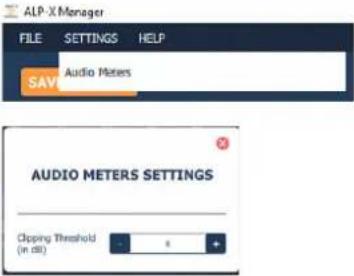 |
 | Clickonthisicontodisplaytheconcernedpairofchannelsastwomono channelstrips. |
 | Clickonthisicontodisplaytheconcernedpairofchannelsasonestereo channelstrip. |
 | ChannelstripnameClickonthechannelstripnameandenteranewname.Note:whenachannelstripdisplayischangedfrommonotostereo,or stereotomono,thechannelstreamnamegoesbacktothedefault name.Asaconsequence,itisrecommendedtokeepthedisplaymodeused (monoorstereo)whenthechannelstripnameshavebeen changed. |
9.4 Firmwareupdateprocedure
The ALP-AES67 cardon-board firmware may havet be upgraded, and updates can be supplied by Digigram and proven necessary.
The firmware update had been done from the AVS-Monitor application, which allows applying a new firmware through the AES67 network. AVS-Monitor is an application from the company Auvitran which is owned by Digigram. It runs under Windows, and accesses the ALP-AES67 card through the AES67 network. As a consequence, the NIC card selected in AVS-Monitormust be connected to the AES67 network.
Incaseyouhavenotalreadydownloadedthisapplication,clickonthebuttonontherightofthe "Firmwareversion"field,asshownonthescreencapturebelow.


AVS-MonitorisconstantlyupdatedonAuvitran'sWEBsite.Italwaysincludesthemostrecent firmwareversionforthecard.IncasethePCrunningAVS-Monitorisconnectedtotheinternet, AVS-Monitorisupdated.
WhenAVS-MonitorisstartedandtheNICcardconnectedtotheAES67networkisselected, AVS-MonitorautomaticallydetectstheAES67productsonthenetwork.
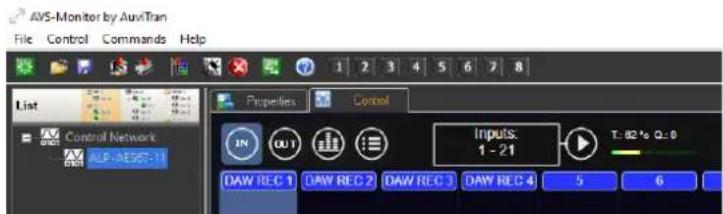
Toupdatethefirmwareoftheproducts,select"LaunchFirmwaremanager"fromthe"Control"menu.

The Firmwaremanagerapplicationisstarted.
If the ALP-AES67 card(s) appears with unchecked boxes as shown below, this mean that no firmware update is to be done.

IftheALP-AES67cardboxesarechecked,thenselect"Update"onthebottomrightoftheFirmware Managerwindowtostartthefirmwareupdate.DonotshutdownthePChostingtheALP-AES67card duringthefirmwareupdate.
AshutdownandrestartofthecomputerhostingtheALP-AES67cardisnecessarytotakeinto accountthenewfirmware.
9.5 Creating, saving and loading settings sessions
ThecurrentconfigurationofallsettingsdefinedinALP-XManagercanbesaved.GototheFilemenu andselect"Savesessionas".
Toloadaconfiguration, gototheFilemenuandselect"Opensession".
Tocreateanewconfigurationfromblanksettings, gototheFilemenuandselect"Newsession".
9.6Keyboardshortcuts
| Keyboard shortcut | Action |
| Session | |
| Ctrl + S | Save |
| Ctrl + Alt + S | Save As |
| Ctrl + N | New |
| Ctrl + O | Open |
10ASIOCONTROLPANELforWindows
TheASIOcontrolpanelcanbestartedfromtheAsioapplication,fromthemenuallowingforthe settingsoftheaudiodeviceandtheASIOconfiguration.
TheASIOsettingsaresavedperapplication.TheASIOdriversupportsmultiplesimultaneousASIO applications,providedthattheydonotusethesamechannels.


Activecardsgroup/Asiochannelsallocation
Thissectionisusedtoselecttheinputchannelsandoutputchannelsthat aremanagedbytheASIOdriverandwhichcanthereforebeusedbyany applicationbasedontheASIOinterface.
Foreverycardselectedfromthe"ACTIVECARDSGROUP"list,clickonthe "ASIOCHANNELSALLOCATION"buttonandselectthechannelsto
beusedunderASIO.

TomanagealltheinstalledcardsfromyourASIOapplication,select"All ALPBoards"fromthelistofcards.
AcardthatisnotusedunderASIOcanbeusedfromaWASAPIor DirectSoundapplication.

Buffersize(latency)
ThissectionisusedtoselectthesizeofaudiobuffersusedbytheASIO driver. Thissizeisgivenasanumberofsamplesanda cross-referenceindurationisindicatedforasamplingfrequency of48kHz. Thehigherthebuffersize, thehigherthelatency.
Asmallbuffersizecanleadtobreaksinaudiothroughputona low-poweredmachineoronamachinewithahighprocessorload.
Bufferssizesfollowedbythesymbol*cannotbeselected.Asmaller internalbuffersizemustbeselectedfromtheWindowsDevice Manager,Sound,videoandgamescontrollers,ALP-AES67 advancedsettings.
 | SamplesizeThissettingdefinestheformatofsamplesexchangedbetweenthe applicationandthecarddriver. |
 | EnableDirectMonitoringControlThisfeaturehasnoimpactontheALP-AES67.Thehardwaremonitoringis notsupported. |
| BoostASIOpriorityThisoptionallowsthesystemtoruntheASIOprocesswithhigh priority,therebyincreasingthereliabilityofthisprocess.Caution, however,thiscanmakeotherprocessesunstable. | |
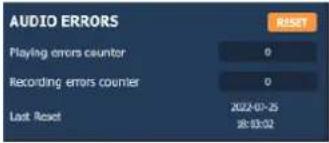 | AudioerrorsThissectionisusedtovisualisecurrenterrorsfor playback and recording via the ASIO driver.Errors frequently reflect to osmallan ASIO buffersize for the system's possibilities.Should they occur, then the buffersizeneedstobe increased until there are non more errors.Syncstatus errors reflect clock synchro errors (AES11 external clock, WordClockorinter-cardsynchro).Error counters can be reset to zero by clicking on the RESET button.Lastly, atimecounter display the time elapsed sincethelast counter reset. |
11ALP-AES67principles
11.1 Embeddedroutingmatrix
![graph LR A["Playback software applications"] --> B["DAW playback devices"] B --> C["64 ch"] C --> D["128 x 128 Embedded routing matrix"] E["AES67 / RAVENNA / ST2110 streams (Sinks)"] --> F["Network interface 1"] F --> G["64 ch"] G --> D H["Redundant AES67 / RAVENNA / ST2110 streams (Sinks)"] --> I["…](/content/2026/05/943586/images/ecc69342ee0e01f59cabca7311341f05a430c3dc0337007b2103b374ca455e1e.jpg)
The inputs of the on-board routing matrix are:
- 64 playback channels coming from the software playback audio devices used by the application based on the ALP driver running under Windows or Linux.
- 64 channels coming from the network interface 1 (or interfaces 1 & 2 when they are configured in redundant mode). Audio channels are extracted from the IP streams to be received and which are named "Sinks".
The outputs of the routing matrix are:
- 64 channels assigned to the software recording audio devices used by the application based on the ALP driver running under Windows or Linux.
- 64 channels assigned to the network interface 1 (or network interfaces 1 & 2 when they are configured in redundant mode). These channels are the audio sources of the AoIP streams published to the network 0. These streams are named "Sources".
11.2Clock
The ALP-AES67 can be slaved to the PTP clock, or master PTP clock on the network.
Slave to PTP clock: the source clock is the PTP clock.
Master PTP Clock: the clock source has to be internal, WordClock, or MADI, and the card is elected as Master PTP on the network if its PTP clock has a higher priority than other potential Master PTP clock units on the network.
CONFIGURATIONOFTHEAoIPPARAMETERS
The network parameters of ALP-AES67 can be configured through its embedded WEB server, which is accessible from any of the two Eth ports.
To access the WEB interface of the ALP-AES67 card, connect the PC network interface to the network your ALP-AES67 is connected to.
The ALP-AES67 Eth ports are by default in DHCP mode. In case there is no DHCP service on your network, the ports are in APIPA mode (Automatic Private Internet Protocol Addressing), with the range of IP addresses 169.254.0.0/16
You can use an application such as MT Discovery to detect the card and access its WEB pages:

The following page is displayed.

The settings are accessible via different tabs:
General settings, PTP, ASIO clock, Session sources, Session sinks, Ins/Outs, I/O router, Statistics, NMOS, System
12.1 Generalsettings

| Parameter | Description |
| Device Name | This is a unique device name. Other devices on the network see this name. We recommend not exceeding 32 characters. |
| Audio Configuration | |
| Sample Rate | Non modifiable.Reflects the current sample rate (44100-48000-88200-96000-176400-192000-352800-384000 Hz) that is set from the ALP-AES67 properties on the driver side. |
| Frame size (@1Fs) | Current frame size (64 - AES67/48 - 32 -16 - 12 -6).Note that available frame size values may not be available or differ ac to the device and/or firmware. |
| Session Sinks Global | |
| Safety Playout Delay (@1Fs) | Additional playout delay. The value is described at 1Fs (44.1-48 kHz) in samples.For example, if the value is 10, the additional playout delay will be 20 (88.2-96 kHz), 40 at 4FS (176.4-192 kHz),... |
| SSM (requires IGMP v3) | Source-Specific Multicast.If you activate this option, make sure your network switch supports and configured for IGMP V3. |
| Network | |
| Multi-Interface mode | Activate / deactivate ST2022-7 mode |
| Interface 1-2 (Interface 2 is displayed if “Multi-interface mode” has previously been enabled and applied) | |
| Link | Status |
| Name | Information only - can't be modified |
| Type | Defines the type of IP V4 address used (Zeroconf - DHCP- Static) |
| Address | To be set only if Type is set to Static.Otherwise, these fields display the assigned values. |
| NetMask | |
| Gateway | |

Reboot is required to apply the changes
12.2PTPsettings

| Parameter | Description |
| Global | |
| PTP Domain | Allows to define a specific PTP domain, usually when several PTP mas are required in the same network (default value is 0). |
| DSCP | PTP DSCP. Values:46-EF : PTP AES6748-CS6: PTP RAVENNA56-CS7 |
| Master | |
| Manual | This checkbox must be checked to modify the PTP settings |
| Priority 1 | Main priority value (1= Highest priority; 255=lowest priority) |
| Class | Device class. This value should not be modified |
| Accuracy | Non modifiable |
| Priority 2 | Only used if the other parameters do not allow for the election of a P* master. |
| GMID | Non modifiable. Current GrandMasterID (PTP Master) |
| Slave only | Forces ALP-AES67 to always be PTP slave |
| Delay Mech | PTP Profile related - E2E or P2P |
| Announce | PTP announcement interval (1 - 2 - 4 - 8 -16 seconds) |
| Sync | 0.0625 - 0.125 - 0.25 - 0.5 seconds |
| Status | |
| GMID | Non modifiable. Current GrandMasterID (PTP Master) |
| Lock | Shows if the device is locked to PTP (Locked -Locking - Unlocked) |
| Interfaces 1 & 2 | |
| PTP status | Master : Device is MasterSlave : Device is SlaveListening : The interface is not used for synchronization |
| Statistics | The graph is only active in slave mode.Green curve: shows the audio clock delay vs the current Master PTP Grey curve: shows the network delay vs the current Master PTP clock, before the device synchronisation algorithm. |
12.3ASIOClock
This tab allows setting the parameters of the clock that can be generated for MERGING AUDIO DEVICE software synchronization.
If this software is not used in your system, just disable this feature (Multicast clock = Off).
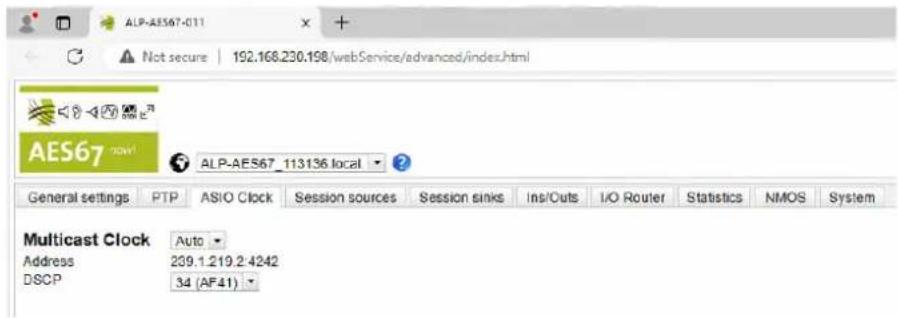
| Parameter | Description |
| Global | |
| Multicast Clock | Off, On, AutoAllows to enable/disable the multicast ASIO clock.Auto activates the ASIO clock only on the master PTP device. |
| Address | Multicast address of the ASIO Multicast Clock |
| DSCP | Allows setting the ASIO Multicast Clock DSCP value: 34 (Default), 46, 56.When using a switch, make sure that the ASIO Clock DSCP has a high in the switch DSCP to Queue table |
Sessionsources
This page allows for the declaration of session source instances on the ALP-AES67 (transmitters that generate the IP streams).
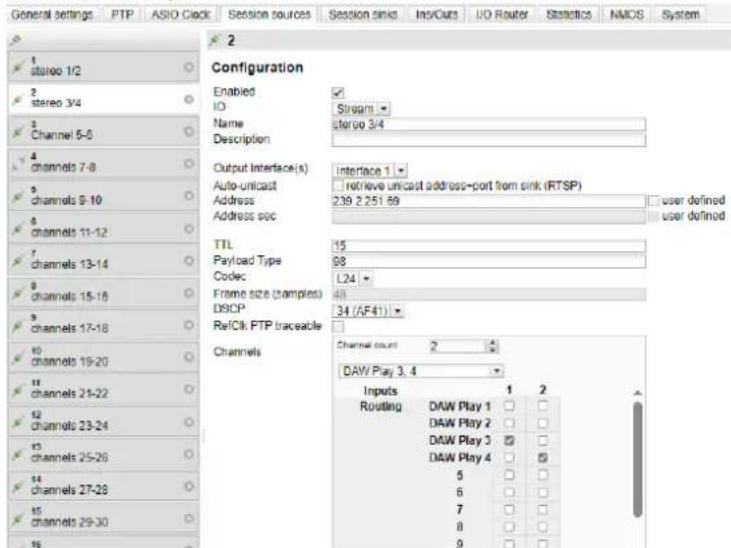
Click on the button to create a new session.
| Parameter | Description |
| Enable | Enables the selected source (active by default) |
| IO | Non modifiable (Stream) |
| Name | Source name (63 characters max). |
| Output interface(s) | Select the network interface (1, 2, or 1&2 in case of ST_2022-7) used streaming this session. |
| Auto-unicast | Automatically retrieves the IP address of the sink (listener) for a unicas connection |
| Address / User defined | Check “user defined” to manually enter or modify the multicast IP addre the generated stream. |
| Address sec / User defined | Not accessible if only one Eth interface is enabled.Check “user defined” to manually enter or modify the multicast IP addre the redundant stream (ST-2022-7). |
| TTL | Time to Live (also called Hop Limit) - this value should not be modified |
| Payload type | RTP Payload type - this value should not be modified |
| Codec | L24 - L16 - DSD64 - DSD64_32 - DSD128 - DSD128_32 - DSD256 (Note that those values are sampling rate dependent; |
| Frame size (samples) | Frame size of the current source. Reflects the frame size set from the General settings section. |
| DSCP | Ip audio stream DSCP value (34: RTP AES67 / 46: RTP Ravenna / 26 |
| RefClk PTP traceable | This feature is useful when you want to connect a stream through the Internet (e.g. with two PTP Masters (GPS) at each location). It allows r connections with devices locked to different traceable PTP Masters.See also “Ignore refclk GMID” - accept source locked to any PTP mas on the Session Sinks section below. |
| Channels | |
| Channels: Channel count | Number of channels in the stream.The “Channel count” drop down menu allows selecting the number of contiguous channels from the 64 available channels. |
| Routing table | The routing table allows for the selection of the content of each channel the stream, among the 128 possible output channels of the ALP-AES67 internal matrix.The first 64 displayed channels are software playback channels.The following channels are the channels received from declared sinks.In the picture above, the channels to be streamed are channels 3 & 4 (DAW Play 3 & DAW Play 4) from the playback application on the PC.Note that the channels can be selected from the sinks receivers, listed the DAW channels. |
| The URL of the SDP of this session is | Allows saving the Session Description into a file (useful for specific third party devices if manual SDP has to be provided).Note :Devices in 2022-7 mode will produce a 2022-7 SDP, containing both interfaces session parameters.If you load such SDP in a non-2022-7 device, only the session parame from interface1 will be used. |
12.4 Sessionsinks
This page allows for the declaration of session sinks (receiver instances) on the ALP-AES67.

Click on the button to create a new session.
| Parameter | Description |
| IO | Non modifiable (Stream) |
| Label | Sink name (=receiver name) |
| Source | Drop down menu to select a source (both sap and bonjour advertised sources are listed). |
| Source: Manual | Allows to manually enter a SDP |
| Delay (samples) | Playback delay.0 is an automatic delay (works with devices based on the AES67 techn from Merging Technologies).If set to 0, and when using devices that are not based on the Merging Technologies technology, the playout delay is calculated based on the va=framecount in the SDP.In any case, the frames must be time aligned; all devices must run an number of frames from time zero (epoch). |
| Ignore refclk MGID: - accept source locked to any PTP master | This feature is useful when you want to connect a stream through the Internet (e.g.with two PTP Masters (GPS) at each location), it allows m connections with devices locked to different traceable PTP Masters.See also RefClk PTP traceable on the Session Sources page. |
| Ignore refclk MGID: - accept source locked from any PTP master | This feature is useful when you want to connect a stream through the Internet, it allows for connections with devices locked to different PTP domains. |
| Relaxed check | Allow connection to a source that has less channels |
| Channels: Channel count | Number of channels in the stream.The associated drop down menu allows selecting the “Channel count” contiguous channels from the 64 available channels.Received channels can be routed towards the DAW recording channels,towards the declared source streams listed after the DAW rec devices: |
| Channels: Count adapted | To be used if the number of channels does not match |
| Session Info | |
| Session status |  |
| Interface 1-2 | |
| RTP Status | Connection status. The displayed value is the sum of the following erro value:0x10receivingRTPpackets0x01:wrongRTPsequenceid0x02:wrongRTPSSRC0x04:wrongRTPpayloadtype0x08:wrongRTPSAC0x20streamhasbeenmuted0x40:Horusimplementation-anincomingstreamismuted0x80:ST2022-7modeonlybothinterfacesarenotreceivingRTPpackets properly→mutedExemple.: Stream muted (0x20) and Wrong payload (4) will be display 0x24 |
| Clock domain | PTP clock type and domain |
| Address | Multicast IP address of the selected sink |
| Payload | Payload / Codec / Sampling Rate / Number of channels |
| SDP | Displays the detailed SDP information on the current stream. |
12.5Ins/Outs
This page allows you to change the name of the Inputs and / or Outputs.

12.6I/ORouter
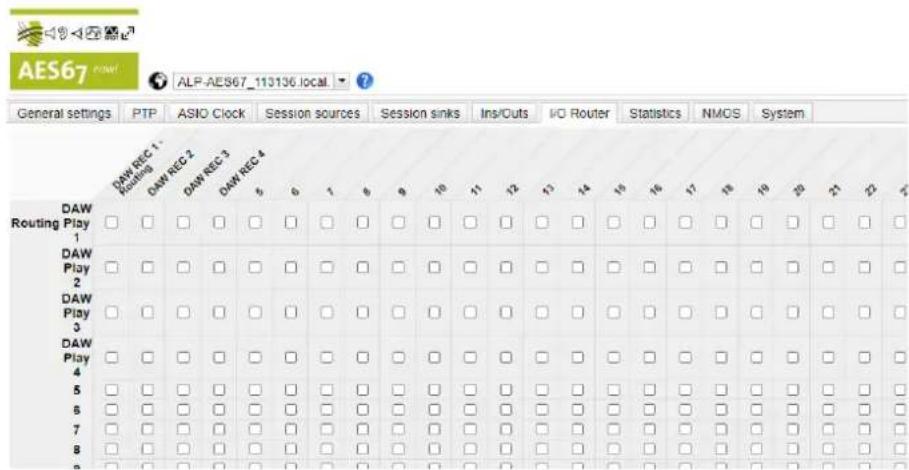
This page allows configuring the routing from the input channels of the internal matrix to its output channels.
An input channel can be routed to several output channels.
But multiple input channels cannot be routed to an output channel (no mixing on the output channel).
The input channels of the matrix are listed vertically on the left. The scroll bar on the right of the page allows scrolling down/up.
The output channels of the mixer are listed horizontally. The scroll bar at the bottom of the page allows scrolling right/left.
To access the input channels coming from the received streams, scroll first down until you see the horizontal scroll bar.
12.7Statistics
This page gives statistics about the sinks (received IP streams).
General settings PTP ASIO Clock Session sources Session sinks Ins/Outs I/O Router Statistics
Sink(17) Stream receive 1
Min: 0 / 0 [us]
Max: 0 / 0 [us]

Sink(22) Stream Receive 2
Min: 0 / 0 [us]
Max: 0 / 0 [us]

12.8NMOS
This page allows configuring the NMOS settings for discovery/registration, and for device connection management.

| Parameter | Description |
| NMOS General Settings | |
| Enable | Enable or disable the NMOS client, following the Port and Registration server configuration.NMOS must be disabled to modify the registration server settings. |
| Port | ALP-AES67 NMOS communication port |
| Flush streamer address on disable | Clears the streamer address when the stream is disabled. This option be useful with some NMOS servers |
| Configure Registration Server | |
| Mode | Registration Server communication modes:mDNS(Bonjour): Automatic communication to a Registration Server, using Bonjour service (The server needs to advertise with Bonjour Service)Search domain: A search domain needs to be supplied.The search domain associated with the primary network interface is shown as Suggested.Static Address: The registration server is found using the address given in the “Address” field.This is currently the preferred and most common way to establish communication with a NMOS Registration Server. (Sony NMOS CPP, RiedeINMOS,...) |
| Address | When Mode is set to Static Address, this allows the user to enter the IP address and port(:).In other modes, this field only displays information when the communication is established. |
| Search Domain | When Mode is set to Search Domain, this allows the user to enter a (Unicast DNS).In other modes, this field only displays information when the communication is established. |
| Registration Server (This section provides status information about the Registration Server) | |
| Server Name / Host | Provided by the Server (with DNS or mDNS). Note that this field may empty when Mode is set to static |
| Address / Port | Server IP address and Port |
| Registered | True if a registration server can be reached |
12.9System
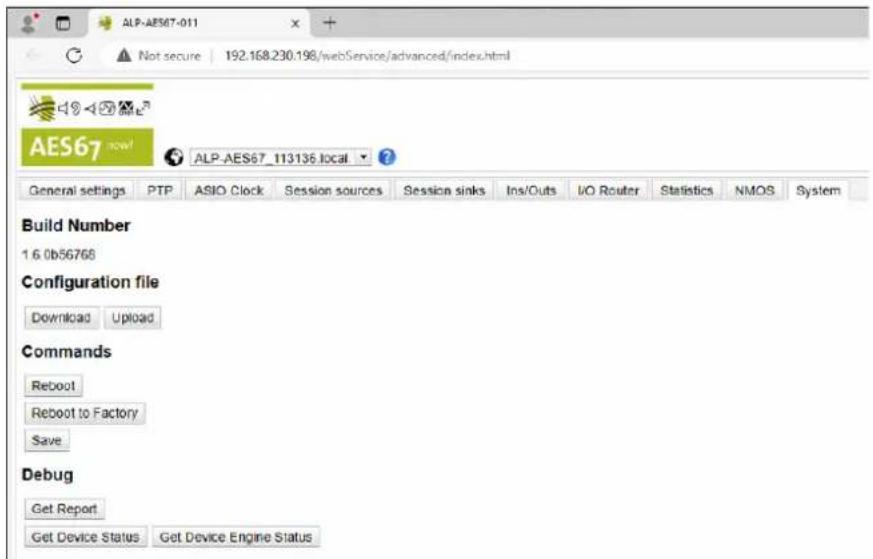
| Parameter | Description |
| Build number | Current firmware version. |
| Configuration file | |
| Download/upload | Save/Load a configuration file (preset) |
| Commands | |
| Reboot | Restart the device |
| Reboot to factory | Restore all settings to factory default, and restart the device |
| Save | save the current configuration. |
| Debug | |
| Get report | Generates a debug report, and saves it on the local computer.If the report is not saved automatically, make sure your web browser d block the download |
| Get device status | Displays the device status (SysLog) |
| Get device engine status | Displays the device engine |
13SPECIFICATIONS
13.1 Configuration
| Bus/Format | PCI EXPRESSTM x1 / Low profile (compatible x2, x4, x8, x16) |
| Dimensions | 168 mm × 69 mm × 20 mm |
| Consumption (+3.3 V/+12 V) | 0.4 A / 0.3 A |
| In operation: temperature/humidity (without condensation) | 0°C/+50°C • 5%/90% |
| Storage: temperature/humidity (without condensation) | -5°C/+70°C • 0%/95% |
13.2Audiocharacteristics
| Sampling frequency | 44.1, 48, 88.2, 96, 176.4, 192 kHz (set from Windows Device Manager, ALP-AES67 card properties) |
| Audio formats supported | PCM: 16, 24, 32 bits |
13.3Connectors
| Internal connectors | Inter-card synchronisation |
| External connectors | 4 x Gbps RJ-45 connectorsEither located on the standard height bracket, or 2 per low profile bracket (main board, and expansion board).Expansion board may not be connected if the two ports are required. |
13.4 Development environment
| Drivers | Windows: WASAPI, ASIOLinux: Alsa |
| Operating systems supported | Windows 10 from version 1809Linux (Ubuntu 20.04, 22.04, ebian 11 |
14APPENDICES
14.1LEDs
TheALPcardhasfourgreenLEDs:twoLEDsonthePCB(onlyvisiblewhenthePCisopen)andtwoLEDsonthebracketsillustratedinthediagrambelow.
BracketLEDs

Internal LEDs

Ifthecardanditson-boardfirmwareareinitialisedcorrectly,LED1 mustbelitsolidgreen,andLED 2mustflasheverysecond(1Hz).
IfLED2flashesfaster(twicepersecond-2Hz), this mean that the firmware version that has been uploaded to the card is corrupted, and the card is running the backup factory firmware version. It is then necessary to install the appropriate firmware version.
| LED | Description | Behaviour |
| LED1 | Signalswhenthecardisinitialisedcorrectly | Solidgreenlit |
| LED2 | Signalsifthecardisrunningthelastupdated firmwareorthebackupfactoryfirmware version. | • Flasheseverysecond: Thecardrunsthelastuploadedfirmwareversion (normalbehaviour). • IfthisLEDflashesdifferently,thecardrunsthe backupfactoryfirmwareinsteadofthelastuploaded versionThislastfirmwareiscorruptedinmemory andhastobeappliedagain. |
14.2Connectors
Cardequippedwiththelowprofilebracket.
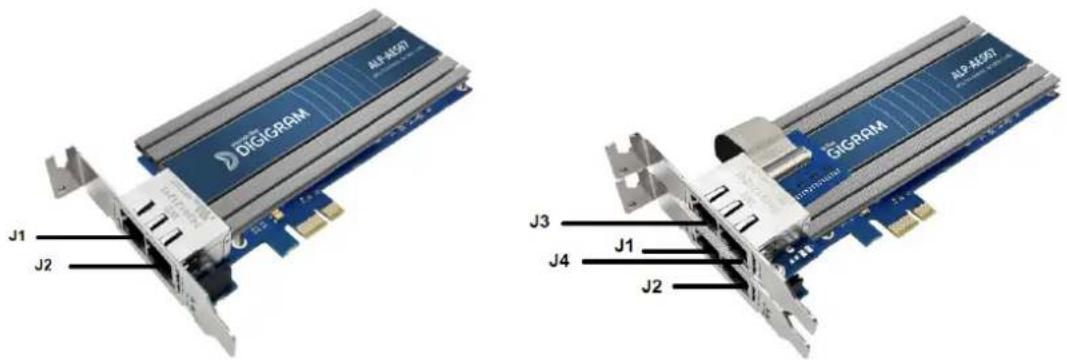
Note: Switch and Redundant modes are configured from the ALP-AES67WEB pages.
Pleasecontactyourdistributorforalltechnicalsupportissues

DIGIGRAM
DigigramDigital
82AlléeGalilée,38330Montbonnot-FRANCE
Tel:+33(0)476524747
E-mail:info@digigram.com
DigigramAsiaPteLtd.
60AlbertStreet-#09-11OGAlbertComplexSingapore189969,Singapore
Tel.:+6562912234•Fax:+6562913433
E-mail:info_asia@digigram.com
Copyright2024Digigram.Allrightsreserved.
No part of this manual may be reproduced without the prior consent of Digigram. This reservation includes photocopying, translating and/or reformatting the information contained in this manual.
Everything possible has been done to ensure the greatest accuracy, however Diagram cannot be held liable for any typing error, error or omission and reserves the righttomakemodificationsandimprovementswithoutpriornotice.
Digigram and the Digigram logo are trademarks or brand names of Digigram Digital. All other marks are owned by their respective companies.


- USERMANUAL ALP-AES67
- PROFESSIONALMULTI-CHANNELSOUNDCARDWITH AES67CONNECTIVITY
- TABLEOFCONTENTS
- 1INTRODUCTION
- 2IMPORTANTNOTICE
- CERTIFICATIONS
- CAUTION
- 3BOXCONTENTS
- 4GENERALCHARACTERISTICS
- 4.1 MAINHARDWARE CHARACTERISTICS
- 4.2 MAINSOFTWARECHARACTERISTICS
- 5REQUIREDCONFIGURATION
- 5.1 REQUIREDHARDWARECONFIGURATION
- THEWINDOWSSLEEPMODEFORTHEPCIEBUSMUSTBEDISABLED
- 5.2 NECESSARYSOFTWARECONFIGURATIONUNDERWINDOWS
- 5.3NECESSARYSOFTWARECONFIGURATIONUNDERLINUX
- UBUNTU
- DEBIAN
- RHEL 9
- 6HARDWAREINSTALLATION
- 6.1 PREPARINGTHECARD
- STANDARDHEIGHTCONFIGURATIONS
- LOWPROFILECONFIGURATIONS
- 6.2 INSTALLINGTHECARDINTHEPC
- 6.3INTERNALLEDS
- 7SOFTWAREINSTALLATIONUNDERWINDOWS
- IMPORTANT
- 7.1 VERYFIRSTINSTALLATION
- 7.2 UPDATINGTHEDRIVERVERSION
- 7.3 UPDATING THE FIRMWARE
- 7.4 VERIFYING THE CARD INSTALLATION
- 7.4.1 PRESENCEOFPLAYBACKANDRECORDINGDEVICES
- 7.4.2 CARDDETECTED BY THE DIGIGRAM ALP-X MANAGER APPLICATION
- 7.4.3 CARDAVAILABILITY UNDER ASIO
- 7.5ADJUSTINGTHEINTERNALLATENCYOFTHECARD
- 7.6REPLACINGACARD
- 7.7CHANGINGTHEORDEROFINSTALLEDCARDS
- 8UNINSTALLINGTHEDRIVERUNDER WINDOWS
- APPS & FEATURES
- 9CONFIGURINGTHECARDUNDERWINDOWS VIATHEALP-XMANAGERAPPLICATION
- 9.1 INSTALLEDALPCARDS
- 9.2SAMPLINGCLOCK
- 9.3 INPUT AND OUTPUT VU-METERS
- 9.4 FIRMWAREUPDATEPROCEDURE
- 9.5 CREATING, SAVING AND LOADING SETTINGS SESSIONS
- 10ASIOCONTROLPANELFORWINDOWS
- ACTIVECARDSGROUP/ASIOCHANNELSALLOCATION
- BUFFERSIZE(LATENCY)
- 11ALP-AES67PRINCIPLES
- 11.1 EMBEDDEDROUTINGMATRIX
- 11.2CLOCK
- CONFIGURATIONOFTHEAOIPPARAMETERS
- 12.1 GENERALSETTINGS
- 12.2PTPSETTINGS
- 12.3ASIOCLOCK
- SESSIONSOURCES
- 12.4 SESSIONSINKS
- 12.5INS/OUTS
- 12.6I/OROUTER
- 12.7STATISTICS
- 12.8NMOS
- 12.9SYSTEM
- 13SPECIFICATIONS
- 13.1 CONFIGURATION
- 13.2AUDIOCHARACTERISTICS
- 13.3CONNECTORS
- 13.4 DEVELOPMENT ENVIRONMENT
- 14APPENDICES
- 14.1LEDS
- 14.2CONNECTORS
- PLEASECONTACTYOURDISTRIBUTORFORALLTECHNICALSUPPORTISSUES
- DIGIGRAM
- DIGIGRAMDIGITAL
- DIGIGRAMASIAPTELTD
Brand : Digigram
Model : ALP-AES67
Category : Soundcard