
BOB12 - Hi-Fi System Digigram - Free user manual and instructions
Find the device manual for free BOB12 Digigram in PDF.


| Product Type | Hi-Fi System |
| Brand | Digigram |
| Model | BOB12 |
| Colour | Black / Silver |
| Dimensions (WxHxD) | 300 x 100 x 250 mm |
| Weight | 2.5 kg |
| Power Supply | AC 100-240 V, 50/60 Hz |
| Power Consumption | 30 W (max) |
| Speaker Output Power | 2 x 20 W RMS |
| Frequency Response | 20 Hz – 20 kHz |
| Supported Media | CD, CD-R/RW, MP3 (USB) |
| Radio Tuner | FM / AM (with RDS) |
| Bluetooth Version | 4.2 |
| USB Port | USB 2.0 Type A (front) |
| Headphone Jack | 3.5 mm (front) |
| Remote Control | Yes (included) |
| Display Type | LCD with backlight |
| Standby Mode | Yes (< 0.5 W) |
| Safety Features | Overheat protection, automatic shutdown |
| Cleaning Instructions | Wipe with a dry, soft cloth |
| Spare Parts Availability | Contact Digigram support |
| Warranty | 1 year |
| Country of Origin | China |
Frequently Asked Questions - BOB12 Digigram
User questions about BOB12 Digigram
0 question about this device. Answer the ones you know or ask your own.
Ask a new question about this device
Download the instructions for your Hi-Fi System in PDF format for free! Find your manual BOB12 - Digigram and take your electronic device back in hand. On this page are published all the documents necessary for the use of your device. BOB12 by Digigram.
USER MANUAL BOB12 Digigram
natural_image
Four black-and-white symbols: four propeller-like shapes, one star, two propeller-like shapes, and one cross (no text or labels)
natural_image
Four abstract black-and-white symbols: four star-like, one with a curved line, two pentagons, and one irregular shape (no text or labels)natural_image
Two black industrial audio equipment modules with multiple ports and connectors, labeled B0812 and 1C-4N respectively (no visible text or symbols on the modules themselves)CONTENTS OF THIS PACKAGE....6
PRODUCT SPECIFICATIONS......8
Size and weight......8
Connectors....8
BOB8 / BOB12 rear panel 8
BOB8 front panel....10
BOB8 wiring diagram....11
BOB12 front panel....12
BOB12 wiring diagram 13
BOB12 pinout....14
Mounting the brackets....15
Thank you for purchasing a Digigram Breakout Box.
Digigram's BOB8 and BOB12 allow straightforward and secure connection to all I/Os of compatible Digigram multichannel sound cards:
- PCX/LCM/VX cards disposing of a Sub-D 62 HD connector, with a connection cable Sub-D 62 HD male / Sub-D 62 HD male
- Cards of the miXart 8 range ^* , with a connection cable Sub-D 62 HD / SCSI 40 (analog) plus MDR 26 (digital)
* on miXart 8 CN and miXart 8 ES, only the analog I/Os are transmitted to BOB8
BOB8 and BOB12 use Neutrik ^TM high-quality connectors.
For further information or specific cables, do not hesitate to contact your supplier.
IMPORTANT NOTICE
To ensure full compliance of our products, the breakout boxes have been tested in combination with Digigram sound cards against the following standards and found to comply:
• International: CISPR22 Class B
• Europe: EMC 89/336/CEE (1992) specifications
• United States: FCC Rules-Part 15-Class B (digital device)
In order to guarantee compliance with the above standards in an installation:
- the breakout boxes must not be modified
- additional cables used must have their respective shield connected to each extremity
The use of a BOB8 or BOB12 breakout box does in no way alter or deteriorate the audio quality of your Digigram sound card when used with the default cable of two meters. The use of a cable of five or ten meters may result in a minor increase of the analog channel crosstalk. For the detailed specifications of your card, please refer to its user's manual.
CONTENTS OF THIS PACKAGE
The package consists of the following components:
* a 2U 19-inch breakout box
* 4 mounting brackets (including fastenings)
* the User's Manual at hand
* a cable (Sub-D 62 HD male to male) to connect your Digigram Sound card to the breakout box*
* A cable of 2 meters is included in the delivery of any BOB8/BOB12 packaged with a Digigram multichannel sound card. For a separately purchased breakout box, cables are available optionally.
Also available (optional):
Set of three label carriers
Product specifications
Size and weight
| BOB8 BOB12 | ||
| Dimensions | 2U 19" rack440 x 88 x 150 mm (width x height x depth) | |
| Mounting brackets:0.09 x 0.35 x 0.07" (22 x 88 x 16 mm) | ||
| Weight ~2.65 kg (~5.85 lbs) | ~2.60 kg (~5.75 lbs) | |
Note: the mounting brackets delivered with Digigram's breakout boxes have been designed to ensure utmost flexibility allowing any of these installation configurations: rack front end, rack back end, under a table, top of a table
Connectors
| BOB8 BOB12 | ||
| Analog line inputs (mono) 8 | 2 | |
| Digital AES/EBU stereo input(s) 4 | 1 | |
| Digital AES/EBU Sync stereo input | 1 | 1 |
| Standard Word Clock input 1 | 1 | |
| Video Sync input 1 | 1 | |
| SMPTE/LTC Sync input(Linear Time Code) | 1 | 1 |
| Analog line outputs (mono) 8 | 12 | |
| Digital AES/EBU stereo outputs | 4 | 6 |
| Standard Word Clock output | 1 | 1 |
Rear panel BOB8 / BOBI2
The rear panels of the breakout boxes are equipped with a Sub-D 62 HD (female) connector to interface your sound card and BOB8 or BOB12.
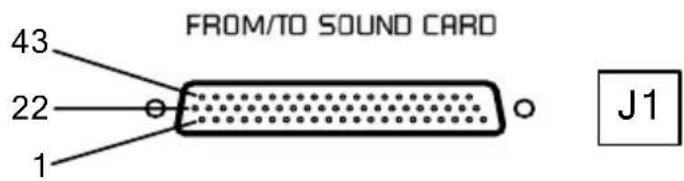
BOB8 pinout - brochage
| Digital | Pin | Signal | Pin | Signal | Pin | Signal |
| 1 | AES/EBU IN 2 - | 22 | GND | 43 | AES/EBU IN 1 - | |
| 2 | AES/EBU IN 2 + | 23 | Vidéo IN | 44 | AES/EBU IN 1 + | |
| 3 | AES/EBU SYNC - | 24 | GND | 45 | AES/EBU OUT 3 - | |
| 4 | AES/EBU SYNC + | 25 | AES/EBU IN 3 - | 46 | AES/EBU OUT 3 + | |
| 5 | AES/EBU OUT 4 - | 26 | AES/EBU IN 3 + | 47 | AES/EBU OUT 1 - | |
| 6 | AES/EBU OUT 4 + | 27 | GND | 48 | AES/EBU OUT 1 + | |
| 7 | AES/EBU OUT 2 - | 28 | AES/EBU IN 4 - | 49 | Word Clock IN | |
| 8 | AES/EBU OUT 2 + | 29 | AES/EBU IN 4 + | 50 | Word Clock OUT | |
| Analog | 9 | LTC IN | 30 | GND | 51 | OUT 7 - |
| 10 | OUT 8 - | 31 | IN 8 - | 52 | OUT 7+ | |
| 11 | OUT 8 + | 32 | IN 8 + | 53 | OUT 5 - | |
| 12 | OUT 6 - | 33 | GND | 54 | OUT 5 + | |
| 13 | OUT 6 + | 34 | IN 7 - | 55 | OUT 3 - | |
| 14 | OUT 4 - | 35 | IN 7 + | 56 | OUT 3 + | |
| 15 | OUT 4 + | 36 | GND | 57 | OUT 1 - | |
| 16 | OUT 2 - | 37 | IN 6 - | 58 | OUT 1 + | |
| 17 | OUT 2 + | 38 | IN 6 + | 59 | IN 3 - | |
| 18 | IN 4 - | 39 | GND | 60 | IN 3 + | |
| 19 | IN 4 + | 40 | IN 5 - | 61 | IN 1 - | |
| 20 | IN 2 - | 41 | IN 5 + | 62 | IN 1 + | |
| 21 | IN 2 + | 42 GND | ||||
BOB12 pinout - brochage
| Digital | Pin | Signal | Pin | Signal | Pin | Signal |
| 1 | NC | 22 | GND | 43 | AES/EBU IN 1 - | |
| 2 | NC | 23 | Vidéo IN | 44 | AES/EBU IN 1 + | |
| 3 | AES/EBU SYNC - | 24 | GND | 45 | AES/EBU OUT 3 - | |
| 4 | AES/EBU SYNC + | 25 | AES/EBU OUT 5 - | 46 | AES/EBU OUT 3 + | |
| 5 | AES/EBU OUT 4 - | 26 | AES/EBU OUT 5+ | 47 | AES/EBU OUT 1 - | |
| 6 | AES/EBU OUT 4 + | 27 | GND | 48 | AES/EBU OUT 1 + | |
| 7 | AES/EBU OUT 2 - | 28 | AES/EBU OUT 6 - | 49 | Word Clock IN | |
| 8 | AES/EBU OUT 2 + | 29 | AES/EBU OUT 6 + | 50 | Word Clock OUT | |
| Analog | 9 | LTC IN | 30 | GND | 51 | OUT 7 - |
| 10 | OUT 8 - | 31 | OUT 12 - | 52 | OUT 7+ | |
| 11 | OUT 8 + | 32 | OUT 12 + | 53 | OUT 5 - | |
| 12 | OUT 6 - | 33 | GND | 54 | OUT 5 + | |
| 13 | OUT 6 + | 34 | OUT 11 - | 55 | OUT 3 - | |
| 14 | OUT 4 - | 35 | OUT 11 + | 56 | OUT 3 + | |
| 15 | OUT 4 + | 36 | GND | 57 | OUT 1 - | |
| 16 | OUT 2 - | 37 | OUT 10 - | 58 | OUT 1 + | |
| 17 | OUT 2 + | 38 | OUT 10 + | 59 | NC | |
| 18 | NC | 39 | GND | 60 | NC | |
| 19 | NC | 40 | OUT 9 - | 61 | IN 1 - | |
| 20 | IN 2 - | 41 | OUT 9 + | 62 | IN 1 + | |
| 21 | IN 2 + | 42 GND | ||||
To ensure utmost adaptability with any mounting environment, the brackets can be affixed alongside any of the four edges of the BOB side panels.
Side view on BOB8/BOB12:
natural_image
Pure mechanical diagram showing rotational arrows and circular components without any text or symbolsFor technical support please contact your system supplier
2000 North 14th Street - Suite 530, Arlington, VA 22201-USA
Tel: +1 703 875 9100 • Fax: +1 703 875 9161 • E-mail: input@digigram.com
Digigram Asia Pte Ltd.
350 Orchard Road - #19-07 Shaw House Singapore 238868-SINGAPORE
Tel: +65 6291 2234 • Fax: +65 6291 3433 • E-mail: info_asia@digigram.com
Brand : Digigram
Model : BOB12
Category : Hi-Fi System