
WK210 - Kitchen scale Eldom - Free user manual and instructions
Find the device manual for free WK210 Eldom in PDF.


| Product Type | Digital Kitchen Scale |
| Brand | Eldom |
| Model | WK210 |
| Max Weight Capacity | 5 kg |
| Division (Precision) | 1 g |
| Power Supply | 9V battery (not included) |
| Display Type | LCD |
| Bowl Material | Transparent glass |
| Unit Conversion | Metric (kg, g) and Imperial (lb, oz) |
| Tare / Zero Function | Yes, with weight-dependent behavior |
| Alarm Timer | Yes, max 99:59 minutes |
| Temperature Sensor | Yes, range 0 to +40°C, division 0.5°C |
| Auto Shut-Off | After 2 minutes of inactivity |
| Overload Indicator | Yes, shows "Err" |
| Low Battery Indicator | Yes, shows "Lo" |
| Cleaning | Damp cloth; do not immerse in water |
| Recommended Storage | Dark, dry place; do not press with other objects |
| Safety | For home use only; not for children under 8 without supervision |
| Repairs | Authorized service center only; use only original parts |
Frequently Asked Questions - WK210 Eldom
User questions about WK210 Eldom
0 question about this device. Answer the ones you know or ask your own.
Ask a new question about this device
Download the instructions for your Kitchen scale in PDF format for free! Find your manual WK210 - Eldom and take your electronic device back in hand. On this page are published all the documents necessary for the use of your device. WK210 by Eldom.
USER MANUAL WK210 Eldom
natural_image
Digital kitchen scale with transparent bowl and digital display (no visible text or symbols)Eldom sp. z o.o.
natural_image
Digital kitchen scale with a clear glass bowl and digital display (no text or symbols visible)INSTRUKCJA OBSŁUGI

ELEKTRONICZNA WAGA KUCHENNA WK210
DANE TECHNICZNE
ZMIANA JEDNOSTKI WAGI
- The device can be used by children aged 8 and older and by persons with limited physical, sensory or mental capabilities, or persons without sufficient experience and knowledge only under supervision or if previously instructed on the safe use of the appliance and the possible risks. Children shall not play with the appliance. Cleaning and maintenance that are the responsibility of the user shall not be carried out by children without supervision. Protect the appliance and the power cord against children under 8 years old.
- For home use only
- Keep the scale in dark and dry place
- While storing do not press with other objects
- The precision of the scales measurements depends on the way of its maintenance
- Repairs can be made only by authorized service center. All modifications or use of parts other
than original is forbidden and may have adverse effects on the operational safety of the appliance
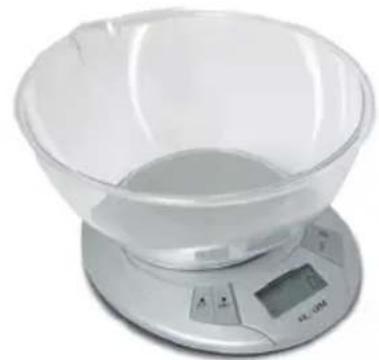
natural_image
Digital kitchen scale with a clear glass bowl and digital display (no visible text or symbols)Operating instruction

ELECTRONIC KITCHEN SCALE WK210
Technical data
■ max weight: 5kg
■ division: 1g
battery: 9V
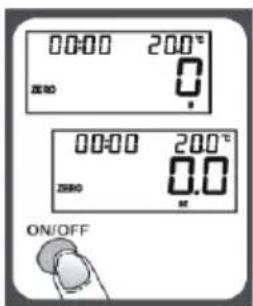
TO OPERATE SCALE
- Please put the scale on a hard and flat surface.
- Place bowl (if used) on the scale before turning on the unit.
- Press and release ON/OFF button to turn on the unit.
- Wait until LCD shows all information.
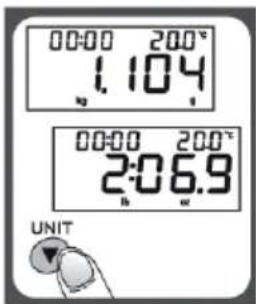
TO CONVERT WEIGHT UNIT
If the scale is with both measuring system of Metric (kilograms,grams) and Imperial (pounds,ounces), you can press UNIT to convert between two systems during the course of weighing.
"ZERO" OR "TARE" FUNCTION
To weigh different loads consecutively without removing loads from the scale. Put first Load on the scale, get weight reading. Press Z/T button to reset the LCD reading to "0" before adding next load. You can repeat this operation.
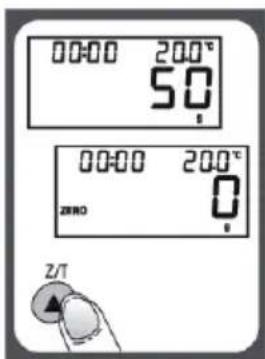
Condition 1: "ZERO" function
When total sum of all loads on scale ≤ 4% of scale's max weight capacity. (4% = 80g when capacity is 2kg; 200g when capacity is 5 kg)
LCD will show "0g" each time Z/T is pressed. Icon "ZERO" will show on lower left corner of LCD, indicating "ZERO" function is active. Max. weight capacity remains unchanged.
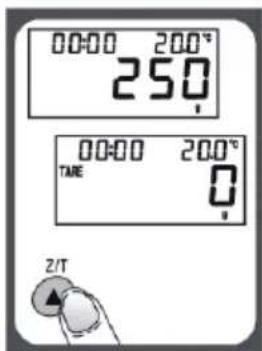
Condition 1: "TARE" function
When total sum of all loads on scale > 4% of scale's max weight capacity. (4% = 80g of scale's max weight capacity. 2kg; 200g when capacity is 5 kg)
LCD will show "0g" each time Z/T is pressed. Icon "TARE" will show on upper left corner of LCD, indicating "TARE" function is active. Max. weight capacity is reduced by total weight of all loads.
TO SET ALARM TIMER
- Press T-SET to confirm and go to next digit.
- After setting time span, press T-SET to start counting down.
- Press any key to stop counting down.
- Press T-SET to clear time span.
- When timer counts down to "00:00", alarm will start "beeping" for 60 times and the scale will automatically shut off.
6.Max.time span:99:59

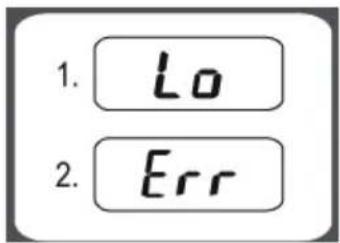
WARNING INDICATORS
- Replace new battery.
- Scale overload. Remove item to avoid damage. Max.Weight capacity is indicated on the scale.
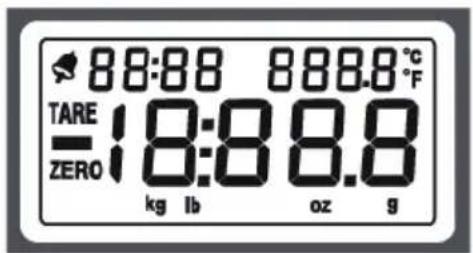
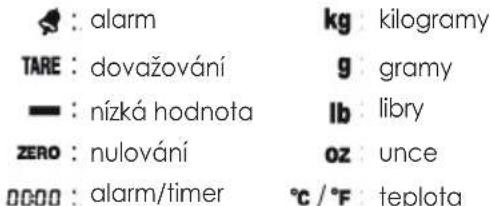
: alarm
TARE : tare weight
- : negative value
ZERO : zero weight
0000 : alarm timer
kg: kilograms
g:grams
lb : pounds
02 : ounces
°C / °F: temperature
TEMPERATURE SENSOR
- Current temperature is shown at the higher right corner of LCD.
- Temperature range: 0\~+40°C
- Division: 0.5°C
AUTO SHUT OFF
Auto shut-off occurs if display shows '0' or shows the same weight reading for 2 minutes. To maximize battery life, always press ON/OFF aga in to turn off the scale after using.
CLEANING AND CARE
- Clean the scale with a slightly damp cloth. DO NOT immerse the scale in water or use chemical/abrasive cleaning agents.
- All plastic parts should be cleaned immediately after contact with fats, spices, vinegar and strongly flavored/colored foods. Avoid contact with acids citrus juices.
ENVIRONMENTAL PROTECTION
- the appliance is made of materials which can be recycled,
- it should be handed over to the applicable collection point for the recycling of electrical and electronic equipment
BEZPEČNOSTNÍ DOPORUČENÍ
natural_image
Digital kitchen scale with a clear glass bowl and digital display (no visible text or symbols)Návod k obsluze

natural_image
Digital kitchen scale with a transparent bowl and digital display (no visible text or symbols)
: Alarm

Kilogramm

: Tarieren

Gramm

: Minuswert

Pfund

: Nullgewicht

Unze

: Alarm/timer

Temperatur
TERMOMETER
natural_image
Digital kitchen scale with a clear glass bowl and digital display (no text or symbols visible)- INSTRUKCJA OBSŁUGI
- ELEKTRONICZNA WAGA KUCHENNA WK210
- DANE TECHNICZNE
- ZMIANA JEDNOSTKI WAGI
- Operating instruction
- ELECTRONIC KITCHEN SCALE WK210
- Technical data
- TO OPERATE SCALE
- TO CONVERT WEIGHT UNIT
- "ZERO" OR "TARE" FUNCTION
- Condition 1: "ZERO" function
- Condition 1: "TARE" function
- TO SET ALARM TIMER
- WARNING INDICATORS
- TEMPERATURE SENSOR
- AUTO SHUT OFF
- CLEANING AND CARE
- ENVIRONMENTAL PROTECTION
- BEZPEČNOSTNÍ DOPORUČENÍ
- Návod k obsluze
- TERMOMETER
Brand : Eldom
Model : WK210
Category : Kitchen scale