
U780CH1 - Dehumidifier ROTEL - Free user manual and instructions
Find the device manual for free U780CH1 ROTEL in PDF.


| Brand | Rotel |
| Model | U780CH1 |
| Product type | Compressor dehumidifier |
| Extraction capacity | 50 L/24h (30°C, 80% RH) |
| Maximum recommended area | Up to 100 m² |
| Water tank | 6 L with automatic shut-off |
| Airflow | 250 m³/h |
| Noise level | 48 dB(A) |
| Power supply | 220-240 V ~ 50 Hz |
| Power consumption | 780 W |
| Net weight | 20 kg |
| Dimensions (W × D × H) | 400 × 350 × 620 mm |
| Refrigerant | R290 (propane) |
| Main functions | Adjustable hygrostat, 24h timer, automatic defrosting, continuous drainage |
| Air filter | Washable, monthly cleaning recommended |
| Safety | Frost protection, full tank shut-off, automatic leak detection |
| Energy class | A (estimated) |
| Maintenance | Regular cleaning of the filter and heat exchanger |
| Spare parts available | Filter, tank, drain pump, continuous drainage kit |
| Repairability | Repairability index: 8/10 |
| Warranty | 2 years (parts and labor) |
| Manual | Free user manual in PDF format available online |
Frequently Asked Questions - U780CH1 ROTEL
User questions about U780CH1 ROTEL
0 question about this device. Answer the ones you know or ask your own.
Ask a new question about this device
Download the instructions for your Dehumidifier in PDF format for free! Find your manual U780CH1 - ROTEL and take your electronic device back in hand. On this page are published all the documents necessary for the use of your device. U780CH1 by ROTEL.
USER MANUAL U780CH1 ROTEL
natural_image
White portable water heater with black lid and brand logo (no visible text or symbols on body)• GEBRAUCHSANWEISUNG
• MODE D'EMPLOI
• ISTRUZIONI PER L'USO
• INSTRUCTIONS FOR USE
D/F/I/E
Deutsch
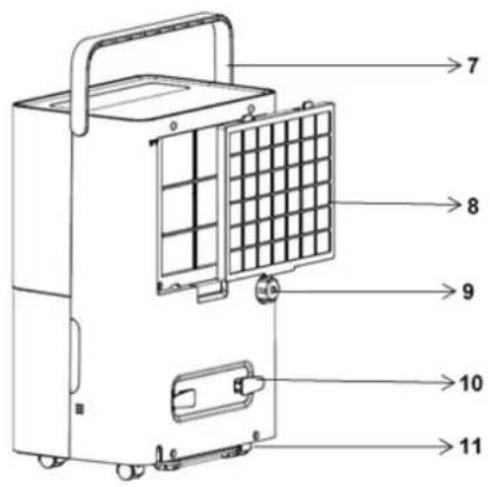
1 Wasserbehälter
-
Water tank
-
Water tank handle
-
Water tank cover
-
Control panel
-
Front panel
-
Back panel
-
Handle
-
Filter frame
-
Drain outlet
-
Power cord storage column
-
Caster
TECHNISCHE DATEN
- Installation....11
Bedienfeld 12
• Installation....24
- Safety instructions....46
Warnings 49
- Installation....50
• Control panel....51
- Operating methods .... 52
Setting the timer to switch off 52
Setting the timer to switch on....52
CONTINUOUS mode 52
DRYING function in the dehumidifier....52
Child lock function....53
- Drainage 53
Use of water tank 53
Continuous drainage 54
- maintenance....55
• FrequentLY ASKED QUESTIONS....56
natural_image
Diagram of a portable air conditioner unit with airflow arrows indicating airflow direction (no text or symbols)• BEDIENFELD
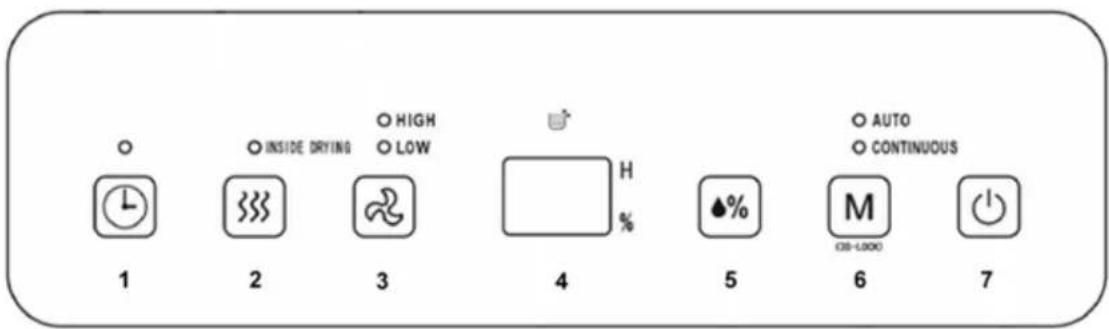
1) Zeitschaltuhr
natural_image
Line drawing of a portable air conditioner unit with handle, wheels, and internal components (no text or symbols)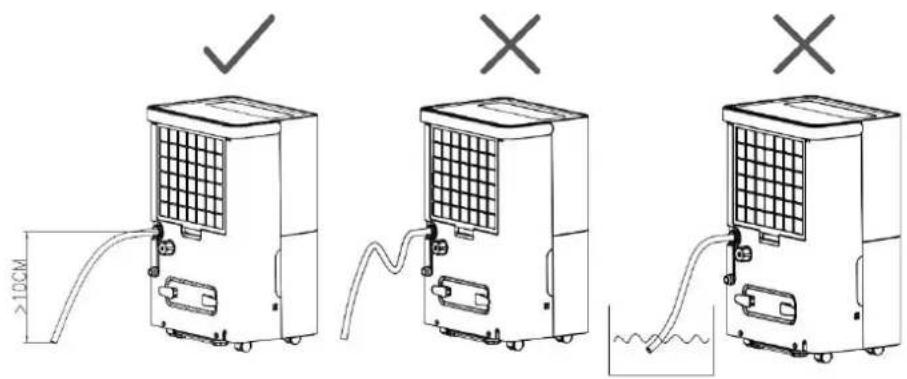
- WARTUNG
natural_image
Diagram of a portable air conditioner unit with airflow arrows indicating airflow direction (no text or symbols)• PANNEAU DE CONTRÔLE
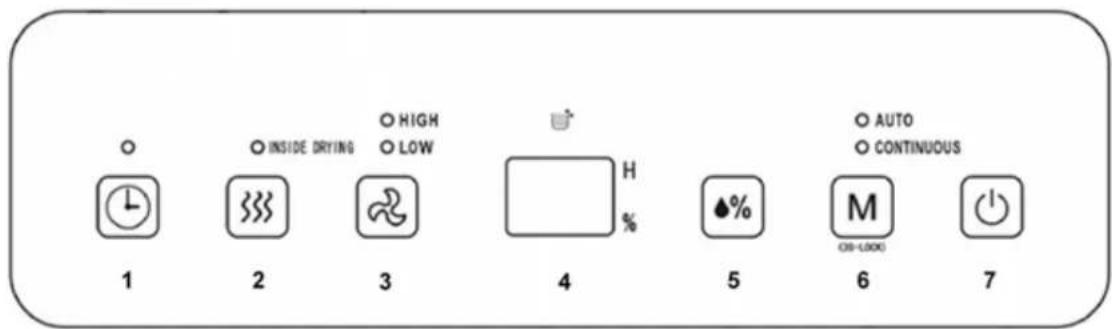
1) Minuterie
natural_image
Line drawing of a portable air conditioner unit with handle, wheels, and internal compartments (no text or symbols)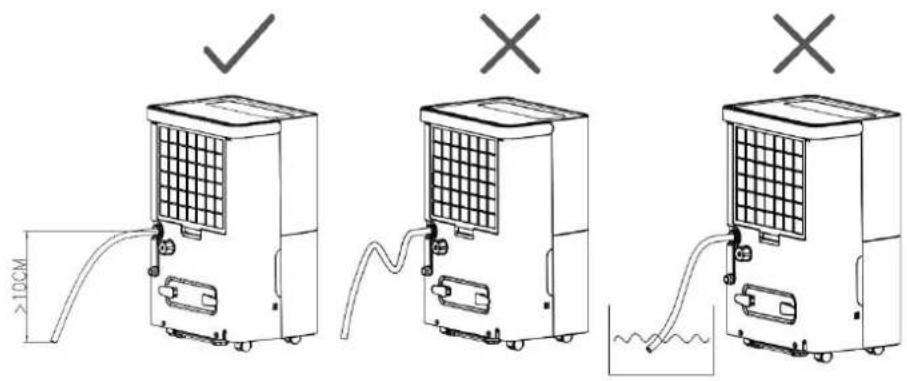
- MAINTENANCE
natural_image
Diagram of a portable air conditioner unit with airflow arrows indicating airflow direction (no text or symbols)• PANNELLO DI CONTROLLO
1) Timer
natural_image
Line drawing of a portable air conditioner unit with handle, casing, and wheels (no text or symbols)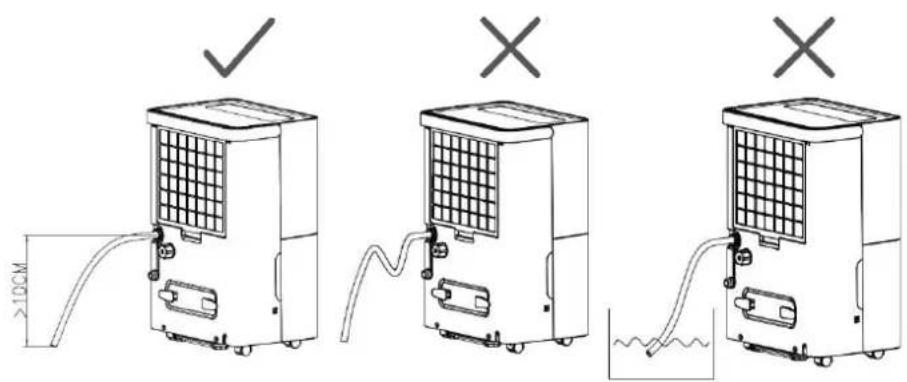
• MANUTENZIONE
Please read all instructions before using the device.
○ This appliance may be used by persons with limited physical, sensory or mental abilities or lack of experience and/or knowledge, provided they are supervised by persons responsible for their security or if they have been instructed on the safe use of the appliance and, therefore, fully understand the hazards involved.
○ This appliance must not be used by children; the appliance and its power cord must be kept away from children.
○ This appliance has been designed for indoor operation only and must not be used for any other purpose.
- It must be installed in accordance with the regulations of the country where the unit is used. If there are any doubts about the electrical installation, it must be checked and, if necessary, modified by a qualified electrician.
- The appliance must be plugged into an outlet that is properly installed and earthed.
Before plugging into a socket, it must be ensured that the mains voltage matches the voltage specified on the rating plate of the appliance.
- The appliance must not be operated with a damaged cord or plug, or if the appliance malfunctions, or it has been damaged in any manner. It must be returned to the nearest authorised service facility for examination, repair, or adjustment.
- The appliance must always be unplugged when not in use or when left unattended, and before disassembling or cleaning. It must be unplugged pulling on the plug, never by pulling the cord.
- Do not place this appliance close to heating devices (flame or heaters, etc.).
Once the appliance is installed, it must be ensured that the power plug is firmly plugged into the power outlet, and the power cord is arranged tidily to prevent someone from tripping on it or pulling out the plug.
- The appliance must always be operated with the filter mounted. The use of the appliance without its filter could cause an excessive accumulation of dust or waste on the inner parts of the device possibly leading to failures.
- Incorrect repairs, assembly, reassembly or use of any accessory attachments not recommended or sold by the manufacturer may cause fire, electric shock or personal injury and will void the manufacturer's warranty.
- The appliance must not be installed closer than 50 cm from flammable substances (alcohol, etc.), heat sources or pressurised containers (e.g. spray cans).
- Do not use insecticide spray or other flammable substances near this appliance.
○ Do not place heavy objects on this appliance.
- Do not tilt, as spilled water can damage the appliance.
○ In the event of an abnormality (such as a burning smell), turn off the machine and unplug the power cord.
- Please do not tilt this appliance more than 45° or place it upside down.
Warnings
○ This air conditioner uses R290 refrigerant, which is a fluorinated flammable greenhouse gas covered by the Kyoto Protocol, with a Global Warming Potential (GWP) of 3.
- Risk of fire/flammable materials used. Please dispose of the appliance in accordance with local regulations regarding disposal of appliances using flammable blowing gas and refrigerant.

○ The refrigerant circuit must not be damaged.
- INSTALLATION
- Please drain the water from the water tank before operating.
During operation, please keep doors and windows closed as much as possible to save energy.
- If the dehumidifier makes a loud noise during operation:
It is recommended to place pads or rubber dampening sheets, etc. under this dehumidifier. This can reduce vibration and noise, and can also prevent the wooden floor or carpet from being marked.
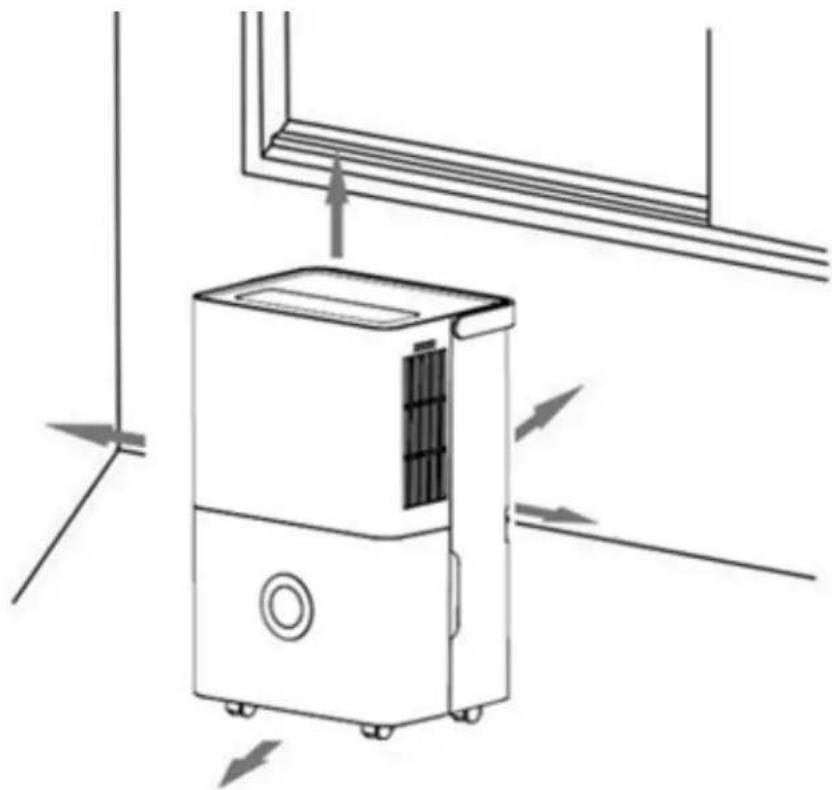
When the dehumidifier is installed, some space must be left around it. The minimum distance above it is 50 cm, and the minimum distance in front, behind and to the left and right is 20 cm:
natural_image
Diagram of a portable air conditioner unit with airflow arrows indicating airflow direction (no text or symbols)• CONTROL PANEL
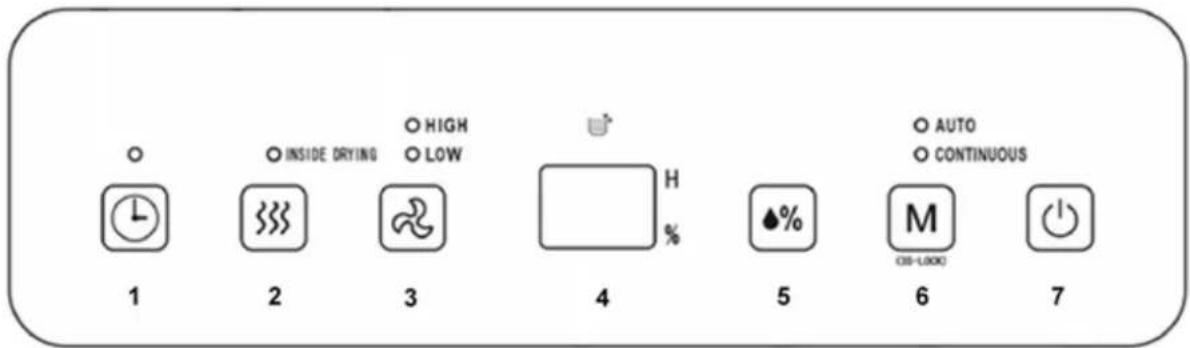
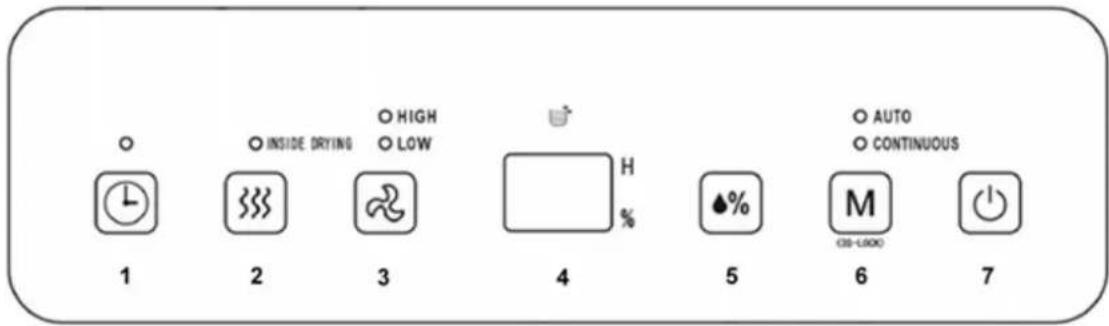
1) Timer
☐ 24-hour timer setup: press this key to set the on/off time of the dehumidifier. The setting range is 1 to 24 hours. Every press adjusts the timer by one hour. To cancel the timer setup, press twice continuously after confirming the setting time.
2) Dry key
Press this key to start the INSIDE DRYING procedure in the dehumidifier. This can prevent mould forming inside the dehumidifier due to damp. The whole drying procedure takes approximately 1 hour. Press this key again to cancel the drying function in the dehumidifier and return to normal operation before starting to dry.
3) Air speed
- In AUTO or CONTINUOUS mode, the fan speed can be set to HIGH or LOW by turning the knob.
4) LCD Display
In AUTO, CONTINUOUS and INSIDE DRYING mode, etc., this figure displays room humidity. When it is set to AUTO mode, this figure shows the set humidity and displays the set time when in timer mode, and % shows percentage of humidity.
5) Humidity setting
☐ If this key is pressed, the humidity is displayed in a circle in the range of 30% - 35% - 40% - 45% - 50% - 55% - 60% - 65% - 70% - 75% - 80%. The humidity setting is only valid in AUTO mode.
6) Mode
During start-up or timer start-up, press this key to select AUTO, CONTINUOUS and INSIDE DRYING modes, etc.. The indicator lamp corresponding to the selected mode will light up. Press and hold the Mode button for 3 seconds to activate the Child Lock. Repeat the process to turn the Child Lock off.
7) On/off key
- Press this key to turn on or turn off the dehumidifier.
• OPERATING METHODS
Setting the timer to switch off
When the dehumidifier is running, press the Timer key to adjust time from 1 hour to 24 hours. Pressing the key once increases the setting time by 1 hour; once the setting time exceeds 24 hours, the figure returns to 1. The Timer key can also be pressed and held. This increases the time, which changes circularly. When the set time is reached, the dehumidifier will turn off automatically. Once setting is complete, if the Timer key is not pressed within 5 seconds, the set time is confirmed. If the timer is off, the key light on the Timer key is usually on.
Setting the timer to switch on
When the dehumidifier is in standby mode, the method for setting the time using the Timer key is the same as for setting the timer to switch off. After the setting is completed, if the Timer key is not pressed within 5 seconds, the set time is confirmed. In timer on mode, the key lamp on the Timer key is normally on, and the set time is displayed on the control panel.
AUTO mode
Select AUTO dehumidification if the room humidity is higher than the set humidity or is between +5% or -5% of the set humidity; the compressor will start, and the fan will run at the set speed. If the room humidity is lower than the set humidity by -5%, the compressor will stop, but the fan will run at the set speed. The default set humidity value is 50%.
CONTINUOUS mode
☐ If CONTINUOUS dehumidification is selected, no matter what the relative humidity in the room is, the compressor will start, and the fan will run at high speed by default. The air speed can be regulated via the air speed key.
DRYING function in the dehumidifier
Press the Inside Drying key to start drying in the dehumidifier. The drying procedure takes approximately 1 hour:
The dehumidifier starts at HIGH air speed and releases air continuously for 30 minutes, then switches to LOW air speed for 20 minutes.
○ How to stop:
Press the key again to cancel drying in the dehumidifier and return to operating mode before starting the drying procedure.
o Press the Power key to stop drying in the dehumidifier and return to standby mode.
Child lock function
Press and hold the Mode key for 3 seconds to enable or disable the child lock function (all keys on the operation panel are disabled when the child lock function is activated).
- DRAINAGE
Use of water tank
When the water tank is full of water, the full water icon on the LCD panel will flash (the compressor and fan will stop running). The BUZZER sounds 10 times to remind the user
to drain the water.
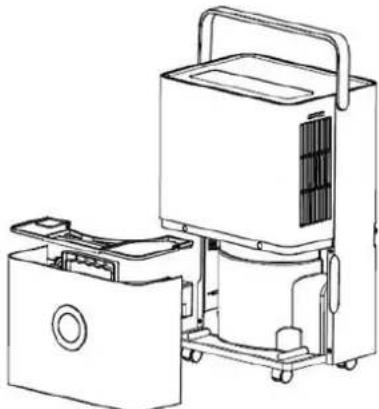
- Place both hands on the side of the back cover side of the depression. Gently remove the water tank, and turn the handle upright, then remove the water tank cover, and pour the water out.
- Put on the tank cover, turn the water tank handle down, then put the water tank gently back in the right place to restart the dehumidifier.
natural_image
Line drawing of a portable air purifier with internal compartments and wheels (no text or symbols)- Attention: once the water tank is full of water, please empty it. Before putting the water tank into the dehumidifier, please check whether the floater is rotating easily, and then push it into position with both hands.
Continuous drainage
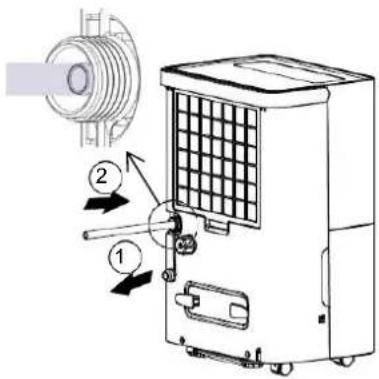
○ If you do not want to drain water in the tank frequently, you can connect a drainage pipe (with a diameter of 9 mm) to the back of this dehumidifier.
- Locate the drain outlet at the back, unscrew the drain cover, and pull out the water plug. - Connect the 9.0-mm drainage pipe to the drain outlet.
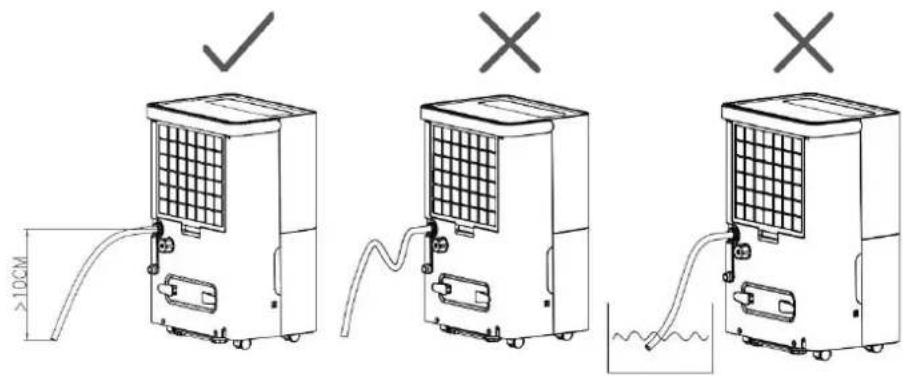
- Attention: the external water pipe must not be too long (the recommended length is less than 0.6 meters). The end of the water pipe must be 10 cm lower than the height of the water outlet. The water pipe must be kept unkinked, otherwise the water may not be drained out normally.
- MAINTENANCE
- Please disconnect the power supply before maintenance or repair to prevent electric shock.
○ If the dehumidifier is not used for long time, please disconnect the power supply.
Cleaning the housing
○ Wipe the surface of the dehumidifier gently with a wet cloth. Do not use detergent or abrasive agents since they may damage the plastic surface.
Cleaning the water tank
Please clean the water tank and its cover with a soft cloth dipped in cold or warm water regularly to prevent mould forming inside the dehumidifier.
Cleaning the filter
- Clean the filter and the frame at least once every two weeks simply with cold or warm water. Do not use chemical solvents or hot water.
• FREQUENTLY ASKED QUESTIONS
Why is there less water in the water tank of the dehumidifier in winter?
In winter the air is cold and dry. In summer, the dehumidification capacity of the dehumidifier decreases remarkably. This is not a fault.
Why will the dehumidifier not work or why has it stopped operating suddenly?
- This dehumidifier may be full of water or the water tank may not be installed properly. Drain the water from the water tank, or re-install water tank correctly.
- If the dehumidifier is in “dehumidification mode” and the ambient temperature is to low or too high, it will not work (dehumidification cannot be performed when the ambient temperature is <5^ or >32^ ).
- The ambient temperature for operation of the dehumidifier is 5 - 32 °C, and the relative humidity is 30% - 80%. The optimal temperature for use is 16 - 32°C.
○ Why is hot air blown out from air supply outlet?
This dehumidifier extracts the air from the room, and the dehumidification unit cools the air. The temperature decreases below the condensation point, so the air condenses into water drops, which falls into water tank, and the dehumidified air is heated by the temperature returning unit. This can reduce energy consumption and also accelerate dehumidification; so, hot air is blown out. This not a fault.
• TROUBLESHOOTING
| Problem | Reasons | Solutions |
| The dehumidifier is not operating | Is the plug disconnected? | Insert power plug into socket. |
| Is the water tank full of water? (the water tank may be full of water or placed in an incorrect position). | Drain water from the water tank, and then install the water tank again. | |
| The ambient temperature is lower than 5°C or higher than 32°C. | This is normal | |
| The dehumidification function is not effective | Is the room temperature or humidity too low? | During the dry season, the de-humidification ability will re-duce. |
| Are the air outlet and inlet blocked? | Clean out the objects blocking the air outlet and inlet. | |
| Air is not being blown out | Is the air filter net blocked? | Clean the air filter net accord-ing to the above method. |
| The noise is abnormal during operation | Is the dehumidifier placed improperly so that it is inclined or unstable? | Please place the dehumidifier in a level place. |
| Is the air filter net blocked? | Clean the air filter net accord-ing to the above method. | |
| Is there a “gurgling” sound? | This is the flowing sound of re-frigerant, and is normal. | |
| Water is leaking | Connection of drainage pipe becomes loose. | Fasten drainage pipe. |
| Drainage system is blocked. | Remove obstacles and straighten out the water pipe. | |
| There is frosting | The ambient temperature is low, and it is in the mode waiting for defrost. | This is normal, and the dehu-midifier has an automatic de-frosting function. |
- DISPLAY CODES
| FL | The water tank is full |
| E1 | The coil sensor has detected an anomaly |
| E2 | The room temperature sensor has detected an anomaly |
| P1 | The unit is in defrosting mode, and this is normal |
| CL | The unit is in internal drying mode, and this is normal |
| LC | Child lock function has started |
- DISPOSAL
- For proper disposal, please return device to a retailer, a service agent or Rotel AG.
European Directive 2012/19/EC concerning Waste Electrical and Electronic Equipment (WEEE) states that household appliances should not be disposed of using the normal solid urban waste cycle. Used appliances should be collected separately to optimise the cost of re-using and recycling materials the machine is made of, to prevent potential damage to public health and the environment. The crossed-out wheeled bin symbol appears on all products to remind owners of the obligations regarding separate waste collection. Owners should contact their local authorities or appliance dealers for further information concerning the correct disposal of household appliances.
This appliance conforms to the following EU directives:

2014/35/EU (Low Voltage Directive) 2014/30/EU (Electromagnetic Compatibility Directive)
D/F/I/E
• GARANTIE / GARANTIE / GARANZIA / WARRANTY
• 3 JAHRE GARANTIE
• 3 ANS DE GARANTIE
• 3 ANNI DI GARANZIA
• 3 YEARS WARRANTY
We commit ourselves to repair this device free of charge, should a failure occur within the period of warranty despite proper handling. We repair all defects caused by material or manufacturing faults. The guarantee will be fulfilled either by repairing the device or replacing the defective parts, according to our judgement. A warranty does not cover damages due to wearing parts, damages and defects caused by improper handling or maintenance (such as limescale and commercial use). It will only be granted if either the warranty card stating date of purchase, dealer's stamp and signature, or the purchase receipt is sent with the device to the relevant after-sales service (see address below). Devices shall be returned in their original packaging. Transport costs are to be borne by the purchaser. Remember to specify your address to your sending, as well as a short declaration about the failure, shall the defect not be obvious.
Servicestation:
Service après-vente:
Rotel AG
After-sales service:
5012 Schönenwerd
E-mail: office@rotel.ch
- D/F/I/E
- Deutsch
- TECHNISCHE DATEN
- • BEDIENFELD
- 1) Zeitschaltuhr
- - WARTUNG
- • PANNEAU DE CONTRÔLE
- 1) Minuterie
- - MAINTENANCE
- • PANNELLO DI CONTROLLO
- 1) Timer
- • MANUTENZIONE
- Warnings
- - INSTALLATION
- • CONTROL PANEL
- 2) Dry key
- 3) Air speed
- 4) LCD Display
- 5) Humidity setting
- 6) Mode
- 7) On/off key
- • OPERATING METHODS
- Setting the timer to switch off
- Setting the timer to switch on
- AUTO mode
- CONTINUOUS mode
- DRYING function in the dehumidifier
- Child lock function
- - DRAINAGE
- Use of water tank
- Continuous drainage
- Cleaning the housing
- Cleaning the water tank
- Cleaning the filter
- • FREQUENTLY ASKED QUESTIONS
- - DISPLAY CODES
- - DISPOSAL
- • GARANTIE / GARANTIE / GARANZIA / WARRANTY
Brand : ROTEL
Model : U780CH1
Category : Dehumidifier