
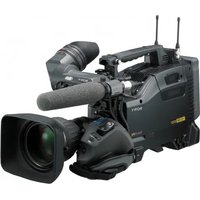
PXW-X320 - Camcorder SONY - Free user manual and instructions
Find the device manual for free PXW-X320 SONY in PDF.


| Product type | Professional camcorder |
| Brand | Sony |
| Model | PXW-X320 |
| Dimensions (L x H x D) | 185 x 200 x 450 mm |
| Weight | Approx. 3.2 kg (without lens) |
| Power supply | BP-GL95 battery or 12 V DC mains |
| Sensor | 3 1/2-inch CMOS sensors |
| Recording resolution | HD 1080i (1920 x 1080) |
| Video codec | MPEG-2 MP@HL 50 Mbps |
| Recording media | SxS Pro cards or SDHC/SDXC |
| Lens | 16x optical zoom with motorization |
| Viewfinder | 3.5-inch color electronic viewfinder |
| Inputs/outputs | HD-SDI, HDMI, Genlock, Timecode |
| Built-in ND filters | Yes, positions Clear, 1/4, 1/16, 1/64 |
| Operating temperature | 0 °C to +40 °C |
| Maintenance | Clean the lens with a microfiber cloth; store in a dry place |
| Safety | Use a suitable tripod; avoid shocks and humidity |
| Spare parts and repairability | Contact Sony authorized service centers |
| General information | Complete manual downloadable in PDF format |
Frequently Asked Questions - PXW-X320 SONY
User questions about PXW-X320 SONY
0 question about this device. Answer the ones you know or ask your own.
Ask a new question about this device
Download the instructions for your Camcorder in PDF format for free! Find your manual PXW-X320 - SONY and take your electronic device back in hand. On this page are published all the documents necessary for the use of your device. PXW-X320 by SONY.
USER MANUAL PXW-X320 SONY
Solid-State Memory Camcorder
Before Using this Unit
© 2015 Sony Corporation


For safety

Turn off the power immediately and extinguish the fire.
Meaning of warning indications
download/software_for_sony_equipment
Main specifications
General
Power supply voltage
DC 12 V
Power consumption
Approx. 25 W
Camera body + LCD viewfinder + auto
focus lens + microphone
During HD recording, power: DC 12 V
Approx. 30 W
Camera body + LCD viewfinder + auto
focus lens + microphone + wireless adapter
CBK-WA101
During recording, power: DC 12 V
Note
1920x1080/59.94i, 50i, 29.97p, 25p, 23.98p
1280x720/59.94p, 50p
1920x1080/59.94i, 50i
1440x1080/59.94i, 50i, 29.97p, 25p, 23.98p
1280x720/59.94p, 50p, 23.98p (2-3 pulldown)
SD MPEG IMX mode
720x486/59.94i, 29.97PsF 720x576/50i, 25PsF
SD DVCAM mode
720x480/59.94i, 29.97PsF 720x576/50i, 25PsF
1280x720/59.94p, 50p, 23.98p (2-
3 pull-down)
SD MPEG IMX mode
720x486/59.94i, 29.97PsF
720x576/50i, 25PsF
SD DVCAM mode
720x480/59.94i, 29.97PsF
720x576/50i, 25PsF
1440x1080/59.94i, 50i, 23.98p (2-3
pull-down)
SD DVCAM mode
720x480/59.94i, 29.97PsF
720x576/50i, 25PsF
Continuous operation time
Approx. 194 minutes (with BP-L80S)
Mass
Body only: approx. 3.4 kg
External dimensions
See page 14
Accessories
See page 13
Camera section
Image sensor
1/2-type CMOS
WRR Digital: 20Hz~20kHz (within ±3dB)
Dynamic range
90 dB (Typical)
Distortion rate
ECM-678/674/673/680S
Microphone holder
CAC-12
Wireless microphone
DWR-S01D/S02DN
WRR-855S/860C/861/862
Other peripheral devices
Tripod attachment
VCT-14/U14
Video light
Before operating the unit, please read this manual thoroughly and retain it for future reference.
Important Safety Instructions
- Read these instructions.
- Keep these instructions.
- Heed all warnings.
- Follow all instructions.
- Do not use this apparatus near water.
- Clean only with dry cloth.
- Do not block any ventilation openings. Install in accordance with the manufacturer's instructions.
Do not install near any heat sources such as radiators, heat registers, stoves, or other apparatus (including amplifiers) that produce heat.
Do not defeat the safety purpose of the polarized or grounding-type plug. A polarized plug has two blades with one wider than the other. A grounding-type plug has two blades and a third grounding prong. The wide blade or the third prong are provided for your safety. If the provided plug does not fit into your outlet, consult an electrician for replacement of the obsolete outlet.
Protect the power cord from being walked on or pinched particularly at plugs, convenience receptacles, and the point where they exit from the apparatus.
Only use attachments/accessories specified by the manufacturer.
Use only with the cart, stand, tripod, bracket, or table specified by the manufacturer, or sold with the apparatus. When a cart is used, use caution when moving the cart/apparatus combination to avoid injury from tip-over.

- Unplug this apparatus during lightning storms or when unused for long periods of time.
- Refer all servicing to qualified service personnel. Servicing is required when the apparatus has been damaged in any way, such as power-supply cord or plug is damaged, liquid has been spilled or objects have fallen into the apparatus, the apparatus has been exposed to rain or
moisture, does not operate normally, or has been dropped.
ATTENTION
The electromagnetic fields at the specific frequencies may influence the picture and sound of this unit.
WARNING
To reduce the risk of fire or electric shock, do not expose this apparatus to rain or moisture.
To avoid electrical shock, do not open the cabinet.
Refer servicing to qualified personnel only.
CAUTION
Danger of explosion if battery is incorrectly replaced.
Replace only with the same or equivalent type recommended by the manufacturer. When you dispose of the battery, you must obey the law in the relative area or country.
CAUTION
The apparatus shall not be exposed to dripping or splashing. No objects filled with liquids, such as vases, shall be placed on the apparatus.
Do not install the appliance in a confined space, such as book case or built-in cabinet.
WARNING
Excessive sound pressure from earphones and headphones can cause hearing loss. In order to use this product safely, avoid prolonged listening at excessive sound pressure levels.
Batteries shall not be exposed to excessive heat such as sunshine, fire or the like.
For the customers in the U.S.A.
This equipment has been tested and found to comply with the limits for a Class A digital device, pursuant to part 15 of the FCC Rules. These limits are designed to provide reasonable protection against harmful interference when the equipment is operated in a commercial environment. This equipment generates, uses, and can radiate radio frequency energy and, if not installed and used in accordance with the instruction manual, may cause harmful interference to radio communications. Operation of this equipment in a residential area is likely to cause harmful interference in which case the user will be required to correct the interference at his own expense.
You are cautioned that any changes or modifications not expressly approved in this manual could void your authority to operate this equipment.
All interface cables used to connect peripherals must be shielded in order to comply with the limits for a digital device pursuant to Subpart B of part 15 of FCC Rules.
This device complies with part 15 of the FCC Rules. Operation is subject to the following two conditions: (1) This device may not cause harmful interference, and (2) this device must accept any interference received, including interference that may cause undesired operation.
For the customers in Canada
CAN ICES-3 (A)/NMB-3(A)
For the customers in Europe
This product is intended for use in the following Electromagnetic Environments: E1 (residential), E2 (commercial and light industrial), E3 (urban outdoors), E4 (controlled EMC environment, ex. TV studio).
For the State of California, USA only
Perchlorate Material – special handling may apply, See www.dtsc.ca.gov/hazardouswaste/perchlorate
For the customers in Taiwan only
Waste batteries please recycle
For the customers in the U.S.A.
SONY LIMITED WARRANTY - Please visit http://www.sony.com/psa/warranty for important information and complete terms and conditions of Sony's limited warranty applicable to this product.
For the customers in Canada
SONY LIMITED WARRANTY - Please visit http://www.sonybiz.ca/pro/lang/en/ca/article/resources-warranty-product-registration for important information and complete terms and conditions of Sony's limited warranty applicable to this product.
For the customers in Europe
Sony Professional Solutions Europe - Standard Warranty and Exceptions on Standard Warranty. Please visit http://www.pro.sony.eu/warranty for important information and complete terms and conditions.
For the customers in Korea
SONY LIMITED WARRANTY - Please visit http://bpeng.sony.co.kr/handler/BPAS-Start for important information and complete terms and conditions of Sony's limited warranty applicable to this product.
Warning
The manual can be read on a computer with Adobe Reader installed.
You can download Adobe Reader free from the Adobe website.
1 Open the index.html file in the CD-ROM. 2 Select and click on the manual that you want to read.
Note
If you have lost or damaged the CD-ROM, you can purchase a new one from your Sony dealer or Sony service counter.
Setting the Area of Use
When using the camcorder for the first time
You cannot use the camcorder without setting the area of use.
To set the area of use
1 Set the POWER switch to the ON position.
The screen for setting the area of use appears in the viewfinder.
2 Press the MENU knob.
The settings for selectable areas of use are displayed.
3 Turn the MENU knob to select the desired area of use.
| Setting Area of use | |
| NTSC Area NTSC area (for areas other than Japan)a) | |
| NTSC(J) Area | NTSC area (Japan)b) |
| PAL Area | PAL areac) |
a) The composite signal output from this camcorder is an NTSC signal with a black setup (7.5 IRE). The system frequency is 59.94i. b) The composite signal output from this camcorder is an NTSC signal with no black setup. The system frequency is 59.94i. c) The composite signal output from this camcorder is a PAL signal. The system frequency is 50i.
4 Set the following items.
- Time Zone
- Date/Time
5 Turn the MENU knob to select "Finish", then press the MENU knob.
The camcorder is now ready for use.
Setup Menu Organization and Levels
On this camcorder, settings for shooting and playback are made in the setup menu, which appears in the viewfinder.
The setup menu can also be displayed on an external video monitor.
Setup Menu Organization
The setup menu consists of the following menus.
Us: USER menu
Contains arbitrary items from other menus in a user-defined order.
Cu: USER MENU CUSTOMIZE menu
Used to configure the USER menu.
Op: OPERATION menu
Settings related to shooting, except settings related to picture quality
Pa: PAINT menu
Settings related to picture quality
Th: THUMBNAIL menu
Settings related to clip thumbnails
Note
The THUMBNAIL menu is used only when a thumbnail screen is displayed. It is disabled when no thumbnail screen is displayed.
Ma: MAINTENANCE menu
Settings related to audio and timecode
Fi: FILE menu
Settings related to file operations
Setup Menu Levels
USER menu
USER
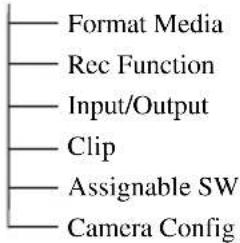
OPERATION menu
OPERATION
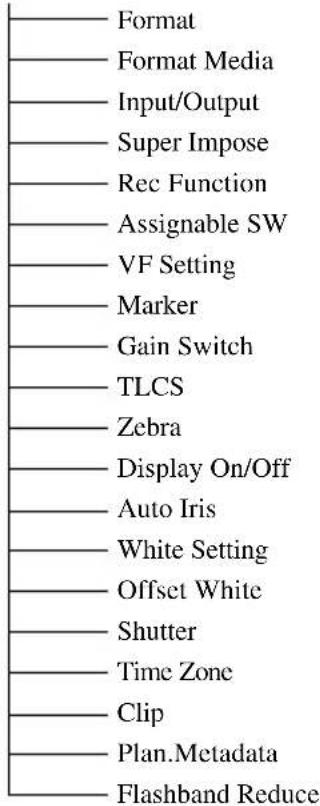
PAINT menu![graph TD A["PAINT"] --> B["Switch Status"] A --> C["White"] A --> D["Black"] A --> E["Flare"] A --> F["Gamma"] A --> G["Black Gamma"] A --> H["Knee"] A --> I["White Clip"] A --> J["Detail(HD Mode)"] A --> K["Detail(SD Mode)"] A --> L["Aperture"] A --> M["Skin Detail"] A --> N["Matrix"] A --> O["Mult…](/content/2026/05/812400/images/ec89acfa2239c5cfaf4a26172166ae7426341b6d345573e54b11ed6fc9d12f8e.jpg)
FILE menu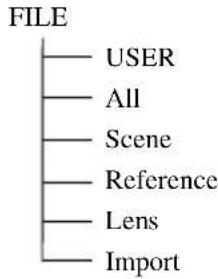
When the unit is used with a PC connection, download any device drivers, plug-ins, and application software you require from the following websites.
Sony Professional products website:
U.S.A. http://pro.sony.com
Canada http://www.sonybiz.ca
Latin America http://sonypro-latin.com
Europe http://www.pro.sony.eu/pro
Middle East, Africa http://sony-psmea.com
Sony Creative Software, software download page:
http://www.sonycreativesoftware.com/
download/software_for_sony_equipment
Specifications
General
Power requirements
12 V DC
Power consumption
Approx. 25 W
Main unit (camcorder) + LCD viewfinder + auto
focus lens + microphone
Power source for HD recording: 12 V DC
Approx. 30 W
Main unit (camcorder) + LCD viewfinder + auto
focus lens + microphone + CBK-WA101
Wireless Adapter
Power source for recording: 12 V DC
Notes
- Do not use a video light with power consumption of over 50 W.
- When connecting a device to the DC OUT connector, use one with current consumption of 0.5 A or less.
Operating temperature
0 °C to 40 °C (32 °F to 104 °F)
Storage temperature
-20 °C to +60 °C (-4 °F to +140 °F)
Recording/playback formats
Video (XAVC)
XAVC-1 mode: GBG, 112 Mbps max, MPEG-4 AVC/H.264
XAVC-L50 mode: VBR, 50 Mbps max, MPEG-4 AVC/H.264
XAVC-L35 mode: VBR, 35 Mbps max, MPEG-4 AVC/H.264
XAVC-L25 mode: VBR, 25 Mbps max, MPEG-4 AVC/H.264
Video (MPEG-2 Long GOP)
HD 422 mode: CBR, 50 Mbps max, MPEG-2 422P@HL
HQ mode: VBR, 35 Mbps max, MPEG-2 MP@HL
SP mode: CBR, 25 Mbps MPEG-2 MP@H-14
SD mode: MPEG IMX, DVCAM
Audio
XAVC-I mode: LPCM 24-bit, 48 kHz, 4 channels
XAVC-L mode: LPCM 24-bit, 48 kHz, 4 channels
HD 422 50 mode: LPCM 24-bit, 48 kHz, 4 channels
HD 420 HQ mode: LPCM 16-bit, 48 kHz, 4 channels
SD MPEG IMX mode: LPCM 16/24-bit, 48 kHz, 4 channels
SD DVCAM mode: LPCM 16-bit, 48 kHz, 4 channels
HD 422 50 mode: LPCM 24-bit, 48 kHz, 4 channels
HD 422 HQ mode: LPCM 16-bit, 48 kHz, 4 channels
SD MPEG IMX mode: LPCM 16/24-bit, 48 kHz, 4 channels
SD DVCAM mode: LPCM 16-bit, 48 kHz, 4 channels
HD mode: LPCM 16-bit, 48 kHz, 4 channels
SD DVCAM mode: LPCM 16-bit, 48 kHz, 2 channels
Maximum recording time
The maximum recording time is equivalent to the duration of a single clip recording that fills the media.
The recording time may become shorter, depending on the number of recorded clips.
XAVC-I mode:
When using SBP-128B (128 GB):
Approx. 120 minutes
When using SBS-64G1A/SBP-64B
(64 GB): Approx. 60 minutes
When using SBS-32G1A (32 GB):
Approx. 30 minutes
XAVC-L50 mode:
When using SBP-128B (128 GB):
Approx. 240 minutes
When using SBS-64G1A/SBP-64B
(64 GB): Approx. 120 minutes
When using SBS-32G1A (32 GB):
Approx. 60 minutes
XAVC-L35 mode:
When using SBP-128B (128 GB):
Approx. 340 minutes
When using SBS-64G1A/SBP-64B
(64 GB): Approx. 170 minutes
When using SBS-32G1A (32 GB):
Approx. 85 minutes
XAVC-L25 mode:
When using SBP-128B (128 GB):
Approx. 440 minutes
When using SBS-64G1A/SBP-64B
(64 GB): Approx. 220 minutes
When using SBS-32G1A (32 GB):
Approx. 110 minutes
HD 422 50/SD MPEG IMX mode:
When using SBP-128B (128 GB):
Approx. 240 minutes
When using SBS-64G1A/SBP-64B
(64 GB): Approx. 120 minutes
When using SBS-32G1A (32 GB):
Approx. 60 minutes
HD 420 HQ mode:
When using SBP-128B (128 GB):
Approx. 360 minutes
When using SBS-64G1A/SBP-64B
(64 GB): Approx. 180 minutes
When using SBS-32G1A (32 GB):
Approx. 90 minutes
SD DVCAM mode:
When using SBP-128B (128 GB):
Approx. 440 minutes
When using SBS-64G1A/SBP-64B
(64 GB): Approx. 220 minutes
When using SBS-32G1A (32 GB):
Approx. 110 minutes
HD 422 50/SD MPEG IMX mode:
When using SBP-128B (128 GB):
Approx. 240 minutes
When using SBS-64G1A/SBP-64B
(64 GB): Approx. 120 minutes
When using G49SBS-32G1A (32 GB):
Approx. 60 minutes
HD 420 HQ mode:
When using SBP-128B (128 GB):
Approx. 360 minutes
When using SBS-64G1A/SBP-64B
(64 GB): Approx. 180 minutes
When using SBS-32G1A (32 GB):
Approx. 90 minutes
SD DVCAM mode:
When using SBP-128B (128 GB):
Approx. 440 minutes
When using SBS-64G1A/SBP-64B
(64 GB): Approx. 220 minutes
When using SBS-32G1A (32 GB):
Approx. 110 minutes
HD HQ mode
When using SBP-128B (128 GB):
Approx. 400 minutes
When using SBS-64G1A (64 GB):
Approx. 200 minutes
When using SBS-32G1A (32 GB):
Approx. 100 minutes
HD SP mode:
When using SBP-128B (128 GB):
Approx. 560 minutes
When using SBS-64G1A/SBP-64B
(64 GB): Approx. 280 minutes
When using SBS-32G1A (32 GB):
Approx. 140 minutes
SD DVCAM mode:
When using SBP-128B (128 GB):
Approx. 520 minutes
When using SBS-64G1A/SBP-64B (64 GB): Approx. 260 minutes
When using SBS-32G1A (32 GB):
Approx. 130 minutes
Recording frame rate
XAVC-I mode: CBG, 112 Mbps max, MPEG-4 AVC/H.264
1920×1080/59.94i, 50i, 29.97p, 25p, 23.98p
1280×720/59.94p, 50p
XAVC-L50 mode: MPEG-4 AVC/H.264, 50Mbps/VBR
23.98p
1280×720/59.94p, 50p
XAVC-L50 mode: MPEG-4 AVC/H.264,
50Mbps/VBR
1920×1080/59.94i, 50i, 29.97p, 25p,
23.98p
1280×720/59.94p, 50p
XAVC-L35 mode: MPEG-4 AVC/H.264,
35Mbps/VBR
1920×1080/59.94i, 50i, 29.97p, 25p,
23.98p
XAVC-L25 mode: MPEG-4 AVC/H.264,
25Mbps/VBR
1920×1080/59.94i, 50i
HD 422 50 mode: MPEG-2 422@HL,
50Mbps/CBR
1920×1080/59.94i, 50i, 29.97p, 25p,
23.98p
1280×720/59.94p, 50p, 29.97p, 25p,
23.98p
HD 420 HQ mode: MPEG-2 MP@HL,
35Mbps/VBR
1920×1080/59.94i, 50i, 29.97p, 25p,
23.98p
1440×1080/59.94i, 50i, 29.97p, 25p,
23.98p
1280×720/59.94p, 50p, 23.98p
(2-3 pull down)
SD MPEG IMX mode:
720×486/59.94i, 29.97PsF
720×576/50i, 25PsF
SD DVCAM mode:
720×480/59.94i, 29.97PsF
720×576/50i, 25PsF
HD 422 50 mode: MPEG-2 422P@HL,
50 Mbps/CBR
1920×1080/59.94i, 50i, 29.97p, 25p,
23.98p
1280×720/59.94p, 50p, 29.97p, 25p,
23.98p
HD 420 HQ mode: MPEG-2 MP@HL,
35 Mbps/VBR
1920×1080/59.94i, 50i, 29.97p, 25p,
23.98p
1440×1080/59.94i, 50i, 29.97p, 25p,
23.98p
1280×720/59.94p, 50p, 23.98p (2-3 pull down)
SD MPEG IMX mode:
720×486/59.94i, 29.97PsF
720×576/50i, 25PsF
SD DVCAM mode:
720×480/59.94i, 29.97PsF
720×576/50i, 25PsF
HD HQ 1920 mode: MPEG-2 MP@HL,
35 Mbps/VBR
1920×1080/59.94i, 50i, 29.97p, 25p,
23.98p
HD HQ 1440 mode: MPEG-2 MP@HL,
35 Mbps/VBR
1440×1080/59.94i, 50i, 29.97p, 25p,
23.98p
HD HQ 1280 mode: MPEG-2 MP@HL,
35 Mbps/VBR
1280×720/59.94p, 50p, 29.97p, 25p,
23.98p
HD SP 1440 mode: MPEG-2 MP@H-14,
25 Mbps/CBR
1440×1080/59.94i, 50i, 23.98p (2-3 pull
down)
SD DVCAM mode:
720×480/59.94i, 29.97PsF
720×576/50i, 25PsF
Continuous operation time
Approx. 194 min. (with the BP-L80S)
Mass
Main body only: 3.4 kg (7 lb 7.9 oz)
Dimensions
See page 28
Supplied accessories
Seepage27
Camera
Imaging element
1/2-inch type CMOS
Effective picture elements: 1920 (H) × 1080 (V)
Format
3-chip RGB
Optical system
F1.6 prism system
Built-in filters
1: Clear
2: 1/4 ND
3: 1/16 ND
4: 1/64 ND
Sensitivity
F11 (1920×1080/59.94i)
F12 (1920×1080/50i)
Minimum illumination
0.04 lx
with 1920×1080/59.94i
(F1.6, 64-frame accumulation, +24 dB)
S/N ratio
60 dB (Y)
Horizontal resolution
1000 TV lines or more (1920×1080i mode)
Gain
-3,0,3,6,9,12,18,24 dB
Shutter speed
1/60 to 1/2000 sec. + ECS (Extended Clear Scan)
Shutter speed (Slow shutter (SLS))
2 to 8, 16, 32, 64 frames
Slow & Quick Motion
720: Frame rate is selectable from 1 fps to 60 fps 1080p: Frame rate is selectable from 1 fps to 30 fps
White balance
Preset (3200K), Memory A, Memory B/ATW
Audio
Sampling frequency
48 kHz
Quantization
16 bits
Headroom
20 dB (factory default) (20, 18, 16, 12 dB)
Frequency response
MIC: 50 Hz to 20 kHz (within ±3 dB)
LINE: 20 Hz to 20 kHz (within ±3 dB)
WRR Analog: 50 Hz to 20 kHz (within ±3 dB)
WRR Digital: 20 Hz to 20 kHz (within ±3 dB)
Dynamic range
90 dB (typical)
Distortion
0.08% max. (with input level -40 dBu)
Built-in speaker
Monaural
Output: 300 mW
Display
Viewfinder
3.5-inch color LCD monitor: 960 (H) × 540 (V), 1/4 HD size
LCD screen
Black and white LCD (displays audio level, TC, and remaining of the battery and media)
Media
Card slots
Type: ExpressCard/34
Number of slots: 2
Connector: Conforms to PCMCIA ExpressCard Standard
Writing rate
200 Mbps or more
Reading rate
200 Mbps or more
Inputs/Outputs
Input/Output connectors
Inputs
Audio input: XLR type, 3-pin, female (2)
Line/Mic/Mic +48 V selectable
-60 dBu/+4 dBu
(0 dBu = 0.775 Vrms)
Microphone input: XLR type, 5-pin, female, -60 dBu
GENLOCK input: BNC type (1)
1.0 Vp-p, 75 ohms, unbalanced
Timecode input: BNC type (1)
0.5 V to 18 Vp-p, 10 kilohms
Outputs
Video output: BNC type (1), HD-Y or analog composite
HDMI: Type A, 19-pin (1)
SDI output: BNC type (2), HD-SDI/SD-SDI selectable
Audio output: XLR type, 5-pin, male, 0 dBu
Timecode output: BNC type (1)
1.0 Vp-p, 75 ohms
Earphone output (stereo minijack) (1)
8 ohms, -∞ to -18 dBs variable
Others
DC input: XLR type, 4-pin, male
11 V to 17 V DC
DC output: 4-pin
11 V to 17 V DC, maximum rated current: 0.5 A
Lens: 12-pin
Supplies power to lens
11 V to 17 V DC, maximum rated current: 1.0 A
Remote: 8-pin
LIGHT: 2-pin
USB: 4-pin, Type B (1), Host Type A (1)
i.LINK: 6-pin (1), IEEE1394 compliant
HDV (HDV1080i)/DVCAM stream input/output, S400
VF: 26-pin, rectangular, 20-pin round
For wireless receiver: D-sub 15-pin
Lens
Lens mount
Sony 1/2-inch type bayonet mount
Focal length
5.8 mm to 93 mm
(35 mm equivalent: 31.4 mm to 503 mm)
Zoom
Servo/Manual selectable
Zoom ratio
16×
Maximum relative aperture
1:1.9
Iris
Auto/Manual selectable
F1.9 to F16 and C (close)
Focus range
Auto/Manual selectable
Ranges:
800 mm (31 1/2 inches) to infinity (Macro OFF, wide angle)
50 mm (2 inches) to infinity (Macro ON, wide angle)
782 mm (30 7/8 inches) to infinity (Macro ON, telephoto)
Filter thread
M82 mm, 0.75 mm pitch
Macro
ON/OFF switchable
Supplied Accessories
Viewfinder (1)
Shoulder strap (1)
Stereo microphone (1)
Windscreen (1)
Cold shoe kit (1 set)
Lens mount cap
Flangeback (focal distance) adjustment chart
Auto focus lens (1)
Before Using this Unit (1)
Operating Instructions (CD-ROM) (1)
Related Equipment
Power supply and related equipment
AC adaptor
AC-DN10/DN2B
Battery pack
BP-L80S
Battery charger
BC-L160/L500/L70
Lens, viewfinder and related equipment
Lens
1/2-inch type bayonet mount lenses only
Viewfinder
DXF-20W/C50WA
CBK-VF02
Viewfinder rotation bracket
BKW-401
Note
The BKW-401 can only be used with the viewfinder supplied with the camcorder or the DXF-20W.
Equipment for remote control
Remote control unit
RM-B170/B750
RCP-1000/1500/1530
RCP-751/921
RCP-1001/1501
Note
The command network unit (CNU) is not supported.
50-pin interface and digital extender
CBK-CE01
HD camera adaptor
CA-FB70/TX70 (when an optional CBK-CE01 is installed)
Note
When using SDIOUT2 with the CA-FB70 attached to the camcorder, use an L angle bracket.
MPEG TS adaptor
HDCA-702 (when an optional CBK-CE01 is installed)
Note
SDIOUT2 cannot be used when the MPEG TS adaptor is attached.
Wireless adaptor
CBK-WA101
USB wireless LAN module
IFU-WLM3
Media adaptor
MEAD-SD02 (for SDHC/SDXC card)
XQD ExpressCard adaptor
QDA-EX1 (for XQD memory card)
Recording media
SxS memory card
SxS PRO+ series
SxS PRO series
SxS-1 series
Audio equipment
Microphone
ECM-678/674/673/680S
Microphone holder
CAC-12
Wireless microphone
DWR-S02D
WRR-855S/860C/861/862
Other peripheral devices
Tripod adaptor
VCT-14/U14
Video light
UC-D200A (PROTECH)
Ultralight (Anton Bauer)
Pad
CBK-SP01 Soft Type Shoulder Pad
Equipment for maintenance and handling
Hard carrying case
LC-H300
Soft carrying case
LC-DS300SFT
Dimensions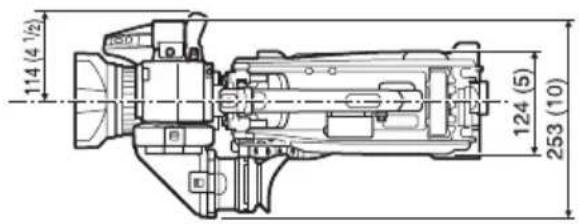
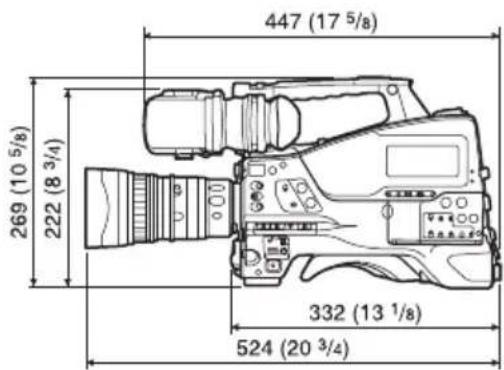
(Unit: mm (inches))
Design and specifications are subject to change without notice.
Notes
• Always make a test recording, and verify that it was recorded successfully. SONY WILL NOT BE LIABLE FOR DAMAGES OF ANY KIND INCLUDING, BUT NOT LIMITED TO, COMPENSATION OR REIMBURSEMENT ON ACCOUNT OF FAILURE OF THIS UNIT OR ITS RECORDING MEDIA, EXTERNAL STORAGE SYSTEMS OR ANY OTHER MEDIA OR STORAGE SYSTEMS TO RECORD CONTENT OF ANY TYPE. • Always verify that the unit is operating properly before use. SONY WILL NOT BE LIABLE FOR DAMAGES OF ANY KIND INCLUDING, BUT NOT LIMITED TO, COMPENSATION OR REIMBURSEMENT ON ACCOUNT OF THE LOSS OF PRESENT OR PROSPECTIVE PROFITS DUE TO FAILURE OF THIS UNIT, EITHER DURING THE WARRANTY PERIOD OR AFTER EXPIRATION OF THE WARRANTY, OR FOR ANY OTHER REASON WHATSOEVER. - SONY WILL NOT BE LIABLE FOR CLAIMS OF ANY KIND MADE BY USERS OF THIS UNIT OR MADE BY THIRD PARTIES. - SONY WILL NOT BE LIABLE FOR THE LOSS, REPAIR, OR REPRODUCTION OF ANY DATA RECORDED ON THE INTERNAL STORAGE SYSTEM, RECORDING MEDIA, EXTERNAL STORAGE SYSTEMS OR ANY OTHER MEDIA OR STORAGE SYSTEMS. - SONY WILL NOT BE LIABLE FOR THE TERMINATION OR DISCONTINUATION OF ANY SERVICES RELATED TO THIS UNIT THAT MAY RESULT DUE TO CIRCUMSTANCES OF ANY KIND.
SONY WILL NOT BE LIABLE FOR DAMAGES OF ANY KIND RESULTING FROM A FAILURE TO IMPLEMENT PROPER SECURITY MEASURES ON TRANSMISSION DEVICES, UNAVOIDABLE DATA LEAKS RESULTING FROM TRANSMISSION SPECIFICATIONS, OR SECURITY PROBLEMS OF ANY KIND.
Depending on the operating environment, unauthorized third parties on the network may be able to access the unit. When connecting the unit to the network, be sure to confirm that the network is protected securely.
Communication content may be unknowingly intercepted by unauthorized third parties in the vicinity of the signals. When using wireless LAN communication, implement security measures properly to protect the communication content.
- XDCAM, SxS, SxS PRO, SxS-1, XQD, i.LINK, and i are registered trademarks of Sony Corporation.
- The terms HDMI and HDMI High-Definition Multimedia Interface, and the HDMI Logo are trademarks or registered trademarks of HDMI Licensing LLC in the United States and other countries.
- The ExpressCard word mark and logos are owned by the Personal Computer Memory Card International Association (PCMCIA) and any use of such marks by Sony Corporation is under license. Other trademarks and trade names are those of their respective owners.
The products or system names appearing in this document are trademarks or registered trademarks of their respective owners.
1920×1080/59.94i, 50i, 29.97p, 25p, 23.98p
1280×720/59.94p, 50p
XAVC-L50 mode: MPEG-4 AVC/H.264, 50 Mbit/s/VBR
1920×1080/59.94i, 50i, 29.97p, 25p, 23.98p
1280×720/59.94p, 50p
XAVC-L35 mode: MPEG-4 AVC/H.264, 35 Mbit/s/VBR
1920×1080/59.94i, 50i, 29.97p, 25p, 23.98p
XAVC-L25 mode: MPEG-4 AVC/H.264, 25 Mbit/s/VBR
1920×1080/59.94i, 50i
HD 422 50 mode: MPEG-2 422@HL, 50 Mbit/s/CBR
1920×1080/59.94i, 50i, 29.97p, 25p, 23.98p
1280×720/59.94p, 50p, 29.97p, 25p, 23.98p
HD 420 HQ mode: MPEG-2 MP@HL, 35 Mbit/s/VBR
1920×1080/59.94i, 50i, 29.97p, 25p, 23.98p
1440×1080/59.94i, 50i, 29.97p, 25p, 23.98p
1280×720/59.94p, 50p, 23.98p (2-3 pulldown)
SD MPEG IMX mode:
720×486/59.94i, 29.97PsF
720×576/50i, 25PsF
SD DVCAM mode:
720×480/59.94i, 29.97PsF
720×576/50i, 25PsF
HD 422 50 mode: MPEG-2 422P@HL, 50 Mbit/s/CBR
1920×1080/59.94i, 50i, 29.97p, 25p, 23.98p
1280×720/59.94p, 50p, 29.97p, 25p, 23.98p
HD 420 HQ mode: MPEG-2 MP@HL, 35 Mbit/s/VBR
1920×1080/59.94i, 50i, 29.97p, 25p, 23.98p
1440×1080/59.94i, 50i, 29.97p, 25p, 23.98p
1280×720/59.94p, 50p, 23.98p (2-3 pulldown)
SD MPEG IMX mode:
720×486/59.94i, 29.97PsF
720×576/50i, 25PsF
SD DVCAM mode:
720×480/59.94i, 29.97PsF
720×576/50i, 25PsF
HD HQ 1920 mode: MPEG-2 MP@HL, 35 Mbit/s/VBR
1920×1080/59.94i, 50i, 29.97p, 25p, 23.98p
HD HQ 1440 mode: MPEG-2 MP@HL, 35 Mbit/s/VBR
1440×1080/59.94i, 50i, 29.97p, 25p, 23.98p
HD HQ 1280 mode: MPEG-2 MP@HL, 35 Mbit/s/VBR
1280×720/59.94p, 50p, 29.97p, 25p, 23.98p
HD SP 1440 mode: MPEG-2 MP@H-14, 25 Mbit/s/CBR
1440×1080/59.94i, 50i, 23.98p (2-3 pull-down)
SD DVCAM mode:
720×480/59.94i, 29.97PsF
720×576/50i, 25PsF
Minimum illumination
| -3, 0, 3, 6, 9, 12, 18, 24 dB |
| Microphone |
| ECM-678/674/673/680S |
| Support de microphone |
| CAC-12 |
| Microphone sans fil |
| DWR-S02D |
| WRR-855S/860C/861/862 |
download/software_for_sony_equipment
Technical specifications
General
Power supply
12 V DC
Power consumption
approx. 25 W
1920×1080/59.94i, 50i, 29.97p, 25p, 23.98p
1280×720/59.94p, 50p
XAVC-L50 mode: MPEG-4 AVC/H.264, 50 Mbit/s/VBR
1920×1080/59.94i, 50i, 29.97p, 25p, 23.98p
1280×720/59.94p, 50p
XAVC-L35 mode: MPEG-4 AVC/H.264, 35 Mbit/s/VBR
1920×1080/59.94i, 50i, 29.97p, 25p, 23.98p
XAVC-L25 mode: MPEG-4 AVC/H.264, 25 Mbit/s/VBR
1920×1080/59.94i, 50i
HD 422 50 mode: MPEG-2 422@HL, 50 Mbit/s/CBR
1920×1080/59.94i, 50i, 29.97p, 25p, 23.98p
1280×720/59.94p, 50p, 29.97p, 25p, 23.98p
HD 420 HQ mode: MPEG-2 MP@HL, 35 Mbps/VBR
1920×1080/59.94i, 50i, 29.97p, 25p, 23.98p
1440×1080/59.94i, 50i, 29.97p, 25p, 23.98p
1280×720/59.94p, 50p, 23.98p
(2-3 pulldown)
SD MPEG IMX mode:
720×486/59.94i, 29.97PsF
720×576/50i, 25PsF
SD DVCAM mode:
720×480/59.94i, 29.97PsF
720×576/50i, 25PsF
HD 422 50 mode: MPEG-2 422P@HL, 50 Mbit/s/CBR
1920×1080/59.94i, 50i, 29.97p, 25p, 23.98p
1280×720/59.94p, 50p, 29.97p, 25p, 23.98p
HD 420 HQ mode: MPEG-2 MP@HL, 35 Mbit/s/VBR
1920×1080/59.94i, 50i, 29.97p, 25p, 23.98p
1440×1080/59.94i, 50i, 29.97p, 25p, 23.98p
1280×720/59.94p, 50p, 23.98p (2-3 pulldown)
SD MPEG IMX mode:
720×486/59.94i, 29.97PsF 720×576/50i, 25PsF
SD DVCAM mode:
720×480/59.94i, 29.97PsF 720×576/50i, 25PsF
HD HQ 1920 mode: MPEG-2 MP@HL, 35 Mbit/s/VBR
1920×1080/59.94i, 50i, 29.97p, 25p, 23.98p
HD HQ 1440 mode: MPEG-2 MP@HL, 35 Mbit/s/VBR
1440×1080/59.94i, 50i, 29.97p, 25p, 23.98p
HD HQ 1280 mode: MPEG-2 MP@HL, 35 Mbit/s/VBR
1280×720/59.94p, 50p, 29.97p, 25p, 23.98p
HD SP 1440 mode: MPEG-2 MP@H-14, 25 Mbit/s/CBR
1440×1080/59.94i, 50i, 23.98p (2-3 pulldown)
SD DVCAM mode:
720×480/59.94i, 29.97PsF
720×576/50i, 25PsF
| DWR-S02D |
| WRR-855S/860C/861/862 |
Technical specifications
General
1920×1080/59.94i, 50i, 29.97p, 25p, 23.98p
1280×720/59.94p, 50p
1920×1080/59.94i, 50i, 29.97p, 25p, 23.98p
1280×720/59.94p, 50p
1920×1080/59.94i, 50i, 29.97p, 25p, 23.98p
1920×1080/59.94i, 50i, 29.97p, 25p, 23.98p
1280×720/59.94p, 50p, 29.97p, 25p, 23.98p
HD 420 HQ mode: MPEG-2 MP@HL, 35Mbps/VBR
1920×1080/59.94i, 50i, 29.97p, 25p, 23.98p
1440×1080/59.94i, 50i, 29.97p, 25p, 23.98p
1920×1080/59.94i, 50i, 29.97p, 25p, 23.98p
1280×720/59.94p, 50p, 29.97p, 25p, 23.98p
HD 420 HQ mode: MPEG-2 MP@HL, 35 Mbps/VBR
1920×1080/59.94i, 50i, 29.97p, 25p, 23.98p
1440×1080/59.94i, 50i, 29.97p, 25p, 23.98p
1920×1080/59.94i, 50i, 29.97p, 25p, 23.98p
HD HQ 1440 mode: MPEG-2 MP@HL, 35 Mbps/VBR
1440×1080/59.94i, 50i, 29.97p, 25p, 23.98p
HD HQ 1280 mode: MPEG-2 MP@HL, 35 Mbps/VBR
1280×720/59.94p, 50p, 29.97p, 25p, 23.98p
From 1/60 to 1/2000 sec. + ECS (Extended Clear Scan)
Timecode output: BNC type (1) 1.0 Vp-p, 75 Ω
Headphone output (stereo mini jack) (1) 8 Ω, -∞ to -18 dBs variable
Other
DC input: XLR type, 4-pin, male From 11 V to 17 V DC
Specifications
General
Power supply
12 V DC
Power consumption
Approx. 25 W
1920×1080/59.94i, 50i, 29.97p, 25p, 23.98p
1280×720/59.94p, 50p
XAVC-L50 mode: MPEG-4 AVC/H.264, 50Mbps/VBR
1920×1080/59.94i, 50i, 29.97p, 25p, 23.98p
1280×720/59.94p, 50p
XAVC-L35 mode: MPEG-4 AVC/H.264, 35Mbps/VBR
1920×1080/59.94i, 50i, 29.97p, 25p, 23.98p
XAVC-L25 mode: MPEG-4 AVC/H.264, 25Mbps/VBR
1920×1080/59.94i, 50i
HD 422 50 mode: MPEG-2 422@HL, 50Mbps/CBR
1920×1080/59.94i, 50i, 29.97p, 25p, 23.98p
1280×720/59.94p, 50p, 29.97p, 25p, 23.98p
HD 420 HQ mode: MPEG-2 MP@HL, 35Mbps/VBR
1920×1080/59.94i, 50i, 29.97p, 25p, 23.98p
1440×1080/59.94i, 50i, 29.97p, 25p, 23.98p
1280×720/59.94p, 50p, 23.98p (2 to 3 Pulldown)
SD MPEG IMX mode:
720×486/59.94i, 29.97PsF
720×576/50i, 25PsF
SD DVCAM mode:
720×480/59.94i, 29.97PsF
720×576/50i, 25PsF
HD 422 50 mode: MPEG-2 422P@HL, 50 Mbps/CBR
1920×1080/59.94i, 50i, 29.97p, 25p, 23.98p
1280×720/59.94p, 50p, 29.97p, 25p, 23.98p
HD 420 HQ mode: MPEG-2 MP@HL, 35 Mbps/VBR
1920×1080/59.94i, 50i, 29.97p, 25p, 23.98p
1440×1080/59.94i, 50i, 29.97p, 25p, 23.98p
1280×720/59.94p, 50p, 23.98p (2:3 pulldown)
SD MPEG IMX mode:
720×486/59.94i, 29.97PsF
720×576/50i, 25PsF
SD DVCAM mode:
720×480/59.94i, 29.97PsF
720×576/50i, 25PsF
HD HQ 1920 mode: MPEG-2 MP@HL, 35 Mbps/VBR
1920×1080/59.94i, 50i, 29.97p, 25p, 23.98p
HD HQ 1440 mode: MPEG-2 MP@HL, 35 Mbps/VBR
1440×1080/59.94i, 50i, 29.97p, 25p, 23.98p
HD HQ 1280 mode: MPEG-2 MP@HL, 35 Mbps/VBR
1280×720/59.94p, 50p, 29.97p, 25p, 23.98p
HD SP 1440 mode: MPEG-2 MP@H-14, 25 Mbps/CBR
1440×1080/59.94i, 50i, 23.98p (2:3 pulldown)
SD DVCAM mode:
720×480/59.94i, 29.97PsF
720×576/50i, 25PsF
Preset (3200K), Memory A, Memory B/ATW
Audio
| DWR-S02D |
| WRR-855S/860C/861/862 |
Sony Creative Software download page: http://www.sonycreativesoftware.com/download/software_for_sony_equipment
Specifications
General specifications
Power requirements
12 V DC
Power consumption
Approx. 25 W
1920 × 1080/59.94i 50
29.97p, 25p, 23.98p
F11 (1920 × 1080/59.94i)
F12 (1920 × 1080/50i)
Minimum illumination
0.04 1x
1920 × 1080/59.94i
(F1.6, cumulative 64 frames, +24dB)
Signal-to-noise ratio
60 dB (Y)
Horizontal resolution
ECM-678/674/673/680S
Microphone holder
CAC-12
Wireless microphone
DWR-S02D
WRR-855S/860C/861/862
Other peripheral devices
Tripod adapter
VCT-14/U14
Video light
UC-D200A (PROTECH)
Ultralight (Anton Bauer)
CBK-SP01 shoulder pad
Device for maintenance and grip
Hard carrying case
LC-H300
Soft carrying case
LC-DS300SFT
Dimensions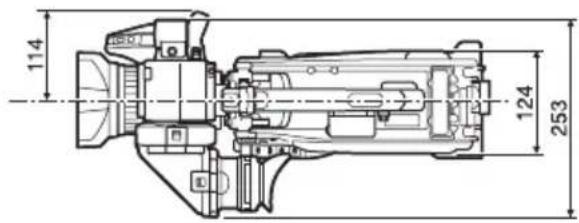
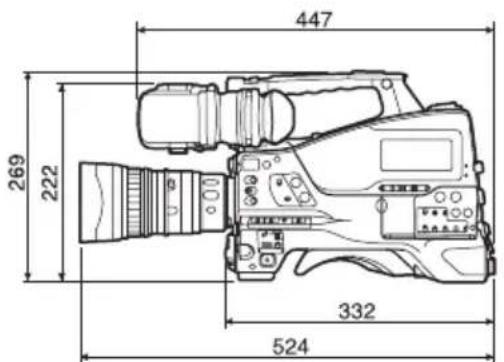
(Unit: mm)
Design and specifications are subject to change without notice.
Note
download/software_for_sony_equipment
ECM-678/674/673/680S
Microphone holder
CAC-12
WRR-855S/860C/861/862
download/software_for_sony_equipment
Specifications
General
XAVC-L mode: LPCM 24-bit, 48 kHz, 4 channels
HD 422 50 mode: LPCM 24-bit, 48 kHz, 4 channels
HD 420 HQ mode: LPCM 16-bit, 48 kHz, 4 channels
SD MPEG IMX mode: LPCM 16/24-bit, 48 kHz, 4 channels
SD DVCAM mode: LPCM 16-bit, 48 kHz, 4 channels
HD 422 50 mode: LPCM 24-bit, 48 kHz, 4 channels
HD 422 HQ mode: LPCM 16-bit, 48 kHz, 4 channels
SD MPEG IMX mode: LPCM 16/24-bit, 48 kHz, 4 channels
SD DVCAM mode: LPCM 16-bit, 48 kHz, 4 channels
HD mode: LPCM 16-bit, 48 kHz, 4 channels
SD DVCAM mode: LPCM 16-bit, 48 kHz, 2 channels
When using SBS-64G1A/SBP-64B (64 GB):
Approx. 60 minutes
When using SBS-32G1A (32 GB):
Approx. 30 minutes
XAVC-L50 mode:
When using SBP-128B (128 GB):
Approx. 240 minutes
When using SBS-64G1A/SBP-64B (64 GB):
Approx. 120 minutes
When using SBS-32G1A (32 GB):
Approx. 60 minutes
XAVC-L35 mode:
When using SBP-128B (128 GB):
Approx. 340 minutes
When using SBS-64G1A/SBP-64B (64 GB):
Approx. 170 minutes
When using SBS-32G1A (32 GB):
Approx. 85 minutes
XAVC-L25 mode:
When using SBP-128B (128 GB):
Approx. 440 minutes
When using SBS-64G1A/SBP-64B (64 GB):
Approx. 220 minutes
When using SBS-32G1A (32 GB):
Approx. 110 minutes
HD 422 50/SD MPEG IMX mode:
When using SBP-128B (128 GB):
Approx. 240 minutes
When using SBS-64G1A/SBP-64B (64 GB):
Approx. 120 minutes
When using G49SBS-32G1A (32 GB):
Approx. 60 minutes
HD 420 HQ mode:
When using SBP-128B (128 GB):
Approx. 360 minutes
When using SBS-64G1A/SBP-64B (64 GB):
Approx. 180 minutes
When using SBS-32G1A (32 GB):
Approx. 90 minutes
SD DVCAM mode:
When using SBP-128B (128 GB):
Approx. 440 minutes
When using SBS-64G1A/SBP-64B (64 GB):
Approx. 220 minutes
When using SBS-32G1A (32 GB):
Approx. 110 minutes
HD 422 50/SD MPEG IMX mode:
When using SBP-128B (128 GB):
Approx. 240 minutes
When using SBS-64G1A/SBP-64B (64 GB):
Approx. 120 minutes
When using G49SBS-32G1A (32 GB):
Approx. 60 minutes
HD 420 HQ mode:
When using SBP-128B (128 GB):
Approx. 360 minutes
When using SBS-64G1A/SBP-64B (64 GB):
Approx. 180 minutes
When using SBS-32G1A (32 GB):
Approx. 90 minutes
SD DVCAM mode:
When using SBP-128B (128 GB):
Approx. 440 minutes
When using SBS-64G1A/SBP-64B (64 GB):
Approx. 220 minutes
When using SBS-32G1A (32 GB):
Approx. 110 minutes
HD HQ mode
When using SBP-128B (128 GB):
Approx. 400 minutes
When using SBS-64G1A (64 GB):
Approx. 200 minutes
When using SBS-32G1A (32 GB):
Approx. 100 minutes
HD SP mode:
When using SBP-128B (128 GB):
Approx. 560 minutes
When using SBS-64G1A/SBP-64B (64 GB):
Approx. 280 minutes
When using SBS-32G1A (32 GB):
Approx. 140 minutes
SD DVCAM mode:
When using SBP-128B (128 GB):
Approx. 520 minutes
When using SBS-64G1A/SBP-64B (64 GB):
Approx. 260 minutes
When using SBS-32G1A (32 GB):
Approx. 130 minutes
1920×1080/59.94i, 50i, 29.97p, 25p, 23.98p
1280×720/59.94p, 50p
XAVC-L50 mode: MPEG-4 AVC/H.264, 50Mbps/VBR
1920×1080/59.94i, 50i, 29.97p, 25p, 23.98p
1280×720/59.94p, 50p
XAVC-L35 mode: MPEG-4 AVC/H.264, 35Mbps/VBR
1920×1080/59.94i, 50i, 29.97p, 25p, 23.98p
XAVC-L25 mode: MPEG-4 AVC/H.264, 25Mbps/VBR
1920×1080/59.94i, 50i
HD 422 50 mode: MPEG-2 422@HL, 50Mbps/CBR
1920×1080/59.94i, 50i, 29.97p, 25p, 23.98p
1280×720/59.94p, 50p, 29.97p, 25p, 23.98p
HD 420 HQ mode: MPEG-2 MP@HL, 35Mbps/VBR
1920×1080/59.94i, 50i, 29.97p, 25p, 23.98p
1440×1080/59.94i, 50i, 29.97p, 25p, 23.98p
1280×720/59.94p, 50p, 23.98p (2-3 pull-down)
SD MPEG IMX mode:
720×486/59.94i, 29.97PsF
720×576/50i, 25PsF
SD DVCAM mode:
720×480/59.94i, 29.97PsF
720×576/50i, 25PsF
HD 422 50 mode: MPEG-2 422P@HL, 50 Mbps/CBR
1920×1080/59.94i, 50i, 29.97p, 25p, 23.98p
1280×720/59.94p, 50p, 29.97p, 25p, 23.98p
HD 420 HQ mode: MPEG-2 MP@HL, 35 Mbps/VBR
1920×1080/59.94i, 50i, 29.97p, 25p, 23.98p
1440×1080/59.94i, 50i, 29.97p, 25p, 23.98p
1280×720/59.94p, 50p, 23.98p (2-3 pulldown)
SD MPEG IMX mode:
720×486/59.94i, 29.97PsF 720×576/50i, 25PsF
SD DVCAM mode:
720×480/59.94i, 29.97PsF 720×576/50i, 25PsF
HD HQ 1920 mode: MPEG-2 MP@HL, 35 Mbps/VBR
1920×1080/59.94i, 50i, 29.97p, 25p, 23.98p
HD HQ 1440 mode: MPEG-2 MP@HL, 35 Mbps/VBR
1440×1080/59.94i, 50i, 29.97p, 25p, 23.98p
HD HQ 1280 mode: MPEG-2 MP@HL, 35 Mbps/VBR
1280×720/59.94p, 50p, 29.97p, 25p, 23.98p
HD SP 1440 mode: MPEG-2 MP@H-14, 25 Mbps/CBR
1440×1080/59.94i, 50i, 23.98p (2-3 pulldown)
SD DVCAM mode:
720×480/59.94i, 29.97PsF
720×576/50i, 25PsF
2 to 8, 16, 32, 64 frames
ECM-678/674/673/680S
WRR-855S/860C/861/862
Other peripheral devices
Tripod adapter
VCT-14/U14
Video light
UC-D200A (PROTECH)
Ultralight (Anton Bauer)
Pad
download/software_for_sony_equipment
Specifications
General
Power requirements
12 V DC
Power consumption
Approximately 25 W
Main unit (camcorder) + LCD viewfinder +
auto focus lens + microphone
1920×1080/59.94i, 50i, 29.97p, 25p, 23.98p
1280×720/59.94p, 50p
XAVC-L50 mode: MPEG-4 AVC/H.264, 50Mbps/VBR
1920×1080/59.94i, 50i, 29.97p, 25p, 23.98p
1280×720/59.94p, 50p
XAVC-L35 mode: MPEG-4 AVC/H.264, 35Mbps/VBR
1920×1080/59.94i, 50i, 29.97p, 25p, 23.98p
XAVC-L25 mode: MPEG-4 AVC/H.264, 25Mbps/VBR
1920×1080/59.94i, 50i
HD 422 50 mode: MPEG-2 422@HL, 50Mbps/CBR
1920×1080/59.94i, 50i, 29.97p, 25p, 23.98p
1280×720/59.94p, 50p, 29.97p, 25p, 23.98p
HD 420 HQ mode: MPEG-2 MP@HL, 35Mbps/VBR
1920×1080/59.94i, 50i, 29.97p, 25p, 23.98p
1440×1080/59.94i, 50i, 29.97p, 25p, 23.98p
1280×720/59.94p, 50p, 23.98p (2-3 pull down)
SD MPEG IMX mode:
720×486/59.94i, 29.97PsF
720×576/50i, 25PsF
SD DVCAM mode:
720×480/59.94i, 29.97PsF
720×576/50i, 25PsF
HD 422 50 mode: MPEG-2 422P@HL, 50 Mbps/CBR
1920×1080/59.94i, 50i, 29.97p, 25p, 23.98p
1280×720/59.94p, 50p, 29.97p, 25p, 23.98p
HD 420 HQ mode: MPEG-2 MP@HL, 35 Mbps/VBR
1920×1080/59.94i, 50i, 29.97p, 25p, 23.98p
1440×1080/59.94i, 50i, 29.97p, 25p, 23.98p
1280×720/59.94p, 50p, 23.98p (2-3 pull-down)
SD MPEG IMX mode:
720×486/59.94i, 29.97PsF
720×576/50i, 25PsF
SD DVCAM mode:
720×480/59.94i, 29.97PsF
720×576/50i, 25PsF
HD HQ 1920 mode: MPEG-2 MP@HL, 35 Mbps/VBR
1920×1080/59.94i, 50i, 29.97p, 25p, 23.98p
HD HQ 1440 mode: MPEG-2 MP@HL, 35 Mbps/VBR
1440×1080/59.94i, 50i, 29.97p, 25p, 23.98p
HD HQ 1280 mode: MPEG-2 MP@HL, 35 Mbps/VBR
1280×720/59.94p, 50p, 29.97p, 25p, 23.98p
HD SP 1440 mode: MPEG-2 MP@H-14, 25 Mbps/CBR
1440×1080/59.94i, 50i, 23.98p (2-3 pull-down)
Modus SD DVCAM:
720×480/59.94i, 29.97PsF
720×576/50i, 25PsF
| Unit remote control |
| RM-B170/B750 |
| RCP-1000/1500/1530 |
| RCP-751/921 |
| RCP-1001/1501 |
Notes
- SOLID-STATE MEMORY CAMCORDER
- FOR SAFETY
- MEANING OF WARNING INDICATIONS
- MAIN SPECIFICATIONS
- GENERAL
- POWER SUPPLY VOLTAGE
- POWER CONSUMPTION
- NOTE
- CONTINUOUS OPERATION TIME
- MASS
- EXTERNAL DIMENSIONS
- ACCESSORIES
- CAMERA SECTION
- IMAGE SENSOR
- DYNAMIC RANGE
- DISTORTION RATE
- OTHER PERIPHERAL DEVICES
- IMPORTANT SAFETY INSTRUCTIONS
- ATTENTION
- WARNING
- CAUTION
- FOR THE CUSTOMERS IN THE U.S.A
- FOR THE CUSTOMERS IN CANADA
- FOR THE CUSTOMERS IN EUROPE
- FOR THE STATE OF CALIFORNIA, USA ONLY
- FOR THE CUSTOMERS IN TAIWAN ONLY
- FOR THE CUSTOMERS IN KOREA
- SETTING THE AREA OF USE
- WHEN USING THE CAMCORDER FOR THE FIRST TIME
- TO SET THE AREA OF USE
- SETUP MENU ORGANIZATION AND LEVELS
- SETUP MENU ORGANIZATION
- US: USER MENU
- CU: USER MENU CUSTOMIZE MENU
- OP: OPERATION MENU
- PA: PAINT MENU
- TH: THUMBNAIL MENU
- MA: MAINTENANCE MENU
- FI: FILE MENU
- SETUP MENU LEVELS
- USER MENU
- OPERATION MENU
- SPECIFICATIONS
- POWER REQUIREMENTS
- NOTES
- OPERATING TEMPERATURE
- STORAGE TEMPERATURE
- RECORDING/PLAYBACK FORMATS
- VIDEO (MPEG-2 LONG GOP)
- AUDIO
- MAXIMUM RECORDING TIME
- CAMERA
- SAMPLING FREQUENCY
- QUANTIZATION
- HEADROOM
- FREQUENCY RESPONSE
- DISTORTION
- BUILT-IN SPEAKER
- DISPLAY
- VIEWFINDER
- LCD SCREEN
- MEDIA
- CARD SLOTS
- WRITING RATE
- READING RATE
- INPUTS/OUTPUTS
- INPUT/OUTPUT CONNECTORS
- INPUTS
- OUTPUTS
- OTHERS
- LENS
- LENS MOUNT
- FOCAL LENGTH
- ZOOM
- ZOOM RATIO
- MAXIMUM RELATIVE APERTURE
- IRIS
- FOCUS RANGE
- FILTER THREAD
- MACRO
- SUPPLIED ACCESSORIES
- VIEWFINDER (1)
- RELATED EQUIPMENT
- POWER SUPPLY AND RELATED EQUIPMENT
- AC ADAPTOR
- BATTERY PACK
- BATTERY CHARGER
- LENS, VIEWFINDER AND RELATED EQUIPMENT
- VIEWFINDER ROTATION BRACKET
- EQUIPMENT FOR REMOTE CONTROL
- REMOTE CONTROL UNIT
- PIN INTERFACE AND DIGITAL EXTENDER
- HD CAMERA ADAPTOR
- MPEG TS ADAPTOR
- MEDIA ADAPTOR
- XQD EXPRESSCARD ADAPTOR
- RECORDING MEDIA
- AUDIO EQUIPMENT
- EQUIPMENT FOR MAINTENANCE AND HANDLING
- TECHNICAL SPECIFICATIONS
- POWER SUPPLY
- OTHER
- GENERAL SPECIFICATIONS
- MINIMUM ILLUMINATION
- SIGNAL-TO-NOISE RATIO
- HORIZONTAL RESOLUTION
- MICROPHONE HOLDER
- WIRELESS MICROPHONE
- TRIPOD ADAPTER
- VIDEO LIGHT
- DEVICE FOR MAINTENANCE AND GRIP
- HARD CARRYING CASE
- SOFT CARRYING CASE
Brand : SONY
Model : PXW-X320
Category : Camcorder