
DN-202WR - Uncategorized DENON - Free user manual and instructions
Find the device manual for free DN-202WR DENON in PDF.


| Product Type | Wireless Audio Receiver |
| Brand | Denon Professional |
| Model | DN-202WR |
| Power Supply | Mains via included power cable (100-240 V AC) |
| Wireless Range | Up to 30.5 m |
| Frequency Band | 2.4 GHz |
| Audio Outputs | 2x balanced XLR, 2x unbalanced 6.35 mm jack |
| Output Level | Line level |
| Volume Control | Level rotary knob |
| LED Indicators | Status LED (pairing), signal indicators |
| Pairing | Touch, press and hold 3 seconds |
| Antenna | Built-in, omnidirectional reception |
| Use | Wireless audio transmission for sound reinforcement systems |
| Compatibility | Requires Denon DN-202WT transmitter |
| Maintenance | Clean with a dry, soft cloth. Do not use solvents. |
| Safety | Keep a minimum distance of 20 cm between the user and the device. Avoid interference (microwaves, etc.). |
| Spare parts | Not available as such. Contact Denon support. |
| General information | User manual available for download. |
Frequently Asked Questions - DN-202WR DENON
User questions about DN-202WR DENON
0 question about this device. Answer the ones you know or ask your own.
Ask a new question about this device
Download the instructions for your Uncategorized in PDF format for free! Find your manual DN-202WR - DENON and take your electronic device back in hand. On this page are published all the documents necessary for the use of your device. DN-202WR by DENON.
USER MANUAL DN-202WR DENON
User Guide (English)
Introduction
DN-202WR is a wireless audio receiver with professional-grade audio inputs. In conjunction with our DN-202WT wireless audio transmitter, this lets you add wireless audio transmission to your audio system—reducing cables and clutter without reducing sound quality.
Please see this guide's Setup chapter to learn how to integrate DN-202WR with your audio system.
Box Contents
DN-202WR
User
Guide
Power Adapter Safety & Warranty Manual
Support
For the latest information about this product (system requirements, compatibility information, etc.) and product registration, visit denonpro.com.
Features
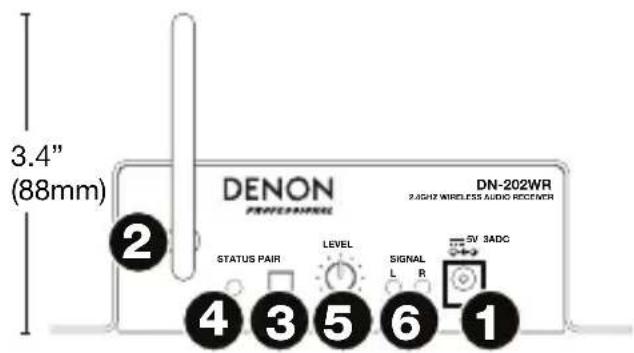
- Power Input: Use the included power adapter to connect this input to a power outlet. See Setup for more information.
- Wireless Antenna: This antenna receives the audio signal from a paired DN-202WT within range. DN-202WR has a range of 100 feet (30.5 meters).
-
Pair Button: Press and hold this button for 3 seconds to make DN-202WR available for pairing to a nearby DN-202WT. See Setup for more information.
-
Status Light: This LED indicates the DN-202WR's pairing status:
-
Flashing slowly (approximately once per second): DN-202WR is not paired to a DN-202WT.
-
Flashing quickly (approximately twice per second): DN-202WR is “searching” for a DN-202WT.
• Solidly lit: DN-202WR is paired to a DN-202WT. -
Level Knob: Turn this knob to set the volume of the audio signal sent to the outputs.
-
Signal Lights: These LEDs light up when DN-202WR is receiving an incoming audio signal from DN-202WT.
-
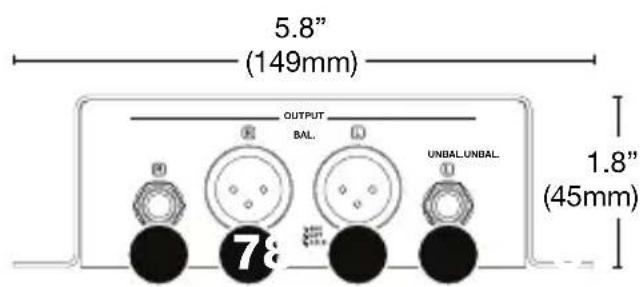
Outputs (Balanced XLR): Use XLR cables to connect these line-level outputs to your audio source (loudspeakers, mixer, amplifier, etc.). See Setup for more information.
-
Outputs (Unbalanced 1/4" / 6.35mm): Use 1/4" (6.35 mm) cables to connect these line-level outputs to your audio source (loudspeakers, mixer, amplifier, etc.). See Setup for more information.
Note: For stereo operation, make sure the left (L) and right (R) inputs are connected to left and right outputs, respectively.
Setup
For an example of how you could set up DN-202WR, please see the Example diagram later in this section.
Items not listed under Introduction > Box Contents are sold separately.
Important:
For stereo operation, make sure left and right inputs are connected to left and right outputs, respectively.
Make sure DN-202WR and DN-202WT are within 100 feet (30.5 meters) of each other.
Do not use DN-202WR near a microwave oven, which can interfere with the reception.
- Use XLR cables or 1/4" (6.35mm) cables to connect DN-202WT's inputs (balanced or unbalanced) to your mixer, media player, or other audio source.
- Use the included power adapter to connect DN-202WT's power input to a power outlet. It will power on immediately.
- Connect your mixer, media player, or other audio source to a power outlet, and then power it on.
DENON PROFESSIONAL
- Use XLR cables or 1/4" (6.35mm) cables to connect your DN-202WR's outputs (balanced or unbalanced) to your loudspeakers, mixer, amplifier, or other device that accepts line-level inputs (make sure this device is powered off).
- Use the included power adapter to connect DN-202WR's power input to a power outlet. It will power on immediately.
- Connect your loudspeakers, mixer, amplifier, or other output device to a power outlet, but do not power it on yet.
- Press and hold the Pair button on DN-202WT for 3 seconds. Its Status Light will start flashing rapidly.
- Within approximately 15 seconds, press and hold the Pair button on DN-202WR for 3 seconds. Its Status Light will start flashing rapidly. If you need to pair multiple DN-202WR units to DN-202WT, do this step with all of them within the 15 seconds.
- Wait until the Status Lights on both DN-202WT and DN-202WR are solidly lit (not flashing), indicating that they are paired.
- Power on your loudspeakers, mixer, amplifier, or other output devices. You can now use DN-202WT and DN-202WR to play audio wirelessly.
Example:
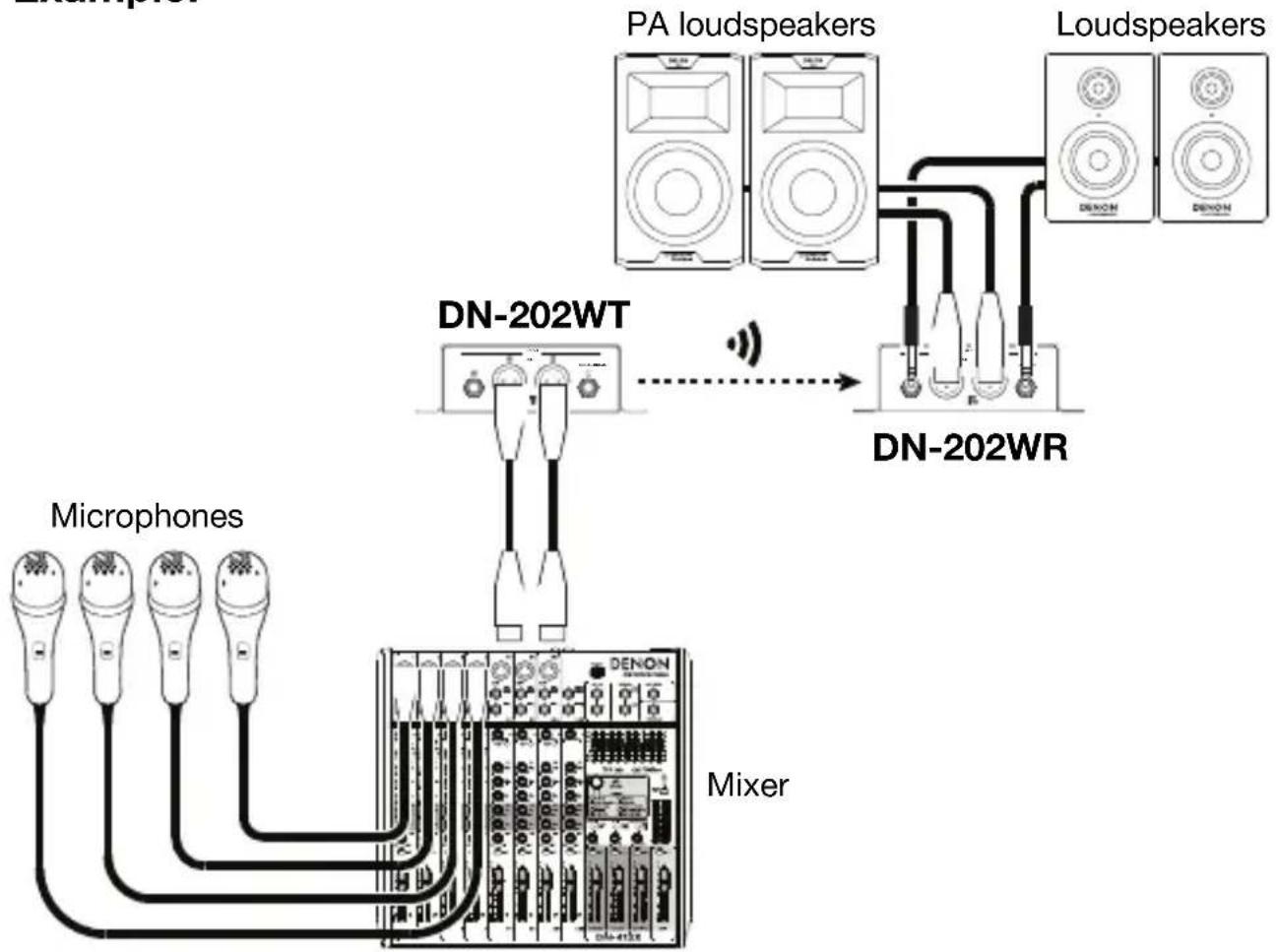
flowchart
graph TD
    A["Microphones"] --> B["DA-202WT"]
    C["PA loudspeakers"] --> D["Loudspeakers"]
    B --> E["Mixer"]
    D --> E
    style A fill:#f9f,stroke:#333
    style C fill:#f9f,stroke:#333
    style B fill:#ccf,stroke:#333
    style D fill:#ccf,stroke:#333
    style E fill:#cff,stroke:#333
Items not listed under Introduction > Box Contents are sold separately.
Troubleshooting
If you encounter a problem, try doing these things first:
- Make sure all cables and other connected devices are properly and securely connected.
• Make sure you are using DN-202WR as described in this User Guide.
• Make sure your other devices or media are working properly. - If you believe DN-202WR is not working properly, check the following table for your problem and solution.
| Problem: | Solution: Please | see: |
| Power does not turn on. | Make sure DN-202WR's power input is properly connected to a power outlet using the included power adapter. | Setup |
| DN-202WR does not produce any sound, or the sound is distorted. | Make sure all cable and device connections are secure and correct.Make sure none of the cables are damaged.Make sure the settings on your loudspeaker, mixer, etc. are correct. | Setup |
| DN-202WR does not pair to a DN-202WT or is having trouble maintaining a connection. | Make sure the power inputs of the DN-202WR and DN-202WT are properly connected to power outlets using the included power adapters.Make sure the DN-202WR and DN-202WT are within 100 feet (30.5 meters) of each other.If possible, remove any obstructions between DN-202WR and DN-202WT.If possible, power off or remove any nearby devices that transmit on a 2.4 GHz frequency. These devices can cause interference. | Setup |
Assistance technique
Technical Specifications
Specifications are subject to change without notice.
For optimal performance, place the product in the center of the room so it is unobstructed by walls, furniture, etc.
| Frequency Response | 20 Hz – 20 KHz, ±3 dB |
| Signal-to-Noise Ratio | ≥ 80 dB |
| THD | ≤ 0.1% |
| Output Level | +18 dBu |
| Dynamic Range | >90 dB at 1 KHz |
| Crosstalk | >90 dB at 1 KHz |
| Latency | 20 ms |
| Wireless Specifications | Channel | 25 |
| Modulation | GFSK | |
| Bandwidth | ≥ 1.8 MHz | |
| Receiver Frequency: | 2.404 – 2.476 GHz | |
| Receiver Range: | Up to 100 ft. (30.5 m) | |
| Receiver Sensitivity: | 10 dBm | |
| Power | 100–240 V AC, 50/60 Hz5 V DC, 3 A, center-positive (adapter included) | |
| Dimensions(width x depth x height) | 5.8” x 4.6” x 1.8”149 mm x 117 mm x 45 mm | |
| Weight | 1.3 lbs.0.6 kg | |
Trademarks and Licenses
Denon is a trademark of D&M Holdings Inc., registered in the U.S. and other countries. All other product or company names are trademarks or registered trademarks of their respective owners.
FCC Information

This device complies with Part 15 of the FCC Rules. Operation is subject to the following two conditions: (1) this device may not cause harmful interference, and (2) this device must accept any interference received, including interference that may cause undesired operation. Changes or modifications not expressly approved by the party responsible for compliance could void the user's authority to operate the equipment.
Note: This equipment has been tested and found to comply with the limits for a Class B digital device, pursuant to Part 15 of the FCC Rules. These limits are designed to provide reasonable protection against harmful interference in a residential installation. This equipment generates, uses instructions, may cause harmful interference to radio communications. However, there is no guarantee that interference will not occur in a particular installation. If this equipment does cause harmful interference to radio or television reception, which can be determined by turning the equipment off and on, the user is encouraged to try to correct the interference by one or more of the following measures:
- Reorient or relocate the receiving antenna.
- Increase the separation between the equipment and receiver.
- Connect the equipment into an outlet on a circuit different from that to which the receiver is connected.
- Consult the dealer or an experienced radio/TV technician for help.
The distance between user and products should be no less than 20 cm.
Warnings
This device complies with Industry Canada's licence-exempt RSSs Operation is subject to the following two conditions: (1) This device may not cause interference and (2) this device must accept any interference, including interference that may cause undesired operation of the device.
Under Industry Canada regulations, this radio transmitter may only operate using an antenna of a type and maximum (or lesser) gain approved for the transmitter by Industry Canada. To reduce potential radio interference to other users, the antenna type and its gain should be so chosen that the equivalent isotropically radiated power (e.i.r.p.) is not more than that necessary for successful communication.
This radio transmitter (identify the device by certification number, or model number if Category II) has been approved by Industry Canada to operate with the antenna types listed below with the maximum permissible gain and required antenna impedance for each antenna type indicated. Antenna types not included in this list, having a gain greater than the maximum gain indicated for that type, are strictly prohibited for use with this device.
The distance between user and products should be no less than 20 cm.
Brand : DENON
Model : DN-202WR
Category : Uncategorized