
IAN 310717 - Elliptical bike CRIVIT - Free user manual and instructions
Find the device manual for free IAN 310717 CRIVIT in PDF.


| Product Type | Magnetic Elliptical |
| Brand | Crivit |
| Model | IAN 310717 |
| Maximum User Weight | 100 kg |
| Appliance Weight | 28 kg |
| Dimensions (L x W x H) | 105 x 60 x 160 cm |
| Power Supply | 2 AAA batteries (not included) |
| Screen | LCD, displays time, distance, speed, calories |
| Resistance Levels | 8 manually adjustable levels |
| Stride Length | 30 cm |
| Flywheel | 5 kg |
| Frame Material | Steel |
| Handles | Fixed handles with pulse sensors |
| Pedals | Non-slip with adjustable straps |
| Transport | Transport wheels at the front |
| Noise Level | Silent (magnetic drive) |
| Maintenance | Clean with a damp cloth and mild detergent. Lubricate moving parts every 3 months. |
| Safety | Do not exceed maximum weight. Use on a flat, stable surface. Keep out of reach of children. |
| Spare Parts | Available via Crivit (Lidl) after-sales service. Repairable. |
| Warranty | 3 years (according to seller's conditions) |
Frequently Asked Questions - IAN 310717 CRIVIT
User questions about IAN 310717 CRIVIT
0 question about this device. Answer the ones you know or ask your own.
Ask a new question about this device
Download the instructions for your Elliptical bike in PDF format for free! Find your manual IAN 310717 - CRIVIT and take your electronic device back in hand. On this page are published all the documents necessary for the use of your device. IAN 310717 by CRIVIT.
USER MANUAL IAN 310717 CRIVIT
- (1) 100% of the company's shareholding structure is defined by the Company's shareholding structure.
2017
1
SEN
(2)
crivit
natural_image
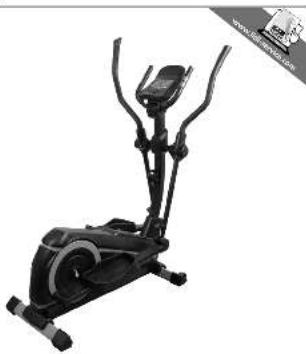
Exterior view of a black stationary exercise bike (no text or symbols visible)CROSSTRAINER
例:例
CROSCHE
O.E.S. 1985
C. 10, 19
①
ELETTICA
The image is too blurry to recognize any text content.
(此表)
VÉLO FURTOUS
Halo Hellhead
(1) 2017年1月1日
(2)
SLIPTICAL TRAIN
In the way


(如图)
Bermes in the following categories: clinical, medical, and other
PROFESSIONAL
H274
(1) 2023年1月1日
Γ/CH Kabel, 2014.
(2) 本说明仅供参考。
IAN 310717
□
IAN 310717
10.3.04
DE AT CH
Operating the computer 27 - 29
General training instructions 29
Warming up 29
Training variations 29
Moving the equipment 29
Storage and cleaning 29
Disposal 30
Notes on the guarantee and
service handling 30
1 x Schwenkarm, links (3L)
1 x Pedal, links (6L)
Steckschlüssel 13, 14 mm (30)
Technische Daten
Maße (B x H x T): ca. 131 x 164 x 62 cm;
Gewicht: 53 kg
2011/65/EU - Directive RoHS
Misure (I x A x P): ca. 131 x 164 x 62 cm;
Peso: 53 kg
With your purchase you have decided on a high-quality product. Get to know the product before you start to use it.

Carefully read the following instructions for use.
Use the product only as described and only for the given areas of application. Keep these instructions safe. When passing the product on to a third party, always make sure that the documentation is included.
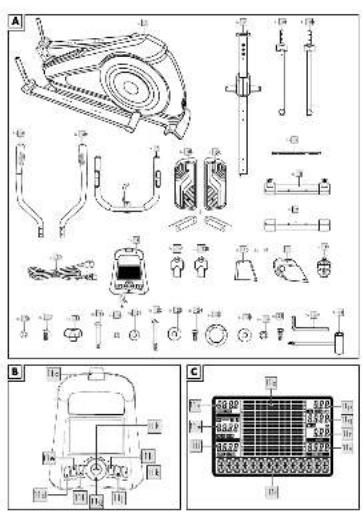
Package contents/Parts list (Fig. A)
1 x instructions for use
1 x cross trainer
1 x base frame (1)
1 x steering column (2)
1 x swivel arm, left (3L)
1 x swivel arm, right (3R)
1 x swivel arm handle, left (4L)
1 x swivel arm handle, right (4R)
1 x handhold (5)
1 x pedal, left (6L)
1 x pedal, right (6R)
1 x swivel arm axis (7)
1 x foot, front (8)
1 x foot, rear (9)
1 x power cable (10)
1 x computer (11)
1 x swivel arm cover, left (12L)
1 x swivel arm cover, right (12R)
1 x handlebar column cover (13)
1 x handhold cover (14)
1 x water bottle holder (15)
1 x screws and tool set
8 x washers M8 (16)
8 x screws M8 x 16mm (17)
4 x adjusting buttons (18)
4 x screws M6 x 45mm (19)
4 x lock washers M6 (20)
4 x washers M6 (21)
4 x screws M8 x 72mm (22)
4 x washers M8 (23)
2 x screws M8 x 20mm (24)
2 x spring washers ∅ 17 (25)
4 x washers M8 (26)
4 x lock washers M8 (27)
2 x screws M8 x 20mm (28)
2 x Allen keys (29)
1 x combination tool with Phillips screwdriver and socket spanner 13, 14mm (30)
Technical data
Dimensions: (W x H x D): approx.
131×164×62cm;
Weight: 53kg
Energy supply: 230V\~50Hz
Non-speed dependent braking system
Compatible with standard heart-rate monitor chest straps with unencrypted 5kHz transmission (not included)
Factor of inertia: 6.210kgm²
Maximum load of tablet mount: 1kg
Power consumption: 60 W

Danger of crushing your fingers!

Maximum load: 150kg

Delta-Sport Handelskontor GmbH, hereby declares that this product meets the following basic requirements, as
well as other important regulations:
2014/53/EU - RED Directive
2011/65/EU - RoHS Directive
Full declarations of conformity are available under http://www.conformity.delta-sport.com/

Date of manufacture (month/year): 10/2018
Device class: HA (for use in private households, exactitude A) / not intended for therapeutic training
Tested according to:
This item was developed as exercise equipment to provide you with a full-body workout. The equipment is designed for private use and is not suitable for medical or commercial purposes. The equipment is suitable for indoor use.

Safety information
Risk of injury!
- This apparatus may be used by children from 14 years of age upwards, as well as by persons with diminished physical, sensory or mental abilities, or those with little experience and knowledge, if they are supervised or instructed with regard to its safe use, provided they also understand the potential risks of such use. Children must not play with the apparatus.
- Consult your doctor before you start training. Make sure that you are healthy enough to train.
- Do not use the item if you are injured or your health is impaired.
- The item is not suitable for therapeutic purposes.
- This item is designed for a maximum body weight of 150kg. Do not use the item if you weigh more than this.
• Always remember to warm up before training and train according to your current performance ability.
High exertion and overtraining can lead to serious injuries.
Stop exercising immediately and contact a doctor if you experience pain, weakness or fatigue.
- WARNING NOTICE! The heart-rate monitoring system can malfunction. Excessive training can lead to severe injury or death. If you notice an unusual reduction in your performance, stop training immediately.
• Always keep the instructions for use with the suggested exercises readily available. - Pregnant women should only train after consulting with their doctor.
- The item should always only be used by one person at a time.
- Keep a clear space of approx. 0.6m around all sides of the training area (Fig. Q).
- Only train on a flat, level, non-slip surface.
- Do not use the item near stairs or steps and terraces.
- Finish the exercise session immediately, if you feel dizzy or have a rapid heartbeat etc., and consult a doctor immediately.
- Ventilate the exercise room sufficiently but beware of draughts.
- Do not use the item as a climbing aid or instead of a ladder.
- To prevent injuries due to incorrect handling, the item may only be assembled by an adult.
Make sure to use the item only after it has been completely assembled.
• To avoid injury, never carry the item by yourself up or down stairs or over other obstacles. - Keep loose clothing away from the pedals.
- Do not exercise when you are tired or distracted. Do not exercise directly after eating a meal. Wait for approx. 2 hours before starting your workout.
- The item does not have a free-wheel. The moving parts cannot be stopped right away.
- Cleaning and maintenance may not be carried out by children without supervision.
- Warning! The item must not be used by people who have a pacemaker!
Risk of electric shock!
- Only plug in the item if the mains voltage of the socket corresponds with the specification on the name plate.
- Connect the item to an easily accessible socket only, so that you can quickly disconnect it in the event of a fault.
- Do not operate the equipment if it is visibly damaged or if the power cable or mains plug is faulty.
- If the item's power cable is damaged it must be replaced by the manufacturer or its customer service agent or a similarly qualified person.
- Do not submerge the equipment, the computer, power cable or mains plug in water or other fluids.
- Do not open the housing. Leave repairs to the professionals. Contact a specialist repair workshop for this. Liability and warranty claims are excluded for repairs that are independently carried out, and for improper connection or incorrect operation.
- Only parts corresponding to the original device data may be used for repairs. There are electrical and mechanical parts in this item that are necessary for protecting against sources of danger.
- Never touch the mains plug with wet or damp hands.
- Never pull the mains plug out of the socket using the power cable, always take hold of the mains plug.
- Never use the power cable as a carrying handle.
- Keep the item, the computer, the mains plug and the power cable away from open fires and hot surfaces.
-
Lay the power cable in such a way that it isn't a trip hazard.
-
Do not bend the power cable or lay it over sharp edges.
- Use the item indoors only.
- Always turn off the item and disconnect the mains plug from the socket when you are not using it, or when cleaning it, or if a malfunction occurs.
- Do not allow the power cable to come into contact with hot parts.
- Never pour liquid into the item or the computer.
- Do not use steam cleaners to clean the item. This could damage the item.
⚠️ Special precaution – risk of injury for children!
- Keep children away from the packaging materials. There is a risk of suffocation!
- The item is not suitable play equipment and must be stored somewhere that is inaccessible to children when not in use. To eliminate the risk of injury, children must not be within reach of the item during the workout.
• In particular, point out to children that the item is not a toy.
• Children should not be allowed play with the item.
⚠️ Dangers due to wear and tear
- Only use the item if it is in perfect condition. Check the item for damage and wear before each use. The safety of the item can only be guaranteed if it is regularly inspected for damage and wear. If, for instance, the vee belt or the handles, show signs of damage, do not use the item any longer.
- Use only original replacement parts.
-
Protect the item from extreme temperatures, sun and dampness. Improper storage and use of the item could lead to premature wear and tear, and possible breakages in the structure, which could result in injuries.
-
Check the item regularly for damage or deterioration. If the item is damaged, you may not use it any longer.
- Do NOT secure or screw the device permanently to the floor. Doing so can cause considerable damage to the device.
- Tighten the nuts and bolts regularly.
- Ensure that defective parts, e.g. connecting parts, are replaced immediately and by a specialist repairer only. Only use the equipment again once all defective parts have been replaced.
- Check the item regularly for visible signs of wear and damage. Check the screw connections regularly. Pay special attention to the screw connection on the height setting of the foothold, as well as the screw connections on the handles, which can be found under the handrail covers.
Assembly
The item should be assembled by two people.
Take care with floors that are susceptible to damage! Use a mat or the like, if necessary, to protect the floor.
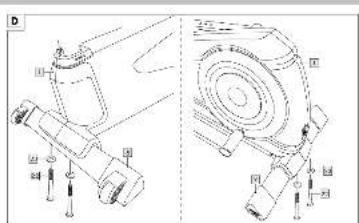
Step 1 (Fig. D)
- Stand the base frame (1) on a solid, level floor.
Note: To make it easier to assemble the legs, turn the base frame so that the bolt holes are facing upwards.
-
Screw the rear foot (9) tightly to the back of the base frame with two screws (22) and two washers (23).
-
Screw the front foot (8) tightly to the front of the base frame using two screws (22) and two washers (23).
Note: Ensure that the transport rollers on the front foot (8) are pointing forwards.
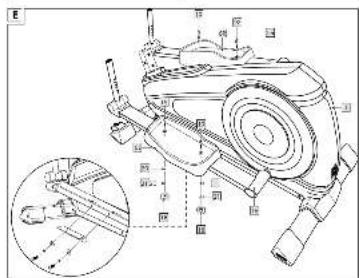
Step 2 (Fig. E)
Note: Take note of the "R" (right) and "L" (left) markings. The open side of the pedals must be pointing outwards.
- Attach the left pedal (6L) to the left pedal bar (1b) and fasten the pedal with two screws (19), two lock washers (20), two washers (21) and two adjustment buttons (18).
- Attach the right pedal (6R) to the right pedal bar (1a) and fasten the pedal with two screws (19), two lock washers (20), two washers (21) and two adjustment buttons (18).
Note: You can attach the pedals to one of the three positions provided for this purpose. Make sure that both pedals are attached at the same position.
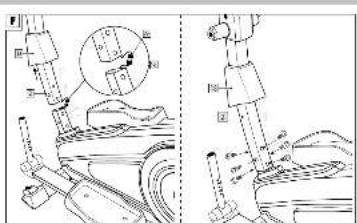
Step 3 (Fig. F)
- Remove the pre-mounted screws, the washers and the lock washers from the base frame.
- Slide the handlebar column cover (13) onto the handlebars (2).
- Hold the handlebar column on the base frame and connect the sensor cables (1c) and (2a) together.
Note: Make sure that the cables are firmly connected so as to ensure reliable signal transmission.
- Slide the handlebar column into the base frame.
Note: Make sure that the cables are not trapped in the process.
-
Secure the handlebar column with the previously removed screws using the combination tool (30).
-
Slide the handlebar column cover over the screws to cover them.
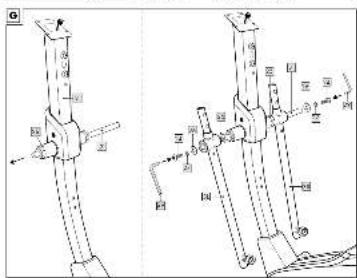
Step 4 (Fig. G)
Note: Take note of the "R" (right) and "L" (left) markings.
- Guide the swivel arm axis (7) through the axis guide (2b).
- Firstly attach a lock washer (25) and then the right swivel arm (3R) to the right side of the swivel arm axis and secure the arm with the lock washer (27), the washer (26), and the screw (24) using the Allen key (29).
- Next attach a lock washer (25) and then the left swivel arm (3L) to the left side of the swivel arm axis and secure the arm with the lock washer (27), the washer (26), and the screw (24) using the Allen key (29).
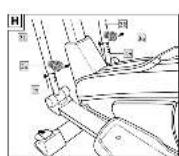
Step 5 (Fig. H)
- Insert the locking tube on the right pedal bar (1a) into the right swivel arm (3R). Secure the tube with the locking screw (3a).
- Insert the locking tube on the left pedal bar (1b) into the left swivel arm (3L). Secure the tube with the locking screw (3a).
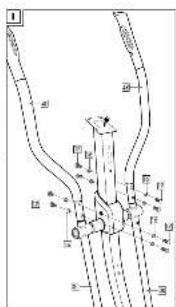
Step 6 (Fig. I)
Note: Take note of the "R" (right) and "L" (left) markings.
- Attach the right swivel arm handle (4R) onto the right swivel arm (3R) and secure the handle with the screws (17) and the washers (16).
- Attach the left swivel arm handle (4L) onto the left swivel arm (3L) and secure the handle with the screws (17) and the washers (16).
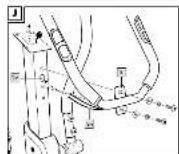
Step 7 (Fig. J)
- Remove the pre-mounted screws, the washers and the lock washers from the handlebar column.
-
Pass the two heart-rate cables (5a) of the handholds through the opening (2c) on the handlebar column. The heart-rate cables must protrude out the top of the handlebar column.
-
Secure the handhold (5) with the previously removed screws using the combination tool (29).
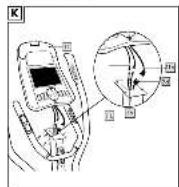
Step 8 (Fig. K)
- Hold the computer (11) on the handlebar column and connect the sensor cable (2d) from the handlebars to the sensor cable (11a) from the computer. Connect the two heart-rate cables (5a) from the handhold with the two heart-rate cables (11b) from the computer.
Note: Make sure that the cables are firmly connected so as to ensure reliable signal transmission.
- Remove the screws from the back of the computer (11) and fasten the computer to the handlebar column with these screws.
Note: Make sure that the cables are not trapped when fastening the computer.
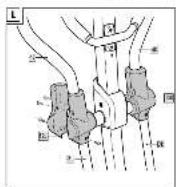
Step 9 (Fig. L)
- Remove the screws from the swivel arm covers (12R) (12L) and put the swivel arm covers on the respective swivel arm.
- Secure each swivel arm cover with the previously removed screws.
Step 10 (Fig. M)
- Remove the screws from the handhold cover (14).
- Put the front part of the handhold cover (14) on the handlebar column and fasten the handhold cover with the previously removed screw.
- Put the rear part of the handhold cover (14) on the handlebar column and fasten the handhold cover with the previously removed screws. Use a standard Phillips screwdriver, size PH1 (not included).
Step 11 (Fig. N)
- Remove the pre-mounted screws from the handlebar column (2).
- Fix the water bottle holder (15) to the handlebar column with the previously removed screws.
Note: Use of the water bottle holder is optional.
Disassembly
Proceed in the reverse order to disassemble the item.
Use
- Choose an exercise area of approx. 3.00 × 1.80m (L x W).
- Train on a flat and non-slip surface only.
Turning the item on and off (Fig. O)
- Connect the power cable (10) to the item and to a power point in order to connect the item to the mains.
- Press the switch (1d) to turn the item on.
- Once you have finished exercising, press the switch to turn the item off.
Getting on correctly
- Hold on to the handhold firmly with both hands and at first get on with just one leg onto either the right or left pedal.
- Put the second leg on the free pedal.
-
Do not reach for the swivel arm handles until both feet are standing on the pedals.
-
Proceed in the reverse order when you are getting off.
Assuming the correct posture
- Stand on the pedals with the front part of your feet all the way to the front and assume an upright body posture.
- Hold the swivel arm handles with your hands. There must be a right angle between your upper and lower arm when your arms are pulled back.
Note: Keep your arms and legs slightly bent while exercising.
Note: Wear gym shoes while exercising.
Adjusting the length of the swivel arm
- To set the swivel arms to the correct length, firstly loosen the locking screw (3a) on the respective swivel arm (3R) (3L). Then move the respective locking screw forwards and push the locking tube of the right or left pedal bar (1a) (1b) into the desired position (Fig. H).
- Release the respective locking screw. The locking button on the swivel arm must click into place.
- Fasten the locking button by tightening the locking screw.
USB connection
The computer has a USB connection for connecting your smartphone or tablet.
- To connect your smartphone or tablet, connect a USB cable (not included) to the USB connection on the computer and to your smartphone or tablet.
Using the smartphone or tablet holder (Fig. P)
- Place your smartphone or tablet on the smartphone or tablet holder.
- Attach your smartphone or tablet with the clip (11c).
Operating the computer
WARNING! The individual human performance required to perform an exercise may differ from the indicated mechanical performance.
Display (Fig. C)
The following information and functions are shown on the display:
- Depending on the display status, the heart rate from 40 to 220 beats per minute or BMR, body fat and BMI measurements are displayed (111).
- Depending on the display status, BMI, body fat, sex, height, weight or age are displayed (11m).
- A training duration with pause mode of between 00:00 and 99:59 is displayed (11n).
- Resistance with 32 resistance levels is displayed (110).
- A pedalling rate of 0 to 999 rotations per minute is displayed alternately with the current speed of between 0.0 to 99.9km/hr (11p).
-
The distance pedalled, from 0.0 to 99.9km is displayed (11q).
-
Resistance of between 0 to 999 Watts is displayed (11r).
- Energy burn* of between 0 to 9999 kilojoules is displayed (11s).
• Information screen with help function for using the menu (11t).
* The calculation is based on pre-programmed standard values that serve as a guideline only.
Changing the language
- The display and the computer buttons use words and abbreviations in English. The display can be switched to German.
- Press the RECOVERY button (11e) and the PROGRAM button (11f) simultaneously to switch between English and German.
Setting the user profile
Before starting your workout, up to 4 different user profiles can be programmed. The pre-set values in each user profile determine the data in the HRC programme and in the BMI/BMR and body fat measurements.
- The user profile U0 is neutral. No user data are pre-set.
- In the U1, U2 and U3 user profiles, personal data such as age, sex, weight and height of the user are set and permanently stored.
- Switch the equipment on as described in the section "Turning the item on and off".
- Turn the selection dial to select the desired user profile.
- Press the MODE button (11h) to confirm your selection.
- Enter the relevant values in the fields "Age" (11m), "Sex" (11m), "Weight" (11m), and "Height" (11m) by turning the selection dial (11g) and confirming the selection with the MODE button (11h).
Selecting a programme
- Press the PROGRAM button (11f).
- Select the desired programme using the selection dial (11g).
- Press the MODE button (11h) to confirm your selection.
QUICKSTART programme
- Select the QUICKSTART programme, as described under "Selecting a programme", or press the QUICKSTART button (11i).
Note: The computer will start automatically with the QUICKSTART programme.
-
Turn the selection dial to set the resistance level.
-
Start the workout.
Note: The resistance level can be altered as desired during the workout.
WATT programme
With this programme you can complete a session that is not dependent on rotational speed. The pre-set resistance level (Watts) remains unchanged and is adjusted to the current pedalling rate and training speed every 0.5 to 4 seconds.
- Select the WATT CONTROL programme, as described under "Selecting a programme".
-
Enter the relevant values in the fields "Watt" (11r), "Time" (11n), "Distance" (11q), "Kilojoule" (11s) and "Pulse" (11l) by turning the selection dial (11g) and confirming the selection with the MODE button (11h).
-
Start moving the pedals to begin the workout.
Note: The default value for Watts can be changed during the workout using the selection dial in increments of 5.
MANUAL programme
- Select the MANUAL programme, as described under "Selecting a programme".
- Enter the relevant values in the fields "Time" (11n), "Distance" (11q), "Kilojoule" (11s) and "Pulse" (11l) by turning the selection dial (11g) and confirming the selection with the MODE button (11h).
- Start moving the pedals to begin the workout.
Note: The resistance level can be altered as desired during the workout.
HRC programme
Note: This programme will only work with a standard chest strap (not included). In this programme, the resistance is adjusted automatically according to the pre-set target heart rate:
- When your current heart rate is below the target heart rate you have set, the resistance will be raised every 10 seconds by one level (up to a maximum of 16).
-
When your current heart rate is above the target heart rate you have set, the resistance will be lowered every 10 seconds by one level (up to a minimum of 1).
-
Select the HRC programme, as described under "Selecting a programme".
-
Turn the selection dial (11g) to select one of the following target heart rate profiles:
• HRC 1: 55% of maximum heart rate
• HRC 2: 75% of maximum heart rate
• HRC 3: 90% of maximum heart rate
- HRC 4: maximum heart rate (can be set freely using the selection dial)
Note: Use the following formula to calculate the maximum heart rate: 220 - age.
-
Press the MODE button (11h) to confirm your selection.
-
Enter the relevant values in the fields "Watt" (11r), "Time" (11n), "Distance" (11q), "Kilojoule" (11s) and "Pulse" (11l) by turning the selection dial (11g) and confirming the selection with the MODE button (11h).
-
Start moving the pedals to begin the workout.
USER programme
With this programme, an individual workout can be compiled and stored. The user's settings in the personal programme will be stored permanently and do not have to be re-entered each time.
- Select the USER programme, as described under "Selecting a programme", or press the USER button (11j).
- Press the MODE button (11g) to programme an individual workout.
-
Enter the relevant values for the bars (11o) in the fields "Time" (11n), "Distance" (11q), "Kilojoule" (11s) and "Pulse" (11l) by turning the selection dial (11g) and confirming the selection with the MODE button (11h).
-
Start moving the pedals to begin the workout. Note: If you start pedalling straight away, the computer will start up a previously saved workout.
INTERVAL programme
The INTERVAL programme is pre-programmed. The high-intensity and low-intensity phases alternate at equal intervals and with equal levels of intensity each time. Because of the significant variations in intensity we recommend that this programme is only used after 2 or 3 weeks of training.
Note: The pre-set resistance level cannot be altered during the workout.
- Select the INTERVAL programme, as described under "Selecting a programme".
- Turn the selection dial (11g) to select one of the following intensity level profiles:
• L1 - prepared beginner
• L2 - advanced
• L3 - fitness athletes and professionals - Press the MODE button (11h) to confirm your selection.
- Enter the relevant values in the fields "Time" (11n), "Distance" (11q), "Kilojoule" (11s) and "Pulse" (11l) by turning the selection dial (11g) and confirming the selection with the MODE button (11h).
- Start moving the pedals to begin the workout.
CLIMBING programme
The CLIMBING programme is pre-programmed. The resistance is increased steadily.
Because of the high intensity level we recommend that this programme is only used after 2 or 3 weeks of training.
Note: The pre-set resistance level cannot be altered during the workout.
- Select the CLIMBING programme, as described under "Selecting a programme".
- Turn the selection dial (11g) to select one of the following intensity level profiles:
• L1 - prepared beginner
• L2 - advanced
• L3 - fitness athletes and professionals - Press the MODE button (11h) to confirm your selection.
- Enter the values in the "Watt" field (11r) by turning the selection dial (11g) and confirming the selection with the MODE button (11h).
- Start moving the pedals to begin the workout.
TEST programme
This programme takes 12 minutes. The aim of this programme is to determine your current level of fitness.
After 12 minutes of exercising, the computer will display values for average speed, distance covered, total kilojoule burn and average heart rate for the completed test workout. The values are saved.
- Select the TEST programme, as described under "Selecting a programme".
- Turn the selection dial (11g) to set the resistance level.
Note: The resistance level cannot be altered during the workout.
- Start moving the pedals to begin the workout.
- Always keep your palms on the hand pulse sensors during the test so that your heart rate can be monitored. Do not exceed the maximum heart rate.
Note: If you start pedalling straight away, the computer will use the value set for this programme during the last workout.
BMI BMR FAT programme
- Select the BMI BMR FAT programme, as described under "Selecting a programme".
- Place your palms on both hand pulse sensors.
- Put your hands around the hand pulse sensors until the measurement has been taken.
-
After approx. 5 to 10 seconds, the following values will be displayed:
-
Body fat and BMI are shown alternately in the display field (11m).
• BMR is shown in the display field (111). - "Err" indicates that the measurement has not been taken successfully. Repeat the measurement process.
Evaluation of fat measurement
Note: Please note that this measurement does not represent a medical measurement. The measured value may differ from the actual value. For a precise measurement of your body fat content, please contact your doctor.
| Sex Low Good Nor | mal | Too high | ||
| male <13% | 13- | 25.8% | 26-30% | >30% |
| female <23% | 23- | 35.8% | 36-40% | |
Evaluation of BMI measurement
The BMI (body mass index) serves as an assessment scale for evaluating body weight.
Note: Please note that this measurement does not represent a medical measurement.
| Age BMI | Men | BMI Women |
| 19-24 years 19 | -24 18-23 | |
| 25-34 years 20 | -25 19 | -24 |
| 35-44 years | 21-26 | 20-25 |
| 45-54 years 22 | -27 21 | -26 |
| 55-64 years | 23-28 | 22-27 |
| 65+ years | 24-29 | 23-28 |
| Category | BMI |
| Emaciated | <15 |
| Underweight | <17.5 |
| Borderline | <19 |
| Normal | 19-24 |
| Overweight | 25-29 |
| Obese | 30-39 |
| Morbidly obese | 40+ |
Evaluation of BMR measurement
The BMR (basal metabolic rate) is the energy required to maintain the body's functions. To determine your body's energy factor, multiply the BMR result from the computer by your activity level according to the table below. The result is displayed in kilojoules (kJ).
| Level of activity | Activity factor |
| Slightly active | BMR × 1.2 (e.g. sedentary activity) |
| Normally active | BMR × 1.3 |
| Fairly active | BMR × 1.4 (e.g. light training 3 to 4 hours a week) |
| Very active | BMR × 1.6 (e.g. a lot of training, 4 to 5 hours a week) |
| Extremely active | BMR × 1.6 (e.g. hard training and physical work) |
Recovery measurement
The recovery measurement indicates whether your recovery heart rate lies within a healthy or less healthy range. After completing the recovery measurement, you will be given a score:
• F1 = very good heart rate recovery
• F6 = poor heart rate recovery
1. After your workout has finished, press the RECOVERY button (11e) to measure your recovery heart rate.
2. Place your palms on both hand pulse sensors.
3. Time (11n) and Heart Rate (11l) will be displayed. The time counts down from 00:60 to 00:00.
4. Put your hands around the hand pulse sensors until the countdown from 60 seconds has finished. Your score is then displayed.
Note: A standard chest strap (not included) can also be used.
- Press the RECOVERY button (11e) again to return to the main menu.
Pausing the workout
- Press the PAUSE button (11d) to pause your workout. The timer will be paused.
- Press the PAUSE button (11d) again to continue the workout.
- Press the PAUSE button (11d) for longer than 3 seconds to restart the computer.
Resetting the display
To reset the display, delete saved settings, or end a workout ahead of time, press the RESET button (11k).
General training instructions
- Wear comfortable sportswear.
- Warm up before each training session and end the training session gradually.
• Take breaks between the exercise routines and drink enough. - If you are a beginner, never train with too much intensity. Increase the intensity of the training sessions slowly.
- Perform all exercises smoothly, not jerkily or fast.
-
Make sure to breathe steadily. Exhale during exertion and inhale upon release.
-
Maintain correct body posture while exercising.
• Make sure that your feet are properly positioned on the pedals. - Hold the handlebars throughout your workout.
- Maintain an upright body position throughout your workout.
Warming up
Take sufficient time before each training session to warm up. Some simple exercises to do this are shown below.
You should repeat each exercise two to three times.
Neck muscles
- Turn your head slowly to the left and to the right. Repeat this movement four to five times.
- Rotate your head slowly, first in one direction, then in the other.
Arms and shoulders
- Clasp your hands behind your back and pull them carefully upwards. If you bend your upper body forwards at the same time, this will give all of your muscles an optimal warm-up.
- Rotate both your shoulders forwards at the same time and then change direction after one minute.
- Pull your shoulders up to your ears and let your shoulders fall again.
- Rotate your right and left arms alternately forwards and then, after one minute, backwards.
Important: Don't forget to keep breathing steadily!
Training variations
- Grasping the swivel arm handle higher up puts a greater stress on the shoulder and back muscles.
- Grasping the swivel arm handle lower down puts a greater stress on the chest muscles.
- Reverse running shifts the centre of gravity.
Moving the equipment
- Turn the item off and unplug from the mains.
- Stand with your right foot on the front foot of the equipment with the rollers.
- Take hold of the cross trainer by the handholds and tip the cross trainer carefully towards you.
- Roll the cross trainer to the desired location and slowly return it to an upright position.
Note: Keep your back straight while moving the equipment.
Storage and cleaning
WARNING: Before cleaning the equipment, it must be switched off and unplugged from the mains.
The item must always be kept dry, and cleaned of any dirt after each use.
Use a lightly dampened cloth to clean the equipment and the computer, and avoid contact with water.
Store the item in a dry, dust-free location away from direct sunlight. Unplug from the mains when not in use.
Disposal
Dispose of the article and the packaging materials in accordance with current local regulations. Packaging materials such as foil bags are not suitable to be given to children. Keep the packaging materials out of the reach of children.

Dispose of the products and the packaging in an environmentally friendly manner.

The recycling code is used to identify various materials for recycling.
The code consists of the recycling symbol - which is meant to reflect the recycling cycle - and a number which identifies the material.

Devices that are marked with the symbol shown here may not be disposed of with domestic waste. You are obliged to
dispose of these kinds of used electrical and electronic devices separately. Ask your local authority about possible methods for regulated disposal. Remove the batteries from the article before disposing of it.
Notes on the guarantee and service handling
The product was produced with great care and under constant supervision. You receive a three-year warranty for this product from the date of purchase. Please retain your receipt.
The warranty applies only to material and workmanship and does not apply to misuse or improper handling. Your statutory rights, especially the warranty rights, are not affected by this warranty.
With regard to complaints, please contact the following service hotline or contact us by e-mail.
Our service employees will advise as to the subsequent procedure as quickly as possible. We will be personally available to discuss the situation with you.
Any repairs under the warranty, statutory guarantees or through goodwill do not extend the warranty period. This also applies to replaced and repaired parts.
Repairs after the warranty are subject to a charge.
IAN: 310717
GB Service Great Britain
Tel.: 0800 404 7657
E-Mail: deltasport@lidl.co.uk
- CROSSTRAINER
- DE AT CH
- Technische Daten
- Carefully read the following instructions for use.
- Package contents/Parts list (Fig. A)
- Technical data
- Safety information
- Risk of injury!
- Risk of electric shock!
- ⚠️ Special precaution – risk of injury for children!
- ⚠️ Dangers due to wear and tear
- Assembly
- The item should be assembled by two people.
- Step 1 (Fig. D)
- Step 2 (Fig. E)
- Step 3 (Fig. F)
- Step 4 (Fig. G)
- Step 5 (Fig. H)
- Step 6 (Fig. I)
- Step 7 (Fig. J)
- Step 8 (Fig. K)
- Step 9 (Fig. L)
- Step 10 (Fig. M)
- Step 11 (Fig. N)
- Disassembly
- Use
- Turning the item on and off (Fig. O)
- Getting on correctly
- Assuming the correct posture
- Adjusting the length of the swivel arm
- USB connection
- Using the smartphone or tablet holder (Fig. P)
- Operating the computer
- Display (Fig. C)
- Changing the language
- Setting the user profile
- Selecting a programme
- QUICKSTART programme
- WATT programme
- MANUAL programme
- HRC programme
- USER programme
- INTERVAL programme
- CLIMBING programme
- TEST programme
- BMI BMR FAT programme
- Evaluation of fat measurement
- Evaluation of BMI measurement
- Evaluation of BMR measurement
- Recovery measurement
- Pausing the workout
- Resetting the display
- General training instructions
- Warming up
- Neck muscles
- Arms and shoulders
- Important: Don't forget to keep breathing steadily!
- Training variations
- Moving the equipment
- Storage and cleaning
- WARNING: Before cleaning the equipment, it must be switched off and unplugged from the mains.
- Disposal
- Notes on the guarantee and service handling
Brand : CRIVIT
Model : IAN 310717
Category : Elliptical bike