
MCF-LW13IO - Smart Home MCF88 - Free user manual and instructions
Find the device manual for free MCF-LW13IO MCF88 in PDF.


| Product Type | LoRaWAN Actuator |
| Brand | MCF88 |
| Model | MCF-LW13IO |
| Category | Smart Home |
| Dimensions | 58 x 44 x 25 mm |
| Weight | Approximately 100 g |
| Power Supply | 230 V AC, 50/60 Hz |
| Input Monitoring | 1 x opto-isolated 230 V AC |
| Output | 1 x relay, 8 A @ 230 V AC (COM, NO, NC) |
| Wireless Protocol | LoRaWAN (EU863-870 or AS923) |
| Device Class | Class C |
| Activation Methods | OTAA, ABP, None |
| Configuration | Via NFC with mcf88 LoRA Tool App (Android) |
| LED Indicators | Red/green for network status |
| Storage Temperature | -20°C to +80°C |
| Operating Temperature | -10°C to +70°C |
| Certifications | CE marked |
| Ordering Code (EU) | MCF-LW13IO |
| Ordering Code (AS) | MCF-LW13IO-AS |
| Firmware Update | Via NFC and mcf88 LoRA Tool App |
Frequently Asked Questions - MCF-LW13IO MCF88
User questions about MCF-LW13IO MCF88
0 question about this device. Answer the ones you know or ask your own.
Ask a new question about this device
Download the instructions for your Smart Home in PDF format for free! Find your manual MCF-LW13IO - MCF88 and take your electronic device back in hand. On this page are published all the documents necessary for the use of your device. MCF-LW13IO by MCF88.
USER MANUAL MCF-LW13IO MCF88
MCF-LW13IO is a LoRaWAN™ actuator that allows to switch ON and OFF a 230 Vac - 8A load. It also reads the status of a 230 Vac input.

2. CONNECTION OF THE DEVICE
If correctly configured, when the device is powered by terminals L LINE and N LINE, it connects to the LoRaWAN™ network. The connection status is visible on the red/green led.
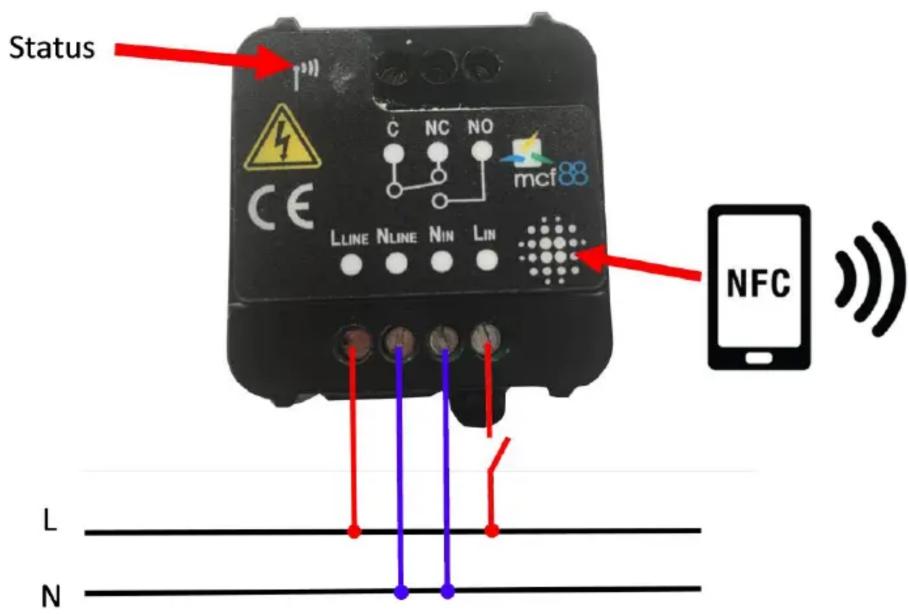
Please refer to following connections:
| Pin | Name | Description |
| L LINE | Device power: 230V Live | |
| N LINE | Device power: 230V Neutral | |
| L IN | Input monitor: 230V Live | |
| N IN | Input monitor: 230V Neutral | |
| C | Terminal for Common contact | |
| NC | Terminal for Normally Close contact | |
| NO | Terminal for Normally Open contact |

Caution: NIN and NLINE are internally connected.
3. LORAWAN™ ACTIVATION
The device supports the following activations on a LoRaWAN™ network:
NONE: sensor not activated
OTAA: the appkey and AppEUI must be written to the device.
OTAA MCF88: Over the air activation according to mcf88 specifications
ABP: requires writing to the device of NwkSkey, AppSkey, DevAddr
The device exits factory activated with NONE mode.
The devEUI of the device is shown on the product label.
MCF-LW13IO is a LoRaWAN™ class C device.
4. DEVICE CONFIGURATION
Configuration can be done using mcf88 LoRA Tool APP (available on Google Play) installed on a NFC smartphone:
![Temp[INT] Network key* App key* Dev Address App EUI XXXXXXXXX DevEUI XXXXXXXXX None MCF88 OTAA ABP IMPOSTA](/content/2026/05/809396/images/4c50629b20c2cab127b5e71c72b44bed97f1054766b88910ff8b19fba4d2e969.jpg)
The application allows, in addition to parameters configuration, the firmware update.
5. LED STATUS
 [K6AB] [K6AB] | LoRaWAN not configured |
  | Joining |
 | Steady state |
 | Uplink in progress |
6. CHARACTERISTICS
• 1 opto-isolated input, 230Vac
• 1 relay output with COM, NO, NC contacts, 8Amp@230Vac
• Power supply from AC line
• Storage temperature range -20 + 80°C
- Working temperature range -10 + 70C°
• Dimension: 58x44x25mm
7. ORDERING CODE
| Ordering Code | Description |
| MCF-LW13IO | LoRaWANTM wireless actuator EU863-870 |
| MCF-LW13IO-AS | LoRaWANTM wireless actuator AS923 |

Brand : MCF88
Model : MCF-LW13IO
Category : Smart Home