MCF-LW06010 - Home Automation MCF88 - Free user manual and instructions
Find the device manual for free MCF-LW06010 MCF88 in PDF.


Pick your language and provide your email: we'll send you a specifically translated version.
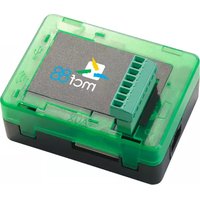
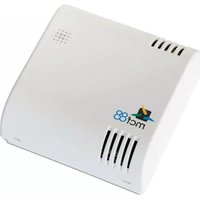
| Product Type | Home Automation Hub |
| Brand | MCF88 |
| Model | MCF-LW06010 |
| Dimensions (W x H x D) | 120 mm x 80 mm x 30 mm |
| Weight | 150 g |
| Power Supply | 5V DC, 1A via micro USB |
| Wireless Protocol | Wi-Fi 802.11 b/g/n, Zigbee |
| Compatible Platforms | Apple HomeKit, Amazon Alexa, Google Assistant |
| Max Connected Devices | 50 |
| Operating Temperature | 0°C to 40°C |
| Humidity Range | 10% to 90% non-condensing |
| Main Functions | Remote control, voice control, scheduling, scenes, notifications |
| Installation | Plug and play, no hub required |
| Mobile App | MCF88 Home app (iOS and Android) |
| Security Features | WPA2 encryption, secure cloud connection |
| Maintenance | Clean with dry cloth, avoid liquids |
| Spare Parts | Power adapter, USB cable available separately |
| Repairability | DIY repair not recommended, contact support |
| Warranty | 2 years limited warranty |
| Certifications | CE, FCC, RoHS |
| Package Contents | Hub, power adapter, USB cable, user manual |
Frequently Asked Questions - MCF-LW06010 MCF88
How do I set up the MCF-LW06010 hub?
Connect the hub to power and your router via the included USB cable. Download the MCF88 Home app, create an account, and follow the in-app instructions to add the hub.
Which devices are compatible with this hub?
The hub works with devices supporting Zigbee and Wi-Fi. It is compatible with many brands like Philips Hue, IKEA Tradfri, and sensors from Xiaomi.
Can I control the hub with voice assistants?
Yes, the MCF-LW06010 works with Amazon Alexa, Google Assistant, and Apple HomeKit. Enable the MCF88 skill in your voice assistant app to start.
How many devices can I connect?
The hub supports up to 50 devices simultaneously, ensuring stable performance for a smart home.
What should I do if the hub loses connection?
First, check your Wi-Fi network and restart the hub. If the issue persists, reset the hub by holding the reset button for 10 seconds. Re-add it in the app.
Is the hub compatible with 5GHz Wi-Fi?
The hub supports 2.4GHz Wi-Fi only. Ensure your router broadcasts a 2.4GHz network for setup and operation.
How do I update the hub firmware?
Firmware updates are automatically pushed via the MCF88 Home app. You can also check for updates manually in the hub settings.
Can I use the hub without internet?
Some local control features (e.g., Zigbee devices) may work without internet, but remote access and voice control require an active internet connection.
What is the operating range of Zigbee?
In open space, the Zigbee range is about 30 meters. Walls and obstacles may reduce the range. Use repeaters if needed.
How do I clean and maintain the hub?
Disconnect power before cleaning. Use a soft, dry cloth to wipe the surface. Do not use liquids or abrasive cleaners. Ensure vents are not blocked.
User questions about MCF-LW06010 MCF88
0 question about this device. Answer the ones you know or ask your own.
Ask a new question about this device
No questions yet. Be the first to ask one.
Download the instructions for your Home Automation in PDF format for free! Find your manual MCF-LW06010 - MCF88 and take your electronic device back in hand. On this page are published all the documents necessary for the use of your device. MCF-LW06010 by MCF88.
USER MANUAL MCF-LW06010 MCF88


Manual assistant
Powered by Anthropic
Waiting for your message
Product information
Brand : MCF88
Model : MCF-LW06010
Category : Home Automation