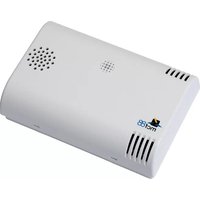
MCF-LW12CO2 - Smart Home MCF88 - Free user manual and instructions
Find the device manual for free MCF-LW12CO2 MCF88 in PDF.


| Type of product | Smart CO2 Monitor |
| Brand | MCF88 |
| Model | MCF-LW12CO2 |
| Dimensions (H x W x D) | 8.5 x 8.5 x 2.5 cm |
| Weight | 150 g |
| Power supply | USB-C (5V 1A) with rechargeable lithium battery |
| Battery life | Up to 8 hours on a full charge |
| Sensor type | NDIR (Non-Dispersive Infrared) CO2 sensor |
| Measuring range | 400 - 5000 ppm |
| Accuracy | ±50 ppm + 5% of reading |
| Additional sensors | Temperature and humidity |
| Connectivity | Wi-Fi 2.4 GHz, Bluetooth 5.0 |
| Display | 2.0 inch color TFT screen |
| App compatibility | iOS 12+ and Android 8+ (MCF88 Smart Home app) |
| Voice assistants | Amazon Alexa, Google Assistant |
| Main functions | Real-time CO2 monitoring, temperature and humidity display, color-coded air quality indication, historical data logging, smart alerts |
| Care and cleaning | Wipe surface with a soft, dry cloth. Do not use liquid cleaners. |
| Safety | Low battery notification, overcharge protection, CE/RoHS compliant |
| Spare parts and repairability | No user-serviceable parts. Contact MCF88 support for repairs. |
| General information | Designed for indoor use only. Operating temperature: 0°C to 50°C. Humidity: 20% to 85%. |
Frequently Asked Questions - MCF-LW12CO2 MCF88
User questions about MCF-LW12CO2 MCF88
0 question about this device. Answer the ones you know or ask your own.
Ask a new question about this device
Download the instructions for your Smart Home in PDF format for free! Find your manual MCF-LW12CO2 - MCF88 and take your electronic device back in hand. On this page are published all the documents necessary for the use of your device. MCF-LW12CO2 by MCF88.
USER MANUAL MCF-LW12CO2 MCF88
The MCF-LW12CO2 is a battery powered sensor for indoor applications that reads temperature, relative humidity, pressure, ambient light index, IAQ air quality index and CO2. The device sends collected data over the LoRaWAN™ network. Ideally suited for a wide range of applications such as home buildings, air quality monitoring and energy saving applications.
2. INSTALLATION
To ensure correct operation and reliable and consistent measurements, install the MCF-LW12CO2 sensor away from direct sunlight and heating sources like radiators, conveyors, TV, lights etc. and far away from doors and windows.

The device must be placed where the LoRaWAN™ signal coverage is good (SF = 7 optimal, SF = 12 weak). The sensor must be installed vertically on a wall at about 1.5mt height. It must be at least 30cm away from metal objects, and 1mt away from electronic devices.
If necessary use drilling guideline as follow:
![graph TD A["0"] --> B{UP} B --> C["O"] style A fill:#fff,stroke:#000 style B fill:#fff,stroke:#000 style C fill:#fff,stroke:#000 note1["Please use these holes for screw"]](/content/2026/06/1340679/images/12f5219787fdf0333d66aa26ba18c8c15a5367e26a116c74218da04419bdd731.jpg)
3. FIRST POWER-ON OF THE SENSOR
The sensor is shipped completely off to prevent battery consumption during storage. It is therefore necessary to carry out a first power-on prior to commissioning.
There are two ways to power on the sensor:
- With NFC: Move the NFC antenna of the mobile (the exact position varies depending on the model of the smartphone) to the sensor antenna, in the area shown in the figure.
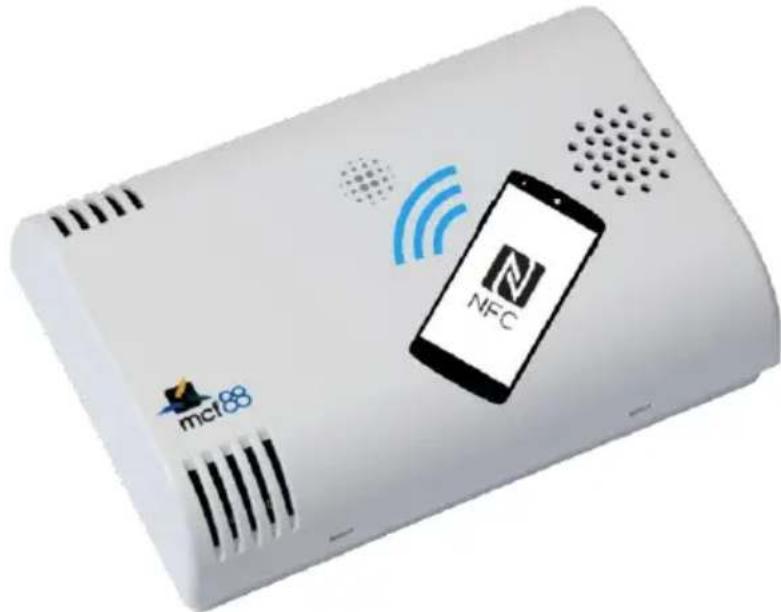
In case of long period inactivity, if necessary, is possible to shut-off again the sensor to prevent battery consumption, using the mcf88 APP.
- Mechanical power on:
Open the case using a screw driver as follow

By using a screw driver pushbutton for 1s as follow, moving right:

Close the plastic case.
Switch-on is visible by flashing of red and green leds.
4. LORAWAN ACTIVATION
The device supports the following activations on a LoRaWAN ™ network:
- NONE: sensor not activated
- OTAA: the appkey and AppEUI must be written to the device.
- OTAA MCF88: Over the air activation according to mcf88 specifications
- ABP: requires writing to the device of NwkSkey, AppSkey, DevAddr
mcf88 Via Roma 3, 28060 Sozzago (NO) ITALY - info@mcf88.it - mcf88.it
![Temp[CO2] Network key* App key* Dev Address App EUI DevEUI 70b3d58ff003585a None MCF88 OTAA ABP SET](/content/2026/06/1340679/images/825de7fd35262636c193acfcdd60ef82352eae65140f5ef7b3a601eda32fa52e.jpg)
The device exits factory activated with NONE mode.
The DevEUI of the device is shown on the product label.
The application allows, in addition to parameters configuration, the firmware update.
Further features are:
LoRaWAN™ class => class "A"
measuring interval => minimum 15 min
transmission interval => every 2 measures
5. SELF CALIBRATION
Due to the internal automatic calibration algorithm (enabled as default), the sensor must be exposed to true fresh air environment at least once a week.
If such an environment can never be expected to occur, either by sensor locality or ever-presence of CO2 emission sources (for example gree-house), or exposure to even lower concentrations than the natural fresh air baseline, the automatic calibration must be disabled with APP:
![Temp[CO2] Central Europe Accelerometer Sleep [min] 15 Altitude [m] 0 Calibration SET](/content/2026/06/1340679/images/4e8b7c7ed320d8417c348c0bbf8a75d64b9de660760e7e47646192e48354265e.jpg)
6. ALTITUDE SETTINGS
When the sensor is not installed at the sea level, the reading of barometric pressures at other elevations must be compensated.
Set the right altitude value with the APP:
![Temp[CO2] Central Europe Accelerometer Sleep [min] 15 Altitude [m] 0 Calibration SET](/content/2026/06/1340679/images/8ab643c20fd05863b5793885d1e178d443b31fbfcca3d12ed05641fc08025792.jpg)

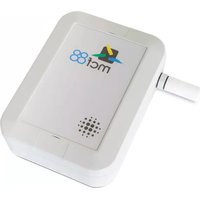

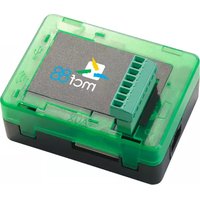
Brand : MCF88
Model : MCF-LW12CO2
Category : Smart Home