
8452 - Drill MAKITA - Free user manual and instructions
Find the device manual for free 8452 MAKITA in PDF.


| Product Type | Drill |
| Brand | Makita |
| Model | 8452 |
| Drilling Capacities | Metal: 13 mm, Wood: 25 mm, Concrete: 15 mm |
| No Load Speed | 0 – 2,800 min-1 |
| Blows per Minute | 0 – 44,800 min-1 |
| Overall Length | 299 mm |
| Net Weight | 1.7 kg |
| Power Supply | Single-phase AC, same voltage as nameplate (e.g., 230V), double-insulated |
| Action Modes | Rotation only, Rotation with hammering |
| Variable Speed Trigger | Yes, speed increases with trigger pressure |
| Reversing Switch | Yes, for clockwise/counterclockwise rotation |
| Lock Button | Yes, for continuous operation |
| Depth Gauge | Yes, adjustable for uniform drilling depth |
| Side Grip | Yes, swivel type for two-handed operation |
| Chuck Type | Keyed chuck (3 holes, tighten with chuck key) |
| Chuck Key | Included, store in designated position after use |
| Sound Pressure Level | 97 dB(A) |
| Sound Power Level | 110 dB(A) |
| Vibration Level | 11 m/s2 (weighted RMS) |
| Safety Features | Double insulation, no earth wire needed; use ear and eye protection |
| Maintenance | Repairs by Makita authorized service centers only |
| Standards Compliance | HD400, EN50144, EN55014, EN61000 |
| Manufacturer | Makita Corporation, Anjo, Aichi, Japan |
Frequently Asked Questions - 8452 MAKITA
User questions about 8452 MAKITA
0 question about this device. Answer the ones you know or ask your own.
Ask a new question about this device
Download the instructions for your Drill in PDF format for free! Find your manual 8452 - MAKITA and take your electronic device back in hand. On this page are published all the documents necessary for the use of your device. 8452 by MAKITA.
USER MANUAL 8452 MAKITA
natural_image
Line drawing of a manual power tool with handle and base (no text or symbols)
1
2
3
4
5
natural_image
Technical line drawing of a mechanical tool or device with no visible text or symbols6
7
Symbols
The followings show the symbols used for the tool. Be sure that you understand their meaning before use.
Symbole
□ Only for EU countries
Do not dispose of electric equipment together with household waste material!
In observance of European Directive 2002/96/EC on waste electrical and electronic equipment and its implementation in accordance with national law, electric equipment that have reached the end of their life must be collected separately and returned to an environmentally compatible recycling facility.
□ Nur für EU-Länder
ENGLISH
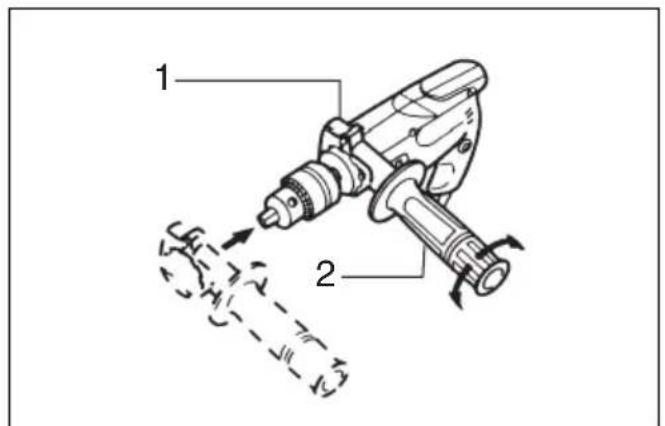
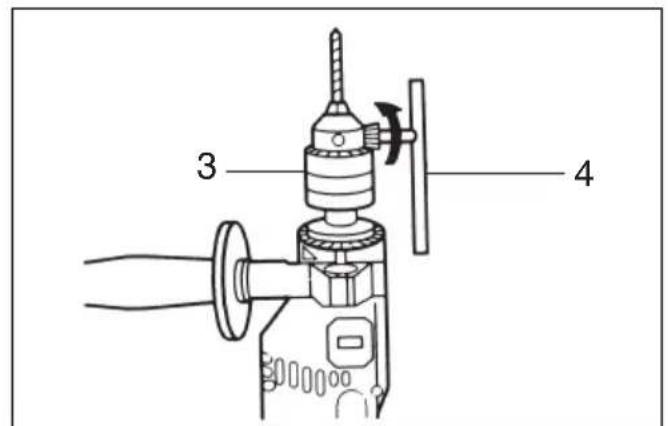
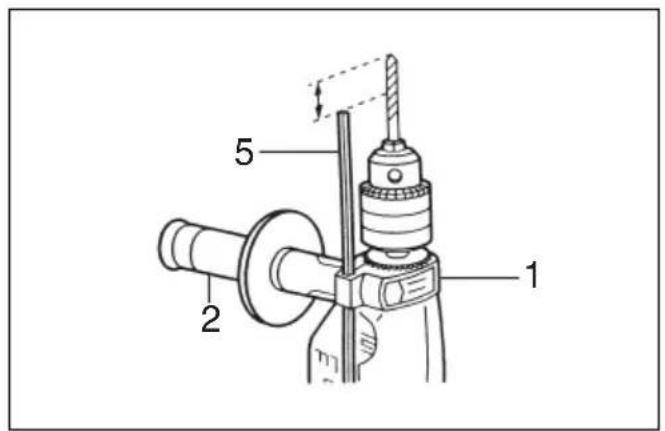
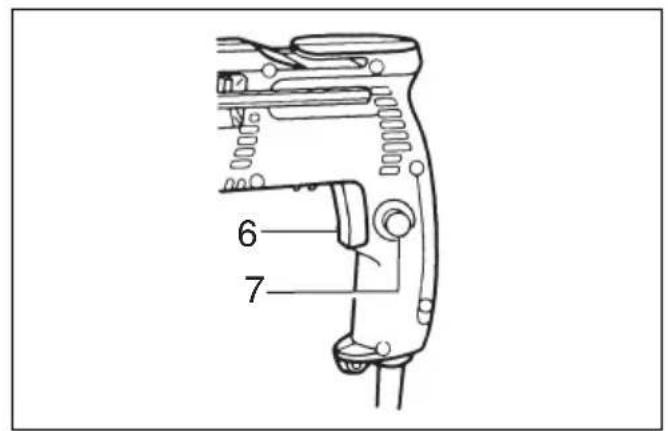
Explanation of general view
| 1 Grip base | 5 Depth gauge | 9 Action mode changing button |
| 2 Side grip | 6 Switch trigger | 10 Ring |
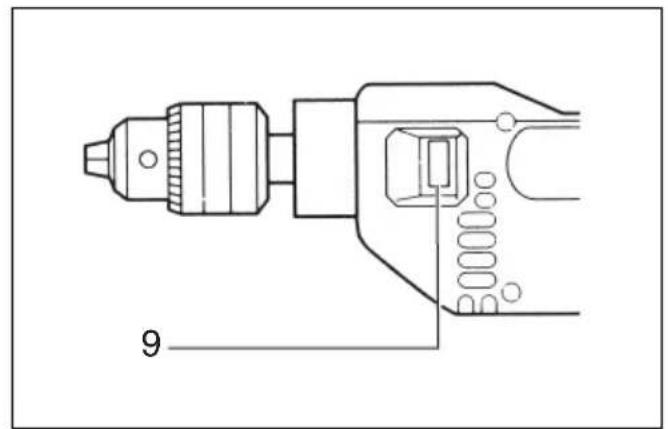
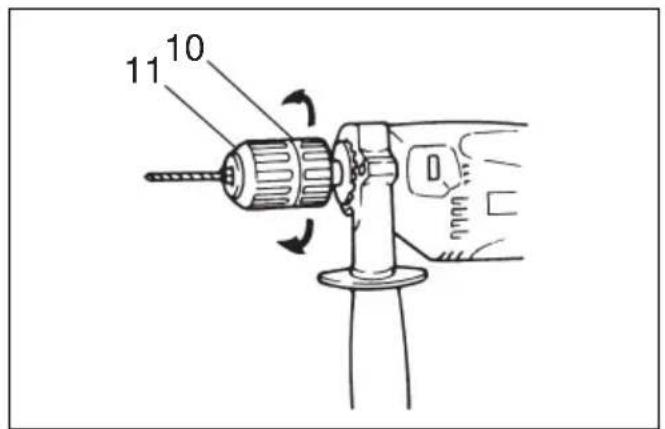
| 3 Chuck | 7 Lock button | 11 Sleeve |
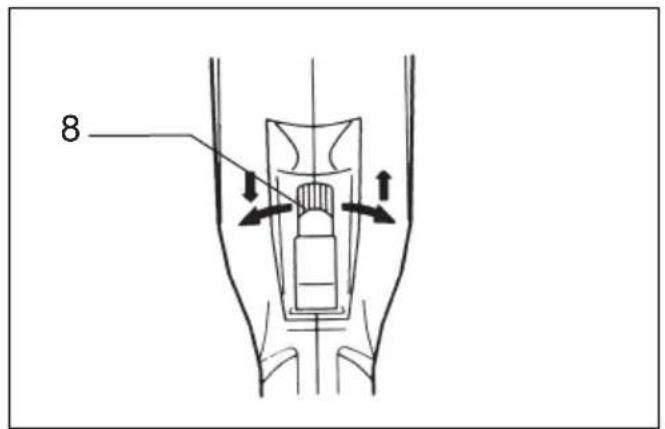
| 4 Chuck key | 8 Reversing switch lever |
SPECIFICATIONS
| Model | 8450 | 8451 | 8452 | |
| Capacities | ||||
| Metal | 13 mm | 13 mm 13 mm | ||
| Wood | 25 mm | 25 mm 25 mm | ||
| Concrete | 15 mm | 15 mm 15 mm | ||
| No load speed (min ^-1 ) | 0 – 2,800 | 0 – 2,800 2,800 | ||
| Blows per minute | 0 – 44,800 | 0 – 44,800 | 44,800 | |
| Overall length | 299 mm | 299 mm | 299 mm | |
| Net weight | 1.7 kg | 1.7 kg | 1.7 kg | |
- Due to our continuing program of research and development, the specifications herein are subject to change without notice.
- Note: Specifications may differ from country to country.
Power supply
The tool should be connected only to a power supply of the same voltage as indicated on the nameplate, and can only be operated on single-phase AC supply. They are double-insulated in accordance with European Standard and can, therefore, also be used from sockets without earth wire.
SAFETY INSTRUCTIONS
Warning! When using electric tools, basic safety precautions should always be followed to reduce the risk of fire, electric shock and personal injury, including the following. Read all these instructions before attempting to operate this product and save these instructions.
For safe operation:
- Keep work area clean
Cluttered areas and benches invite injuries. - Consider work area environment
Don't expose power tools to rain. Don't use power tools in damp or wet locations. Keep work area well lit. Don't use power tools in presence of flammable liquids or gases. - Guard against electric shock
Prevent body contact with grounded surfaces (e.g. pipes, radiators, ranges, refrigerators). - Keep children away
Do not let visitors contact tool or extension cord. All visitors should be kept away from work area. -
Store idle tools
When not in use, tools should be stored in dry, high, or locked-up place, out of the reach of children. -
Don't force tool
It will do the job better and safer at the rate for which it was intended. - Use right tool
Don't force small tools or attachments to do the job of a heavy duty tool. Don't use tools for purposes not intended; for example, don't use circular saw for cutting tree limbs or logs. - Dress properly
Do not wear loose clothing or jewelry. They can be caught in moving parts. Rubber gloves and non-skid footwear are recommendemd when working outdoors. Wear protective hair covering to contain long hair. - Use safety glasses and hearing protection
Also use face or dust mask if cutting operation is dusty. - Connect dust extraction equipment
If devices are provided for the connection of dust extraction and collection facilities, ensure these are connected and properly used. - Don't abuse cord
Never carry tool by cord or yank it to disconnect it from receptacle. Keep cord from heat, oil and sharp edges. - Secure work
Use clamps or a vise to hold work. It's safer than using your hand and it frees both hands to operate tool. - Don't overreach
Keep proper footing and balance at all times. - Maintain tools with care
Keep tools sharp and clean for better and safer performance. Follow instructions for lubricating and changing accessories. Inspect tool cords periodically and, if damaged, have repaired by authorized service facility. Inspect extension cords periodically and replace if damaged. Keep handles dry, clean and free from oil and grease.
15. Disconnect tools
When not in use, before servicing, and when changing accessories such as blades, bits and cutters.
16. Remove adjusting keys and wrenches
Form the habit of checking to see that keys and adjusting wrenches are removed from tool before turning it on.
17. Avoid unintentional starting
Don't carry plugged-in tool with finger on switch. Be sure switch is off when plugging in.
18. Outdoor use extension cords
When tool is used outdoors, use only extension cords intended for use outdoors and so marked.
19. Stay alert
Watch what you are doing. Use common sense. Do not operate tool when you are tired.
20. Check damaged parts
Before further use of the tool, a guard or other part that is damaged should be carefully checked to determine that it will operate properly and perform its intended function. Check for alignment of moving parts, binding of moving parts, breakage of parts, mounting, and any other conditions that may affect its operation. A guard or other part that is damaged should be properly repaired or replaced by an authorized service center unless otherwise indicated elsewhere in this instruction manual. Have defective switches replaced by and authorized service center. Do not use tool if switch does not turn it on and off.
21. Warning
The use of any other accessory or attachment other than recommended in this operating instruction or the catalog may present a risk of personal injury.
22. Have your tool repaired by an expert
This electric appliance is in accordance with the relevant safety rules. Repairing of electric appliances may be carried out only by experts otherwise it may cause considerable danger for the user.
ADDITIONAL SAFETY RULES
-
Wear a hard hat (safety helmet), safety glasses and/or face shield. It is also highly recommended that you wear a dust mask, ear protectors and thickly padded gloves.
-
Under normal operation, the tool is designed to produce vibration. The screws can come loose easily, causing a breakdown or accident. Check tightness of screws carefully before operation.
-
Always be sure you have a firm footing. Be sure no one is below when using the tool in high locations.
-
Hold the tool firmly with both hands. Always use the side grip.
-
Keep hands away from rotating parts.
-
Do not leave the tool running. Operate the tool only when hand-held.
-
When drilling into walls, floors or wherever "live" electrical wires may be encountered, DO NOT TOUCH ANY METAL PARTS OF THE TOOL! Hold the tool only by the insulated grasping surfaces to prevent electric shock if you drill into a "live" wire.
-
Do not touch the bit or the workpiece immediately after operation; they may be extremely hot and could burn your skin.
SAVE THESE INSTRUCTIONS.
OPERATING INSTRUCTIONS
CAUTION:
- Always be sure that the tool is switched off and unplugged before installing or removing the side grip, bit or other accessories.
Installing the side grip (Fig.1)
Always install the side grip on the tool and hold the tool firmly with both hands during operation. The side grip swings around to either side, allowing easy handling of the tool in any position. Swing it to the desired position and secure it by turning clockwise.
NOTE:
The side grip cannot swing 360^ when the depth gauge is installed.
Installing or removing the drill bit
For Model 8450, 8452
To install the bit, place it in the chuck as far as it will go. Tighten the chuck by hand. Place the chuck key in each of the three holes and tighten clockwise. Be sure to tighten all three chuck holes evenly.
To remove the bit, turn the chuck key counterclockwise in just one hole, then loosen the chuck by hand.
After using the chuck key, be sure to return it to the original position.
For Model 8451 (Fig.2)
Hold the ring and turn the sleeve counterclockwise to open the chuck jaws. Place the bit in the chuck as far as it will go. Hold the ring firmly and turn the sleeve clockwise to tighten the chuck.
To remove the bit, hold the ring and turn the sleeve counterclockwise.
Depth gauge (Fig.3)
The depth gauge is convenient for drilling holes of uniform depth. Loosen the side grip and insert the depth gauge into the hole in the side grip. Adjust the depth gauge to the desired depth and tighten the side grip.
Switch action (Fig.4)
For Model 8450, 8451
To start the tool, simply pull the trigger. Tool speed is increased by increasing pressure on the trigger. Release the trigger to stop. For continuous operation, pull the trigger and then push in the lock button. To stop the tool from the locked position, pull the trigger fully, then release it.
For Model 8452
To start the tool, simply pull the trigger. Tool speed is increased by increasing pressure on the trigger. Release the trigger to stop. For continuous operation, pull the trigger and then push in the lock button. To stop the tool while in the locked position, pull the trigger fully, then release it.
Reversing switch (Fig.5)
For Model 8450, 8451
These tools have a reversing switch to change the direction of rotation. Move the reversing switch lever to the ↑ position for clockwise rotation or the ↓ position for counterclockwise rotation.
CAUTION:
- Always check the direction of rotation before operation.
- Use the reversing switch only after the tool comes to a complete stop. Changing the direction of rotation before the tool stops may damage the tool.
- A stuck bit can be removed simply by setting the reversing switch to reverse rotation in order to back out. However, the tool may back out abruptly if you do not hold it firmly.
For ALL MODELS
CAUTION:
Before plugging the tool, always check to see that the switch trigger actuates properly and returns to the "OFF" position when released.
Action mode (Fig.6)
This tool employs the action mode changing buttons. For rotation only, press the button on the ▲▼▼ mark side fully. For rotation with hammering, press the button on the ⏱ mark side fully.
CAUTION:
Be sure to press the action mode changing button as far as it will go. Failure to do so may cause malfunction of the tool.
Operation (Fig.7)
1) Hammer drilling operation
When drilling in concrete, granite, tile, etc., press the button on the ⚡ mark side fully. Be sure to use a tungsten-carbide tipped bit. Do not apply more pressure when the hole becomes clogged with chips or particles. Instead, run the tool at an idle, then remove the bit partially from the hole. By repeating this several times, the hole will be cleaned out. After drilling the hole, use the blow-out bulb to clean the dust out of the hole.
2) Drilling operation
When drilling in wood, metal or plastic materials, press the button on the ▲▶ mark side fully. Drilling in wood
When drilling in wood, best results are obtained with wood drills equipped with a guide screw. The guide screw makes drilling easier by pulling the bit into the workpiece.
Drilling in metal
To prevent the bit from slipping when starting a hole, make an indentation with a centerpunch and hammer at the point to be drilled. Place the point of the bit in the indentation and start drilling. Use a cutting lubricant when drilling metals. The exceptions are iron and brass which should be drilled dry.
CAUTION:
- Pressing excessively on the tool will not speed up the drilling. In fact, this excessive pressure will only serve to damage the tip of your bit, decrease the tool performance and shorten the service life of the tool.
- There is a tremendous twisting force exerted on the tool/bit at the time of hole breakthrough. Hold the tool firmly and exert care when the bit begins to breakthrough the workpiece. Use both hands to help control the tool. Be sure to use the side grip to maintain proper control.
- A stuck bit can be removed simply by setting the reversing switch to reverse rotation in order to back out. However, the tool may back out abruptly if you do not hold it firmly.
- Always secure small workpieces in a vise or similar hold-down device.
MAINTENANCE
CAUTION:
Always be sure that the tool is switched off and unplugged before attempting to perform inspection or maintenance.
To maintain product safety and reliability, repairs, any other maintenance or adjustment should be performed by Makita Authorized or Factory Service Centers, always using Makita replacement parts.
Noise and Vibration
of Models 8450/8451/8452
The typical A-weighted noise levels are
sound pressure level: 97 dB (A)
sound power level: 110 dB (A)
- Wear ear protection. -
The typical weighted root mean square acceleration value is 11 m/s^2 .
EC-DECLARATION OF CONFORMITY
We declare under our sole responsibility that this product is in compliance with the following standards or standardized documents,
HD400, EN50144, EN55014, EN61000,
in accordance with Council Directives, 73/23/EEC, 89/336/EEC and 98/37/EC.
Yasuhiko Kanzaki
CE99
Director
MAKITA INTERNATIONAL EUROPE LTD.
Michigan Drive, Tongwell, Milton Keynes,
Bucks MK15 8JD, ENGLAND
Übersicht
HD400, EN50144, EN55014, EN61000.
Yasuhiko Kanzaki CE99
Direktor
MAKITA INTERNATIONAL EUROPE LTD.
Michigan Drive, Tongwell, Milton Keynes,
Bucks MK15 8JD, ENGLAND
Michigan Drive, Tongwell, Milton Keynes,
Bucks MK15 8JD, ENGLAND
Michigan Drive, Tongwell, Milton Keynes,
Bucks MK15 8JD, ENGLAND
Makita Corporation
Anjo, Aichi, Japan
884139A207