
55T609SUS - TV TESLA - Free user manual and instructions
Find the device manual for free 55T609SUS TESLA in PDF.


| Product Type | LED TV |
| Brand | Tesla |
| Model | 55T609SUS |
| Screen Size | 55 inches |
| Resolution | 3840 x 2160 (4K Ultra HD) |
| Power Consumption (Operating) | 150 W |
| Power Consumption (Standby) | ≤ 0.5 W |
| Operating Voltage | 180 - 240 V AC, 50/60 Hz |
| Dimensions (W x H x D) | 1242 x 719 x 79 mm (approx.) |
| Weight | Approx. 16 kg |
| TV Tuner | DVB-T2/C/S2 |
| HDMI Inputs | 3 (1 with ARC) |
| USB Ports | 2 (USB 2.0 & USB 3.0) |
| Ethernet Port | Yes |
| Wi-Fi | Built-in |
| Smart TV Platform | Proprietary (Netflix, YouTube) |
| Audio Output | SPDIF Coaxial, Headphone, AV Out |
| CI+ Slot | Yes |
| Remote Control | Included (batteries AAA x2) |
| Operating Temperature | +5 to +35 °C |
| Ventilation Clearance | 10 cm on all sides |
| Cleaning Instructions | Use a dry, soft cloth; avoid liquids |
Frequently Asked Questions - 55T609SUS TESLA
User questions about 55T609SUS TESLA
0 question about this device. Answer the ones you know or ask your own.
Ask a new question about this device
Download the instructions for your TV in PDF format for free! Find your manual 55T609SUS - TESLA and take your electronic device back in hand. On this page are published all the documents necessary for the use of your device. 55T609SUS by TESLA.
USER MANUAL 55T609SUS TESLA
Fig.1 Note: The illustrations for 55-inch model is used in this manual.
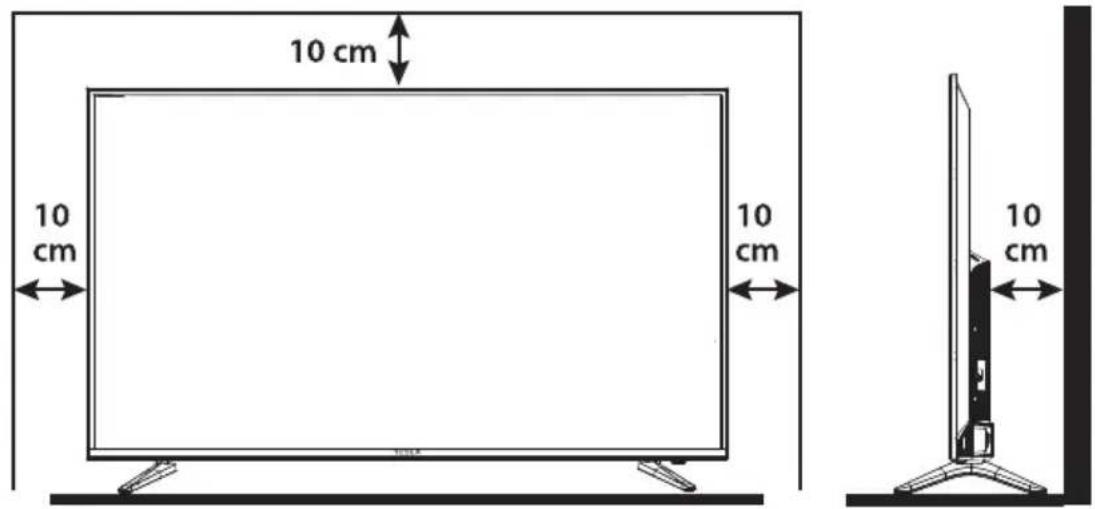
Fig.2
Fig.3
natural_image
Simple line drawing of a blank rectangular frame with two labeled corner markers (2 and 1) at the bottom, no text or symbols present.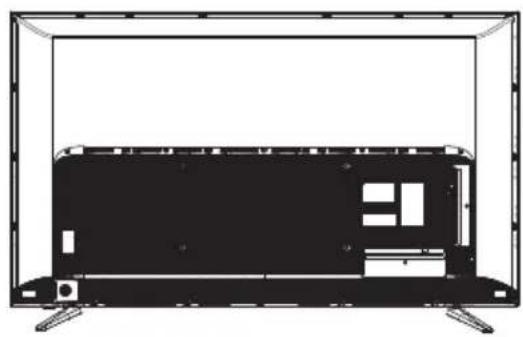
natural_image
Line drawing of a flat-screen TV unit with visible circuitry and display (no text or symbols)Fig.3a
natural_image
Technical line drawing of a mechanical assembly with no visible text or symbolsFig.3b


Fig.4
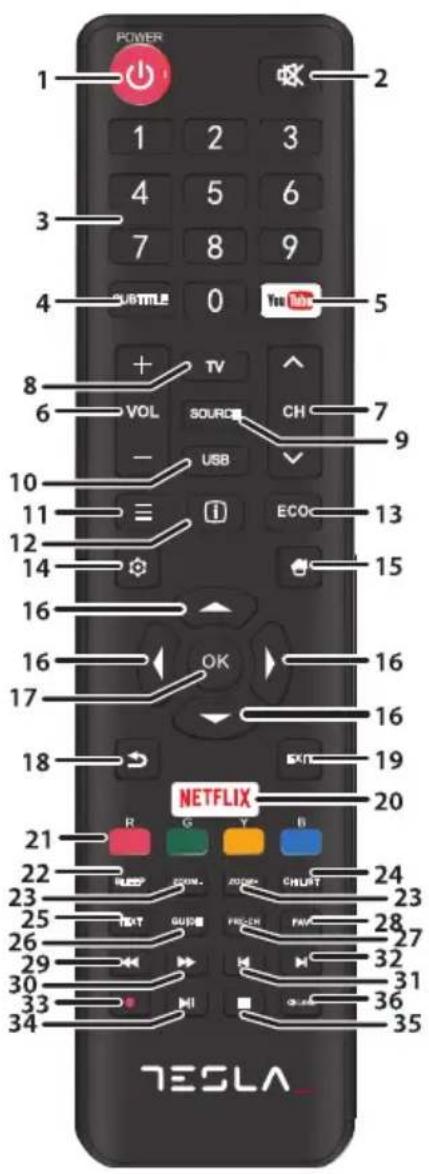
Fig.5
ENG
Please read these instructions before operating your set and retain them for future reference.
BG
Please read these instructions before operating your set and retain them for future reference.
DE
BETRIEBSANLEITUNGEN
Please read these instructions before operating your set and retain them for future reference.
HR
UPUTE ZA KORIŠTENJE
Please read these instructions before operating your set and retain them for future reference.
INSTRUCTION
Accessories
1x safety instructions/warranty cards, 1x remote control, 2x AAA batteries, 1x main power cable
Equipment set-up

Fig.1 NOTE: The graphics are for representation only.
Install the display on a solid horizontal surface such as a table or desk. For ventilation, leave a space of at least 10 cm free all around the set. To prevent any fault and unsafe situations, please do not place any objects on top of the set. This apparatus can be used in tropical and/or moderate climates.
The symbols serve as follows:
WARNING Indicates warning information.
NOTE Indicates any other additional important or helpful information.
MENU Represents a button on the remote control or the TV. (Bold characters)
Move to Represents a menu item within a window. (Italic characters)
INSTALLATION
Default PIN code: 1234
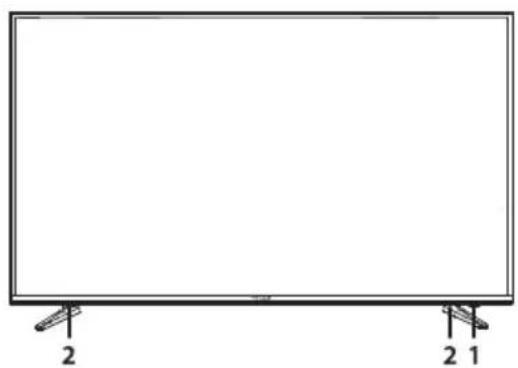
Front panel

Fig.2 NOTE: The graphics are for representation only.
- Power indicator /remote sensor
- Speakers
Rear panel

Fig.3a NOTE: The graphics are for representation only.
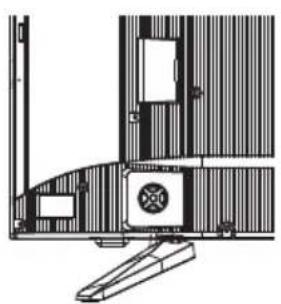
- ▲▼
Channel up/down button
- ◀ ▶
Volume up/down button
- ⏻/Menu
Press to turn the TV on or standby/Enter Menu

Fig.3b NOTE: The graphics are for representation only.
- ETHERNET Connect to your Internet router to access the internet/apps.
- USB 2.0 USB 2.0 port.
-
HDMI 3 Connect HDMI input signal from a signal source such as DVD, Blu-ray player or game console.
-
HDMI 2 (ARC) Connect HDMI input signal from a signal source such as DVD,
Blu-ray player or game console or directly to a Digital Amplifier that supports the ARC function. This input is equipped with the ARC (Audio Return Channel) feature to implement audio connections and for a full Dolby audio support.
-
ANT/CABLE IN Connect a coaxial cable to receive signal from the antenna or cable
-
SAT IN (INPUT) Connect a coaxial cable to receive signal from the LNB.
-
AV OUT To connect your TV with an amplifier or home theatre set, with a 3.5 mm audio/video OUT cable.
-
AUDIO R/L Audio Right/Left IN. Use RCA Male (Plug) to RCA Male (Plug) to connect your TV to a home theatre.
-
VIDEO Video IN. Use RCA Male (Plug) to RCA Male (Plug) to connect your TV with home theatre, s-video VCRs, camcorders or DVD players.
-
HDMI 1 Connect HDMI input signal from a signal source such as DVD, Blu-ray player or game console.
-
Cl+ Insert a Conditional Access Module (CAM).
-
USB 3.0 USB 3.0 port.
-
Headphone or Earphone audio output, speakers will be muted when earphone is plugged in and headphone selected.
-
S/PDIF (coax.) Use an RCA cable to connect your TV to a compatible digital amplifier or Home theatre set.
NOTE: If the TV turns off when you plug a cable to any connector, just turn it on again.
Remote control

Fig.4 NOTE: The graphics are for representation only.
-
⏻ Press to turn the TV on or standby.
-
Ⓧ Press to mute or restore the volume.
3.0 \~ 9 Choose channel directly.
-
SUBTITLE Press to display the Subtitle Language menu
-
YouTube Press to enter YouTube immediately
-
VOL +/ Adjust the volume up or down.
-
TV Switch back to the TV mode.
-
SOURCE Select the input source mode.
-
USB Enter the multimedia menu.
-
CH ^/ ▼ Change programmes up or down.
-
≡ To display the option menu.
-
i Display information about the current source.
-
ECO Select desired power saving mode
-
Open the menu options.
-
Goes to the smart TV homepage.
-
▲▼◀▶ Navigate the menu.
-
OK Confirm the selection.
-
In menu mode, goes back to the previous menu or interface.
-
EXIT Exit the current menu.
20.NETFLIX Press to enter NETFLIX immediately
-
COLOUR BUTTONS Selects tasks
-
SLEEP Select the sleep time, such as 10 min, 20 min etc.
-
ZOOM-/ZOOM+ Change aspect ratio.
-
CH LIST Press to enter the channel list.
-
TEXT Press to enter or exit the teletext menu.
-
GUIDE Press to display the current EPG information in DTV mode.
- PRE-CH Return to previous channel.
- FAV Press to view your assigned favourite channels.
29.◀ Press to fast reverse. - ▶ Press to fast forward.
- Press to play the previous file.
- ▶ Press to play the next file.
- No function.
- ▶ II Press to pause playback, press again to continue playback.
- ■ Press to stop playback.
- ☉ Lang Select audio language
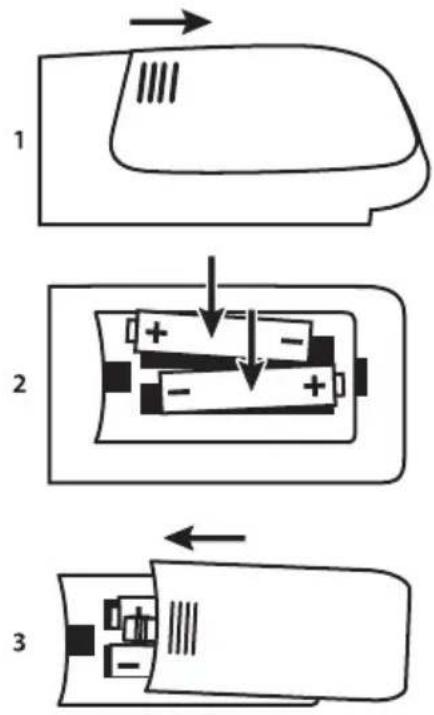
Installing the batteries
Fig.5 NOTE: Pictures are only for reference. Actual items may differ.
Precautions for using the battery
Improper using of the battery will cause leakage. Carefully follow these instructions.
- Please note the batteries' polarity to avoid short circuit.
- When the battery's voltage is insufficient which affect the use range, you should replace it with a new battery. Remove the batteries from the remote-control unit if you do not intend to use it for a long time.
- Do not use different types of batteries (for example Manganese and Alkaline batteries) together.
- Do not put the battery into fire, and charge or decompose the battery.
- Please dispose batteries abide by relevant environmental protection regulation.
Using the remote control
- Use the remote control by pointing it towards the remote sensor. Items between the remote control and the remote sensor could block normal operation.
- Do not cause the remote control to vibrate violently. Also, do not splash liquid on the remote control, also do not put the remote control in a high humidity place.
- Do not place the remote control under direct sunlight which will cause deformation of the unit by heat.
- When the remote sensor is under direct sunlight or strong lighting, the remote control will not work. If so, please change the lighting or TV's position, or operate the remote control closer to the remote sensor.
FIRST TIME INSTALLATION
After all connections have been made properly, switch your TV on. The language selection will appear on the screen. Use ▲▼ to select the Language of your preference and select your country, confirm with OK. The "Welcome screen" appears, please confirm with OK. Here you can choose where you are using the TV. For normal use, you can use the Home setting. After you selected the setting which fits for your usage, confirm with OK. The Legal statement will appear, please read them and continue with I agree.
The installation will proceed to the Internet Connection screen, choose between Setup or Skip and confirm with OK. If you choose Setup you will be forwarded to the network configuration screen; with Skip you automatically jump one screen further and you are able to choose the correct time zone.
On the following screen, you can select the Antenna scan type, choose the one you like to use and follow the on-screen instructions. Select which input source you want to use: DTV to receive digital terrestrial broadcasts or ATV for analogue terrestrial reception. Other tuners can be set-up if you choose for to Skip. Select Cable to receive digital or analogue cable broadcasts or Satellite to receive digital satellite broadcasts (if you have a satellite dish).
DVB-S/S2 installation
Satellite Setting
Press the MENU button and select Channel Scan by pressing OK.
Use the ▲▼ buttons to go to Tuner Type menu and by pressing ▲▼ again in the menu you can select
Satellite, confirm with OK and press BACK to return to the previous menu.
Channel Search
Use the ▲▼ buttons to choose Auto Tuning and press OK to confirm. The default setting is ASTRA 19.2.
Use ◀▶ if you like to select a different satellite signal and press OK to confirm.
With the ▲▼ buttons you can decide which scan options shall be used:
Channel Type Choose between Free & Scramble and Free.
Service Type Select DTV to search DTV channels only, or All for a complete search.
Network Search Network Scan on the selected satellite.
Clear DB Choose between All or OFF if you want to delete channels that were previously
saved during the installation of new channels.
It is recommended to use the default settings. Then select Auto Scan and press OK to proceed. Scanning a full satellite may take a while to complete. You have the same possibilities with the DTV - Manual Tuning process.
NOTE: Network Scan: This function allows you to search for the NIT data of the corresponding satellite to receive newly appeared channels. Please consider that unlike Astra 19.2 or HOT BIRD 13° some satellites do not offer this function or only support it partly. If you have any questions, please contact your dealer or the service/service hotline.
DVB-T2 installation
Terrestrial Setting
Press MENU and select Channel Scan by pressing OK. First use the ▲▼ buttons to enter the Country menu and select the country you are living in, confirm with OK and return to the previous menu with the BACK button.
Use the ▲▼ buttons again to go to the Tuner Type menu and by pressing ▲▼ you can select Antenna, confirm with OK. The TV will now search for digital channels.
After choosing the Antenna option, go to Auto Tuning and choose between DTV, ATV or both scan options.
Select one and confirm by pressing the OK button; with BACK you return to the previous menu.
DVB-C installation
Cable Setting
Press MENU and select Channel Scan by pressing OK. First use the ▲▼ buttons to enter the Country menu and select the country you are living in, confirm with OK and return to the previous menu with the BACK button.
Use the ▲▼ buttons to go to Tuner Type menu and by pressing ▲▼ again in the menu you can select Cable, confirm with OK. The TV will now search for cable channels.
After selecting the Cable option, go to Auto Tuning and choose between DTV, ATV or both scan options.
Select one and confirm by pressing the OK button; with BACK you return to the previous menu.
If you selected the DTV Channel scan, you can use ◀▶ to choose between Full, Network or Quick scan. With the Network scan you can fill out the base frequency settings, obtained from your provider. If you are ready, go to Scan option and press OK to start searching.
ATV installation
Analogue cable setting
Press MENU and select Channel Scan by pressing OK. First use the ▲▼ buttons to enter the Country menu and select the country you are living in, confirm with OK and return to the previous menu with the BACK button.
Use the ▲▼ buttons to go to Tuner Type menu and by pressing ▲▼ again in the menu you can select
Antenna/Cable, confirm with OK; with BACK you return to the previous menu.
After you have selected the Antenna/Cable option, go to Auto Tuning menu and choose ATV tuner, confirm by pressing the OK button. The TV will search for analogue channels.
MENU SETTINGS
Menu control
Press MENU to enter the main menu. Press ▲▼◀▶ to scroll through the items. Press OK to enter the submenus. Use OK to select an item. Use ◀▶ to change an item, press BACK to exit the item. Some items are for information only and cannot be changed.
Picture menu
Picture Mode Available choices are Dynamic, Standard, Movie and User. In User mode, you can change the settings. Settings can be changed for Brightness, Contrast, Color, Sharpness and Backlight.
ECO Setting Switches between OFF or ON.
Colour Temperature Select the overall colour tone of the picture. Available choices are Cool, Normal, Warm
MFC Setting This setting ensures that the image is displayed smoother. Available choices are Off, Low, Middle, High
Aspect Ratio Select the aspect ratio (display proportions) according to your video signal type or preference. Available choices are Just Scan, Auto, 4:3, 16:9.
NOTE: Some options may not be available with some sources.
Noise Reduction Eliminates noise in the picture. Available choices are Off, Low, Middle, High, Auto.
Dynamic Contrast Enhancement Available choices are Off/ON. When set to ON, the contrast setting will be automatically adapted to the ambient light
Sound menu
Sound Mode Select your favourite sound mode for each input. Choices are Standard, Music, Movie, News and User. In User mode, you can change the settings. Settings can be changed in 5 equalizer bands.
Balance Control the sound balance between the right and left loudspeaker (earphone).
Auto Volume Adjust the volume corresponding to the input audio level. Options are ON and OFF.
SPDIF Mode When connected to a digital amplifier you can select PCM to have all audio converted to a 2-channel stereo. Select Auto to keep the audio settings as they are or OFF to turn off.
Audio Delay Here it is possible to set up SPDIF Delay and Speaker Delay.
Audio Type Here you can choose between Normal and Visual Impaired.
Primary Audio Here it is possible to set a primary audio language. There is a choice of different
Language language options.
Secondary Audio Setting up a secondary audio language.
Language
GENERAL DATA
Operating voltage: 180 \~ 240 V AC 50/60 Hz
Power consumption: 43": 90 W
49": 125 W
55": 150 W
Power consumption in standby:
43", 49", 55": ≤ 0.5 W
Operating temperature: +5 °C \~ +35 °C
Storage temperature: -15 °C \~ +45 °C
Operating humidity: 20% \~ 80% RH,
non-condensing
Storage humidity: 10% \~ 90% RH,
non-condensing
Dimensions (WxHxD) in mm:
This product contains one or more programs protected under international and U.S. copyright laws as unpublished works. They are confidential and proprietary to Dolby Laboratories. Their reproduction or disclosure, in whole or in part, or the production of derivative works therefrom without the express permission of Dolby Laboratories is prohibited. Copyright 2003-2009 by Dolby Laboratories. All rights reserved.
THIS PRODUCT IS SOLD WITH A LIMITED LICENSE AND IS AUTHORIZED TO BE USED ONLY IN CONNECTION WITH HEVC CONTENT THAT MEETS EACH OF THE THREE FOLLOWING QUALIFICATIONS:
(1) HEVC CONTENT ONLY FOR PERSONAL USE;
(2) HEVC CONTENT THAT IS NOT OFFERED FOR SALE; AND
(3) HEVC CONTENT THAT IS CREATED BY THE OWNER OF THE PRODUCT. THIS PRODUCT MAY NOT BE USED IN CONNECTION WITH HEVC ENCODED CONTENT CREATED BY A THIRD PARTY, WHICH THE USER HAS ORDERED OR PURCHASED FROM A THIRD PARTY, UNLESS THE USER IS SEPARATELY GRANTED RIGHTS TO USE THE PRODUCT WITH SUCH CONTENT BY A LICENSED SELLER OF THE CONTENT. YOUR USE OF THIS PRODUCT IN CONNECTION WITH HEVC ENCODED CONTENT IS DEEMED ACCEPTANCE OF THE LIMITED AUTHORITY TO USE AS NOTED ABOVE.
TESLA declares that the equipment complies with the European Directive 2014/30/EU (EMC) and the Low Voltage Directive 2014/35/EU (LVD) and Radio Equipment Directive 2014/53/EU(RED) and the ErP Directive 2009/125/EC and the RoHS Directive 2011/65/EU in accordance with the following technical standards:
EMC Directive: 2014/30/EU
EN 55032:2015; EN 55020:2007+A12:2016; EN 55024:2010+A1:2015; EN 61000-3-2:2014; EN 61000-3-3:2013
LVD Directive: 2014/35/EU
EN 60065:2014
RE Directive: 2014/53/EU
EN 303 340 V1.1.2:2016-09; EN 303 372-2 V1.1.1:2016-04; EN 300 328 V2.1.1:2016-11; EN 301 489 -1 V2.1.1:2017-02; EN
301 489 -17 V3.1.1:2017-02; EN 301 489 -3 V2.1.1 :2017-03; EN 62311:2008
ErP Directive: 2009/125/EC
OMMISSION REGULATION (EC) No 642/2009; EN 50564:2011; IEC 62087:2011
RoHS Directive: 2011/65/EU
EN 50581:2012
Subject to alterations. In consequence of continuous research and development technical specifications, design and appearance of products may change. Manufactured under license from Dolby Laboratories. Dolby Audio and the double-D symbol are registered trademarks of Dolby Laboratories. HDMI, the HDMI logo and High-Definition Multimedia Interface are trademarks or registered trademarks of HDMI Licensing LLC in the United States and other countries. Wi-Fi is a registered trademark of Wi-Fi Alliance®. Netflix is a registered trademark of Netflix, Inc. YouTubeTM is a trademark of Google Inc. All product names are trademarks or registered trademarks of their respective owners.
© TESLA 2018. All rights reserved.
ИНСТРУКЦИИ
Аксесоари
This product contains one or more programs protected under international and U.S. copyright laws as unpublished works. They are confidential and proprietary to Dolby Laboratories. Their reproduction or disclosure, in whole or in part, or the production of derivative works therefrom without the express permission of Dolby Laboratories is prohibited. Copyright 2003-2009 by Dolby Laboratories. All rights reserved.
THIS PRODUCT IS SOLD WITH A LIMITED LICENSE AND IS AUTHORIZED TO BE USED ONLY IN CONNECTION WITH HEVC CONTENT THAT MEETS EACH OF THE THREE FOLLOWING QUALIFICATIONS:
(1) HEVC CONTENT ONLY FOR PERSONAL USE;
(2) HEVC CONTENT THAT IS NOT OFFERED FOR SALE; AND
(3) HEVC CONTENT THAT IS CREATED BY THE OWNER OF THE PRODUCT. THIS PRODUCT MAY NOT BE USED IN CONNECTION WITH HEVC ENCODED CONTENT CREATED BY A THIRD PARTY, WHICH THE USER HAS ORDERED OR PURCHASED FROM A THIRD PARTY, UNLESS THE USER IS SEPARATELY GRANTED RIGHTS TO USE THE PRODUCT WITH SUCH CONTENT BY A LICENSED SELLER OF THE CONTENT. YOUR USE OF THIS PRODUCT IN CONNECTION WITH HEVC ENCODED CONTENT IS DEEMED ACCEPTANCE OF THE LIMITED AUTHORITY TO USE AS NOTED ABOVE.
Fig.4 NOTE: The graphics are for representation only.
This product contains one or more programs protected under international and U.S. copyright laws as unpublished works. They are confidential and proprietary to Dolby Laboratories. Their reproduction or disclosure, in whole or in part, or the production of derivative works therefrom without the express permission of Dolby Laboratories is prohibited. Copyright 2003-2009 by Dolby Laboratories. All rights reserved.
THIS PRODUCT IS SOLD WITH A LIMITED LICENSE AND IS AUTHORIZED TO BE USED ONLY IN CONNECTION WITH HEVC CONTENT THAT MEETS EACH OF THE THREE FOLLOWING QUALIFICATIONS:
(1) HEVC CONTENT ONLY FOR PERSONAL USE;
(2) HEVC CONTENT THAT IS NOT OFFERED FOR SALE; AND
(3) HEVC CONTENT THAT IS CREATED BY THE OWNER OF THE PRODUCT. THIS PRODUCT MAY NOT BE USED IN CONNECTION WITH HEVC ENCODED CONTENT CREATED BY A THIRD PARTY, WHICH THE USER HAS ORDERED OR PURCHASED FROM A THIRD PARTY, UNLESS THE USER IS SEPARATELY GRANTED RIGHTS TO USE THE PRODUCT WITH SUCH CONTENT BY A LICENSED SELLER OF THE CONTENT. YOUR USE OF THIS PRODUCT IN CONNECTION WITH HEVC ENCODED CONTENT IS DEEMED ACCEPTANCE OF THE LIMITED AUTHORITY TO USE AS NOTED ABOVE.

Fig.4 NOTE: The graphics are for representation only.
Abmessungen (BxHx T) in mm:
This product contains one or more programs protected under international and U.S. copyright laws as unpublished works. They are con dental and proprietary to Dolby Laboratories. Their reproduction or disclosure, in whole or in part, or the production of derivative works therefrom without the express permission of Dolby Laboratories is prohibited. Copyright 2003-2009 by Dolby Laboratories. All rights reserved.
THIS PRODUCT IS SOLD WITH A LIMITED LICENSE AND IS AUTHORIZED TO BE USED ONLY IN CONNECTION WITH HEVC CONTENT THAT MEETS EACH OF THE THREE FOLLOWING QUALIFICATIONS:
(1) HEVC CONTENT ONLY FOR PERSONAL USE;
(2) HEVC CONTENT THAT IS NOT OFFERED FOR SALE; AND
(3) HEVC CONTENT THAT IS CREATED BY THE OWNER OF THE PRODUCT. THIS PRODUCT MAY NOT BE USED IN CONNECTION WITH HEVC ENCODED CONTENT CREATED BY A THIRD PARTY, WHICH THE USER HAS ORDERED OR PURCHASED FROM A THIRD PARTY, UNLESS THE USER IS SEPARATELY GRANTED RIGHTS TO USE THE PRODUCT WITH SUCH CONTENT BY A LICENSED SELLER OF THE CONTENT. YOUR USE OF THIS PRODUCT IN CONNECTION WITH HEVC ENCODED CONTENT IS DEEMED ACCEPTANCE OF THE LIMITED AUTHORITY TO USE AS NOTED ABOVE.
This product contains one or more programs protected under international and U.S. copyright laws as unpublished works. They are confidential and proprietary to Dolby Laboratories. Their reproduction or disclosure, in whole or in part, or the production of derivative works therefrom without the express permission of Dolby Laboratories is prohibited. Copyright 2003-2009 by Dolby Laboratories. All rights reserved.
THIS PRODUCT IS SOLD WITH A LIMITED LICENSE AND IS AUTHORIZED TO BE USED ONLY IN CONNECTION WITH HEVC CONTENT THAT MEETS EACH OF THE THREE FOLLOWING QUALIFICATIONS:
(1) HEVC CONTENT ONLY FOR PERSONAL USE;
(2) HEVC CONTENT THAT IS NOT OFFERED FOR SALE; AND
(3) HEVC CONTENT THAT IS CREATED BY THE OWNER OF THE PRODUCT. THIS PRODUCT MAY NOT BE USED IN CONNECTION WITH HEVC ENCODED CONTENT CREATED BY A THIRD PARTY, WHICH THE USER HAS ORDERED OR PURCHASED FROM A THIRD PARTY, UNLESS THE USER IS SEPARATELY GRANTED RIGHTS TO USE THE PRODUCT WITH SUCH CONTENT BY A LICENSED SELLER OF THE CONTENT. YOUR USE OF THIS PRODUCT IN CONNECTION WITH HEVC ENCODED CONTENT IS DEEMED ACCEPTANCE OF THE LIMITED AUTHORITY TO USE AS NOTED ABOVE.
This product contains one or more programs protected under international and U.S. copyright laws as unpublished works. They are confidential and proprietary to Dolby Laboratories. Their reproduction or disclosure, in whole or in part, or the production of derivative works therefrom without the express permission of Dolby Laboratories is prohibited. Copyright 2003-2009 by Dolby Laboratories. All rights reserved.
THIS PRODUCT IS SOLD WITH A LIMITED LICENSE AND IS AUTHORIZED TO BE USED ONLY IN CONNECTION WITH HEVC CONTENT THAT MEETS EACH OF THE THREE FOLLOWING QUALIFICATIONS:
(1) HEVC CONTENT ONLY FOR PERSONAL USE;
(2) HEVC CONTENT THAT IS NOT OFFERED FOR SALE; AND
(3) HEVC CONTENT THAT IS CREATED BY THE OWNER OF THE PRODUCT. THIS PRODUCT MAY NOT BE USED IN CONNECTION WITH HEVC ENCODED CONTENT CREATED BY A THIRD PARTY, WHICH THE USER HAS ORDERED OR PURCHASED FROM A THIRD PARTY, UNLESS THE USER IS SEPARATELY GRANTED RIGHTS TO USE THE PRODUCT WITH SUCH CONTENT BY A LICENSED SELLER OF THE CONTENT. YOUR USE OF THIS PRODUCT IN CONNECTION WITH HEVC ENCODED CONTENT IS DEEMED ACCEPTANCE OF THE LIMITED AUTHORITY TO USE AS NOTED ABOVE.
TESLA izjavljuje da je oprema uskladjena sa evropskom direktivom 2014/30/EU (EMP) i direktivom za nizak napon 2014/35/EU (LVD), Direktiva za radijsku opremu 2014/53/EU(RED) i direktivom ErP 2009/125/EC i direktivom RoHS 2011/65/EU u skladu sa sledećih tehničkim standardima:
This product contains one or more programs protected under international and U.S. copyright laws as unpublished works. They are confidential and proprietary to Dolby Laboratories. Their reproduction or disclosure, in whole or in part, or the production of derivative works therefrom without the express permission of Dolby Laboratories is prohibited. Copyright 2003-2009 by Dolby Laboratories. All rights reserved.
THIS PRODUCT IS SOLD WITH A LIMITED LICENSE AND IS AUTHORIZED TO BE USED ONLY IN CONNECTION WITH HEVC CONTENT THAT MEETS EACH OF THE THREE FOLLOWING QUALIFICATIONS:
(1) HEVC CONTENT ONLY FOR PERSONAL USE;
(2) HEVC CONTENT THAT IS NOT OFFERED FOR SALE; AND
(3) HEVC CONTENT THAT IS CREATED BY THE OWNER OF THE PRODUCT. THIS PRODUCT MAY NOT BE USED IN CONNECTION WITH HEVC ENCODED CONTENT CREATED BY A THIRD PARTY, WHICH THE USER HAS ORDERED OR PURCHASED FROM A THIRD PARTY, UNLESS THE USER IS SEPARATELY GRANTED RIGHTS TO USE THE PRODUCT WITH SUCH CONTENT BY A LICENSED SELLER OF THE CONTENT. YOUR USE OF THIS PRODUCT IN CONNECTION WITH HEVC ENCODED CONTENT IS DEEMED ACCEPTANCE OF THE LIMITED AUTHORITY TO USE AS NOTED ABOVE.

Fig.3a NOTE: The graphics are for representation only.

Fig.4 NOTE: The graphics are for representation only.
This product contains one or more programs protected under international and U.S. copyright laws as unpublished works. They are confidential and proprietary to Dolby Laboratories. Their reproduction or disclosure, in whole or in part, or the production of derivative works therefrom without the express permission of Dolby Laboratories is prohibited. Copyright 2003-2009 by Dolby Laboratories. All rights reserved.
THIS PRODUCT IS SOLD WITH A LIMITED LICENSE AND IS AUTHORIZED TO BE USED ONLY IN CONNECTION WITH HEVC CONTENT THAT MEETS EACH OF THE THREE FOLLOWING QUALIFICATIONS:
(1) HEVC CONTENT ONLY FOR PERSONAL USE;
(2) HEVC CONTENT THAT IS NOT OFFERED FOR SALE; AND
(3) HEVC CONTENT THAT IS CREATED BY THE OWNER OF THE PRODUCT. THIS PRODUCT MAY NOT BE USED IN CONNECTION WITH HEVC ENCODED CONTENT CREATED BY A THIRD PARTY, WHICH THE USER HAS ORDERED OR PURCHASED FROM A THIRD PARTY, UNLESS THE USER IS SEPARATELY GRANTED RIGHTS TO USE THE PRODUCT WITH SUCH CONTENT BY A LICENSED SELLER OF THE CONTENT. YOUR USE OF THIS PRODUCT IN CONNECTION WITH HEVC ENCODED CONTENT IS DEEMED ACCEPTANCE OF THE LIMITED AUTHORITY TO USE AS NOTED ABOVE.
This product contains one or more programs protected under international and U.S. copyright laws as unpublished works. They are confidential and proprietary to Dolby Laboratories. Their reproduction or disclosure, in whole or in part, or the production of derivative works therefrom without the express permission of Dolby Laboratories is prohibited. Copyright 2003-2009 by Dolby Laboratories. All rights reserved.
THIS PRODUCT IS SOLD WITH A LIMITED LICENSE AND IS AUTHORIZED TO BE USED ONLY IN CONNECTION WITH HEVC CONTENT THAT MEETS EACH OF THE THREE FOLLOWING QUALIFICATIONS:
(1) HEVC CONTENT ONLY FOR PERSONAL USE;
(2) HEVC CONTENT THAT IS NOT OFFERED FOR SALE; AND
(3) HEVC CONTENT THAT IS CREATED BY THE OWNER OF THE PRODUCT. THIS PRODUCT MAY NOT BE USED IN CONNECTION WITH HEVC ENCODED CONTENT CREATED BY A THIRD PARTY, WHICH THE USER HAS ORDERED OR PURCHASED FROM A THIRD PARTY, UNLESS THE USER IS SEPARATELY GRANTED RIGHTS TO USE THE PRODUCT WITH SUCH CONTENT BY A LICENSED SELLER OF THE CONTENT. YOUR USE OF THIS PRODUCT IN CONNECTION WITH HEVC ENCODED CONTENT IS DEEMED ACCEPTANCE OF THE LIMITED AUTHORITY TO USE AS NOTED ABOVE.
TESLA izjavlja, da je oprema skladna z evropsko direktivo 2014/30/EU (Elektromagnetna združljivost), direktivo Nizka napetost 2014/35/EU (LVD), Direktiva Radijska oprema 2014/53/EU(RED), in Direktivo Radijska oprema 2014/53/EU in direktivo RoHS 2011/65/
This product contains one or more programs protected under international and U.S. copyright laws as unpublished works. They are confidential and proprietary to Dolby Laboratories. Their reproduction or disclosure, in whole or in part, or the production of derivative works therefrom without the express permission of Dolby Laboratories is prohibited. Copyright 2003-2009 by Dolby Laboratories. All rights reserved.
THIS PRODUCT IS SOLD WITH A LIMITED LICENSE AND IS AUTHORIZED TO BE USED ONLY IN CONNECTION WITH HEVC CONTENT THAT MEETS EACH OF THE THREE FOLLOWING QUALIFICATIONS:
(1) HEVC CONTENT ONLY FOR PERSONAL USE;
(2) HEVC CONTENT THAT IS NOT OFFERED FOR SALE; AND
(3) HEVC CONTENT THAT IS CREATED BY THE OWNER OF THE PRODUCT. THIS PRODUCT MAY NOT BE USED IN CONNECTION WITH HEVC ENCODED CONTENT CREATED BY A THIRD PARTY, WHICH THE USER HAS ORDERED OR PURCHASED FROM A THIRD PARTY, UNLESS THE USER IS SEPARATELY GRANTED RIGHTS TO USE THE PRODUCT WITH SUCH CONTENT BY A LICENSED SELLER OF THE CONTENT. YOUR USE OF THIS PRODUCT IN CONNECTION WITH HEVC ENCODED CONTENT IS DEEMED ACCEPTANCE OF THE LIMITED AUTHORITY TO USE AS NOTED ABOVE.
- BETRIEBSANLEITUNGEN
- UPUTE ZA KORIŠTENJE
- INSTRUCTION
- Accessories
- Equipment set-up
- Fig.1 NOTE: The graphics are for representation only.
- INSTALLATION
- Default PIN code: 1234
- Front panel
- Fig.2 NOTE: The graphics are for representation only.
- Rear panel
- Fig.3a NOTE: The graphics are for representation only.
- Fig.3b NOTE: The graphics are for representation only.
- Remote control
- Installing the batteries
- Fig.5 NOTE: Pictures are only for reference. Actual items may differ.
- Precautions for using the battery
- Using the remote control
- FIRST TIME INSTALLATION
- DVB-S/S2 installation
- Satellite Setting
- Channel Search
- DVB-T2 installation
- Terrestrial Setting
- DVB-C installation
- Cable Setting
- ATV installation
- Analogue cable setting
- MENU SETTINGS
- Menu control
- Picture menu
- Sound menu
- GENERAL DATA
- ИНСТРУКЦИИ
- Аксесоари
Brand : TESLA
Model : 55T609SUS
Category : TV