OPTOMA ZH506Te - Video projector

ZH506Te - Video projector OPTOMA - Free user manual and instructions

Find the device manual for free ZH506Te OPTOMA in PDF.

📄 73 pages English EN Download 💬 AI Question
Notice OPTOMA ZH506Te - page 1
Pick your language and provide your email: we'll send you a specifically translated version.

User questions about ZH506Te OPTOMA

0 question about this device. Answer the ones you know or ask your own.

Ask a new question about this device

The email remains private: it is only used to notify you if someone responds to your question.

No questions yet. Be the first to ask one.

Download the instructions for your Video projector in PDF format for free! Find your manual ZH506Te - OPTOMA and take your electronic device back in hand. On this page are published all the documents necessary for the use of your device. ZH506Te by OPTOMA.

USER MANUAL ZH506Te OPTOMA

natural_image Line drawing of a projector with ventilation slots and a central vent (no text or symbols)

INHALTSVERZEICHNIS

SICHERHEIT 4

natural_image Illustration of a projector with label 'Projektor Fernbe' at the bottom (no other text or symbols)
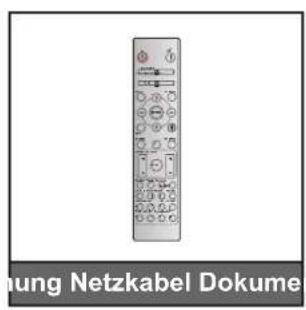
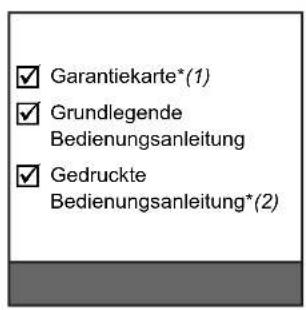
OPTOMA ZH506Te - SICHERHEIT 4 - 1

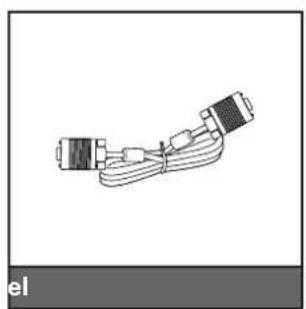
natural_image Coiled cable with two connectors, no text or symbols visible
OPTOMA ZH506Te - SICHERHEIT 4 - 2

natural_image Line drawing of a Tragetasche VGA device with two handles and a strap (no text or symbols on the device itself)
OPTOMA ZH506Te - SICHERHEIT 4 - 3

natural_image Diagram of a USB cable connector with multiple connectors and wires (no text or symbols)

Hinweis:

text_image Diagram of a projector unit with labeled components and internal ports, showing front and back views with numbered labels.

Hinweis:

natural_image Line drawing of a person sitting in a chair watching a television on a desk (no text or symbols present)
natural_image Simple line drawing of a person sitting in a chair facing a wall-mounted device, no text or symbols present
natural_image Line drawing of a person sitting in a chair watching a projector screen, with a monitor on the left (no text or symbols)
natural_image Illustration of a person sitting in a chair viewing a wall-mounted projector mounted on a screen (no text or symbols present)
text_image Diagram showing battery charge distribution before and after using a handheld device, with magnified view of charge distribution.
text_image Local Area Connection 2 Properties Networking Connect using: Atheros AR8151 PCI-E Gigabit Ethernet Controller (NDIS € Configure... This connection uses the following items: ✓ Client for Microsoft Networks ✓ QoS Packet Scheduler ✓ File and Printer Sharing for Microsoft Networks ✓ Internet Protocol Version 6 (TCP/IPv6) ✓ Internet Protocol Version 4 (TCP/IPv4) ✓ Link-Layer Topology Discovery Mapper I/O Driver ✓ Link-Layer Topology Discovery Responder Install... Uninstall Properties Description Transmission Control Protocol/Internet Protocol. The default wide area network protocol that provides communication across diverse interconnected networks. Internet Protocol Version 4 (TCP/IPv4) Properties General You can get IP settings assigned automatically if your network supports this capability. Otherwise, you need to ask your network administrator for the appropriate IP settings. Obtain an IP address automatically Use the following IP address: IP address: 192 . 168 . 0 . 99 Subnet mask: 255 . 255 . 255 . 0 Default gateway: 192 . 168 . 0 . 254 Obtain DNS server address automatically Use the following DNS server addresses: Preferred DNS server: 192 . 168 . 0 . 1 Alternate DNS server: . Validate settings upon exit Advanced... OK Cancel Internet Protocol Version 4 (TCP/IPv4) Properties
text_image Diagram showing connection between a laptop and an RJ-46 network device via USB port, with ports labeled in English.
text_image Administrator Internet Internet Explorer E-mail Outlook Express Windows Media Player Windows Messenger Tour Windows XP Windows Movie Maker Files and Settings Transfer Wizard All Programs My Documents My Recent Documents My Pictures My Music My Computer Control Panel Set Program Access and Defaults Connect To Printers and Files Help and Support Search Run... Log Off Turn Off Computer Start
text_image Network Connections LAM or High-Speed Internet Local Area Connection Connectors, Preloaded Struckbox Net Master Plus Rigs E344 Connection Connectors, Preloaded E344 Net Master Wireless Network Connection Net connected, Preloaded High (Low) Wireless With Low 400... Wizard New Connection Wizard Network Setup Wizard Subjects
text_image Network Connections File Edit View Favorites Tools Advanced Help Address Network Connections LAN or High-Speed Internet Local Area Connection Description, Precluded Product Networks 57.1.02 Wizard New Connection Wizard Enable Status Report Bridge Connections Create Shortcut Remove Properties Wireless Network Connection for Connection, Precluded Total(8) Wireless WITH LAN 406... View or Change settings for this connection, such as adapter, protocol, or mode configuration settings.

PROJEKTOR VERWENDEN

text_image Local Area Connection Properties General | Advanced | Connect us: Broadcom NetEase 57 or Organic Co Configure... This connection uses the following items: □ DoS Pocket Scheduler □ Networks, Manitoba Driver □ Internal Protocol ID (CP/CP) Install... Remove... Properties... Description Transmission Control Protocol/Internal Protocol. The default width is area network protocol that provides communication across diverse interconnected networks. □ Shog con in notification area when connected □ Notify go when this connection has limited to no connectivity OK Cancel
text_image Internet Protocol Version 4 (TC/IP+4) Properties General You can get IP settings assigned automatically if your network supports the capability. Otherwise, you need to ask your network administrator for the appropriate IP settings. Obtain an IP address automatically Up the following IP address: IP address: 182 . 168 , 0 . 90 Subject mask: 255 . 231 . 253 . 9 Default gateway: 182 . 168 , 0 . 254 Obtain DNS server address automatically Use the following DNS server addresses: Preferred DNS server: 182 . 168 , 0 . L Alternate DNS server: - - - Validate settings upon exit Advanced... OK Cancel
text_image Model: Optoma Tool Info Contact IT Help Optoma Projector Information Projector Status Projector Name Optoma HDHD Location Power Status Power On. Source HDMI Display Mode Cinema Projection Front Firmware Version RCL MAC Address 60.90 E9.16.58.17 Resolution 1000p 60Hz Lamp Hours 0 Brightness Mode Bright Assigned to Optoma Projector Error Status Off Error EXIT CRESTRON connected Eneronin Options

Haupt-Seite
OPTOMA ZH506Te - PROJEKTOR VERWENDEN - 1

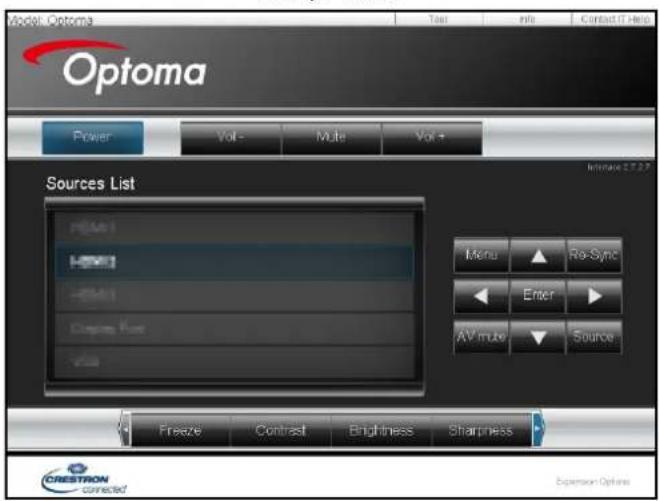
text_image Model Optoma Optoma Power Vol- Multi Vol+ Sources List H2401 H2401 H2401 Camps Mode Vss Menu Re-Sync Enter AV mode Source Freeze Contrast Brightness Sharpness CRESTRON connected Expansion Options

Werkzeuge-Seite
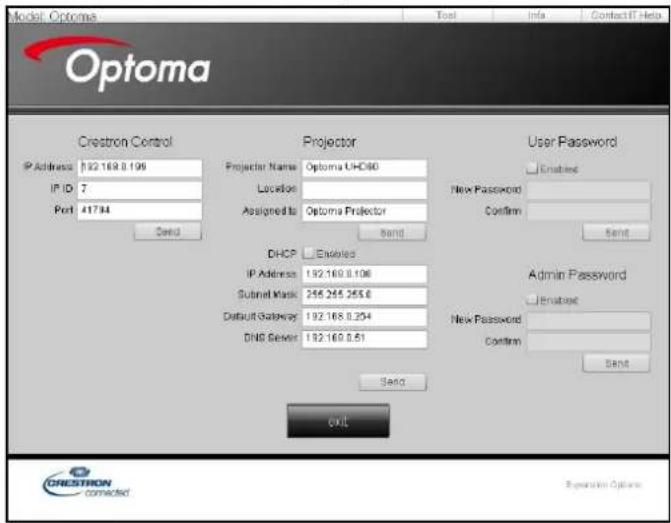
OPTOMA ZH506Te - PROJEKTOR VERWENDEN - 2

text_image Model: Optoma Test Info Contact IT Nets Optoma Creatron Control Projector User Password IP Address 192.169.8.199 IP ID 7 Port 41734 Send Projector Name Optoma UHC80 Location Assigned to Optoma Projector Send DHCP Enabled IP Address 192.169.8.196 Submit Mask 256.265.253.6 Default Gateway 192.169.8.294 DNS Server 192.169.8.51 Send Admin Password Enablee New Password Confirm Send OKL Expression Options

IT-Helpdesk kontaktieren
OPTOMA ZH506Te - PROJEKTOR VERWENDEN - 3

text_image Title Send

PROJEKTOR VERWENDEN

text_image Administrator Internet Internet Explorer E-mail Microsoft Office Outlook Windows Media Player OpenOffloading Writer See Program Access and Defaults MSN Explorer Outlook Express Windows Messenger All Programs > My Documents My Recent Documents My Pictures My Music My Computer Control Panel Set Program Access and Defaults Printers and Files Help and Support Search Run... Log Off Turn Off Computer Start
text_image Set Program Access and Details Windows Catalog Windows Update New Office Document Open Office Document Program Updates Active Resources General Startup Internet Explorer MSN Explorer Outlook Express Remote Assistance Windows Media Player Windows Messenger Accessibility Entertainment System Tools Address Book Calculator Command Prompt Proposed Park Program Compatibility Wizard
text_image Diagram of a laptop chassis showing labeled parts and directional arrows indicating assembly or component alignment.
text_image Diagram showing a laptop interior with labeled parts and two hands inserting a device into the case.

ZUSÄTZLICHE INFORMATIONEN

47697 Westinghouse Drive, Fremont, CA 94539, USA www.optomausa.com

888-289-6786 510-897-8601 services@optoma.com

Kanada

47697 Westinghouse Drive, Fremont, CA 94539, USA www.optomausa.com

888-289-6786 510-897-8601 services@optoma.com

Südamerika

47697 Westinghouse Drive, Fremont, CA 94539, USA www.optomausa.com

888-289-6786 510-897-8601 services@optoma.com

Europa

Unit 1, Network 41, Bourne End Mills Hemel Hempstead, Herts, HP1 2UJ, United Kingdom www.optoma.eu Service-Tel: +44 (0)1923 691865

+44 (0) 1923 691 800 +44 (0) 1923 691 888 service@tsc-europe.com

Benelux BV

Randstad 22-123 1316 BW Almere The Netherlands www.optoma.nl

+31 (0) 36 820 0252 +31 (0) 36 548 9052

Frankreich

Bâtiment E 81-83 avenue Edouard Vaillant 92100 Boulogne Billancourt, France

+33 1 41 46 12 20 +33 1 41 46 94 35 savoptoma@optoma.fr

Spain

C/ José Hierro,36 Of. 1C 28522 Rivas VaciaMadrid, Spain

+34 91 499 06 06 +34 91 670 08 32

Deutschland

Wiesenstrasse 21 W D40549 Düsseldorf, Germany

+49 (0) 211 506 6670 +49 (0) 211 506 66799 info@optoma.de

Skandinavien

Lerpeveien 25 3040 Drammen Norway

+47 32 98 89 90 +47 32 98 89 99 info@optoma.no

PO.BOX 9515 3038 Drammen Norway

Korea

WOOMI TECH.CO.,LTD. 4F, Minu Bldg.33-14, Kangnam-Ku, Seoul,135-815, KOREA korea.optoma.com

+82+2+34430004 +82+2+34430005

Japan

Unit A, 27/F Dragon Centre, 79 Wing Hong Street, +852-2396-8968 Cheung Sha Wan, +852-2370-1222 Kowloon, Hong Kong www.optoma.com.hk

China

5F, No. 1205, Kaixuan Rd., +86-21-62947376 Changning District +86-21-62947375 Shanghai, 200052, China www.optoma.com.cn

[Non-Text]

[Non-Text]

广力云智慧零售收银系统

[Non-Text]

[Non-Text]

[Non-Text]

[Non-Text]

[Non-Text]

[Non-Text]

[Non-Text]

[Non-Text]

[Non-Text]

[Non-Text]

[Non-Text]

[Non-Text]

[Non-Text]

[Non-Text]

[Non-Text]

[Non-Text]

[Non-Text]

[Non-Text]

[Non-Text]

[Non-Text]

[Non-Text]

[Non-Text]

e örtliche Nie

Japan

Japan 東京都足立区

朱永都是立区株式会社才。

コンタクトサ

(1) 2017年1月1日

Taiwan

12F. No 213

Xindian Dist.

Taiwan, R.O

www.optoma

Hongk

Unit A, 27/F Dragon Centre, 79 Wing Hong Street, +852-2396-8968 Cheung Sha Wan, +852-2370-1222 Kowloon, Hong Kong www.optoma.com

China

5F, No. 1205, Kaixuan Rd., +86-21-62947376 Changning District +86-21-62947375 Shanghai, 200052, China www.optoma.com.cn

[Non-Text]

[Non-Text]

PO.BOX 9515 3038 Drammen Norway

[Non-Text]

[Non-Text]

[Non-Text]

[Non-Text]

[Non-Text]

[Non-Text]

[Non-Text]

[Non-Text]

[Non-Text]

[Non-Text]

[Non-Text]

[Non-Text]

[Non-Text]

[Non-Text]

[Non-Text]

[Non-Text]

e örtliche Nie

Japan

東京都足立区

株式会社才

コンタクトセ

[Non-Text]

Taiwan

12F., No.213, Sec. 3, Beixin Rd., +886-2-8911-8600 Xindian Dist., New Taipei City 231, +886-2-8911-6550 Taiwan, R.O.C. services@optoma.com.tw www.optoma.com.tw asia.optoma.com

Hongk

Unit A, 27/F Dragon Centre, 79 Wing Hong Street, +852-2396-8968 Cheung Sha Wan, +852-2370-1222 Kowloon, Hong Kong www.optoma.com

China

5F, No. 1205, Kaixuan Rd., +86-21-62947376 Changning District +86-21-62947375 Shanghai, 200052, China www.optoma.com.cn

[Non-Text]

[Non-Text]

[Non-Text]

[Non-Text]

[Non-Text]
[Non-Text]
[Non-Text]
[Non-Text]
[Non-Text]
[Non-Text]
[Non-Text]
[Non-Text]
[Non-Text]
[Non-Text]
[Non-Text]
[Non-Text]
[Non-Text]
[Non-Text]
[Non-Text]
[Non-Text]
[Non-Text]
[Non-Text]
[Non-Text]
[Non-Text]
[Non-Text]
[Non-Text]
[Non-Text]
[Non-Text]
[Non-Text]
[Non-Text]
[Non-Text]
[Non-Text]
[Non-Text]

Manual assistant
Powered by Anthropic
Waiting for your message
Product information

Brand : OPTOMA

Model : ZH506Te

Category : Video projector