
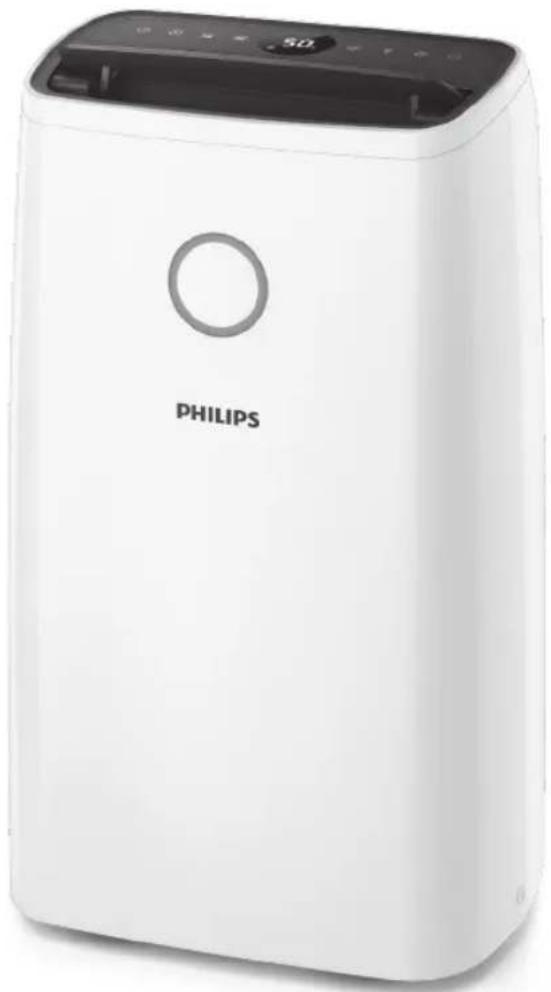
DE3203 - Dehumidifier PHILIPS - Free user manual and instructions
Find the device manual for free DE3203 PHILIPS in PDF.


| Product Type | Dehumidifier |
| Brand | Philips |
| Model | DE3203 |
| Moisture Extraction (30°C, 80% RH) | 20 L/day |
| Water Tank Capacity | 4 L |
| Power Consumption | 265 W |
| Airflow | 150 m³/h |
| Noise Level | 42 dB(A) |
| Humidity Control | Digital display with target humidity (30%-80%) |
| Continuous Drainage | Yes (via hose, not included) |
| Auto Defrost | Yes |
| Air Filter | Washable pre-filter |
| Timer | 1-12 hours |
| Dimensions (W x D x H) | 345 x 275 x 550 mm |
| Weight | 14.5 kg |
| Power Supply | 220-240 V, 50 Hz |
| Energy Efficiency Class | A+ |
| Refrigerant | R-290 (propane) |
| Operating Temperature Range | 5°C – 35°C |
| Warranty | 2 years |
Frequently Asked Questions - DE3203 PHILIPS
User questions about DE3203 PHILIPS
0 question about this device. Answer the ones you know or ask your own.
Ask a new question about this device
Download the instructions for your Dehumidifier in PDF format for free! Find your manual DE3203 - PHILIPS and take your electronic device back in hand. On this page are published all the documents necessary for the use of your device. DE3203 by PHILIPS.
USER MANUAL DE3203 PHILIPS
ZH-S User Manual 1
EN User manual 18
Table of Contents
1 Important 2
Safety 2
2 Your Air Dehumidifier 5
Product Overview 5
Controls Overview 6
3 Getting Started 7
Before First Use 7
Placing the Dehumidifier 7
Using the Aroma Function 7
4 Using the Dehumidifier 8
Humidity Indicator 8
Turning On and Off 8
Set humidity level 9
Select auto mode 9
Change fan speed 10
Select dry clothes mode 10
Use swing function 10
Set timer 11
Dehumidifier defrost 11
Use light on/off function 11
5 Empty the dehumidifier 12
Empty the water tank 12
Use continuous drain outlet 12
6 Clean 13
Clean the dehumidifier body 13
Clean the water tank 13
Clean the back cover 14
7 Storage 15
8 Troubleshooting 16
9 Warranty and Service 17
Ordering parts or accessories 17
10 Notices 17
Electromagnetic fields (EMF) 17
Recycling 17
1 Important
Safety
www.Philips.com/welcome°
Product overview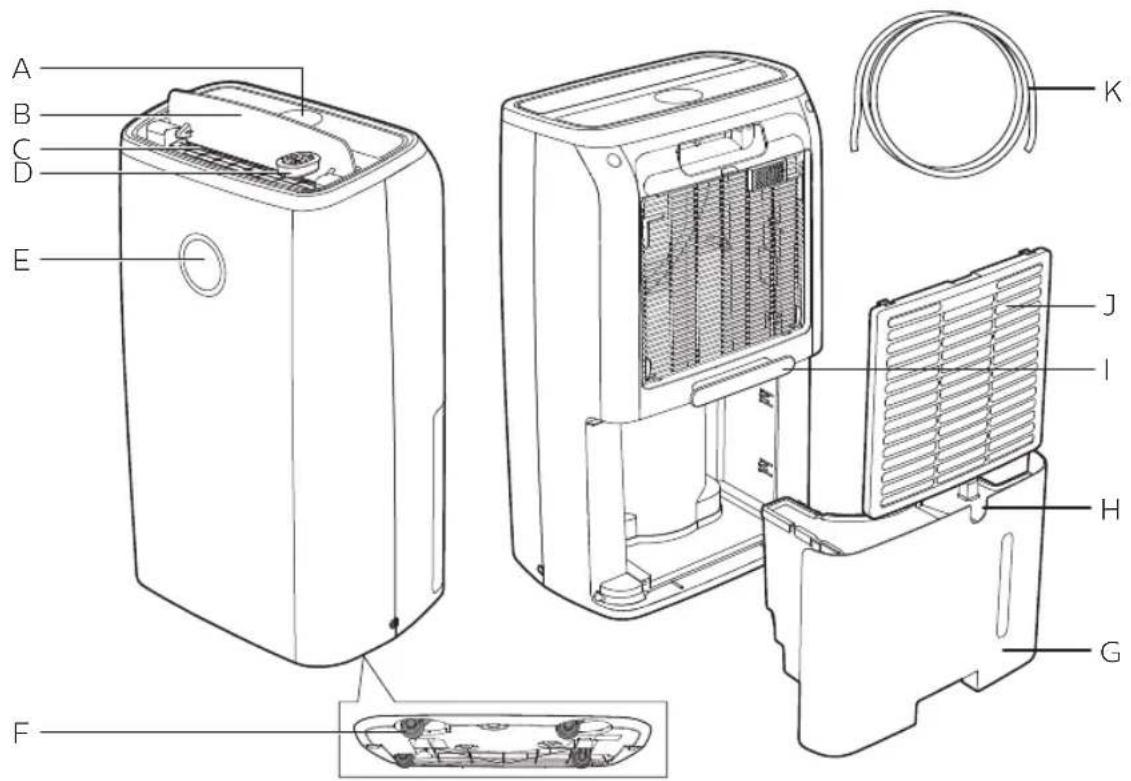
2 Remove the cover of the aroma box.
4 Add 2-3 drops of essential oil to the aroma pad.
4 Using the dehumidifier
Humidity indicator
Select automatic mode
2 Touch the ⇌ button again to deactivate the swing function.
Tip
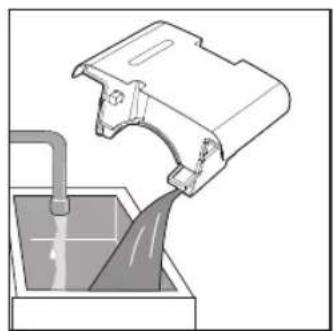
2 Open the water tank cover and pour water into the tank.
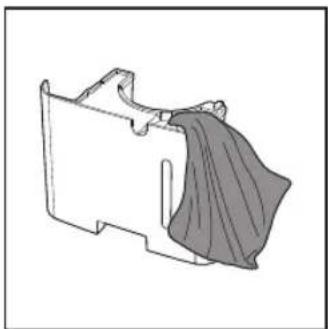
3 Dry the outside of the water tank with a clean cloth.
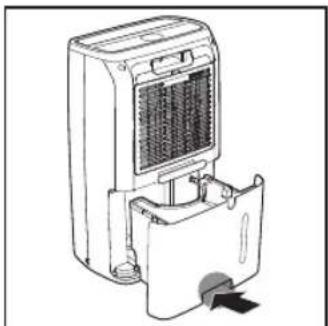
4 Put the water tank back into the dehumidifier.

Note
- After emptying the water tank, the dehumidifier will continue to operate.
Using the continuous drain outlet
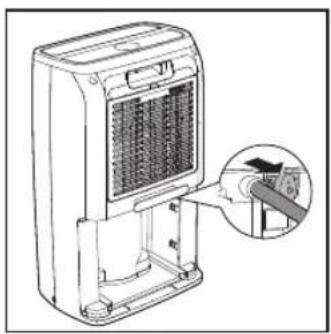
3 Connect the hose to the drain outlet.
4 Put the water tank back into the dehumidifier.
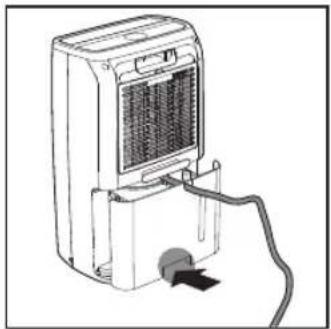

Note
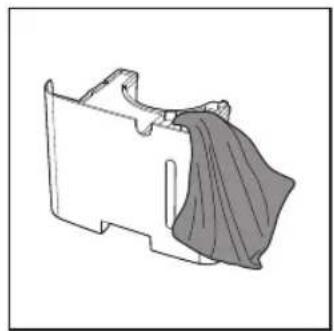
6 Dry the outside of the water tank with a clean cloth.
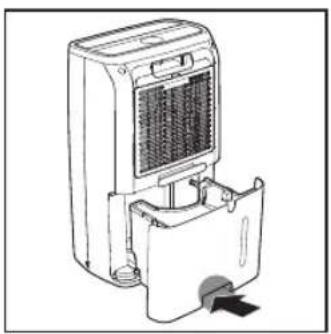
7 Put the water tank back into the dehumidifier.
Clean the back cover of the unit
Clean the back cover of the unit when necessary to keep it clean.

Note
- The back cover can be washed or cleaned with a vacuum cleaner.
3 Getting started 25
Before first use 25
Positioning the dehumidifier 25
Using the aroma function 25
4 Using the dehumidifier 27
The humidity light 27
Turning on and off 27
Setting the humidity level 28
Selecting the Auto mode 28
Changing the fan speed 29
Selecting laundry drying mode 29
Using the swing function 30
Setting the Timer 30
Defrosting the dehumidifier 30
Using the light on/off function 31
5 Draining the dehumidifier 31
Emptying the water tank 31
Using the continuous drainage 32
6 Cleaning 33
Cleaning the body of the dehumidifier 33
Cleaning the water tank 34
Cleaning the back cover 35
7 Storage 36
8 Troubleshooting 37
9 Guarantee and service 39
Order parts or accessories 39
10 Notices 39
Electromagnetic fields (EMF) 39
Recycling 40
1 Important
Safety
Read this user manual carefully before you use the dehumidifier, and save it for future reference.
Danger
- Do not spray any flammable materials such as insecticides or fragrance around the dehumidifier to avoid electric shock and/or a fire hazard.
- Do not drink the accumulated water, use it to feed animals, nor to water plants. Empty the water tank, and pour the water down the drain.
Warning
- Check if the voltage indicated on the bottom or indicated at the rear of the appliance corresponds to the local power voltage before you connect the appliance.
- Connect the dehumidifier to the power socket exclusively, and do not connect it through an extension cord to prevent fire hazard and/or electric shock.
- If the power cord is damaged, you must have it replaced by Philips, a service center authorized by Philips, or similarly qualified persons in order to avoid a hazard.
- Do not use the appliance if the plug, the power cord, or the appliance itself is damaged.
- This appliance is not intended for use by persons (including children) with reduced physical, sensory, or mental capabilities, or lack of experience and knowledge, unless they have been given supervision or instruction concerning use of the appliance by a person responsible for their safety. Children should be supervised to ensure that they do not play with the appliance.
- Do not start or stop the dehumidifier by plugging and unplugging the power cord.
- Do not block the air inlet and outlet, e.g., by placing items on the air outlet or in front of the air inlet.
- Do not insert your fingers or objects into the air inlet and outlet to prevent physical injury or product malfunction.
- Do not use the aroma function if you are allergic to essential oils.
- It is suggested not to use the aroma function if you have respiratory issues.
- If you feel unwell during the use of the aroma function, stop this function immediately.
- Do not use the aroma function for infants, pregnant women, or women in the lactation period.
- It is not recommended to use substances other than essential oils.
- This appliance can only be used for the intended purpose shown in the user manual.
Caution
- Do not turn the appliance on and off frequently.
- If the power socket used to power the dehumidifier has poor connections, the plug of the dehumidifier becomes hot. Make sure you plug the dehumidifier
into properly connected power socket.
• Always place and use the dehumidifier on a dry, stable, level, and horizontal surface. - Leave at least 40 cm free space behind and on both sides of the dehumidifier and leave at least 60 cm free space above it. Insufficient ventilation may cause overheating or fire hazard. - Do not use this dehumidifier when you have used indoor smoke-type insect repellents or in places with oily residues, burning incense, or chemical fumes. - Do not operate or store the dehumidifier under direct sunlight. - Do not use the dehumidifier near gas appliances, heating devices or fireplaces. - Do not use the dehumidifier in a bathroom or other places where it is likely to come in contact with water, or wash it with water.
- When you use the dehumidifier for drying laundry, hang your clothes from a distance where water droplets will not drip onto the dehumidifier.
- The dehumidifier is only intended for household use under normal operating conditions (5°C - 35°C).
- Do not use the dehumidifier in a room with major temperature changes.
- Run the power cord under carpeting, rugs, or runners. Arrange the cord away from areas where it may be tripped over.
- Make sure the water tank is properly installed before you switch on the dehumidifier.
- Do not touch the swing louver.
- Avoid knocking against the dehumidifier (the air inlet and outlet in particular) with hard objects. • Always unplug the dehumidifier after use and before you move or clean it. • Power off and unplug the dehumidifier before
draining the water from the tank. Otherwise, this may result in water leakage or electricity leakage.
- Do not drop the dehumidifier as this may cause personal injury, and damage to the floor or household items as a result of water spillage.
- Do not place anything on top of the dehumidifier.
- Do not stand on, sit on, or lean against the dehumidifier. This may cause the dehumidifier to tip over causing injury.
- Do not remove or dismantle the float in the tank; otherwise, the dehumidifier cannot detect when the tank is full and could result in water leakage.
- Do not use detergents, cleaning agents, abrasive powders, chemically treated dusters, gasoline, benzene, thinners or other solvents, as they can damage the dehumidifier or the water tank. This may result in water leakage.
- Mildew may form in the water tank, clean it every week with tap water. Then, wipe with a soft, dry cloth.
- If you do not use the dehumidifier for an extended period of time, make sure all parts are clean and dry.
- Do not use the dehumidifier for food preservation, art or scientific works.
- Do not point the airflow of the dehumidifier directly at the body for a prolonged period of time, especially where there is someone who is unable to use the humidity adjustment function. For instance: infant, child, or elderly person. This may harm the physical condition and lead to dehydration.
- Use the dehumidifier with cautions where the walls, furniture, and art works are vulnerable to dry air.
- Do not place the appliance directly below an air conditioner to prevent condensation from dripping onto the appliance which will cause short circuit and leakage of electricity.
- Do not use the dehumidifier in a room with major temperature changes, as this may cause
condensation inside the dehumidifier.
• To prevent interference, place the appliance at least 2m away from electrical appliances that use airborne radio waves such as TVs, radios, and radio-controlled clocks. - The appliance does not remove carbon monoxide (CO) or radon (Rn). It cannot be used a safety device in case of accidents with combustion processes and hazardous chemicals. - Never move the appliance by pulling the power cord. - This appliance is not a substitute for proper ventilation, regular vacuum cleaning, or use of an extractor hood or fan while cooking. - Do not sit or stand on the appliance. The appliance is equipped with omni wheels. Sitting or standing on the appliance may lead to potential injury.
Fuse Specification:
2010 T1.6A 250V~
2010 T5.0A 250V~
2 Your Air Dehumidifier
Congratulations on your purchase, and welcome to Philips!
To fully benefit from the support that Philips offers, register your product at www.Philips.com/welcome.
Product Overview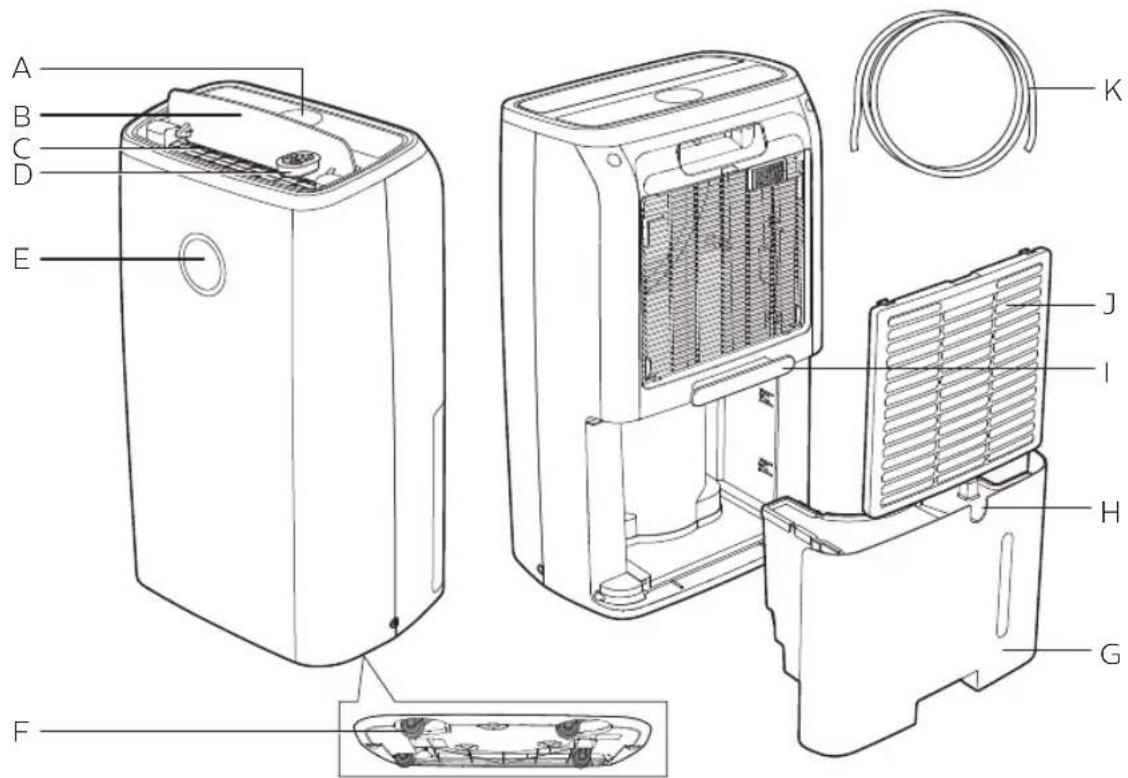
| A | Display panel | G | Water tank |
| B | Louver | H | Continuous drainage outlet |
| C | Air outlet | I | Power cord wrapping handle |
| D | Aroma box | J | Back cover |
| E | Humidity indication light | K | Hose |
| F | Omni wheels |
Controls Overview
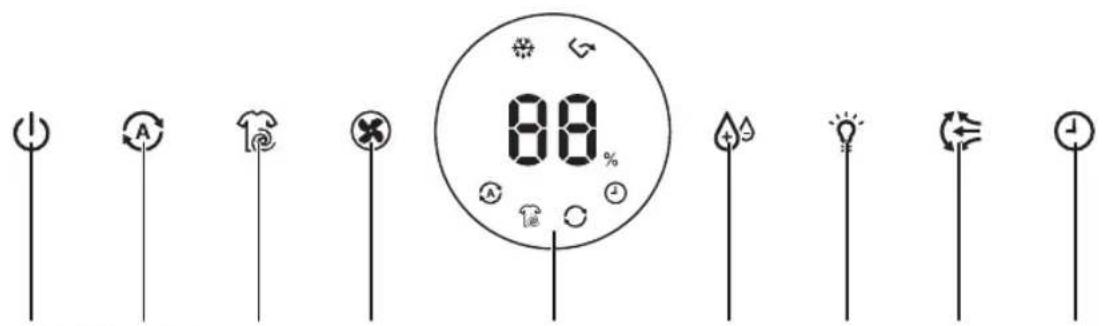
ABCDFEGHI
| A | On/off button | F | Humidity setting button |
| B | Auto mode button | G | Light on/off button |
| C | Laundry drying mode button | H | Auto swing button |
| D | Fan speed button | I | Timer button |
| E | Display screen |
Display panel
 | Auto defrosting indicator Laundry drying mode icon | ||
| [2274] | Water tank full alert Continuous mode icon | ||
 | Auto mode icon Timer indicator |
3 Getting started
Before first use
Before using the appliance, remove all packaging materials.

Note
- Before using the dehumidifier, place it horizontally.
Positioning the dehumidifier
To increase the dehumidifying effectiveness, position the dehumidifier in a location that can draw the most air.

Note
- When the dehumidifier is operating, do not open exterior doors or windows.
Using the aroma function

Note
- Only the aroma box is provided, the essential oils are not included. Please purchase and use the essential oils if needed.
- Read the user manual of essential oils carefully before using the aroma function. • Make sure the dehumidifier is disconnected with power before dropping essential oils into the aroma box.
- It is suggested not using the aroma function if you have respiratory issues.
- Do not use the aroma function if you are allergic to essential oils.
- If you feel unwell during the use of the aroma function, stop this function immediately.
- Do not use the aroma function for infants, pregnant women or women in lactation period.
- It's recommended not to use substances other than essential oils.
1 Remove the aroma box from the top of the appliance.
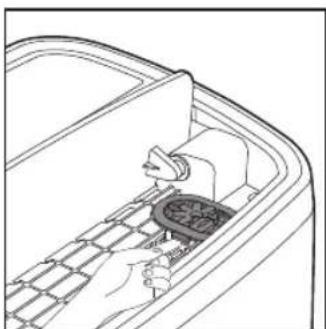
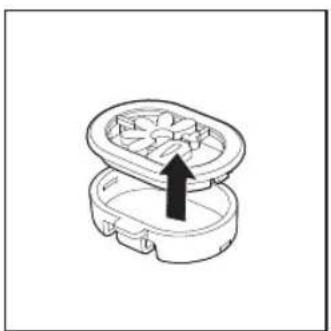
2 Remove the cover of the aroma box.
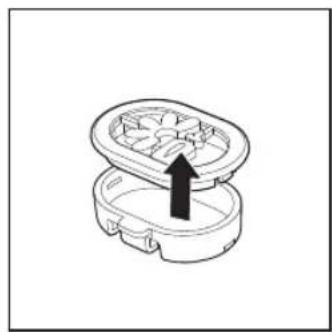
3 Remove the packing materials of the aroma pads and put one piece of pads into aroma box.
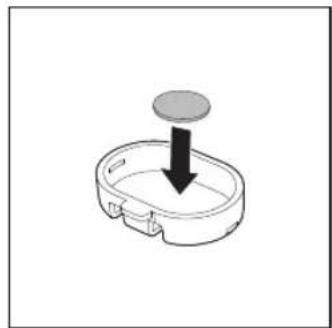
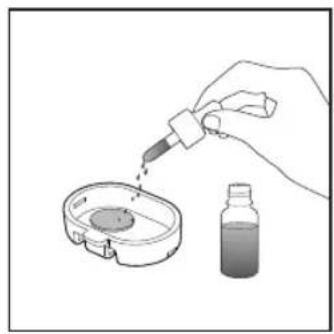
4 Drop in 2-3 drops of essential oils to the aroma pad.
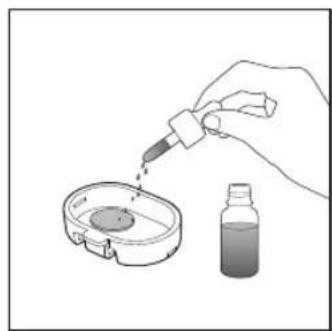
5 Close the cover of the aroma box and put it back onto the top of the dehumidifier.
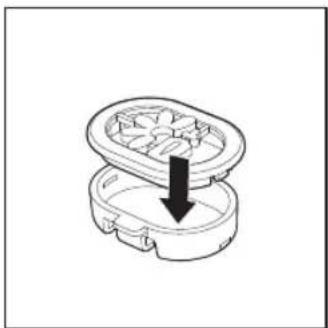
4 Using the dehumidifier
The humidity light
| Humidity light color | Ambient humidity level |
| Blue ≤5 (Lower ambient humidity level compared with preset humidity level) | |
| Purple 6-15 (Medium ambient humidity level compared with preset humidity level) | |
| Red >15 (Higher ambient humidity level compared with preset humidity level) | |
The humidity light automatically goes on when the appliance is switched on, and lights up all colors in sequence. In a short time the humidity sensors select the color that corresponds to the surrounding humidity.
Turning on and off

Note
- For optimum performance, close doors and windows.
- Keep curtains away from the air inlet or air outlet.
- For optimum dehumidification efficiency, place the dehumidifier on a flat, stable surface.
- Before turning on the dehumidifier, check if the power voltage corresponds to the voltage printed on the dehumidifier.
1. Put the plug of the dehumidifier in the wall outlet.
→ The dehumidifier beeps.
2. Touch the ⏻ button once to turn on the appliance.
→ The current humidity level is displayed on the screen. → After measuring the ambient humidity level, the humidity sensor automatically selects the color of the humidity light. → The dehumidifier goes to the Auto mode.
3. Touch and hold for 3 seconds to turn off the dehumidifier.
Setting the humidity level
You can set the desired humidity level to 40, 50, 60, 70, or -- percent.
- Touch the 🎨 button one or more times to set the desired humidity level, and the humidity indicator lights up.
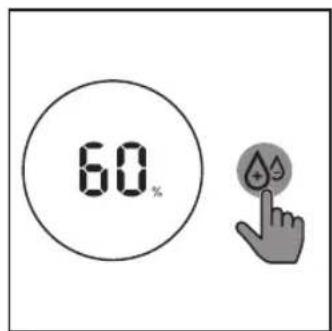

Note
- When the humidity is decreased to the selected level, the dehumidifier automatically stops dehumidifying the air, but the fan will continue working.
- If you do not set the humidity level, the default relative humidity is 60%.

Tip
• A comfortable humidity level is from RH 40% to RH 60%.
Continuous mode
In continuous mode, the appliance constantly works with the optimal dehumidifying settings.
- Touch the 📄 button repeatedly to select the continuous mode.
→ The and display on the screen.
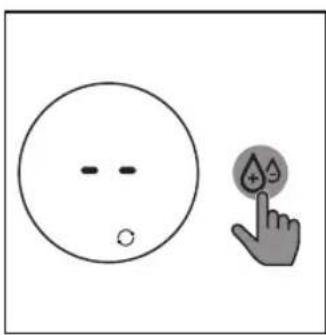
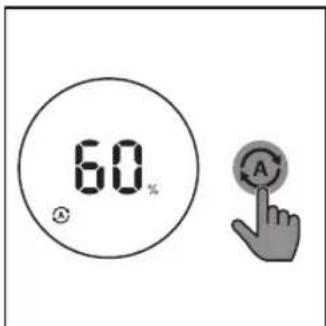
Selecting the Auto mode
- Touch the Auto mode button to select the Auto mode.

displays on the screen.
→ The current humidity level displays on the screen.
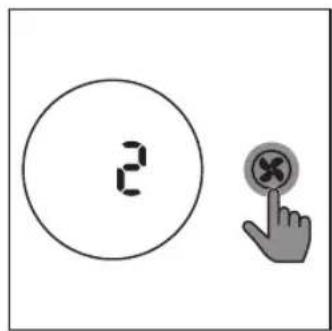
Changing the fan speed
- Touch the fan speed button repeatedly to select the fan speed (1, 2 or 3) you need.
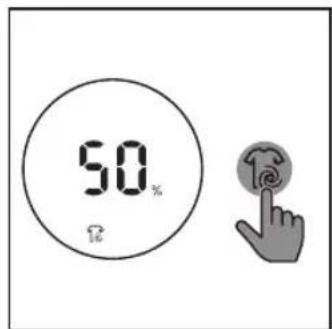
Selecting laundry drying mode
- Touch the 📋 button to select the laundry drying mode.
→ The dehumidifier goes to laundry drying mode.
→ The dehumidifier operates under the highest fan speed.
display on the screen.

Note
- Do not point the airflow of the dehumidifier directly at the body for a prolonged period of time, especially where there is someone who is unable to use the humidity adjustment function.
- When you use the dehumidifier for laundry drying, hang your clothes from a distance where water droplets will not drip onto the dehumidifier. • Make sure the air inlet and outlet are not blocked by the clothes. • Make sure that you dry the clothes on a safe and secure place from dropping to block the air inlet and outlet.

Tip
- Direct the louver until air flows directly onto the clothes to dry your clothes more efficiently.
Using the swing function
The louver is able to swing close to 90 degrees. Use the swing function to direct the air flow.
1 Touch the button to activate the swing function.
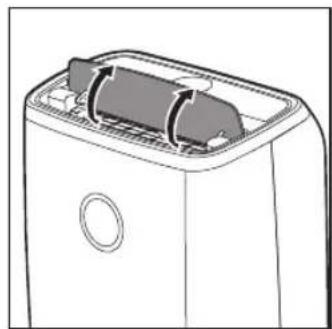
2 Touch the button again to deactivate the swing function.

Tip
• After the appliance is turned on, turn the louver upward to increase the dehumidifying efficiency.
Setting the Timer
With the timer function, you can let the dehumidifier operate for a set number of hours. When the set time has elapsed, the dehumidifier automatically turns off. The timer is available from 1 to 9 hours.
1 Touch the button to activate the timer.
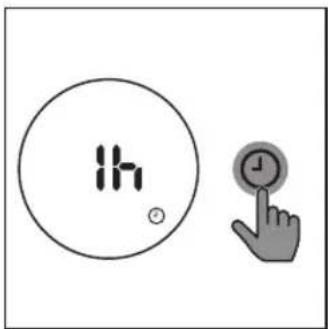
2 Touch the ⏻ button repeatedly to choose the number of hours you want the dehumidifier to operate.
- To deactivate the timer function, touch the ⏻ button repeatedly until - is displayed on the screen.
Defrosting the dehumidifier

Note
- The defrosting function is enabled only when the dehumidifier operates under dehumidifying mode.
The dehumidifier is equipped with a defrosting sensor to make sure it is in optimal condition when being used in cold weather. The dehumidifier automatically detects if defrosting is required.
When defrosting is required:
→ The indicator is on.
→ Defrosting will begin defrosting and continue until the dehumidifier is completely defrosted.
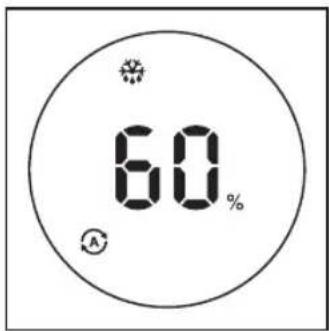

Note
- During defrosting, the dehumidifier operates in clothes dry mode.
- The dehumidifier will resume working and operate the previous settings after defrosting is completed.
Using the light on/off function
With the light on/off button, you can switch on or off the humidity light or the display screen.
1 Touch the light on/off button once, the humidity light will go off. 2 Touch the light on/off button again, the display screen will dim. 3 Touch the light on/off button for the third time, all lights will be on again.
5 Draining the dehumidifier
Emptying the water tank
When the water tank is full:
→ The appliance beeps, and the indicator is on.
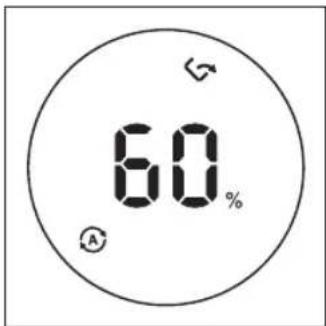
1 Hold the recess of the water tank, and pull it from the dehumidifier.
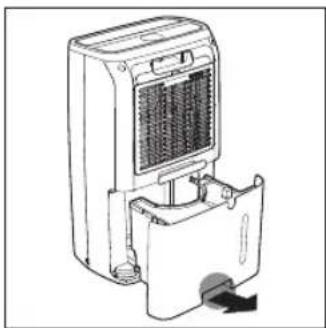
2 Open the water tank cover and empty the water into a sink.
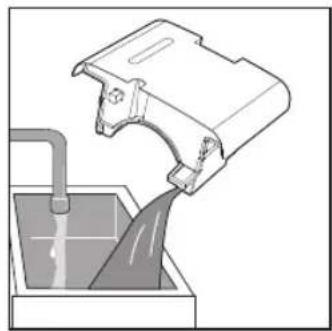
3 Wipe the outside of the water tank dry with a clean cloth.
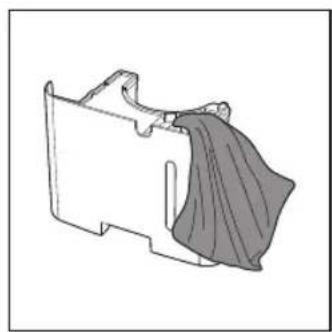
4 Put the water tank back into the dehumidifier.
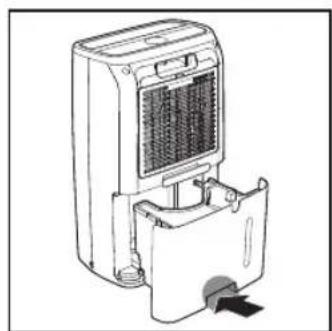

Note
- The dehumidifier will resume working after the water tank is emptied.
Using the continuous drainage
The dehumidifier can also drain excess water by attaching a hose. This allows you to operate the dehumidifier without emptying the water tank.
1. Turn off the dehumidifier and unplug it from the wall socket. 2. Remove the water tank from the dehumidifier.
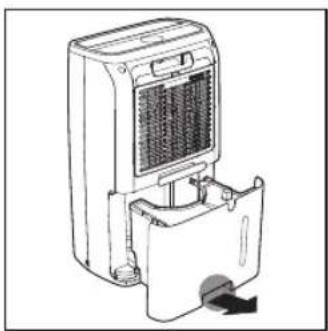
3. Connect the hose to the drainage outlet.
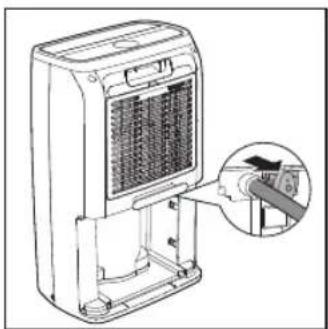
4. Put the water tank back into the dehumidifier.
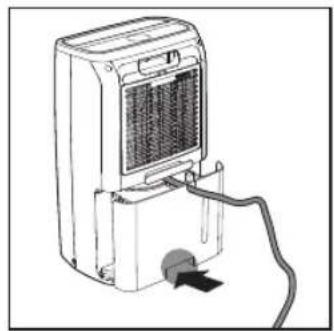

Note
- Put the water tank back into the dehumidifier even when using the continuous drainage, or the dehumidifier cannot operate normally. • Make sure the hose fits tightly so that no water leaks from the dehumidifier.
- When using the continuous drainage, make sure the hose is laid flat and not knotted. • Make sure the hose is not immersed in water, nor raised higher than the continuous drainage hole.
- Place the outlet of the hose somewhere it can easily drain.
- Check the dehumidifier once a week when draining water continuously or if it is left unattended for an extended period of time.
6 Cleaning

Note
• Always turn the appliance off and unplug it from the electrical outlet before cleaning. - Never immerse the appliance in water or any other liquid. - Never use abrasive or aggressive cleaning agents such as bleach or alcohol to clean any part of the appliance. • The back cover is washable.
Cleaning the body of the dehumidifier
Regularly clean the inside and outside of the dehumidifier to prevent dust from collecting.
1 Use a soft, dry cloth to clean both the interior and exterior of the appliance. 2 The air outlet can also be cleaned with a dry, soft cloth.
Cleaning the water tank
Clean the water tank every day to keep it clean.
1 Switch off the dehumidifier and unplug from the electrical outlet.
2 Remove the water tank from the dehumidifier.
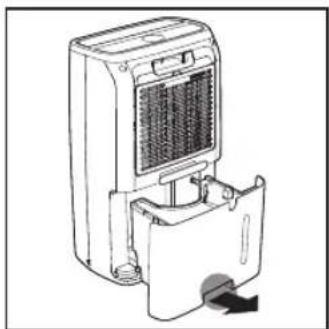
3 Open the water tank cover and fill the water tank for 1/3 with water.
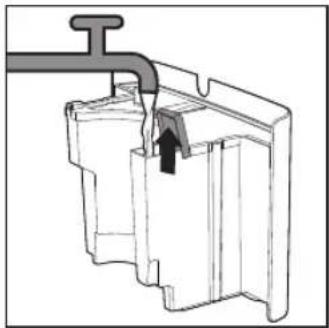
4 Add some mild washing-up liquid to the water in the water tank.
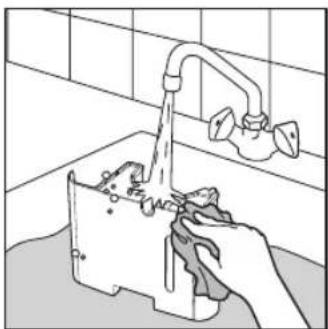
5 Wash the water tank under running tap water, and clean the insides of it with a soft clean cloth.
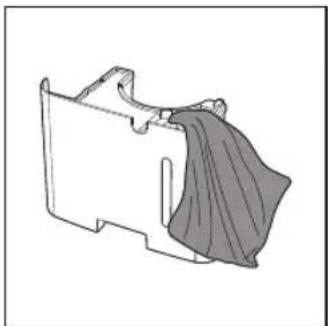
6 Wipe the outside of the water tank dry with a clean cloth.
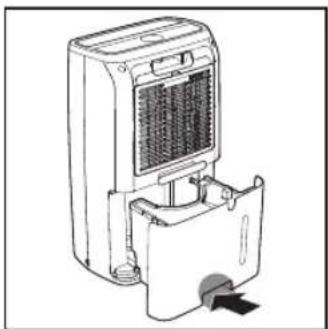
7 Put the water tank back into the dehumidifier.
Cleaning the back cover
Clean the back cover when necessary to keep it clean.

Note
- The back cover is washable and vacuum cleanable.
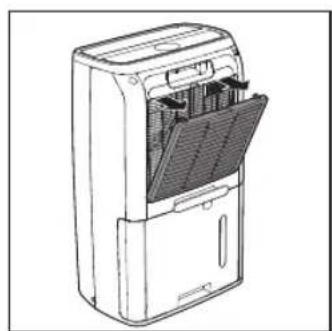
1 Switch off the dehumidifier and unplug from the electrical outlet. 2 Pull the back cover, and remove it from the dehumidifier.
3 If the back cover is very dirty, use a soft brush to brush away the dust. Wash the back cover under running tap water.
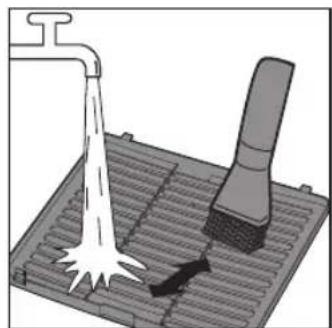
4 Allow the back cover to air dry thoroughly before placing it back in the dehumidifier.
5 Put the back cover back into the appliance.
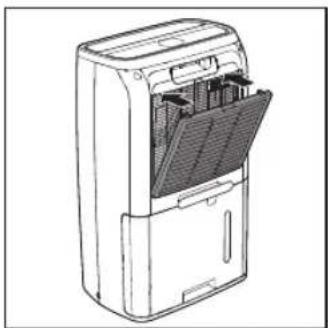
6 Put the plug of the dehumidifier in the wall outlet. 7 Wash your hands thoroughly after cleaning the back cover.
7 Storage
1 Turn off the dehumidifier and unplug it from the wall outlet. 2 Clean the dehumidifier, empty the water tank, and wash the back cover (see chapter 'Cleaning'). 3 Let all parts dry thoroughly before storing. 4 Store the dehumidifier in a cool, dry location.
8 Troubleshooting
This chapter summarizes the most common problems you could encounter with the dehumidifier. If you are unable to solve the problem with the information below, visit www.philips.com/support or contact the Consumer Care Center in your country for assistance.
Problem Possible solution
| The appliance does not work even though it is plugged in to the wall socket and switched on. | · The timer is set to a specific time interval. Reset or turn off the timer.· Try a different electrical socket or check the wall switch.· Make sure that the water tank is empty and placed in the dehumidifier properly. |
| The water tank is empty but the indicator is still on. | · Remove the water tank from the dehumidifier and place it back to the dehumidifier again. |
| There is no air dehumidification in the room or the dehumidifying effectiveness is low. | · Make sure the air inlet and outlet are not blocked.· The room humidity is below what the dehumidifier is set to. Select a lower humidity level.· Make sure that no exterior doors or windows are open.· The current temperature is low in the room. Try again until the temperature rises up. |
| Water leaks from the dehumidifier. | · Make sure that the dehumidifier is in good condition and the water tank is not cracked. |
| The dehumidifier does not collect water. | · The humidity is low. The dehumidifier automatically resumes working when the humidity level is increased.· The temperature is low. Wait until the temperature rises up. |
Problem Possible solution
| The airflow that comes out of the air outlet is significantly weaker than before. | · The back cover is dirty. Clean the back cover (see chapter "Cleaning"). |
| The dehumidifier produces a unpleasant smell. | · The first few times you use the dehumidifier, it may produce a plastic smell. This is normal.· If the dehumidifier produces a burnt odor, switch OFF and unplug from the electrical outlet. Contact the Consumer Care Center in your country for assistance. |
| The dehumidifier is loud. | · If the dehumidifier is too loud, change the fan speed to a lower fan speed level. When using the product in a bedroom at night, choose a lower fan speed.· Make sure that the dehumidifier is placed on a flat and stable surface. |
| Error codes "E3" "E4" or "E5" displays on the screen. | · The dehumidifier has malfunctions. Contact the Consumer Care Center in your country. |
9 Guarantee and service
If you need information or if you have a problem, please visit the Philips website at www.philips.com or contact the Philips Consumer Care Center in your country (you can find its phone number in the worldwide guarantee leaflet). If there is no Consumer Care Center in your country, go to your local Philips dealer.
Order parts or accessories
If you have to replace a part or want to purchase an additional part, go to your Philips dealer or visit www.philips.com/support.
If you have problems obtaining the parts, please contact the Philips Consumer Care Center in your country (you can find its phone number in the worldwide guarantee leaflet).
10 Notices
Electromagnetic fields (EMF)
This Philips appliance complies with all applicable standards and regulations regarding exposure to electromagnetic fields.
Compliance with EMF
Koninklijke Philips N.V. manufactures and sells many products targeted at consumers, which, like any electronic apparatus, in general have the ability to emit and receive electromagnetic signals.
One of Philips' leading Business Principles is to take all necessary health and safety measures for our products, to comply with all applicable legal requirements and to stay well within the EMF standards applicable at the time of producing the products.
Philips is committed to develop, produce and market products that cause no adverse health effects. Philips confirms that if its products are handled properly for their intended use, they are safe to use according to scientific evidence available today.
Philips plays an active role in the development of international EMF and safety standards, enabling Philips to anticipate further developments in standardization for early integration in its products.
Recycling
Do not throw away the product with the normal household waste at the end of its life, but hand it in at an official collection point for recycling. By doing this, you help to preserve the environment.
Follow your country's rules for the separate collection of electrical and electronic products. Correct disposal helps prevent negative consequences for the environment and human health.
PHILIPS
Product Warranty Card
Warranty and Service:


- TABLE OF CONTENTS
- IMPORTANT
- SAFETY
- USING THE DEHUMIDIFIER
- SELECT AUTOMATIC MODE
- TIP
- NOTE
- USING THE CONTINUOUS DRAIN OUTLET
- CLEAN THE BACK COVER OF THE UNIT
- GETTING STARTED
- DRAINING THE DEHUMIDIFIER
- CLEANING
- STORAGE
- TROUBLESHOOTING
- GUARANTEE AND SERVICE
- NOTICES
- DANGER
- WARNING
- CAUTION
- YOUR AIR DEHUMIDIFIER
- CONTROLS OVERVIEW
- DISPLAY PANEL
- BEFORE FIRST USE
- POSITIONING THE DEHUMIDIFIER
- USING THE AROMA FUNCTION
- TURNING ON AND OFF
- SETTING THE HUMIDITY LEVEL
- CONTINUOUS MODE
- SELECTING THE AUTO MODE
- CHANGING THE FAN SPEED
- SELECTING LAUNDRY DRYING MODE
- USING THE SWING FUNCTION
- SETTING THE TIMER
- DEFROSTING THE DEHUMIDIFIER
- USING THE LIGHT ON/OFF FUNCTION
- EMPTYING THE WATER TANK
- USING THE CONTINUOUS DRAINAGE
- CLEANING THE BODY OF THE DEHUMIDIFIER
- CLEANING THE WATER TANK
- CLEANING THE BACK COVER
- ORDER PARTS OR ACCESSORIES
- ELECTROMAGNETIC FIELDS (EMF)
- COMPLIANCE WITH EMF
- RECYCLING
- PHILIPS
- PRODUCT WARRANTY CARD
- WARRANTY AND SERVICE
Brand : PHILIPS
Model : DE3203
Category : Dehumidifier