
DE5207 - Dehumidifier PHILIPS - Free user manual and instructions
Find the device manual for free DE5207 PHILIPS in PDF.


| Product Type | Dehumidifier and Air Purifier 2-in-1 |
| Brand | Philips |
| Model | DE5207 |
| Dimensions (W x H x D) | 300 x 550 x 250 mm |
| Weight | 8.5 kg |
| Power Consumption | 225 W |
| Voltage | 220-240 V / 50-60 Hz |
| Dehumidification Capacity | 13 L/day (at 30°C, 80% RH) |
| Water Tank Capacity | 3.5 L |
| Airflow | 220 m³/h |
| Noise Level | 25 - 44 dB (depending on mode) |
| Suitable Room Size | Up to 50 m² |
| Filter Type | NanoProtect HEPA + Activated Carbon |
| Operating Modes | Auto, Continuous, Silent, Turbo |
| Humidity Control | Target humidity adjustable (40% - 70% RH) |
| Air Purification Technology | VitaShield IPS |
| Special Features | Air Multiplier, Auto restart, Full tank indicator, Timer |
| Safety | Auto shut-off when tank full, Overheat protection |
| Filter Maintenance | Clean every 2 months, Replace annually |
| Cord Length | 1.8 m |
| Energy Efficiency | Class A (EU) |
Frequently Asked Questions - DE5207 PHILIPS
User questions about DE5207 PHILIPS
0 question about this device. Answer the ones you know or ask your own.
Ask a new question about this device
Download the instructions for your Dehumidifier in PDF format for free! Find your manual DE5207 - PHILIPS and take your electronic device back in hand. On this page are published all the documents necessary for the use of your device. DE5207 by PHILIPS.
USER MANUAL DE5207 PHILIPS
© 2022 Philips Domestic Appliances Holding, CV.
1000159 5142 (8/31/2022)


HN User manual 1 /H | 使用手册 19



Contents
1 Important 2
Safety 2
2 Your Philips 2-in-1 Air
Dehumidifier and Purifier 6
Product Overview (fig.①) 6
Controls Overview (fig.②) 6
3 Getting started 7
Installing the filter 7
Positioning the
dehumidifier 7
4 Using the dehumidifier 8
The air quality light 8
Turning on and off 8
Setting the humidity level 8
Changing the fan speed 9
Using the purification only mode 9
Using the swing function 10
Setting the Timer 10
Defrosting the
dehumidifier 10
Setting the child lock 11
Using the light on/off
function 11
5 Draining the dehumidifier 11
Emptying the water tank 11
Using the continuous
drainage 11
6 Cleaning 12
Cleaning the body of the dehumidifier 12
Cleaning the water tank 13
Cleaning the pre-filter 13
Cleaning the air quality sensor 14
7 Replacing the HEPA filter 14
HEPA filter replacement indicator 14
Replacing the HEPA filter 14
8 Storage 15
9 Troubleshooting 16
10 Guarantee and support 18
Order parts or accessories 18
11 Notices 18
Electromagnetic fields (EMF) 18
Recycling 18
1 Important
Safety
Read this user manual carefully before you use the dehumidifier, and save it for future reference.
Danger
- Do not spray any flammable materials such as insecticides or fragrance around the dehumidifier to avoid electric shock and/or a fire hazard.
- Do not drink the accumulated water, use it to feed animals, nor to water plants. Empty the water tank, and pour the water down the drain.
Warning
- Check if the voltage indicated on the bottom or indicated at the rear of the appliance corresponds to the local power voltage before you connect the appliance.
- Connect the dehumidifier to the power socket exclusively, and do not connect it through an extension cord to prevent
fire hazard and/ or electric shock.
- If the power cord is damaged, you must have it replaced by Philips, a service center authorized by Philips, or similarly qualified persons in order to avoid a hazard.
- Do not use the appliance if the plug, the power cord, or the appliance itself is damaged.
- This appliance is not intended for use by persons (including children) with reduced physical sensory or mental capabilities, or lack of experience and knowledge, unless they have been given supervision or instruction concerning use of the appliance by a person responsible for their safety.
- Children should be supervised to ensure that they do not play with the appliance.
- Do not start or stop the dehumidifier by plugging and unplugging the power cord.
- Do not block the air inlet and outlet, e.g. by placing items on the air outlet or in front of the air inlet.
- Do not insert your fingers or objects into the air inlet and outlet to prevent physical injury or product malfunction.
Caution
- Do not turn the appliance on and off frequently.
- If the power socket used to power the dehumidifier has poor connections, the plug of the dehumidifier becomes hot. Make sure you plug the dehumidifier into a properly connected power socket. Always place and use the dehumidifier on a dry, stable, level, and horizontal surface.
- Leave at least 40 cm free space behind and on both sides of the dehumidifier and leave at least 60 cm free space above it. Insufficient ventilation may cause overheating or fire hazard.
- Do not use this dehumidifier when you have used indoor smoke-type insect repellents or in places with oily residues, burning incense, or chemical fumes.
- Do not operate or store the dehumidifier under direct sunlight.
- Do not use the dehumidifier near gas appliances, heating devices or fireplaces.
- Do not use the dehumidifier in a bathroom or other places where it is likely to come in contact with water, or wash it with water.
- When you use the dehumidifier for drying laundry, hang your clothes from a distance where water droplets will not drip onto the dehumidifier.
- The dehumidifier is only intended for household use under normal operating conditions (5°C - 35°C).
- Do not use the dehumidifier in a room with major temperature changes.
- Run the power cord under carpeting, rugs, or runners. Arrange the cord away from areas where it may be tripped over.
- Make sure the filters and the water tank are properly installed before you switch on the dehumidifier.
- Do not touch the swing louver.
- Avoid knocking against the dehumidifier (the air inlet and outlet in particular) with hard objects.
- Always unplug the dehumidifier after use and before you move or clean it.
- Power off and unplug the dehumidifier before draining the water from the tank. Otherwise, this may result in water leakage.
- Always move the dehumidifier in an upright position with handle, and do not carry it horizontally.
- Do not drop the dehumidifier as this may cause personal injury, and damage to the floor or household items as a result of water spillage.
- Do not place anything on top of the dehumidifier.
- Do not stand on, sit on, or lean against the dehumidifier. This may cause the dehumidifier to tip over causing injury.
- Do not remove or dismantle the float in the tank; otherwise, the dehumidifier cannot detect when the tank is full and could result in water leakage.
- Do not use detergents, cleaning agents, abrasive powders, chemically treated dusters, gasoline, benzene, thinners or other solvents, as they can damage the dehumidifier or the water tank. This may result in water leakage.
- Mildew may form in the water tank, clean it every week with tap water. Then, wipe with a soft, dry cloth.
- If you do not use the dehumidifier for an extended period of time, make sure all parts are clean and dry.
- Do not use the dehumidifier for food preservation, art or scientific works.
· Do not point the airflow of the dehumidifier directly at
the body for a prolonged period of time, especially where there is someone who is unable to adjust the humidity. For instance: infant, child, or elderly person. This may harm the physical condition and lead to dehydration.
- Use the dehumidifier with cautions where the walls, furniture, and art works are vulnerable to dry air.
- Do not place the appliance directly below an air conditioner to prevent condensation from dripping onto the appliance which will cause short circuit and leakage of electricity.
- Only use the original Philips filters specially intended for this appliance. Do not use any other filters.
- Burning the filter may cause irreversible damage to humans or other creatures. Do not use the filter as fuel or for similar purposes. · Always lift or move the appliance by the handle at the top of the appliance.
- Do not use the dehumidifier in a room with major temperature changes, as this may cause
condensation inside the dehumidifier.
• To prevent interference, place the appliance at least 2m away from electrical appliances that use airborne radio waves such as TVs, radios, and radio-controlled clocks. · The appliance does not remove carbon monoxide (CO) or radon (Rn). It cannot be used a safety device in case of accidents with combustion processes and hazardous chemicals. · Never move the appliance by pulling the power cord. · This appliance is not a substitute for proper ventilation, regular vacuum cleaning, or use of an extractor hood or fan while cooking. - If the appliance is not used for a long period of time, remove the HEPA filter from the dehumidifier and store it separately in a cool, dry place. - Do not sit or stand on the appliance. The appliance is equipped with unilateral rotating wheels. Sitting or standing on the appliance may lead to potential injury.
Fuse Specification:
T2.0A 250V~
T5.0A 250V~
2 Your Philips 2-in-1 Air Dehumidifier and Purifier
Congratulations on your purchase, and welcome to Philips!
To fully benefit from the support that Philips offers, register your product at www.Philips.com/welcome.
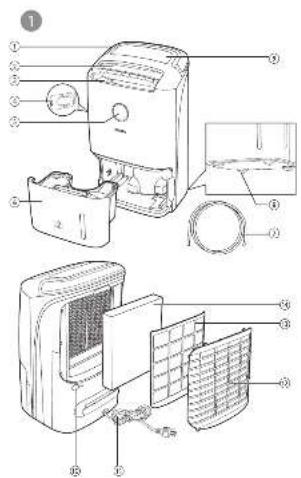
Product Overview (fig.①)
| 1 | Handle 8 Unilateral rotating wheels | ||
| 2 | Louver 9 Display panel | ||
| 3 | Air outlet 10 Continuous drainage outlet | ||
| 4 | Air quality sensor 11 Power cord | ||
| 5 | Air quality light | 12 | Rear cover with air inlet |
| 6 | Water tank 13 Pre-filter | ||
| 7 | Hose 14 NanoProtect filter HEPA Series 1 | (FY1119) |
Controls Overview (fig.②)
| 1 | On/off button | 6 | Humidity level setting button |
| 2 | Child lock button 7 Light on/off button | ||
| 3 | Auto swing button 8 Purification ONLY button | ||
| 4 | Fan speed button | 9 Timer button | |
| 5 | Display screen |
Display panel
 | HEPA filter replacement alert | Auto mode icon | |
 | Auto defrosting indicator | Laundry drying mode icon | |
 | Water tank full alert | Continuous mode icon | |
| [A6DB] | Pre-filter cleaning alert | Purification ONLY mode icon |
3 Getting started
Installing the filter

Note
- Make sure that the appliance is unplugged before installing the filter.
Before using the appliance, remove all packaging materials from the filter and place the filter into the appliance as described as follows.
1 Pull the top part of the rear panel to remove it from the appliance (fig.③). 2 Take out the HEPA filter and the pre-filter (fig.④). 3 Remove all packaging materials from the HEPA filter (fig.⑤). 4 Place the HEPA filter into the dehumidifier and then the pre-filter (fig.6).

Note
- Make sure that the HEPA filter and the pre-filter are properly attached to the dehumidifier.
5 Reattach the rear cover by pressing the bottom part of the rear cover onto the appliance first (1). Then, gently push the rear cover against the body of the appliance (2) (fig.⑦).
6 Wash your hands thoroughly after installing filters.
Positioning the dehumidifier
To increase the dehumidifying effectiveness, position the dehumidifier in a location that can draw the most air.

Note
- When the dehumidifier is operating, do not open exterior doors or windows.
4 Using the dehumidifier
The air quality light
| Color of the air quality light | Air quality level |
| Blue Good | |
| Blue-violet Fair | |
| Red-purple Unhealthy | |
| Red Very unhealthy |
The air quality light automatically goes on when the appliance is switched on, and lights up all colors in sequence. In a short time the air quality sensors select the color that corresponds to the surrounding air quality of airborne particles.
Turning on and off

Note
- For optimum performance, close doors and windows.
- Keep curtains away from the air inlet or air outlet.
- For optimum dehumidification efficiency, place the dehumidifier in a flat, stable surface.
- Before turning on the dehumidifier, check if the power voltage corresponds to the voltage printed on the dehumidifier.
1 Put the plug of the dehumidifier in the wall outlet.
→ The dehumidifier beeps.
2 Touch the ⏻ button once to turn on the appliance (fig.⑧).
→ The current humidity level is displayed on the screen. → After measuring the air quality for a short time, the air quality sensor automatically selects the color of the air quality light. → The dehumidifier goes to combi AUTO mode.
3 Touch and hold ⏻ for 3 seconds to turn off the appliance.
Setting the humidity level
You can set the desired humidity level to 40, 50, 60, 70, or 80 percent.
1 Touch the 📄 button one or more times to set the desired humidity level, and the humidity indicator lights up (fig.⑨).

Note
- When the humidity is decreased to the selected level, the dehumidifier automatically stops dehumidifying the air, but the fan will continue working.
- If you do not set the humidity level, the default humidifier is 60%.
- You can touch the button for 5 seconds to display the current ambient temperature.

Tip
• A comfortable humidity level is from 40RH% to 60RH%.
Continuous mode
In continuous mode, the appliance constantly works with the optimal dehumidifying settings.
1 Touch the button repeatedly to select the continuous mode (fig.⑩). → The and display on the screen.
Changing the fan speed
You can select the desired fan speed (Auto, 1, 2, 3, and 4), or clothes dry mode.
Auto
- Touch the fan speed button repeatedly to select the auto mode (fig. 11).

Note
- You can adjust the humidity settings manually by touching the button.
Manual
- Touch the fan speed button repeatedly to select the fan speed you need (fig. 12).
Laundry drying mode
- Touch the button until "t" is displayed to select the laundry drying mode (fig. 13). → The dehumidifier goes to laundry drying mode. → The dehumidifier operates under the highest fan speed. → "t" and "t" display on the screen.

Note
- Do not point the airflow of the dehumidifier directly at the body for a prolonged period of time, especially where there is someone who is unable to adjust the humidity.
- When you use the dehumidifier for laundry drying, hang your clothes from a distance where water droplets will not drip onto the dehumidifier.
• Make sure the air inlet and outlet are not blocked by the clothes.
• Make sure that you dry the clothes on a safe and secure place from dropping to block the air inlet and outlet.

Tip
- Direct the louvre until air flows directly onto the clothes to dry your clothes more efficiently.
Using the purification only mode
The appliance can be used in purification only mode.
1 Touch the button to access purification only mode (fig.14). → The appliance operates under auto mode by default. → The dehumidifier will stop dehumidifying the air. → The and the display on the screen.
2 Touch the fan speed button ✗ to select the desired fan speed (fig.15). → The fan speed and display on the screen. 3 Touch the button again to exit the purification only mode. → The dehumidifier goes to combi AUTO mode.

Note
- Whenever the current mode of appliance works, it goes to purification only mode when touching the button.
- Humidity setting and laundry drying mode are off in the purification only mode.
Using the swing function
The louver is able to swing up to 90 degrees. Use the swing function to direct the air flow.
1 Touch the button to activate the swing function (fig.16). 2 Touch the button again to deactivate the swing function.

Tip
• After the appliance is turned on, turn the louver upward to increase the dehumidifying efficiency.
Setting the Timer
With the timer function, you can let the dehumidifier operate for a set number of hours. When the set time has elapsed, the dehumidifier automatically turns off. The timer is available from 1 to 9 hours.
1 Touch the button to activate the timer (fig. 17). 2 Touch the power button repeatedly to choose the number of hours you want the dehumidifier to operate (fig. 18).
- To deactivate the timer function, touch the power button repeatedly until "-" is displayed on the screen.
Defrosting the dehumidifier

Note
- The defrosting function is enabled only when the dehumidifier operates under dehumidifying mode.
The dehumidifier is equipped with a defrosting sensor to make sure it is in optimal condition when being used in cold weather. The dehumidifier automatically detects if defrosting is required.
When defrosting is required:
→ The indicator light is on (fig. 19). → Defrosting will begin and continue until the dehumidifier is completely defrosted.

Note
- During defrosting, the dehumidifier operates in clothes dry mode.
- The dehumidifier will resume working and operate the previous settings after defrosting is completed.
Setting the child lock
1 Touch and hold the child lock button for 3 seconds to activate child lock (fig. 20).
→ "L" displays on the screen for 3 seconds. → When the child lock is on, all the other buttons are not responsive.
2 Touch and hold the child lock button for 3 seconds again to deactivate child lock (fig. 21).
→ "UL" displays on the screen for 3 seconds.
Using the light on/off function
With the light on/off button, you can switch on or off the air quality light, the display screen and the function indicators if desired.
1 Touch the light on/off button once, the air quality light will go off. 2 Touch the light on/off button again, the display screen will dim. 3 Touch the light on/off button for the third time, all lights will be on again.
5 Draining the dehumidifier
Emptying the water tank
When the water tank is full:
→ The appliance beeps, and the indicator is on. → The appliance goes to purification only mode automatically.
1 Place your fingers in the side recess of the dehumidifier, and gently pull the water tank out. Hold the sides of the water tank, and remove it from the dehumidifier (fig. 22). 2 Empty the water into a sink (fig. 23). 3 Wipe the outside of the water tank dry with a clean cloth (fig. 24). 4 Put the water tank back into the dehumidifier (fig. 25).

Note
- The dehumidifier will resume working after the water tank is emptied.
Using the continuous drainage
The dehumidifier can also drain excess water by attaching a hose. This allows you to operate the dehumidifier without emptying the water tank.
1 Turn off the dehumidifier and unplug from the wall outlet. 2 Open protective cover of the drainage hole (fig. 26).
3 Remove the water tank from the dehumidifier (fig. 22). 4 Insert the Philips provided hose into the drainage hole (fig. 27). 5 Push the protective cover of drainage outlet rightwards to open it (fig. 28). 6 Connect the hose to the drainage outlet (fig. 29). 7 Put the water tank back into the dehumidifier (fig. 25).

Note
- Put the water tank back into the dehumidifier even when using continuous drainage, or the dehumidifier will not operate normally.
- Make sure the hose fits tightly so that no water leaks from the dehumidifier.
- When using continuous drainage, make sure the hose is laid flat and not knotted.
- Make sure the hose is not immersed in water, nor raised higher than the continuous drainage hole.
- Place the outlet of the hose somewhere it can easily drain.
- Check the dehumidifier once a week when draining water continuously or when left unattended for an extended period of time.
6 Cleaning

Note
• Always turn the appliance off and unplug it from the electrical outlet before cleaning. - Never immerse the appliance in water or any other liquid. - Never use abrasive or aggressive cleaning agents such as bleach or alcohol to clean any part of the appliance. - Only the pre-filter is washable. The air purification filter is not washable. - Do not attempt to clean the filter or air quality sensor with a vacuum.
Cleaning the body of the dehumidifier
Regularly clean the inside and outside of the dehumidifier to prevent dust from collecting.
1 Use a soft, dry cloth to clean both the interior and exterior of the appliance. 2 The air outlet can also be cleaned with a dry, soft cloth.
Cleaning the water tank
Clean the water tank every day to keep it clean.
1 Switch off the dehumidifier and unplug it from the electrical outlet. 2 Remove the water tank from the dehumidifier (fig. 2). 3 Fill the water tank one-third full with water (fig. 3). 4 Add some mild dishwashing liquid to the water in the tank. 5 Wash the water tank under running tap water, and clean the inside with a soft, clean cloth (fig. 31). 6 Wipe the outside of the water tank dry with a clean cloth (fig. 24). 7 Put the water tank back into the dehumidifier (fig. 25).
Cleaning the pre-filter
Clean the pre-filter when F0 and are displayed on the screen.

Note
• The pre-filter is washable and can be vacuumed.
1 Switch off the dehumidifier and unplug it from the electrical outlet. 2 Hold the dehumidifier and pull the top part of the rear cover towards you (fig. 3). 3 Detach the pre-filter from the appliance (fig. 32). 4 If the pre-filter is very dirty, use a soft brush to brush away the dust. Wash the pre-filter under running tap water (fig. 33).
5 Allow the pre-filter to air dry thoroughly before placing it back in the dehumidifier.

Note
• To optimize the lifetime of the pre-filter, make sure it dries completely after cleaning. - Wash your hands after handling the filter.
6 Put the pre-filter back into the appliance (fig. 34). 7 Reattach the rear panel by pressing the bottom part of the rear panel onto the appliance first (1). Then, gently push the panel against the body of the appliance (2) (fig. 7). 8 Plug the dehumidifier into the wall outlet. 9 Touch and hold the timer button ⏻ for 3 seconds to reset the pre-filter. 10 Wash your hands thoroughly after cleaning the filter.
Cleaning the air quality sensor
Clean the air quality sensor every 2 months for optimal functioning of the dehumidifier.

Note
- If the humidity level in the room is very high, condensation may develop on the air quality sensor and the air quality light may indicate poorer air quality even though the air quality is actually good. If this occurs, clean the air quality sensor or use the dehumidifier on a manual speed setting.
- If the dehumidifier is used in a dusty environment, it may need to be cleaned more often.
1 Switch off the dehumidifier and unplug from the wall outlet. 2 Clean the air quality sensor inlet and outlet with a soft brush (fig. 35). 3 Remove the air quality sensor cover (fig. 36). 4 Clean the air quality sensor, the dust inlet and the dust outlet with a damp cotton swab (fig. 37). 5 Dry all parts thoroughly with a dry cotton swab. 6 Reattach the air quality sensor cover (fig. 38).
7 Replacing the HEPA filter
HEPA filter replacement indicator
This dehumidifier is equipped with a HEPA filter replacement indicator to make sure that the air filter is in optimal condition when the dehumidifier is operating. When the HEPA filter needs to be replaced, the filter replacement alert displays on the screen.
If the HEPA filter is not replaced in 14 days, the dehumidifier will stop operating and automatically lock. You need to replace the HEPA filter immediately.
Replacing the HEPA filter

Note
- The HEPA filter is not washable nor reusable. Always turn off the dehumidifier and unplug from the electrical outlet before replacing the HEPA filter.
- Do not clean the HEPA filter with a vacuum.
Replace the HEPA filter when A5 and display on the screen.
1 Switch off the dehumidifier and unplug from the wall outlet. 2 Take out the used HEPA filter according to the filter alert light status displayed on the screen. Discard used filters (fig. 39).

Note
- Do not touch the pleated filter surface, or smell the filters as they have collected pollutants from the air.
3 Remove all packaging material from the new HEPA filter (fig. 40). 4 Place the new HEPA filter into the appliance (fig. 41). 5 Put the plug of the dehumidifier in to wall outlet. 6 Touch and hold the timer button ⏻ for 3 seconds to reset the HEPA filter lifetime counter. 7 Wash your hands thoroughly after changing the HEPA filter.
8 Storage
1 Turn off the dehumidifier and unplug from the wall outlet. 2 Clean the dehumidifier, air quality sensor, empty the water tank and wash the pre-filter (see chapter 'Cleaning'). 3 Let all parts dry thoroughly before storing. 4 Wrap the filter and pre-filter separately in air tight plastic bags. 5 Store the dehumidifier, filters and pre-filter in a cool, dry location. 6 Always thoroughly wash hands after handling filters.
9 Troubleshooting
This chapter summarizes the most common problems you could encounter with the dehumidifier. If you are unable to solve the problem with the information below, visit www.philips.com/support or contact the Consumer Care Center in your country for assistance.
| Problem Possible solution | |
| The appliance does not work even though it is plugged in to the wall outlet and switched on. | · The timer is set to a specific time interval. Reset or turn off the timer.· Try a different electrical outlet or check the wall switch.· Make sure that the water tank is empty and placed in the dehumidifier properly.· The filter alert status is displaying the filter code. Replace the corresponding filter and reset the filter lifetime counter (see chapter "Replacing the filter"). |
| The dehumidifier does not work even though it is switched on. | · The filter replacement indicator has been on continuously but you have not replaced the corresponding filter, and the appliance is now locked. In this case, replace the filter and reset the filter lifetime counter. |
| The water tank is empty but the ◀ indicator is still on. | · Remove the water tank from the dehumidifier and place it back to the dehumidifier again. |
| There is no air dehumidification in the room or the dehumidifying effectiveness is low. | · Make sure that the filters are clean and in good condition.· Make sure the air inlet and outlet are not blocked.· The room humidity is below what the dehumidifier is set to. Select a lower humidity level.· Make sure that no exterior doors or windows are open.· The current temperature is low in the room. Try again until the temperature rises up. |
| Water leaks from the dehumidifier. | · Make sure that the dehumidifier is in good condition and the water tank is not cracked. |
| The dehumidifier does not collect water. | · The humidity is low. The dehumidifier automatically resumes working when the humidity level is increased.· The temperature is low. Wait until the temperature rises up. |
| The airflow that comes out of the air outlet is significantly weaker than before. | · The pre-filter is dirty. Clean the pre-filter (see chapter "Cleaning"). |
| The air quality does not improve, even though the appliance has been operating for a long time. | · One of the filters has not been placed in the appliance. Make sure that all filters are properly installed in the following order, starting with the innermost filter: 1) NanoProtect filter HEPA Series 1 (FY1119); 2) pre-filter. · The air quality sensor is wet. Make sure that the air quality sensor is clean and dry (see chapter "Cleaning"). |
| The color of the air quality light always stays the same. | · The air quality sensor is dirty. Clean the air quality sensor (see chapter "Cleaning"). |
| The dehumidifier produces a unpleasant smell. | · The first few times you use the dehumidifier, it may produce a plastic smell. This is normal. The dehumidifier may also produce an unpleasant smell when the filter is dirty. In this case, clean or replace the appropriate filter. · If the dehumidifier produces a burnt odor, switch OFF and unplug from the electrical outlet. Contact the Consumer Care Center in your country for assistance. |
| The dehumidifier is loud. | · If the dehumidifier is too loud, change the fan speed to a lower fan speed level. When using the product in a bedroom at night, choose a lower fan speed. · Make sure that the dehumidifier is placed on a flat and stable surface. |
| The dehumidifier still indicates that I need to replace a filter, but I already did. | · Perhaps you did not reset the filter lifetime counter. Plug in the dehumidifier, touch to switch on the dehumidifier, and touch and hold the timer button for 3 seconds. |
| Error codes "E1", "E2", "E3" "E4" or "E5" displays on the screen. | · The dehumidifier has malfunctions. Contact the Consumer Care Center in your country. |
10 Guarantee and support
Philips offers a 2-year warranty on this product after purchase. This warranty is not valid if a defect is due to incorrect use or poor maintenance.
More information is available online, please visit our website www.philips.com/support.
Order parts or accessories
If you have to replace a part or want to purchase an additional part, go to your Philips dealer or visit www.philips.com/support.
If you have problems obtaining the parts, please contact the Philips Consumer Care Center in your country (you can find its phone number in the worldwide guarantee leaflet).
11 Notices
Electromagnetic fields (EMF)
This Philips appliance complies with all applicable standards and regulations regarding exposure to electromagnetic fields.
Recycling
This symbol means that electrical products shall not be disposed of with normal household waste.
Follow your country's rules for the separate collection of electrical products.



- CONTENTS
- IMPORTANT
- YOUR PHILIPS 2-IN-1 AIR
- GETTING STARTED
- USING THE DEHUMIDIFIER
- DRAINING THE DEHUMIDIFIER
- CLEANING
- REPLACING THE HEPA FILTER
- STORAGE
- TROUBLESHOOTING
- GUARANTEE AND SUPPORT
- NOTICES
- SAFETY
- DANGER
- WARNING
- CAUTION
- YOUR PHILIPS 2-IN-1 AIR DEHUMIDIFIER AND PURIFIER
- INSTALLING THE FILTER
- NOTE
- POSITIONING THE DEHUMIDIFIER
- TURNING ON AND OFF
- SETTING THE HUMIDITY LEVEL
- TIP
- CONTINUOUS MODE
- CHANGING THE FAN SPEED
- AUTO
- MANUAL
- LAUNDRY DRYING MODE
- USING THE PURIFICATION ONLY MODE
- USING THE SWING FUNCTION
- SETTING THE TIMER
- DEFROSTING THE DEHUMIDIFIER
- SETTING THE CHILD LOCK
- USING THE LIGHT ON/OFF FUNCTION
- EMPTYING THE WATER TANK
- USING THE CONTINUOUS DRAINAGE
- CLEANING THE BODY OF THE DEHUMIDIFIER
- CLEANING THE WATER TANK
- CLEANING THE PRE-FILTER
- CLEANING THE AIR QUALITY SENSOR
- HEPA FILTER REPLACEMENT INDICATOR
- ORDER PARTS OR ACCESSORIES
- ELECTROMAGNETIC FIELDS (EMF)
- RECYCLING
Brand : PHILIPS
Model : DE5207
Category : Dehumidifier