GT4670-TB3 - NAS Raidon - Free user manual and instructions
Find the device manual for free GT4670-TB3 Raidon in PDF.


User questions about GT4670-TB3 Raidon
0 question about this device. Answer the ones you know or ask your own.
Ask a new question about this device
Download the instructions for your NAS in PDF format for free! Find your manual GT4670-TB3 - Raidon and take your electronic device back in hand. On this page are published all the documents necessary for the use of your device. GT4670-TB3 by Raidon.
USER MANUAL GT4670-TB3 Raidon
-
Environmental Requirements....1
-
Product Appearance and Packaging Content ....1
-
Hardware Requirements and Precautions ......2
-
Hardware Installation....3
-
The MSU, and easy RAID configurator ....4
-
Description of HDD Indicators 10
-
Connect with other devices ....10
-
Frequently Asked Questions ......11
Thank you for choosing the RAIDON product. This manual will familiarize you with the RAIDON GT4670-TB3 product. We recommend reading through this manual before using the RAIDON GT4670-TB3 product. The information provided in this manual was checked before publication, but the actual product specifications may have changed before shipping; Latest product specifications and updates can be found at www.RAIDON.com.tw. No separate notifications will be provided by our company. If you would like to receive the latest RAIDON product information, manuals, and firmware, or have any questions regarding RAIDON products, please contact your local supplier or visit www.RAIDON.com.tw for more information.
All product-related content in this manual are copyrighted by RAIDON TECHNOLOGY, INC.
1. Environmental Requirements
Operating Temperature: 0 \~ 40 °C (32 \~ 104 °F)
Storage Temperature : -20 \~ 47°C (-4 \~ 116 °F)
Line Voltage : 100 \~ 240V AC
2. Product Appearance and Packaging Content
The following items should be inside the package upon opening:
| GT4670-TB3 |
| GT4670-TB3 product x1 (containing HDD enclosure x4) |
| ThunderboltTM cable x1 |
| Power cable x1 |
| Quick Setup Guide x1 |
| Screws and key |
- Please check the product and accessories for any defect or missing parts. If you have any questions, please contact your product supplier.
- Please visit the official website - Download page (http://www.RAIDON.com.tw/RAIDON2016/download.php) to download drivers and other related resources.
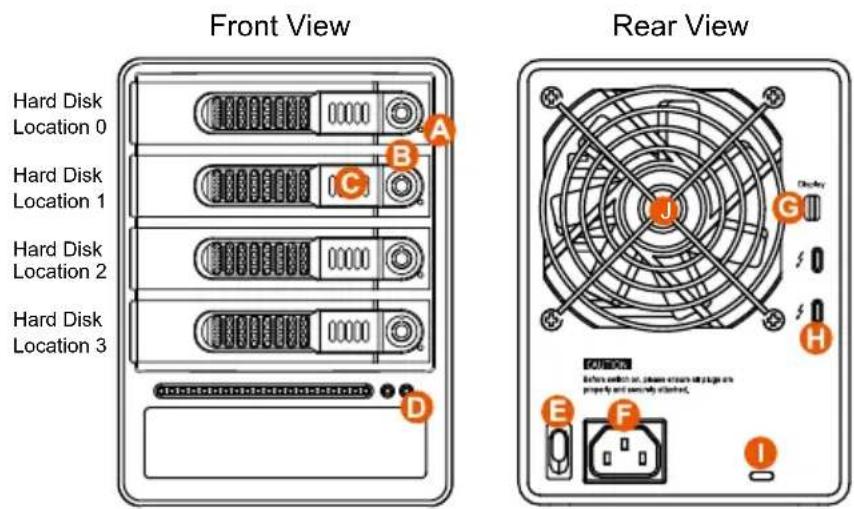
Note: A hard disk must be installed at HDD location 0
A. HDD access light
B. HDD enclosure key lock
C. HDD enclosure button
D. Power status light
E. System status light
F. Thunderbolt™ port
G. Mini DisplayPort
H. Anti-theft lock
I. Fan
J. Fan speed switch
K. Mute switch
L. Power switch
M. Power socket
3. Hardware Requirements and Precautions
- This system can only transfer data to one computer through one interface at a time.
- Please make sure that the hard drives are free from bad blocks or defects prior to installation in order to avoid system crashes or data loss.
- Whenever turning off or unplugging the GT4670-TB3 from your computer system becomes necessary, always remember to safely remove it from your operating system first.
- When the ST4 is connected to the computer system, it's prohibited to remove, insert or swap the hard drive while data transfer is being performed.
- If you will be incorporating either software or hardware RAID functionality to operate with the GT4670-TB3, it is important to understand the RAID level and its component that will be incorporated and the precautions to take as each RAID level and component may function differently and contains various limitations.
- It is highly recommended for users to back up important data contained within the drives of the GT4670-TB3 on a regular basis or whenever the user feels necessary to a remote or a separate storage device. RAIDON will not be responsible for any lost of data caused during the use of the GT4670-TB3 or the recovery of the data lost.
4. Hardware Installation
Please follow the steps below to complete the hardware installation process:
Step 1 When you open the package, please immediately check the product and included parts for any damage or missing parts. If there is a problem with the product or included parts please contact your supplier immediately.
Step 2 Place the device on a flat, even surface. Make sure that the cooling fan is not blocked and there is sufficient surrounding space for cooling. (Keep away from water or other environments that may cause product damage)
Step 3 Please insert the key included with the parts pack into the keyhole to release the HDD enclosure handle and remove the HDD enclosure.
Step 4 Place the hard disk in the HDD enclosure and secure it in place with the included screws; this will prevent damage to the hard disk from external vibration.
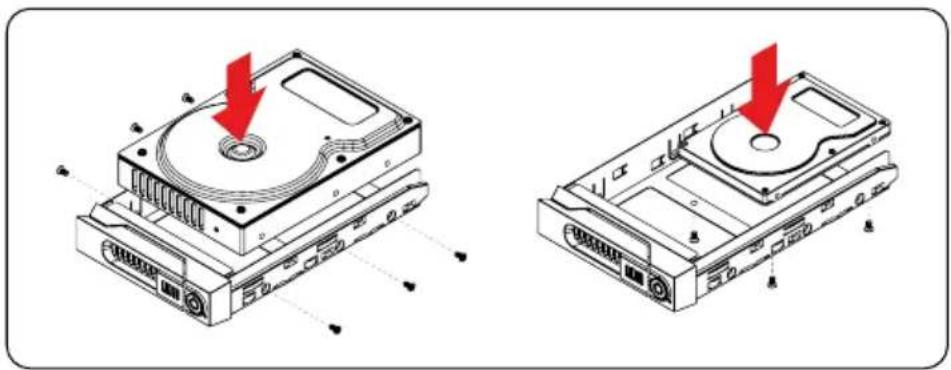
natural_image
Technical illustration of two hard disk drives with red arrows indicating mounting points (no text or symbols present)Note: Please avoid using hard disk drives from different manufacturers or different models from the same manufacturer as this may impact system performance.
Step 5 Once the hard disk is installed, slide the enclosure into the system and close the handle.
Step 6 Select the appropriate cable from the accessories pack depending on the interface. Connect the GT4670-TB3 backplate connection port to the corresponding port on the computer.
Step 7 Connect the AC Power cable to the GT4670-TB3. Plug the connector into the power socket then start the system.
Step 8 Your operating system will automatically detect available capacity once the device finishes booting. Once the device has been detected, please follow instructions given by the operating system and format the system. Once the hard disk has been formatted, the GT4670-TB3 can be used.
Step 9 If the computer is unable to detect the system, please install the drivers from official website - Download page (http://www.RAIDON.com.tw/RAIDON2016/download.php).
5. The MSU, and easy RAID configurator
- RAID 0: Only enhances the performance of data accessing, it does not provide backup/fail-safe for stored data.
- RAID 1: Function provides fully automatic backup that ensures data security.
- JBOD: To use individual capacity of each installed HDD.
Please visit the official website - Download page (http://www.RAIDON.com.tw/RAIDON2016/download.php) to download Marvell Storage Utility (MSU). After GT4670-TB3 connected to the computer and install the MSU, multiple RAID modes can be set up through the MSU.
A. Set up RAID Mode:
- Use your Windows username and password to log into the MSU. If you have a username but no password, then leave the password field blank.
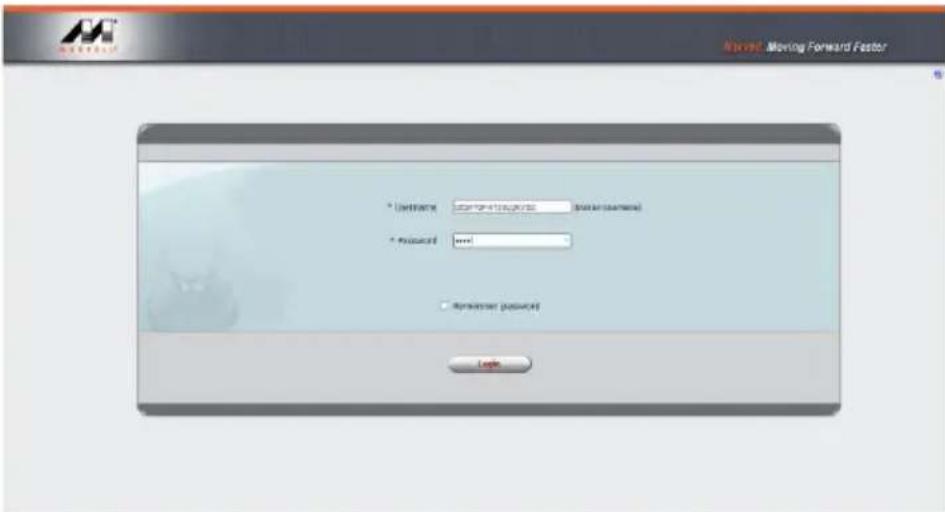
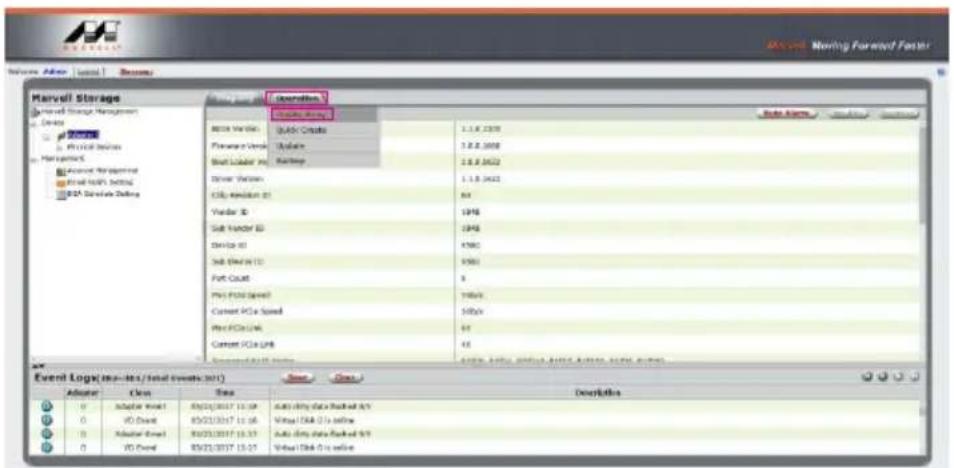
text_image
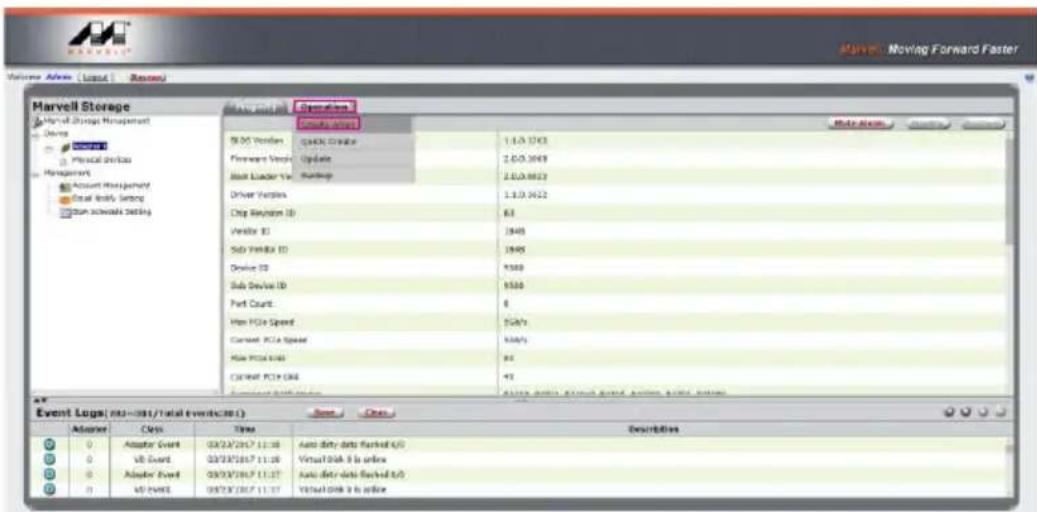
Market Moving Forward Factor * Default * Request * Request Password • Rememberer Password Login- Click 【Operation】 and 【Create Array】.
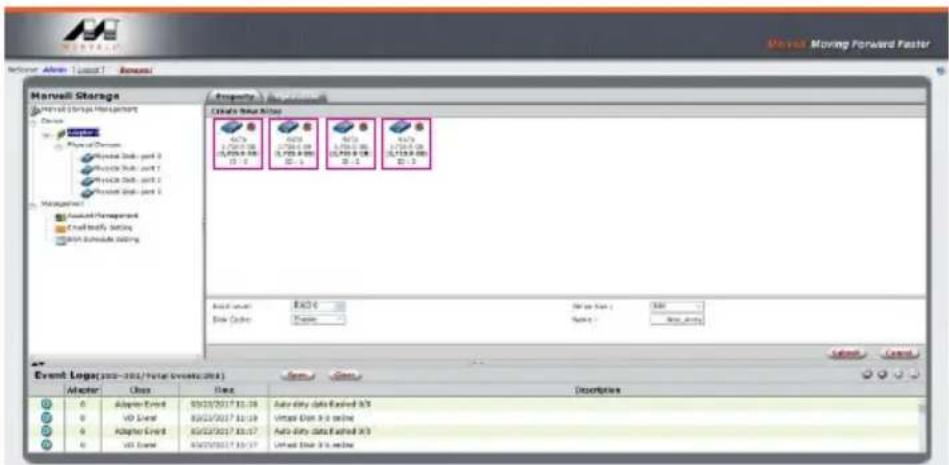
text_image
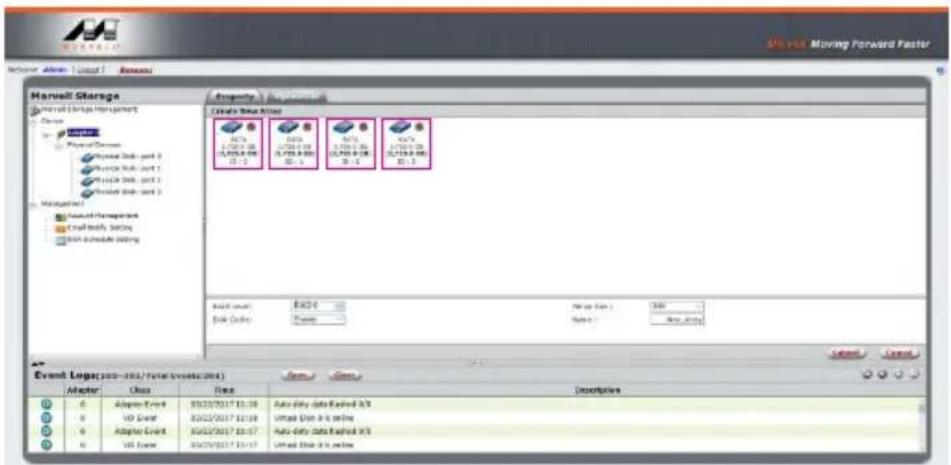
Marvell Storage Marvell Storage Management Serving Physical Workbox Management Account Management Serial Audio Setting Sum Software Setting Event Logs (03-051/Total Events: 0) Adder Class Time Descriptions 0 Adder Event 03/03/2017 11:38 Auto data data backed 6/0 0 USB Event 03/03/2017 11:38 Virtual Disk 3 is online 0 Adder Event 03/03/2017 11:37 Auto data data backed 6/0 0 USB Event 03/03/2017 11:37 Virtual Disk 3 is online3. Click at the selected HDDs.
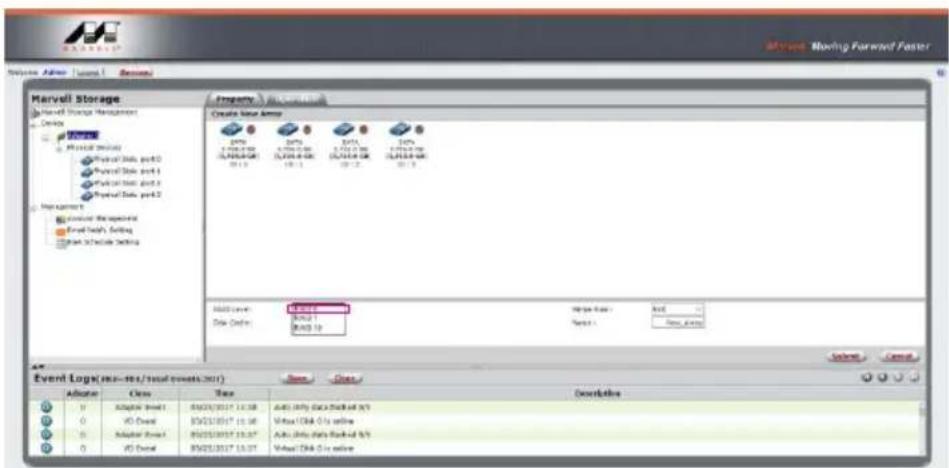
text_image
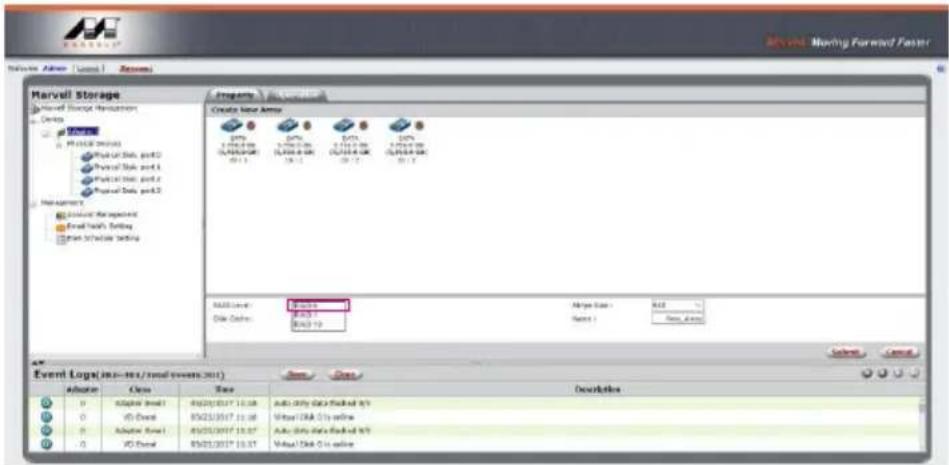
Marvell Storage Current Events Management Status: Planned Documents Planned Link - part 2 Planned Link - part 1 Planned Link - part 2 Planned Link - part 1 Management Assured Management Email Modify Setting Email Schedule setting Event Log(s: 200-300/Total events:200) Operator Use Time Description 0 Adaptive Event 9/25/2017 12:16 Auto Data Data KEared X/S 0 VD Event 8/25/2017 10:19 Uttash Unit 4.0 online 0 Adaptive Event 8/25/2017 10:17 Auto Data Data KEared X/S 0 VD Event 8/25/2017 10:17 Uttash Unit 4.0 online4. Select【RAID 0】.
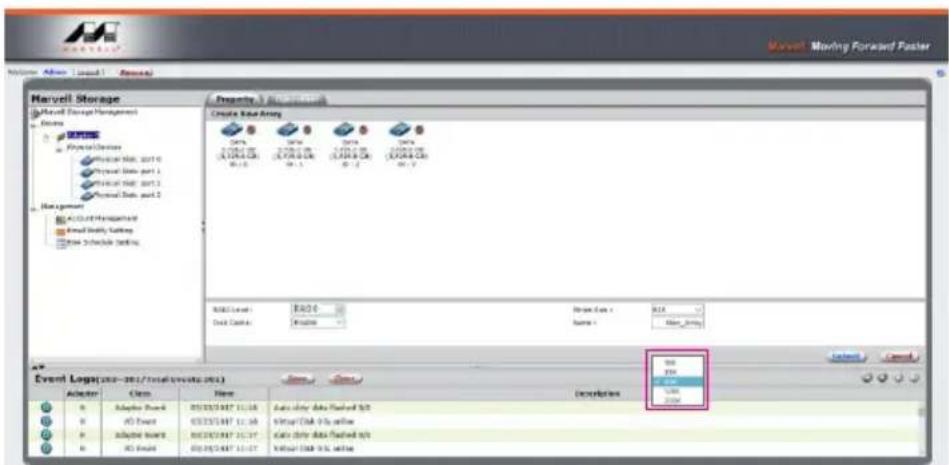
text_image
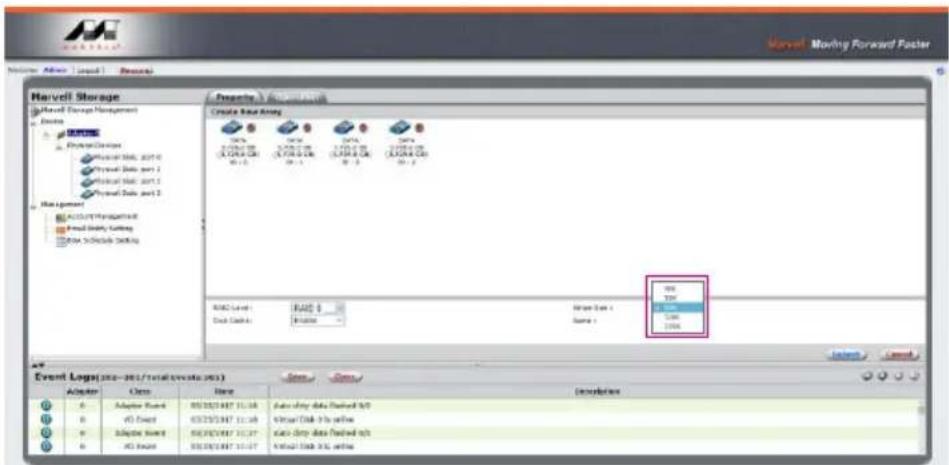
Marvell Storage Marvell Storage Hardware Design Status: PROLOGIC (2018) Product Data, port 0 Product Data, port 1 Product Data, port 2 Product Data, port 3 Management Data Management Email Touch's Setting Email Schedule Setting Create Event Area 10% 20% 30% 40% 50% 60% 70% 80% 90% 100% 110% 120% 130% 140% 150% 160% 170% 180% 190% 200% 210% 220% 230% 240% 250% 260% 270% 280% 290% 300% 310% 320% 330% 340% 350% 360% 370% 380% 390% 400% 410% 420% 430% 440% 450% 460% 470% 480% 490% 500% 510% 520% 530% 540% 550% 560% 570% 580% 590% 600% 610% 620% 630% 640% 650% 660% 670% 680% 690% 700% 710% 720% 730% 740% 750% 760% 770% 780% 790% 800% 810% 820% 830% 840% 850% 860% 870% 880% 890% 900% 910% 920% 930% 940% 950% 960% 970% 980% 990% 1000% MALL Level: Event Log(1/2-MSI/MSI/MSI/MSI/MSI/MSI/MSI/MSI/MSI/MSI/MSI/MSI/MSI/MSI/MSI/MSI/MSI/MSI/MSI/MSI/MSI/MSI/MSI/MSI/MSI/MSI/MSI/MSI/MSI/MSI/MSI/MSI/MSI/MSI/CS Date Date: Balance: Balance Type: Balance: Balance Status: Balance: Balance: Balance: Balance: Balance: Balance: Balance: Balance: Balance: Balance: Balance: Balance: Balance: Balance: Balance: Balance: Balance: Balance: Balance: Balance: Balance: Balance: Balance: Balance: Balance: Balance: Balance: Balance: Balance: Balance: Balance: Balance: Balance: Balance: Event Log(1/2-MSI/MSI/MSI/MSI/MSI/MSI/MSI/MSI/MSI/MSI/MSI/MSI/MSI/MSI/MSI/MSI/MSI/MSI/MSI/MSI/MSI/MSI/MSI/MSI/MSI/MSI/MSI/MSI/MSI/MSI/MSI/ Allocation Class Time Description D Adaptive Model 1 4X2X2X3X3* 15.38 Auto Only Data Backed MSY D VD Control 8X2X2X3X3* 15.38 Virtual DNA CIs online D Adaptive Model 1 4X2X2X3X3* 15.37 Auto Only Data Backed MSY D VD Control 8X2X2X3X3* 15.37 Virtual DNA CIs online5. Setup Stripe Size.
text_image
Harvell Storage Harvell Storage Management Actions 100% Physical Devices Physical Data 2017-0 Physical Data part 1 Physical Data part 2 Physical Data part 3 Management ACCOUNT/Portfolio-R Fixed Data Cutting Auto To Include Setting Create Base Array 76% 3.05E+08 (0.00E+08) (0.00E+08) (0.00E+08) (0.00E+08) (0.00E+08) (0.00E+08) (0.00E+08) (0.00E+08) (0.00E+08) (0.00E+08) (0.00E+08) (0.00E+08) (0.00E+08) (0.00E+08) (0.00E+08) (0.00E+08) (0.00E+08) (0.00E+08) (0.00E+08) (0.00E+08) (0.00E+08) Event Log(s:xxx-xxx/total events:xxx) Adapter Cells Adaptive Breaks v5 Direct Adaptive Breaks AG Breaks Event Logs Name Description Status: Data Found in N/D Virtual Disk to write Status: Data Found in N/D Virtual Disk to write Status: Data Found in N/D Status: Data Found in N/D Status: Data Found in N/D Status: Data Found in N/D Status: Data Found in N/D Status: Data Found in N/D Status: Data Found in N/D Status: Data Found in N/D Status: Data Found in N/D Status: Data Found in N/D Status: Data Found in N/D Status: Data Found in N/D Status: Data Found in N/D Status:Data Found in N/D Status: Data Found in N/D Status: Data Found in N/D Status: Data Found in N/D Status: Data Found in N/D Status: Data Found in N/D Status: Data Found in N/D Status: Data Found in N/D Status: Data Found in N/D Status: Data Found in N/D Status: Data Found in N/D Status: Data Found in N/D Status: Data Found in N/C Status: Data Found in N/C Status: Data Found in N/C Status: Data Found in N/C Status: Data Found in N/C Status: Data Found in N/C Status: Data Found in N/C Status: Data Found in N/C Status: Data Found in N/C Status: Data Found in N/C Status: Data Found in N/C Status: Data Found in N/C Status: Data Found in N/C Status:Data Found in N/C Status: Data Found in N/C Status: Data Found in N/C Status: Data Found in N/C Status: Data Found in N/C Status: Data Found in N/C Status: Data Found in N/C Status: Data Found in N/C Status: Data Found in N/C Status: Data Found in N/C Status: Data Found in N/C Status: Data Found in N/C Status: Data Found in N/A- The more Stripe Sizes helps a better data transfer for large data files which is good for video and audio editing works.
-
The less Stripe Sizes helps a better efficiency at random files which is good for daily word processing, frequent read-&-write works.
-
Type Storage Name and Submit RAID setting.
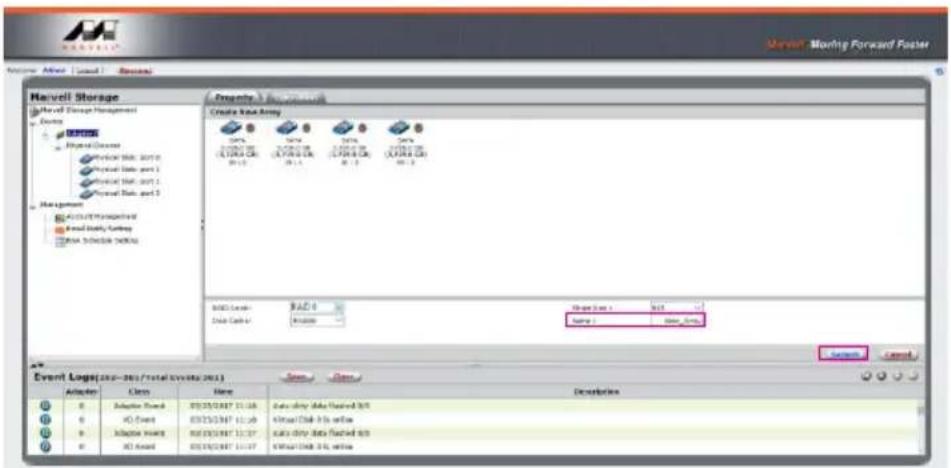
text_image
Marvell Storage Marvell Storage Management Energy MOSOS Physical Devices Device Web: 2010 Physical Data port 1 Physical Web: 2011 Physical Data port 2 Management ACADELIS PROFESSIONAL Real Data Turkey SMA Technology NORMAL Create Data Army Data Data Data Data Data Data Data Data Data Data Data Data Data Data Data Data Data Data Data Data Data Data Data Data Data Data Data Data Data Data Data Data Data Data Data Data Data Data Data Data Data Data Data Data Data Data Data Data Data Data DSC Server: MAC 0 Data Center: MacIcon Design Date: NCT Design 1: Design 2: Design 3: Design 4: Design 5: Design 6: Design 7: Design 8: Design 9: Design 10: Design 11: Design 12: Design 13: Design 14: Design 15: Design 16: Design 17: Design 18: Design 19: Design 20: Design 21: Design 22: Design 23: Design 24: Design 25: Design 26: Design 27: Design 28: Design 29: Design 30: Design 31: Design 32: Design 33: Design 34: Design 35: Design 36: Design 37: Design 38: Design 39: Design 40: Design 41: Design 42: Design 43: Design 44: Design 45: Design 46: Design 47: Design 48: Design 49: Design 50: Design 51: Design 52: Design 53: Design 54: Design 55: Design 56: Design 57: Design 58: Design 59: Design 60: Design 61: Design 62: Design 63: Design 64: Design 65: Design 66: Design 67: Design 68: Design 69: Design 70: Design 71: Design 72: Design 73: Design 74: Design 75: Design 76: Design 77: Design 78: Design 79: Design 80: Design 81: Design 82: Design 83: Design 84: Design 85: Design 86: Design 87: Design 88: Design 89: Design 90: Design 91: Design 92: Design 93: Design 94: Design 95: Design 96: Design 97: Design 98: Design 99: Design 100:- After submitting RAID setting:
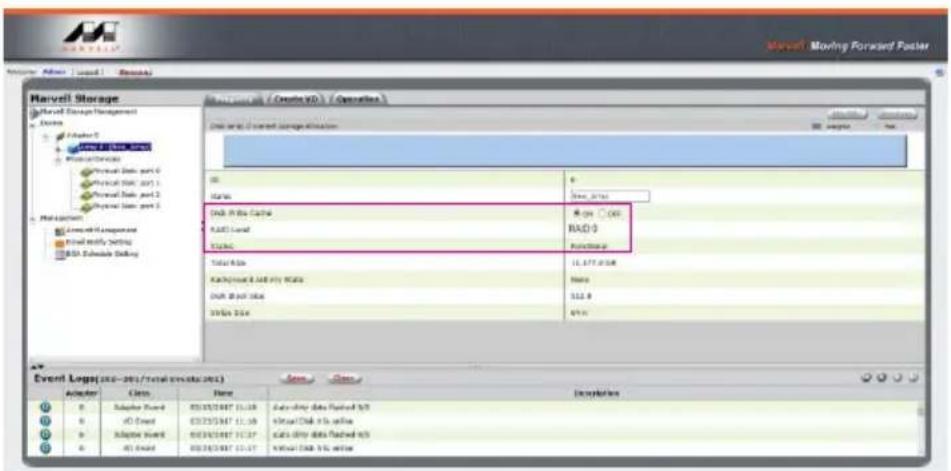
text_image
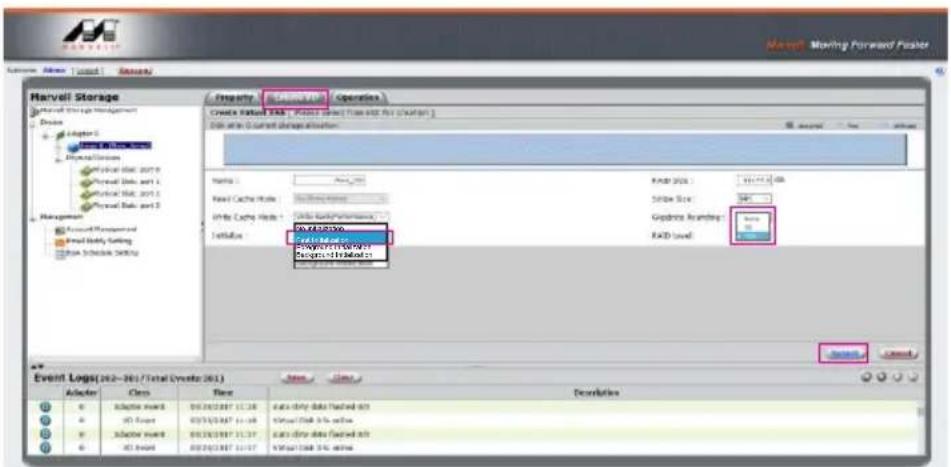
Marvell Storage Marvell Storage Management Actions Driver 0 MARELL Storage Performance Services Physical Data port 0 Physical Data port 1 Physical Data port 2 Physical Data port 3 Maintenance Live Web Application Final Initialize Setting RSD Substrate Setting Event Log(sxx-xx/total events/xx) Operator Class Name Description 0 Substrate Wizard 05/05/047 11:39 Data data packets sent to 0 AD Wizard 05/05/047 11:39 Data data packets sent to 0 Adaptive Wizard 05/05/047 11:37 Data data packets sent to 0 AD Wizard 05/05/047 11:37 Data data packets sent to Start Date: Create ID / Operations Status: 0 Date: July OK OK RADI Level Functionals Total Rate 11.377.01:48 Background & Alert Key Status Status: 112.8 Status Date: 67.0 Event Log(sxx-xx/total events/xx) Start Cancel- Click 【Create VD】, 【Initialize】option is set to 【Fast Initialization】; 【Gigabyte Rounding】options set to 【10G】, then click 【Submit】.
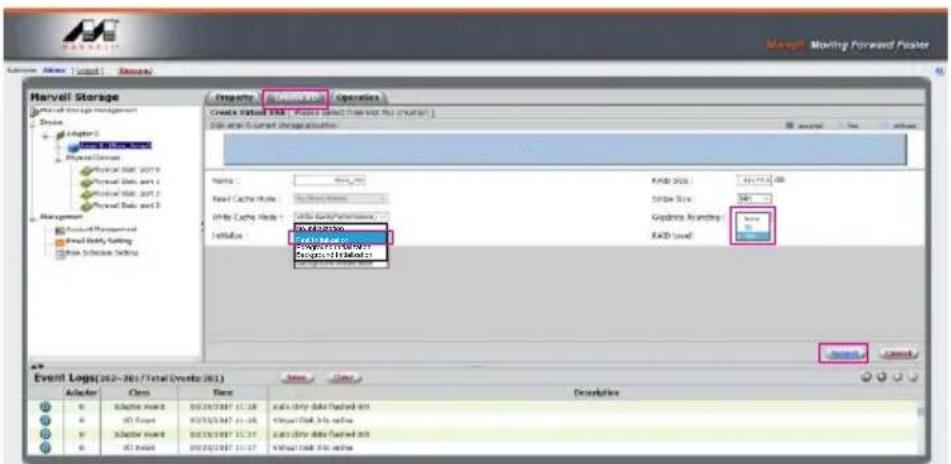
text_image
Harvell Storage Create Event: FAD - Point Data (Start and End) (Start) Data and Current Design Options Name: FAD Size: 100% Load Cache Mode: New Cache Strike Size: 46% Write Cache Mode: New Cache SetNote: FAD Level: 50% FAD Level: 50% FAD Level: 50% FAD Level: 50% FAD Level: 50% FAD Level: 50% FAD Level: 50% FAD Level: 50% FAD Level: 50% FAD Level: 50% FAD Level: 50% FAD Level: 50% FAD Level: 50% FAD Level: 50% FAD Level: 50% FAB Level: 50% FAB Level: 50% FAB Level: 50% FAB Level: 50% FAB Level: 50% FAB Level: 50% FAB Level: 50% FAB Level: 50% FAB Level: 50% FAB Level: 50% FAB Level: 50% FAB Level: 50% FAB Level: 50% FAB Level: 50% FAB Level: 100% FAB Level: 100% FAB Level: 100% FAB Level: 100% FAB Level: 100% FAB Level: 100% FAB Level: 100% FAB Level: 100% FAB Level: 100% FAB Level: 100% FAB Level: 100% FAB Level: 10 Event Logs(262-783/Total Events 261) Adder Class Time Description Adaptor name: B2/2/2/2/2/2 / 11.38 Cable Only data (*.casted int) Adaptor name: B2/2/2/2/2/2 / 11.38 Cable Only data (*.casted int) Adaptor name: B2/2/2/2/2/2 / 11.37 Cable Only data (*.casted int) Adaptor name: B2/2/2/2/2/2 / 11.37 Cable Only data (*.casted int) Adaptor name: B2/2/2/2/2/2 / 11.37 Cable Only data (*.casted int) Adaptor name: B2/2/2/2/2/2 / 11.379. After submit, you get a New\_VD.
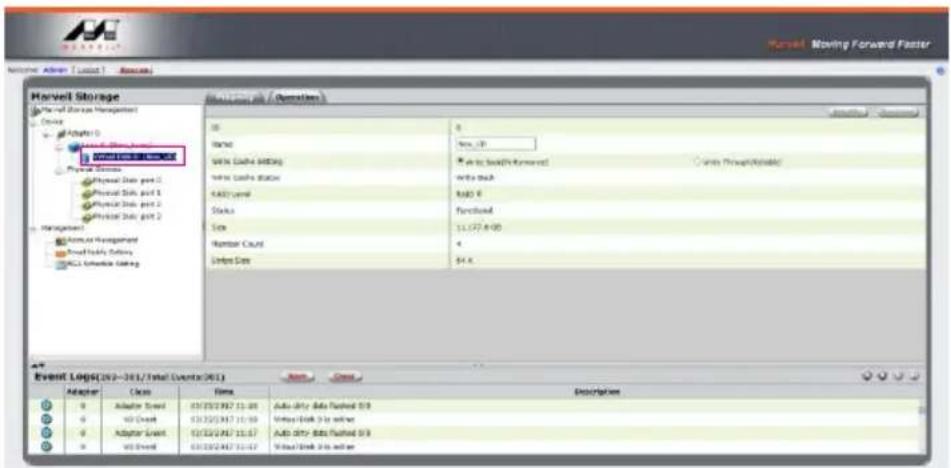
text_image
Marvel Moving Forward Faster Volume: Admin (Load) - Access Harvell Storage Event Log(2023-301/Total Events(201)) Adapter Name New User Active Data Loading Active Data Status Add User Status Text Number Count Delete Count Event Logs(2023-301/Total Events(201)) Adapter Case Time Description Adapter Adapter Event 01/25/2017 11:01 01/25/2017 11:00 01/25/2017 11:07 01/25/2017 11:07 Auto Only Data Flashed 0.9 Video Link 0 is slower Auto Only Data Flashed 0.9 Video Link 0 is slowerP.S. VD is the abbreviation of Virture Disk.
10. To initiate and format HDD/SSD at OS level.
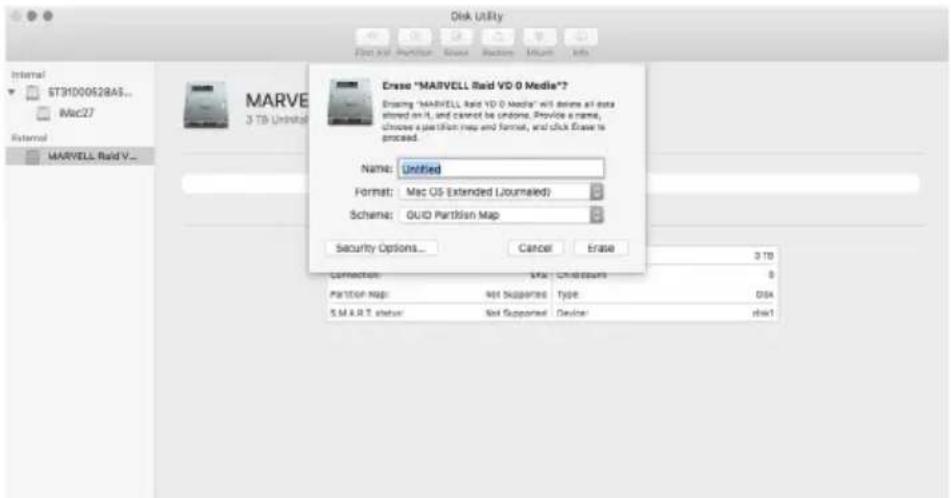
text_image
Disk Utility Internal ST3H000628A5... Mac27 External MARVELL Raid V... MART Name: Untitled Format: Mac OS (Extended Jourmailed) Schema: GUID Partition Map Security Options... Cancel Erase Connection: MIA Chlossum Partition Map: Not Suspende Type: Disk S.M.R.T. status: Not Supported Device: disk111. After completing the format, you could start using your GT4670-TB3.
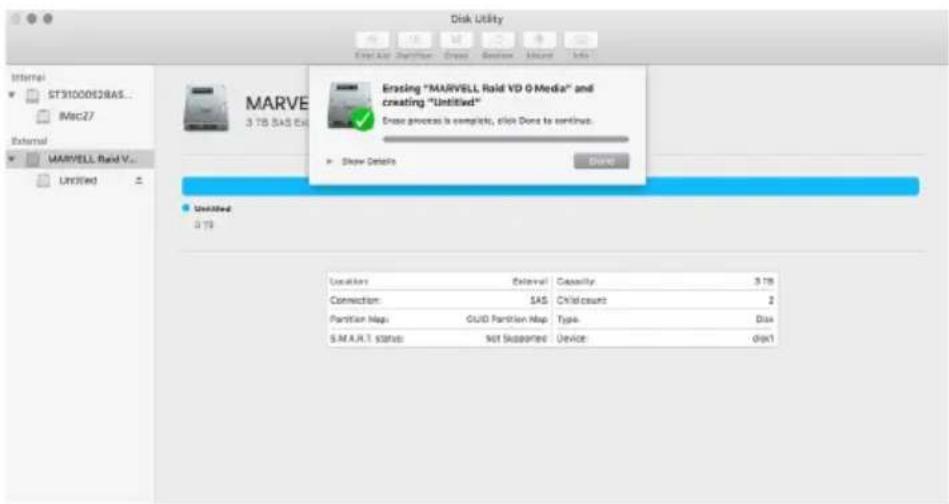
text_image
Disk Utility Start All: Partition - Create Review Summary Info Internal ST31000628AS... M8c27 External MARVELL Rand V... Unlimited 3.75 Erosing "MARVELL Rand VD 0 Media" and creating "Untitled" Erosa process is complete, click Done to continue. Show Details Done Unlimited 3.75 Location: Interval Capacity: 3.75 Connection: SAS Child count: 2 Partition Map: GUID Partition Map Type: Disk S.M.A.R.T. Status: Not Supported Device: disk1B. Delete a RAID for a new RAID setting
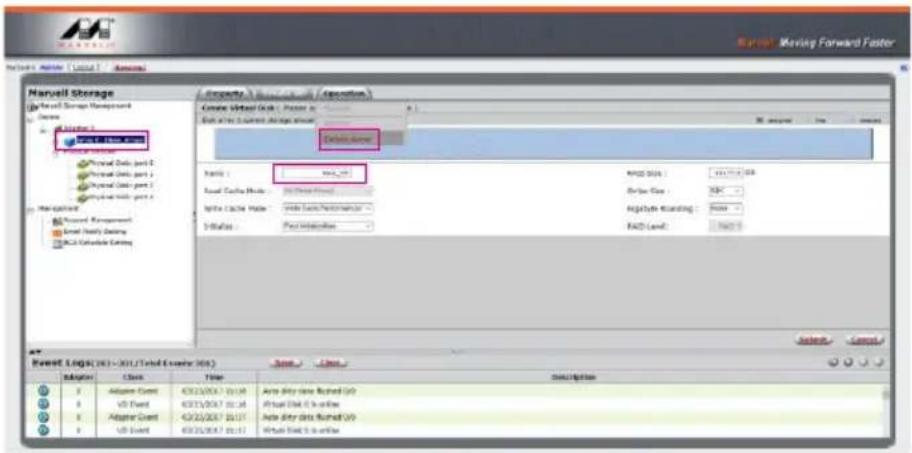
1. Click 【Operation】 and 【Delete VD】.
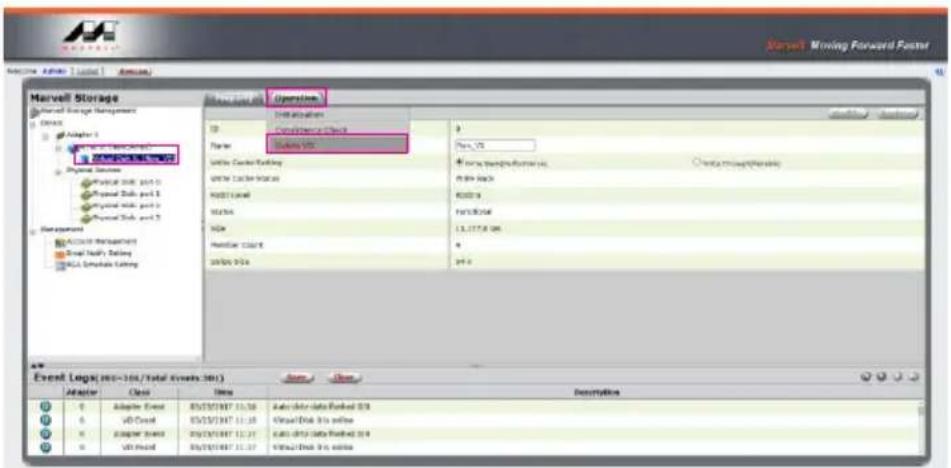
text_image
Marvell Storage Operating Database Adapter 1 Subway V50 Physical Services Physical Disk port 2 Physical Data port 1 Physical Data port 2 Physical Data port 3 Management Active Management Event Supply Setting SQL Estimate Setting Operation Database Operator: Subway V50 Unit: Cache Setting Unit: Cache Status Address Level Address Name Host: C#S# 00% @ S# Event Logs: 100/100/100/100/100/100/100/100/100/100/100/100/100/100/100/100/100/100/100/100/100/100/100/100/100/100/ Operator: Subway V50 System: V50 Active Management: 6.89.864 KDD2.3 FATR3.546 13.177.8.286 49.6 Event Logs: 100/100/Total Events: 399) Operator: Class Time Description Adapter Event Subway V50 Subway V50 Subway V50 Subway V50 Subway V50 Subway V50 Subway V50 Subway V502. Click 【OK】 at first warning message.
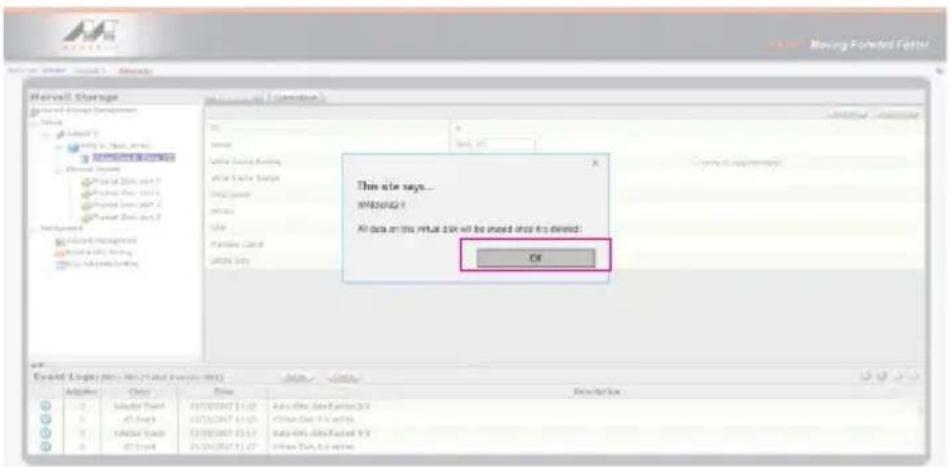
text_image
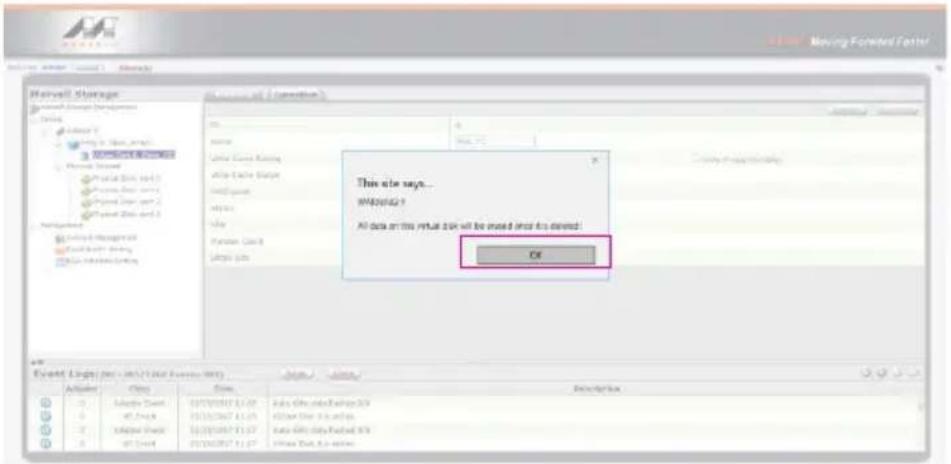
Microsoft Storage Microsoft Office (Microsoft Excel) Add: 1 Remove: 2 Remove: 3 Add: 4 Add: 5 Add: 6 Add: 7 Add: 8 Add: 9 Add: 10 Add: 11 Add: 12 Add: 13 Add: 14 Add: 15 Add: 16 Add: 17 Add: 18 Add: 19 Add: 20 Add: 21 Add: 22 Add: 23 Add: 24 Add: 25 Add: 26 Add: 27 Add: 28 Add: 29 Add: 30 Add: 31 Add: 32 Add: 33 Add: 34 Add: 35 Add: 36 Add: 37 Add: 38 Add: 39 Add: 40 Add: 41 Add: 42 Add: 43 Add: 44 Add: 45 Add: 46 Add: 47 Add: 48 Add: 49 Add: 50 Add: 51 Add: 52 Add: 53 Add: 54 Add: 55 Add: 56 Add: 57 Add: 58 Add: 59 Add: 60 Add: 61 Add: 62 Add: 63 Add: 64 Add: 65 Add: 66 Add: 67 Add: 68 Add: 69 Add: 70 Add: 71 Add: 72 Add: 73 Add: 74 Add: 75 Add: 76 Add: 77 Add: 78 Add: 79 Add: 80 Add: 81 Add: 82 Add: 83 Add: 84 Add: 85 Add: 86 Add: 87 Add: 88 Add: 89 Add: 90 Add: 91 Add: 92 Add: 93 Add: 94 Add: 95 Add: 96 Add: 97 Add: 98 Add: 99 Add: 100 This site says... MSD002-1 All data on this virtual tool will be used and it is closed: OK Event Log(s) (rsc, int'l, or vcl, etc.) Add Use Remove Adapter Copy Time Description3. Click 【OK】 at the second warning message.
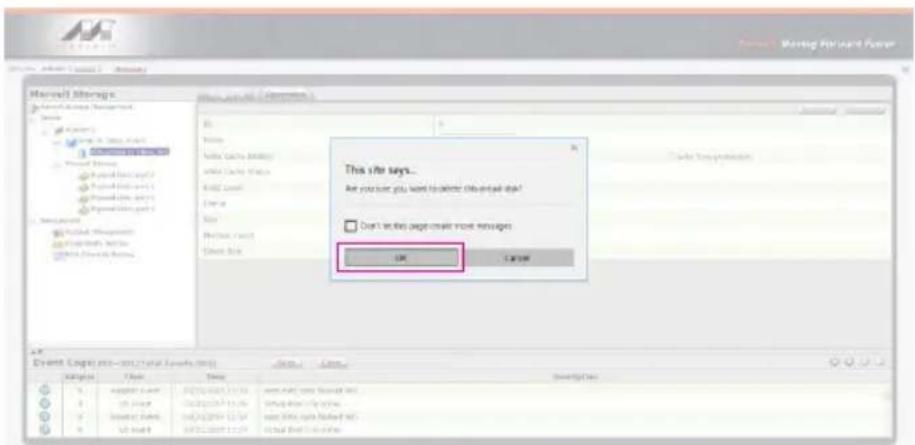
text_image
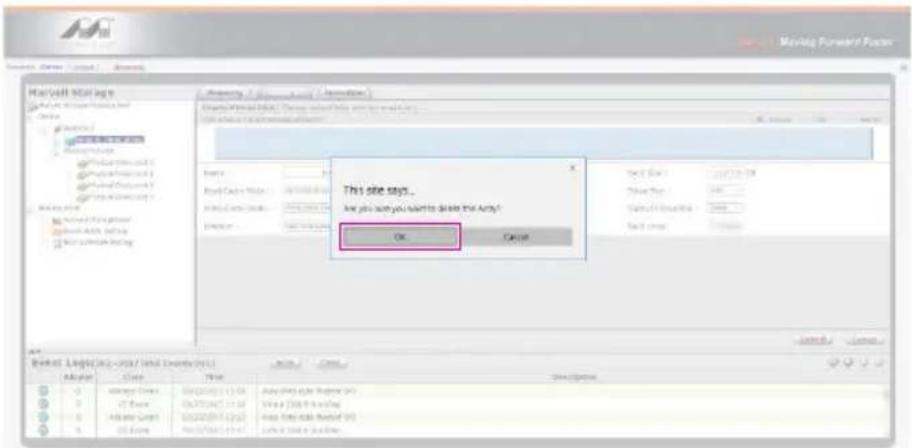
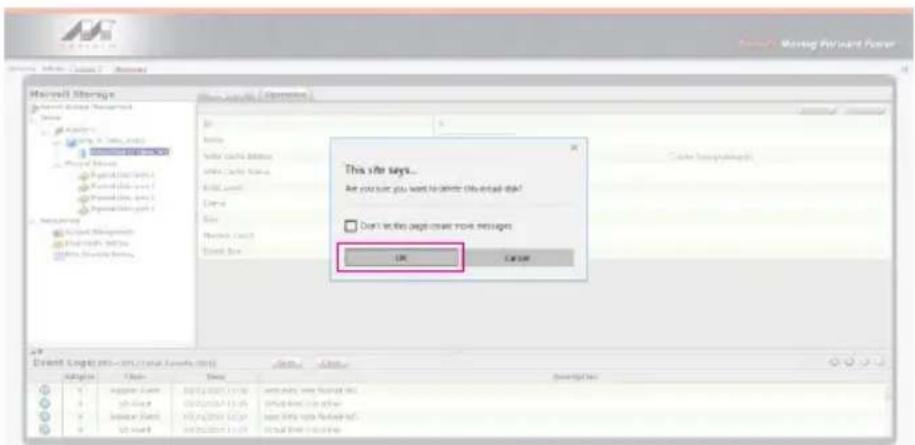
Microsoft Storage This site says... Are you sure you want to deliver this email copy? Don't in this page create more messages OK Canceltext_image
Marvell Storage Marvell Storage Management Description Property: 1.0 (M) or 2.0 (C) Source: Marvell Storage Management Data type: Current design tool Other Area Name: Mn_200 Raw Data Mode: D3 Direct Load Write Cache Mode: Write Back Performance 100% Rate: New Interface PROD Data: 117.17.17.08 Drive Type: 50K Regulate Tracking: None FAD Level: 5000 Browse LOG(S)(R)=301/Total Customer: 364) Save... Delete... Description Adapter Class Title Adapter Event X:21/00/17 16:19 Auto Data (data returned) (S) V5 Event X:21/00/17 16:18 Auto Data (S) to online Adapter Event X:21/00/17 16:17 Auto Data (data returned) (S) V5 Event X:21/00/17 16:17 Auto Data (S) to online- Click 【OK】 at warning message.
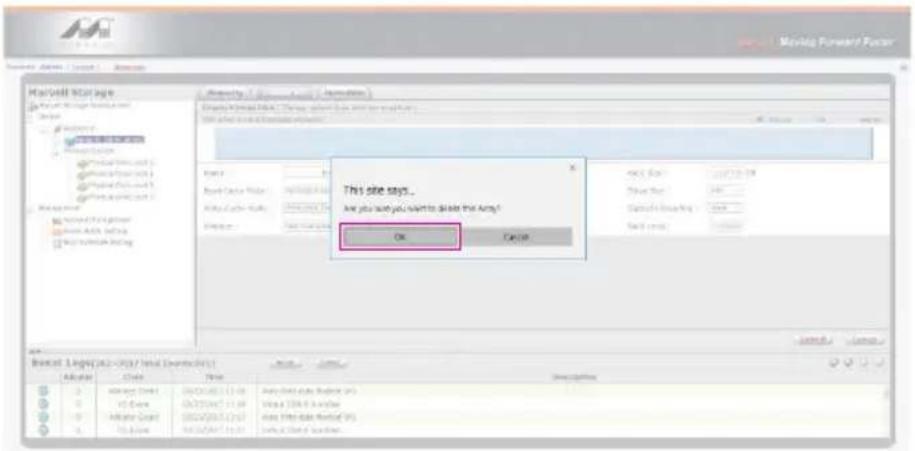
text_image
MacVail Manager This site says... Are you sure you want to decode the Army? OK Cancel- It returns to JBOD mode, you just have to format every individual HDD or just to set up another RAID.
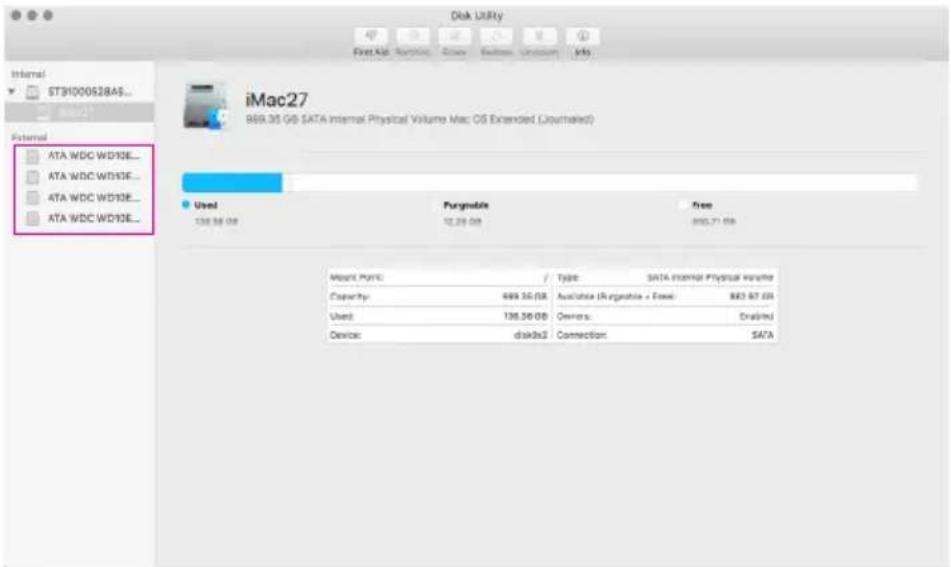
text_image
Disk Utility File Edit View Insert Close Edit Add Un recommend Info Internal ST31000528A5... External iMac27 869.35 GB SATA Internal Physical Volume Mac OS Extended (Journalled) ATA WDC WD12E... ATA WDC WD12E... ATA WDC WD12E... Used Pargnable Free 136.58 GB 12.28 GB 880.71 GB Mount Point / Type: SATA Internal Physical Volume Capacity: 469.35 GB Available (Pargnable + Free): 863.87 GB Used: 136.36 GB Owners: Disabled Device: disks32 Connection: SATAPlease refer to "RAIDON All TB2&TB3 RAID 5 Storage MSU User Manual.pdf" for the RAID setting.
6. Description of HDD Indicators
| Status System indicator Light HDD Status Light | ||
| No HDD Blue light always on N/A | ||
| HDD failed Blue light always on N/A | ||
| Data access Blue light always on Blue light flashing | ||
| HDD idle Blue light always on Blue light always on | ||
7. Connect with other devices
- TB port: Thunderbolt™ 3 ports can be connected to TB3, USB3.1 and Display port device. It is downward to support USB3.0 / USB2.0. This product can connect with different USB devices by USB Type C to Type A/B cable. It supports TB port power delivery (PD) function, which can provide 15W (5V / 3A) power output to support 5V / 3A rechargeable notebook computer use. There is no additional power supply need.
- Mini Display port: configured with Mini Display Port connection port to provide additional screen output.
Two System Connections:
A. GT4670-TB3: Let its TB A port connect to Host (PC/Workstation/Server), TB B port to other Device (USB or TB), and mDP (Mini Display) port to monitor.
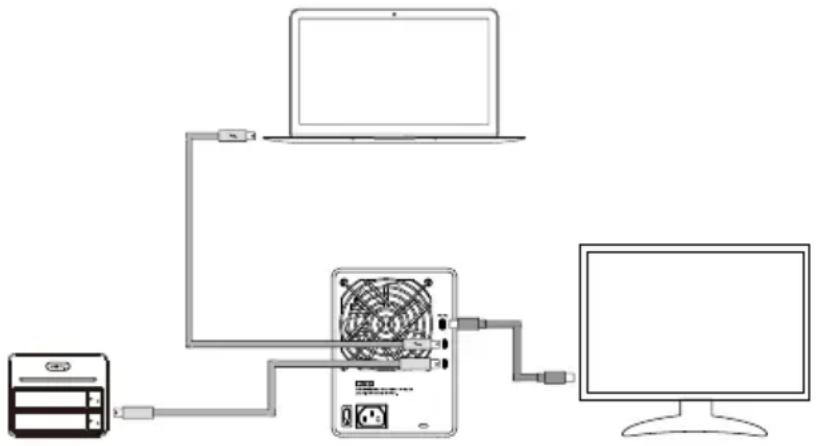
flowchart
graph TD
    A["电脑"] --> B["电脑"]
    B --> C["电脑"]
    C --> D["Laptop"]
    D --> E["电脑"]
    E --> F["电脑"]
    F --> G["电脑"]
B. GT4670-TB3: Let its TB A port connect to Host (PC/Workstation/Server), TB B port to a monitor, and mDP port to the second monitor.
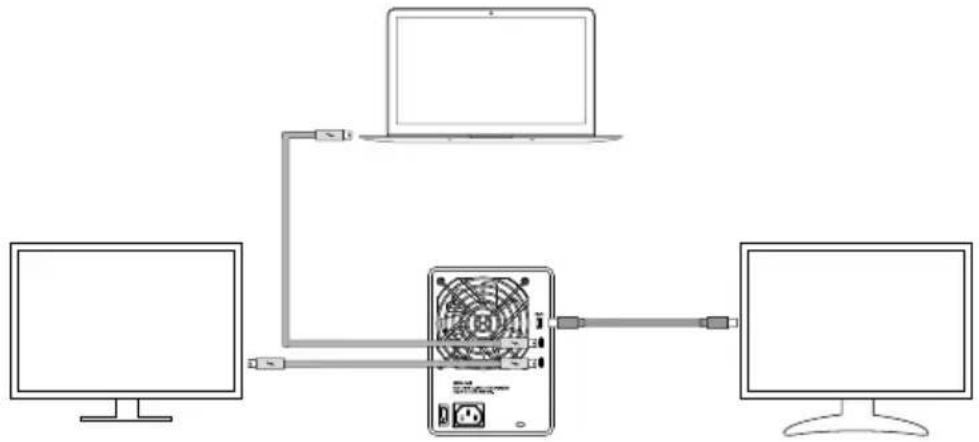
flowchart
graph TD
    A["Computer 1"] --> B["Router"]
    C["Computer 2"] --> B
    B --> D["Computer 3"]
    B --> E["Computer 4"]
    style B fill:#f9f,stroke:#333,stroke-width:2px
8. Frequently Asked Questions
- If the GT4670-TB3 is turned on, but the Thunderbolt™ cable is not connected, the fan and power status lights will both be in stopped/hibernation mode. The fan and power status light will not come on until the Thunderbolt™ cable is connected to the computer.
- When the computer enters hibernation mode, the fan and power status lights will both be in stopped/ hibernation mode. The fan and power status light will not come on until the computer is awake.
- If a hard disk already contains data from another RAID product or RAID mode has already been set, we recommend reverting back to JBOD mode before the drive is used with the GT4670-TB3 again to avoid problems accessing the hard drive.
- If the GT4670-TB3 is installed on the Windows OS but can not be connected, refer to the following steps:
A. Open the Windows Taskbar.
B. right-click the Thunderbolt™ icon.
C. Select "Approve Attached Devices".
D. Select the port to which the device is connected.
E. Wait for the dialog box "Approve Thunderbolt™™ Devices" to appear.
F. Select "Always Connect"
G. Press "OK"。
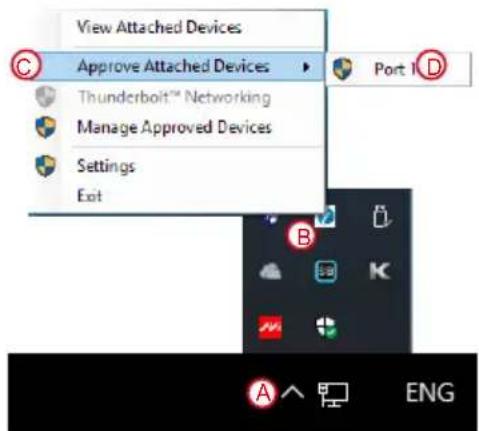
text_image
View Attached Devices Approve Attached Devices Thunderbolt™ Networking Manage Approved Devices Settings Exit Port 1 D A ENG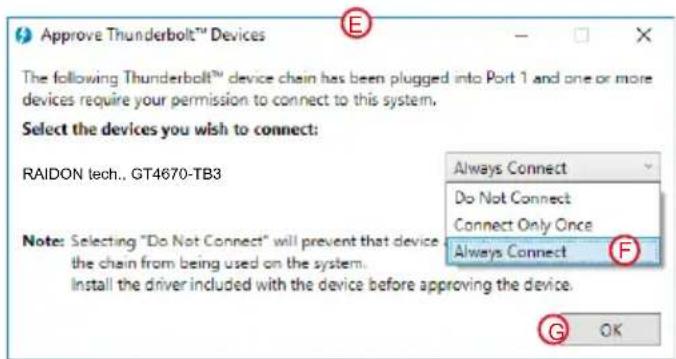
text_image
Approve Thunderbolt™ Devices The following Thunderbolt™ device chain has been plugged into Port 1 and one or more devices require your permission to connect to this system. Select the devices you wish to connect: RAIDON tech... GT4670-TB3 Note: Selecting "Do Not Connect" will prevent that device the chain from being used on the system. Install the driver included with the device before approving the device. Always Connect Do Not Connect Connect Only Once Always Connect G OK5. How to install software on macOS:
A. Unzip the downloaded tarball and execute msu.dmg.

text_image
4.1.0.2033 4.1.0.2033 Favorites Downloads Recants Applications Documents art Desktop AirDrop msu.dmg Mac27 > Users > art > Downloads > iOS 10.11.x MSU Utility > Mac > 4.1.0.2033 1 item, 853.57 GB availableB. Get the installation program MSUSetup.pkg, execute the program, and enter the installation process.
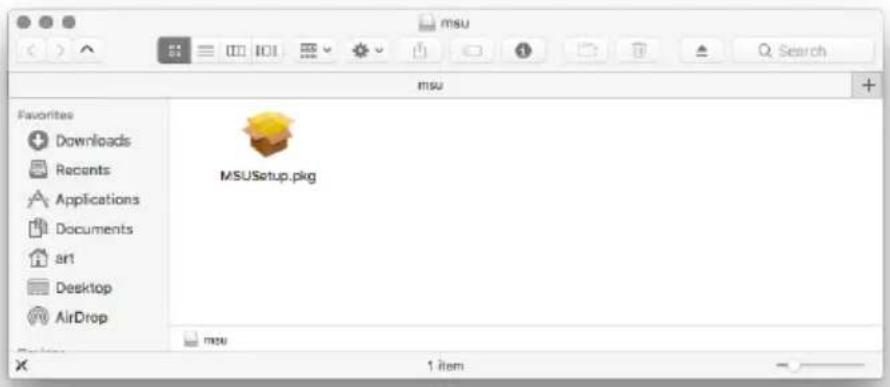
text_image
msu Favorites Downloads Recents Applications Documents ar1 Desktop AirDrop MSUSetup.pkg msu 1 itemC. Follow the flow instructions and actual conditions to complete the installation.
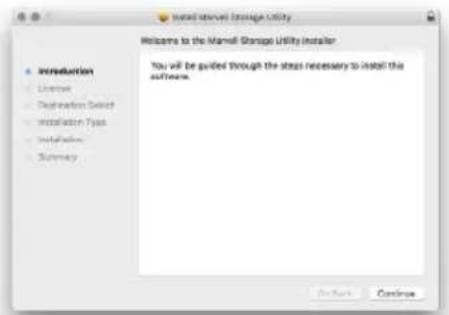
text_image
Welcome to the Marrell Storage Utility Welcome to the Marrell Storage Utility installer • Introduction License Destination Select Installation Type Installation Summary You will be guided through the steps necessary to install the software. Refresh Continue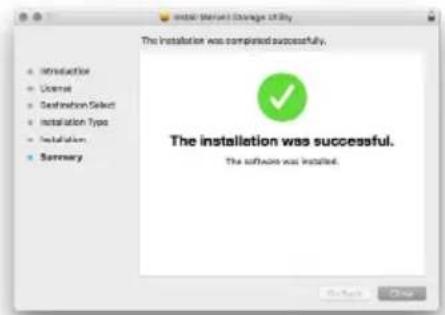
text_image
Installation (Deviant) Storage Utility The installation was completed successfully. The installation was successful. The software was installed.- There are three ways to start the program:
A. Find MarvellTray in the folder "Applications", hit the point and execute the program.
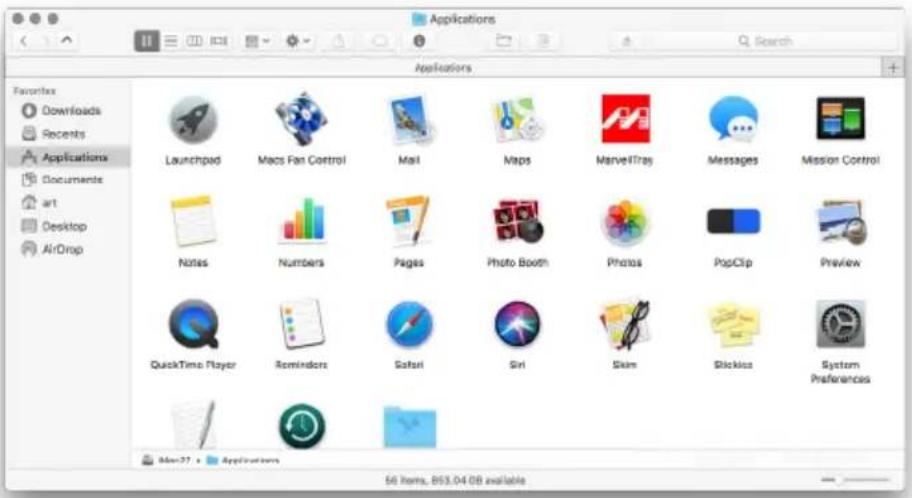
text_image
Applications Favorites Downloads Recents Applications Documents art Desktop AirDrop Launchpad Macs Fan Control Mail Maps MarvelTray Messages Mission Control Notes Numbers Pages Photo Booth Photos PopClip Preview QuickTime Player Reminders Safari Siri Skim Slackbox System Preferences Mac27. Applications 50 items, 853.04 GB availableB. Hit the Launchpad on the Dock and hit the MarvellTray icon to execute the program.
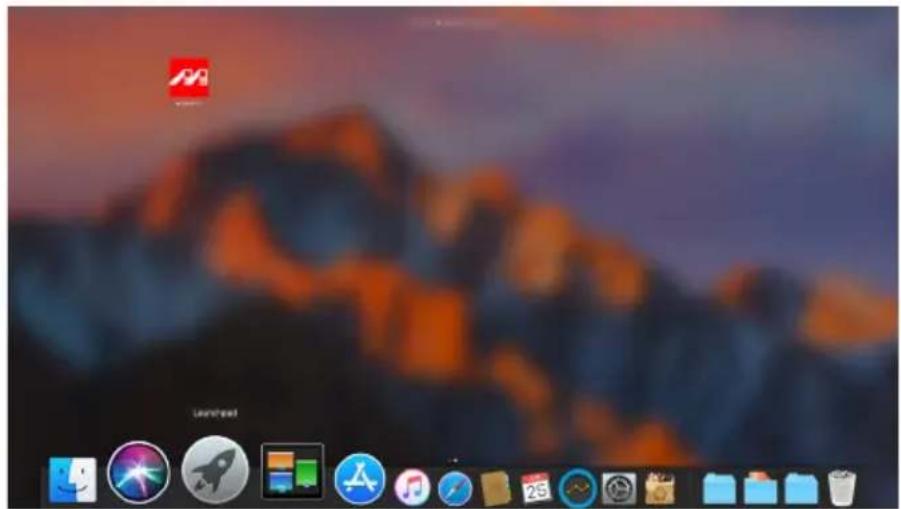
text_image
Desktop screenshot with macOS and network icons, showing a cityscape background and application iconsC. Using Spotlight's search function, type MarvellTray to find the program and press Enter to execute the program.
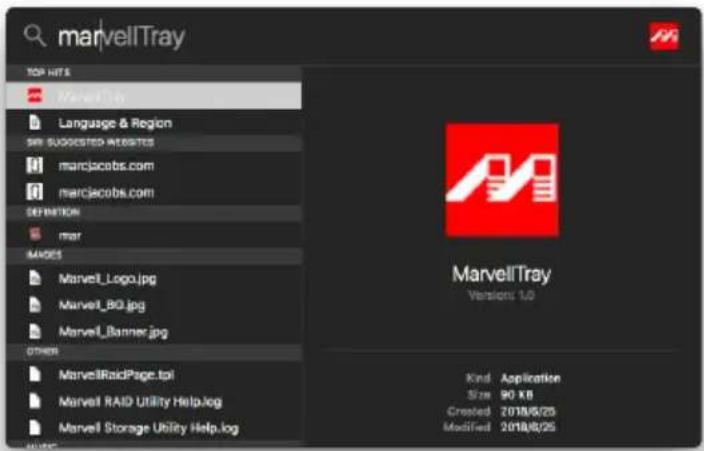
text_image
marvellTray TOP HITS MarvellTun Language & Region SIN SUGGESTED ITEMS marclacobs.com marCacobs.com DEFINITION mar MADES Marvell_Logo.jpg Marvell_BO.jpg Marvell_Banner.jpg OTHER MarvellRaidPage.tol Marvell RAID Utility Help.log Marvell Storage Utility Help.log Kind Application Size 90 KB Created 2018/5/25 Modified 2018/5/25- The new macOS 10.13 (High Sierra) requires user approval before loading new, third-party kernel extensions:
A. Execute MarvellMvumi.pkg.
B. Appear from an unidentified developer warning, click on the lower right corner of the "OK."
C. Open System Preferences, and go to Security & Privacy.
D. Click on the "Allow" button.
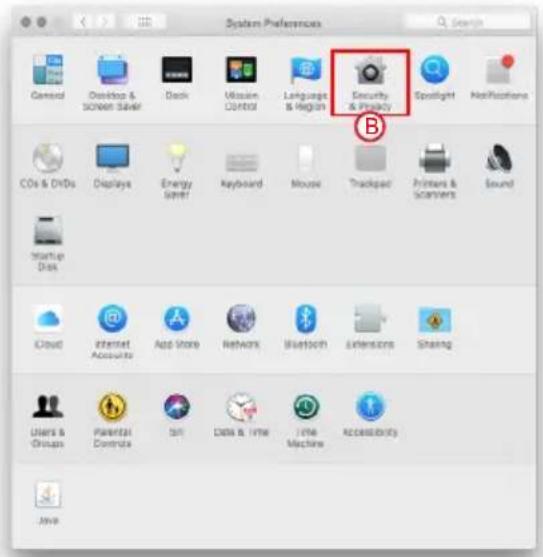
text_image
System Preferences General Desktop & Screen Saver Dock Mission Control Language & Region Security & Privacy Spotlight Notifications CDs & DVDs Displays Energy Sheet Keyboard Mouse Trackpass Printers & Scanners Sound Startup Disk Cloud Internet Accounts App Store Network Bluetooth Extensions Sharing Users & Groups Parental Controls Scan Data & Time Time Machine Accessibility Java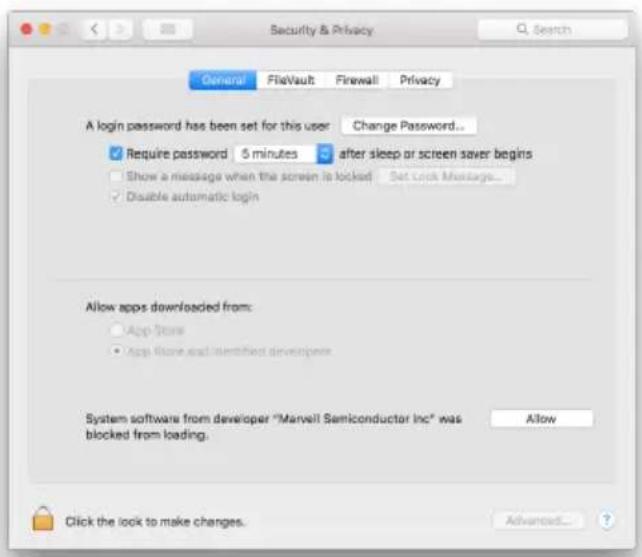
text_image
Security & Privacy General FlatVault Firewall Privacy A login password has been set for this user Change Password... ✓ Require password 5 minutes ✓ after sleep or screen saver begins □ Show a message when the screen is locked Set Lock Message... ✓ Disable automatic login Allow apps downloaded from: □ App Store • App Store and identified developers System software from developer "Marvell Semiconductor Inc" was blocked from loading. Allow Click the look to make changes. Advanced...Note: If you can not click the allow button, click the lower left corner of the lock icon, and enter the administrator password.
關於這份手冊
natural_image
Front view of a server rack with four vertical slots and labeled ports (A, B, C, D), no text or symbols present.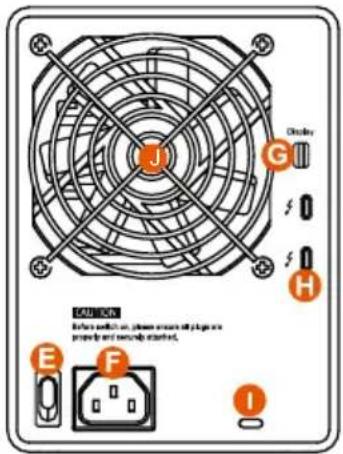
text_image
J G H E F I Direction Before switch on power outlet with plug or propuls and normally started.natural_image
Technical illustration of two hard disk components with red arrows indicating features (no text or symbols present)text_image
BuyOff Moving Forward Fetter * Visit here: 2017/04/2018 (New) Considered * Presetred: ■ Reminder project- 點擊【Operation】與【Create Array】。
text_image
Marvell Storage Marvell Storage Management Design Microsoft Physical Services Management Account Management Physical Tools Section PCI Service Definition Event Log(s): (no - tcs / total events 201) Operator Class Status Description ACOS Version: GASO Clients Firewalls Version: Update Build Loader No: Runtime Driver Version: PCI: Extension (E): Vendor ID: Sub Vendor ID: Device ID: Sub Event (D): Port Count: PVI PCO Speed: Current PCIe Speed: PVI PCIe Link: Current PCIe Link: Systematic Event 1.1.8.2008 1.1.8.2008 1.1.8.2022 1.1.8.2022 64 1948 1948 KNO 9500 5 1950x 5000x 64 Event Log(s): (no - tcs / total events 201) Operator Class Status Description 0 Adapter Event 0/0/23/2017 11:37 0/0/23/2017 11:37 0/0/23/2017 11:37 0/0/23/2017 11:37 Auto Only data Packed &Y Virtual Disk CI as follows Auto Only data Packed &Y Virtual Disk CI as follows3. 點擊選擇硬碟。
text_image
Marvell Moving Forward Faster Market Manager | Local | Amounts Harwell Storage Initial Storage Management Device Marvell Physical Devices Physical Data port 0 Physical Data port 1 Physical Data port 2 Physical Data port 3 Management Assessment Management Catal Supply Setting Data Schedule Setting Event Log(s:202-205/Total Event(s:202)) Operator Class其实 Sales Description 0 0 Adapter Event 05/22/2017 10:38 Auto data Eased X/S 0 0 VD Event 05/22/2017 10:19 Virtual Data & Online 0 0 Adapter Event 05/22/2017 10:17 Auto data Eased X/S 0 0 VD Event 05/22/2017 10:17 Virtual Data & Online Record Status: EXO Show Code: Update Start Date: Date Save: New Site Cancel Cancel Event Log(s:202-205/Total Event(s:202))4. 選擇【RAID 0】
text_image
Marvell Storage Marvell Storage Management Device Storage Physical Data Physical Data port0 Physical Data port1 Physical Data port2 Physical Data port3 Management Consumer Management Food Stock Setting Food Schedule Setting Event Logs (ms=ms/total records, 201) Address Class Time Description N Adaptive Store1 N VCD Document N Adaptive Store1 N VCD Document N Adaptive Store1 N VCD Document N Adaptive Store1 N VCD Document N Adaptive Store1 N VCD Document N Adaptive Store1 N VCD Document N Adaptive Store1 N VCD Document N Adaptive Store1 N VCD Document N Adaptive Store1 No Add Date: 10.00.00.00.00.00.00.00.00.00.00.00.00.00.00.00.00.00.00.00.00.00.00.00.00.00.00.00.00.00.00.00.00.00.05 Add Date: 10.00.00.00.00.00.00.00.00.00.00.00.00.00.00.00.00.00.00.00.00.00.00.055. 設定 Stripe Size
text_image
Marvell Storage Record Storage Management Actions MIME Physical Storage Physical Data, 2017 Physical Data, part 1 Physical Data, part 2 Management ACOUNT Configuration Email Supply Settings Mail Schedule Setting Create Data Array 3.000 GB 3.000 GB 3.000 GB 3.000 GB 3.000 GB 3.000 GB 3.000 GB 3.000 GB 3.000 GB 3.000 GB 3.000 GB 3.000 GB 3.000 GB 3.000 GB 3.000 GB 4.00 GB 4.00 GB 4.00 GB 4.00 GB 4.00 GB 4.00 GB 4.00 GB 4.00 GB 4.00 GB 4.00 GB 4.00 GB 4.00 GB 4.00 GB 4.00 GB 4.00 GB 4.00 GB 4.00 GBtext_image
Marvell Storage Marvell Storage Management Data Operator 0 MARELL Storage Performance Services Physical Data port 0 Physical Data port 1 Physical Data port 2 Physical Data port 3 Maintenance Network Management Final notify setting RSD Substrate Setting Event Log(s: 200-201/total events: 201) Operator Class# Name Description 0 Adaptive Event 03/25/2017 11:39 Cable data data changed in %5 0 AD Event 03/25/2017 11:39 Visual Data 3% online 0 Adaptive Event 03/25/2017 11:37 Cable data data changed in %5 0 AD Event 03/25/2017 11:37 Visual Data 3% online- 點擊【Create VD】,將【Initialize】的選項設定為【Fast Initialization】;將【Gigabyte Rounding】的選項設定為【10G】,再點擊【Submit】。
text_image
Marvell Storage Harvell Storage Management Devices Adapter 0 Physical Storage Physical Data: 2017.9 Physical Data: 2017.5 Physical Data: 2017.3 Management Account Software and Physical Security Setting Show Schedule Setting Property Storage Operations Create Existing Data (Data type) from the CNTs? File name: Current storage allocation Name: Aval Final Cache Mode: C:\Users\Watermark Write Cache Mode: Cable BackPerformance C:\Documents\Balance\Balance\Balance\Balance\Balance\Balance\Balance\Balance\Balance\Balance\Balance\Balance\Balance\Balance\Balance\Balance\Balance\Balance\Balance\Balance\Balance\Balance\Balance\Balance\Balance\Balance\Balance\Balance\Balance\Balance\Balance\Balance\Balance\Balance\Balance\Balance\Balance\Balance\Balance\Balance\Balance\Balance\Balance\Balance\Balance\Balance\Balance\Balance\Balance\Balance\ Balance Final Cache Mode: Cable BackPerformance C:\Documents\Balance\Balance\Balance\Balance\Balance\Balance\Balance\Balance\Balance\Balance\Balance\Balance\Balance\Balance\Balance\Balance\Balance\Balance\Balance\Balance\Balance\Balance\Balance\Balance\Balance\Balance\Balance\Balance\Balance\Balance\Balance\Balance\Balance\Balance\Balance\Balance\Balance\Balance\Balance\Balance\Balance\Balance\Balance\Balance \nBalance Value Positive Value Positive Value Positive Value Positive Value Positive Value Positive Value Positive Value Positive Value Positive Value Positive Value Positive Value Positive Value Positive Value Positive Value Positive Value Positive Value Positive Value Positive Value Positive Value Positive Value Positive Value Positive Value Positive Value Positive Value Positive Value Positive Value Positive Value Positive Value Positive Value Positive Value Positive Value Positive Value Positive Value PositiveValuetext_image
Marvell Storage Market Storage Management Open Adapter 1 Adapter 2 System Tools: 0.00000000000000000000000000000000000000000000000000000000000000000000000000000000000000000000000 Operating Compliance Info Subway VLS Open Cactor Ranking UWLE List for Status MID2 Level NOSL NOR Handler Count VSPG 35.6 Event Logs: 198-199/Total Events: 198) Adapter Class Time Description Adapter Event: 87/37/24T 11:38 Auto data Readout 578 Adapter Event: 87/37/24T 11:38 Virtual Disk 3 to online Adapter Event: 87/37/24T 11:37 Auto data Readout 58 Adapter Event: 87/37/24T 11:37 Virtual Disk 3 to online- 在第一條警告消息中點擊【OK】。
text_image
Microsoft Stock Exchange Event Log(s) (per 100%): Microsoft Stock Exchange (MSX) Add: Remove: Add: Remove: Add: Remove: Add: Remove: Add: Remove: Add: Remove: Add: Remove: Add: Remove: Add: Remove: Add: Remove: Add: Remove: Add: Remove: Add: Remove: Add: Remove: Add: Remove: Add: Remove: Add: Remove: Add: Add: Remove: Add: Remove: Add: Remove: Add: Remove: Add: Remove: Add: Remove: Add: Remove: Add: Remove: Add: Remove: Add: Remove: Add: Remove: Add: Remove: Add: Remove: Add: Remove: Add: Remove: Add: Remove: Add: This site says... MIDUOGY? All data on this retail store will be used since its closed! OK Event Log(s) (per 100%): Microsoft Stock Exchange (MSX) Add: Remove: Description Add Remove Add Add Remove Add Add Remove Add Add Remove Add Add Remove Add Add Remove Add Add Remove Add Add Remove Add Add Remove Add Add Remove Add Add Remove Add Add Remove Add Add Remove Add Add Remove Add Add Remove Add Add Remove Add Add Remove Add Add New New New New New New New New New New New New New New New New New New New New New New New New New New New New New New New New New New New New New New New New New New New New New New New New New New Old- 在第二條警告信息中點擊【OK】。
text_image
Microsoft Storage This site says... Are you sure you want to render this email disk! Don't in the past create more messages. OK Cancel4. 點擊【Operation】、【Delete Array】與【Submit】
text_image
Marvell Storage Market Storage Management Description MAYA-101-2017 Physical Data: part 2 Physical Data: part 1 Physical Data: part 2 Capacity: 100% Capacity: 100% Capacity: 100% Capacity: 100% Capacity: 100% Capacity: 100% Capacity: 100% Capacity: 100% Capacity: 100% Capacity: 100% Capacity: 100% Capacity: 100% Capacity: 100% Capacity: 100% Capacity: 100% Capacity : 100% Capacity : 100% Capacity : 100% Capacity : 100% Capacity : 100% Capacity : 100% Capacity : 100% Capacity : 100% Capacity : 100% Capacity : 100% Capacity : 100% Capacity : 100% Capacity : 100% Capacity : 100% Capacity : 54.77.2.26 Capacity : 54.77.2.26 Capacity : 54.77.2.26 Capacity : 54.77.2.26 Capacity : 54.77.2.26 Capacity : 54.77.2.26 Capacity : 54.77.2.26 Capacity : 54.77.2.26 Capacity: 54.77.2.26 Capacity: 54.77.2.26 Capacity: 54.77.2.26 Capacity: 54.77.2.26 Capacity: 54.77.2.26 Capacity: 54.77.2.26 Capacity: 54.77.2.26 Capacity: 189.38 Capacity: 189.38 Capacity: 189.38 Capacity: 189.38 Capacity: 189.38 Capacity: 189.38 Capacity: 189.38 Capacity: 189.38 Capacity: 189.38 Capacity: 189.38 Capacity: 189.39 Capacity: 189.39 Capacity: 189.39 Capacity: 189.39 Capacity: 189.39 Capacity: 189.39 Capacity: 189.39 Capacity: 189.39 Capacity: 189.39 Capacity: 189.39 Capacity: 189.38 Capacity: 189.38 Capacity: 189.38 Capacity: 189.38 Capacity: 189.38 Capacity: 189.38 Capacity: 189.38 Capacity: 189.38 Capacity: 189.38 Capacity: 189.37 Capacity: 189.37 Capacity: 189.37 Capacity: 189.37 Capacity: 189.37 Capacity: 189.37 Capacity: 189.37 Capacity: 189.37 Capacity: 189.36 Capacity: 189.36 Capacity: 189.36 Capacity: 189.36 Capacity: 189.36 Capacity: 189.36 Capacity: 189.35 Capacity: 189.35 Capacity: 189.35 Capacity: 189.35 Capacity: 189.35 Capacity: 189.35 Capacity: 189.34 Capacity: 189.34 Capacity: 189.34 Capacity: 189.34 Capacity: 189.34 Capacity: 189.34 Capacity: 189.34 Capacity: 189.34 Capacity: 189.34 Capacity: 189.34 Capacity: 189.33 Capacity: 189.33 Capacity: 189.33 Capacity: 189.33 Capacity: 189.33 Capacity: 189.32 Capacity: 189.32 Capacity: 189.32 Capacity: 189.32 Capacity: 189.32 Capacity: 189.32 Capacity: 189.32 Capacity: 189.32 Capacity: 189.32 Capacity: 189.32 Capacity: 189.31 Capacity: 189.31 Capacity: 189.31 Capacity: 189.31 Capacity: 189.30 Capacity: 189.30 Capacity: 189.30 Capacity: 189.29 Capacity: 189.29 Capacity: 189.29 Capacity: 189.28 Capacity: 189.28 Capacity: 189.27 Capacity: 189.27 Capacity: 189.26 Capacity: 189.26 Capacity: 189.25 Capacity: 189.25 Capacity: 189.24 Capacity: 189.24 Capacity: 189.23 Capacity: 189.22 Capacity: 189.22 Capacity: 189.21 Capacity: 189.20 Capacity: 189.205. 在警告信息中點擊【OK】。