
AS 06 - TV Antenna ZEHNDER - Free user manual and instructions
Find the device manual for free AS 06 ZEHNDER in PDF.


| Product Type | Digital TV Antenna (DVB-T) |
| Brand | Zehnder |
| Model | AS 06 |
| Frequency Range | 174–870 MHz (Channels 05–69) |
| Amplifier Gain | 18 dB |
| Cable Length | 300 cm (coaxial) |
| Power Supply | 9–12 V DC / 100 mA (with adapter) or 5 V DC / 50 mA (via DVB-T receiver) |
| Power Adapter | AC 230 V / 50 Hz; DC 12 V / 250 mA |
| Power Consumption | < 0.5 Watt |
| Dimensions (B x H x T) | 28.5 x 146.5 x 15.2 mm |
| Weight (approx.) | 200 g |
| Mounting Type | Wall mount with screws or Velcro, indoor/outdoor |
| Housing Material | Waterproof and UV-resistant plastic |
| Amplifier Technology | Ultra low noise (< 2 dB) |
| Compatibility | DVB-T receivers with DC 5V antenna powering; ATSC/ISDB-T may not support 5V |
| Included Accessories | Power adapter, power inserter, mounting holder, screws, anchors, Velcro tape |
| Disposal | Electronic equipment – do not dispose as household waste; take to designated collection points |
Frequently Asked Questions - AS 06 ZEHNDER
User questions about AS 06 ZEHNDER
0 question about this device. Answer the ones you know or ask your own.
Ask a new question about this device
Download the instructions for your TV Antenna in PDF format for free! Find your manual AS 06 - ZEHNDER and take your electronic device back in hand. On this page are published all the documents necessary for the use of your device. AS 06 by ZEHNDER.
USER MANUAL AS 06 ZEHNDER
Installationshinweise
Digital TV Antenna Outdoor / Indoor
MODEL: AS 06
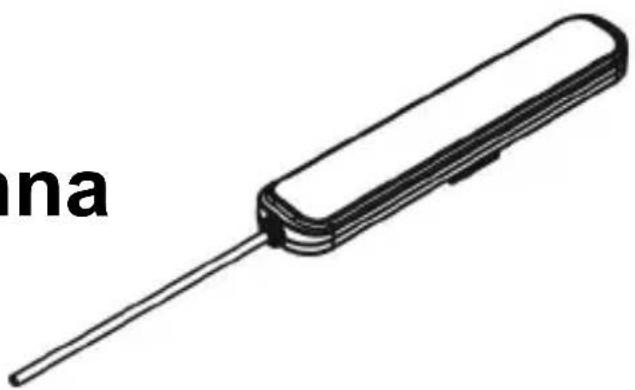
Congratulations on your purchase of the portable digital TV antenna. Your satisfaction is very important to us. Before your installation, please read this manual carefully and keep this manual for further information.
INTRODUCTION
AS 06 is a special design antenna for digital terrestrial TV broadcasting reception. With state of the art low noise amplifier circuitry design, it will provide the best reception quality. AS 06 is designed to be used in both indoor and outdoor environment. The slim and stylish housing design makes the antenna easy to use and easy to match with house decoration.
Feature:
- Slim and compact design
■ Wall mountable design
■ Water-proof and Anti-UV housing
■ Frequency range: 174-870 MHz - Gain \~18 dB
■ Ultra low noise amplifier technology (<2 dB)
■ Cable length 300 cm
PACKAGE CONTENT
Before start your installation, please check the contents.
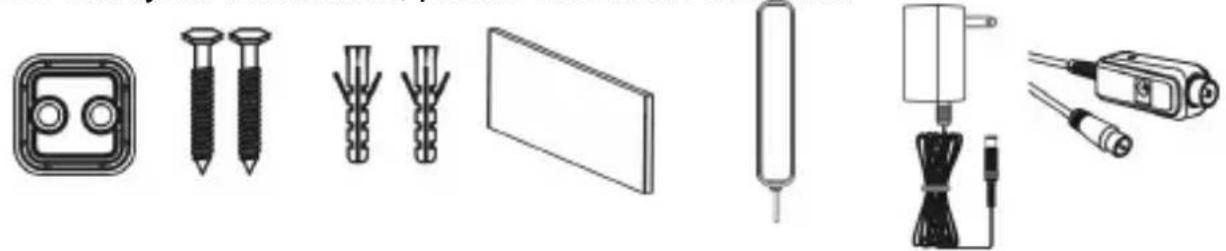
Velcro Anch Ma Sctevits HdRbewer
Adaptor
Power
Inserter
Disposal
Electronic equipment is not household waste. In accordance with directive 2002/9
6/EC OF THE EUROPEAN PARLIAMENT AND THE COUNCIL of 27th January
2003 on used electrical and electronic equipment, it must be disposed of properly.
„At the end of its service life, take this unit for disposal at the designated public collection points."
The Ground Truth image displays a single, solid horizontal line. According to Rule 2 (UNDERSCORE & LINE RULES), this is a stylistic or background line, not a placeholder underscore. Therefore, the OCR result must ignore it and output nothing or only meaningful text. The provided OCR content is "____", which consists of four underscores. This is an incorrect interpretation of the line as a placeholder, violating the rule that stylistic lines must be ignored. The OCR has hallucinated underscores where none should exist based on the GT's visual context. Hence, the OCR result is inconsistent with the Ground Truth.
Antenna connection:

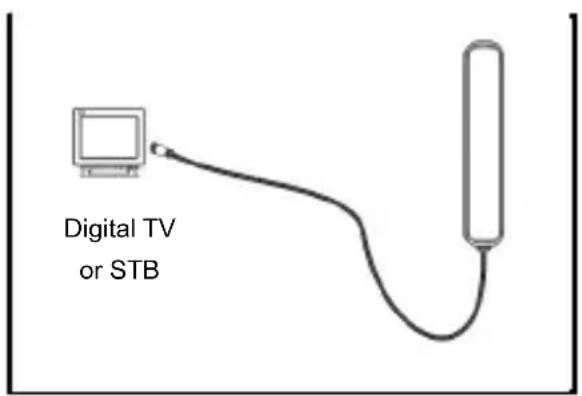
Powering the antenna with the Set-Top-Box
(1) Take out the AS 06 main unit and check the accessories.
(2) Take the coaxial cable that attached on the antenna, and connect it to the antenna input connector of your Set Top Box (or Digital TV).
(3) Please make sure the antenna powering function of your Set Top Box (or Digital TV) is activated.
(4) Perform the channel scan. (Please see the user's manual of your STB or Digital TV for the operation instruction.)
(5) Check the signal quality. If you can not get a good signal reception, please try to put the antenna at different position.
Note: Please make sure the connected STB (or TV) can support DC 5V powering function through coaxial cable to antenna. ATSC and ISDB-T digital TV system may not support DC 5V powering function.

Powering the antenna with the power adaptor and power inserter
(1) Take out the AS 06 main unit and check the accessories.
(2) Connect the power inserter to the antenna input of your Set Top Box (or Digital TV).
(3) Take the coaxial cable that attached on the antenna, and connect it to the power inserter.
(4) Take out the power adaptor. Connect it to the DC input of power inserter; and plug the AC end to an AC Outlet. (Please note use only supplied power adaptor.)
(5) Perform the channel scan. Please see the user's manual or your STB or Digital TV for the operation instruction.
(6) Check the signal quality. If you can not get a good signal reception, please try to put the antenna at different position.

Antenna placement:
Before the following step, please make sure that you have enough protection when you try to drill on wall and install the antenna outdoor.
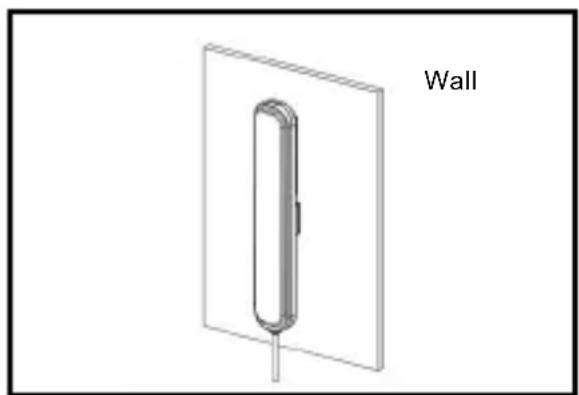
Wall mounted installation:
(1) Mark the fixing position with a pencil or pen (please use the holder to mark the position).
(2) Take the electric drill, Use drill bit to drill a 35mm deep hole. Then clean the hole.
(3) Take the plastic screw anchors, using hammer to insert the anchors into the hole.
(4) Take the screws, use screw driver, and fix the screws through the fixing holder onto the plastic anchors.
(5) Place the main unit on the fixing holder.


Wall mounted installation with the Velcro tape:
(1) Find the fixing position and make sure the antenna can get a good signal reception.
(2) Attach one side of the Velcro tape to the back of the antenna, and another side of the Velcro tape to the position you want to fix the antenna.
(3) Place the main unit to the position.

NOTICE
For the best reception, please check the following conditions.
- Keep the antenna away from the sources of interference: keep the antenna away from those big power consumption devices, such as air conditioner, elevator, hair dryer and microwave oven...etc.
- Installed as high as possible: In the case of digital terrestrial reception, if there is interruption between antenna and transmission tower, it will cause the signal loss. Avoid any interruption, the reception will be better.
- Place the antenna near windows when use the antenna in indoor environment. If the Windows screen is made of metal material, it will become as a signal shielding. Place the antenna away from those metal material windows screen.
TROUBLE SHOOTING
- If you can not get the digital programs as you expect, please check following conditions:
a. Check the connection. Make sure all the connection is correct.
b. Check the antenna powering (coaxial cable powering) function of your STB. AS 06 is an active antenna. You will need to enable the antenna powering function. (Please check the operational manual of the STB or TV.)
c. If you place the AS 06 antenna on the TV panel, please try to move the antenna away from the TV panel. Some panel may reduce the signal reception of the antenna.
- Adjust the direction and position of antenna to find the best reception angle.
Specifications:
| Frequency Range | 174~870MHz,Chanal 05~69 |
| Amplifier Gain 18 dB | |
| Power Supply | 9-12V DC/100mA, with power adaptor,5V DC/50mA, with DVB-T Receiver |
| Power Adaptor AC ~230V/50Hz;DC 12V/250mA | |
| Consumption < 0.5 Watt | |
| Size: B x H x T 28.5 x | 146.5 x 15.2 mm |
- INSTALLATIONSHINWEISE
- DIGITAL TV ANTENNA OUTDOOR / INDOOR
- INTRODUCTION
- FEATURE
- PACKAGE CONTENT
- DISPOSAL
- ANTENNA CONNECTION
- POWERING THE ANTENNA WITH THE SET-TOP-BOX
- POWERING THE ANTENNA WITH THE POWER ADAPTOR AND POWER INSERTER
- ANTENNA PLACEMENT
- WALL MOUNTED INSTALLATION
- WALL MOUNTED INSTALLATION WITH THE VELCRO TAPE
- NOTICE
- TROUBLE SHOOTING
Brand : ZEHNDER
Model : AS 06
Category : TV Antenna