PW-E310 - Uncategorized SHARP - Free user manual and instructions
Find the device manual for free PW-E310 SHARP in PDF.


Pick your language and provide your email: we'll send you a specifically translated version.
| Product Type | Electronic Dictionary / Translator |
| Brand | Sharp |
| Model | PW-E310 |
| Display | LCD screen, monochrome or color |
| Dimensions (approx.) | 120 mm x 80 mm x 15 mm |
| Weight (approx.) | 150 g (including batteries) |
| Power Source | 2 x AAA batteries (alkaline recommended) |
| Main Functions | English-Japanese dictionary, translations, phrasebook, vocabulary learning |
| Additional Features | Search by keyword, voice playback (text-to-speech), multiple dictionary databases |
| Language Support | English and Japanese (primary), other languages may be available |
| Memory Storage | Internal ROM (dictionary data), no expandable memory |
| User Interface | QWERTY keyboard, directional keys, menu buttons |
| Battery Life (approx.) | Up to 100 hours of continuous use |
| Auto Power Off | Yes, after 5 minutes of inactivity |
| Maintenance | Clean with a soft, dry cloth. Do not use liquids or solvents. |
| Safety Precautions | Keep away from moisture and extreme temperatures. Do not disassemble. |
| Spare Parts | Batteries (AAA), no other user-replaceable parts |
| Repairability | Limited; contact Sharp service center for repairs |
| Included Accessories | User manual, batteries (may not be included) |
| Certifications | CE, FCC (typical) |
Frequently Asked Questions - PW-E310 SHARP
How do I turn on the Sharp PW-E310?
Press the Power button located on the top or side of the device. If the device does not turn on, check that fresh batteries are installed correctly.
What type of batteries does the PW-E310 use?
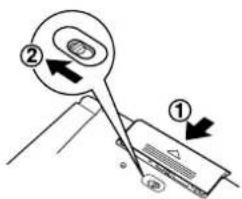
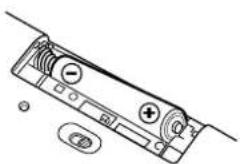
It uses two AAA alkaline batteries. For best performance, use fresh alkaline batteries and remove them if the device will not be used for an extended period.
How do I reset the device?
Remove the batteries, wait 30 seconds, then reinsert them. If the device still does not respond, press the Reset button (if available) with a pointed object.
Can I add new dictionaries or languages?
No, the PW-E310 has fixed internal dictionaries and does not support additional downloads or memory expansion.
How do I search for a word?
Type the word using the built-in QWERTY keyboard and press Enter or the Search key. The device will display dictionary entries.
Does the PW-E310 have voice pronunciation?
Yes, it features text-to-speech for English and Japanese words. Press the Speaker icon or assigned key to hear pronunciation.
How do I change the contrast or brightness?
Go to the Settings or Display menu. Use the arrow keys to adjust contrast. Brightness may not be adjustable if the screen is fixed.
Why is the screen blank or dim?
Check if the device is turned on and batteries have sufficient charge. If the contrast is too low, use the contrast adjustment in settings. Try resetting the device.
Can I use rechargeable batteries?
Yes, you can use NiMH rechargeable AAA batteries. Note that battery life may be shorter compared to alkaline batteries.
How do I clean the device?
Use a soft, dry cloth to wipe the exterior. Do not use water, cleaning agents, or abrasive materials. Avoid moisture entering the device.
User questions about PW-E310 SHARP
0 question about this device. Answer the ones you know or ask your own.
Ask a new question about this device
No questions yet. Be the first to ask one.
Download the instructions for your Uncategorized in PDF format for free! Find your manual PW-E310 - SHARP and take your electronic device back in hand. On this page are published all the documents necessary for the use of your device. PW-E310 by SHARP.
USER MANUAL PW-E310 SHARP
natural_image
Line drawing of a laptop computer with open lid and keyboard (no text or symbols)
ELECTRONIC DICTIONARY
New Oxford Thesaurus of English 44
Erste Schritte
natural_image
Diagram of a device panel with buttons and indicators (no text or symbols)