OSMO Vehicle Mount - Tripod DJI - Free user manual and instructions
Find the device manual for free OSMO Vehicle Mount DJI in PDF.


User questions about OSMO Vehicle Mount DJI
0 question about this device. Answer the ones you know or ask your own.
Ask a new question about this device
Download the instructions for your Tripod in PDF format for free! Find your manual OSMO Vehicle Mount - DJI and take your electronic device back in hand. On this page are published all the documents necessary for the use of your device. OSMO Vehicle Mount by DJI.
USER MANUAL OSMO Vehicle Mount DJI
natural_image
Technical line drawing of a mechanical device with three base platforms and a central vertical-mounted component (no text or symbols)Disclaimer and Warning
Congratulations on purchasing your new DJI product. The information in this document affects your safety and your legal rights and responsibilities. Read this entire document carefully to ensure proper configuration before use. Failure to read and follow instructions and warnings in this document may result in serious injury to yourself or others, damage to your DJI product, or damage to other objects in the vicinity. This document and all other collateral documents are subject to change at the sole discretion of DJI. For up-to-date product information, visit http://www.dji.com and click on the product page for this product.
By using this product, you hereby signify that you have read this disclaimer and warning carefully and that you understand and agree to abide by the terms and conditions herein. You agree that you are solely responsible for your own conduct while using this product, and for any consequences thereof. You agree to use this product only for purposes that are proper and in accordance with all applicable laws, rules, and regulations, and all terms, precautions, practices, policies and guidelines DJI has made and may make available.
DJI accepts no liability for damage, injury or any legal responsibility incurred directly or indirectly from the use of this product. The user shall observe safe and lawful practices including, but not limited to, those set forth in this document.
Introduction
The Vehicle Mount for the Osmo uses a triple suction cup design to secure the Osmo on any flat surface of a vehicle.
Specifications
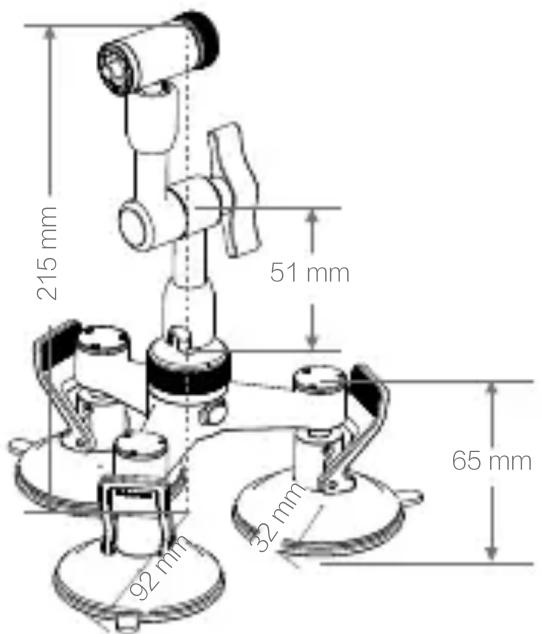
Base Radius: 92 mm
Suction Cup Radius: 32 mm
Universal Joint Half: 51 mm
Max Height: 215 mm
Weight: 425 g
text_image
215 mm 51 mm 65 mm 92 mm 32 mmInstallation
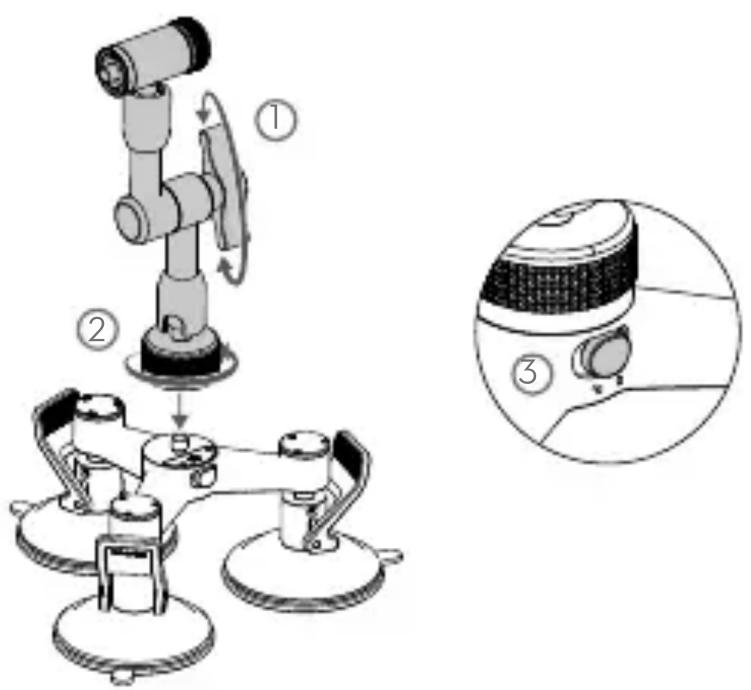
- Unfold the universal joint by loosening the knob. Screw it onto the base. Then, slide the base lock to the locked position.
text_image
Technical diagram showing a robotic arm with labeled parts and a close-up of the device's internal structure.- Place the Vehicle Mount on a flat surface such as the roof of your car. Ensure the suction cups make good contact with the surface and then push down the suction cup levers.

natural_image
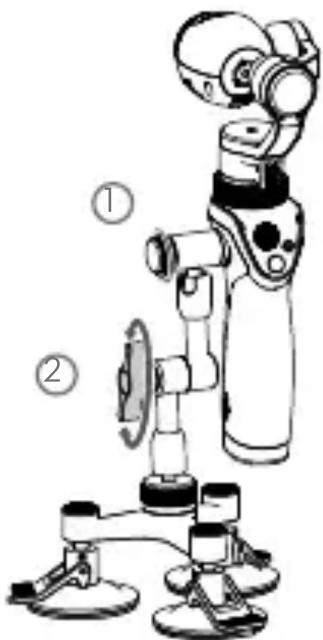
Mechanical device with rotating components and gear-like base (no text or symbols)- Attach the Osmo handle to the Vehicle Mount and then tighten the screw to secure. The position of the Osmo handle can be adjusted by loosening the knob on the universal joint.
text_image
Diagram of a robotic device with labeled parts, showing mechanical components and wiring connections.
Ensure the base lock is in the unlocked position before unscrewing the universal joint.
WARNING
- Ensure the Vehicle Mount is mounted on a flat and clean surface. Failure to do so may cause the suction cups to perform poorly and result in the Vehicle Mount falling off.
- Ensure the Vehicle Mount is mounted securely and will not fall off.
- Be observant and check for signs of looseness during your ride.
- The suction cups may perform poorly in low temperature environments. DO NOT use the Vehicle Mount if it shows signs of looseness.
- Bring the Osmo inside of the vehicle if you are travelling at speeds over 100 km/h. Otherwise, the gimbal may enter Protection mode and become inactive.
The content is subject to change.
Download the latest version from
www.dji.com/product/osmo
If you have any questions about this document, please contact
DJI by sending a message to DocSupport@dji.com.