
D02I710 - Sports Watch Clas Ohlson - Free user manual and instructions
Find the device manual for free D02I710 Clas Ohlson in PDF.


| Type | Sports Watch with Heart Rate Monitor and Pedometer |
| Brand | Clas Ohlson |
| Model | D02I710 |
| Article Number | 31-1055 |
| Display Type | Digital LCD with EL backlight |
| Heart Rate Measurement | Via chest strap (included) |
| Pedometer | Measures steps, distance, speed |
| Water Resistance | 5 ATM (50 meters) |
| Stopwatch Resolution | 1/100 second |
| Stopwatch Range | 9 hours, 59 minutes, 59.99 seconds |
| Timer Resolution | 1 second |
| Timer Range | 23 hours, 59 minutes, 59 seconds |
| Alarm | Daily alarm with 30-second sound |
| Fitness Test | Recovery rate measurement, 6 levels |
| Calorie/Fat Burn Display | Yes |
| Distance Range | 0–99.99 km (0–62.13 miles) |
| Speed Range | Up to 45 km/h (27.96 mph) |
| Step Range | 0–999,999 steps |
| Exercise Memory | One session with detailed summary |
| Stride Calibration | Auto or manual |
| Backlight | EL, 3 seconds active |
| Watch Battery | CR2032 (estimated, replacement by qualified professional) |
| Chest Strap Battery | CR2032 (user-replaceable) |
| Chest Strap | Adjustable elastic strap with sensor |
| Dimensions (Approx.) | 50 mm diameter, 15 mm thickness |
| Weight (Approx.) | 50 g (including strap) |
| Care and Maintenance | Clean with damp cloth; avoid knocks |
| Safety | Consult physician before exercise; max heart rate: 220 minus age |
| Spare Parts / Repairability | Chest strap and batteries replaceable; watch battery change by qualified personnel only |
Frequently Asked Questions - D02I710 Clas Ohlson
User questions about D02I710 Clas Ohlson
0 question about this device. Answer the ones you know or ask your own.
Ask a new question about this device
Download the instructions for your Sports Watch in PDF format for free! Find your manual D02I710 - Clas Ohlson and take your electronic device back in hand. On this page are published all the documents necessary for the use of your device. D02I710 by Clas Ohlson.
USER MANUAL D02I710 Clas Ohlson
Pulse watch with pedometer
Pulsklocka med stegräknare Pulsklokke med skritteller Sykemittarikello ja askelmittari Pulsuhr mit Schrittzähler
Art.no.
31- 1055
Model
D02I710
Ver. 20130913
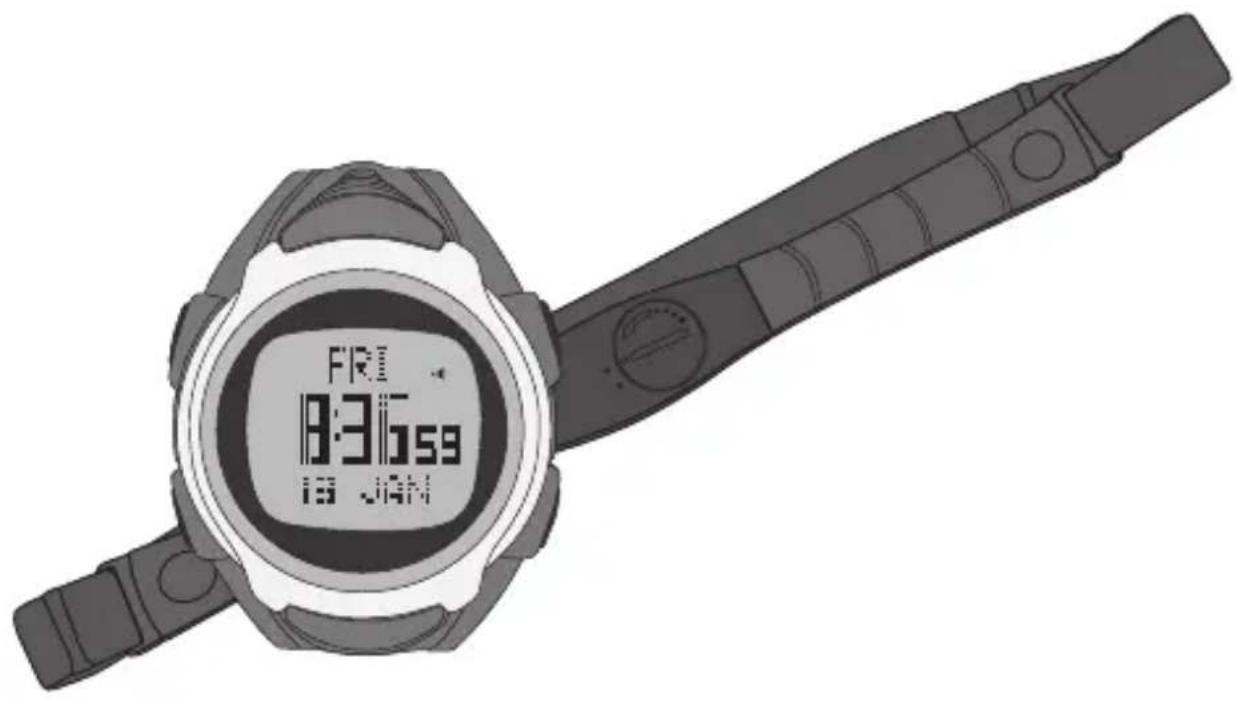
Pulse Watch with Pedometer
Art.no 31-1055 Model D02I710
Please read the entire instruction manual before using the product and save it for future reference. We reserve the right for any errors in text or images and any necessary changes made to technical data. If you have any questions regarding technical problems please contact our customer services.
Safety
- Contact your physician or trainer if you are unsure about the amount of physical activity you can engage in before attempting any pulse training regimes.
- An average max pulse value can be calculated by subtracting your age from 220. Example: If you are 40, your max pulse would be 180 (220 - 40 = 180).
Product description
Pulse Watch with Pedometer. Measures heart rate according to your personal profile, using the included chest strap.
- Distance
- Speed
- Calories burned
- Stopwatch
- Timer
- Clock
- Date
- Memory
• Water resistant to 5 ATM
Buttons and functions
Pulse watch
1. [LIGHT]
• Turns the backlight on for 3 seconds.
2. [MODE] Function selector.
- Press and release to scroll through the following functions: Time, exercise, stop watch (Chrono), alarm, timer or dual time display (Dual-T). Dual-time display allows you to set your destination time while travelling while also keeping track of your local time at home.
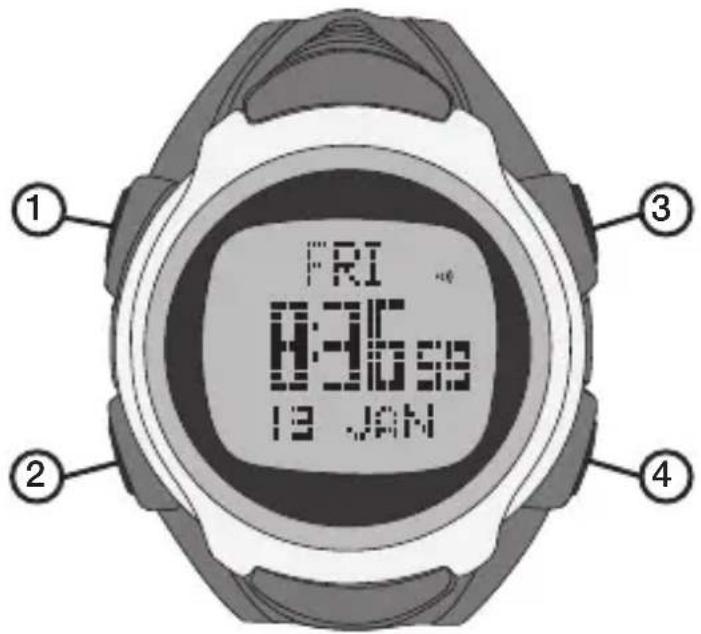
- Press and hold to enter/exit the settings mode for time, exercise, alarm, timer and dual-time display.
- Press to change between different value settings, e.g. from seconds to minutes for time display settings.
- Press and hold to enter the Recall-function in stopwatch mode.
3. [ST./STP./RST.] Start, stop and reset
- Press to start/stop the countdown while in exercise, stopwatch or timer mode.
- Press and hold to reset.
- Press to increase values while in different settings, e.g. setting the hours for time, etc.
4. [LAP/RELOAD]
- Press to decrease values while in different settings, e.g. setting the hours for time, etc.
- Press and hold for 5 seconds to put the watch into standby and turn off the display.
- Press to clear and restart the timer.
- Press to display the different exercise parameters.
Chest strap
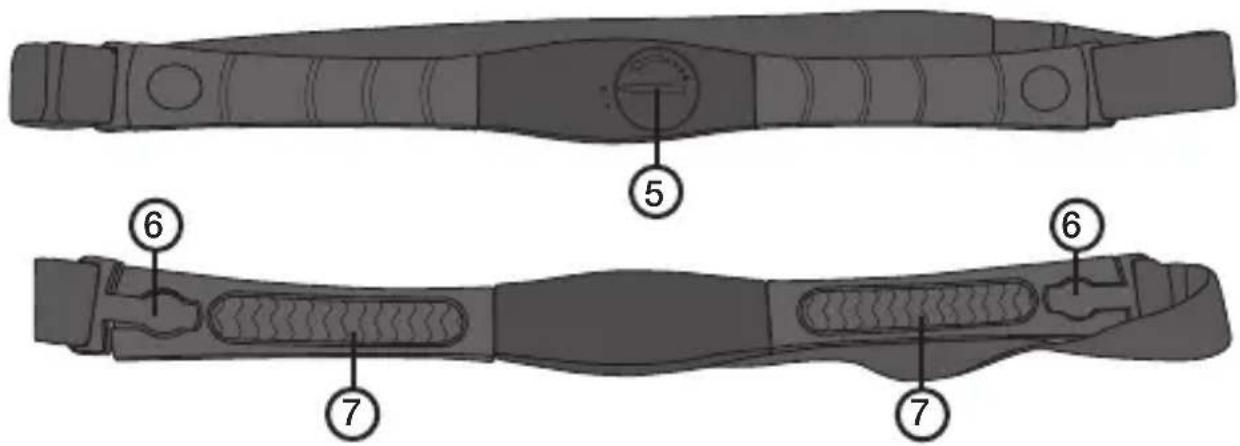
- Battery compartment
- Strap fastener
- Sensor surface area
Note:
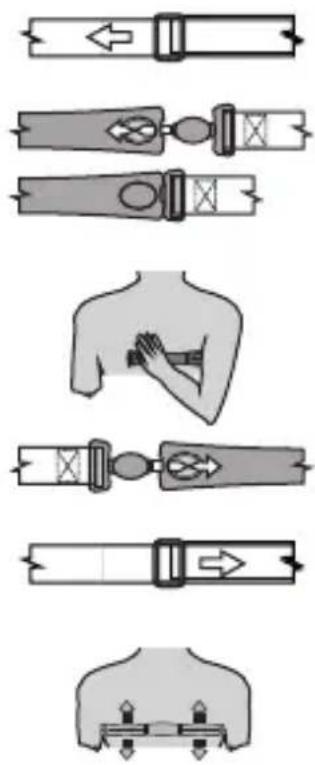
- Adjust the elastic strap so that it sits securely on your chest during strenuous physical activity. It is extremely important that the contact area (7) has good contact with your skin at all times for accurate measurements to be registered.
- Clean the contact area using a few drops of water and wiping off with a clean dry cloth after every exercise session.
- Wash the skin area with both soap and water before putting on the chest strap for the best effect.
- If your skin is dry use a little contact gel to allow for better signal transmission.
Operation
Each press on [MODE] will display the main functions of the pulse watch in the following order:
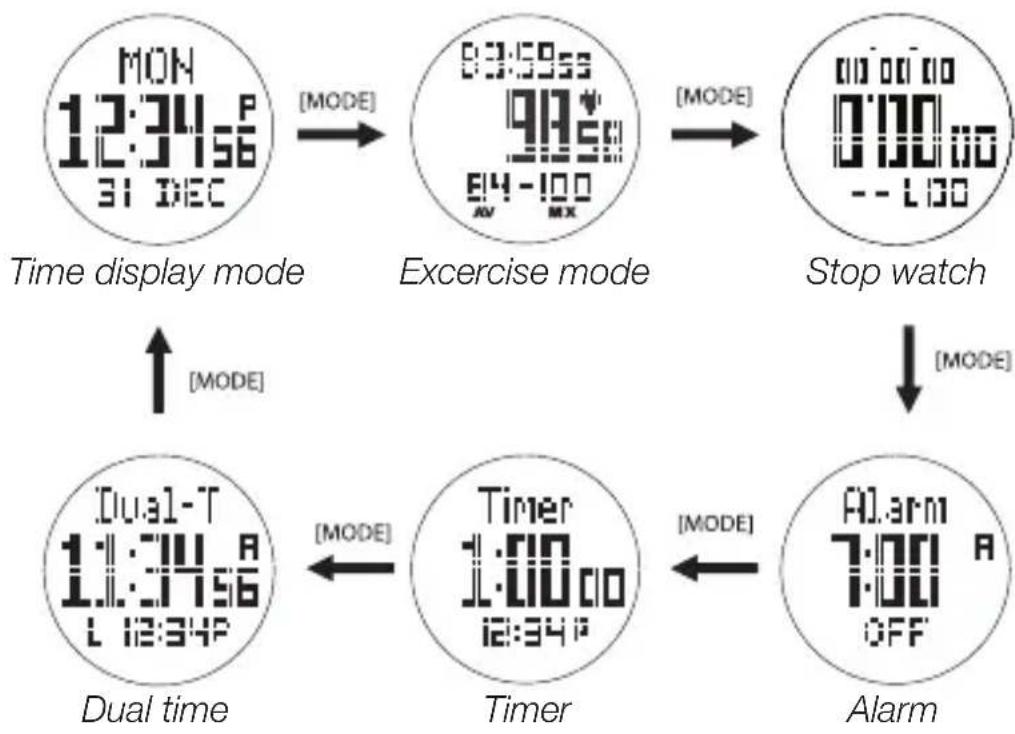
flowchart
graph TD
    A["MON 12:34:56 31 DEC"] -->|MODE| B["83:59:55 97:55 E4-100 MX"]
    B -->|MODE| C["Stop watch 0:00:00 0:00:00 -- L00"]
    C -->|MODE| D["Dual time 11:34:56 L 12:34:56"]
    D -->|MODE| E["Timer 1:00:00 i2:34:56"]
    E -->|MODE| F["Alarm 7:00:00 OFF"]
Time display mode
- Normal display mode shows day, time and date.
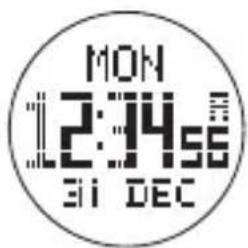
Time display settings:
- Press and hold [MODE] for approx. 2 seconds. The seconds setting will then begin flashing.
• Use [ST./STP./RST.] to increase and [LAP/RELOAD] to decrease values. - Press [MODE] to continue onto the minutes setting and use the same procedure as described above for setting the minutes.
- Press [MODE] again to continue onto the hours setting. Follow the same procedure to continue onto and input the other settings.
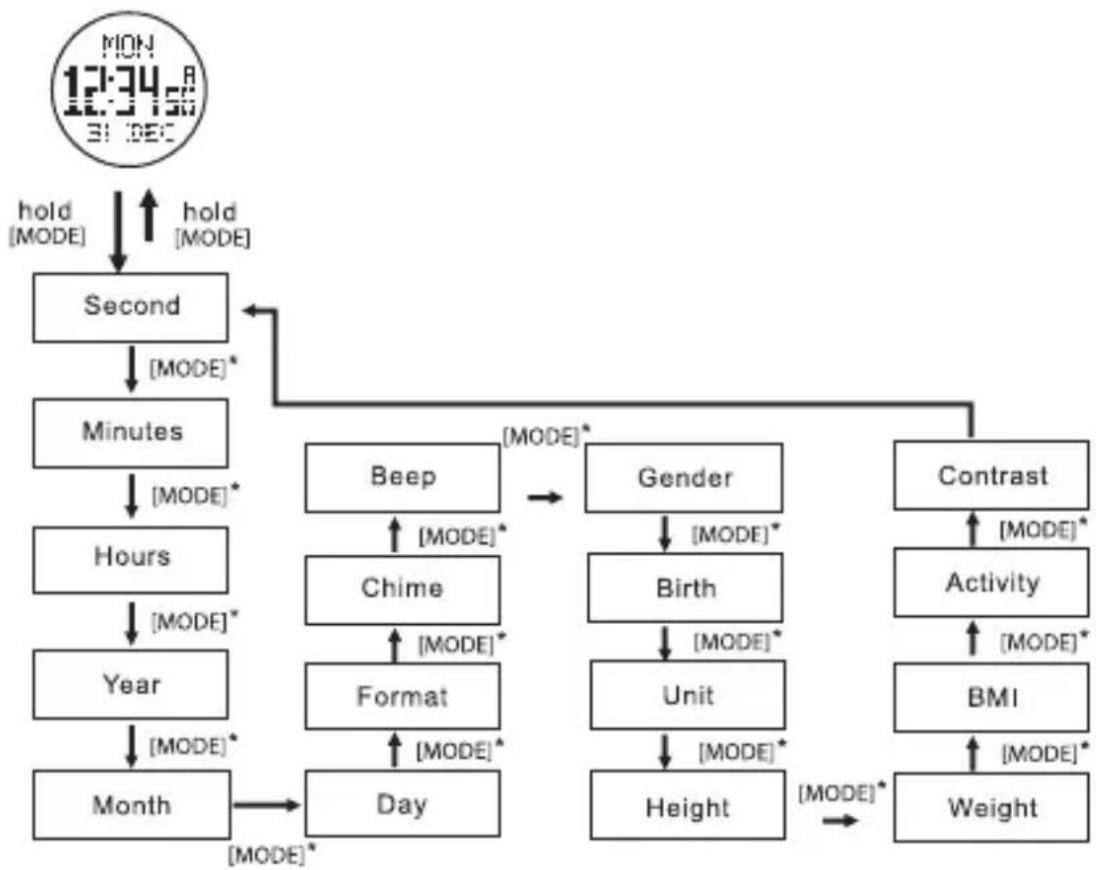
• 17 different settings can be entered as shown in the figure below. - Hold [MODE] for about 2 seconds to exit the settings.
flowchart
graph TD
    A["MON 12:34:08 31:DEC"] --> B["Second"]
    B --> C["minutes"]
    C --> D["Hours"]
    D --> E["Year"]
    E --> F["Month"]
    F --> G["Day"]
    G --> H["Format"]
    H --> I["Chime"]
    I --> J["Beep"]
    J --> K["Gender"]
    K --> L["Birth"]
    L --> M["Unit"]
    M --> N["Height"]
    N --> O["Contrast"]
    O --> P["Activity"]
    P --> Q["BMI"]
    Q --> R["Weight"]
    R --> S["Height"]
    S --> T["Day"]
    T --> U["Month"]
    U --> V["Month*"]
    V --> W["Day*"]
    W --> X["Month*"]
    X --> Y["Month*"]
    Y --> Z["Month*"]
    Z --> AA["Month*"]
    AA --> AB["Month*"]
    AB --> AC["Month*"]
    AC --> AD["Month*"]
    AD --> AE["Month*"]
    AE --> AF["Month*"]
    AF --> AG["Month*"]
    AG --> AH["Month*"]
    AH --> AI["Month*"]
    AI --> AJ["Month*"]
    AJ --> AK["Month*"]
    AK --> AL["Month*"]
    AL --> AM["Month*"]
    AM --> AN["Month*"]
    AN --> AO["Month*"]
    AO --> AP["Month*"]
    AP --> AQ["Month*"]
    AQ --> AR["Month*"]
    AR --> AS["Month*"]
    AS --> AT["Month*"]
    AT --> AU["Month*"]
    AU --> AV["Month*"]
    AV --> AW["Month*"]
    AW --> AX["Month*"]
    AX --> AY["Month*"]
- Second
- Minute
• Hour - Year
- Month
Day - Format (12 or 24 clock display)
- Chime
- Beep (keypad touch tone on/off)
• Gender (M-man, F-woman) - Birth (Birth year)
• Unit (Measuring units: Metric-metres, Imperial-feet/inches) - Height
- Weight
• BMI (Body mass index calculated using height and weight settings) - Activity (LOW-not physically active, MEDIUM-exercises 2–3 times a week, HIGH-engages in strenuous physical exercise on a regular basis)
- Contrast (Display's contrast setting)
Exercise
Heart rate
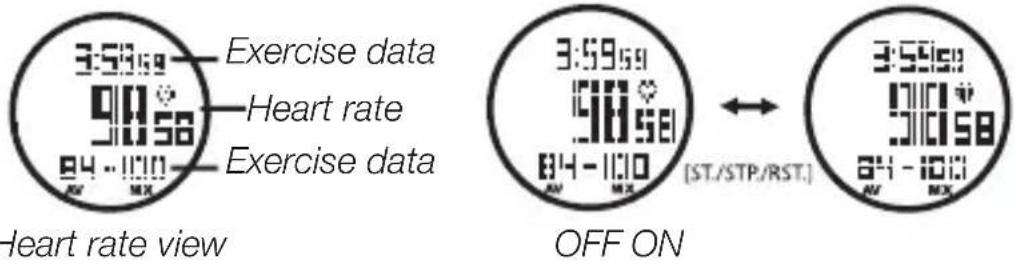
- Your heart rate is measured automatically five seconds after you have finished your exercise session.
- Press [ ST./STP./RST. ] to manually start/stop the exercise mode.
- Starting the exercise mode will delete all registered values from the last exercise session.
- The measurement of your heart rate will discontinue automatically if no pulse has been registered within five minutes.
Heart rate alarm
- Set the desired pulse rate you wish to maintain during your exercise session.
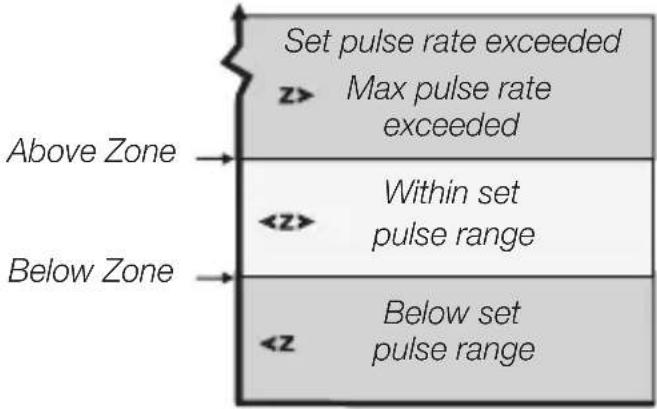
- An alarm will sound if your pulse either exceeds or goes below the set values (see the Settings section below).
- In order for the alarm to sound the Above Z (pulse rate exceeded) and Below Z (below set pulse rate) settings must be activated (see the Settings section below). The display will show symbols that tell you whether you are within, have exceeded or are below your set pulse settings. The alarm functions are shown in the figure below.
- Having Heart rate or Distance as your main display values, you are also able to choose various other values to be displayed both above and below the main value. See Distance measurement below.
Note: The watch must be on your wrist and the chest strap must be securely in place in order for any input to be registered. Stop the heart rate measurement and then press and hold in [ST./STP./RST.] to clear and reset it.
Heart rate (beats per minute)
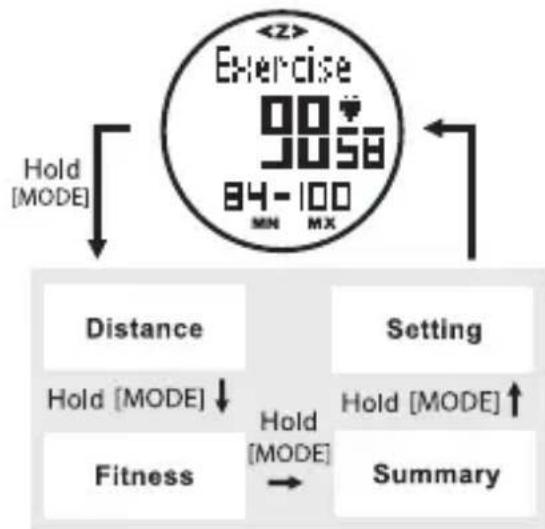
The following sub-categories are available in exercise mode:
- Distance
- Fitness
- Summary
- Setting
Press and hold [ MODE ] in order to display categories. Release [ MODE ] once the desired category is displayed.
flowchart
graph TD
    A["Exercise 90-100"] --> B["Hold [MODE"]]
    B --> C["Distance"]
    B --> D["Setting"]
    C --> E["Hold [MODE"]]
    D --> F["Hold [MODE"]]
    E --> G["Fitness"]
    F --> H["Summary"]
Distance measurement
![Sp 20.7 17.07° St 1098 Distance Distance measuring Sp 20.7 17.07° St 1098 OFF [ST/STP/RST.] Sp 20.7 17.07° St 1098 ON](/content/2026/05/783570/images/a8bc595765c3b80821db6a4c8be3367cb06b16e920230f3ad6c584e6bdde0a8a.jpg)
Having Heart rate or Distance as your main display values, you are also able to choose various other values to be displayed both above and below the main value.
- Press [LAP/RELOAD] to select between the following settings for the top row: "0:00" Elapsed exercise time
"I" Within time range
"B" Time range exceeded
"A" Below time range
"Sp" Speed
“Di” Distance
- Press and hold [ LAP/RELOAD ] to select between the following settings for the bottom row:
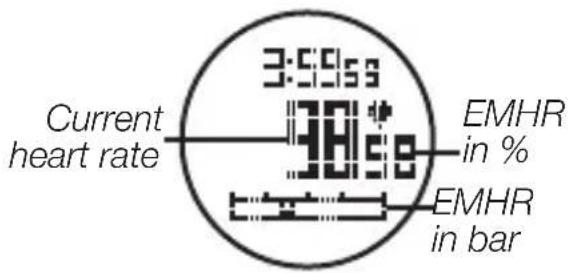
EMHR-diagram- Displays your current max pulse % (not displayed during distance measurement).
"KC"- Calories burned
"G"- Fat burned
"St"- Pedometer
"AV"- Average pulse
“MX”-Max pulse for current exercise session (not displayed during distance measurement).
"Heart symbol"- Current pulse (not displayed during heart rate measurement).
- If the EMHR-diagram is selected during heart rate measurement your current max pulse % will be displayed on the bar graph and also as a digit display to the right of the main display value.
• Calculation example using EMHR:
For an 18-yr old user, they would subtract their age from 220:
220 - 18 = 202 (see Safety section above)
Measured pulse: 140
140/202 × 100 % ≈ 69 %
The user will have reached 69% of their max pulse.
Fitness
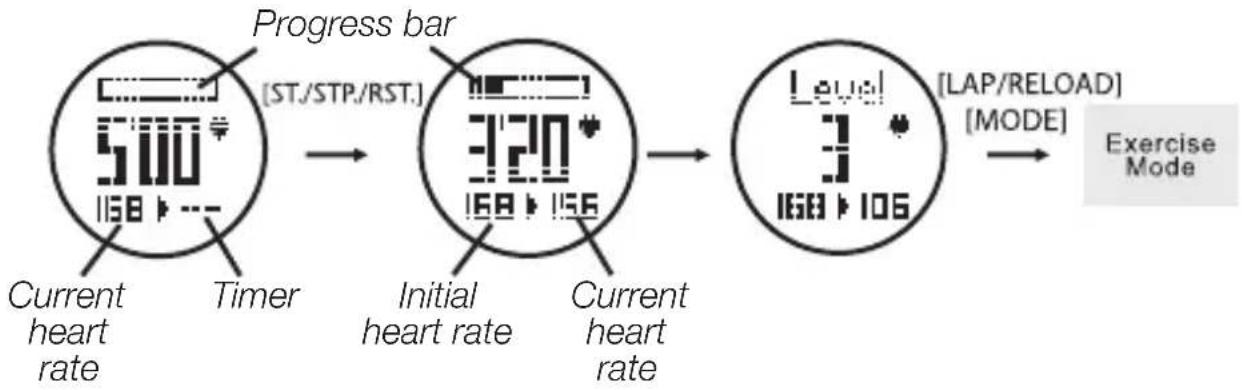
The pulse watch can give you an indication of your fitness level by measuring how fast your pulse rate returns to a normal rate after your exercise section. The watch will measure how fast your pulse rate falls for five minutes after your exercise session has ended. Results can be classified into six levels where one is best.
flowchart
graph LR
    A["Current heart rate"] --> B["Timer"]
    B --> C["Progress bar [ST./STP./RST."]]
    C --> D["Initial heart rate"]
    D --> E["Current heart rate"]
    E --> F["Level 168-106"]
    F --> G["LAP/RELOAD"] [MODE]
    G --> H["Exercise Mode"]
Fitness level
| Level BPM (beats per minute) after 5 minutes rest | |
| 1 < 100 | |
| 2 105–100 | |
| 3 110–105 | |
| 4 120–110 | |
| 5 130–120 | |
| 6 >130 | |
Summary
Results from your exercise session will be saved in the following manner:
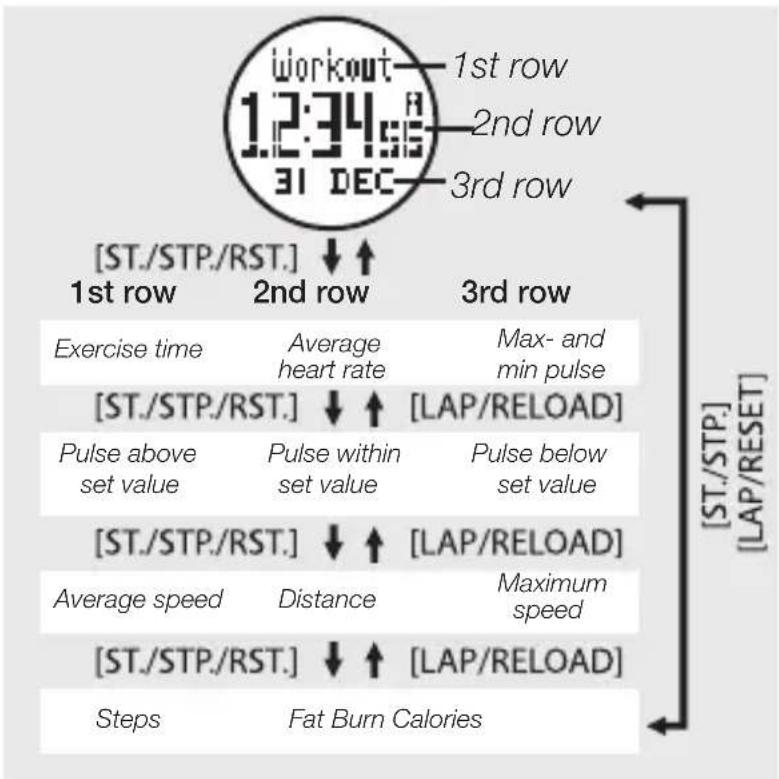
Note: All data is deleted once the Exercise session function is started again.
Settings
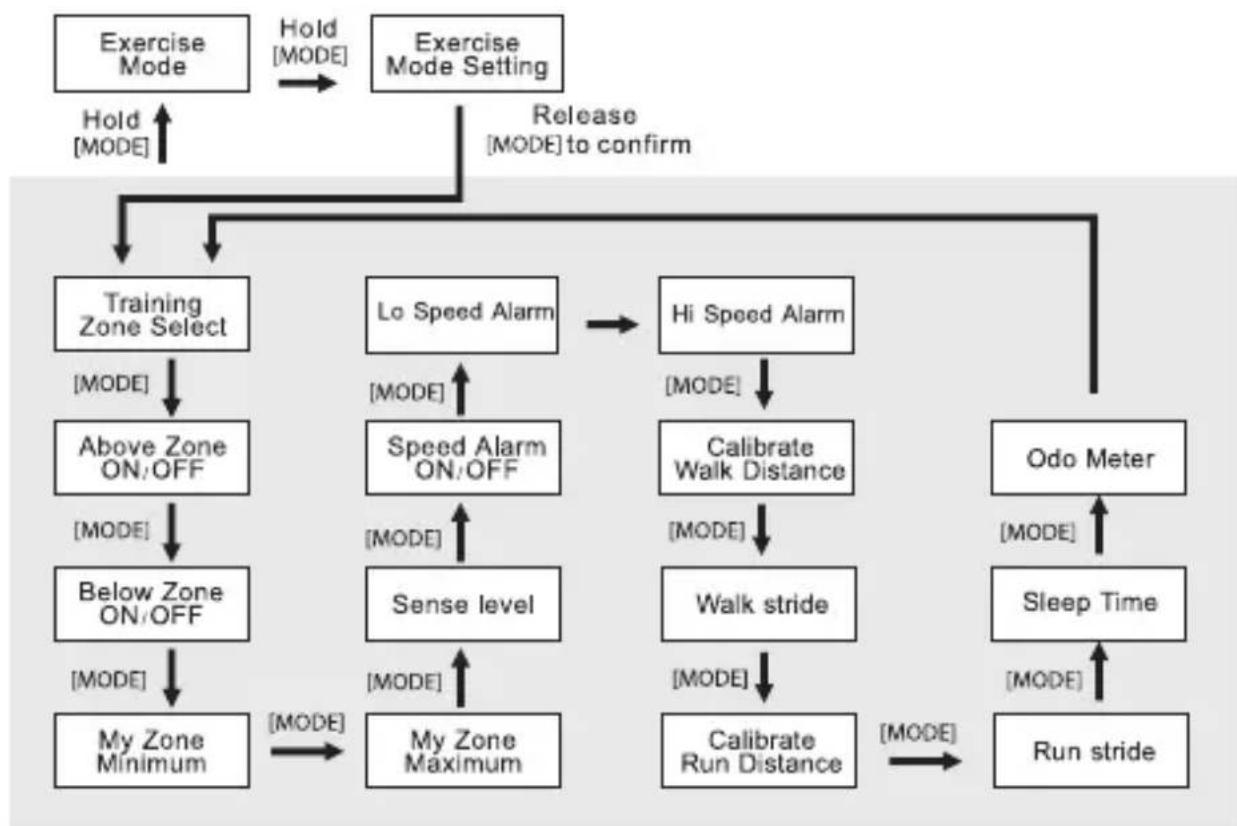
Select Exercise mode. Press and hold [MODE] until Setting is shown in the display. Press [MODE] again to browse between the different settings. The following settings can be adjusted:
flowchart
graph TD
    A["Exercise Mode"] -->|Hold["MODE"]| B["Exercise Mode Setting"]
    B -->|Release["MODE"] to confirm| C["Training Zone Select"]
    C --> D["Above Zone ON/OFF"]
    D --> E["Below Zone ON/OFF"]
    E --> F["My Zone Minimum"]
    F --> G["My Zone Maximum"]
    G --> H["Sense level"]
    H --> I["Speed Alarm ON/OFF"]
    I --> J["Hi Speed Alarm"]
    J --> K["Calibrate Walk Distance"]
    K --> L["Walk stride"]
    L --> M["Calibrate Run Distance"]
    M --> N["Run stride"]
    N --> O["Sleep Time"]
    O --> P["Odo Meter"]
    P --> Q["Release to confirm"]
    style A fill:#f9f,stroke:#333
    style B fill:#f9f,stroke:#333
    style C fill:#ccf,stroke:#333
    style D fill:#ccf,stroke:#333
    style E fill:#ccf,stroke:#333
    style F fill:#ccf,stroke:#333
    style G fill:#ccf,stroke:#333
    style H fill:#ccf,stroke:#333
    style I fill:#ccf,stroke:#333
    style J fill:#ccf,stroke:#333
    style K fill:#ccf,stroke:#333
    style L fill:#ccf,stroke:#333
    style M fill:#ccf,stroke:#333
    style N fill:#ccf,stroke:#333
    style O fill:#ccf,stroke:#333
    style P fill:#ccf,stroke:#333
    style Q fill:#ccf,stroke:#333
- When "My Zone" flashes while you are in Training Zone Select, press [ST./STP./RST.] or [LAP/RELOAD] to select between Health, FatBurn, Aerobic or My Zone.
- When "Above Z" (pulse above set value), "Below Z" (pulse below set value) and "Speed Alarm On" or "OFF" flashes, press [ST./STP./RST.] or [LAP/RELOAD] to switch the function on or off.
- If "My Zone-min and max", "Sense" (pedometer sensitivity), "Speed alarm-ON/OFF-High/Low", "Sleep Time", "Odo meter flash", press [ST./STP./RST.] or [LAP/RELOAD] to change the value. Holding either of the buttons makes the values change quickly.
Note: The pedometer's sensitivity is on a scale of 1–5 where 1 is the lowest sensitivity and 5 the highest. When either Above Z or Below Z are triggered, "Z" will be in the upper portion of the display.
- In order to calculate speed and distance correctly, the user must first input their stride length for both running and walking.
- You can calibrate stride length for both Walk and Run modes by selecting either Auto or Manual.
Auto
- Select the Calibrate Walk setting.
- Press [ST./STP./RST.] to input the desired stride length.
- Press [ LAP/RELOAD ] to start calibration.
- Walk or run the displayed distance.
-
Press [ST./STP./RST.] or [LAP/RELOAD] to end calibration.
-
Calculations for both walking and running will be automatically calculated.
Manual
- Select the Calibrate Walk or Run setting.
- Press [MODE] in order to enter the settings for Walk St (walking stride) or Run St (running stride).
- Press [ST./STP./RST.] or [LAP/RELOAD] to end calibration.
Stopwatch (Chronograph)
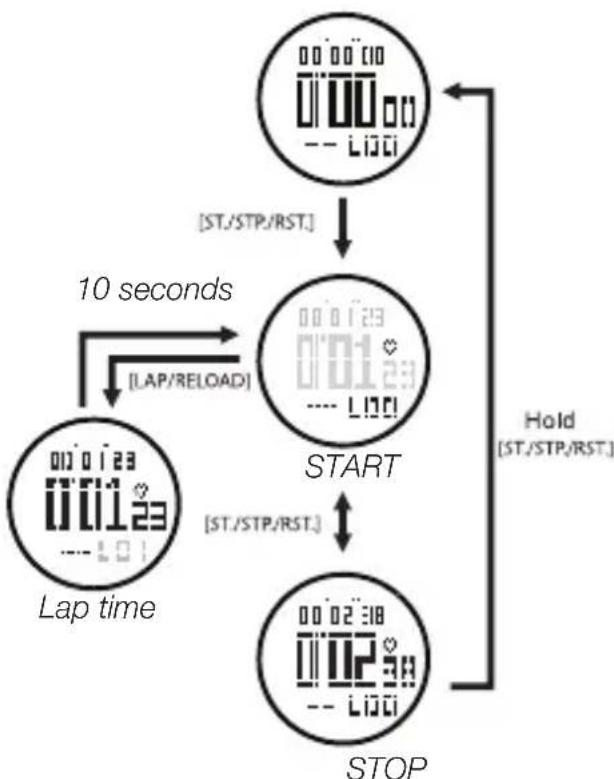
- Press [ST./STP./RST.] to start/stop the stopwatch.
- Press [ LAP/RELOAD ] to register lap-time.
- Press [ ST./STP./RST. ] to start/stop the stopwatch.
- Hold in [ ST./STP./RST. ] to clear and reset the stopwatch.
flowchart
graph TD
    A["Start"] -->|10 seconds| B["Lap time"]
    B --> C["10 seconds"]
    C --> D["STOP"]
    D -->|Hold["ST./STP/RST."]| A
    style A fill:#f9f,stroke:#333
    style B fill:#ccf,stroke:#333
    style C fill:#cfc,stroke:#333
    style D fill:#fcc,stroke:#333
Stopwatch mode
While the stopwatch is selected you may also select other values to be displayed on the top row. Hold in [MODE] once the stopwatch has started taking time to select amongst the following functions:
- Speed
- Distance
- Step (stride)
- StopW (stopwatch)
- Release [MODE] once the desired function is displayed.
Lap data
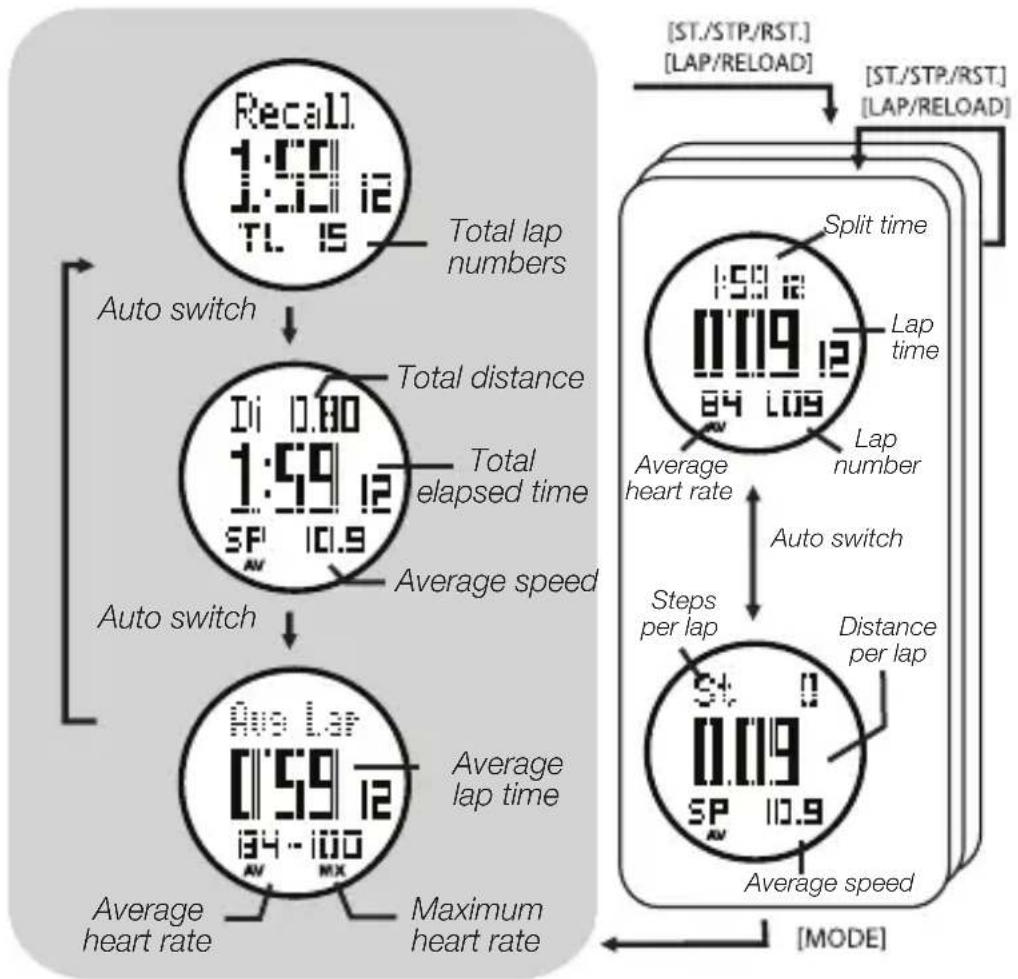
You can save both your lap time and heart rate for any particular exercise session. This data can then be displayed at the end of any exercise session.
- Hold in [MODE] once timekeeping has stopped until "Recall" is shown in the display. Release [MODE] once "Recall" is shown to activate the function.
• The following readings will transition automatically in the display:
flowchart
graph TD
    A["Recall 1:00 i:00 i2 TL 15"] --> B["Auto switch"]
    B --> C["Ii 0.80 1:59 i2 SF 10.9"]
    C --> D["Auto switch"]
    D --> E["Aus Lap 0:59 i2 i34 - i00 AV MX"]
    E --> F["Average lap time"]
    F --> G["Average heart rate"]
    G --> H["Maximum heart rate"]
    H --> I["Average speed"]
    I --> J["Distance per lap"]
    J --> K["Lap number"]
    K --> L["Average heart rate"]
    L --> M["Split time"]
    M --> N["Lap time"]
    N --> O["Auto switch"]
    O --> P["Average speed"]
    P --> Q["ST./STP/RST. [LAP/RELOAD"]]
    Q --> R["ST./STP/RST. [LAP/RELOAD"]]
    R --> S["MODE"]
Alarm settings
- Press and hold [MODE] until the hours setting flashes.
- Set the hours by pressing [ST./STP./RST.] or [LAP/RELOAD] (hold in the buttons to advance quickly).
- Press [MODE]. The minutes setting will begin to flash. Set the minutes using the same procedure as described above.
- Press and hold in [MODE] once you are finished to exit the settings mode.
• •••• will appear on the display when the alarm is activated.
• The alarm will sound for 30 seconds. - Press any button to turn the alarm off.
Note: The alarm will remain active if the alarm time is changed.
Timer settings
- Press [ ST./STP./RST. ] to start/stop the timer.
- When the timer has stopped, press [ LAP/RELOAD ] to clear and reset.
-
When the timer has counted down to its set time an alarm will sound for 30 seconds.
-
Press and hold [MODE] until the hours setting flashes.
- Set the hours by pressing [ST./STP./RST.] or [LAP/RELOAD] (hold in the buttons to advance quickly).
- Press [MODE]. The minutes setting will begin to flash. Set the minutes using the same procedure as described above.
- Press [MODE]. The seconds setting will begin to flash. Set the seconds using the same procedure as described above.
- Press and hold in [MODE] once you are finished to exit the settings mode.
Dual-time display
Dual-time display allows you to set your destination time while travelling and also keep track of your local time at home.
- Press and hold [MODE] until the hours setting flashes.
- Set the hours by pressing [ST./STP./RST.] or [LAP/RELOAD] (hold in the buttons to advance quickly).
- Press [MODE]. The minute setting will begin to flash. Set the minutes using the same procedure as described above.
- Press and hold in [MODE] once you are finished to exit the settings mode.
Standby mode
• In order to save battery life the screen can be turned off.
- Hold in [LAP/RELOAD] for about five seconds in time display mode to turn off the screen.
• Time will still be kept in standby mode.
- Press any button to exit standby mode and return to normal time display.
Care and maintenance
- Handle the watch and chest strap carefully. Never subject them to unnecessary knocks or blows.
- Clean the watch and chest strap with a lightly moistened soft cloth.
- Store the watch and chest strap in a dry place if you do not intend to use them for a long time.
Changing the watch battery
The watch casing must only be opened by qualified personnel. Let a tradesman perform the battery change if you are at all unsure about carrying out the procedure yourself.
Note: If the watch is used in extremely cold weather the low battery icon may be displayed. This is normal and the icon will disappear as soon as the watch begins to reach body temperature.
Changing the chest strap battery
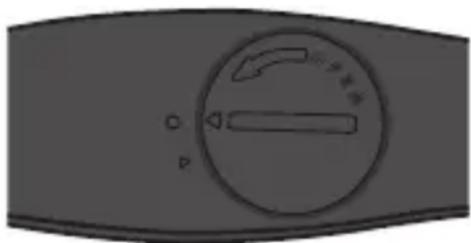
- Turn the battery compartment's cover so that its arrow is pointing to the corresponding arrow on the chest strap unit.
- Turn the cover past the arrow symbol to make it easier to remove.
- Remove the old battery and insert a new one (CR2032).
Note: Note the polarity markings at the bottom of the battery compartment to ensure correct insertion. The plus symbol should be on top facing you and fit securely under the retaining bracket.
- The cover has a thin o-ring to prevent dust and moisture from entering the device. Make sure that this ring is undamaged during battery change.
- Replace the cover with the arrow symbols lined up and turn the cover so that its arrow is again pointing to the circle symbol to ensure that it is properly closed.
natural_image
Close-up of a gray industrial control panel with a circular dial indicator and directional arrows (no text or symbols)Disposal
This product should be disposed of in accordance with local regulations. If you are unsure how to proceed, contact your local authority.
Specifications
Current time mode
Time system am, pm, hours, minutes, seconds
Time format 12-hour or 24-hour
Calendar month, date and day of week (auto-calendar function for day of week and leap year)
Alarm mode
Daily alarm and hourly chime
Alarm sound 30 seconds
Stopwatch mode
Resolution 1/100 second
Measuring range 9 hours, 59 minutes, 59.99 seconds
Countdown timer
Resolution 1 second
Measuring range 23 hours, 59 minutes, 59 seconds
Timer sounds The timer beeps once per minute for the last 10 minutes, every 10 seconds the last minute and every second for the last five seconds. It beeps for 30 seconds when it has counted down to zero.
Exercise mode
Six fitness levels measure how fast your pulse decreases during a five minute recovery period.
Automatic and manual settings for stride length.
Displayable steps range 0–999,999 steps
Exercise timer Max 24 hours
Distance measuring 0–99.99 km/0--62.13 miles
Speed measuring 45 km/h / 27.96 mph
Calorie burn range 0–9,999 calories
Auto start/stop schedule 6 schedules
Measuring range 30 to 240 bpm
Heart rate zone
alert setting Three pre-defined zones and one user defined zone
Heart rate zone alert Above max, Above zone and Below zone
Exercise memory One reading
Exercise record Total exercise time, average speed, total distance, total steps, total calorie burn, total fat burn, maximum/minimum/average heart rate, above/in/below zone exercise time.
Pedometer Sleep time (waits 1–240 min if no steps are recorded before shutting off), sensitivity 1–5 levels.
Backlight
Type of backlight
Electro-luminescent (EL) backlight
natural_image
Three schematic diagrams of mechanical components or connectors, no text or symbols present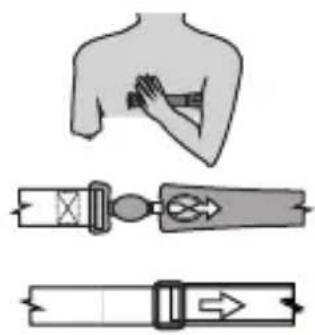
natural_image
Diagram showing three different types of medical or mechanical interventions: a hand holding a button, a belt switch with directional arrows, and a belt buckle with an arrow (no text or symbols present)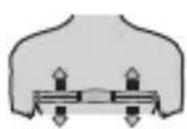
Användning
flowchart
graph TD
    A["Tidvisningsläge"] -->|MODE| B["Träningsläge"]
    B -->|MODE| C["Stoppur"]
    C -->|MODE| D["Alarm"]
    D -->|MODE| E["Timer"]
    E -->|MODE| F["Dubbel tidvisning"]
    F -->|MODE| G["12:34:56 31:DEC"]
    G -->|MODE| H["11:34:56 12:34P"]
    H --> I["1:00:00 12:34P"]
    I --> J["1:00:00 12:34P"]
    J --> K["1:00:00 12:34P"]
    K --> L["1:00:00 12:34P"]
    L --> M["1:00:00 12:34P"]
    M --> N["1:00:00 12:34P"]
    N --> O["1:00:00 12:34P"]
    O --> P["1:00:00 12:34P"]
    P --> Q["1:00:00 12:34P"]
    Q --> R["1:00:00 12:34P"]
    R --> S["1:00:00 12:34P"]
    S --> T["1:00:00 12:34P"]
    T --> U["1:00:00 12:34P"]
    U --> V["1:00:00 12:34P"]
    V --> W["1:00:00 12:34P"]
    W --> X["1:00:00 12:34P"]
    X --> Y["1:00:00 12:34P"]
    Y --> Z["1:00:00 12:34P"]
    Z --> AA["1:00:00 12:34P"]
    AA --> AB["1:00:00 12:34P"]
    AB --> AC["1:00:00 12:34P"]
    AC --> AD["1:00:00 12:34P"]
    AD --> AE["1:00:00 12:34P"]
    AE --> AF["1:00:00 12:34P"]
    AF --> AG["1:00:00 12:34P"]
    AG --> AH["1:00:00 12:34P"]
    AH --> AI["1:00:00 12:34P"]
    AI --> AJ["1:00:00 12:34P"]
    AJ --> AK["1:00:00 12:34P"]
    AK --> AL["1:00:00 12:34P"]
    AL --> AM["1:00:00 12:34P"]
    AM --> AN["1:00:00 12:34P"]
    AN --> AO["1:00:00 12:34P"]
    AO --> AP["1:00:00 12:34P"]
    AP --> AQ["1:00:00 12:34P"]
    AQ --> AR["1:00:00 12:34P"]
    AR --> AS["1:00:00 12:34P"]
    AS --> AT["1:00:00 12:34P"]
    AT --> AU["1:00:00 12:34P"]
    AU --> AV["1:00:00 12:34P"]
    AV --> AW["1:00:00 12:34P"]
    AW --> AX["1:00:00 12:34P"]
    AX --> AY["1:00:00 12:34P"]
    AY --> AZ["1:00:00 12:34P"]
    AZ --> BA["1:00:00 12:34P"]
    BA --> BB["1:00:00 12:34P"]
    BB --> BC["1:00:00 12:34P"]
    BC --> BD["1:00:00 12:34P"]
    BD --> BE["1:00:00 12:34P"]
    BE --> BF["1:00:00 12:34P"]
    BF --> BG["1:00:00 12:34P"]
    BG --> BH["1:00:00 12:34P"]
    BH --> BI["1:00:00 12:34P"]
    BI --> BJ["1:00:00 12:34P"]
    BJ --> BK["1:0O OFF"]
Tidvisningsläge
Konditionstest (Fitness)
natural_image
Gray-scale diagram of a device control panel with a circular dial and indicator lights (no text or symbols)Avfallshantering
- Batteriholder
- Feste for elastisk reim
- Kontaktflater for pulsmåling
Obs!
natural_image
Three schematic diagrams of mechanical components or connectors, no text or symbols present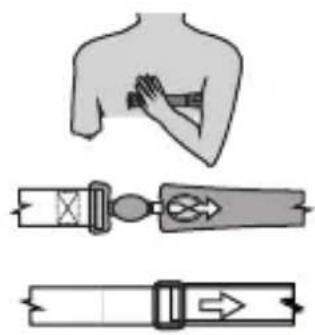
natural_image
Illustration of a human shoulder and two belt drive mechanisms (no text or symbols)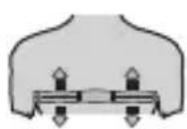
Bruk
Sammendrag (Summary)
Innstillinger (Settings)
natural_image
Close-up of a gray industrial control panel with a circular dial and indicator lights (no readable text or symbols)Avfallshändtering
Tidssystem am (fm), pm (em), h (time), min (minutt), s (sekund)
Tidsformat 12 eller 24 timer
- Paristolokero
- Elastisen nauhan kiinnike
- Anturiosat sykkeenmittausta varten
Huom.!
Käyttö
Pois päältä Päällä
Kuntotesti (Fitness)
natural_image
Gray industrial control panel with circular dial and indicator lights (no readable text or symbols)Kierrätys
Bedienung
Konditionstest (Fitness)
natural_image
Close-up of a gray industrial control panel with a circular dial and indicator lights (no readable text or symbols)Postal 10 – 13 Market Place
Kingston Upon Thames
Surrey
KT1 1JZ
Deutschland
Kundenservice
- Pulse watch with pedometer
- Safety
- Product description
- Buttons and functions
- Pulse watch
- [LIGHT]
- [MODE] Function selector.
- [ST./STP./RST.] Start, stop and reset
- [LAP/RELOAD]
- Chest strap
- Note:
- Operation
- Time display mode
- Time display settings:
- Exercise
- Heart rate
- Heart rate alarm
- Fitness
- Summary
- Settings
- Auto
- Manual
- Stopwatch (Chronograph)
- Stopwatch mode
- Lap data
- Alarm settings
- Timer settings
- Dual-time display
- Standby mode
- Care and maintenance
- Changing the watch battery
- Changing the chest strap battery
- Disposal
- Specifications
- Current time mode
- Alarm mode
- Countdown timer
- Exercise mode
- Backlight
- Användning
- Tidvisningsläge
- Konditionstest (Fitness)
- Avfallshantering
- Obs!
- Bruk
- Sammendrag (Summary)
- Innstillinger (Settings)
- Avfallshändtering
- Huom.!
- Käyttö
- Kuntotesti (Fitness)
- Kierrätys
- Bedienung
- Deutschland
Brand : Clas Ohlson
Model : D02I710
Category : Sports Watch