
DVD 4511 CR - DVD player AEG - Free user manual and instructions
Find the device manual for free DVD 4511 CR AEG in PDF.


| Product Type | DVD Player with memory card reader |
| Model | AEG DVD 4511 CR |
| Dimensions (W x D x H) | 430 x 260 x 49 mm |
| Weight | 2.1 kg |
| Power Supply | AC 230V, 50Hz |
| Power Consumption | 12 W |
| Signal System | NTSC / PAL (AUTO selectable) |
| Disc Compatibility | DVD, DVD-R, DVD-RW, SVCD, VCD, CD, CD-R, CD-RW, MP3-CD, JPEG CD, DivX |
| Memory Card Support | Compact Flash, Memory Stick, Smart Media, Secure Digital, MultiMediaCard |
| Video Outputs | Composite (RCA), S-Video (Mini DIN), SCART (CVBS/RGB) |
| Audio Outputs | 2ch analog (RCA), 5.1ch analog (RCA), Coaxial digital |
| Remote Control | Infrared, range approx. 5 m, 30-degree angle |
| Playback Features | Repeat (chapter/title/track/all), A-B repeat, Program play, Shuffle, Slow motion, Zoom (2x-4x), Angle selection, Subtitle/Audio language selection, Bookmark, Digest |
| Setup Options | TV display (Normal/PS, Normal/LB, Wide), Video out (SCART/CVBS or RGB), Screen saver, Captions, Parental control (levels 1-8), Password, Last memory, Default reset |
| Audio Setup | Downmix (LT/RT, Stereo, Off), Speaker size (Large/Small/Off), SPDIF output (OFF/RAW/PCM), Dynamic range compression |
| Video Adjustments | Sharpness (High/Medium/Low), Brightness (-20 to +20), Contrast (-16 to +16) |
| Operating Temperature | +5°C to +35°C |
| Operating Humidity | 5% to 90% (no condensation) |
| Safety | Class 1 laser product; do not expose to rain or moisture; use only in temperate climate; allow 5 cm ventilation space |
| Maintenance | Clean with soft dry cloth; do not use alcohol or solvents; clean discs from center outward |
| Warranty | 24 months from purchase date |
| Region Code | Printed on rear panel; must match disc region |
Frequently Asked Questions - DVD 4511 CR AEG
User questions about DVD 4511 CR AEG
0 question about this device. Answer the ones you know or ask your own.
Ask a new question about this device
Download the instructions for your DVD player in PDF format for free! Find your manual DVD 4511 CR - AEG and take your electronic device back in hand. On this page are published all the documents necessary for the use of your device. DVD 4511 CR by AEG.
USER MANUAL DVD 4511 CR AEG
natural_image
Three horizontal grayscale gradient bars with a small centered symbol (no text or labels)AEG
natural_image
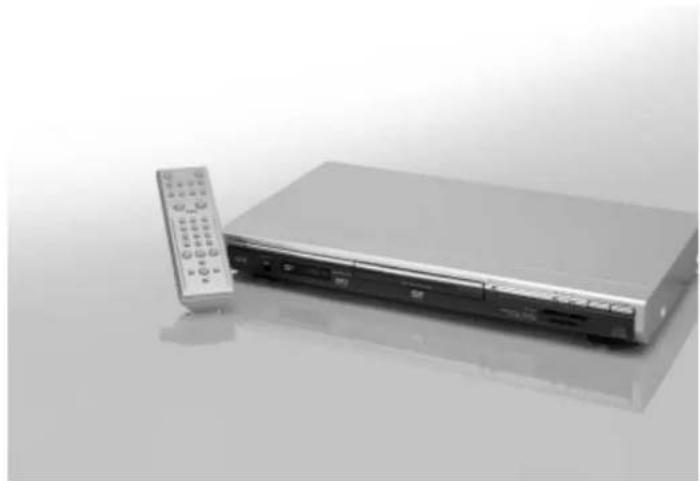
Exterior view of a silver DVD player with remote control (no visible text or symbols)
VIDEO

DIGITAL AUDIO

CD-R/RW
Instruction Manual/Guarantee
DVD-Player
DVD Player
DVD 4511 CR


natural_image
Two horizontal grayscale color swatches with a central crosshair symbol (no text or labels)Inhalt
Contents
D
natural_image
Two horizontal bar designs with grayscale shades and a small crosshair symbol (no text or symbols)SICHERHEITSHINWEISE
natural_image
Two horizontal grayscale color swatches with a central dot and corner alignment markers (no text or symbols)BESCHREIBUNG
natural_image
Two horizontal grayscale color swatches with a central dot and corner alignment markers (no text or symbols)Fernbedienung
natural_image
Two horizontal grayscale gradient bars with a central crosshair marker (no text or symbols)Gorman.p65 9/6/05, 10:56 AM7



natural_image
Two horizontal grayscale color swatches with a small central dot and corner alignment markers (no text or symbols)natural_image
Two horizontal grayscale color swatches with a central crosshair marker (no text or symbols)KARTEN EINLEGEN
natural_image
Two horizontal grayscale color swatches with a small compass rose on the right (no text or symbols)natural_image
Three horizontal grayscale gradient bars with a small central icon (no text or symbols)natural_image
Two horizontal grayscale color swatches with a small compass rose on the right (no text or symbols)Programmwiedergabe
natural_image
Three horizontal grayscale gradient bars with a small central crosshair symbol (no text or labels)natural_image
Two horizontal grayscale color swatches with a small compass rose on the right (no text or symbols)natural_image
Two horizontal grayscale color swatches with a central dot and angle marker (no text or symbols)natural_image
Two horizontal grayscale color swatches with a small central indicator (no text or symbols)natural_image
Two horizontal grayscale gradient bars with a central crosshair marker (no text or symbols)Bildschirmschoner
natural_image
Two horizontal grayscale color swatches with a central crosshair symbol (no text or labels)HINTERE LAUTSPRECHER (5.1 KANAL)
natural_image
Two horizontal grayscale color swatches with a central dot and corner alignment markers (no text or symbols)natural_image
Two horizontal grayscale color swatches with a small compass rose on the right (no text or symbols)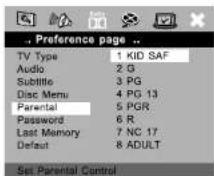
20
natural_image
Two horizontal grayscale color swatches with a small central indicator (no text or symbols)Werkseinstellungen
natural_image
Two horizontal grayscale color swatches with a small compass rose on the right (no text or symbols)ZU IHRER INFORMATION:
natural_image
Two horizontal grayscale color swatches with a central crosshair symbol (no text or labels)natural_image
Two horizontal grayscale color swatches with a central crosshair symbol (no text or labels)D-47906 Kempen/Germany
natural_image
Two horizontal grayscale color swatches with a central crosshair (no text or symbols)SAFETY INFORMATION
CAUTION: DVD/CD PLAYER IS A CLASS 1 LASER PRODUCT. HOWEVER, THIS DVD/CD PLAYER USES A INVISIBLE LASER BEAM WHICH COULD CAUSE HAZARDOUS RADIATION EXPOSURE IF DIRECTED. BE SURE TO OPERATE THE DVD/CD PLAYER CORRECTLY AS INSTRUCTED.
WARNING:
TO REDUCE THE RISK OF FIRE OR ELECTRIC SHOCK, DO NOT EXPOSE THIS PLAYER TO RAIN OR MOISTURE

THIS PRODUCT CONTAINS A LOW POWER LASER DEVICE.
SAFETY INFORMATION
Please Note:
This device is designed only or use in temperate climate. It must only be connected to an alternating current supply of 220-240V/50Hz. The device must not be used under any other circumstances.
Important:
- The DVD player is a class 1 laser product. The device uses an invisible laser beam which may produce hazardous rays. Please ensure that you use the device only for the purposes for which it is designed and in accordance with instructions.
- When the device is connected to a standard mains power socket do not put your eyes too close to the opening in the device and do not look inside the player.
- Any use of the operating controls, any settings or use of the device which deviate from those described in these instructions may result in your being exposed to the hazardous rays.
- Do not open any covers or repair the device yourself. Please contact qualified specialists if this device requires maintenance or repairs.
Warning:
- In order to avoid risks such as fire or electric shock, please do not expose the device to rain or moisture.
- In order to avoid risks such as tire, electric shock or interference, please use only the recommended accessories.
PRECAUTIONS
Please read these precautions carefully before using the device.
Protections of the Mains Lead
In order to prevent the device from malfunctioning and to protech against electric shocks, fire or injury, please note the following:
- Always remove the plug by pulling the plug itself and not the lead.
- Never touch the mains plug or lead with wet hands.
- Keep the mains lead away from heaters.
- Never put a heavy object on the electric lead. - Never try to repair or replace the mains lead yourself.
The mains lead may only be replaced by a qualified electrician!
Positioning
Please avoid setting up the device in the following surroundings:
- In direct sunshine, where there is exposure to heaters or in closed vehicles.
• In high temperatures (over 35°C) or high humidity (over 0.0%)
- In extremely dusty surroundings.
Otherwise internal parts may be seriously damages.
When the device is not being used:
- Please turn the device off when it is not being used.
- Should you not use the device for a prolonged period,
please remove the mains plug from the socket.
Do not insert your fingers or other objects into
the device
- Touching internal parts of this device is dangerous and may result in serious damage to the device. Do not try to take the device apart.
- Do not insert any foreign bodies into the CD drawer.
Keep awy from water, fire and magnets
- Keep the device away from vases, baths, wash basins etc. If liquid enters the device this may cause serious damage.
- Open sources of fire, such as burning candles, must not be placed on the device.
- Never place magnetic items, such as loudspeakers, in the vicinity of the device.
Ventilation
- Please maintain a free space of 5 cm around the device to ensure adequate ventilation.
- Do not cover any ventilation slits with objects such as magazines, tablecloths, curtains etc.
- Please position the device horizontally and do not place any heavy items on it.
- Do not place the device on amplifiers or other devices which may heat up.



natural_image
Two horizontal grayscale color swatches with a small central icon (no text or symbols)Condensation
In the following situations moisture may develop on the lens:
- Immediately if a heater is switched on.
- In a steaming or very damp room. - If the device is transferred from cold to warm surroundings.
If moisture has formed inside the device, it is possible that the device will no longer function correctly. In the case please turn off the power and wait for approximately one hour until the moisture has evaporated.
What to do if there is television interference while
you are watching a programme.
Depending on the reception conditions there may be interference to the television picture when you are watching a television programme and the device is switched on. This is not a malfunction of the device or television. Switch the device off if you want to watch a television programme.
DISC FOR PLAYBACK
This DVD player is capable of playing the following types of discs with the corresponding logos:
Usable Discs:
| Disc Types | Marks | Recording Types | Disc Size | Max. Playing Time |
| DVD | Audio+Video | 12cm | Approx. 240 min. (Single-sided) | |
| Approx. 480 min. (Double-sided) | ||||
| 8cm | Approx. 80 min. (Single-sided) | |||
| Approx. 160 min. (Double-sided) | ||||
| AUDIO-CD | Audio | 12cm | 74 min. | |
| 8cm | 20 min. |

Digital Audio disc
Stereo disc
NTSC broadcast
PAL broadcast
system in USA,
system in U.K.,
Canada, Japan,
France,
South Korea, etc.
Region Code
Both the DVD player and the disc are coded by region. These regional codes must match in order for the disc to play. If the codes do not match, the disc will not be played.
The Region Number for this player is describer on the rear panel of the player.
Disc structure
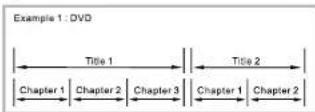
A DVD video disc consists of "title", and each title may be divided into some "chapters". (See Example 1.)
For example, if a DVD disc contains some movies, each movie may have its own title number, and it may be further divided into some chapters.
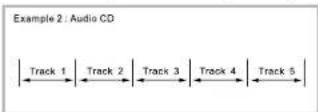
On the other hand, Audio CD consist of "tracks". (See Example 2.)
In general, each track has it own track number. (On some discs, each track may also be divided by indexes.)
26
English.p65 9/5/05, 11:10 AM26


natural_image
Three horizontal grayscale color swatches with a central dot and angle marker (no text or symbols)DESCRIPTION
Front Panel
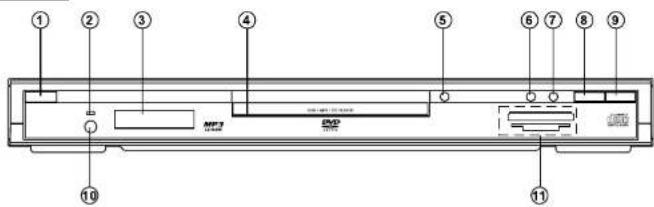
- POWER
- To switch standby modes.
-
STANDBY INDICATOR
-
DISPLAY
-
DISC TRAY
5 OPEN/CLOSE
- To open or close the disc tray.
- SKIP
- Press to skip to the previous chapter:track.
- SKIP
- Press to skip to the next chapter/track.
- STOP ■
- To stop playing the disc.
- PLAY/PAUSE ▶/II
- To start disc playback
- To interrupt disc playback.
-
REMOTE SENSOR
-
Memory Card insert slot (COMPACT FLASH, MEMORY
STICK, SMART MEDIA CARD. SECURE DIGITAL
CARD, MULTIMEDIA MEMORY CARD)

Rear Panel
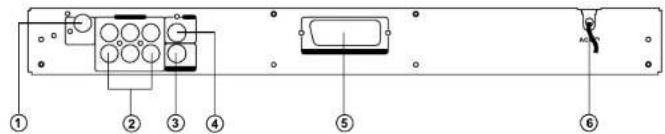
- DIGITAL OUT-COAXIAL
- Connect to audio equipment with digital-coaxial audio
input.
- 5.1ch Analog audio out jacks.
- Connect to an amplifier with 5.1 ch analog
input jacks
- S-VIDEO OUT
- Connect to a TV with SVHS video input.
- VIDEO OUT
- Connect to a TV with video input.
- SCART OUT
- Connect to a TV with SCART input.
- AC POWER CORD
- Connect to a standard AC outlet.
CAUTION: Do not touch the inner pins of the jacks or the rear panel. Electrostatic discharge may cause permanent damage the unit.
27

English p65 9/5/05, 11:10 AM27



natural_image
Two horizontal grayscale color swatches with a central crosshair target (no text or symbols)
28
English p65 9/5/05, 11:10 AM28

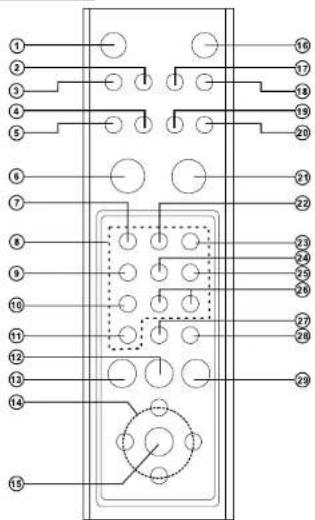
- DISPLAY
- Press during playback to see current disc information or the TV screen.
- SUBTITLE
- Select a subtitle language.
- MUTE
- Press to silence the volume, press again to restore the volume.
- SETUP
- Press to access or remove the setup menu of the player.
- GOTO
- In SHIFT ON press to search for a specific chapter or playing time. - In SHIFT OFF press to select DVD or MEMORY CARD.
- STOP ■
- Press to stop playback.
- REPEAT
- Press to play a chapter, title, track or disc repeatedly. 23. A-B
- Press to repeat a specific segment.
- SHUFFLE
- Press to play track in random order.
- ■ / STEP
- Pause playback temporarily/frame-by-frame playback.
- SL
- Press to play slow reverse/forward playback of DVD.
- REV
- Press to search backward during playback.
- FWD/CLEAR
- Press to search forward during playback. - Clear input selections.
- SHIFT
- Press to number lock on the buttons with number printed on the surface.
Insert Batteries (Remote Control Unit)
You can control the player with the supplied remote control unit. Insert two R6 (size AA) batteries by matching the + and - markings inside the compartment. When using the remote unit, point it at the remote sensor on the player.
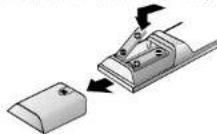
Notes:
- Do not leave the remote control unit in the extremely hot or humid place.
- Do not use a new battery with an old one.
- Do not expose the remote sensor to direct light from the sun or lighting apparatus. Doing so may cause a malfunction in controlling the player.
- If you do not use the remote control unit for an extended period of time, remove the batteries to avoid possible damage from battery leakage and corrosion.

natural_image
Two horizontal grayscale color swatches with a central dot and corner alignment markers (no text or symbols)Range of Operation of the Remote Control
The remote control can be used up to approximately 5 meters in a straight line.
It can also be operated at a horizontal angle of up to 30^ from the remote sensor.

CONNECTION TO A TV (FOR VIDEO)
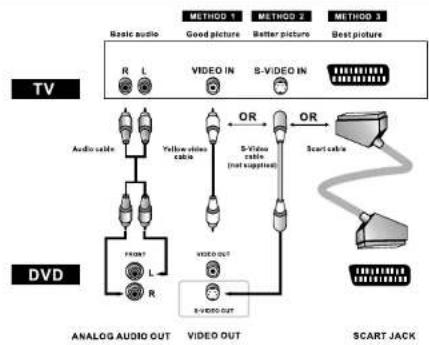
flowchart
graph TD
    TV["TV"] -->|Basic audio R L| AudioConA["Audio cable"]
    TV -->|Audio ConA L| VideoOut1["Video OUT"]
    VideoOut1 -->|S-Video cable (not supplied)| AudioConA
    AudioConA -->|OR| S-VideoOut1
    S-VideoOut1 -->|OR| StartCable["Start cable"]
    StartCable -->|SCART JACK| Output["Output"]
    AudioConA -->|Yellow video cable| VideoOut2["Video OUT"]
    VideoOut2 -->|S-Video cable (not supplied)| AudioConA
    AudioConA -->|R| VideoOut3["Video OUT"]
    VideoOut3 -->|S-Video out| AudioConA
    AudioConA -->|R| VideoOut4["Video OUT"]
    VideoOut4 -->|S-Video out| AudioConA
    AudioConA -->|R| VideoOut5["Video OUT"]
    VideoOut5 -->|S-Video out| AudioConA
    AudioConA -->|R| VideoOut6["Video OUT"]
    VideoOut6 -->|S-Video out| AudioConA
    AudioConA -->|R| VideoOut7["Video OUT"]
    VideoOut7 -->|S-Video out| AudioConA
    AudioConA -->|R| VideoOut8["Video OUT"]
    VideoOut8 -->|S-Video out| AudioConA
    AudioConA -->|R| VideoOut9["Video OUT"]
    VideoOut9 -->|S-Video out| AudioConA
    AudioConA -->|R| VideoOut10["Video OUT"]
    VideoOut10 -->|S-Video out| AudioConA
    AudioConA -->|R| VideoOut11["Video OUT"]
    VideoOut11 -->|S-Video out| AudioConA
    AudioConA -->|R| VideoOut12["Video OUT"]
    VideoOut12 -->|S-Video out| AudioConA
    AudioConA -->|R| VideoOut13["Video OUT"]
    VideoOut13 -->|S-Video out| AudioConA
    AudioConA -->|R| VideoOut14["Video OUT"]
    VideoOut14 -->|S-Video out| AudioConA
    AudioConA -->|R| VideoOut15["Video OUT"]
    VideoOut15 -->|S-Video out| AudioConA
    AudioConA -->|R| VideoOut16["Video OUT"]
    VideoOut16 -->|S-Video out| AudioConA
    AudioConA -->|R| VideoOut17["Video OUT"]
    VideoOut17 -->|S-Video out| AudioConA
    AudioConA -->|R| VideoOut18["Video OUT"]
    VideoOut18 -->|S-Video out| AudioConA
    AudioConA -->|R| VideoOut19["Video OUT"]
    VideoOut19 -->|S-Video out| AudioConA
    AudioConA -->|R| VideoOut20["Video OUT"]
    VideoOut20 -->|S-Video out| AudioConA
    AudioConA -->|R| VideoOut21["Video OUT"]
    VideoOut21 -->|S-Video out| AudioConA
    AudioConA -->|R| VideoOut22["Video OUT"]
    VideoOut22 -->|S-Video out| AudioConA
    AudioConA -->|R| VideoOut23["Video OUT"]
    VideoOut23 -->|S-Video out| AudioConA
    AudioConA -->|R| VideoOut24["Video OUT"]
    VideoOut24 -->|S-Video out| AudioConA
    AudioConA -->|R| VideoOut25["Video OUT"]
    VideoOut25 -->|S-Video out| AudioConA
    AudioConA -->|R| VideoOut26["Video OUT"]
    VideoOut26 -->|S-Video out| AudioConA
    AudioConA -->|R| VideoOut27["Video OUT"]
    VideoOut27 -->|S-Video out| AudioConA
    AudioConA -->|R| VideoOut28["Video OUT"]
    VideoOut28 -->|S-Video out| AudioConA
    AudioConA -->|R| VideoOut29["Video OUT"]
    VideoOut29 -->|S-Video out| AudioConA
    AudioConA -->|R| VideoOut30["Video OUT"]
    VideoOut30 -->|S-Video out| AudioConA
METHOD 1 DVD Player + TV with Video input jack
METHOD 2 DVD Player + TV with S-Video input jack
METHOD 3 DVD Player + TV with Scart Input jack (Audio & video)


natural_image
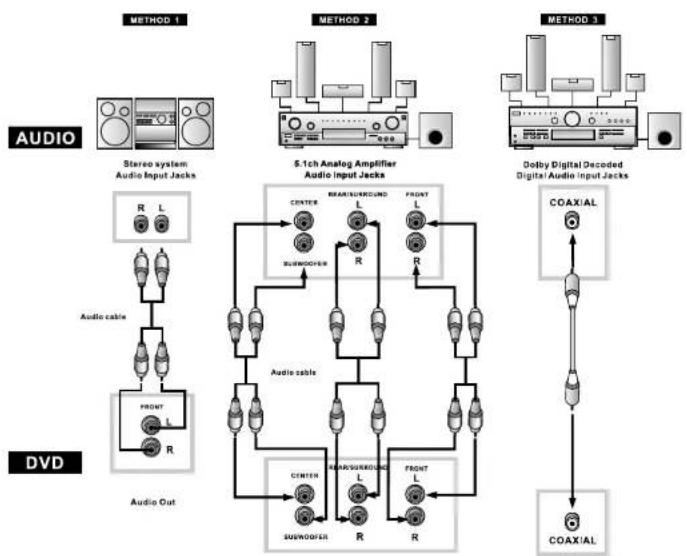
Two horizontal grayscale color swatches with a central pointer and corner alignment markers (no text or symbols)CONNECTION TO AN AUDIO SYSTEM
The following diagram shows examples of connections commonly used to connect the DVD player to TV sets with other audio equipment.
Before Connecting the DVD player
- Be sure to turn off the power to all components in the system before connecting another component.
- Refer to the instruction Manuals for your TV, stereo system and other components to be connected to the DVD player.
flowchart
graph TD
    subgraph AUDIO
        A["Stereo system Audio Input Jacks"] --> B["Audio cable"]
        B --> C["FRONT L R"]
        D["Audio Out"] --> E["Front L R"]
    end

    subgraph METHOD 1
        F["5.1ch Analog Amplifier Audio Input Jacks"] --> G["Center"]
        G --> H["RAN/SURROUND L"]
        H --> I["FRONT L R"]
        I --> J["BRUMBOODER"]
        J --> K["Central"]
        K --> L["SUSWODER"]
        L --> M["RAN/SURROUND L"]
        M --> N["FRONT L R"]
        N --> O["BRUMBOODER"]
        O --> P["Central"]
        P --> Q["SUSWODER"]
        Q --> R["RAN/SURROUND L"]
        R --> S["FRONT L R"]
        S --> T["BRUMBOODER"]
        T --> U["Central"]
    end

    subgraph METHOD 2
        V["Dolby Digital Decoded Digital Audio Input Jacks"] --> W["COAXIAL"]
    end

    subgraph METHOD 3
        X["Dolby Digital Decoded Digital Audio Input Jacks"] --> Y["COAXIAL"]
    end
• METHOD 1 DVD Player + Stereo System
• METHOD 2 DVD Player + Amplifier with 5.1ch Analog input jacks
• METHOD 3 DVD Player + Amplifier with Dolby Digital Decoder/DTS Decoder
30
English p65 9/5/05, 11:10 AM30



natural_image
Two horizontal grayscale gradient bars with a central crosshair marker (no text or symbols)This DVD player is capable of playing MP3 and reading JPEG files in the memory card of the following types memory media.
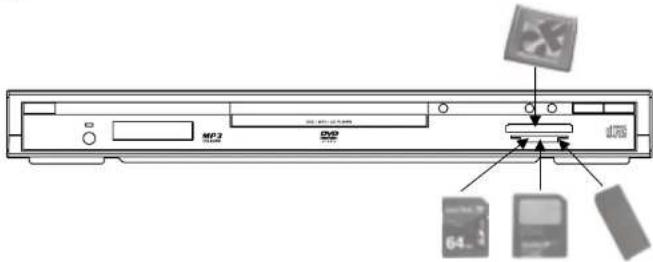
- Compact flash card (CF), insert it face up the arrow direction.
- Secure digital card (SD) and multimedia memory card (MMC), insert it face up to the arrow direction.
- Smart media card (SM), insert it upside down to the arrow direction.
- Memory stick card (MS), insert it face up to the arrow direction.
Reading Card Port
- Press the SHIFT button first, the symbol 13 appears in the right lower corner at the TV screen.
- Press GOTO button to select the card slot.
- For further details please see section "MP3 playback".
IMPORTANT NOTES - When insert a card, please insert it into the pin awarding to the following, and each time you can insert one card.
IMPORTANT NOTES
- When insert a card, please insert it into the pin awarding to the following, and each time you can insert one card.
• Make sure no disc in the tray and the DVD player in STOP mode before insert the memory card.
• Make sure stop to play MP3 or reading JPEG files in memory card and unplug all memory card before open the tray
to playing the DVD movie. - Press GOTO button and ▲ / ▼ button in remote control. It may re-read the DVD tray or memory card.


natural_image
Two horizontal grayscale color swatches with a small compass rose on the right (no text or symbols)SPEACIAL FEATURE
This player can playback MPEG / DivX (.avi) & MPEG (.mpg) files and compatible with DVD / SVCD / VCD / CD / MP3 / JPEG CD / CD-R / CD-RW / DVD-R
- Compatible with DivX 3.11, 4.XX, 5.02, 5.03 encoder standard.
Starting playback (MPEG 4 / DivX)
- It is recommended you turn on you TV when playing back MPEG / DivX disc.
- Press the OPEN / CLOSE button to load disc.
-
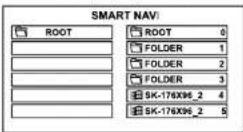
The menu will show up the folders and the files in root directory.
-
Use the ▲ / ▼ buttons to select the desired folder, then press ENTER.
-
Use the ▲ / ▼ buttons again to select a (.avi) files. Press ENTER to begin playback of the file.
BASIC PLAYBACK
Powering on the player and playing the disc
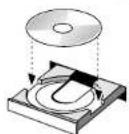
- Press POWER button. If there is a disc in the tray, the player will begin to play it once the power is on.
- Press OPEN / CLOSE button to open the tray to either change the disc or insert a disc.
- Once the disc is in the tray, press OPEN / CLOSE button to close the tray. Once closed, the player will begin to play the disc.
Stopping playback
- Press STOP ■ button once to stop playback and show the logo screen. The player memorizes the location where playback is stopped, if last memory is ON.
- Press PLAY ▶ button to resume playback from the location where playback is stopped.
- When the STOP ■ button is pressed twice, the resume function will be cleared.
Pausing playback
- Press / BTEP button once to pause playback. The sound is muted during PAUSE mode.
- Press PLAY ▶ button to resume normal playback.
Search Forward / Search backward
- Press ▶▶ FWD button to fast forward through the disc. The speed can be selected by pressing the key further (2x, 4x, 8x, 16x, normal).
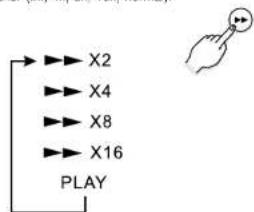
flowchart
graph TD
    A["X2"] --> B["X4"]
    B --> C["X8"]
    C --> D["X16"]
    D --> E["PLAY"]
- Press PLAY ▶ button to resume normal playback.
- Press REV button to fast reverse through the disc. The speed can be selected by pressing the key further (2x, 4x, 8x, 16x, normal).
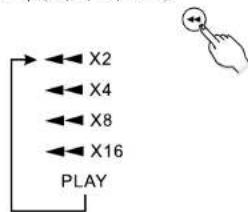
- Press PLAY ▶ to resume normal playback.
Slow motion Forward / Backward
- Press SLOW forward button ▶ to play a disc in slow motion.
- Each time the SLOW forward button ▶ is pressed, the slow motion speed changes (1/2, 1/4, 1/8, 1/16 of normal speed.)
- Press PLAY ▶ button to resume normal playback.
- Press SLOW backward button ◀ to play a disc in slow reverse.
- Each time the SLOW backward button is pressed, the slow reverse speed changes (1/2, 1/4, 1/8, 1/16 of normal speed).
- Press PLAY ▶ button to resume normal playback. Note:
The function slow-motion backwards depends on the medium.

natural_image
Three horizontal grayscale gradient bars with a small central crosshair symbol (no text or labels)Skipping to the Next / Previous chapter/track
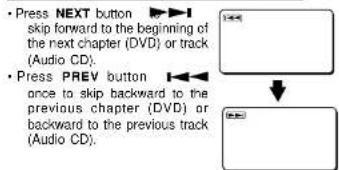
Checking the Remaining Time
- Press the DISPLAY button to check the elapsed time and remaining time as illustrated.
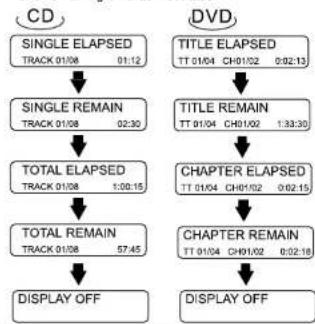
flowchart
graph TD
    A["CD"] --> B["SINGLE ELAPSED TRACK 01/08 01:12"]
    B --> C["SINGLE REMAIN TRACK 01/08 02:30"]
    C --> D["TOTAL ELAPSED TRACK 01/08 1:00:15"]
    D --> E["TOTAL REMAIN TRACK 01/08 57:45"]
    E --> F["DISPLAY OFF"]

    G["DVD"] --> H["TITLE ELAPSED TT 01/04 CH01/02 0:02:13"]
    H --> I["TITLE REMAIN TT 01/04 CH01/02 1:33:30"]
    I --> J["CHAPTER ELAPSED TT 01/04 CH01/02 0:02:15"]
    J --> K["CHAPTER REMAIN TT 01/04 CH01/02 0:02:18"]
    K --> L["DISPLAY OFF"]
REPEAT PLAY
Repeat Viewing / Listening
- Press REPEAT button to repeat the chapter, title and all for DVD disc; track and all for CD disc.
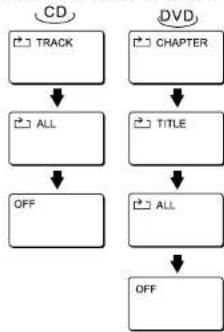
flowchart
graph TD
    A["CD"] --> B["TRACK"]
    B --> C["ALL"]
    C --> D["OFF"]
    E["DVD"] --> F["CHAPTER"]
    F --> G["TITLE"]
    G --> H["ALL"]
    H --> I["OFF"]
TITLE / ALL - repeat entire title
When playback reaches the end title of the disc, playback resumes at the beginning.
CHAPTER - repeat current chapter
When playback reaches the end of the current chapter, playback jumps back to the beginning of the chapter.
TRACK - repeat current track
When playback reaches the end of the current track, playback jumps back to the beginning of the track.
A - B Repeat playback
- Press A - B button once at the beginning of the segment (point A) you want to play repeatedly.
- Press A - B button again at the end of the segment (point B).
- The player automatically returns to point A and starts repeat playback of the selected segment (A - B).
- Press A - B button a third time to disable repeat A - B playback and allow playback to continue in normal.
Program Play
- Press PRGM (Program) button and enter TITLE and CHAPTER number with the number buttons (0–9) on the remote control. The OSD will display the following:
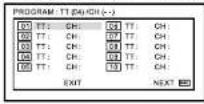
- Select program and press UP / DOWN, LEFT / RIGHT buttons to move the cursor to START and press ENTER button to play the program.
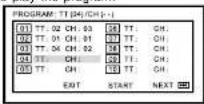
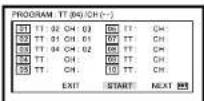
• The program function can be applied in the same way for audio CD.
Random play (shuffle)— For CD or VCD only
- Press SHUFFLE button during playback to toggle between ON and OFF. The setting are as follow: RANDOM = Random mode enabled. When playback reaches the end of the current track, playback jumps to a random track.
OFF = Random model disabled. {OSD} off

natural_image
Three horizontal grayscale gradient bars with a small central symbol (no text or labels)INTRO PLAY FOR CD only
- Press DIGEST button during CD playback to start a intro play of the tracks for about 6 sec.
Note: In MP3 mode the Intro function can not be applied.
USING DISC MENU / TITLE
To select the disc menu
- You can use the menus for the audio language, subtitle language, etc. DVD menu contents differ from disc to disc.
- Press the DVD MENU button during playback. The menu screen appears.
- Use the UP/DOWN (▲/▼) or LEFT/RIGHT (◄/►)
- Press the ENTER button • The selected item will play.
Using the Title Menu
- For DVD's containing multiple titles, you can view the title of each movie. Depending on the disc, this function may either not work at all, or may work differently.
AUDIO LANGUAGE / SUBTITLE LANGUAGE
(only applicable to DVD disc)
Selecting the Audio Language
- Press AUDIO button to select different audio languages (eg. English, French, Spanish, German, .....depending on the number of languages recorded on a DVD disc).
Selecting the Subtitle Language
- Press SUBTITLE button to select different subtitle languages (eg. English, French, Spanish, German, ....depending on the number of languages recorded on a DVD disc).
ZOOM
- Press ZOOM button repeatedly during playback to select zoom 2x, 3x, 4x to change the size of the picture.
- While an image is enlarged, you can use UP/ DOWN, LEFT / RIGHT buttons to shift the view and display the part you wanted.
ANGLE
- Press the ANGLE button during playback to select the desired angle.
- This function only works with discs on which multiple scenes were shot from different angles.
MOVE TO A TITLE, CHAPTER OR TIME
DIRECTLY
- Press the GOTO button.
- Each time the button is pressed, it repeats as shown below.
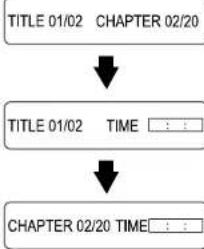
flowchart
graph TD
    A["TITLE 01/02 CHAPTER 02/20"] --> B["TITLE 01/02 TIME : :"]
    B --> C["CHAPTER 02/20 TIME : :"]
• The player will jump to the desired location immediately.
- In VCD2.0 playback. Press GOTO button to choose a
search mode.
(Disc Time/Track Time/Track Number)
- In CD or VCD discs, press GOTO button and enter the track number.
BOOKMARK (DVD OR VCD)
• The bookmark function lets you select parts of a DVD or VCD. so that you can quickly find the section at a later time. (The player can support up to 12 bookmarks.)
- Press the BOOKMARK button during playback and the bookmark table will be shown.
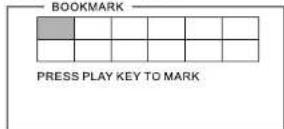
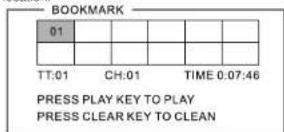
- Press the PLAY ▶ button, the player will mark the location.


natural_image
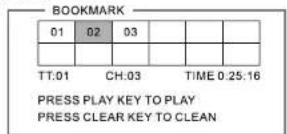
Two horizontal grayscale color swatches with a central dot and corner alignment markers (no text or symbols)- If you want to mark more than one location, use the ▲/▼, ◀/► button to choose another empty box and press PLAY ► button.
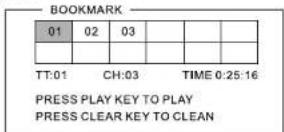
- Press the BOOKMARK button again to close the bookmark table.
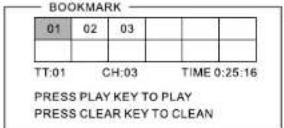
• To clear a bookmark entry, go to that location and press CLEAR button.
DIGEST PLAY (DVD)
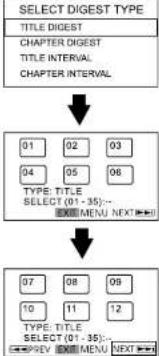
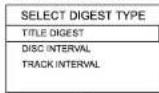
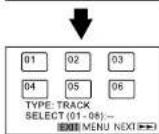
- Press the DIGEST button and the following menu will appear.
- Press the ▲▼ button to select TITLE DIGEST, CHAPTER DIGEST, TITLE INTERVAL and CHAPTER INTERVAL and BOOKMARK and then press ENTER button.
flowchart
graph TD
    A["SELECT DIGEST TYPE\nTITLE DIGEST\nCHAPTER DIGEST\nTITLE INTERVAL\nCHAPTER INTERVAL"] --> B["01 02 03\n04 05 06"]
    B --> C["TYPE: TITLE\nSELECT (01-35)...\nMENU NEXT"]
    C --> D["07 08 09\n10 11 12"]
    D --> E["TYPE: TITLE\nSELECT (01-35)...\nPREV MENU NEXT"]
- TITLE DIGEST: The movie will be divided into several parts according to the number of titles it contains. Each of the 6 sub screens will show one of the divided titles.
- CHAPTER DIGEST: The title will be divided into several
parts according to the number of chapters it contains. - TITLE INTERVAL: The current title will be divided into several parts with same length in time (10 minutes). Each of the sub-screens will show one of the divided parts.
- CHAPTER INTERVAL: The current chapter will be divided into several segments of the same time length.
- Press the number, ▲/▼, ◀/► buttons to select the window you'd like to see, and press the ENTER button.
- Up to 6 windows (titles or chapters) can be displayed on the screen at a time. You may select NEXT and then press ENTER button for the next 6 titles of chapters if the movie has more than 6.
Digest play (VCD)
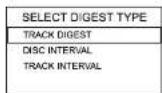
- During play, press the DIGEST button. The following menu will appear.
- Press the UP/DOWN buttons to select TRACK DIGEST. DISC INTERVAL, TRACK INTERVAL. Then press ENTER button.
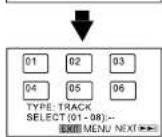
- Press ▲/▼, and buttons to select the window you'd like to see, and press the ENTER button.
- Up to 6 windows can be displayed on the screen at a time. Press the ▲/▼, ▼ and ▶ buttons to select NEXT ▶. Then press ENTER button for the next 6 windows if the movie has more than 6.
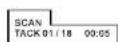
- For CD audio, this function only supports intro play (scan). The player will play the first 6 seconds of each track sequentially.


natural_image
Two horizontal grayscale color swatches with a small central icon (no text or symbols)JPEG Playback
Some CD-Rs may contain pictures in a JPEG format. For example, you may have photographic film developed with pictures stored in JPEG format. Then you can playback those JPEG files in this player.
Some useful features are described below:
- When you insert a disc with JPEG files, the files or pictures available for playback will be listed on the screen.
- Press UP / DOWN buttons to select the folder or file and press ENTER.
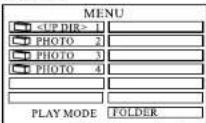
- After you open one JEPG file, each subsequent file will appear automatically for a few seconds. To keep the JEPG image on the screen longer, press PAUSE button to pause the image.
- During playback, press UP / DOWN, LEFT / RIGHT to rotate or flip the image.
- You may press ZOOM button to enlarge or reduce an image during playback. Press ▶▶ to enlarge the image. Press ▶◀ to reduce the image's size.
- Press zoom again to turn off zoom function and the image's size become normal
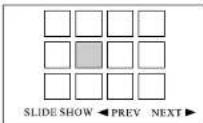
- During playback, press STOP button. 12 pictures will be shown on the TV screen each time. If there are more than 12 pictures, press UP / DOWN or LEFT / RIGHT buttons to select PREV or NEXT, then press ENTER.
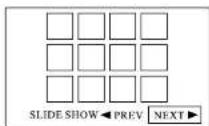
- Choose 'slide show' on the screen to change to slide show mode. The player will start showing from the first picture.
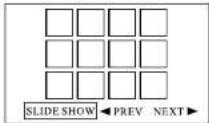
- Press UP / DOWN, LEFT / RIGHT buttons to select the picture, then press ENTER and it will shift to slide show mode starting with the picture selected.
MP3 Playback
This system has a built in MP3 decoder. You can playback MP3 tracks (files) recorded on CD-R, CD-RW.
Starting playback
- It is recommended you turn on you TV when playing back an MP3 disc.
- Press the OPEN/CLOSE button to load a disc.
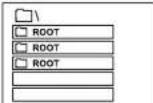
- The menu will show up the folders and the files in root directory.
-
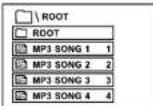
Use the ▲/▼ buttons to select the desired music folder, then press ENTER.
-
Use the ▲/▼ buttons again to select a song file. Press ENTER to begin playback of the song file.
Play mode
- The indication corresponding to the selected mode appears on the TV screen.
-
Use the LEFT/RIGHT and UP/DOWN buttons to select play mode.
-
Use the ◀/▶ buttons to select the desire music folder, then press ENTER.
-
Use the ▶ / ▲ and buttons to select the song file, then press ENTER.
NOTE:
A. FOLDER
All the files in the current folder will be played once in sequence.
B. REPEAT ONE
The selected file will be repeated.
C. REPEAT FOLDER All the files in the current folder will be repeated.


natural_image
Two horizontal grayscale gradient bars with a central crosshair marker (no text or symbols)SETUP MENU
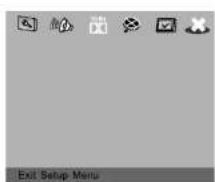
The SETUP MENU let you to customize the DVD player by allowing you to select various language preferences, set up a parental level, turn captions and screen saver on and off, adjust what type of television screen you have and more. Below, find the menu, and then find the corresponding page that describes the features of the selected menu option.
- When you press SETUP button on the remote control, the SETUP MENU will be displayed.
- Within the SETUP MENU, you can use ▲, ▼ and ▶ buttons on the remote control to move the cursor and then press the ENTER/PLAY button to make your selection. Press ▶ can return the previous menu.
- To exit SETUP MENU, you can press SETUP button again.
GENERAL MENU
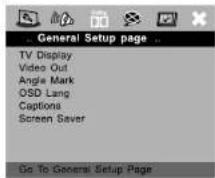
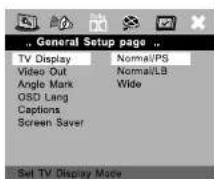
Select GENERAL SETUP in the SETUP MENU and then select the desired option using the cursor (▲,▼,★) buttons to navigate through the menus/screens and press the ENTER button to select.
TV Display
NORMAL/PS: Pan scan. Select when the unit is connected to a conventional TV. Video material formatted in the Pan Scan style is played back with the left and right edges are cut off.
NORMAL/LB: Letter Box. Select when the unit is connected to a normal TV. Wide-screen images are shown on the screen with a black band at the top and bottom.
WIDE: Select when the unit is connected to a wide-screen TV.
Note:
The displayable picture size is preset on the DVD disc. Therefore the playback picture of some DVD discs may not conform to the picture size you select.
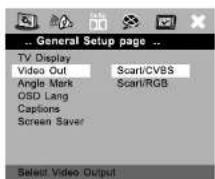
Video Out
Select the color video type to fit your connector type: SCART/CVBS or SCART/RGB
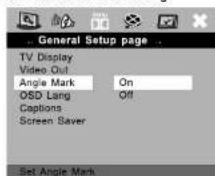
Angle Mark
Some DVDs include scenes recorded from different angles. This selection can show the marking.
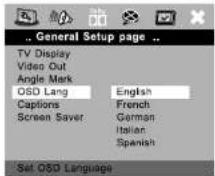
On-Screen Display Language
You can set the SETUP and on-screen messages to appear in English, French, German, Italian or Spanish. This language selection will not affect the languages of DVD disc or Title menus or any audio or subtitle languages.

natural_image
Two horizontal grayscale color swatches with a central crosshair symbol (no text or labels)Captions
This option can show or hide the captions.
- ON (show captions)
- OFF (hide captions)
Note: This function can only be used for DVD disc with captions.
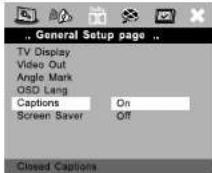
The TV set must support closed captions function.
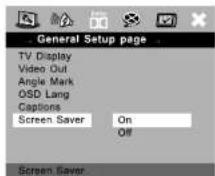
Screen Saver
The Screen Saver is the moving DVD logo that appears on your TV screen when Disc playback is stopped and you do not use the player or its remote control for about few minutes. The screen saver prevents damage to your TV caused by leaving a still image on the screen for a long time.
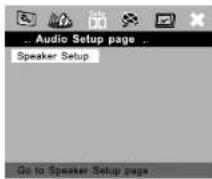
AUDIO SETUP
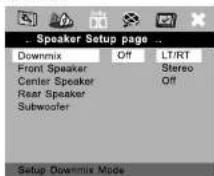
Select speaker setup in the setup up menu and then select the desired option using the cursor (▲, ▼, ▶) buttons to select the desired option and press the ENTER button to select.
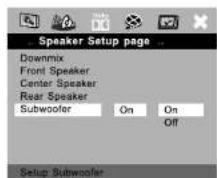
SPEAKER SETUP
Select speaker setup in the setup up menu and then select the desired option using the cursor (▲, ▼, ★b□tons to select the desired option and press the ENTER button to select.
Downmix
• LT/RT
- A disc recorded multi channel soundtrack, the output signal will be incorporated to left and right channel.
• STEREO
- A disc recorded multi channel soundtrack, the output signal will be incorporated to stereo.
• OFF
- Disable DOWNMIX.
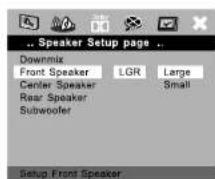
FRONT SPEAKER (5.1 CHANNEL)
User can setup the front speakers.
• LARGE
• SMALL
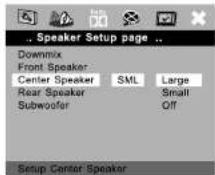
CENTER SPEAKER (5.1 CHANNEL)
User can setup the center speakers. The option is available when DOWNMIX is off.
• LARGE
- SMALL
• OFF
38
English p65 9/5/05, 11:10 AM38


natural_image
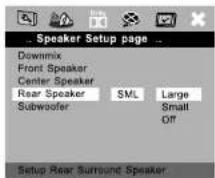
Two horizontal grayscale color swatches with a central dot and corner alignment markers (no text or symbols)REAR SPEAKER (5.1 CHANNEL)
User can setup the rear speakers. The option is available
when DOWNMIX is off.
• LARGE
• SMALL
• OFF
SUBWOOFER (5.1 CHANNEL)
User can turn or/off the subwoofer through this option.
• ON
• OFF

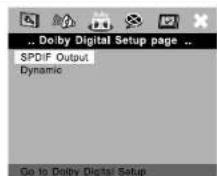
DOLBY DIGITAL SETUP
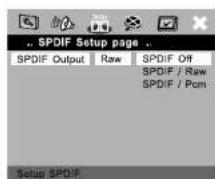
SPDIF Output
- Press on to select SPDIF output, then press ENTER.
- Press ▲ or ▼ to select SPDIF OFF, SPDIF/RAW, or SPDIF/PCM, then press ENTER.
- Choose SPDIF OFF if no external audio equipment is connected.
- Select SPDIF RAW if the player is connected to a 5.1 home theatre system by a coaxial cable (not supplied).
- Select SPDIF PCM to enable the internal Dolby Digital decoder of this player.
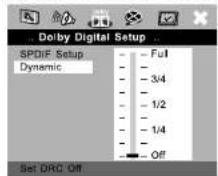
Dynamic Range Compression
Dynamic Range Compression reduces volume changes by letting you adjust the difference between soft and loud sounds.
Press ▲ or ▼ to set Dynamic Range higher dynamic sound will be produced if dynamic range is selected.
VIDEO SETUP
Select video setup in the setup menu then press ENTER button.
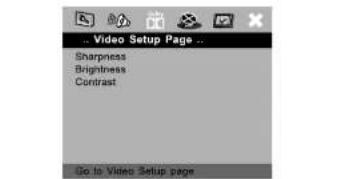
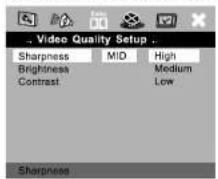
- Press ▼ or ▲ to select sharpness, brightness, contrast then press ▶ button.
- Press ◀ to go back and select another picture setting as needed.
For sharpness, choose high, medium, low 3 different levels.



natural_image
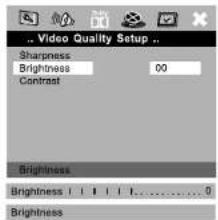
Two horizontal grayscale color swatches with a small central indicator (no text or symbols)For BRIGHTNESS, the range is -20 to +20.
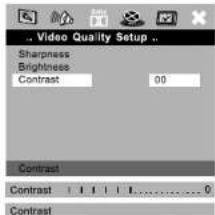
For CONTRAST, the range is -16 to +16.

PREFERENCE SETUP MENU
Select PREFERENCE SETUP in the setup menu, (in stop mode) then press ENTER.
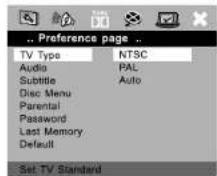
TV Type
TV type will be selected. Press ▶
- Press ▲ or ▼ to select NTSC, PAL, AUTO then press ENTER.
- Choose NTSC if your TV is NTSC -compatible. Choose PAL if your TV is PAL -compatible. Choose AUTO if you want the player to automatically select the color system of the current DVD. The TV system setting must be AUTO.
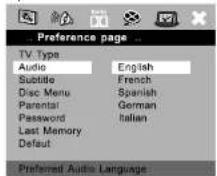
Audio
Audio will be selected. Press ▶
- Press ▲ or ▼ to select the desired audio language and then press ENTER.
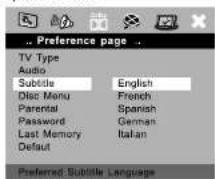
Subtitle
Subtitle will be selected. Press ▶
- Press ▲ or ▼ to select the desired subtitle language and then press ENTER.
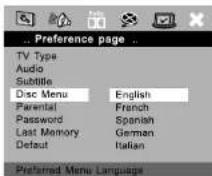
Disc Menu
Disc menu will be selected. Press ▶
Press ▲ or ▼ to select the desired disc menu language and then press ENTER.

natural_image
Two horizontal grayscale color swatches with a small central dot and arrow, no text or symbols present.Parental control levels
Parental lock will be selected. Press ▶
- Press o▲ to select a parental control level (1–8), then press enter or select off to completely turn off the parental controls.
- Press the number buttons to enter your 6-digit password as requested, then press ENTER. You cannot play DVD discs rated higher than the level you selected unless you cancel the parental lock function.
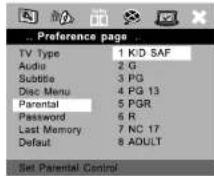
RATING EXPLANATIONS
- KID SAF – Kid safe; it is safe even for kids.
• G – General Audience: recommended as acceptable for viewers of all ages. - PG – Parental Guidance suggested.
- PG 13 – Material is unsuitable for children under age 13.
PG-R - Parental Guidance-restricted recommended that parents restrict children under age 17 from viewing or allow children to view only when supervised by a parent or adult guardian. R - Restricted, under 17 requires accompanying parent or adult guardian.
NC-17 - NO children under age 17; not recommended viewing for children under age 17. ADULT - Mature material; should be viewed only by adults due to graphic sexual material, violence, or language.
Notes: Parental control is a relatively new feature encoded into DVD discs. Currently very few DVD titles (if any) include parental control in the Australia and New Zealand region.
"PASSWORD": You need in "PASSWORD" setting to set the NEW PASSWORD or use SUPERUSER PASSWORD "136900".
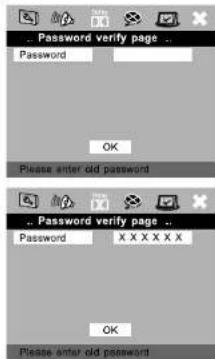
Parental control Password
Parental control limits viewing of DVDs when a DVD has movie rating that exceeds the parental level you selected. To adjust the PARENTAL level so that DVDs cannot be played if the level has exceed, see PARENTAL CONTROL LEVELS, Press ▼ and ▶to select Password, CHANGE will be highlighted and then press ENTER.
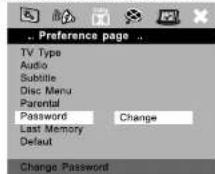
• A box beside OLD password will be highlighted.
- Press the number buttons to enter your Old 6-digit password. The box beside NEW password will be highlighted automatically.
- Press the number buttons to enter new 6-digit password of your choice. The box beside CONFIRM PWD will be highlighted automatically.
- Press the number buttons to enter the same new 6-digit password you just entered for the NEW PASSWORD.
- Press ENTER to save the new password.




natural_image
Two horizontal grayscale color swatches with a small compass rose on the right (no text or symbols)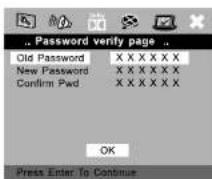
To clear 6-digit password if you forget your password, follow the procedure below.
- At the change page enter 6-digit number "136900" (SUPERUSER PASSWORD) and then press ENTER.
- Enter a new password.
Last Memory
Press and to select LAST MEMORY.
- Press ▼ or ▲ to select ON or OFF, then press ENTER.
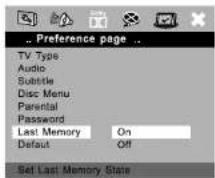
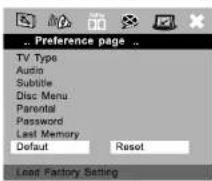
Default
To restore the original settings of the player, follow the steps below.
Press ▼ and ▶ to select DEFAULT.
RESET will be highlighted. Press ENTER.
• The original settings of the player will be restored.
Troubleshooting
Before calling customer service if you have problems with this device, please search for the possible fault in the table below. With a few simple tests or minor adjustments you may be able to rectify the problem so that the device functions correctly again.
Symptom (frequent) Remedy
No power insert the mains plug into the socket.
• No playback • Condensation has formed: wait
even if PLAY is approx. 1 to 2 hours until the device pressed, has dried out.
- Playback begins but stops again immediately. - The device can only play back the following media: DVDs, video CDs, CDs, MP3s and JPEGs.
• The disc may be dirty and require cleaning.
- Ensure that the disc has been inserted with the label facing upwards.
| No picture. | ·Ensure that the device is properly connected. ·Ensure that the television is turned to "video" ·Please press the VIDEO button until you have a picture again. |
- No sound. - Ensure that the device is properly connected.
- Distorted sound. - Ensure that the television and stereo system have been adjusted correctly.
- Adjust the main volume via the remote control.
The picture is in this case the picture is sometimes distorted during a little distorted - this is normal. fast forward or
No fast forward (or fast rewind) playback. Some discs have sectors which do not allow fast forward (or reverse) playback.
No 4:3 (16:9) Select the correct setting corresponding to the characteristics of you television ("TV Aspects")
No Surround Sound Select the correct setting under "Audio Output" corresponding to you stereo system.
No operation possible via the remote control. - Check whether the batteries have been inserted with the correct polarity (+ and -).
- The batteries are flat and must be replaced.
- Point the remote control in the direction of the sensor on the device.
- Do not use the remote control at a distance of more than 5 metres from the sensor.
- The remote control is adjusted to the other key surface. Please press the SHIFT button to change the key surface.

natural_image
Three horizontal grayscale color swatches with a central pointer and corner markers (no text or symbols)Symptom (frequent) Remedy
Buttons do not • Remove any obstacles between the work (on the remote control and the sensor on device and/or the device.
on control). • Switch the device off and then on again. Alternatively, switch the device off, remote the mains plug an re-insert it in the socket (it is possible that the device is not working due to external circumstances such as a thunderstorm or static electricity eln).
Menu screen is Select the corresponding type of not or only partially screen according to the operating displayed on the instructions of the television set. television screen.
No colour Turn the TV type to the German colour norm PAL. Confirm the SETUP button to return to the menu.
Symptom (DVD) Remedy
Audio soundtrack If the audio soundtrack and/or subtitle and/or subtitle language is not on the disc, the language is not language selected in the basic settings the one selected cannot be heard or seen. in the basic setup.
The display The setting in the menus under 'Disc appears in French Languages' is French. Select English. (for example).
| No subtitles. | Subtitles only appear on DVDs on which subtitles have been recorded.Subtitles have been switched off from the television picture. Press the “SUBTITLE” button. |
| No alternative • No alternative language is selected | |
| audio soundtrack (or subtile) language is selected. | on discs on which only one language has been recorded. • On some discs the alternative language cannot be selected with the AUDIO or SUBTITLE button. Try to select it from the DVD menu if there is one. |
| Angles cannot be changed. | This function depends on the availability of the software. Even if a DVD has been recorded from different angles, these may only be available for certain scenes (when the ANGLE symbol lights up on the device). |
Symptom (Video CD) Remedy
There is no menu. This function is only possible with video CDs with Playback Control.
| VCD/ SVCD does not play back. | With the disc inserted, switch over the PBC function using the MENU button. |
| CD-RWs do not play back. | CD-RWs must not be written with hard disc simulation tools such as Packed CD. In CD or similar programmes. |
Symptom (Video CD) Remedy
CD-Rs and The error rate of CD-R and CD-RW
CD-RWs do not media depends on:
play back, or only • The media type.
play back with errors.
• The writing program (possibly carry out an UPDATE).
• The writer and its firmware (possibly carry out an UPDATE).
- The writing speed (the lower the better).
For your Information:
This product is equipped with copyright protection technology which is itself protected by specific American patent claims and other intellectual copyrights in the possession of the Macrovision Corporation and other holders of rights Use of this copyright protection technology is only permitted with the authorization of the Macrovision Corporation and is limited to home and other restricted performance situations unless express approval is given by the Macrovision Corporation Dismantling or disassembly of this protection technology is prohibited.
How to Handle and Care for your CDs
Handling Precautions
- Hold the CD by the edges so that the surface is not covered in fingerprints.
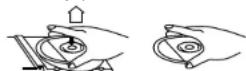
- Fingerprints, dirt and scratches may cause the CD to jump and distort the sound.
- Do not write on the label side with a ballpoint pen or other writing utensil.
- Do not use any record cleaning spray, petrol, diluting agent, antistatic fluid or any other kind of solvent.
- Please ensure that you do not bend or drop the CD.
- Never insert more than one CD into the CD compartment.
- Do not try to close the door if the CD has not been correctly inserted into the CD compartment.
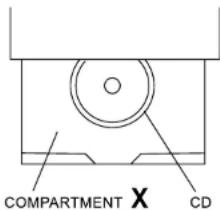
- Please make sure that you always store the CD in its original case when not being used.



natural_image
Two horizontal grayscale color swatches with a small compass rose pointing to the center (no text or symbols)If the Surface is Dirty
- Wipe the CD gently with a soft, moist (water only) cloth.
- When wiping CDs always move the cloth from the center of the CD to the outer edge.
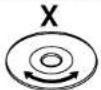

(if you wipe the CD in a circular manner you will cause circular scratches which will produce noises on the CD.)
- If a CD is moved from cold to warm surroundings it is possible that moisture will form on the CD. Wipe off the moisture with a soft, dry cloth that is free of fluff before inserting the CD.
Incorrect CD Storage
You may damage the CD if you store it in the following locations:
• exposed to direct sunlight
- damp or dusty locations
- locations exposed to a direct source of heat or heating.
Maintenance
- Please ensure that before any maintenance is carried out the device is switched off and the plug removed from the power supply.
- Wipe the device with a dry, soft cloth. Should the surfaces become extremely dirty, please wipe them with a cloth that has been immersed in a weak soapy water solution and then wrung out before wiping off with a dry cloth.
- Never use alcohol, petrol, diluting agent, cleaning liquid or other chemicals. Do not use any compressed air to remove dust.
Definition of Terms
Angle
On some DVDs there are scenes that have been recorded simultaneously from a number of different viewing angles (the same scene from the front, the left, the right etc.). With such DVDs the ANGLE button can be pressed to see the scene from the various angles.
Chapter Number
These numbers are recorded on DVDs. A title is divided up into many sections, each of which has a number. Specific sections of the video presentation can be quickly found using these numbers.
DVD
This term refers to optical CDs of a high-density on which high-quality picture and sound recordings have been made using digital signals. Through the use of a new video compression technique (MPEG) and a high-density recording technique it is possible to record long and aesthetically pleasing videos on DVDs (for example, an entire feature film can be recorded). DVDs consist of two 0.6 mm-thin discs. The greater the density, the more information can be recorded. A DVD has a greater capacity than a single side 1.2 mm thick disc. The fact that two thin discs are combined means that at some time in the future it will be possible to have double-side playback with even longer playback times.
PBC (Playback Control)
This is recorded on video CDs (version 2.0). The scenes or information can be seen (or heard) interactively via the television screen using the menu that appears on the screen.
Subtitles
These are printed lines of text that appear at the bottom of the screen and translate or explain the dialogue. Subtitles are recorded on DVDs.
Time Number
This shows the running time recorded on the DVD. If a DVD contains two or more films, the films are numbered as title 1, title2, etc.
Track Number
This number refers to tracks recoded on video CDs and CDs. They make it possible to search for and find specific tracks (e.g. songs) very quickly.
Video CD
Video CDs contain picture and sound recordings whose quality is comparable to a video cassette. This device also supports video CDs with Playback Control (version 2.0).

natural_image
Three horizontal grayscale color swatches with a central pointer and corner alignment markers (no text or symbols)SPECIFICATIONS
Power Requirement AC 230V, 50Hz
Power Consumption 12W
Signal System NTSC/PAL
Weight 2.1 kg
Dimensions 430(L) x 260(W) x 49(H)mm
Operating Temperature Range +5° 10 +35°C
Operating Humidity Range5 to 90% (no condensation)
Discs Played
- DVD-VIDEO disc
12cm single-sided, single-layer
12cm single-sided, dual-layer
12cm double-sided, single-layer
- Compact Disc (CD-DA, MP3-CD)
12cm disc
8cm disc
S Video Output
Y output level 1 Vp-p (75Ω)
C output level 0.30 Vp-p (75Ω)
Output connector Mini Din
Number of connectors 1
Video Output
Output level 1 Vp-p (75Ω)
RCA type
Number of connectors 1
Audio Output
Output Level
2 Vrms (1kHz. 0db)
Output connector
RCA type
Audio Signal Output Characteristics
- S/N ratio
CD audio
90dB (EIAJ)
- Dynamic range
DVD (Linear audio)
CD audio
80dB
80dB (EIAJ)
- Total hamonic distortion
THD + SN 70db
Digital Audio Output
Output connectors
Coaxial digital output
RCA type
Specifications are subject to change without notice. Weight and dimensions are approximate.
This device has been tested according to all relevant current CE guidelines, such as electromagnetic compatibility and low voltage directives, and has been constructed in accordance with latest safety regulations.
Subject to technical changes without prior notice!
Guarantee
The device supplied by our Company is covered by a 24 month guarantee starting on the date of purchase (receipt).
During the life of the guarantee any fault of the device or its accessories *) ascribable to material or manufacturing defects will be eliminated free of charge by repairing or, at our discretion, by replacing it. The guarantee services do not entail an extension of the life of the guarantee nor do they give rise to any right to a new guarantee!
Proof of the guarantee is provided by the proof of purchase. Without proof of purchase no free replacement or repair will be carried out.
If you wish to make a claim under the guarantee please return the entire machine in the original packaging to your dealer together with the receipt.
*) Damage to accessories does not mean automatic free replacement of the whole machine. In such cases please contact our hotline. Broken glass or breakage of plastic parts are always subject to a charge.
Defects to consumables or parts subject to wearing (e.g. motor pistons, kneading blades, drive shafts, spare remote control, spare toothbrushes, saw blades, etc.) as well as cleaning, maintenance or the replacement of said parts are not covered by the guarantee and hence are to be paid!
The guarantee lapses in case of unauthorized tampering.
After the expiry of the guarantee
After the expiry of the guarantee repairs can be carried by the competent dealer or repair service against the payment of the ensuing costs.


natural_image
Two horizontal grayscale color swatches with a central pointer and corner alignment markers (no text or symbols)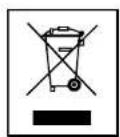
Meaning of the "Dustbin" Symbol
Protect our environment: do not dispose of electrical equipment in the domestic waste.
Please return any electrical equipment that you will no longer user to the collection points provided for their disposal.
This helps avoid the potential effects of incorrect disposal on the environment and human health.
This will contribute to the recycling and other forms of reutilisation of electrical and electronic equipment.
Information concerning where the equipment can ve disposed of can be obtained from your local authority.
In many EU countries the disposal of electrical and electronic equipment in the domestic waste is prohibited from August 13, 2005 on. In Germany from March 29, 2006 on.

46
English p65 9/5/05, 11:10 AM46

47
English.p65 9:5:05, 11:10 AM47

natural_image
Two horizontal grayscale color swatches with a central crosshair symbol (no text or labels)GARANTIE-KARTE
Garantiebewijs • Carte de garantie Certifi cato di garanzia • Tarjeta de garantia
Cartão de garantia • Guarantee card Garantikort • Karta gwarancyjna • Záruční list Garancia lap • Гарантийная карточка
DVD 4511 CR
24 Monate Garantie gemäß Garantie-Erklärung • 24 maanden garantie overeenkomstig schriftelijke garantie • 24 mois de garantie conformément à la déclaration de garantie • 24 meses de garantie según la déclaration de garantia • 24 meses de garantia, conforme a declaração de garantia • 24 mesi de garanzia a seconda della spiegazione della garanzia • 24 months guarantee according lo guarantee declaration 24 méneders garanti i henhold til garantierklæring • 24 mioslące gwarancji na podstawie karty gwarancyjnoj • Zaruka 24 mesi/c podle prohlåšeni o záruce • A garanciál lásd a használati utasítášban Garantinyne obateilístva – «сморги руководство пользователя
Kaufdatum, Händlerstempal, Unterschrift • Koopdatum, Stempal van de kvarander. Handtokering • Data a nach, cachard revendeur, signature • Faeha da compra, Soliodel vendedor, Firme • Data de compra, Carimbo do vendedor, Aestimata • Data dell'aqueiro, timoro del commerciente, fit ma • Purchase data, Dealer stemp, Signature • Kopedato, stempel fra tohander, underskrit • Data lupina, Ploezigka aoki, Pocips • Datum kopure, Rešliko prodeje, Pocips • A vassirāsi iely belyeječuje, slārās Data покупki, pachat trogova, podniss



- Inhalt
- SICHERHEITSHINWEISE
- KARTEN EINLEGEN
- Programmwiedergabe
- Bildschirmschoner
- HINTERE LAUTSPRECHER (5.1 KANAL)
- Werkseinstellungen
- ZU IHRER INFORMATION:
- SAFETY INFORMATION
- WARNING:
- Please Note:
- Important:
- PRECAUTIONS
- Protections of the Mains Lead
- Positioning
- When the device is not being used:
- Do not insert your fingers or other objects into
- the device
- Keep awy from water, fire and magnets
- Ventilation
- Condensation
- What to do if there is television interference while
- you are watching a programme.
- DISC FOR PLAYBACK
- Region Code
- Disc structure
- Insert Batteries (Remote Control Unit)
- Range of Operation of the Remote Control
- CONNECTION TO AN AUDIO SYSTEM
- Before Connecting the DVD player
- Reading Card Port
- IMPORTANT NOTES
- SPEACIAL FEATURE
- Starting playback (MPEG 4 / DivX)
- BASIC PLAYBACK
- Powering on the player and playing the disc
- Stopping playback
- Pausing playback
- Search Forward / Search backward
- Slow motion Forward / Backward
- Skipping to the Next / Previous chapter/track
- Checking the Remaining Time
- REPEAT PLAY
- Repeat Viewing / Listening
- A - B Repeat playback
- Program Play
- Random play (shuffle)— For CD or VCD only
- INTRO PLAY FOR CD only
- USING DISC MENU / TITLE
- To select the disc menu
- Using the Title Menu
- AUDIO LANGUAGE / SUBTITLE LANGUAGE
- (only applicable to DVD disc)
- Selecting the Audio Language
- Selecting the Subtitle Language
- ZOOM
- ANGLE
- MOVE TO A TITLE, CHAPTER OR TIME
- DIRECTLY
- BOOKMARK (DVD OR VCD)
- DIGEST PLAY (DVD)
- Digest play (VCD)
- JPEG Playback
- MP3 Playback
- Starting playback
- Play mode
- NOTE:
- SETUP MENU
- GENERAL MENU
- TV Display
- Video Out
- Angle Mark
- On-Screen Display Language
- Captions
- Screen Saver
- AUDIO SETUP
- SPEAKER SETUP
- Downmix
- FRONT SPEAKER (5.1 CHANNEL)
- CENTER SPEAKER (5.1 CHANNEL)
- REAR SPEAKER (5.1 CHANNEL)
- SUBWOOFER (5.1 CHANNEL)
- DOLBY DIGITAL SETUP
- SPDIF Output
- Dynamic Range Compression
- VIDEO SETUP
- PREFERENCE SETUP MENU
- TV Type
- Audio
- Subtitle
- Disc Menu
- Parental control levels
- RATING EXPLANATIONS
- Parental control Password
- Last Memory
- Default
- Troubleshooting
- Symptom (frequent) Remedy
- Symptom (DVD) Remedy
- Symptom (Video CD) Remedy
- For your Information:
- How to Handle and Care for your CDs
- Handling Precautions
- If the Surface is Dirty
- Incorrect CD Storage
- Maintenance
- Definition of Terms
- Chapter Number
- DVD
- PBC (Playback Control)
- Subtitles
- Time Number
- Track Number
- Video CD
- SPECIFICATIONS
- Discs Played
- Audio Signal Output Characteristics
- Digital Audio Output
- Guarantee
- After the expiry of the guarantee
- Meaning of the "Dustbin" Symbol
- GARANTIE-KARTE
- DVD 4511 CR
Brand : AEG
Model : DVD 4511 CR
Category : DVD player