
DVD 4535 - DVD player AEG - Free user manual and instructions
Find the device manual for free DVD 4535 AEG in PDF.


| Product Type | DVD Player |
| Brand | AEG |
| Model | DVD 4535 |
| Dimensions (W x D x H) | 430 x 260 x 40 mm |
| Weight | 2.0 kg |
| Power Supply | AC 100-240V, 50/60 Hz |
| Power Consumption | 12 W (standby: <1 W) |
| Disc Compatibility | DVD, DVD±R/RW, CD, CD-R/RW, MP3, JPEG, DivX |
| Video Output | Composite, Component, SCART, HDMI (if available) |
| Audio Output | Stereo RCA, Coaxial Digital |
| Playback Formats | MPEG-1, MPEG-2, MPEG-4, DivX, XviD, MP3, WMA, JPEG |
| Progressive Scan | Yes |
| Dolby Digital | Decoding capable |
| Remote Control | Included |
| Child Lock | Parental control via rating level |
| Maintenance | Clean lens with DVD lens cleaner; wipe exterior with soft dry cloth |
| Safety Precautions | Do not open casing; laser radiation |
| Spare Parts | Remote control, power cable, RCA cable |
| Reparability | See manual for service; contact AEG support |
Frequently Asked Questions - DVD 4535 AEG
User questions about DVD 4535 AEG
0 question about this device. Answer the ones you know or ask your own.
Ask a new question about this device
Download the instructions for your DVD player in PDF format for free! Find your manual DVD 4535 - AEG and take your electronic device back in hand. On this page are published all the documents necessary for the use of your device. DVD 4535 by AEG.
USER MANUAL DVD 4535 AEG
natural_image
Black AEG remote control unit with external control panel and USB port (no visible text or symbols on main body)PERFECT IN FORM AND FUNCTION
AEG
Deutsch
Inhalt
Overview of the Components ......Page 3
Instruction Manual Page 36
Technical Data Page 38
Overview of the Components
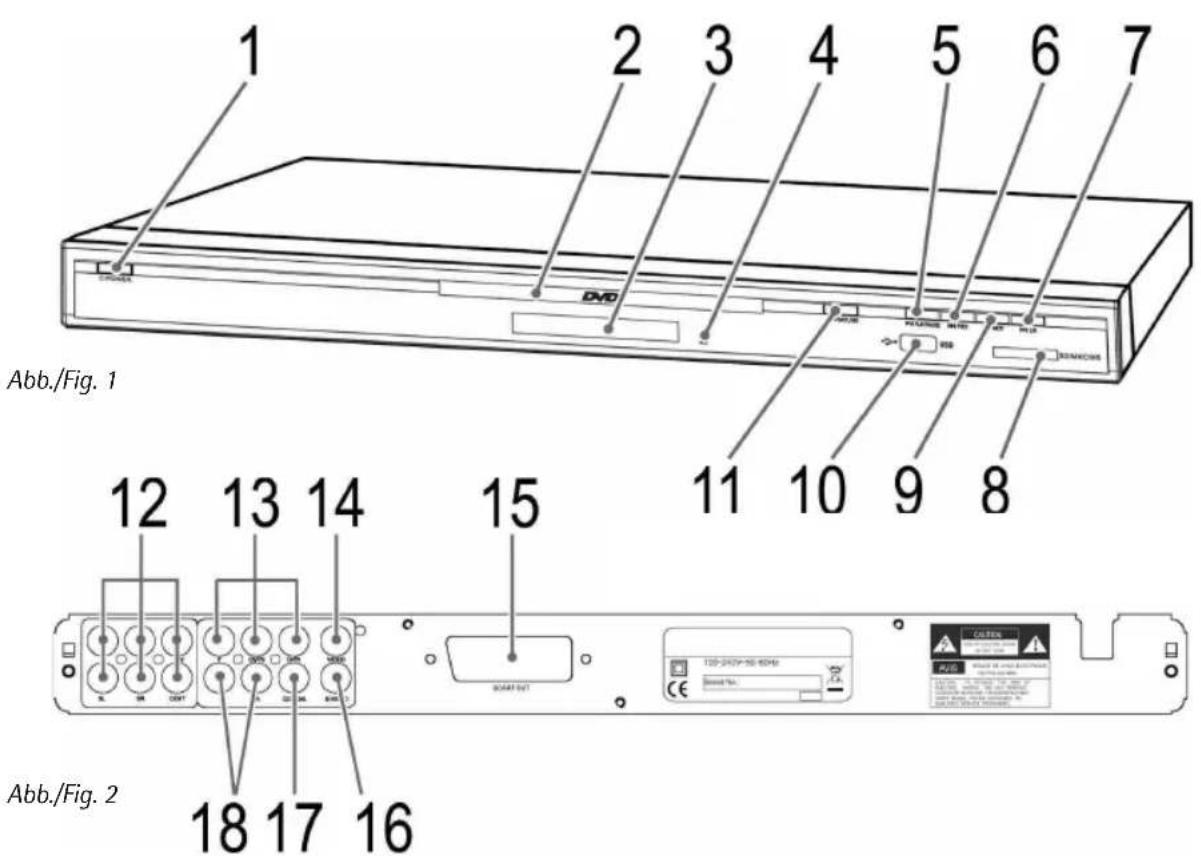
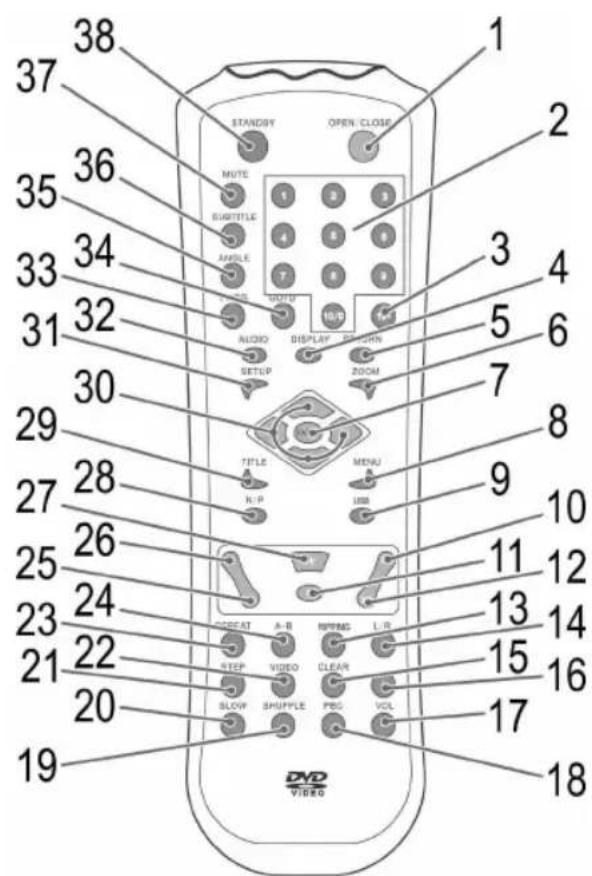
Abb./Fig. 3
4 Deutsch
natural_image
Line drawing of a rectangular electronic device labeled 'Bvo' with ports and control buttons (no readable text beyond label)Abb. 2/15
SCART
Abb. 2/12
Stereo
SD-Card
Multi Media Card
Memory-Stick
1X = Echtzeit, 4X = Schnell.
Subwoofer, Center, Rear
D-47906 Kempen/Germany
1 POWER switch (Power On/Off)
2 CD/DVD-tray
3 Display
4 IR Receiver
5 Play/Pause"
(▶II PLAY/PAUSE) button
6 „Reverse" button
( I ◀ PREV)
7 "Sound selection"
(L/R) button
8 Card slot
(SD/MMC/MS)
9 "Forwards" button
(▶▶I NEXT)
10 USB interface
11 „Open/Close“
(▲ OPEN/CLOSE) button
12 5.1 output
13 Component Video output
14 Composite Video output
15 SCART output
16 S-Video output
17 Digital Audio output
18 L/R Audio output
English
Remote (Fig. 3)
1 OPEN/CLOSE: To open or close the CD/DVD tray.
2 Numerical buttons:
For direct selection of chapter or song number.
3 10+:
For selecting the chapters/tracks above 9. Pressing again increases by a further 10.
4 DISPLAY:
To display the play status on screen.
5 RETURN:
Returning to the previous
menu.
6 ZOOM: To zoom in or out.
7 ENTER: Confirm the input.
8 MENU:
To display the main menu of the DVD/VCD.
9 USB:
USB/CARD/DVD switching.
10 ◀◀:
To return to the previous chapter or song.
1 1 ■: Stop play.
12 ▶▶▶I:
To jump to the next chapter
or song.
13 RIPPING:
Calls up the ripping menu.
14 L/R:
Switches between the right-hand and left-hand channel.
15 CLEAR:
Deleting tracks from the
playlist.
16 VOL +: To increase the volume.
17 VOL-: To reduce the volume.
18 PBC:
Displays the playback control of a VCD.
19 SHUFFLE:
Switches random playback on/off.
20 SLOW:
Slow motion. Press the „▶II“ button to continue the film.
21 STEP:
To freeze the picture. Press again to show the next picture. Press the "▶II" button to continue the film.
22 VIDEO:
Progressive scan/interlace/
S-Video switching.
23 REPEAT:
To repeat title, chapters, etc.
24 A-B:
To select the section to be repeated.
25 ▶: Fast forward.
26 ◀: Fast reverse.
27 ▶II:
Start playback. To freeze the picture. Press the „▶II“ button to continue the film.
28 N/P:
AUTO/NTSC/PAL colour norm
switching.
29 TITLE:
To show the Playback-Control
for VCD.
30 Cursor buttons:
Navigation in screen menu.
31 SETUP:
To start the setup menu.
32 AUDIO:
To change the Audio settings.
33 PROG: Call up DVD play list.
34 GOTO:
For direct accessing of a section on the CD/DVD.
35 ANGLE:
To select the viewing angle.
36 SUBTITLE: To show/hide subtitles.
37 MUTE: To switch of the sound.
38 STANDBY:
To activate standby mode.
38 English
Technical data
| Type of equipment DVD-Player | |
| Model DVD 4535 (N) | |
| Voltage 100-240 V, 50/60 Hz | |
| Output 9 W | |
| Dimensions (W x H x D) 430 x 48 x 246 mm | |
| Weight 1,79 kg | |
| Laser Semiconductor laser | |
| Signal format PAL/NTSC | |
| Signal noise distance >= 90 dB | |
| Video output 1,0 V (P-P) 75 Ω | |
| Analogue Audio output 2,0 V (rms) | |
| S-Video output | (Y) 1,0 V (P-P), 75 Ω(C) 286 mV (P-P), 75 Ω |
| Operating environment 0°C bis 40°C, level base | |
| Compatible media | DVD-Video (DVD Disc, DVD ±R/RW)MPEG-4 Video (from CD/DVD Disc, DVD±R/RW, CD-R/RW)Audio CD (from CD Disc, CD-R/RW)Video CD (from CD Disc, CD-R/RW)MP3 files (from CD/DVD Disc, DVD±R/RW, CD-R/RW) |
| Regional 2 (= Europe, Greenland, South Africa, Egypt and Middle East, Japan) | |
Table of Contents
| Device parts | 3/36 |
| Remote control | 3/37 |
| Technical data | 38 |
| Safety instructions | 40 |
| Setting up and connecting | 42 |
| Starting up | 42 |
| About the DVD-Player | 46 |
| Playing media | 47 |
| Working in file mode | 51 |
| Changing the default settings | 55 |
| Troubleshooting | 61 |
| Disposal | 62 |
| Declaration of conformity | 62 |
| OSD Menu overview | 63 |
English
Many thanks!
We are glad that you have made a decision in favour of the DVD-Player DVD 4535 (N)!
We would like to wish you much joy with your machine and thank you for your purchase!

natural_image
Line drawing of a rectangular electronic device labeled 'SWE' with ports and control buttons (no readable text beyond label)Symbols in this operating manual
Important instructions for your safety are especially marked. You must follow these instructions to avoid accidents and damage to the machine:

WARNING:
Warns against dangers to your health and indicates potential risks of injury.

ATTENTION:
Indicates potential hazards for the player or other objects.

NOTE: Highlights tips and information for you.
Manufacturer address
ETV
We reserve the right to make technical and design-related changes in the course of ongoing product improvements.

English
Safety instructions
Operating manual
Read the complete operating manual before using the player.
Keep the manual in a safe place. If you pass the player on to a third party, pass on the operating manual as well.
Non-compliance with this manual can lead to severe injuries or damage to the machine.
We assume no liability for damage caused as a result of non-compliance with this operating manual.
The player may only be used in households for private use. It is not suitable for commercial use.
Children and Frail Individuals
Do not leave the machine unattended, and do not use it if children or persons who cannot assess the risk are nearby.
Children or persons who cannot assess the risks are not allowed to use the player. Keep the player out of reach.
Packaging material must not be used to play with. There is a risk of suffocation.
Power supply
The machine is operated with electrical current, which means there is in principle a risk of electric shock. For this reason, pay particular attention to the following:
Never touch the plug with wet hands.
If you want to pull the plug out of the plug socket, always pull directly on the plug. Never pull on the cable as it could tear.
Make sure that the power cable is not bent, caught or run over and that it does not come into contact with heat sources.
Please ensure that during operation the electric lead is not wound around the device.
Never place the machine on the power cable while it is being operated.
Only use extension cables that are designed for the power consumption level of the machine.
- Keep the appliance away from rain and any moisture.
You should only operate this device if the electric voltage stated on the type plate of the device is the same as that supplied by your power socket. The wrong voltage can destroy the machine.
Do not stand vases etc. on the appliance. Water could seep into the appliance.
Do not open the appliance.
Pull out the mains plug if the appliance is not to be used over a longer period of time.
Take care that nobody can trip over the power supply cable.
English
Laser

This appliance is classified as laser appliance of class 1 (CLASS 1 LASER). The associated label is attached to the outside of the appliance.
Laser beams can damage the eyes. Therefore observe the following:
Do not open the appliance. Do not attempt to dismantle the appliance.
In order to avoid any danger: Have service work only carried out by the manufacturer or an authorized service workshop.
Transport
Where to position the appliance
In order to avoid damage to the DVD, you should remove it before transporting the appliance.
Never move the machine when it is in operation.
Safe operation of the appliance presupposes that it is positioned in an appropriate place. Therefore observe the following:
- Protect the appliance against the influence of weather. Never use it in the open-air.
- Protect the appliance against moisture.
Do not place any vessels filled with liquids, e.g. vases, on the device.
Never place the appliance on or in direct vicinity of heat sources, such as e.g. hobs, ovens, etc.
Do not expose the appliance to direct sunlight.
Place the appliance so that a sufficient air supply is assured. This is to avoid a build up of heat inside the appliance. Make sure that the ventilation slots are not blocked. - Protect the appliance against the mechanical vibrations.
Always place the device on a firm and flat surface. - Protect the remote control against weather influences, moisture and high temperatures (e.g. by direct sunlight).
Operation
The player is able to show a still image on the TV-screen/monitor over an unlimited period of time. This can cause damage to the screen. It is therefore advisable to activate the screen saver Page 56, "System settings".
Do not increase the volume when the player is just playing very quiet sections. This could damage the speaker if very loud passages start all of a sudden after the quiet section.
Do not move the player with a DVD inserted. This could damage the DVD.
Do not put your hands into the DVD-slot. You could be injured.
Place only DVDs or CDs on the DVD-tray, as otherwise the player may be damaged.
Switch the player off by the On/Off-switch if it is not going to be used for a longer period of time.
Please disconnect the mains plug during thunderstorms.
42 English
Intended use
The DVD-Player is solely intended for the following tasks:
Playing of Video DVD/Video CD.
Playing of Audio-CD.
Any other use is considered non-intended use and is prohibited.
Defect
If the machine should become defective at some point:
If the power supply cable for this appliance is damaged, it must be replaced by the manufacturer or his customer services, in order to avoid hazards.
Should fluid have seeped into the player or if the player has been dropped down or damaged in any other way, the player must be examined by an authorized dealer. Disconnect the player from the power supply and consult an authorized dealer.
Setting up and connecting
Unpacking
Unpack the appliance and all accessories and check that the contents are complete.
ATTENTION:
Always transport/send the player in its original packaging to prevent it from being damaged. Keep the packaging for this purpose. Dispose of unnecessary packaging material in accordance with the regulations applicable in your country.
i NOTE:
Get in touch with your dealer immediately if you notice damage caused by transport.
Setting up
- Place the player on a stable, heat resistant, horizontal and level surface. Keep a distance of at least 10 cm from walls and objects.
- Connect the device to a properly installed power socket.
Starting up
Remote control battery installation
WARNING:
Leaking out battery acid can damage your health. Remove the battery from the battery compartment as soon as it is exhausted or if the remote control is not going to be used for a longer period of time. Wipe up leaked out battery acid with a cloth. In case of skin contact immediately wash the affected area. Seek medical advice if battery acid has been swallowed. In case of contact with your eyes wash out the eyes and seek medical advice.
ATTENTION:
Mismatching battery types or new and used batteries must never be used together. Different battery types have different properties. Do not use old and new batteries together. The mutual use of old and new batteries can shorten the lifetime of the new batteries and possibly result in leakage of the old batteries. When disposing of old batteries you should strictly comply with the legal and environmental regulations applicable in your country. Do not throw batteries into fire!
NOTE: The lifetime of the enclosed batteries may be shortened because of storage.
- Open and remove the battery compartment cover.
- Insert two batteries of type AAA/R03 (1.5 V), ensure correct polarity (+ and -). Start with the negative pole (-).
- Attach and close the battery compartment cover.
i NOTE:
The signals from the remote control are transmitted to the DVD-Player by infrared light. You should therefore take care that the DVD-Player is not exposed to the direct sunlight. This could make the transmission of signals from the remote control to the DVD-Player impossible.
Effective range of the remote control
If you want to use the remote control it has to be pointed at the remote control sensor on the front of the device. The distance between remote control and sensor should not exceed 5m. The angle of the remote control to the remote control sensor to right, left, top and bottom should not exceed 30°.
Connecting the Video cable
The video cable transmits the video data from your DVD-Player to the TV or the Video-Projector.
There are four different ways of connecting the DVD-Player with your TV/Video-Projector. Select one of these possibilities to suit your replay unit.
i NOTE:
If you do not use a SCART connection it is necessary to make an additional audio connection for the transmission of the audio data (i.e. the sound).
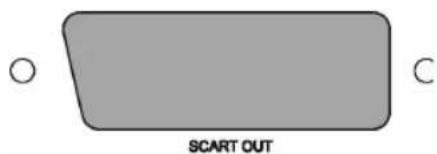
Fig. 2/15
SCART
SCART is used to transmit both Video and Audio data.
- Plug the SCART jack firmly into the socket on the back of the player.
- Plug the SCART jack into the corresponding socket on your playback device.
- Press the VIDEO button (Fig. 3/22) repeatedly to select the „RGB" setting.
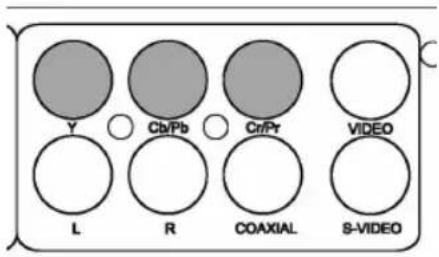
Fig. 2/13
Component Video
Connection using a Component Video cable ensures a very high replay quality.
Component Video transmits only Video signals.
- Plug each of the three jacks into the corresponding sockets on the DVD-Player.

Fig. 2/16
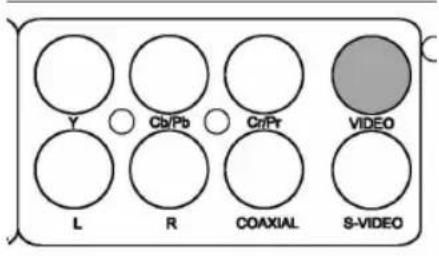
Fig. 2/14
Connecting the Audio cable
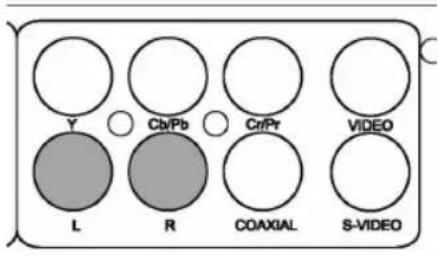
Fig. 2/18
- Plug the jacks into the corresponding socket on your playback device. Press the VIDEO button (Fig. 3/22) repeatedly to select between the settings „Progressive" (P-Scan), „RGB", „S-Video" and „Interlace" for the connected playback device. Please see the operating instructions of the connected device for the correct setting.
S-Video
Connection using a S-Video cable ensures a very high replay quality. Component Video transmits only Video signals.
- Plug the S-Video jack into the socket on the back of the player.
- Plug the S-Video jack into the corresponding socket on your play-back device.
Composite-Video
Composite-Video is used to transmit both Video data.
- Plug the Composite-Video jack into the socket on the back of the player.
- Plug the Composite-Video jack into the corresponding socket on your playback device.
You can choose from three transmission methods for audio signals.
You must generally choose first whether you would like to have the sound coming from your TV, or through a Stereo or 5.1-Amplifier. The Audio cable must then be connected to the TV or an amplifier accordingly.

NOTE:
If your amplifier is equipped with a digital output, you should use the amplifier. You will experience a much better audio quality, and the installation is much easier.
Stereo
Connect both Audio cables for the right and the left speakers to your playback device or your amplifier.
- Plug the Audio jacks into the sockets on the back of the player.
- Plug the Audio jacks into the corresponding sockets on your playback device or your amplifier.

Fig. 2/12
5.1-Audio signal
If you would like to achieve a replay of almost original quality you should use an Audio output by means of a 5.1-Audio signal.
This method uses 6 speakers. Four of these speakers are placed in the four corners of the room. One speaker is positioned close to the playback device. The sixth speaker serves the output of very low tones. With this arrangement of speakers a very natural stereophonic sound is achieved.
Connect the 5.1CH AUDIO OUT sockets on the back of the DVD player to the corresponding connections on the back of the subwoofer.
Proceed as follows:
-
Plug the Audio jacks into the sockets on the back of the player. Make sure that the jacks are correctly arranged:
-
(1) Connection for Subwoofer: Bass
- (2) Connection for Center speaker
- (3) Speaker rear right
- (4) Speaker rear left
- (5) Speaker front right
-
(6) Speaker front left
-
Plug the Audio jacks into the corresponding sockets on your play-back device or your amplifier.

Fig. 2/17
Digital
Connect the Coaxial cable for transmission of digital Audio signals to your playback device or your amplifier.
- Plug the Audio jack into the socket on the back of the player.
- Plug the Audio jack into the corresponding socket on your playback device or your amplifier.
Inputs on the Front
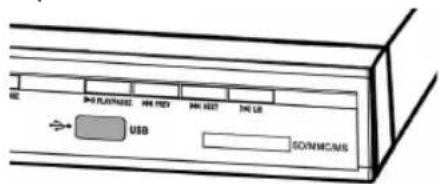
Fig. 1/10
USB Input (on the Front)
Connect your output device directly to the socket on the front of the device.

Fig. 1/8
Memory Card Slot (on the Front)
Insert an SD/MMC or MS memory card into the card slot on the front of the device.
46 English
Switching on the player

Fig. 1/1
Turn on the main switch of the DVD player by pressing the „POWER" on/off switch on the front of the machine.
About the DVD-Player
With this DVD-Player you can play a vast variety of DVD-formats ⇒ Page 38, „Technical data“.
However, you must be aware that in many cases DVDs are encrypted with a so-called "Regional Code". This specifies for which region in the world the DVD is intended. As an example, the DVDs marked with regional code "1" are intended for the USA and Canada. DVDs with regional code "2" are for use in Europe.
i NOTE:
With your DVD-Player you can only play DVDs with regional code "2". There are both lots of burning and compressing methods as well as high quality differences in (burned) CDs/DVDs. Moreover, the music industry has not yet agreed on a fixed standard for copy protection. This may, in very isolated cases, result in problems when relaying CDs, DVDs and MP3 CDs. This is no malfunction of the player.
Furthermore, there may be isolated problems when playing CDs or DVDs which were created on a PC (e.g. holiday photographs). In case of problems check the settings of the DVD writing program on your computer. You should in particular make sure that the DVD has been finalized. For further information on this matter please refer to the operating manual of your recorder.
Input Not Possible
If an input or function selected by you is not possible, the words "INVALID KEY" appear on the screen.
Terminology
Track: "Track" is the designation for sections on an Audio-CD. This may be a song, the set of a symphony, etc.
Title/Chapter: Video-DVDs are divided into "Title" and "Chapters". A "Title" may be e.g. a particular film, the "Chapters" may be subsections of this film.
MPEG4:Your DVD player is also suitable for playing back files that have been compressed using the MPEG-4 system (short for Moving Picture Experts Group-4). MPEG-4 is a compression method by means of which large quantities of data can be reduced without any noticeable loss of picture and sound quality.
i NOTE:
It is not possible to guarantee full compatibility with all of the compression methods used worldwide, particularly when more than one soundtrack or subtitles are involved. Also MPEG 4 files with integrated special functions such as a menu, subtitles etc. are not always supported. This is no malfunction of the player.
Playing media
Using the remote control
Loading a CD/DVD
Understanding the onscreen CD-menu
You transmit commands to the DVD-Player via remote control. It is thus important to point the end of the remote control towards the DVD-Player.
- Press the remote control button OPEN/CLOSE (Fig. 3/1). The CD/DVD tray opens.
- Place the CD/DVD on the tray.
- Press the remote control button OPEN/CLOSE (Fig. 3/1) again. The CD/DVD tray closes. The display (Fig. 1/3) first shows „LOAd“. After a short while the type of the loaded medium is displayed (e.g. „DVD”).
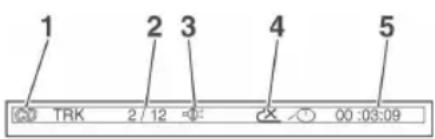
When playing CDs the following status information is displayed on screen:
Media type (1), e.g. "CD".
Current track/total number of tracks (2).
Audio output (3): If the MUTE-button (Fig. 3/37) on the remote control was pressed, the audio output is prevented. The word „Mute“ appears on the screen.
Repeat (4):
„x“: no repeat.
„1“: the current track is repeated.
„A“: all tracks are repeated.
Specify the repeat with the REPEAT-button.
Time (5): This provides information about the duration and the remaining play time. By standard the play time expired of the current track is displayed. The display is in hours, minutes and seconds. Press the DISPLAY button (Fig. 3/4) once or several times to have further times displayed.
The following possibilities are available for selection
time remaining to the end of the track,
■ expired playing time of the CD,
time remaining to the end of the CD.
Understanding the onscreen DVD-menu
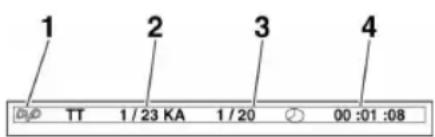
When playing DVDs you can view the on-screen menu by pressing the DISPLAY button (Fig. 3/4).
DVD-menu page 1
Current title/total number of titles (1).
Current chapter/total number of chapters (2).
Time (3): This provides information about the duration and the remaining play time. By standard the play time expired of the current title is displayed. The display is in hours, minutes and seconds. Press the DISPLAY button (Fig. 3/4) once or several times to have further times displayed.
English

The following possibilities are available for selection
time remaining to the end of the chapter,
expired playing time of the title,
time remaining to the end of the title.
DVD-menu page 2
Output language (1): The display shows how many languages are available and which language is used.
Type of Audio output (2).
■ Display of subtitles (3): The display shows in which languages subtitles are available.
Viewing angle (4): If the DVD offers the possibility to choose from different viewing angles, the display will now show the number of possible viewing angles and the currently selected angle.
Starting the replay
- Place the CD/DVD on the CD/DVD-tray → Page 47, "Loading a CD/DVD".
- Press the "▶II" button (Fig. 3/27) on the remote control.
i NOTE:
If the replay does not start or the replay is of poor quality, you should check the default settings of the DVD-Player.
Interrupting the replay
- Press the "▶II" button (Fig. 3/27) on the remote control. The replay is interrupted, the currently visible image is "frozen".
- Press the "▶II" button (Fig. 3/27) on the remote control to restart the "normal" replay.
Changing Audio-Language/Audio-Mode
Press the AUDIO button (Fig. 3/32) several times to change the Audio language. The available audio languages depend on the DVD.
Only for audio/MP3 CDs:
By repeatedly pressing the L/R (Fig. 3/14) button you can set the audio mode to „Mono“ or „Stereo“.
Showing subtitles
Press the SUBTITLE button (Fig. 3/36) to display the current subtitle status. Press the button several times if you would like to activate or deactivate the subtitle function or if you want to choose a different subtitle language. The available subtitle languages depend on the DVD.
Stopping the replay
Press the „■“ button (Fig. 3/11) during replay. The replay stops.
Press the „▶II" button (Fig. 3/27) again, to continue the replay from the last position.
Press the „■“ button (Fig. 3/11) twice to stop the replay completely. Press the „▶II“ button (Fig. 3/27) again, to replay the CD/DVD from the beginning.
Selecting previous chapter/track
Press the "I◄◄" button (Fig 3/10) to jump to the start of the previous chapter or track.
English
Selecting next chapter/track
Press the „▶▶1” button (Fig 3/12) to jump to the start of the next chapter or track.
Selecting track directly
Enter the number of the desired chapter/track with the Numerical Buttons on the remote control (Fig. 3/2).
Replay of the track starts after a short while.
Accessing a section via menu

The on-screen menu enables comfortable access to any sections of a medium. To do this, proceed as follows
- Press the GOTO-button (Fig. 3/34). The media specific menu is displayed.
- The menu shows an insertion mark (1). Use the Cursor Buttons (Fig. 3/30) to move it to the desired subject (e.g. „Chapter”).
- Now move to the point from which the replay should start. Depending on the type of medium this may be a track number, a chapter or even a point in time. The input must be made with the Numerical Buttons (Fig. 3/2).
- Press the ENTER-button (Fig. 3/7) to start the replay from this point.
Repeating DVD-title/chapter
- Choose the chapter or title to be repeated.
- Press the REPEAT button (Fig. 3/23). The message "REPEAT: [CHAPTER]" appears on the screen.
- Press the REPEAT button again, until the message „REPEAT: [TITLE]" is displayed.
Stopping repeat
Keep pressing the REPEAT-button (Fig. 3/23), until the message „REPEAT: [OFF]" is displayed on screen.
Selecting a section to be repeated
You can define a freely selected section to be automatically repeated.
To do this, proceed as follows:
- Mark the beginning of the section to be repeated. During repetition press the button A-B (Fig. 3/24) on the remote control once. The message „REPEAT A“ appears on the screen.
- Mark the end of the section to be repeated by pressing the A-B-button on the remote control once again. The message „REPEAT A-B" appears on the screen. The previously marked section is now repeated.
Press the A-B-button again to stop the repetition.
i NOTE:
On CDs/MP3 CDs the section to be repeated must be within a track.
50 English
Using the DVD-menu
Normally each DVD has its own menu. Here you can choose chapters, make settings, etc. This menu is specific for the DVD and can thus not be explained in detail.
Press the MENU button (Fig. 3/8) to access the DVD-menu. Use the Cursor Buttons (Fig. 3/30) to navigate in the Menu. Press the ENTER button (Fig. 3/7) to confirm.
If you are in a menu area for direct chapter selection, you can enter the number of this chapter with the Numerical Buttons (Fig. 3/2) on the remote control.
Using fast forward or reverse
The DVD-Player has a fast forward and a fast reverse feature.
-
Press the ▶▶ (Fig. 3/25) or ◀◀ button (Fig. 3/26) to start fast forward or fast reverse. The current replay direction and the speed, e.g. "FORWARD x 2 ▶◀" is now displayed on screen.
-
Press the ▶ or ◀ button several times in order to change the speed. The speed can be accelerated by factor 2, 4, 8 or 20.
-
Press the "▶II" button (Fig. 3/27) to restart the "normal" replay when the desired section is reached.
Enlarging a screen section
You can change the screen section when viewing DVDs, VCDs or images.
Press the ZOOM button (Fig. 3/6) to change the screen section. Press the button several times to select the suitable zoom factor or to return to the original zoom factor.
i NOTE:
With the cursor buttons (Fig. 3/30) you can move through the zoomed image.
Changing the viewing angle
Some DVDs offer the possibility to select the viewing angle.
Press the ANGLE button (Fig. 3/35) to change the viewing angle.
i NOTE:
If changing the Viewing Angle is not possible, the message „INVALID KEY" will be displayed.
Repeat pressing the button to choose a different viewing angle, or to return to the original viewing angle.
Adjusting the volume
Press the VOL + button (Fig. 3/16) to increase the volume.
Press the VOL - button (Fig. 3/17) to reduce the volume.
i NOTE:
Please remember, that this will only change the output volume of the DVD-Player. In order to adjust the volume to your requirements you may also have to change the volume of the playback device.
English
51
Creating a playlist (DVD/CD)
| 1 0001 | 5 ---- | 9 ---- | 13 ---- |
| 2 ---- | 6 ---- | 10 ---- | 14 ---- |
| 3 ---- | 7 ---- | 11 ---- | 15 ---- |
| 4 ---- | 8 ---- | 12 ---- | 16 ---- |
| PROGRAM | PLAY | CLEAR | |
Fig. CD
It is possible that you may not wish to play the titles in the same order that they are to be found on the DVD. The function „Create Playlist“ you can create your own playing order.
To do this, proceed as follows:
- Press the PROG button (Fig. 3/33). A table is displayed. Here you can enter the desired order of tracks (in the case of CDs/MP3 CDs) or chapters/titles (in the case of DVDs).
i NOTE:
However, your playlist will be lost when switching off the DVD-Players or when inserting a new DVD.
-
Use the Cursor Buttons (Fig. 3/30) to navigate in the table.
-
Enter the desired title and chapter at the relevant position in the table. Use the Numerical Buttons (Fig. 3/2) for this purpose.
-
Use the Cursor Buttons (Fig. 3/30) to select the command "PLAY" at the bottom of the screen to save the input.
-
Press the ENTER button (Fig. 3/7) on the remote control to confirm this command.
Deleting a playlist (DVD/CD)
- Press the PROG button. You will now see a table.
- Use the Cursor Buttons (Fig. 3/30) to manoeuvre to the command "CLEAR" at the bottom of the table.
- Press the ENTER button (Fig. 3/7) on the remote control to confirm this command.
- Press the PROG button to terminate this procedure.
Working in file mode
As well as being able to play back „normal“ films or music from CDs/DVDs, this DVD player is also able to play back video or audio files from CDs or DVDs which are stored in the file system. Such media are frequently available if you create CDs of digital photographs or MP3 music on your computer.
Using CD/DVD
- Place the CD or DVD on the tray Page 47, "Loading a CD/DVD".
- Select the desired file(s) and start the replay Page 52, "Selecting file/directory and starting replay".
Using a memory card
The following memory cards can be used:
SD-Card
Multi Media Card
Memory-Stick
- Insert the memory card into the card reader (Fig. 1/8).
- Press the USB button (Fig. 3/9) on the remote control in order to turn the DVD player to the file mode.
- Use the Cursor Buttons (Fig. 3/30) to select the "CARD" mode. Confirm with the ENTER (Fig. 37) button.
Using a USB medium
Selecting file/directory and starting replay

In order to find out which files can be played back the DVD player now reads the contents of the storage medium. In the case of large storage media this procedure may take a long time.
- Select the desired file(s) und start playback Page 52, "Selecting file/directory and starting playback".
- If you would like to change back to DVD mode, press the USB button (Fig. 3/9) again. Use the Cursor Buttons (Fig. 3/0) to select the 3 „DISC“ mode. Confirm with the ENTER (Fig. 3/7) button.
By means of the USB connection you can connect numerous devices to the DVD Player.
This device has been developed in accordance with the latest technical developments in the USB field. Unfortunately the large number of different types of USB storage media on offer today makes it impossible to guarantee full compatibility with all USB storage media. For this reason there may be problems in rare cases with playing back from USB storage media. This is not a malfunction of the device.
- Insert a USB storage medium directly into the corresponding connection of the DVD player (Fig. 1/10).
- Press the USB button (Fig. 3/9) on the remote control in order to turn the DVD player to the file mode.
- Use the Cursor Buttons (Fig. 3/30) to select "USB" mode. Confirm with the ENTER (Fig. 3/7) button.
i NOTE:
In order to find out which files can be played back the DVD player now reads the contents of the storage medium. In the case of large storage media this procedure may take a long time.
- Select the desired file(s) und start playback Page 52, "Selecting file/directory and starting playback".
- If you would like to change back to DVD mode, press the USB button (Fig. 3/9) again. Use the Cursor Buttons (Fig. 3/0) to select the 3 „DISC" mode. Confirm with the ENTER (Fig. 3/7) button.
Media may contain a large number of data/files. You must therefore first determine the data to be played.
- If this has not yet taken place: Insert the CD or DVD in the drive. The file selection dialogue appears. This dialogue is structured as follows:
Directory overview (1)
File overview (2)
Currently selected directory and probably the selected file (3): The directory name appears in square brackets.
Example: "[Directory1]Filename2.jpg".
Button „Selection Audio Files" (4): Music files are displayed.
Button „Selection Photo Files“ (5): Photo files are displayed.
Button „Selection Video Files“ (6): Film files are displayed.
i NOTE:
You can use the Cursor buttons (◀, ▶) of the remote control to navigate to the file overview and the selection buttons in this menu.
Please note:
There are both lots of burning and compressing methods as well as high quality differences in CDs/DVDs and burned CDs/DVDs.
For this reason there may occasionally be problems when files are played back (for example files are displayed but cannot be played back). This is no malfunction of the player.
- If the memory medium contains various file types (e.g. Audio and Video files), files of the wrong type may be displayed. Example: The file selection dialogue shows Audio files, but you would like to play Video files. In this case use one of the selection buttons, e.g. "Selection of Audio Files", to select the desired file type. Use the Cursor Buttons (◀, ▶) (Fig. 3/30) on the remote control to select the selection buttons. Press the ▶II-button (Fig. 3/27) to confirm your input.
i NOTE:
Selection buttons are only available if corresponding files are present. If e.g. a medium does not contain any Video files, the button „Selection Video Files“ cannot be activated.
- Choose the directory you would like to play. Use the Cursor Buttons (◀, ▶) (Fig. 3/30) on the remote control to select the directory overview. The currently selected directory is highlighted in orange. If necessary change the directory with the Cursor Buttons (▲, ▼).
- Press the ▶II-button (Fig. 3/27) to start the replay. All files in the selected directory will now be played.
Selecting a file
If you want to play only one file or if you want to start the replay from a certain file, please proceed as follows:
- Select the file type and the directory which contains the desired file as described above. Page 52, "Selecting file/directory and starting replay", item 1-3.
- Use the Cursor Buttons (◀, ▶) (Fig. 3/30) on the remote control to change to the directory overview.
- Choose the desired file. The currently selected file is highlighted in orange. If necessary change the file with the Cursor Buttons (▲, ▼).

Press the "■" button (Fig. 3/11) on the remote control to stop the replay.
54 English
Ripping (CD-MP3 Conversion)


With an audio CD running you can activate the ripping function. This function allows you to convert the data on the audio CD into the MP3 format and store on your connected MP3 player or inserted memory card.

NOTE:
You can move through the ripping menu with the Cursor buttons (Fig. 3/30) and change the settings with the ENTER button (Fig. 3/7).
- Press the RIPPING button (Fig. 3/13) to call up the ripping menu.
- Perform the required adjustments under "OPTIONS".
Speed: Here you can select the speed with which the tracks are to be converted. The options available are
1X = real time and 4X = Fast.
Bitrate: Here you can select the desired bit rate.
Create ID3 TAG: Select whether ID3 information should be created (☒ = Yes, ☐ = No).

NOTE:
This is only possible in the case of CDs which contain file information.
Create Playlist: Select whether a PC playlist should be created ☒= Yes, ☐No).
- Under "TRACKS" you can now select the tracks to be converted with the arrow buttons and the ENTER button (= selected).
- Under „START“ you are shown the number of selected tracks, the total track length and the required disc space.

NOTE:
If you would like to convert all of the tracks on the CD, select the box in the top line under „TRACKS“.
In order to delete your selection, deactivate the box again.
-
Now select the "START" field press the ENTER button (Fig. 3/7).
-
The conversion begins. Progress is shown on the screen.
-
When conversion is completed the words „Ripping Complete“ are shown. Then press the ENTER button in order to return to the ripping menu.
-
In order to exit the ripping menu, select the „QUIT“ field and press the ENTER button.

NOTE:
You can stop the conversion process by pressing „Cancel“. Press the ENTER button to do so. The tracks already converted are nevertheless stored.
Interrupted tracks and those already present can only be deleted on the PC.
English
Viewing pictures
The DVD player is suitable for displaying your digital photographs. These photos may be stored only any medium (DVD, CD, etc.) supported by the DVD player.
i NOTE:
Please ensure a suitable size of the photos. Large size photos may take some time to be displayed or may not be displayed at all. It is of advantage if the size of the photo corresponds with the screen size of the playback device. For TVs this is normally 1024x576 pixel (TV-aspect 16:9) or 768x576 (TV-aspect 4:3).
Start the replay of photos by selecting the file from which the replay shall start Page 52, „Selecting file/directory and starting replay".
Scrolling
Manual: Press the „I◀◀“ (Fig. 3/10) or „▶▶I“ button (Fig. 3/12) on the remote control to scroll forward or back.
Interrupt scrolling: Press the ▶II button (Fig. 3/27) in order to interrupt the automatic picture change. Press the ▶II button again in order to resume picture playback.
Rotating a photo
You can use the Cursor buttons to rotate a photo during replay:
Mirror vertically: Cursor Button „▲“
Mirror horizontally: Cursor Button „▼“
Rotate clockwise for 90°: Cursor Button „▶“
Rotate counter-clockwise for 90°: Cursor Button „◀”
Changing the default settings
A large number of default settings can be comfortably changed via the screen menu.
Press the SETUP button (Fig. 3/31) on the remote control to start the menu for changing the default settings.
i NOTE:
Many of these default settings can be changed via both the remote control and the menu. The difference is: If you change the default settings via the remote control, these changes will only be valid until the DVD-Player is switched off or the DVD is changed. However, any changes made in the menu are permanent.
Understanding the menu structure
The Setup menu has two menu levels:
Main menu: The main level is represented by graphical symbols.
Submenu: The corresponding sub-menu options can be found under each of the main menu options.
56 English
Using the menu
Navigation and selection
Use the Cursor Buttons (Fig. 3/30) (▶ / ◀) on the remote control to browse through the main menu.
In contrast to this, you must use the Cursor Buttons (▼/▲) to move in the sub-menu.
Select a menu option with the ENTER button (Fig. 3/7).
Use the ENTER button also to select an option. The selected option is now highlighted.
Slide control
In some menus you will find slide controls with which you can adjust the volume or picture brightness, for example. The slide control is used as follows:
- Select with the ENTER button.
- Move the control with the Cursor Buttons (▼/▲).
- Confirm the entry with the ENTER button.
Overview of the main menu

System settings (1)
Language settings (2)
Audio settings (3)
Video settings (4)
Speaker settings (5)
Digital settings (6)
i NOTE:
Some of the menu settings are only available in stop mode (depending on the DVD).
System settings
| System settings | |
| TV SYSTEM | NTSCPALAUTO |
| SCREEN SAVER | ONOFF |
| VIDEO | INTERLACERGBPROGRESSIVES-VIDEO |
| TV TYPE | 4:3 PAN SCAN4:3 LETTER BOX16:9 |
| PASSWORD | ---- [IMAGE] |
| RATING | 1 KID SAFE2 G3 PG4 PG 135 PG-R6 R7 NC-178 ADULT |
| DEFAULT | RESTORE |
TV-System
Match the output of the DVD-Player to the colour transfer system of your replay device. The following options are available:
NTSC: A system primarily used in North America.
PAL: A system commonly used in Europe.
AUTO: Select this setting if your replay device is a multi-system unit.
Screen saver
The player is able to display a still image for any time on the screen. This can cause damage to the screen. It is therefore recommended to activate the screen saver. The following options are available:
ON: The screen saver is activated (default setting).
OFF: The screen saver is deactivated.
Video output
With the option „Video“ you determine the signal format to be transmitted to your replay device. Choosing the right signal format depends on the type of connection and the replay device (see also the operating manual of the replay unit).
Older replay units normally only support the so-called interlaced scanning method ("INTERLACE"). With this method the image is composed by means of two successively built up fields. The first field thereby consists of the even screen lines, the second one of the odd ones. With the "progressive" Video signal, in contrast, the complete image is build up in a single process. The thus achieved image quality is normally much higher.
The following options are available:
INTERLACE: Choose this option if your replay device does not support progressive signals and is connected to the DVD-Player by means of a Component-Video cable.
RGB: Choose this option if your replay device supports progressive signals and is connected to the DVD-Player by means of an S-Video cable or a Composite-Video cable.
PROGRESSIVE: Choose this option if your replay device supports progressive signals and is connected to the DVD-Player by means of a Component-Video cable.
S-VIDEO: Choose this option if your replay device supports progressive signals and is connected to the DVD-Player by means of an S-Video cable.
i NOTE:
If the DVD-Player is connected to the replay device by means of a Composite-Video cable or a SCART-cable, you may choose any setting from this menu.
TV Type
Here you can adapt the output of the DVD-Player to the TV-aspect.
Concerning the background: If you do not have a wide screen TV the TV-aspect will be 4:3. However, most feature films have an aspect of 16:9, the image is therefore too wide for the TV-screen.
Here you can specify how the replay of the film is to be adapted to the replay device:
4:3 PAN SCAN: You will only see the middle section of the film. The borders will be cut off („Pan-Scan“).
4:3 LETTER BOX: You will see the complete width of the fi lm. The fi lm is thus reduced in size, whereby black bars appear below and above the film ("Letter-Box").
16:9: Select this option if you use a wide screen TV for replay. Please note that films, that have been recorded with TV-aspect 4:3 can still be replayed using aspect 4:3. This means, that replaying this film will not require the complete wide screen area of the television.
i NOTE:
The setting „4:3/PAN SCAN“ is not supported by all DVDs.
Password
If you want to operate the DVD-Player with a child protection system, you must first enter a password. This password safeguards the settings for the child protection system, so that it can only be changed by yourself.
In order to change the password, you must first enter the current password. The master password is "8888".

NOTE:
If you forgot your password, you can deactivate the child protection system with this password.
Proceed as follows to change the password:
- Enter the current password with the Numerical Buttons (Fig. 3/2) on the remote control. To prevent the password from being read by unauthorized persons only the characters "XXXX" will appear on the screen.
- Press the ▶II-button (Fig. 3/27) to confirm your input.
- Now enter your new password with the Numerical Buttons (Fig. 3/2) of the remote control.
Rating (Child protection)
Some DVD contain information concerning the target group. This method is comparable with the rating of cinema films ("Suitable only for persons of 12 years and over" e.g.).
If you have the child protection option activated a probably existing corresponding information is read from the DVD and compared with the value pre-set by you. If a DVD is intended for an older age group than the one pre-set by you, the DVD cannot be played.
The following child protection options are available:
KID SAF: Suitable for children.
G: Suitable for all age groups.
PG: The presence of parents is recommended. Some scenes may be unsuitable for children.
PG 13: The presence of parents is strictly recommended. Some scenes may be unsuitable for children under the age of 13.
PGR: The presence of parents is strictly necessary.
R: Young persons under the age of 17 may only view this film in the presence of an adult.
NC17: Children and juveniles under the age of 17 are not allowed to watch this film.
ADULT: The film must only be watched by adults.
Default settings
Select the command „Default/Restore" if you want to reset the player to the factory implemented default settings.
Any settings you have made will be lost.
English
Language setup
| Language settings |
| OSD LANGUAGE |
| AUDIO LANG |
| SUBTITLE LANG |
| MENU LANG |
Audio setup
| Audio settings | |
| AUDIO OUT | OFFRAWPCM |
Here you can make various language settings.
OSD language: The language in the on-screen displays.
Audio language: The language of the Audio output.
Subtitle language: The language of film related subtitles.
■ Menu language: The language of the DVD-menus.
Audio output
Here you specify the settings for the digital Audio output.
OFF: Output of an analogue Audio signal, but no digital signal.
RAW: Output of a digital Audio signal. Use this setting if your amplifier is notwo-channel stereo amplifier.
PCM: Output of a digital Audio signal that is converted to a 2-channel signal. Use this setting if your amplifier is a two-channel stereo amplifier.
i NOTE:
If there is no Audio output, even though you connected the DVD-Player to an amplifier, you will most likely have chosen an incorrect setting for the Audio output.
Video setup
| Video settings |
| BRIGHTNESS |
| CONTRAST |
| HUE |
| SATURATION |
| SHARPNESS |
Here you can make various settings to adapt the video signal.
All settings can be made with a slide control.
Brightness
Contrast
Hue
Saturation
Sharpness
Speaker setup
| Speaker settings | |
| DOWNMIX | LT/RTSTEREOVSS5.1CH |
| SUBWOOFER | OFFON |
| CENTER | LARGESMALLOFF |
| CENTER DELAY | |
| REAR | LARGESMALLOFF |
| REAR DELAY | |
Downmix
Change the characteristics of the speaker output:
LT/RT: Choose this setting if you want to play the DVD with the Pro Logic Dolby stereo effect. This produces a almost real 2-channel replay effect.
Stereo: Choose this setting if you want to play a DVD, that has been produced in the 5.1-Audio format, as 2-channel stereo sound.
VSS: You may probably not have a 5.1-Audio system. In this case you can use the „VSS“-setting to simulate a similar sound effect.
5.1 CH: Select this setting to transmit the Audio signal to the output device without changes.
i NOTE:
The „SUBWOOFER“, „CENTER“, „CENTER DELAY“, „REAR“ and „REAR DELAY“ menus only appear if the „5.1CH“ option is enabled on the „DOWNMIX“ menu.
Digital setup
 |
Subwoofer, Center, Rear
Here you can set the characteristics of the loudspeakers.
ON: The loudspeaker emits audio signals.
Large: The loudspeaker produces bass and treble sounds.
Small: The loudspeaker produces only treble sounds.
Off: The loudspeaker does not produce any audio signals.
Center/Rear Delay (CENTER DELAY/REAR DELAY)
If you use a 5.1-Audio system, you may experience a distortion of the sound impression caused by the distance differences between speaker groups and listener. Sounds that should be heard by the listener at the same time arrive successively.
Here you can delay the output from the center or rear loudspeakers in order to ensure that the listener hears balanced sound.
OP Model (Night mode)
Night mode activates a special Audio characteristic with which the sound is felt less disturbing.
Linie Out: Night mode is activated.
RF Remod: Night mode is deactivated.
Dynamic Range
The term „Dynamic Range“ describes the ratio of quietest and loudest sound. If the dynamic range is very large, you will experience very quiet and very loud sounds.
This may cause replay problems. Let us assume that you are watching a DVD in a relatively loud environment. You can now increase the volume to be able to hear also the very quiet passages, however with the disadvantage that loud passages will be unacceptably loud. In this case it would make sense to compress the dynamic range (i.e. reduce) and increase the output volume at the same time.
FULL -2/8: The dynamic range is compressed slightly (2/8) to full (FULL).
OFF: The dynamic range is not compressed at all (default).
Dual Mono
The Audio output is normally in stereo. Here you have the possibility to choose Mono-output instead of Stereo-output.
Stereo: The Audio output is in Stereo (default).
Mono L: The Audio output is in Mono. In this case the signal of the "left" stereo channel is transmitted to all speakers.
Mono R: The Audio output is in Mono. In this case the signal of the "right" stereo channel is transmitted to all speakers.
Mix Mono: The Audio output is in Mono. In this case the signal of the "both" stereo channel is transmitted to all speakers.
Troubleshooting
Before sending the machine to the Customer Services, use the following table to check whether you can rectify the fault yourself.
| Fault Possible cause | Solution | |
| No display No power supply | ⚠ WARNING:Before troubleshooting, switch the player off.Put the mains plug in correctly, if necessary, check the socket is working with another appliance. | |
| no power supply/ mains switch switched off | Switch the player on by the mains switch (Fig. 1/1). | |
| No image displayed on screen | Video cable not correctly connected | ⚠ WARNING:Before troubleshooting, switch the player off.Check the correct fit of the Video cable „Connecting the Video cable“. Make sure that the jacks are tightly in the sockets. |
| no DVD/CD inserted Insert a CD/DVD. | ||
| DVD/CD not compatible | Use only compatible media (see „Technical data“). | |
| DVD/CD incorrectly placed in CD/DVD-tray | Turn the CD/DVD around. | |
| CD/DVD is dirty Clean the CD/DVD around. | ||
| CD/DVD is damaged Use a different CD/DVD. | ||
| Incorrect settings Check the settings of your DVD-Player. | ||
| The child lock system is activated | Deactivate the child lock. | |
| The wrong TV mode has been selected (no P-SCAN-capable playback device). | Press the VIDEO button (Fig. 3/22) to change the TV mode. | |
| No response when pressing button | Power supply problem or static charging of appliance | Switch off the main switch and pull out the mains plug. Insert the mains plug into the socket and switch the player on again. |
| No sound Audio cable not connected | ⚠ WARNING:Before troubleshooting, switch the player off. | |
| Video plug for transmission of the Video signal, you must use and Audio cable in addition to the Video cable ⇌ „Connecting the Audio cable“. | ||
| Amplifier switched off If you use an amplifier for Audio output: check whether the amplifier is switched on. | ||
| Incorrect settings Check the settings of your DVD-Player. | ||
| The remote control does not work | wrong direction The remote control is not pointed towards the DVD-Player. | |
| too far away Make sure that the remote control is not further than 5 m away from the player. | ||
| Batteries empty Replace the batteries in the remote control ⇌ „Remote control battery installation“. | ||
| DVD cannot be played | DVD has not been finalized Use a finalized DVD. | |
Disposal
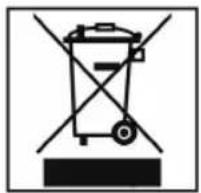
At the end of the service life of the appliance, in particular if it is malfunctioning, make the appliance unusable by pulling the mains plug out of the socket and separating the power cable. Dispose of the appliance according to the environmental regulations applicable in your country. Electrical waste may not be disposed of together with household waste. For any advice regarding recycling, contact your local municipal authorities or your dealer.
Batteries
Notes on Handling Batteries:
- Keep batteries away from children. They are not a toy!
Never throw batteries into a fire or immerse in water.
When inserting a battery, ensure the correct polarity.
Do not open the batteries by force.
Avoid contact with metallic objects (rings, nails, screws et cetera). There is a danger of short-circuiting!
As a result of a short-circuit batteries may heat up considerably or even catch fire. This may result in burns.
If a battery leaks do not rub the liquid into your eyes or mucous membranes. If hands come into contact with the liquid they should be washed thoroughly and eyes rinsed out with clear water; if symptoms persist please consult a doctor.
Used batteries should not be disposed of in the normal domestic waste. Please return old batteries to an appropriate connection point.
The following symbols are to be found on (rechargeable) batteries containing harmful substances:

Pb = contains lead
Cd = contains cadmium
Hg = contains mercury
Li = contains lithium
Declaration of conformity
ETV Elektro-Technische Vertriebsgesellschaft mbH hereby declares that the device DVD 4535 (N) is in conformity with the basic requirements of the European guideline for electromagnetic compatibility (2004/108/EG) and the low voltage guideline (2006/95/EG).
OSD Menu Overview
| System settings | |
| TV SYSTEM NTSC | PALAUTO |
| SCREEN SAVER ON | OFF |
| VIDEO INTERLACE | RGBPROGRESSIVES-VIDEO |
| TV TYPE 4:3 PAN SCAN | 4:3 LETTER BOX16:9 |
| PASSWORD | - - - - [IMAGE] |
| RATING 1 KID SAFE | 2 G3 PG4 PG 135 PG-R6 R7 NC-178 ADULT |
| DEFAULT RESTORE | |
| Language settings |
| OSD LANGUAGE |
| AUDIO LANG |
| SUBTITLE LANG |
| MENU LANG |
| Audio settings | |
| AUDIO OUT OFF | RAWPCM |
| Video settings |
| BRIGHTNESS |
| CONTRAST |
| HUE |
| SATURATION |
| SHARPNESS |
| Speaker settings | |
| DOWNMIX LT/RT | STEREOVSS5.1CH |
| SUBWOOFER OFF | ON |
| CENTER LARGE | SMALLOFF |
| CENTER DELAY | |
| REAR LARGE | SMALLOFF |
| REAR DELAY | |
| Digital settings | |
| OP MODE LINE OUT | RF REMOD |
| DYNAMIC RANGE | |
| DUAL MONO STEREO | MONO LMONO RMIX MONO |
GARANTIE-KARTE


- Deutsch
- Inhalt
- Deutsch
- SCART
- Stereo
- Subwoofer, Center, Rear
- English
- English
- WARNING:
- ATTENTION:
- Safety instructions
- Operating manual
- Children and Frail Individuals
- Power supply
- Laser
- Transport
- Where to position the appliance
- Operation
- English
- Intended use
- Defect
- Setting up and connecting
- Unpacking
- i NOTE:
- Setting up
- Starting up
- Remote control battery installation
- Effective range of the remote control
- Component Video
- S-Video
- Composite-Video
- NOTE:
- 5.1-Audio signal
- Proceed as follows:
- Digital
- USB Input (on the Front)
- Memory Card Slot (on the Front)
- English
- About the DVD-Player
- Input Not Possible
- Terminology
- Playing media
- DVD-menu page 1
- DVD-menu page 2
- Starting the replay
- Interrupting the replay
- Changing Audio-Language/Audio-Mode
- Showing subtitles
- Stopping the replay
- Selecting previous chapter/track
- English
- Working in file mode
- Please note:
- Selecting a file
- English
- Viewing pictures
- Scrolling
- Rotating a photo
- Changing the default settings
- Understanding the menu structure
- English
- Navigation and selection
- Slide control
- TV-System
- Screen saver
- Video output
- TV Type
- Password
- Rating (Child protection)
- Default settings
- Audio output
- Downmix
- Center/Rear Delay (CENTER DELAY/REAR DELAY)
- OP Model (Night mode)
- Dynamic Range
- Dual Mono
- Troubleshooting
- Disposal
- Batteries
- Notes on Handling Batteries:
- Declaration of conformity
- OSD Menu Overview
- GARANTIE-KARTE
Brand : AEG
Model : DVD 4535
Category : DVD player