
MCX 45.1 BIT - Microwaves TEKA - Free user manual and instructions
Find the device manual for free MCX 45.1 BIT TEKA in PDF.


| Product Type | Microwave oven with grill and hot-air functions |
| Brand | Teka |
| Model | MCX 45.1 BIT |
| Oven Capacity | 32 L |
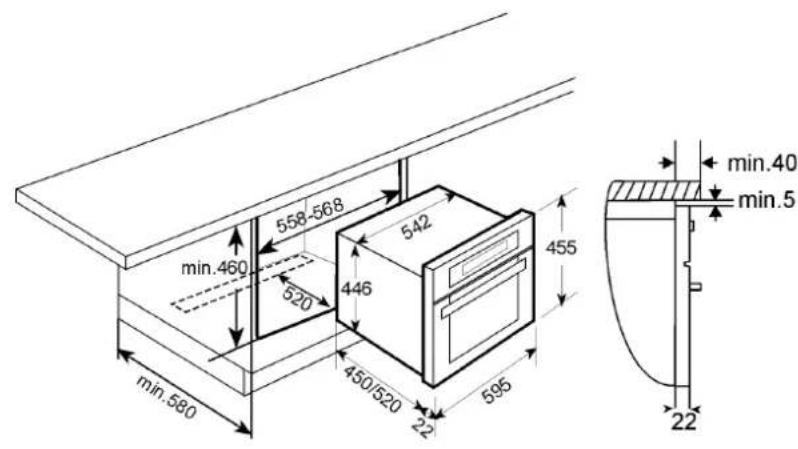
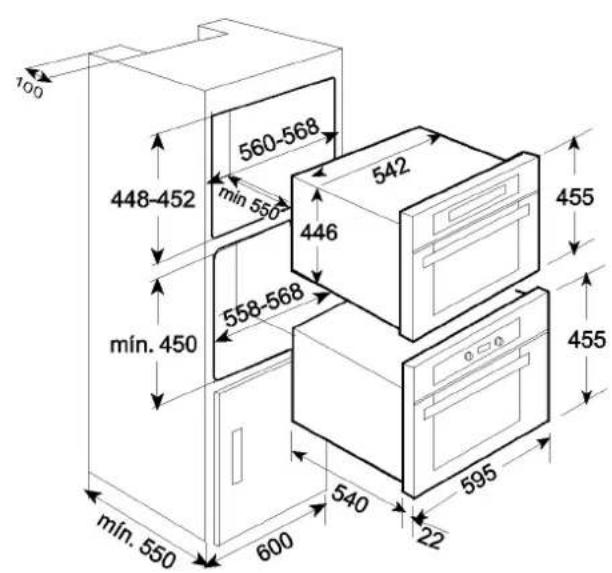
| Exterior Dimensions (W×H×D) | 595 × 455 × 472 mm |
| Interior Dimensions (W×H×D) | 420 × 210 × 390 mm |
| Weight | 35 kg |
| Power Supply | 230-240 V / 50 Hz |
| Power Consumption | 3300 W |
| Microwave Output Power | 1000 W |
| Grill Power | 1500 W |
| Microwave Frequency | 2450 MHz |
| Functions | Microwave, Grill, Microwave+Grill, Hot-Air, Microwave+Hot-Air, Grill+Fan |
| Special Functions | Defrost by time, Defrost by weight, Auto-cook programs (P1, P2, P3) |
| Turntable | Yes, with stop option |
| Browning Plate | Included |
| Safety Features | Child lock, door interlock, automatic shut-off |
| Installation | Built-in, requires proper ventilation |
| Cleaning | Wipe with damp cloth; mica cover must be kept clean |
| Accessories Included | Glass turntable, rectangular rack, browning plate, turntable support and ring |
Frequently Asked Questions - MCX 45.1 BIT TEKA
User questions about MCX 45.1 BIT TEKA
0 question about this device. Answer the ones you know or ask your own.
Ask a new question about this device
Download the instructions for your Microwaves in PDF format for free! Find your manual MCX 45.1 BIT - TEKA and take your electronic device back in hand. On this page are published all the documents necessary for the use of your device. MCX 45.1 BIT by TEKA.
USER MANUAL MCX 45.1 BIT TEKA
Instructions for Use EN
MCX 45 BIT
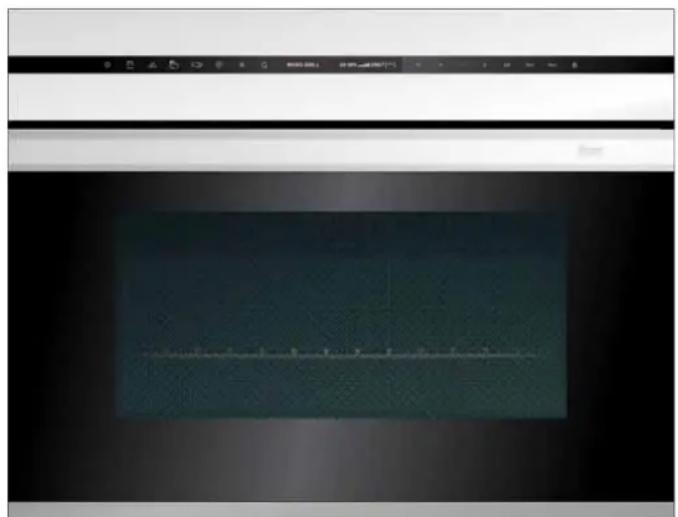
natural_image
Interior view of a kitchen appliance with a dark interior and a white top panel (no visible text or symbols)
Werter Kunde:
natural_image
Two glassware illustrations: one with a spoon inside water, the other with a black 'X' symbol (no text or labels)natural_image
Simple line drawing of a cooking pot with arrows indicating direction (no text or symbols)natural_image
Simple line drawing of a bowl with liquid and arrows indicating flow or direction (no text or symbols)natural_image
Simple line drawing of a cat sitting on a bench with arrows indicating direction (no text or symbols)Before going any further, we want to thank you for preferring our product. We are sure that this modern, functional and practical microwave oven, manufactured with top quality materials, will fully meet your expectations.
We ask you to read the instructions in this booklet very carefully as this will allow you to get the best results from using your microwave oven.
KEEP THE DOCUMENTATION OF THIS PRODUCT FOR FUTURE REFERENCE.
Always keep the instruction manual handy. If you lend the microwave oven to someone else give them the manual as well!
Environmental protection
Disposal of the packaging

The packaging bears the Green Point mark.
Dispose of all the packaging materials such as cardboard, expanded polystyrene and plastic wrapping in the appropriate bins. In this way you can be sure that the packaging materials will be re-used.
Disposal of equipment no longer used
According to European Directive 2002/96/EC on the management of waste electrical and electronic equipment (WEEE), home electrical appliances should not be put into the normal systems for disposal of solid urban waste.
Outdated appliances should be collected separately to optimise component material recovery and re-cycling rates and to prevent potential harm to human health and the environment. The symbol of a rubbish container superimposed by a diagonal cross should be put on all such products to remind people of their obligation to have such items collected separately.
Consumers should contact their local authorities or point of sale and request information on the appropriate places to leave their old home electrical appliances.
Before disposing of your appliance, render it non-usable by pulling out the power cable, cutting this and disposing of it
EN
Contents
Installation instructions ....36
Before installation....36
After installation....36
Microwave safety 37
The advantages of microwaves....39
Description of your oven....40
Basic settings 41
Setting the Clock 41
Hiding/Displaying the Clock....41
Safety blocking 42
Stopping the rotating plate....42
Basic Functions....43
Microwave 43
Grill 43
Microwave + Grill 44
Hot-Air 44
Microwaves + Hot-Air 45
Grill + Fan 45
Special functions....46
Defrosting by time (manual)......46
Defrosting by weight (automatic) 47
Special Function P1: Heating food 48
Special Function P2: Cooking....49
Special Function P3: Defrosting & Cooking....50
Using the Browning Plate ....51
When the oven is working....52
Interrupting a cooking cycle....52
Altering parameters 52
End of a cooking cycle....52
Defrosting....53
Cooking with a microwave oven ....55
Cooking with the grill 57
What kind of ovenware can be used? 60
Microwave function....60
Grill function....60
Microwave + grill function 60
Aluminium containers and foil....60
Lids....60
Oven Cleaning and Maintenance....62
What should I do if the oven doesn't work?......64
Substitution of light bulb 64
Technical characteristics....65
Description of Functions....65
Specifications 65
Installation....66
Installation instructions
Before installation
Check that the input voltage indicated on the characteristics plate is the same as the voltage of the power outlet you are going to use.
Open the oven door and take out all the accessories and remove the packing material.
Do not remove the mica cover on the ceiling of the interior! This cover stops fat and pieces of food damaging the microwave generator.
Warning! The front surface of the oven may be wrapped with a protective film. Before using the oven for the first time, carefully remove this film, starting on the inside.
Make sure that the oven is not damaged in any way. Check that the oven door closes correctly and that the interior of the door and the front of the oven opening are not damaged. If you find any damage contact the Technical Assistance Service.
DO NOT USE THE OVEN if the power cable or the plug are damaged, if the oven does not function correctly or if it has been damaged or dropped. Contact the Technical Assistance Service.
Put the oven on a flat and stable surface. The oven must not be put close to any sources of heat, radios or televisions.
During installation, make sure that the power cable does not come into contact with any moisture or objects with sharp edges behind the oven. High temperatures can damage the cable.
Warning: after the oven is installed you must make sure you can access the plug.
After installation
The oven is equipped with a power cable and a plug for single phase current.
If the oven is to be installed on a permanent basis it should be installed by a qualified technician. In such a case, the oven should be connected to a circuit with an all-pole circuit breaker with a minimum separation of 3 mm between contacts.
WARNING: THE OVEN MUST BE EARTHED.
The manufacturer and retailers do not accept responsibility for any damage that may be caused to people, animals or property if these installation instructions are not observed.
The oven only functions when the door is closed correctly.
After the first use, clean the inside of the oven and the accessories, following the cleaning instructions given in the section "Oven cleaning and maintenance".
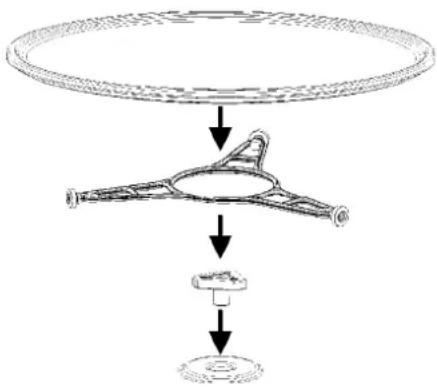
Fit the Turntable support in the centre of the oven cavity and put the Turntable ring and the Turntable plate on top, making sure they slot in. Whenever you use the microwave, the turntable plate and the respective accessories must be inside and correctly fitted. The turntable plate can rotate in both directions.
flowchart
graph TD
    A["Large Circular Component"] --> B["Intermediate Stage"]
    B --> C["Product"]
    C --> D["Final Product"]
During installation, follow the instructions supplied separately.
- Warning: Don't use the baking tray with microwave function or combined microwave function.
- Warning! Never leave the oven unwatched, especially when using paper, plastic or other combustible materials. These materials can char and may fire. FIRE RISK!
- Warning! If you see smoke or fire, keep the door closed in order to smother the flames. Switch off the oven and take the plug out of the socket or cut off the oven power supply.
- Warning! Do not heat pure alcohol or alcoholic drinks in the microwave. FIRE RISK!
- Warning! Do not heat liquids or other foods in closed containers since these may explode readily.
- Warning! This appliance is not intended for use by persons (including children) with reduced physical, sensory or mental capabilities, or lack of experience and knowledge, unless they have been given supervision or instruction concerning use of the appliance by a person responsible for their safety.
- Warning! Children should be supervised to ensure that they do not play with the appliance.
- Warning! If the oven has a combined function mode (microwave with other means of heating), children should not be allowed to use the oven without adult supervision on account of the high temperatures generated.
-
Warning! The oven cannot be used if:
-
The door is not closed correctly;
- The door hinges are damaged;
- The surfaces of the contact between the door and the oven front are damaged;
- The door window glass is damaged;
- There is frequent electrical arcing inside the oven even though there is no metal object inside.
-
The oven can only be used again after it has been repaired by a Technical Assistance Service technician.
-
During use the appliance becomes hot. Care should be taken to avoid touching heating elements inside the oven.
- Warning: Accessible parts may become hot during use. Young children should be kept away.
Beware!
- Never heat baby foods or drinks in bottles or jars with the teats or lids on them. After heating the food mix or shake well so that the heat is spread evenly. Check the food temperature before feeding this to the child. DANGER OF BURNING!
- To avoid food overheating or burning it is very important not to select long time periods or power levels that are too high when heating small quantities of food. For example, a bread roll can burn after 3 minutes if the power selected is too high.
- For toasting, use just the grilling function and watch the oven all the time. It you use a combined function to toast bread it will catch fire in a very short time.
- Make sure you never catch the power cables of other electrical appliances in the hot door or the oven. The cable insulation may melt. Danger of short-circuiting!
natural_image
Two glass bowls: one with a spoon inside, the other with a black 'X' symbol (no text or labels)Take care when heating liquids!
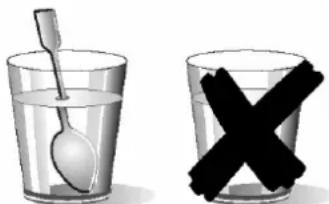
When liquids (water, coffee, tea, milk, etc.) are nearly at boiling point inside the oven and are taken out suddenly, they may spurt out of their containers. DANGER OF INJURIES AND BURNS!
To avoid that type of situation when heating liquids, put a teaspoon or glass rod inside the container.
Microwave safety
This oven is exclusively for domestic use!
Use the oven only for preparing meals.
Avoid damaging the oven or other dangerous situations by following these instructions:
- Do not switch on the oven without the turntable support, the turntable ring and the respective plate being in place.
- Never switch on the microwave when it is empty. If there is no food inside there may be an electrical overcharge and the oven could be damaged. RISK OF DAMAGE!
- For carrying out oven programming tests put a glass of water inside the oven. The water will absorb the microwaves and the oven will not be damaged.
- Do not cover or obstruct the ventilation openings.
- Use only dishes suitable for microwaves. Before using dishes and containers in the microwave, check that these are suitable (see the section on types of dishes).
- Never remove the mica cover on the ceiling of the oven interior! This cover stops fat and pieces of food damaging the microwave generator.
- Do not keep any inflammable object inside the oven as it may burn if the oven is switched on.
- Do not use the oven as a pantry.
- Eggs with their shells and whole boiled eggs must not be heated in microwave ovens because they may explode.
- Do not use the oven for frying as it is impossible to control the temperature of oil heated by microwaves.
- To avoid being burnt, always use oven gloves for handling dishes and containers and touching the oven.
- Do not lean or sit on the open oven door. This may damage the oven, especially in the hinge zone. The door can bear a maximum weight of 8 kg.
- The turntable and the grills can bear a maximum load of 8 kg. To avoid damaging the oven, do not exceed this load.
Cleaning:
- Warning! Your microwave oven must be cleaned regularly. All food remains must be removed (see section on Oven Cleaning). If the microwave oven is not kept clean its surface may deteriorate and this may shorten the oven's working life and could even result in a dangerous situation.
- Warning! Do not use harsh abrasive cleaners or sharp metal scrapers to clean the oven door glass since they can scratch the surface, which may result in shattering of the glass.
- The door contact surfaces (the front of the cavity and the inside part of the doors) must be kept very clean in order to ensure the oven functions correctly.
- Please follow the instructions regarding cleaning in the section "Oven Cleaning and Maintenance".
Repairs:
- Warning – Microwaves! The outer protection of the oven must not be removed. It is dangerous for anyone not authorised by the manufacturer to carry out any kind of repair or maintenance work.
- If the power cable is damaged it should be substituted by the manufacturer, authorised agents or technicians qualified for this task in order to avoid dangerous situations. Furthermore, special tools are required for this task.
- Repair and maintenance work, especially of current carrying parts, can only be carried out by technicians authorised by the manufacturer.
EN
The advantages of microwaves
In conventional ovens, heat radiated by electrical elements or gas burners slowly penetrates the food from outside to inside. On account of this there is a major amount of energy is wasted heating the air, the oven components and the food containers.
In a microwave oven, heat is generated by the food itself and the heat travels from inside to outside. No heat is lost to the air, the walls of the oven cavity or the dishes and containers (if these are suitable for use in microwave oven), in other words, only the food is heated.
Microwave ovens have the following advantages:
- Shorter cooking times; in general these are up to 3/4 less than the time required for conventional cooking.
- Ultra-fast food defrosting, thus reducing the danger of bacterial development.
- Energy savings.
- Conservation of the nutritional value of foods due to the shorter cooking times.
- Easy to clean.
How a microwave oven works
In a microwave oven there is a high tension valve called a magnetron which converts electrical energy into microwave energy. These electromagnetic waves are channelled to the interior of the oven through a wave guide and distributed by a metallic spreader or through a turntable.
Inside the oven the microwaves propagate in all directions and are reflected by the metal walls, uniformly penetrating the food.
Why food heats up
Most foods contain water and water molecules vibrate when subjected to microwaves.
The friction between molecules produces heat which raises the temperature of the food, defreezing it, cooking it or keeping it hot.
Since the heat arises inside the food:
- This can be cooked with little or no liquid or fats/oils;
- De-freezing, heating or cooking in a microwave oven is quicker than in a conventional oven;
- The vitamins, minerals and nutritional substances in the food are conserved;
- The natural colour and aroma of the food are unchanged.
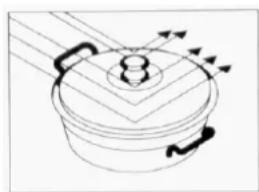
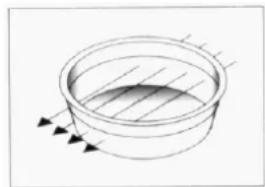
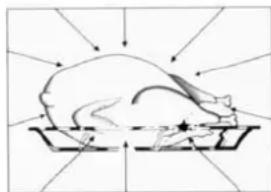
Microwaves pass through china, glass, cardboard or plastic but do not go through metal. For this reason, metal containers or ones with metal parts must not be used in a microwave oven.
Microwaves are reflected by metal...
natural_image
Simple line drawing of a cooking pot with arrows indicating direction (no text or symbols)... but go through glass and china...
natural_image
Simple line drawing of a bowl with liquid and arrows indicating flow or direction (no text or symbols)and are absorbed by foods.
natural_image
Simple line drawing of a pig on a tray with directional arrows indicating flow or movement (no text or symbols)Description of your oven
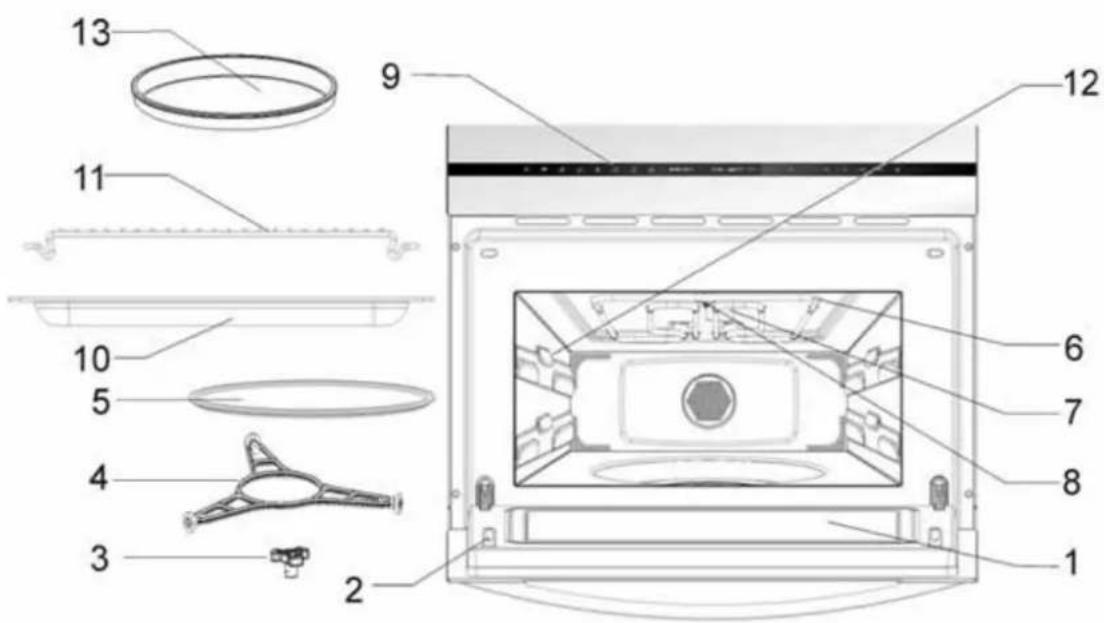
- – Door window glass
-
- Catches
- – Turntable support
- – Turntable ring
- – Turntable plate
-
- Drop-down grill
-
- Mica cover
-
- Lamp bulb
-
- Control panel
-
- Glass tray
-
- Rectangular rack
- – Lateral supports
- – Browning Plate
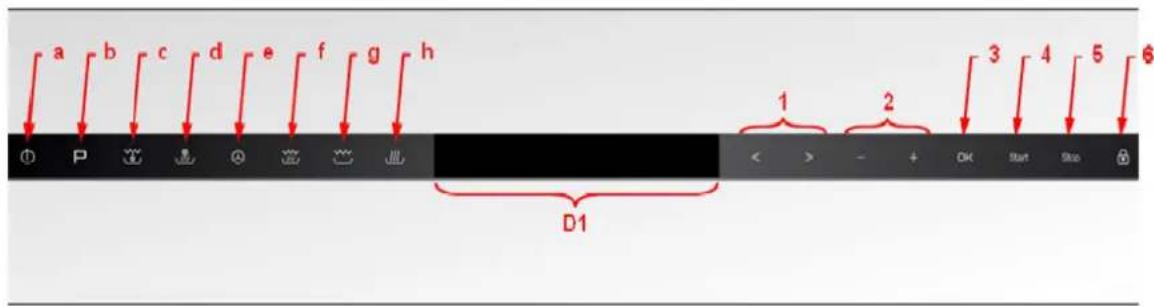
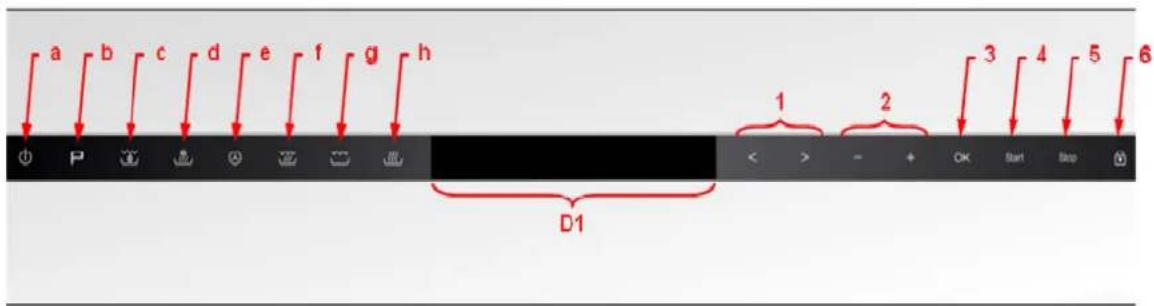
a - ON/OFF key 1 - "Left" and "Right" keys
b – Auto-cook programs key
c - Grill + Fan function key 3 - "OK" key
d - Microwaves + Hot-Air function key
e - Hot-Air function key
f - Microwaves + Gril function key
g - Grill function key
h – Microwave function key
2 - “+” and “-” keys
4 - "Start" key
5 - "Stop" key
6 – “Safety Block” key
D1 – Display
EN
Basic settings
Setting the clock
The clock display will flash if your microwave oven is first plugged in or after a power failure, to indicate that the time shown is not correct. To set the clock, proceed as follows:

- Press the "On/Off" key to switch the oven on.
-
Hold down the “+” and “-” keys simultaneously for 3 seconds.. The hour digits will flash (steps 1 and 2 are not necessary when the oven is first plugged in or after a power failure).
-
Press the “+” and “−” keys to set the hours.
- Press the OK key to confirm the hours. The minutes digits will flash.
- Press the “+” and “-” keys to set the minutes.
- Press the OK key to confirm the minutes.
Hiding/Displaying the Clock

If the clock display disturbs you, you can hide it by proceeding as follows
- Press the "On/Off" key to switch the oven on.
- Press the "OK" key for 3 seconds. The display will blank.
If you want to see the clock display again repeat the above procedure.
Basic settings
Safety blocking
The oven functioning can be blocked (for example, to stop it being used by children).

To block the oven proceed as follows:
- Press the "On/Off" key to switch the oven on.
- Hold down the "Safety Block" key for 3 seconds. The "Safety Block" key lights up and the display shows a key symbols.
The oven will not operate until it is unblocked. To unblock the oven repeat the above procedure.
Stopping the rotating plate

If the turntable rotation disturbs you, you can stop it by proceeding as follows.
While the oven is being programmed or during the normal operation of a function, press the "<" and "> " keys simultaneously.
The turntable stops and the display shows the symbol ∅.
If you want to allow the turntable to rotate, press again the "<" and "> " keys simultaneously. The symbol ∅ disappears.
EN
Basic Functions
Microwave
Use this function to cook and heat up vegetables, potatoes, rice, fish and meat.

- Press the "On/Off" key to switch the oven on.
- Press the "Microwave" function key. The key turns red and the display shows:

- Press the “+” and “-” keys to set the desired Operating Time.
- Press the “>” key. The display shows:

- Press the “+” and “−” keys to set the required Microwave Power Level (see the chapter Technical Characteristics).
- If you want to modify any of the above parameters, press the "<" or "> " keys to select the parameter and then the "+" and "-" keys to set a different value.
- Press the Start key. The oven will start to operate.
Grill
Use this function to brown the surface of food quickly.

- Press the "On/Off" key to switch the oven on.
- Press the "Grill" function key. The key turns red and the display shows:

- Press the “+” and “-” keys to set the desired Operating Time.
- Press the Start key. The oven will start to operate.
Basic functions
Microwave + Grill
Use this function to cook lasagne, poultry, baked potatoes and casseroles.

- Press the "On/Off" key to switch the oven on.
- Press the "Microwave + Grill" function key. The key turns red and the display shows:

- Press the “+” and “-” keys to set the desired Operating Time.
- Press the “>” key. The display shows:

- Press the “+” and “−” keys to set the required Microwave Power Level (see the chapter Technical Characteristics).
- If you want to modify any of the above parameters, press the "<" or "> " keys to select the parameter and then the "+" and "-" keys to set a different value.
- Press the Start key. The oven will start to operate.
Hot-Air
Use this function to bake food.

- Press the "On/Off" key to switch the oven on.
- Press the "Hot-Air" function key. The key turns red and the display shows:

- Press the “+” and “-” keys to set the desired Operating Time.
- Press the “>” key. The display shows:

- Press the “+” and “-” keys to set the required Temperature.
- If you want to modify any of the above parameters, press the "<" or "> " keys to select the parameter and then the "+" and "-" keys to set a different value.
- Press the Start key. The oven will start to operate.
Important Note: The symbol 🔍 will flash next to Hot-Air function symbol during the pre-heat phase. It will disappear when the set temperature is reached.
EN Basic functions
Microwaves + Hot-Air
Use this function to rapidly bake the foods.

- Press the "On/Off" key to switch the oven on.
- Press the "Microwaves + Hot-Air" function key. The key turns red and the display shows:

- Press the “+” and “-” keys to set the desired Operating Time.
- Press the “>” key. The display shows:

- Press the “+” and “−” keys to set the required Microwave Power Level (see the chapter Technical Characteristics).
- Press the “>” key. The display shows:

- Press the “+” and “-” keys to set the required Temperature.
- If you want to modify any of the above parameters, press the "<" or "> " keys to select the parameter and then the "+" and "-" keys to set a different value.
- Press the Start key. The oven will start to operate.
Important Note: The symbol ⚙ will flash next to Hot-Air function symbol during the pre-heat phase. It will disappear when the set temperature is reached.
Grill + Fan
Use this function to bake evenly the food and at the same time brown their surface.

- Press the "On/Off" key to switch the oven on.
- Press the "Grill + Fan" function key. The key turns red and the display shows:

- Press the “+” and “-” keys to set the desired Operating Time.
- Press the Start key. The oven will start to operate.
Special functions
Defrosting by time (manual)
Use this function to defrost any type of food quickly.

- Press the "On/Off" key to switch the oven on.
- Press the "Auto-cook programs" key. The key turns red and the display shows:

- Press the "OK" key to select the function. The display shows:

- Press the “+” and “-” keys to set the desired Operating Time.
- Press the Start key. The oven will start to operate.
EN
Special functions
Defrosting by weight (automatic)
Use this function to defrost meat, poultry, fish, fruit and bread quickly.

- Press the "On/Off" key to switch the oven on.
- Press the "Auto-cook programs" key. The key turns red.
- Press the “>” to highlight the Defrost by Weight function. The display shows:

- Press the "OK" key to select the function. The display shows:

- Press the “+” and “−” keys to select the desired Program (see table below).
- Press the “>” key. The display shows:

-
Press the “+” and “-” keys to set the desired Food Weight.
-
If you want to modify any of the above parameters, press the "<" or "> " keys to select the parameter and then the "+" and "-" keys to set a different value.
-
Press the Start key. The oven will start to operate.
The following table shows the defrosting by weight function programmes, indicating weight intervals, and defrosting and standing times (in order to ensure the food is of a uniform temperature).
| Programme | Food | Weight (g) | Time (min) | Standing time (min) |
| Pr 01 Meat 100 – 2000 2 – 43 | 20 – 30 | |||
| Pr 02 Poultry | 100 – 2500 2 – 58 | 20 – 30 | ||
| Pr 03 | Fish | 100 – 2000 | 2 – 40 | 20 – 30 |
| Pr 04 | Fruit | 100 – 500 | 2 – 13 | 10 – 20 |
| Pr 05 | Bread | 100 – 800 | 2 – 19 | 10 – 20 |
Important Note: see "General instructions for defrosting".
Special functions
Special Function P1: Heating food
Use this function to heat various types of food.

- Press the "On/Off" key to switch the oven on.
- Press the "Auto-cook programs" key. The key turns red.
- Press the “>” 2 times to highlight the P1 function. The display shows:

- Press the "OK" key to select the function. The display shows:

- Press the “+” and “-” keys to select the desired Program (see table below).
- Press the “>” key. The display shows:

- Press the “+” and “-” keys to set the desired Food Weight.
- If you want to modify any of the above parameters, press the "<" or "> " keys to select the parameter and then the "+" and "-" keys to set a different value.
- Press the Start key. The oven will start to operate.
The following table shows the Special Function Auto1 programmes, indicating weight intervals, and defrosting and standing times (in order to ensure the food is of a uniform temperature).
| Programme | Food | Weight (kg) | Time (min) | Note |
| A 01 Soup | 200 – 1500 3 – 15 | Turn 1-2 x, keep covered | ||
| A 02 | Pre-prepared dishes dense food | 200 – 1500 3 – 20 | Turn 1-2 x, keep covered | |
| A 03 | Pre-prepared dishes e.g. goulash | 200 – 1500 3 – 18 | Turn 1-2 x, keep covered | |
| A 04 Vegetables | 200 – 1500 | 2,6 – 14 | Turn 1-2 x, keep covered |
Important Notes:
- Always use dishes for use in the microwave oven and a lid or cover to avoid loss of liquids.
- Stir or mix the foods several times during heating, especially when the oven emits a beep and the display is flashing as follows: turn.
- The time required to heat the food will depend on its initial temperature. Food taken straight from the fridge will take longer to heat up than food that is at room
temperature. If the food temperature is not what is wanted, select a greater or lesser weight next time you heat up the food.
- After heating, stir the food and then leave the food to stand for some time to allow the temperature to become uniform throughout the food.
Warning! After heating the container may be very hot. Although microwaves do not heat up most containers, these may heat up through heat transmission from food.
EN Special functions
Special Function P2: Cooking
Use this function to cook fresh food.

- Press the "On/Off" key to switch the oven on.
- Press the "Auto-cook programs" key. The key turns red.
- Press the “>” 2 times to highlight the P1 function. The display shows:

- Press the "OK" key to select the function. The display shows:

- Press the “+” and “-” keys to select the desired Program (see table below).
- Press the “>” key. The display shows:

- Press the “+” and “-” keys to set the desired Food Weight.
- If you want to modify any of the above parameters, press the "<" or "> " keys to select the parameter and then the "+" and "-" keys to set a different value.
- Press the Start key. The oven will start to operate.
The following table shows the Special Function Auto2 programmes, indicating weight intervals, and defrosting and standing times (in order to ensure the food is of a uniform temperature).
| Programme | Food | Weight (kg) | Time (min) | Note |
| B 01 Potatoes | 200 – 1000 4 – 17 | Turn 1-2 x, keep covered | ||
| B 02 Vegetables | 200 – 1000 4 – 15 | Turn 1-2 x, keep covered | ||
| B 03 | Rice | 200 – 500 13 – 20 | One part rice, two parts water | |
| B 04 | Fish | 200 – 1000 | 4 – 13 | Keep covered |
Important Notes:
• Always use dishes for use in the microwave oven and a lid or cover to avoid loss of liquids.
- Stir or mix the foods several times during heating, especially when the oven emits a beep and the display is flashing as follows turn.
Warning! After heating, the container may be very hot. Although microwaves do not heat up most containers, these may heat up through heat transmission from food.
Preparation instructions:
- Fish pieces – Add 1 to 3 soup spoons of water or lemon juice.
- Rice – Add water equivalent to twice times the quantity of rice.
- Unpeeled potatoes – Use potatoes of the same size. Wash them and prick the skin several times. Add 1 to 3 soup spoons of water.
- Peeled potatoes and Fresh vegetables—Cut into pieces of the same size. Add a soup spoon of water for every 100 g of vegetables, and salt to taste.
Special functions
Special Function P3: Defrosting & Cooking
Use this function to defrost and cook various types of food.

- Press the "On/Off" key to switch the oven on.
- Press the "Auto-cook programs" key. The key turns red.
- Press the “>” 2 times to highlight the P1 function. The display shows:

- Press the "OK" key to select the function. The display shows:

- Press the “+” and “−” keys to select the desired Program (see table below).
- Press the “>” key. The display shows:

-
Press the “+” and “-” keys to set the desired Food Weight.
-
If you want to modify any of the above parameters, press the "<" or "> " keys to select the parameter and then the "+" and "-" keys to set a different value.
-
Press the Start key. The oven will start to operate.
The following table shows the Special Function Auto3 programmes, indicating weight intervals, and defrosting and standing times (in order to ensure the food is of a uniform temperature).
| Programme | Food | Weight (kg) | Time (min) | Note |
| C 01 Pizza | 300 – 550 3 – 9 | Preheat the backing pan | ||
| C 02 | Deep-frozen food | 400 – 1000 | 8 – 14 | Turn 2 x, keep covered |
| C 03 | Potato dishes | 200 – 450 | 10 – 12 | Turn 1 x |
Important Notes:
• Always use dishes for use in the microwave oven and a lid or cover to avoid loss of liquids.
- Stir or mix the foods several times during heating, especially when the oven emits a beep and the display is flashing as follows turn.
Warning! After heating, the container may be very hot. Although microwaves do not heat up most containers, these may heat up through heat transmission from food.
Preparation instructions:
- Frozen pizza – Use pre-cooked frozen pizzas and pizzas-rolls.
- Deep-frozen food – Use lasagne, cannelloni, prawn soufflé, all frozen. Keep covered.
- Potato dishes, frozen – Chips, potato croquettes and fried potatoes must be suitable for preparation in the oven.
EN
Using the Browning Plate
Normally when cooking food, such as pizzas or pies, on a grill or in a microwave oven, the dough or pastry becomes soggy. This can be avoided by using a browning plate. As a high temperature is reached quickly on the bottom of the browning plate, the crust turns crisp and brown.
The browning plate can also be used for bacon, eggs, sausages, etc.
VERY IMPORTANT NOTES:
- Use oven gloves at all times as the browning plate will become very hot.
- Never place the browning plate in the oven without the glass plate.
- Do not place any recipients on the browning plate that are not heat-resistant (plastic bowls for example).
How to cook with the browning plate:
- Preheat the browning plate by selecting the Microwave and Grill function for 3 to 5 minutes with a 600 W microwaves power level.
- Brush the browning plate with oil in order to brown the food nicely.
- Place the fresh or frozen food directly on the browning plate.
- Place the browning plate on the glass turntable in the microwave oven.
- Select the Microwaves and Grill function and the cooking time as described below.
| Food Weight | Cooking Time | Standing Time | Recommendation | |
| Pizza | 200 g 4 - 5 min --- | If the pizza is thin. | ||
| 300 g 5 - 6 min --- | If the pizza is high increase the time by 1 – 2 minutes | |||
| 400 g 7 – 8 min --- | ||||
| Quiches and Pies | 200 g 3 – 4 min 2 – 3 min | |||
| 300 g 5 - 6 min 2 – 3 min | ||||
| Hamburgers | 150 - 200 8 - 10 min 5 – 8 min Turn 2 x | |||
| Oven chips | 400 g | 6 -8 min | --- | Turn 1 x |
VERY IMPORTANT NOTES:
As the browning plate has a Teflon layer, if you use it incorrectly, it can be damaged.
Never cut the food on the plate. Remove the food from the plate prior to cutting.
Cleaning:
The best way to clean the browning plate is to wash it with hot water and detergent and rinse off with clean water. Do not use a scrubbing brush or a hard sponge otherwise the top layer will be damaged.
When the oven is working...
Interrupting a cooking cycle
You can stop the cooking process at any time by pressing the Stop key once or by opening the oven door.
In both cases:
- Microwave emission is stopped immediately.
- The grill is de-activated but is still very hot. Danger of burning!
- The timer stops automatically, indicating the operating time that is left.
If you wish, at this time you can:
- Turn or stir the food to ensure it will be evenly cooked.
- Change the process parameters.
To restart the process, close the door and press the Start/Stop key.
Altering parameters
The operating parameters
■ Time (with the “+” and “-” keys)
■ Function (with the function selector)
■ Power (with the microwave power level selector)
can be altered when the oven is operating or when the cooking process has been interrupted by simply turning the respective knob to the new value.
Cancelling a cooking cycle
If you wish to cancel the cooking process, press the Start/Stop key twice.
End of a cooking cycle
At the end of the process you will hear three beeps and the display will show the word "End".
To defrost food you should select Microwave function with one of the following Power Levels:
| Position | Power Level Power | |
| Defrost / Keep Warm | 150 W | |
| Defrost | 300 |
The table below shows different defrosting and standing times (in order to ensure the food temperature is evenly distributed) for different types and weights of food, plus recommendations.
W
| Food Weight (g) Defrosting time (min) | Standing time (min) | Recommendation | ||
| Portions of meat, veal, beef, pork | 100 | 2-3 | 5-10 Turn | |
| 200 | 4-5 | 5-10 Turn | ||
| 500 | 10-12 | 10-15 Turn | ||
| 1000 | 21-23 | 20-30 Turn | ||
| 1500 | 32-34 | 20-30 Turn | ||
| 2000 | 43-45 | 25-35 Turn | ||
| Goulash | 500 | 8-10 | 10-15 Turn tw | |
| 1000 | 17-19 | 20-30 Turn | ||
| Minced meat | 100 | 2-4 | 10-15 Turn | |
| 500 | 10-14 | 20-30 Turn | ||
| Sausages | 200 | 4-6 | 10-15 Turn | |
| 500 | 9-12 | 15-20 Turn tv | ||
| Poultry (portions) | 250 | 5-6 | 5-10 | Turn once |
| Chicken | 1000 | 20-24 | 20-30 | Turn twice |
| Poularde | 2500 | 38-42 | 25-35 | Turn three times |
| Fish fillet | 200 | 4-5 | 5-10 | Turn once |
| Trout | 250 | 5-6 | 5-10 | Turn once |
| Prawns | 100 | 2-3 | 5-10 Turn | |
| 500 | 8-11 | 15-20 Turn tv | ||
| Fruit | 200 | 4-5 | 5-10 Turn | |
| 300 | 8-9 | 5-10 Turn | ||
| 500 | 11-14 | 10-20 Turn | ||
| Bread | 200 | 4-5 | 5-10 Turn | |
| 500 | 10-12 | 10-15 Turn | ||
| 800 | 15-17 | 10-20 Turn | ||
| Butter | 250 | 8-10 | 10-15 | |
| Cream cheese | 250 | 6-8 | 10-15 | |
| Creams | 250 | 7-8 | 10-15 | |
Defrosting
General instructions for defrosting
- When defrosting, use only dishes that are appropriate for microwaves (china, glass, suitable plastic).
- The defrost function by weight and the tables refer to the defrosting of raw food.
- The defrosting time depends on the quantity and thickness of the food. When freezing food keep the defrosting process in mind. Distribute the food evenly in the container.
- Distribute the food as best as possible inside the oven. The thickest parts of fish or chicken drumsticks should be turned towards the outside. You can protect the most delicate parts of food with pieces of aluminium foil. Important: The aluminium foil must not come into contact with the oven cavity interior as this can cause electrical arcing.
- Thick portions of food should be turned several times.
- Distribute the frozen food as evenly as possible since narrow and thin portions defrost more quickly than the thicker and broader parts.
-
Fat-rich foods such as butter, cream cheese and cream should not be completely defrosted. If they are kept at room temperature they will be ready to be served in a few minutes. Frozen cream must be stirred prior to use.
-
Place poultry on an upturned plate so that the meat juices can run off more easily.
- Bread should be wrapped in a napkin so that it does not become too dry.
- Remove frozen food from its wrapping and do not forget to take off any metal twist-tags. For containers that are used to keep frozen food in the freezer and which can also be used for heating and cooking, all you need to do is take off the lid. For all other cases you should put the food into containers that are suitable for microwave use.
- The liquid resulting from defrosting, principally that from poultry should be discarded. In no event should such liquids be allowed to come into contact with other foods.
- Do not forget that by using the defrosting function you need to allow for standing time until the food is completely defrosted.
EN
Cooking with a microwave oven
Warning! Read the section "Microwave Safety" before cooking with your microwave.
Follow these recommendations when cooking with your microwave:
- Before heating or cooking foods with peel or skin (e.g. apples, tomatoes, potatoes, sausages) prick them so that they do not burst. Cut the food up before starting to prepare it.
- Before using a container or dish make sure that it is suitable for microwave use (see the section on types of ovenware).
- When cooking food with very little moisture (e.g. defrosting bread, making popcorn, etc.) evaporation is very quick. The oven then works as if it was empty and the food may burn. The oven and the container may be damaged in such a situation. You should therefore set just the cooking time necessary and you must keep a close eye on the cooking process.
- It is not possible to heat large quantities of oil (frying) in the microwave.
- Remove pre-cooked food from the containers they come in since these are not always heat resistant. Follow the food manufacturer's instructions.
- If you have several containers, such as cups, for example, set them out uniformly on the turntable plate.
- Do not close plastic bags with metal clips. Use plastic clips instead. Prick the bags several times so that the steam can escape easily.
- When heating or cooking foods, check that they reach at least a temperature of 70^ .
- During cooking, steam may form on the oven door window and may start to drip. This situation is normal and may be more noticeable if the room temperature is low. The oven's safe working is not affected by this. After you have finished cooking, clean up the water coming from the condensation
- When heating liquids, use containers with a wide opening, so that the steam can evaporate easily.
Prepare the foods as per the instructions and keep in mind the cooking times and power levels indicated in the tables.
Keep in mind that the figures given are only indicative and can vary depending on the initial state, temperature, moisture and type of food. It is advisable to adjust the times and power levels to each situation. Depending on the exact characteristics of the food you may need to increase or shorten the cooking times or increase or decrease the power levels.
Cooling with microwaves...
- The greater the amount of food, the longer the cooking time. Keep in mind that:
- Double the quantity » double the time
- Half the quantity » half the time
- The lower the temperature, the longer the cooking time.
- Foods containing a lot of liquid heat up more quickly.
- Cooking will be more uniform if the food is evenly distributed on the turntable. If you put dense foods on the outside part of the plate and less dense ones on the centre of the plate, you can heat up different types of food simultaneously.
- You can open the oven door at any time. When you do this the oven switches off automatically. The microwave will only start working again when you close the door and press the start key.
- Foods that are covered require less cooking time and retain their characteristics better. The lids used must let microwaves pass through and have small holes that allow steam to escape.
Cooking with a microwave oven
Tables and suggestions – Cooking vegetables
| Food Quantity (g) | Addition of liquids | Power (Watt) | Time (min.) | Standing Time (min.) | Instructions | |
| Cauliflower | 500 | 100 ml | 750 | 9-11 | 2-3 | Divide into florets |
| Broccoli | 300 | 50 ml | 750 | 6-8 | 2-3 | Cut into slices |
| Mushrooms | 250 | 25 ml | 750 | 6-8 | 2-3 | Turn 1 x, cover |
| Peas & carrots, | 300 | 100 ml | 750 | 7-9 | 2-3 | Cut into cubes or slices. Cover. |
| Frozen carrots | 250 | 25 ml | 750 | 8-10 | 2-3 | Turn 1 x |
| Potatoes 250 25 ml | 750 5-7 2-3 | Peel, cut into uniform | pieces. Cover, turn 1 x | |||
| Pepper | 250 | 25 ml | 750 | 5-7 | 2-3 | Cut into pieces or slices. |
| Leek | 250 | 50 ml | 750 | 5-7 | 2-3 | Cover. Turn 1 x |
| Frozen Brussels sprouts | 300 50 ml | 750 6-8 2-3 | Cover. Turn 1 x | |||
| Sauerkraut 250 25 ml | 750 8-10 | 2-3 Cover. Turn 1 x | ||||
Tables and suggestions – Cooking fish
| Food Quantity (g) | Power(Watt) | Time(min.) | Standing Time(min.) | Instructions | |
| Fish fillets 500 550 10-12 3 | Cook covered over. Turn after half of cooking time. | ||||
| Whole fish | 800 | 750300 | 2-37-9 | 2-3 | Cook covered over. Turn after half of cooking time. You may wish to cover up the small edges of the fish. |
EN
Cooking with the grill
For good results with the grill, use the grid iron supplied with the oven.
Fit the grid iron in such a way that it doesn't come into contact with the metal surfaces of the oven cavity since if it does there is a danger of electric arcing which may damage the oven.
IMPORTANT POINTS:
- When the microwave grill is used for the first time there will be some smoke and a smell coming from the oils used during oven manufacture.
- The oven door window becomes very hot when the grill is working. Keep children away.
-
When the grill is operating, the cavity walls and the grid iron become very hot. You should use oven gloves.
-
If the grill is used for extended period of time it is normal to find that the elements will switch themselves off temporarily due to the safety thermostat.
- Important! When food is to be grilled or cooked in containers you must check that the container in question is suitable for microwave use. See the section on types of ovenware!
- When the grill is used it is possible that some splashes of fat may go onto the elements and be burnt. This is a normal situation and does not mean there is any kind of operating fault.
- After you have finished cooking, clean the interior and the accessories so that cooking remains do not become encrusted.
Cooking with the grill
Tables and suggestions – Grill without microwave
| Fish | Quantity (g) | Time (min.) | Instructions |
| Fish | |||
| Bass | 800 | 18-24 | Spread lightly with butter. After half of cooking time turn and spread with seasoning. |
| Sardines/gurnard | 6-8 fish. | 15-20 | |
| Meat | |||
| Sausages 6-8 units 22-26 Halfway through, pierce and turn over. | |||
| Frozen hamburgers 3 units 18-20 Turn over 2 or 3x | |||
| Spare rib (approx. 3 cm thick) 400 25-30 Baste with oil, turn over halfway through | |||
| Others | |||
| Toast 4 units 112 -3 Keep an eye on the toastin | g process, turn over | ||
| Toasted sandwiches | 2 units | 5-10 | Keep an eye on the toasting process. |
Heat up the grill beforehand for 2 minutes. Unless indicated otherwise, use the grid iron. Place the grid on a bowl so that the water and the fat can drop.
The times shown are merely indicative and can vary as a function of the composition and quantity of the food, as well as the final condition wished for. Fish and meat taste great if, before grilling, you brush them with vegetable oil, spices and herbs and leave to marinate for a few hours. Only add salt after grilling.
Sausages will not burst if you prick them with a fork before grilling.
After half the grilling time has passed, check on how the cooking is going and, if necessary, turn the food over.
The grill is especially suitable for cooking thin portions of meat and fish. Thin portions of meat only need to be turned once, but thicker portions should be turned several times.
EN
Cooking with the Grill
Tables and suggestions – Microwave + Grill
The microwave + grill function is ideal for cooking quickly and, at the same time, browning foods. Furthermore, you can also grill and cook cheese covered food. The microwave and the grill work simultaneously. The microwave cooks and the grill toasts.
| Food Quantity (g) Dish | Power(Watt) | Time (min.) | Standing time(min.) | |
| Cheese topped pasta 500 Low dish 300 12-17 3-5 | ||||
| Cheese topped potatoes 800 | Low dish | 550 | 20-22 | 3-5 |
| Lasagne approx. | Low dish | 550 | 15-20 | 3-5 |
| Grilled cream cheese approx. 500 | Low dish | 300 | 18-20 | 3-5 |
| 2 fresh chicken legs(grilled) 200 each | Low dish | 300 | 10-15 | 3-5 |
| Chicken approx. 1000 Low and wide dish 300 35-40 3-5 | ||||
| Cheese topped onion soup 2 x 200 g cups | Soup bowls | 300 | 2-4 | 3-5 |
Before using a dish in the microwave oven make sure that it is suitable for microwave use. Only use dishes or containers that are suitable for microwave use.
The dish to be used in the combined function must be suitable for microwave and grill use. See the section on types of ovenware!
Keep in mind that the figures given are merely indicative and can vary as a function of the initial state, temperature, moisture and type of food.
If the time is not enough to brown the food well, put it under the grill for another 5 or 10 minutes.
Please follow the standing times and don't forget to turn the meat pieces.
Unless indicated to the contrary, use the turntable plate for cooking.
The values given in the tables are valid when the oven cavity is cold (it is not necessary to pre-heat the oven).
What kind of ovenware can be used?
Microwave function
For the microwave function, keep in mind that microwaves are reflected by metal surfaces. Glass, china, clay, plastic, and paper let microwaves pass.
For this reason, metal pans and dishes or containers with metal parts or decorations cannot be used in the microwave. Glass ware and clay with metallic decoration or content (e.g. lead crystal) cannot be used in microwave ovens.
The ideal materials for use in microwave ovens are glass, refractory china or clay, or heat resistant plastic. Very thin, fragile glass or china should only be used for short period of times (e.g. heating).
Hot food transmits heat to the dishes which can become very hot. You should, therefore, always use an oven glove!
How to test ovenware you want to use
Put the item you want to use in the oven for 20 seconds at maximum microwave power. After that time, if it is cold and just slightly warm, it is suitable to use. However, if it heats up a lot or causes electric arcing it is not suitable for microwave use.
Grill function
In the case of the grill function, the ovenware must be resistant to temperature of at least 300^ C.
Plastic dishes are not suitable for use in the grill.
Microwave + grill function
In the microwave + grill function, the ovenware used must be suitable for use in both the microwave and the grill.
Aluminium containers and foil
Pre-cooked food in aluminium containers or in aluminium foil can be put in the microwave if the following aspects are respected:
- Keep in mind the manufacturer's recommendations written on the packaging.
- The aluminium containers cannot be more than 3 cm high or come in contact with the cavity walls (minimum distance 3 cm). Any aluminium lid or top must be removed.
- Put the aluminium container directly on top of the turntable plate. If you use the grid iron, put the container on a china plate. Never put the container directly on the grid iron!
- The cooking time is longer because the microwaves only enter the food from the top. If you have any doubts, it is best to use only dishes suitable for microwave use.
- Aluminium foil can be used to reflect microwaves during the defrosting process. Delicate food, such as poultry or minced meat, can be protected from excessive heat by covering the respective extremities/edges.
- Important: aluminium foil cannot come into contact with the cavity walls since this may cause electrical arcing.
Lids
We recommend you use glass or plastic lids or cling film since:
- This will stop excessive evaporation (mainly during very long cooking times);
- The cooking times are shorter;
- The food does not become dry;
- The aroma is preserved.
The lid should have holes or openings so that no pressure develops. Plastic bags must also be opened. Baby feeding bottles or jars with baby food and similar containers can only be heated without their tops / lids otherwise they can burst.
EN
What kind of ovenware can be used?
Table of Ovenware
The table below gives you a general idea of what type of ovenware is suitable for each situation.
| Operating modeType of ovenware | Microwave | Grill | Microwave + Grill | |
| Defrosting / heating | Cooking | |||
| Glass and china 1)Home use, not flame resistant, can be used in dish washer | yes | yes | no | |
| Glazed chinaFlame resistant glass and china | yes | yes | yes | yes |
| China, stone ware 2)Unglazed or glazed without metallic decorations | yes | yes | no | |
| Clay dishes 2)GlazedUnglazed | yes | yes | nono | nono |
| no | no | |||
| Plastic dishes 2)Heat resistant to 100°CHeat resistant to 250°C | yes | no | nono | nono |
| yes | yes | |||
| Plastic films 3)Plastic film for foodCellophane | no | no | nono | nono |
| yes | yes | |||
| Paper, cardboard, parchment 4) | yes | No | no | |
| MetalAluminium foilAluminium wrappings 5)Accessories (grid iron) | yes | no | yes | no |
| nono | yes | yes | yes | |
| no | no | yes | yes | |
- Without any gold or silver leaf edging; no lead crystal.
- Keep the manufacturer's instructions in mind!
-
Do not use metal clips for closing bags. Make holes in the bags. Use the films only to cover the food.
-
Do not use paper plates.
-
Only shallow aluminium containers without lids/tops. The aluminium cannot come into contact with the cavity walls.
Oven Cleaning and Maintenance
Cleaning is the only maintenance normally required.
Warning! Your microwave oven should be cleaned regularly, with all food remains being removed. If the microwave is not kept clean its surfaces may deteriorate, reducing the oven's working life and possibly resulting in a dangerous situation.
Warning! Cleaning should be done with the oven power switched off. Take the plug out of the socket or switch off the oven's power circuit.
Do not use aggressive or abrasive cleaning products, scourers that scratch surfaces or sharp objects, since stains may appear.
Do not use high pressure or stream jet cleaning appliances.
Front surface
Normally you just need to clean the oven with a damp cloth. If it is very dirty, add a few drops of dishwashing liquid to the cleaning water. Afterwards, wipe the oven with a dry cloth.
In an oven with an aluminium front, use a glass cleaning product and a soft cloth that does not release any fibres or threads. Wipe from side to side without exerting any pressure on the surface.
Immediately remove lime, fat, starch or egg white stains. Corrosion can occur under these stains.
Do not let any water get inside the oven.
Oven interior
After each time the oven is used, clean the inside walls with a damp cloth since this is the easiest way to remove splashes or spots of food that may have stuck to the inside.
To remove dirt that is harder to shift, use a non-aggressive cleaning product. Do not use oven sprays or other aggressive or abrasive cleaning products.
Always keep the door and the oven front very clean to ensure that the door opens and closes properly.
Make sure water does not enter the microwave ventilation holes.
Regularly take out the turntable plate and the respective support and clean the cavity base, especially after any liquid spillage.
Do not switch on the oven without the turntable and the respective support being in place.
If the oven cavity is very dirty, put a glass of water on the turntable and switch on the microwave oven for 2 or 3 minutes at maximum power. The steam released will soften the dirt which can then be cleaned easily using a soft cloth.
Unpleasant odours (e.g. after cooking fish) can be eliminated easily. Add a few drops of lemon juice or vinegar in a cup of water. Put a spoonful of coffee in the cup to avoid the water boiling over. Heat the water for 2 to 3 minutes at maximum microwave power.
EN
Oven Cleaning and Maintenance
Oven ceiling
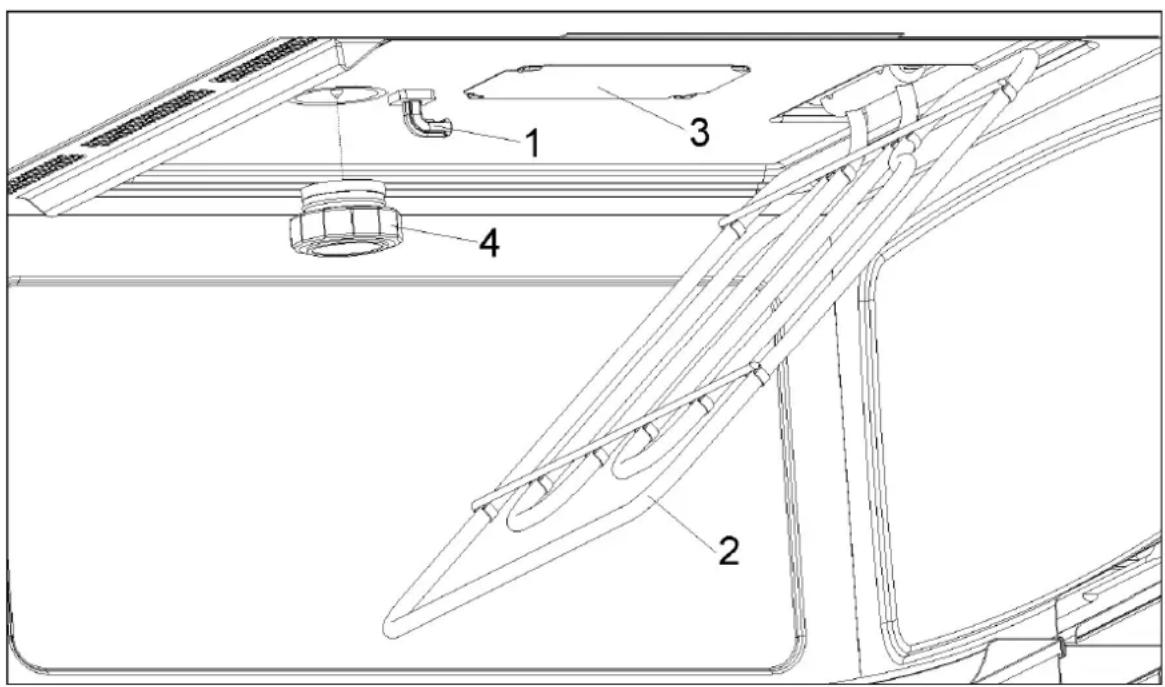
If the oven ceiling is dirty, the grill can be lowered to make cleaning easier.
To avoid the danger of burning, wait until the grill is cold before lowering it.
Proceed as follows:
- Turn the grill support by 180^ (1).
- Lower the grill gently (2). Do not use excessive force as this may cause damage.
- After cleaning the ceiling, put the grill (2) back in its place, carrying out the previous operation.
IMPORTANT WARNING: The grill heating element support (1) may fall when it is rotated. If this happens, insert the grill heating element support (1) into the slot in the ceiling of the cavity and rotate it 90° to the grill heating element support (2) position.
The mica cover (3) located in the ceiling must always be kept clean. Any food remains that collect on the mica cover can cause damage or provoke sparks.
Do not use abrasive cleaning products or sharp objects.
To avoid any risk, do not remove the mica cover.
The glass lamp cover (4) is located on the oven ceiling and can be removed easily for cleaning. For this you just need to unscrew it and clean it with water and dishwashing liquid.
Accessories
Clean the accessories after each use. If they are very dirty, soak them first of all and then use a brush and sponge. The accessories can be washed in a dish washing machine.
Make sure that the turntable plate and the respective support are always clean. Do not switch on the oven unless the turntable and the respective support are in place.
What should I do if the oven doesn't work?
WARNING! Any type of repair must only be done by a specialised technician. Any repair done by a person not authorised by the manufacturer is dangerous.
You do not need to contact Technical Assistance to resolve the following questions:
•The display is not showing! Check if:
- The time indication has been switched off (see section on Basic Settings).
- Nothing happens when I press the keys! Check if:
- The Safety Block is active (see section on Basic Settings).
•The oven does not work! Check if:
- The plug is correctly fitted in the socket.
- The oven's power is switched on.
- The door is completely closed. The door should close with an audible click.
- There are any foreign bodies between the door and the cavity front.
- When the oven is operating I can hear some strange noises! Check if:
- There is any electrical arcing inside the oven caused by foreign metallic objects (see section on type of ovenware).
- The ovenware is touching the oven walls.
- There are any loose items of cutlery or cooking tools inside the oven.
- The food doesn't heat up or heats very slowly! Check if:
- You have inadvertently used metal ovenware.
- You have selected the correct operating times and power level.
- The food you have put inside the oven is a larger amount or colder than you usually put in.
•The food is too hot, dried out or burnt! Check if you selected the correct operating time and power level.
- I hear some noises after the cooking process is finished! This is not a problem. The cooling fan keeps on working for some time. When the temperature has dropped sufficiently, the fan will switch itself off.
•The oven switches on but the interior light does not go on! If all the functions work properly it is probable that the lamp has blown. You can keep on using the oven.
Substitution of light bulb
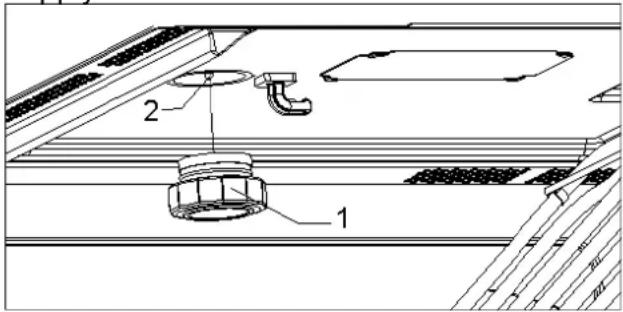
To substitute the light bulb, proceed as follows:
- Disconnect the oven from the power supply. Take the plug out of the socket or switch off the oven's power circuit.
- Unscrew and remove the glass light cover (1).
- Remove the halogen light bulb (2). Warning! The bulb may be very hot.
- Fit a new 12V / 10W halogen bulb. Warning! Do not touch the light bulb surface directly with your fingers because you may damage the bulb. Follow the lamp manufacturer's instructions.
- Screw the glass light cover into place (1).
- Connect the oven again to the power supply.
EN Technical characteristics
Description of Functions
| Symbol | Function | Microwave Power Output | Foods |
 | Microwave | 200 W | Slow defrosting for delicate foods; keeping food hot |
| 400 W | Cooking with little heat; boiling riceRapid defrosting | ||
| 600 W | Melting butterHeating baby food | ||
| 800 W | Cooking vegetables and foodCooking and heating carefully,Heating and cooking small portions of foodHeating delicate food | ||
| 1000 W | Cooking and rapidly heating liquids and pre-cooked foods | ||
 | Microwave + Grill | 200 W | Toasting food |
| 400 W | Grilling poultry and meat | ||
| 600 W | Cooking pies and cheese-topped dishes | ||
| 800 W | Use carefully: food might burn | ||
| 1000 W | Use carefully: food might burn | ||
 | Grill | --- | Grilling food |
 | Microwaves + Hot-Air | 200 W | Meat roast and simmer |
| 400 W | Poultry roast | ||
| 600 W | Other fast roasts | ||
 | Hot-Air | --- | Roast and bake |
 | Grill + Fan | --- | Food even browning |
Specifications
- AC Voltage 230-240 V / 50 Hz
• Power required 3300 W - Grill power.... 1500 W
- Microwave output power.... 1000 W
- Microwave frequency 2450 MHz
- Exterior dimensions (W×H×D). 595 × 455 × 472 mm
- Interior dimensions (W×H×D). 420 × 210 × 390 mm
- Oven capacity.... 32 l
- Weight 35 kg
natural_image
Technical line drawing of a mounted appliance with four close-up views showing internal components (no text or symbols)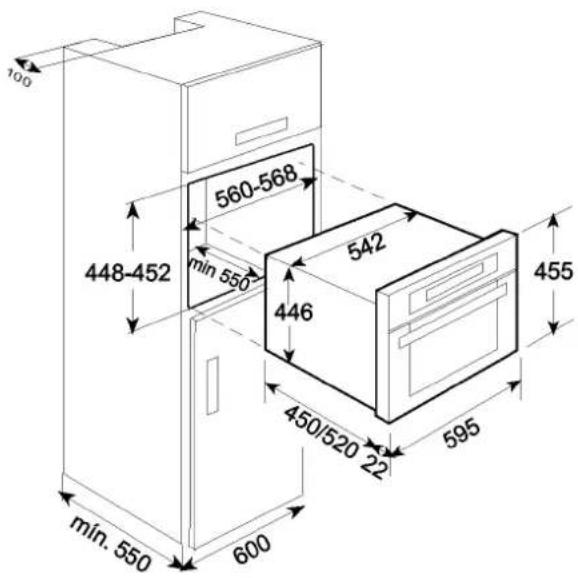
DE
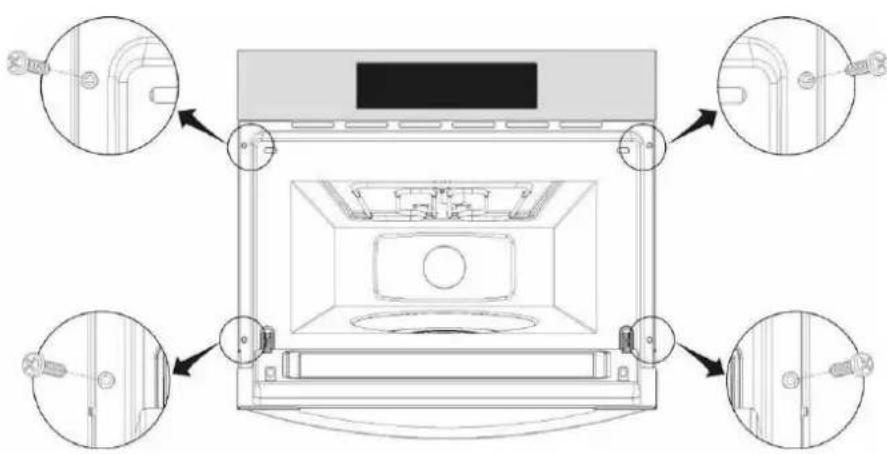
- Push oven completely into the cabinet and centre it.
- Open microwave door and fasten the appliance to the cabinet using the four screws provided. Insert the screws through the front holes.
AUSTRALIA TEKA AUSTRALIA Pty. Ltd. 61 3 9550 6100 sales@tekaaustralia.com.au
AUSTRIA KÜPPERSBUSCH GesmbH 43 1 866 800 info@kueppersbusch.at
| BELGIUM | B.V.B.A. KÜPPERSBUSCH S.P.R.L. | 32 | 2 466 8740 | info@kuppersbusch.be |
| BULGARY | TEKA BULGARIA EOOD. | 359 | 2 9768 330 | 2 9768 332 |
| CANADA | TEKA CANADA LTD. | 1 | 866-282-5403 | info@tekacanada.com |
| CHILE | TEKA CHILE, S.A. | 56 | 2 4386 000 | info@teka.cl |
| P. R. CHINA | TEKA INTERNATIONAL TRADING (Shanghai) | 86 | 21 511 688 41 | info@teka.cn |
| CZECH REPUBLIC | TEKA CZ S.R.O. | 420 | 2 84 691940 | info@teka-cz.cz |
| ECUADOR | TEKA ECUADOR, S.A. | 593 | 4 2251174 | ventas@teka.ec |
| FRANCE | TEKA FRANCE S.A.S. | 33 | 1 343 01597 | 1 343 01598 |
| GERMANY | TEKA KÜCHENTECHNIK GmbH | 49 | 27718141-0 | info@teka-kuechentechnik.de |
| GREECE | TEKA HELLAS A.E. | 30 | 210 9760283 | info@tekahellas.gr |
| HUNGARY | TEKA HUNGARY KFT | 36 | 1 3542110 | teka@teka.hu |
| INDONESIA | PT TEKA BUANA | 62 | 21 390 5274 | teka@tekabuana.com |
| ITALY | TEKA ITALIA S.P.A. | 39 | 0775 898271 | info@tekaitalia.it |
| KOREA (SOUTH REP.) | TEKA KOREA CO. LTD. | 82 | 2 599 4444 | 222 345 668 |
| MALAYSIA | TEKA KÜCHENTECHNIK (MALAYSIA) SDN. | 60 | 3 7620 1600 | customer_svc@teka.com.my |
| MIDDLE EAST | TEKA KÜCHENTECHNIK MIDDLE EAST FZE | 971 | 4 887 2912 | teka@emirates.net.ae |
| MEXICO | TEKA MEXICANA S.A. de C.V. | 52 | 555 133 0493 | ventas@tekamexicana.com.mx |
| PAKISTAN | KÜPPERSBUSCH-TEKA PAKISTAN Pvt. Ltd. | 92 | 42 576 1656 | 42 576 1657 |
| POLAND | TEKA POLSKA SP. ZO.O. | 48 | 22 7383270 | teka@teka.com.pl |
| PORTUGAL | TEKA PORTUGAL, S.A. | 351 | 234 329 510 | sacliente@teka.pt |
| RUSSIA | TEKA RUS LLC | 7 | 495 101 31 08 | info@tekarus.ru |
| SINGAPORE | TEKA SINGAPORE PTE. LTD. | 65 | 67342415 | tekasin@pacific.net.sg |
| SPAIN | TEKA INDUSTRIAL, S.A. | 34 | 942350505 | mail@teka.com |
| THAILAND | TEKA (THAILAND) CO. LTD. | 66 | 2 652 2999 | 2 652 2740 1 |
| TURKEY | TEKA TEKNIK MUTFAK | 90 | 212 288 3134 | teka@teka.com.tr |
| UKRAINE | TEKA UA | 380 | 44 496 0680 | info@teka.ua |
| UNITED ARAB EMIRATES | TEKA KÜCHENTECHNIK U.A.E. LLC | 971 | 4 283 3047 | uaeteka@emirates.net.ae |
| UNITED KINGDOM | TEKA PRODUCTS LTD. | 44 | 1235 861916 | info@teka.co.uk |
| USA | TEKA USA, INC. | 1 | 813 2888820 | info@tekausa.com |
| VENEZUELA | TEKA ANDINA, S.A. | 58 | 2 1229 12821 | teka@teka.com.ve |
natural_image
Three grayscale images of the Americas showing continents (no text or labels)TEKA Industrial, S. A.
Cajo, 17
39011 SANTANDER (Spain)
Tel: 34 - 942 - 35 50 50
Fax: 34 - 942 - 34 76 94
mail@teka.com

35708 Haiger (Germany)
Tel: 49-2771-8141-0
Fax: 49 - 2771 - 8141 - 10

Estimado Cliente:
flowchart
graph TD
    A["Top Circular Component"] --> B["Intermediate Stage"]
    B --> C["Final Circular Component"]
natural_image
Two glass bowls: one with a spoon inside, the other with a black 'X' symbol (no text or labels)natural_image
Simple line drawing of a cooking pot with arrows indicating direction (no text or symbols)natural_image
Simple line drawing of a circular container with internal shading and directional arrows (no text or symbols)natural_image
Diagram of a mouse inside a container with directional arrows indicating motion (no text or labels)- – Vidrio de ventana de la puerta 8. – Bombilla
- – Cierres
- – Panel de control
- – Soporte giratorio 10. – Bandeja de vidrio
- – Anillo giratorio 11. – Parrilla rectangular
- – Plato giratorio 12. – Soportes laterales
- – Grill desplegable 13. – Plato de tostar
-
- Cobertura de mica
ES
flowchart
graph TD
    A["Circular Component"] --> B["Multi-Component"]
    B --> C["Final Step"]
natural_image
Two glassware illustrations: a spoon inside and a black X symbol (no text or symbols present)natural_image
Simple line drawing of a cooking pot with arrows indicating direction (no text or symbols)natural_image
Simple line drawing of a circular container with internal shading and directional arrows (no text or symbols)natural_image
Simple line drawing of a pig sitting on a platform with directional arrows indicating flow or movement (no text or symbols)INDICAÇÕES IMPORTANTES:
PT
natural_image
Technical diagram of a kitchen appliance with four close-up views showing internal components and mounting brackets (no text or labels)
ES
natural_image
Three grayscale images of the Americas showing continents (no text or labels)TEKA Industrial, S. A.
Cajo, 17
39011 SANTANDER (Spain)
Tel: 34-942-35 50 50
Fax: 34-942-347694
mail@teka.com

www.teka.com
35708 Haiger (Germany)
Tel: 49-2771-8141-0
Fax: 49-2771-8141-10
- Environmental protection
- Disposal of the packaging
- Disposal of equipment no longer used
- EN
- Contents
- Installation instructions ....36
- Microwave safety 37
- The advantages of microwaves....39
- Description of your oven....40
- Basic settings 41
- Basic Functions....43
- Special functions....46
- Using the Browning Plate ....51
- When the oven is working....52
- Defrosting....53
- Cooking with a microwave oven ....55
- Cooking with the grill 57
- What kind of ovenware can be used? 60
- Oven Cleaning and Maintenance....62
- What should I do if the oven doesn't work?......64
- Technical characteristics....65
- Installation....66
- Installation instructions
- Before installation
- After installation
- WARNING: THE OVEN MUST BE EARTHED.
- Beware!
- Take care when heating liquids!
- Microwave safety
- This oven is exclusively for domestic use!
- Use the oven only for preparing meals.
- Avoid damaging the oven or other dangerous situations by following these instructions:
- Cleaning:
- Repairs:
- The advantages of microwaves
- How a microwave oven works
- Why food heats up
- Description of your oven
- Basic settings
- Setting the clock
- Hiding/Displaying the Clock
- Safety blocking
- Stopping the rotating plate
- Basic Functions
- Microwave
- Grill
- Microwave + Grill
- Hot-Air
- EN Basic functions
- Microwaves + Hot-Air
- Grill + Fan
- Special functions
- Defrosting by time (manual)
- Defrosting by weight (automatic)
- Special Function P1: Heating food
- Important Notes:
- EN Special functions
- Special Function P2: Cooking
- Preparation instructions:
- Special Function P3: Defrosting & Cooking
- Using the Browning Plate
- VERY IMPORTANT NOTES:
- When the oven is working...
- Interrupting a cooking cycle
- Altering parameters
- Cancelling a cooking cycle
- End of a cooking cycle
- Defrosting
- General instructions for defrosting
- Cooking with a microwave oven
- Warning! Read the section "Microwave Safety" before cooking with your microwave.
- Cooling with microwaves...
- Cooking with the grill
- IMPORTANT POINTS:
- Tables and suggestions – Microwave + Grill
- What kind of ovenware can be used?
- Microwave function
- How to test ovenware you want to use
- Grill function
- Microwave + grill function
- Aluminium containers and foil
- Lids
- Table of Ovenware
- Oven Cleaning and Maintenance
- Front surface
- Oven interior
- Oven ceiling
- To avoid the danger of burning, wait until the grill is cold before lowering it.
- Do not use abrasive cleaning products or sharp objects.
- Accessories
- What should I do if the oven doesn't work?
- Substitution of light bulb
- EN Technical characteristics
- Specifications
- DE
- ES
- INDICAÇÕES IMPORTANTES:
- PT
Brand : TEKA
Model : MCX 45.1 BIT
Category : Microwaves