
Shipman GPS-AutoSkew - Satellite receiver MEGASAT - Free user manual and instructions
Find the device manual for free Shipman GPS-AutoSkew MEGASAT in PDF.


User questions about Shipman GPS-AutoSkew MEGASAT
0 question about this device. Answer the ones you know or ask your own.
Ask a new question about this device
Download the instructions for your Satellite receiver in PDF format for free! Find your manual Shipman GPS-AutoSkew - MEGASAT and take your electronic device back in hand. On this page are published all the documents necessary for the use of your device. Shipman GPS-AutoSkew by MEGASAT.
USER MANUAL Shipman GPS-AutoSkew MEGASAT
natural_image
White MEGASAT satellite antenna with power control panel and satellite selection button (no text or symbols on main body)Shipman / Shipman GPS/AS
natural_image
3D illustration of a white dome-shaped object on an open yellow cardboard box with a red upward arrow, no text or symbols present.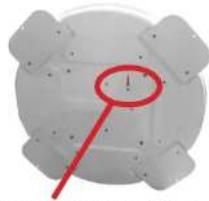
natural_image
Circular mechanical component with a red circular highlight and a red diagonal line, no visible text or symbolsnatural_image
Close-up of a red pencil writing on a white surface with a dashed outline (no text or symbols)natural_image
Illustration of a satellite with red and blue stripes (no text or symbols)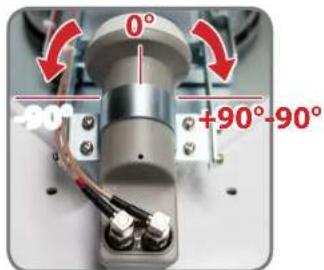
text_image
0° -90° +90°-90°SD CARD DETECTED WRITING SOFTWARE
natural_image
White MEGASAT satellite antenna with a black power supply unit nearby (no visible text or symbols on the device body)Stand: v2.0 April 2013
User manual and installation instructions
Contents
1. Introduction
Safety Information 03
Short description....03
Delivery....03
System Components 04
2. Installation
Installation 05
Gluing instructions....06
Connection 07
The control unit 08
Satellite broadcasting....09
Startup and operation....10
Setting the LNB skew....11
-
Troubleshooting 12
-
Skew Settings....13
-
Firmware Update....14
-
Footprint 16
-
Specifications 17
Safety Information

Caution - Improper handling by unqualified personnel can cause serious damage to this equipment. Unqualified personnel who tamper with this equipment may be held liable for any resultant damage to the equipment.
Note - Before you begin, carefully read each of the procedures in this manual. If you have not performed similar operations on comparable equipment, do not attempt to perform these procedures.
Short description
The satellite antenna system is the innovative and a technologically advanced satellite Positioner system. The antenna has a unique combination of cutting-edge components. Fast satellite search and compatibility with all digital, HID-ready set-top boxes and TV sets are guaranteed.
Delivery
Shipman / Shipmas GPS/AS
• Control unit (IDU) incl. powercable
- 1x antenna cable (10 m)
• 1x antenna cable (1 m)
• Installation glue (optional)
• Power supply 230 V (12 V, 5 A) (optional)
- User manual
System Components
Open box and remove the control unit, cables and packing material. Lift the antenna straight up out of the box. Never place the system upside down!
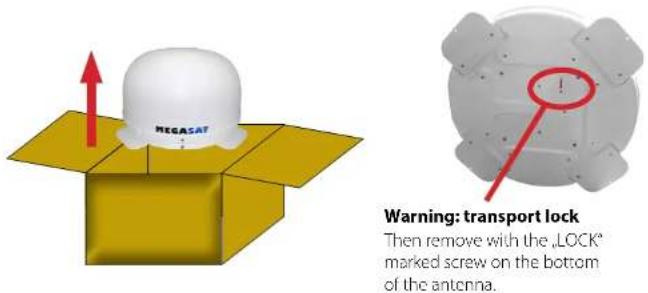
Then remove with the „LOCK" marked screw on the bottom of the antenna.
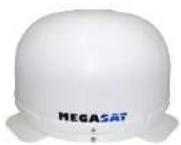
Antenna unit
The elegant plastic housing will protecting the antenna against outside weather conditions. Under the housing there is a 45 cm high-performance antenna. The new technology of 0-90° elevation enables optimal reception across Europe.
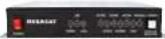
Control unit (IDU)
The control unit is used for satellite selection and control. It is connected between the antenna and the set-top box and supplied the antenna with electricity.

Warning:
The Campingman Twin/AutoSkew has an additional Auto Skew function that adjust the polarization angle of the LNB automatically, and a additional connection for a second set-top box. The control unit must be operated only on the selected antenna port. Only this is provided for controlling.
Installation
Basically, we recommend that you leave the installation to make by your dealer or workshop!

Warning:
Please also note that the antenna height of the vehicle will change accordingly! Please strictly adhere to the various points in the installation instructions!
General information:
Provide a suitable working environment, a garage/warehouse is better than open air. The ambient temperature for installation is between +5°C and max. +25°C. Work not directly in the sun. Comply with the safety regulations when handling with chemical products. Provide the necessary hygiene.
Preparation:
- Make sure that the roof of your vehicle is sufficiently stable. In case of insufficient or doubtful roof stability is an approximately 2 mm thick plate with 100 x 100 cm is to be attached to the outer roof skin. Ask to your vehicle manufacturer.
- Make sure that all parts are present. You may also need a roof penetration for the connecting cable of the antenna. This you get in specialist shops.
- Place the antenna on the installation area and align it so that the antenna connection is not facing forward. Make sure that the mounting location is flat and do not interfere with roof constructions that can interfere with satellite reception. Constructions up to 8 cm in height do not matter, higher constructions should have a respective distance from the antenna, so that no barrier exists between the antenna and the satellite. The least distance to an air conditioner should be 30 cm.
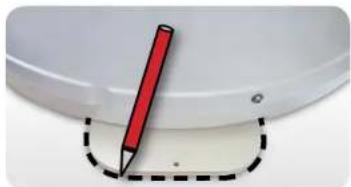
- Clean the mounting surface with a suitable cleaner and a fleece cloth to remove dirt and impurities. Then draw the antenna feet with a pen.
natural_image
Close-up of a red pencil on a white surface with a dashed outline (no text or symbols)- Roughen the drawn areas and feet with sandpaper (120 grit) to easily and thoroughly clean the surface again with Cleaner (WARNING: then no longer touch areas) and let the clean dry for about 10 minutes.
- Unless you have a way to run the cable through an existing roof outlet, lock for a suitable place (best in the wind shadow behind the antenna) on the roof for the installation of a roof outlet to avoid the ingress of moisture (eg rain or splash water) in the wellbore. Make sure that the cables are not curved too much to avoid signal loss and damage the cable (bending radius max. 5-7 cm).
Gluing instructions
- Prepare the glue for mounting.
- Now take the glue on the underside of the antenna bases in serpentine lines, so that the glue can harden well to the inside.
- Now place immediately (within 5 minutes after adhesive application), the antenna on the marked fields. Press your feet slightly and evenly and fix the antenna so that it stays in place, eg by an adhesive tape. It must be after pressing for at least 2 mm glue between antenna and surface. The adhesive is cured max. in 48 hours at +18°C and a relative humidity of 50%. Should prevail low humidity during the assembly time, spray after bonding in the vicinity of the antenna always some water in the air.
- Remove any spilled adhesive immediately with a putty knife or similar and clean the soiled surfaces with the cleaner and a fleece cloth.
- For safety, you can attach the antenna bases additionally. Given by drill through the existing hole in the respective antenna to the roof of your car and fix it with a screw with locking nut. In order for the freshly bonded feet can not slip, wait with this work until the adhesive has cured.
- After the complete assembly and curing of the adhesive, a silicone can be drawn around the antenna bases.

Connection
Install the control unit and the set-top box is not inside the vehicle in the region of an airbag. Maintain a careful installation of the cable in order to avoid short circuits. Pay attention also to existing cables.
Connect the antenna as shown in the illustration below:
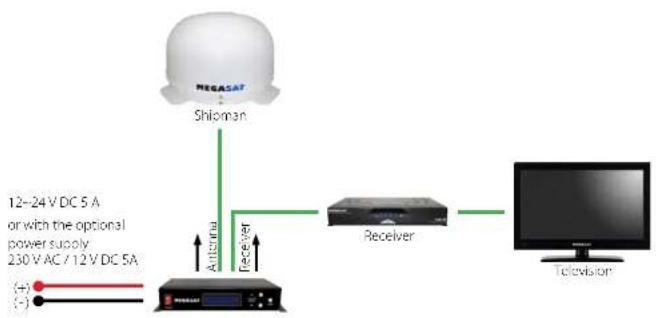
flowchart
graph LR
    A["MEGASAT"] --> B["Shioman"]
    B --> C["Antenna"]
    C --> D["Receiver"]
    D --> E["Television"]
    style A fill:#f9f,stroke:#333
    style B fill:#ccf,stroke:#333
    style C fill:#cfc,stroke:#333
    style D fill:#fcc,stroke:#333
    style E fill:#cff,stroke:#333
The contron unit
Front view of the control unit
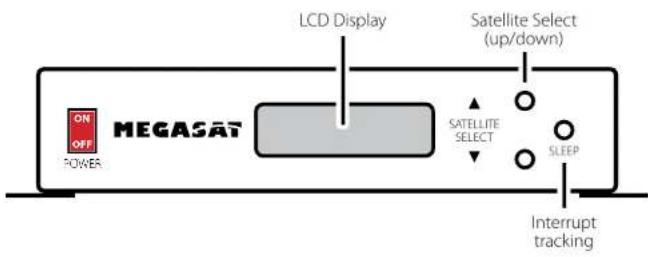
flowchart
graph LR
    A["ON/OFF POWER"] --> B["MEGASAT"]
    B --> C["LCD Display"]
    C --> D["Satellite Select (up/down)"]
    D --> E["SATELLITE SELECT"]
    E --> F["SLEEP"]
    F --> G["Interrupt tracking"]
Rear view of the control unit
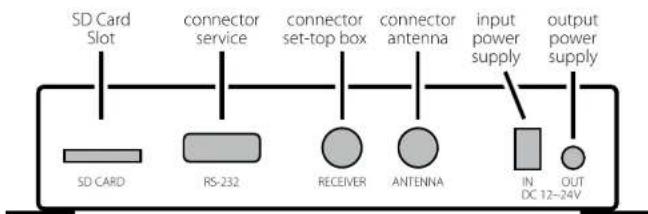
text_image
SD Card Slot connector service connector set-top box connector antenna input power supply output power supply SD CARD RS-232 RECEIVER ANTENNA IN DC 12-24V
Warning:
Connect the device only at a 7 amp protected line.
The line must be at least 2.5 mm ^2 strong. (never directly to the car battery).
Satellite broadcasting
Direct Broadcast Service (DBS) satellites broadcast audio, video and data information from satellites located 22 miles in space. A receiving station, such as the antenna, should include a dish and satellite receiver to receive the signals and process them for use by the consumer audio and video equipment. The system requires a clear view of the satellite to maximize the signal reception.
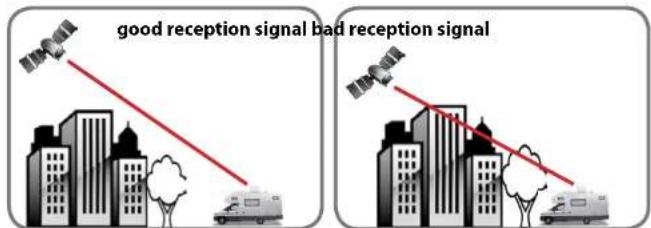
text_image
good reception signal bad reception signalObjects such as tall lighthouse, bridges and big ship that block this view will cause a loss of signal. The signal will be quickly restored once the antenna has a clear line of sight again. Heavy rain, cloud, snow or ice may also interfere with the signal reception quality. If the satellite signal is lost due to blockage or severe weather condition, services from the receiver will be lost (picture will freeze frame and may disappear). When the satellite signal strength is again high enough, then the receiver will resume providing desired programming services.
Startup and operation
-
Turn on the TV and the set-top box. The green LNB LED on the display of the control box lights up when the satellite receiver is turned on and a supply voltage for the LNB is available.
-
Turn on the control unit. Then, the indicator of the preset satellites lights red. Shortly thereafter, the LED starts to flash for about 5 seconds. Only this time you can select another satellite by press the white key. Each press of the button, the display will continue to a satellite position. Press it as long until the desired satellite is flashing. Now the search is started.
-
When a satellite is found, the antenna stop and carries out a fine-tuning. Then begins to identify the satellite identification (ID). This process can be tracked on the display. After successful identification "LOCKED" ap-
| It shows user selected satellite | It shows satellite id |
| It shows current operational status | It shows intensity of signal |
pears in the display. Should not be identified the satellite of your choice, the antenna corrected the position. Once the satellite is correct, the display will show it (eg ID:AS1). After a successful search, the receiver is assured by the antenna.
-
The Shipman has a tracking function, which allows to receive even while driving a permanent signal. This is fully automatic and requires no adjustments to the equipment.
-
The antenna is constantly moving in order to detect any changes in the position. If your vehicle at a fixed location, the movement of the antenna cause irritating noises. Therefore press the "SLEEP" button on the control unit to turn off the tracking function of the antenna. To activate the automatic positioning again, please restart the control unit.
-
When the tracking function is not disabled and there was no movement on the vehicle at least for 10 min., the function is switched off automatically. If the antenna or the vehicle moves easily (eg walking in the vehicle), the tracking function is activated automatically.
Note: Changing the satellite is only possible shortly after switching on the power (as described in point 3) or after successful satellite search.
Preprogrammed satellites:
ASTRA 2 Position for Astre 2 to 28.2° East
ASTRA 3 Position for Astra 3 to 23.5° East
ASTRA 1 Position for Astre 1 to 19.7° East
HOTBIRD Position for Hotbird to 13 ^th -ast
ASTRA 4 Position for Astra 4 (Sirius) to 4.8° East
THOR Position for Thor to 0.8° West
HISPASAT Position for Hispasal to 30° West
TURKSAT Position for Turksat to 47° East
Setting the LNB Skew
The following settings are only for the Shipman (without AutoSkew). An overview of the skew settings can be found on page 13.
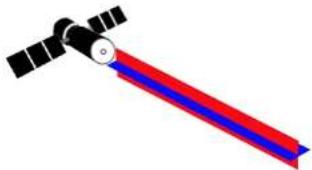
natural_image
Illustration of a satellite with red and blue stripes (no text or symbols)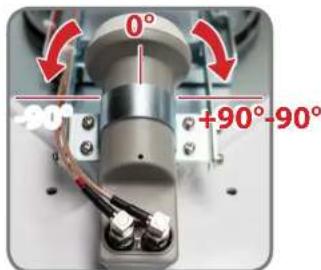
text_image
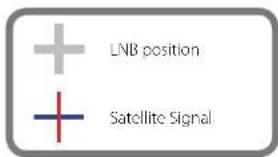
0° -90° +90°-90°Signals in the vertical (red) and horizontal (blue) line have an offset of exactly 90° to each other. Due to the different position of the satellites, depending on your location, it is possible that the signals do not meet exactly vertically and horizontally on the LNB. To adjust this, turn the LNB into the correct position to the transmitted signal. This adjustment to the LNB is called „skew adjustment“. The following figure shows the optimal setting of the LNB. More accurate the match, the better of reception.
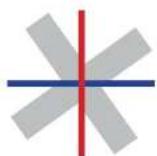
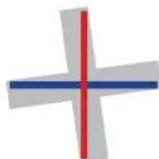

bad reception good reception best reception
text_image
LNB position Satellite SignalTroubleshooting
No Signal
- Objects such as trees, bridges, and large buildings, which are located in the angle of the satellite will lead to a loss of the signal.
- If the satellite signal is lost through severe weather conditions, the current program of the receiver is stopped (the image freeze, or disappear). If the weather conditions allow a good reception again, the TV screen will be restored.
- Make sure that the settings of the set-top box to LNB voltage is switched on. This is indicated by the green LED on the control unit (LED green = LNB voltage present).
• Only Shipman (without AutoSkew)
If the antenna has not found satellites, check the Skew settings for the satellite at your location. An overview of the skew settings can be found on page 13. The basic setting of the LNB is 0°. Should they deviate more than 5°, adjust the degrees accordingly.
There is dirt on the antenna?
Excessive dirt on the housing may cause reception problems.
Everything is properly connected and turned on?
Your satellite TV receiver might be set up incorrectly or defective. First check the receiver's configuration to ensure it is set up for the desired programming. In the case of a faulty receiver, refer to your selected receiver's user manual for service and warranty information.
Satellite footprint
Television satellites are located in fixed positions above the Earth's equator and beam TV signals down to certain regions of the planet (not worldwide). To receive TV signals from a satellite, you must be located within that satellite's unique coverage area. With the figure on page 10, you can check if you are located in the footprint of the satellite. In the outlying areas of the footprint there may be interference.
Satellite Frequency Data Changed
If some channels work, while one or more other channels do not, or if the antenna cannot find the selected satellite, the satellite's frequency data might have changed.
Error message on the display: „Communication Error“
The antenna is not connected to the control unit. Check the wiring to the antenna.
Skew Settings
| Country | City | GSE | TUESDAY | HILLIAS | EUTELSAT | ASTRA | ASTRA1 | EUTELSAT | HOTTBID | EUTELSAT | SUSBITAT | THOR | ATLANTIC | HISPASAT | |||||||||||
| 2Q1A | SAT 2 | WADY | 2A BID | 2008/01 | 1M | VOWSCAT | 6009 | WDA | WDA | 3/5/6 | BIRD 3 | 1C/1D | |||||||||||||
| 4Q1R | FUR | 3Q1R | FUR | 3Q1R | FUR | 1QA | 1QA | 1QA | 1QA | 1QA | 1QA | 1QA | 1QA | 1QA | 1QA | 1QA | 0.0W | N.W | N.W | N.W | N.W | ||||
| Bulgaria | Sofia | AZ | 153.5 | 157.5 | 161.6 | 172.8 | 179.7 | 180 | 190.7 | 195 | 199.2 | 203.3 | 206.3 | 212.7 | 210.5 | 242.2 | |||||||||
| CL | 37.2 | 38.2 | 29.1 | 40.5 | 40.7 | 40.5 | 40.2 | 39.6 | 38.9 | 38 | 37.3 | 34.9 | 33 | 17.8 | |||||||||||
| SOW | -19.2 | -16.3 | -13.4 | 1.7 | 0.8 | 11.4 | 7.8 | 11 | 14 | 16.9 | 19 | 24 | 27.2 | 41 | |||||||||||
| Iceland krona | Kinderholm | AZ | 340.7 | 149 | 152.4 | 161.1 | 166.9 | 172 | 175.9 | 190.5 | 189.3 | 196.8 | 199.4 | 196.3 | 201 | 739.1 | |||||||||
| CL | 21.7 | 22.2 | 22.2 | 25 | 25.8 | 26.2 | 26.5 | 26.5 | 26.5 | 26.2 | 26.1 | 25.8 | 24.6 | 16.3 | |||||||||||
| SOW | -19.2 | -16.3 | -13.4 | 1.7 | 0.8 | 11.4 | 7.8 | 11 | 14 | 16.9 | 19 | 24.6 | 17.8 | 24.6 | |||||||||||
| Finland | Nebelux | AZ | 100.6 | 104 | 107.4 | 120.3 | 130.7 | 138.7 | 140.4 | 150.8 | 147.2 | 200.0 | 209.4 | 209.4 | 212.7 | 238.7 | |||||||||
| CL | 20.3 | 20.8 | 21.2 | 25.8 | 27.8 | 21.6 | 21.7 | 21.4 | 21.1 | 20.1 | 19.7 | 18.4 | 17.3 | 8 | |||||||||||
| SOW | -4.5 | -7.9 | -4.3 | 5.2 | 7.9 | 10.2 | 5.1 | 6.8 | 8.5 | 10.1 | 11.2 | 14.2 | 16 | 25.2 | |||||||||||
| France | Paris | AZ | 122.2 | 126.3 | 138.5 | 147.2 | 152.8 | 158 | 164.1 | 165.9 | 168.8 | 173.8 | 176.7 | 184.6 | 189.7 | 220 | |||||||||
| CL | 22.3 | 23.9 | 25.3 | 28.6 | 30.3 | 31.6 | 32.4 | 32.9 | 33.4 | 33.7 | 33.0 | 33.0 | 33.4 | 25.9 | |||||||||||
| SOW | -29.1 | -27.5 | -29.8 | -13.9 | -10.5 | -7.2 | -11.7 | -9.2 | -6.7 | -4.1 | -4.2 | 2.9 | 6.3 | 25 | |||||||||||
| Germany | Berlin | AZ | 145.5 | 148.9 | 152.2 | 163.6 | 167.4 | 172.7 | 176.3 | 180.5 | 184.2 | 188.1 | 190.8 | 197.9 | 202.8 | 220 | |||||||||
| CL | 24.4 | 25.5 | 26.4 | 28.4 | 29.2 | 20.7 | 29.9 | 30 | 29.9 | 29.7 | 29.4 | 28.5 | 27.6 | 10 | |||||||||||
| SOW | -20.2 | -16.3 | -16.4 | -4.1 | -0.7 | 2.6 | -2.0 | 0.3 | 2.6 | 4.9 | 6.6 | 10.0 | 11.6 | 27.8 | |||||||||||
| Umsat Kingdom | London | AZ | 130.8 | 133.8 | 136.9 | 145.4 | 150.7 | 155.8 | 159.6 | 163.3 | 167.1 | 170.8 | 173.6 | 181 | 186.1 | 206.2 | |||||||||
| CL | 18.3 | 20.7 | 27.1 | 25.3 | 7.7 | 28.3 | 29.1 | 29.8 | 30.3 | 30.7 | 30.9 | 31.5 | 30.8 | 34.8 | |||||||||||
| SOW | -24.7 | -26.2 | -25.2 | -19.2 | -16.7 | -15.2 | -15.5 | -16.0 | -16.0 | -16.0 | -16.0 | -16.0 | -16.0 | -21.6 | |||||||||||
| Greece | Athens | AZ | 131.0 | 134.0 | 136.5 | 141.5 | 143.3 | 147.3 | 150.4 | 153.0 | 155.0 | 158.0 | 160.0 | 163.0 | 166.0 | 170.7 | |||||||||
| CL | 42 | 43.1 | 44.1 | 42.7 | 46 | 45.7 | 45.2 | 44.6 | 43.7 | 42.6 | 41.7 | 39 | 50.8 | 19.6 | |||||||||||
| SOW | -21.9 | -18.7 | -15.3 | 1.3 | 7.3 | 12.7 | 12.7 | 13.4 | 16.9 | 20.2 | 22.5 | 28.1 | 31.6 | 45.9 | |||||||||||
| Hungary | Budapest | AZ | 150.2 | 153.9 | 157.6 | 162.7 | 173.4 | 179.9 | 184.2 | 188.3 | 193.3 | 196.2 | 199.1 | 206.4 | 211.3 | 237.4 | |||||||||
| CL | 31 | 32.1 | 33 | 34.7 | 35.3 | 35.4 | 35.3 | 35.1 | 34.7 | 34.2 | 33.7 | 32 | 30.6 | 18 | |||||||||||
| SOW | -19.9 | -17.3 | -18.9 | -1.3 | 3 | 0.9 | 2.8 | 5.6 | 8.3 | 10.9 | 12.8 | 17.5 | 20.5 | 34.7 | |||||||||||
| Italy | Italy | AZ | 118.7 | 143.1 | 146.9 | 150.7 | 164.8 | 170 | 174.8 | 179.1 | 181.7 | 188.7 | 191.9 | 199.8 | 203.2 | 219.9 | |||||||||
| CL | 32.1 | 34.6 | 36 | 39 | 40.2 | 41.1 | 41.5 | 41.6 | 41.5 | 41.3 | 41 | 39.7 | 38.4 | 35.4 | |||||||||||
| SOW | 20.8 | 26.4 | 24.0 | 5.0 | 5.0 | 5.4 | 1.9 | 0.6 | 2.8 | 6.1 | 8.5 | 14.6 | 18.5 | 37 | |||||||||||
| Fukun | Wuricawa | AZ | 154.1 | 157.7 | 161.3 | 170.9 | 176.8 | 182.3 | 186.3 | 190.1 | 193.8 | 197.5 | 200.2 | 207.1 | 211.7 | 237.4 | |||||||||
| CL | 27.1 | 27.9 | 28.4 | 29.8 | 30.1 | 30.7 | 30.7 | 29.7 | 29.3 | 28.6 | 28.3 | 26.8 | 25.5 | 14.2 | |||||||||||
| SOW | -11.1 | -12.4 | -11.0 | 1.5 | 5.4 | 3.9 | 4.1 | 4.4 | 4.0 | 11.8 | 12.5 | 18.3 | 18.2 | 79.3 | |||||||||||
| Portugal | Lisbon | AZ | 110.7 | 119.2 | 121.0 | 129.3 | 134.2 | 139.2 | 143.0 | 146.9 | 150.9 | 152.1 | 154.3 | 157.7 | 175.3 | 211.3 | |||||||||
| CL | 21.4 | 23.4 | 25.5 | 30.9 | 32.8 | 34.4 | 34.9 | 40.9 | 40.9 | 42.1 | 43.4 | 44.4 | 45.7 | 43.2 | |||||||||||
| SOW | -44.7 | -47.9 | -43.1 | -40.7 | -31.0 | -31.7 | -30.0 | -29.6 | -27.5 | -29.2 | -30.8 | -28.1 | -5.7 | -55.9 | |||||||||||
| Equaria | Madrid | AZ | 123.2 | 125.1 | 138 | 135.2 | 141.6 | 146.9 | 151.3 | 155.2 | 159.8 | 163.8 | 167 | 175.8 | 182 | 217.2 | |||||||||
| CL | 24.2 | 26.2 | 28.2 | 32.5 | 35.6 | 37.7 | 39.1 | 40.2 | 41.2 | 42 | 42.5 | 43.2 | 43.2 | 36 | |||||||||||
| SOW | -90.1 | -38.6 | -36.9 | -24.8 | -21.2 | -17.6 | -21.6 | -16.7 | -15.6 | -12.1 | -9.9 | -3.2 | 1.5 | 27.5 | |||||||||||
| Belgium | Brussels | AZ | 135.2 | 138.3 | 141.6 | 150.4 | 155.9 | 161.2 | 165.2 | 169 | 172.8 | 176.7 | 179.5 | 187 | 192.1 | 221.5 | |||||||||
| CL | 22 | 22.4 | 24.3 | 27.6 | 28.1 | 29.3 | 29.8 | 30.8 | 31.2 | 21.6 | 21.8 | 21.6 | 21.1 | 23.5 | |||||||||||
| SOW | -26.5 | -24.9 | -23.1 | -11.2 | -7.9 | -4.8 | 0.3 | 7.0 | 4.6 | 2.1 | -0.3 | 4.6 | 7.6 | 24.7 | |||||||||||
| Sweden | Stockholm | AZ | 152.7 | 156.1 | 159.4 | 160.3 | 173.7 | 170.7 | 182.4 | 185.9 | 189.4 | 192.9 | 195.4 | 201.9 | 206.4 | 232.4 | |||||||||
| CL | 19.6 | 20.3 | 21 | 22.1 | 22.5 | 22.7 | 22.7 | 23.3 | 23 | 23.7 | 23.7 | 20.7 | 19.8 | 13.4 | |||||||||||
| SOW | -13.5 | -12.0 | -10.3 | -11.1 | -7.8 | -6.4 | -7.2 | -7.7 | -8.4 | -6.5 | -7.8 | -7.8 | -7.8 | -20.8 | |||||||||||
| Switzerland | Barren | AZ | 130.9 | 130.9 | 134.5 | 135.6 | 145.5 | 144.5 | 146.3 | 151.4 | 156.5 | 160.6 | 164.9 | 174.4 | 180.7 | 226.5 | |||||||||
| CL | 26.4 | 27.8 | 29.3 | 32.3 | 33.7 | 34.7 | 35.3 | 35.7 | 35.9 | 36 | 35.9 | 35.3 | 34.6 | 24.9 | |||||||||||
| SOW | -27.9 | -26.0 | -24.1 | -11.3 | -7.5 | -3.8 | -7.9 | -8.2 | -7.4 | -2.4 | -2.4 | -7.8 | -11.3 | -29.5 | |||||||||||
| Austria | Spain | AZ | 140.1 | 140.8 | 144.3 | 148.8 | 153.5 | 150.1 | 156.5 | 160.6 | 164.0 | 169.6 | 174.9 | 180.8 | 201.7 | 248.6 | |||||||||
| CL | 29.4 | 30.5 | 31.5 | 32.3 | 34.2 | 34.6 | 34.7 | 34.6 | 34.3 | 33.0 | 33.5 | 32.1 | 30.9 | 19.2 | |||||||||||
| SOW | 21.0 | 19.0 | 16.7 | 3.4 | 0.7 | 4.5 | 0.4 | 0 | 5.7 | 8.3 | 10.2 | 15 | 18.1 | 32.0 | |||||||||||
Firmware Update
When the frequency is switched off, on which the antenna idendifiziert the satellite, you must update the firmware of the control unit.
The current firmware version of the control unit, you can read on the bottom of the screen in the first 3 seconds after switching on.
Please check our website for the latest firmware version.
Preparing the SD card:

Before you use the SD card, format it to "FAT32"
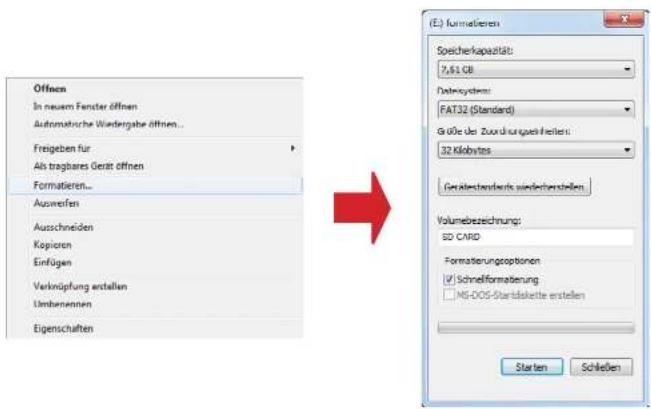
After you format the SD card, copy the new software on it.
Update process:
- Turn off the controller.
- Insert the SD card into the slot on the rear side of the control unit.
- Turn on the control unit. The following will appear in the display:
SD CARD DETECTED WRITING SOFTWARE
- After the software is copied, the following message appears:
LOAD COMPLETE
- Now switch off the control unit and remove the SD card.
- Turn on the control unit again. The firmware is updated now.
Footprint
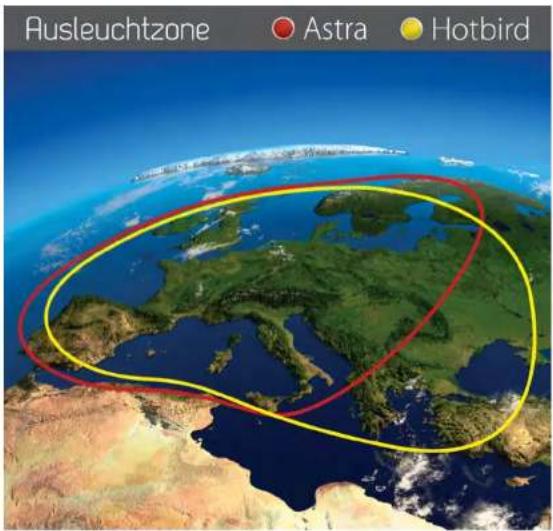
text_image
Ausleuchtzone Astra HotbirdNote: In the outlying areas of the footprint there may be interference.
Specifications
| Antenna typ | Off-Set-Dish |
| Users | 1 |
| LNB typ | Universal LNB |
| Frequenzy band | Ku Band |
| Frequenzy range | 10.7GHz to 12.75 GHz |
| LNB gain | 33 dBi |
| Minimum EIRP | 49 dBW |
| Polarization | V/H or RHCP/LHCP |
| Type of Stabilisation | 2-Axis DC Motor |
| Elevation | 15° to 62° |
| Azimuth | 360° |
| Tracking rate | 50° / sec. |
| Alignment time | 1 - 2 min. |
| Temperature range | -25°C to +70°C |
| Power supply | 12VDC @ 5 Amps |
| Weight | 9kg (Shipman) / 12 kg (Shipman GPS/AS) |
| Dimensions dish | 450 x 300 mm (B/H) |
| Dimensions antenna | 700 x 400 mm (∅/H) |
| Dimensions control unit | 245 x 43 x 147 mm (B/H/T) |
Declaration of Conformity
Note:
Weight and dimensions are not absolutely exact values.
Technical details can be changed at any time (according to manufacturer) without prior notice.
Declaration of Conformity
This complies with the following directives / standards is confirmed:
Electromagnetic Compatibility Directive 2004/108/EC
EN 55013:2001+A1:2003+A2:2006
EN 55020:2007
EN 61000-3-2:2006 | A1:2009 | A2:2009
EN 61000-3-3:2008
Low Voltage Directive 2006/95/EG
EN 60065:2002 | A1:2006 | A11:2008
Status: v2.0 April 2013