
CTV 4868 - TV AEG - Free user manual and instructions
Find the device manual for free CTV 4868 AEG in PDF.


| Product Type | 19-inch TFT LCD TV with integrated DVD player |
| Model | CTV 4868 |
| Brand | AEG |
| Display Diagonal | 482.6 mm (19 inches) |
| Aspect Ratio | 16:9, 4:3, Zoom, 16:9 FS, Panorama |
| Receiving System | B/G, I, D/K, L, L' |
| Color System | PAL, SECAM, Auto |
| Sound System | B/G, I, D/K, L, L' |
| Power Supply | AC 110-240 V, 50/60 Hz (adapter) to DC 12 V, 4.5 A |
| Power Consumption (On) | 41–55 W |
| Power Consumption (Standby) | 4.2–4.5 W |
| Speaker Impedance | 8 Ω × 2 |
| Audio Output | < 3 W |
| Dimensions (W × H × D) with Stand | 480 × 398 × 195.5 mm |
| Net Weight | 6 kg |
| Antenna Input | 75 Ω coaxial |
| Inputs/Outputs | SCART, HDMI, VGA, YPbPr (RCA), PC Audio, Earphone, Tuner (RF out) |
| DVD Playback | DVD, Video CD, Audio CD, MP3 CD |
| Teletext | Yes (with index, reveal, mix, size, stop, subpage, color buttons) |
| Remote Control Batteries | 2 × AAA (R03, 1.5 V) supplied |
| Safety Features | Automatic standby after 5 minutes without signal (TV mode), screen saver, child lock (parental control with password) |
| Cleaning Instructions | Unplug power, wipe with dry soft cloth. Do not use liquid cleaners. |
| Environmental Disposal | Do not dispose in household waste; use collection points for electronic equipment. |
Frequently Asked Questions - CTV 4868 AEG
User questions about CTV 4868 AEG
0 question about this device. Answer the ones you know or ask your own.
Ask a new question about this device
Download the instructions for your TV in PDF format for free! Find your manual CTV 4868 - AEG and take your electronic device back in hand. On this page are published all the documents necessary for the use of your device. CTV 4868 by AEG.
USER MANUAL CTV 4868 AEG
Operating Instructions
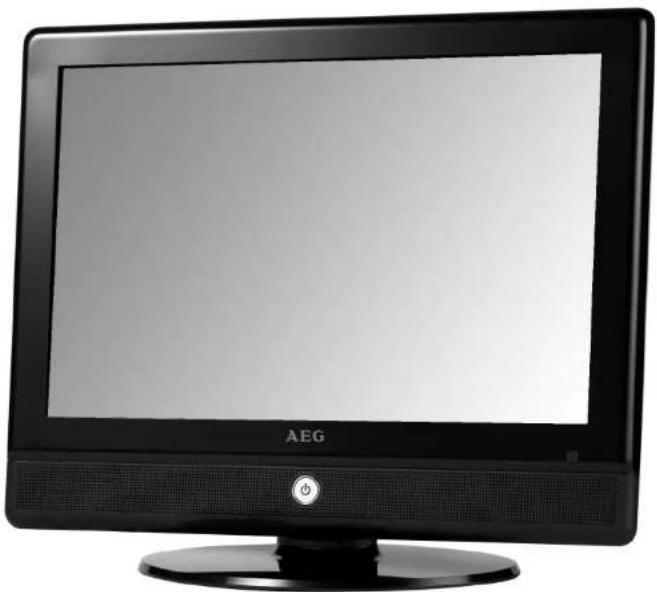
natural_image
Black AEG television monitor with a power button and stand (no visible text or symbols on the screen)19" TFT LCD TV
CTV 4868 LCD/DVD
INHALTSVERZEICHNIS/CONTENTS
1 Specifications 33
2 Important Safety Instructions....34
3 Installation....39
4 Functional Parts....41
5 Insert DVD 42
6 Side view of TV set....43
7 Remote control unit 44
8 Teletext operations....46
9 DVD operations....47
10 Menu Screens 49
11 Trouble shooting tips 56
12 The causes of interference....58
13 Guarantee....59
DE
GB

VORSICHT!
natural_image
Simple line drawing of a monitor with a black X mark on the screen (no text or symbols)
VORSICHT!

VORSICHT!

VORSICHT!
natural_image
Simple line drawing of a broken box and a door with motion lines (no text or symbols)
VORSICHT!
natural_image
Illustration of a person in business attire standing next to a monitor with a magnifying glass, crossed out by a crossed-out arrow (no text or symbols present)
VORSICHT!
natural_image
Simple line drawing of a door with a handle and base, emitting steam (no text or symbols)
VORSICHT!
natural_image
Simple line drawing of a computer monitor with X-shaped prohibition symbol and a warning light emitting smoke (no text or symbols)
WARNUNG!
natural_image
Two line drawings showing electrical connections with wires, no text or symbols present
WARNUNG!
natural_image
Diagram showing two views of a cylindrical device with internal components and a separate open panel, no text or symbols present.Vorgehensweise
natural_image
Technical line drawing of a vertical electronic device with a base mount (no text or symbols)DE
DC 12V IN
YPbPr (Video/Audio L/Audio R)
HDMI
VGA
SCART
PC-A IN (Audio)
FARB TEMP: Normal, Warm, Kalt
ANSICHT: 16:9, 4:3, Zoom, 16:9 FS, Panorama
DOLBY: DOLBY DIGITAL SETUP-Menü.
VIDEO: Menü VIDEO SETUP (Videoeinstellung).
PREFERENCE: Menü PREFERENCE PAGE (Bevorzugte Einstellung).
| Receiving System: B/G, I, D/K, L, L' | |
| Colour System: PAL SECAM | |
| LCD Panel: 482.6 mm (19 inch) diagonal | |
| Ext. Antenna: | 75 Ohm Coaxial Cable |
| Ext. In/Out: EARPHONE, SCART, YPbPr(RCA), PC (VGA/AUDIO) IN,HDMI IN | |
| Speaker: 8 OHM X 2 | |
| Audio Output: <3 W | |
| Power consumption: 41~55 W | |
| Standby power consumption: 4.2~4.5 W | |
| Wall Power Supply:TV Power Supply: | AC 110-240V 50/60HzDC 12V, 4.5A |
| Dimension: W 480 X H 398 X D | 195.5(mm) (with standing foot) |
| Net Weight: 6 kg | |
GB
Note
Design and specifications are subject to change without prior notice.
This device has been tested according to all relevant current CE guidelines, such as electromagnetic compatibility and low voltage directives, and has been constructed in accordance with the latest safety regulations.

WARNING!
RISK OF ELECTRIC SHOCK
DO NOT OPEN
TO REDUCE THE RISK OF ELECTRIC SHOCK DO NOT REMOVE COVER OR BACK. NO USER-SERVICEABLE PARTS INSIDE. REFER SERVICING TO QUALIFIED SERVICE PERSONNEL.

The lighting flash with arrow head within a triangle is intended to tell the user that parts inside the product are a risk of electric shock to persons.

The exclamation point within a triangle is intended to tell the user that important operating and servicing instructions are in the papers with the appliance.

Devices bearing this symbol work with a „class 1 laser“ for tracing the CD. The build-in safety switches should prevent the user exposed to dangerous laser light, which is invisible to the human eye, when the CD compartment is open.
Under no circumstances should these safety switches be bapassed or manipulated, as this could result in a danger of exposure to the laser light.
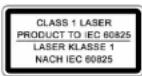
This device works with a class 1 laser.
CAUTION: TO REDUCE THE RISK OF ELECTRIC SHOCK DO NOT EXPOSE THIS APPARATUS TO RAIN OR MOISTURE AND OBJECTS FILLED WITH LIQUIDS, SUCH AS VASES, SHOULD NOT BE PLACED ON THIS APPARATUS.
CAUTION
Never tamper with any components inside your set, or any other adjustment controls not mentioned in this manual. When you clean up dust or stick of stain on the LCD panel. The power cord should be pulled out from the plug receptacle, then wipe the receiver with dry soft cloth. During thunder and lighting, unplug the power cord and antenna cord to prevent your TV set from damage. All television receivers are high voltage instruments. All "inside work" on your receiver should be performed by the TV service personnel.
IMPORTANT SAFETY INSTRUCTIONS
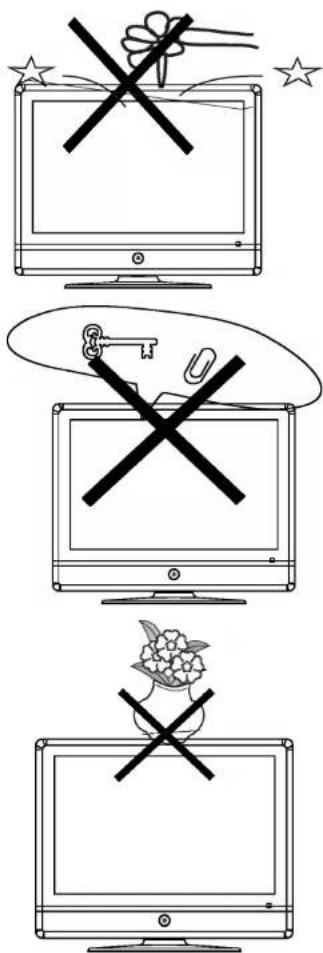

CAUTION!
Do not drop or push objects into the television cabinet slots or openings. Never spill any kind of liquid on the television receiver.

CAUTION!
Do not insert anything in the ventilation holes. If metal or something flammable enters, it may result in fire or electric shock.

CAUTION!
Do not place objects on this unit, it may damage the screen surface.
GB
IMPORTANT SAFETY INSTRUCTIONS
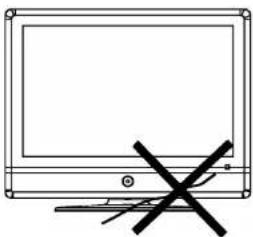
natural_image
Simple line drawing of a monitor with a black X mark on the side (no text or symbols)
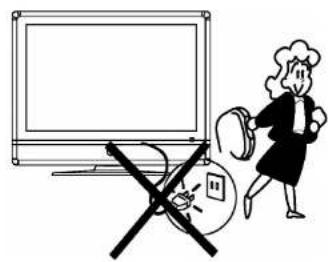
CAUTION!
Do not squash power supply cord under the television receiver.
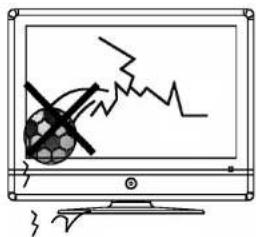

CAUTION!
Do not throw anything at the set. The screen glass may explode by impact and cause serious injury.
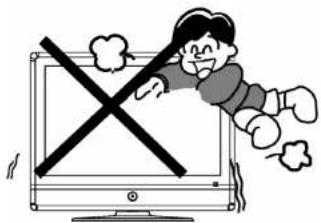

CAUTION!
Never stand on, lean on, or suddenly push the television or its stand. You should pay special attention to children. Serious injury may result if it should fall.
natural_image
Simple line drawing of a broken box and a door with motion lines (no text or symbols)
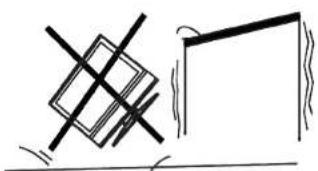
CAUTION!
Do not place your television on an unstable cart, stand, shelf or table. Serious injury to an individual, and damage to the television, may result if it should fall.
IMPORTANT SAFETY INSTRUCTIONS
natural_image
Illustration of a woman holding a magnifying glass next to a monitor and a broken glass, with no visible text or symbols.
CAUTION!
When the television receiver is not used for an extended period of time, it is advisable to disconnect the AC power cord from the AC outlet.
natural_image
Simple line drawing of a heating element with steam rising (no text or symbols)
CAUTION!
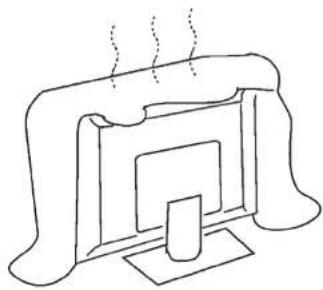
Do not block the ventilation holes in the back cover. Adequate ventilation is essential to prevent failure of electrical component.

WARNING!
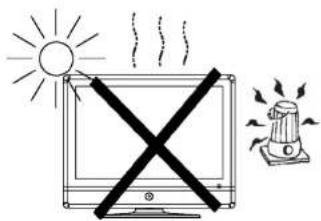
Avoid exposing the television receiver to direct sunlight and other source of the heat. Do not stand the television receiver directly on other produces which give off heat. E.g. video cassette players. Audio amplifiers. Do not place naked flame sources, such as lighted candle on the television. Do not expose the LCD screen surface to the sun, it may damage the screen surface.
natural_image
Two technical illustrations of electrical connections with wires, no text or symbols present
WARNING!
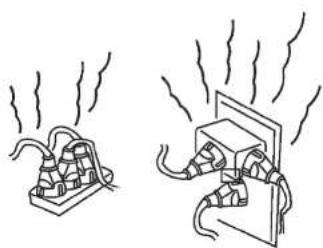
Take care not to connect many appliances to the same mains socket as this could result in fire or electric shock.

WARNING!
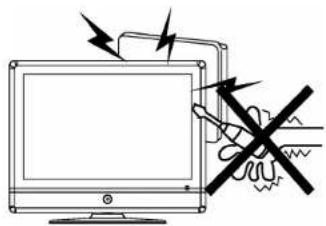
High voltages are used in the operation of this television receiver. Do not remove the cabinet back from your set. Refer servicing to qualified service personnel.

WARNING!
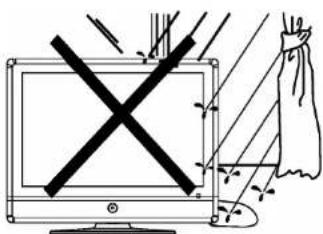
To prevent fire or electrical shock hazard, Do not expose the television receiver to rain or moisture.
natural_image
Illustration of a computer monitor with lightning bolts and a bag, no text or symbols present
WARNING!
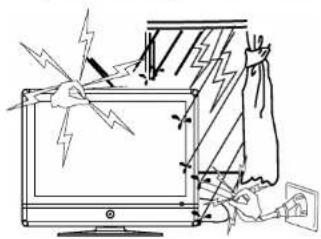
For you own safety, Do not touch any part of the set, main lead or aerial lead during lighting storms.

CAUTION!
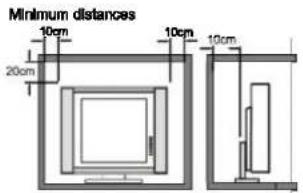
If the television is to be built into a Compartment or similarly enclosed, the minimum distances must be maintained. Heat build-up can reduce the service life of your television, and can also be dangerous.
Thank you very much for your purchase of this product. To enjoy your set to the full from the very beginning, read this manual carefully and keep it handy for ready reference.
- Locate the TV -Set in the room where direct light does not strike the screen. Total darkness or a reflection on the picture screen can cause eyestrain. Soft and indirect lighting is recommended for comfortable viewing.
- Allow enough space between the TV- Set and the wall to permit ventilation.
- Avoid excessively warm locations to prevent possible damage to the cabinet or premature component failure.
This TV operates on a DC supply provided by the AC-DC adaptor. The voltage is as indicated on the label on the back cover. Only use the AC-DC adaptor supplied with the TV and never apply an AC mains to the TV directly. The AC-DC adaptor operates on and AC mains supply, the voltage is as indicated on the label of the AC-DC adaptor. Connect the DC plug of the AC-DC adaptor to the DC 12 V socket at the rear side of the TV. Connect the AC-DC adaptor and its mains cord. Insert the mains plug in the wall socket having a mains voltage of 230 V/50 Hz.
Do not install the TV -Set in a location near heat sources such as radiator, air ducts, direct sunlight, or in a place somewhere like close compartment and close area.
■ Do not cover the ventilation openings when using the set.
Intended Use
This device is exclusively determined for the following use:
■ Reception and replay of image and sound signals
■ Playing back Video DVD's/Video CD's
■ Playing back Audio-/MP3 CD's.
Any other use is considered non-intended use and is prohibited. The device must not be used for commercial purpose.
Insert the battery into the remote control
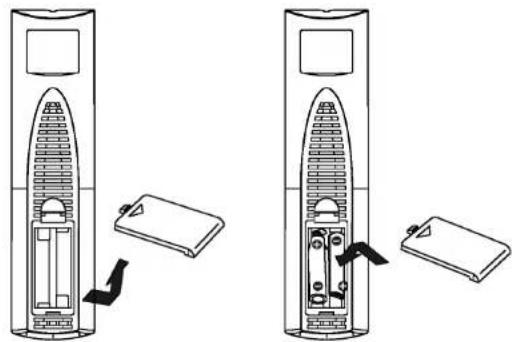
2 batteries (AAA, R03, 1.5V) are requested (supplied).
natural_image
Diagram showing two views of a cylindrical device with internal components and a separate open panel, no text or symbols present.Procedure
- Remove the battery cover by pressing it and liding it down
- Insert the batteries, make sure the polarity (+/-) of the batteries matches the polarity marks inside the compartment.
- Replace the battery cover by sliding it on the remote control, you hear a click sound.
Note
A wrong proceeding can leak the battery or to corrosion, which could damage the remote control maintenance.
Precautions
Batteries are not to be disposed of together with domestic wastes. Dispose of the used batteries at the relevant collection bin or at your dealer's.
Do not expose the batteries to high temperatures or direct sunlight. Never throw batteries into the fire. There is a danger of explosion!
■ Batteries do not reload, short circuit or take apart!
■ Different battery types or new and used batteries must not be used together.
4. If you cause an electrostatic unloading by touching and the equipment does not function any longer, simply pull the plug from the AC plug socket, wait a few minutes and connect the cable again. The equipment should function completely normally again.
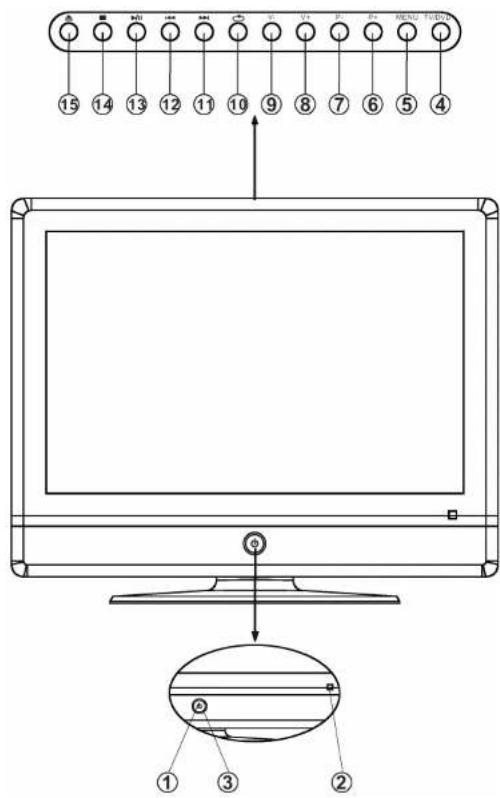
1 LED indicator lamp
2 Remote Sensor
3 Standby/Power Button
4 TV/DVD Button
5 MENU Button
6 P + Button
7 P - Button
8 V + Button
9 V - Button
10 Button
11 ▶▶Button
12 Button
13 ▶/|| Button
14 ■ Button
15
To turn the TV power On
Put the TV set on the correct place, then connect the DC plug of the AC-DC adaptor to the DC 12V socket at the rear side of the TV set. Connect the adaptor main cord to the wall outlet, then the LED indicator lamp turns red/blue and the TV set is at Standby/work Mode. At Standby Mode, if Standby Button is pressed the power indicator will change to blue. It takes a few seconds before the picture appears.
To turn the TV power Off
Press the Standby Button to make the TV set in Standby Mode, then disconnect the power plug from the wall outlet.
Note
If TV is the selected input without signal received and NO operation is performed for about 5 minutes continuously, the TV set will enter standby mode. For any inputs other than TV, the TV set will not enter standby mode automatically without users instruction. If you are not going to use this TV set for a long time, switch off the set and disconnect the power plug from the wall outlet.
natural_image
Technical line drawing of a vertical cylindrical device with a base mount (no text or symbols)Insert DVD
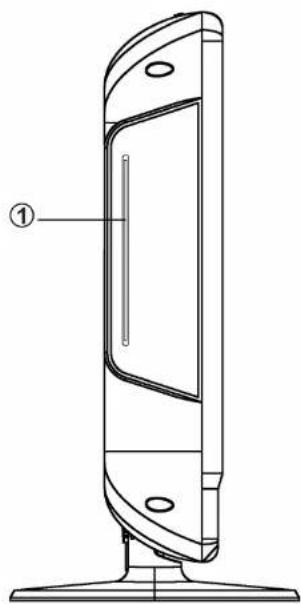
1 DVD slot
Switch the TV-Set to DVD status, insert the disc to the DVD slot (label side facing backwards), and the player will suck it in.
Notes:
- Do not attach any seal or label to either side (the label side or the recorded side) of a disc.
- Do not use irregularly shaped CDs (e.g., Heartshaped or octagonal) since they may result in malfunction.
- Some playback operations of DVDs and Video CDs may be intentionally programmed by software manufacturers. This unit plays DVDs and Video CDs according to disc content designed by the software manufacturer, therefore some playback features may not be available or other functions may be added.
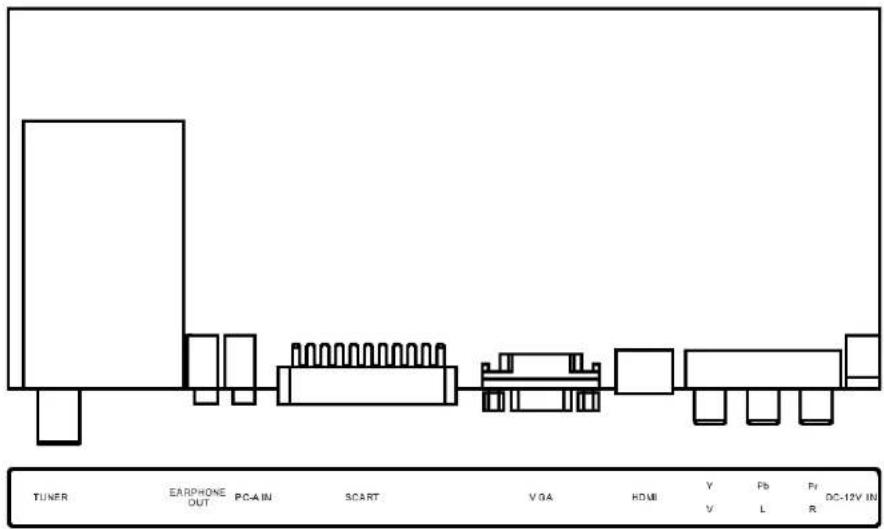
DC 12V IN
YPbPr (Video/Audio L/Audio R)
HDMI
VGA
SCART
PC A IN (Audio)
EARPHONE OUT
TUNER (RF out)
GB
Note
■ Precautions when connecting to other equipment.
- When using external equipment with this TV set, please read the instruction manual of the external equipment.
■ Switch off all power supplies to the equipment and TV set before connection.
■ Always ensure that the input and output terminals are correctly connected.
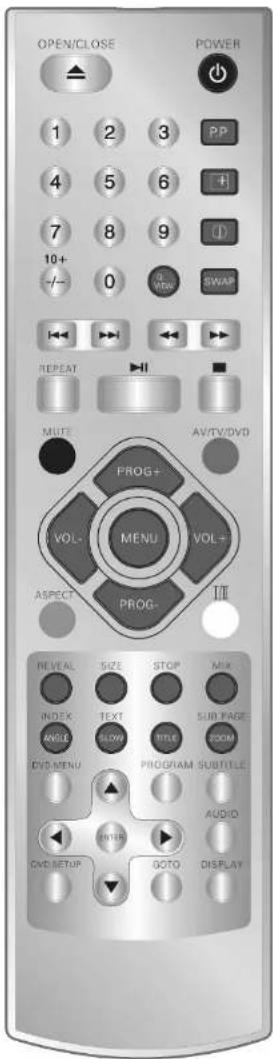
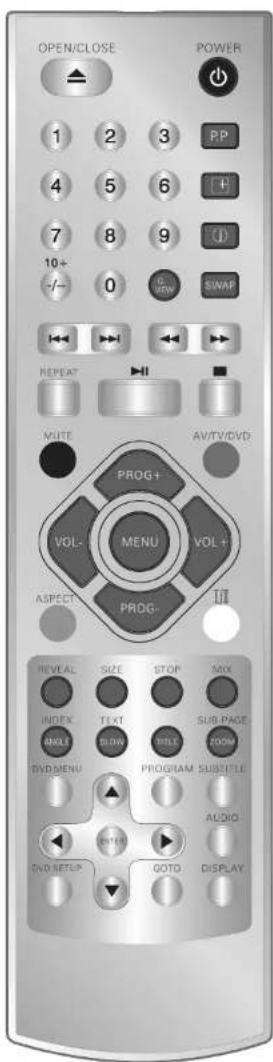
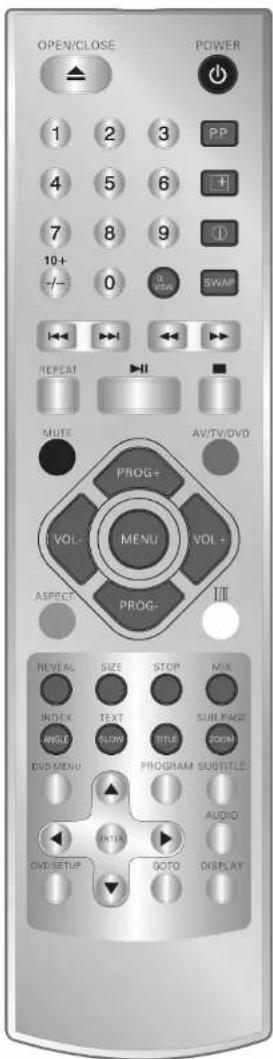
POWER Button
Press this button to switch on the TV when at standby mode or enter standby mode.
MUTE Button
Press this button to mute or restore sound.
P.M Button
Press this button to select the desired picture mode:
Custom -- Normal -- Dynamic -- Soft
Display Button
Press this button to display the setting on the screen.
Timer Button
Press this button to set the sleep timer, the order shown below (minutes):
0-10-20-30-40-50-60-70-80-90-100-110-120
When the preset length of the time has passed, the TV set enters standby mode.
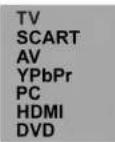
TV/AV/DVD Button
Press this button to switch among TV broadcast, AV input program and other inputs. Press TV/AV button to enter the AV menu. Press the PROG+/PROG- buttons to select the AV source and press VOL+ to confirm.
-- Button (0-9)
Press this button to select one-digit, two-digit or tree digital channels input options.
To select an one-digit channel (e.g. Channel 8), press this (-/-) button to change channel selection to "-" on screen display and press the (8) button only.
To select a two-digit channel (e.g. Channel 28), press this (-/-) button to change channel selection to "--" on screen display and press (2) and (8) buttons.
To select a three-digit channel (e.g. Channel 128), press this (-/-) button to change channel selection to "--" on screen display and press (1), (2) and (8) buttons.
MENU Button
Press this button to enter the menu screens for various optional adjustable settings.
PROG +/- Button
Press the program up button to select the program forwards. Press the program Down button to select the program Backwards.
VOL +/- Button
Press volume up/down buttons to adjust sound level.
Q.VIEW Button
Press this button to return to the previously viewed program.
I/II Button
Press this button to switch between stereo and mono or audio channel I and audio channel II (dualsound channel broadcasting).
SWAP Button
You can adjust your TV program list order, press this button the program swap menu will be displayed, as shown below. E.g. Swap channel 0 and 7, press (SWAP) button, press (PROG+/PROG-) to choose "From" and then press (VOL+/VOL-) to change channel number; so as to the "To", select (7), lastly move to "Save", press (VOL+) to implement this change.
| From | CH 0 |
| To | CH 7 |
| Save |
ASPECT Button
Press this button to select the aspect ratio:
16:9, 4:3, ZOOM, 16:9 FS, PANORAMA
GB
For models with Teletext function only
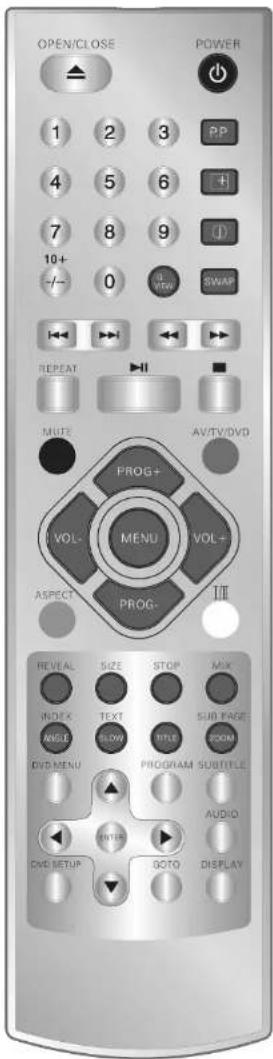
TEXT Button
Press this button to enter or exit the Teletext mode.
INDEX Button
Press the button to go to the index page.
REVEAL Button
Press this button to reveal the hidden information for some Teletext pages (e.g. answers to puzzles or riddles). Press again to hide the information.
MIX Button
Press this button enter to mix mode. (For SUBTITLE or NEWSFLASH page, please use mix mode). Press this button again to exit.
SIZE Button
Press this button to change the Teletext screen display mode among the following:
■ Upper half screen enlarged
■ Lower half screen enlarged
Normal screen state
STOP Button
Press this button to hold the Teletext page on display to prevent the page from changing. Press again to release the hold state.
SUB. Page Button
Press this button to display sub. Page.
COLOR Buttons (red, green, yellow, blue)
Press this button to access directly to the corresponding pages displayed at the lower part of the Teletext screen.
For models with DVD function only
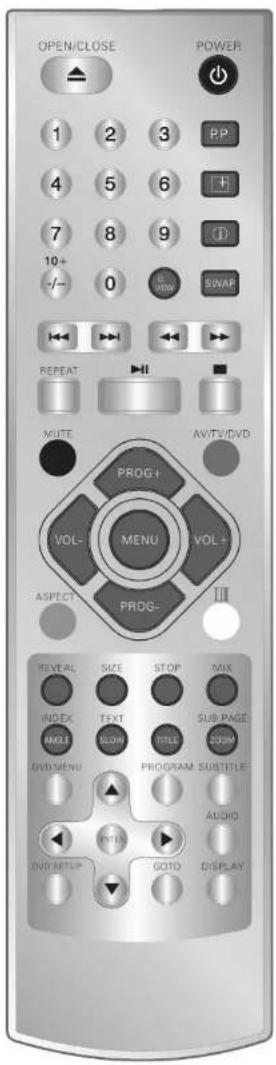
OPEN/CLOSE-Button
Press OPEN/CLOSE button to load disc on disc tray. Hold the disc without touching either of its surfaces, insert the disc with the label side facing backwards. In case of interactive DVDs with playback control, a menu appears on the TV screen.
DVD MENU-Button
During playback a DVD disc, press this button to go back to root menu screen.
Cursor buttons
Navigation in screen menu.
PROGRAM-Button
Place a track on the program list.
Press PROGRAM button, the „Program screen" will appear on the TV screen. In the table you can navigate with the Cursor buttons. Enter the desired title and chapter by using the numerically buttons. Chose the option "START" with the cursor buttons and confirm with "ENTER". The desired track will be played.
SUBTITLE-Button
You can choose different subtitle languages, if multilinguals are available.
DVD SETUP-Button
With this button activate the DVD-Setup menu.
AUDIO-Button
You can choose different audio languages, if multilinguals are available.
GOTO-Button
Press this button to go to desired position. The player provides 3 search mode. When the above items are shown on the TV screen, you can input number to locate desire sector. Press "to commence playback. The number you input is invalid if it is beyond the tracks capacity.
ENTER-Button
Confirm your inputs/choices.
SLOW-Button
Press this button during playback to activate the slow function. Each press on this button change the TV screen in the following sequences: 1/2, 1/4, 1/8, 1/16, normal play.
GB
For models with DVD function only
DISPLAY-Button
To display player OSD.
◀/▶Button
Press these buttons to go to the previous/next chapter (DVD).
◀/▶Button
These buttons allow skipping ahead/back at 5-level speed. Press "button to return to normal playback.
REPEAT-Button
Press this button you can repeatedly play a title (DVD) or all tracks (CD) when "ALL" appears on TV screen. You can repeatedly play a chapter (DVD) or a single track (CD) when "REPEAT CHAPTER" appears on TV screen. You can cancel repeat function, when nothing appears on TV screen.
▶ (Play/Pause)-Button
Press this button to start playback. Press this button again to pause playback.
■ (Stop)-Button
When this button is pressed once, the unit records the stopped point from where playback will resume (resume function) if "▶" is pressed afterwards. But if „■“-button is pressed again instead of “▶” button, there will be no resume function.
TITLE-button
Press TITLE button then the DVD menu or titles available on the disc will be displayed. The you can use "and ENTER" button to select options.
ANGLE-Button
Select the viewing angle, if available.
ZOOM-Button
Press this button several times to change the ZOOM mode and/or to go back to normal play. With the ✦ Cursor buttons you can move through the zoomed image.
10+ Button
For selecting the chapters/tracks above 9. Pressing again increases by a further 10.
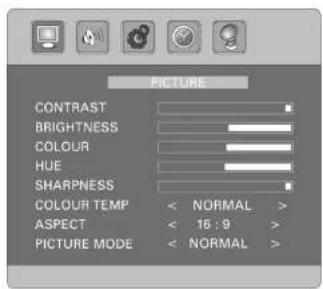
This TV allows you to adjust any setting from the menu screens using "MENU", "VOL+/-" and "PROG+/-" buttons. Press "MENU" button to display the menu, press "VOL+/-" to change menu from one to another, then press "PROG -" to enter the item of each menu, press "VOL +/-" to change the value or state of each item. Press "MENU" again to exit the menu mode
Picture Menu
You can select Contrast, Brightness, Colour, Hue (only in NTSC systems), Sharpness, Colour Temp, Aspect and Picture Mode by pressing PROG+/-.
You can adjust
CONTRAST: (only custom mode),
BRIGHTNESS: (only custom mode)
COLOUR: (only custom mode)
HUE: (only in NTSC systems)
SHARPNESS: (only custom mode)
COLOUR TEMP: Normal, Warm, Cool
ASPECT: 16:9, 4:3, Zoom, 16:9 FS, Panorama
PICTURE MODE: Normal, Dynamic, Soft, Custom
by pressing VOL+/-
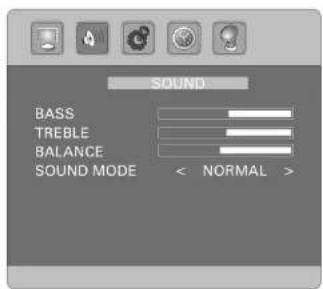
Sound Menu
You can select Bass, Treble, Balance, Sound Mode by pressing PROG+/-.
You can adjust
BASS: (only custom mode),
TREBLE: (only custom mode)
BALANCE
SOUND MODE: Normal, News, Music, Custom
by pressing VOL+/-.
GB
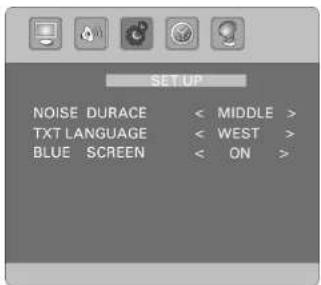
Setup Menu
You can select Noise Durace, TXT Language, Blue Screen by pressing PROG+/-.
You can adjust
NOISE DURACE: Off, Weak, Middle, Strong
TXT LANGUAGE: West, East, Russian, Arabic, Farsi
BLUE SCREEN: On/Off
by pressing: VOL+/-.
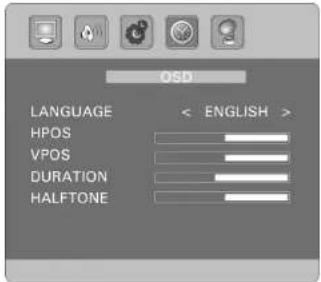
OSD Menu
You can select Language, HPOS, VPOS, Duration and Halftone by pressing PROG+/-.
You can adjust
LANGUAGE: Choose the desired OSD language.
HPOS: (picture: horizontal position)
VPOS: (picture: vertical position)
DURATION: (duration of menu 5 - 60 sec.)
HALFTONE: (halftone image)
by pressing VOL+/-.
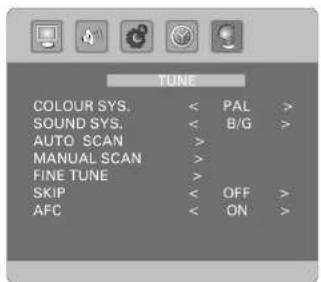
Tune Menu
You can select Colour Sys., Sound Sys., Auto Scan, Manuel Search, Fine Tune, Skip and AFC by pressing VOL+/-
You can adjust
COLOUR SYS.: Pal, Secam, Auto
SOUND SYS.: B/G, I, D/K, L, L'
by pressing VOL+/-.
AUTO SCAN: Press VOL+ to begin search program, and press MENU to exit auto search.
MANUEL SEARCH: Press VOL+/- buttons to start searching until a program is searched, or press MENU to stop it.
FINE TUNE: Frequency data can be fine-tuned in upward or downward by VOL+/-
SKIP: Set this item on to skip the channel which you are watching.
AFC: Activate (ON) or deactivate (OFF) the automatic frequency control.
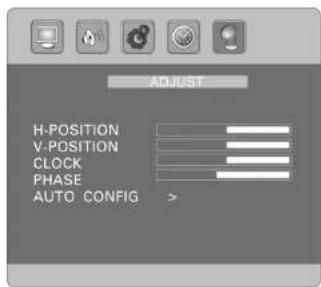
PC Menu (only for PC monitor mode: ADJUST).
You can select H-Position, V- Position, Clock, Phase, Auto-Config by pressing PROG+/-
You can adjust
HPOS: (picture: horizontal position)
VPOS: (picture: vertical position)
CLOCK: Press the VOL+/- to minimize any vertical bars or stripes visible on the screen background.
PHASE: When necessary, adjust the pixel phase of the picture to avoid picture interference.
AUTO CONFIG: To adjust the screen settings automatically. It will take a few seconds and during this process the screen will be black.
Note
If the set is cold, there may be a small "flicker" when the set is switched on. It is normal. There is nothing wrong with the set. If possible, use the VESA 1024X768@60HZ video mode to obtain the best image quality for your LCD monitor. Under other resolutions some scaled or processed pictures may appear on the screen. Some dot defects may appear on the screen, like red, green or blue Spots, however, this will have no impact or effect on the monitor performance. Do not press the LCD screen with your finger for a long time as it may incur some damage to the screen.
GB
Press „DVD SETUP“ button to get the setup menu. Use the cursor buttons “◀” to select the preferred item. After finishing setting, press „DVD SETUP“ again for normal TV display.
The following menu items can be changed:
GENERAL: selects the General Page menu.
AUDIO: selects the Audio menu.
DOLBY: selects the Dolby Digital Setup menu.
VIDEO: selects the Video Setup Page menu.
PREFERENCE: selects the Preference Page menu.
General Setup Page
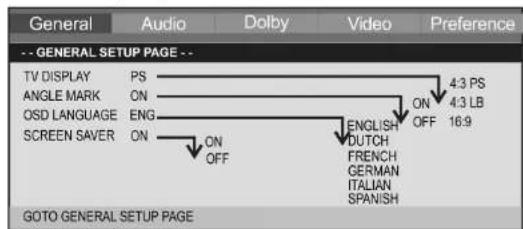
The following menu items can be changed:
TV DISPLAY
Here you can adapt the output of the DVD-Player to the TV-aspect.
4:3 PS You will only see the middle section of the film. The borders will be cut off.
4:3 LB You will see the complete width of the film. The film is thus reduced in size, whereby black bars appears below and above the film.
16:9 Select this option if you use a wide screen TV for reply.
Note:
The setting "4:3 PS" is not supported by all DVDs.
ANGLE MARK
Shows a hint for the possibility to change the viewing angle (if available).
OSD LANGUAGE
Here you can select the language of the on-screen displays.
SCREEN SAVER
The player is able to display a still image for any time on the screen. This can cause damage to the screen. It is therefore recommended to activate the screen saver.
Analog Audio Setup Page
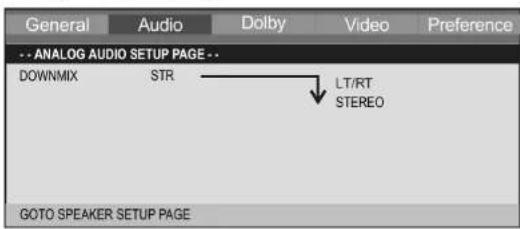
This page is for setup speaker output.
DOWNMIX
LT/RT
Choose this setting if you want the play the DVD with the Pro Logic Dolby stereo effect. This produces a almost real 2-channel replay effect.
STEREO
Choose this setting if you want to play a DVD, that has been produced in the 5.1-Audio format, as 2-channel stereo sound.
Dolby Digital Setup
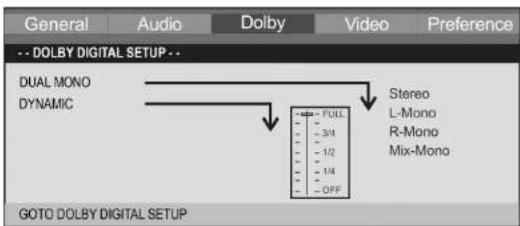
The following menu items can be changed:
DUAL MONO
The Audio output is normally in stereo. Here you can have the possibility to choose Mono-output instead of Stere-output.
STEREO
The Audio output is in Stereo.
L-MONO
The Audio output is in Mono. In this case the signal of the "left" stereo channel is transmitted to all speakers.
R-MONO
The Audio output is Mono. In this case the signal of the "right" channel ist transmitted to all speakers.
MIX MONO
The Audio output is Mono. In this case the signal of the "both" stereo channels is transmitted to all speakers.
DYNAMIC
The term „Dynamic" (Dynamic Range) describes the ratio of quitest and loudest sound. If the dynamic range is very large, you will experience very quit and very loud sounds.
This may cause replay problems. Let us assume that you are watching a DVD in a relative loud environment. You can now increase the volume to be able to hear also the very quit passages, however with the
disadvantage that loud passages will be unacceptably loud. In this case it would make sense to compress the dynamic range (i.e. reduce) and increase the output volume at the same time.
FULL - 1/8 The dynamic range is compressed slightly (1/8) to full (FULL).
OFF The dynamic range is not compressed at all.
Video Setup Page
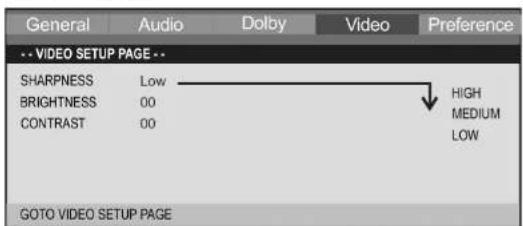
In this menu it is possible to perform various settings to adapt the video signal.
SHARPNESS sharpness value.
BRIGHTNESS Brightness value.
CONTRAST contrast value.
PREFERENCE PAGE (Pref...)
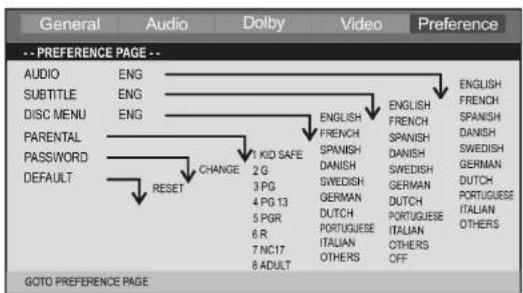
AUDIO Here you can select the preferred audio language.
SUBTITLE Here you can select the preferred language for the film subtitles.
DISC MENU Here you can select the preferred language for the DVD menu.
PARENTAL
Some DVD contain information concerning the target group. This method is comparable with the rating of cinema films („Suitable only for persons of 12 years and over“ e.g.).
If you have the child lock option activated a probably existing corresponding information is read from the DVD and compared with the value pre-set by you. If a DVD is intended for an older age group than the one pre-set by you, the DVD cannot be played.
The following child lock options are available:
KID SAFE Suitable for children.
G Suitable for all age groups.
PG The presence of parents is recommended. Some scenes may be unsuitable for children.
PG 13 The presence of parents is strictly recommended. Some scenes may be unsuitable for children under the age of 13.
PGR The presence of parents is strictly necessary.
R Young persons under the age of 17 may only view this film in the presence of an adult.
NC17 Children and juveniles under the age of 17 are not allowed to watch this film.
ADULT The film must only be watched by adults.
PASSWORD
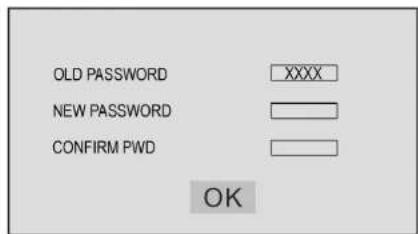
In this menu you can change the password for the child lock system.
In order to change the password, you must first enter the current password. The master password is „1369“.
OLD PASSWORD Enter the old password and the cursor will jump automatically to "NEW PASSWORD".
NEW PASSWORD Enter the new password. Use the numerically buttons to enter a 4-digit password. The cursor will jump automatically to "CONFIRM PWD".
CONFIRM PWD Confirm the new password by entering it again. If the confirmation is incorrect the cursor will stay in this column. After entering the correct password again, the cursor will jump automatically to "OK".
OK When the cursor is on „OK“, press ENTER button to confirm the setting.
DEFAULT
Select the commend „Default/Reset“ if you want to reset the player to the factory implemented default setting.
Any settings you have made will be lost.
Before calling for service, you can check the following items on symptoms and solutions.
TV mode
No picture
Check other channel, maybe station problem.
Adjust the tuning control.
Ensure that the input setting is at TV state.
Ensure that the LCD is on.
Ensure that the equipment is connected properly.
■ No sound and distorted sound
Ensure that the input settings for the TV and sound are proper.
Adjust the tuning control.
Probably local interference, such as an appliance.
Re-orient aerial (if indoor type).
Ensure that the equipment is connected properly.
■ No remote Control
Check the battery are installed with the correct polarity.
Point the remote control unit at the remote control sensor and operate.
Remove the obstacles between the remote control and the remote control sensor.
Operate the remote control unit at a distance of not more than 8 meters from the remote control sensor.
PC mode
■ NO SYNC SIGNAL or POWER SAVE displayed
Check if the wire is connected correctly.
Ensure the computer or other equipments are at power on mode.
Ensure the computer is not at power save mode.
Ensure the TV input setting is at pc mode.
■ Invalid Scan Fred displayed
Check if the input setting is compatible to the monitor specification.
Check if the wire is connected correctly.
TROUBLE SHOOTING TIPS
■ Led lamp indicator on but no picture Check the monitor setting :contrast ,brightness. Check if the wire is connected correctly.
■ Some unusual spots on screen Some dot defects may appear on the screen, like red, green or blue, Spots, However, this will have no impact or effect on the monitor performance.
Incorporated in your TV receiver are the most up-to-date devices to eliminate interference. Local radiation however, can create disturbances which visibly affect your picture. Proper installation, a good aerial are your best safe-guards against these disturbances.
RF interference
Moving ripples across the screen are caused by nearby transmitting or receiving short-wave radio equipment.
Diathermy
Herringbone pattern and partial picture loss can result from the operation of diathermy equipment from a nearby doctors surgery or hospital.
Snow
Weak TV signals from long distant stations result in an instead picture and give the effect of falling snow. An antenna adjustment or antenna amplifier may be needed.
Ghost
Multiple image caused by TV signals reflected back from surrounding buildings, hills, aircraft, ect. Is minimized by correct aerial positioning.
Car ignition
Nearby cars and electrical motors can cause small streaks across the picture or make the picture roll.
The device supplied by our Company is covered by a 24 month guarantee starting on the date of purchase (receipt).
During the life of the guarantee any fault of the device or its accessories ascribable to material or manufacturing defects will be eliminated free of charge by repairing or, at our discretion, by replacing it. The guarantee services do not entail an extension of the life of the guarantee nor do they give rise to any right to a new guarantee!
Proof of the guarantee is provided by the proof of purchase. Without proof of purchase no free replacement or repair will be carried out.
If you wish to make a claim under the guarantee please return the entire machine in the original packaging to your dealer together with the receipt. Defects to consumables or parts subject to wearing as well as cleaning, maintenance or the replacement of said parts are not covered by the guarantee and hence are to be paid! The guarantee lapses in case of unauthorized tampering.
After the expiry of the guarantee
After the expiry of the guarantee repairs can be carried by the competent dealer or repair service against the payment of the ensuing costs.
GB

Meaning of the „Dustbin“ Symbol
Protect our environment: do not dispose of electrical equipment in the domestic waste.
Please return any electrical equipment that you will no longer use to the collection points provided for their disposal.
This helps avoid the potential effects of incorrect disposal on the environment and human health.
This will contribute to the recycling and other forms of reutilisation of electrical and electronic equipment.
Information concerning where the equipment can be disposed of can be obtained from your local authority.
GARANTIE-KARTE
Garantiebewijs • Carte de garantie Certifi cato di garanzia • Tarjeta de garantia Cartão de garantia • Guarantee card Garantikort • Karta gwarancyjna • Záruční list Garancia lap • Гарантийная карточка
CTV 4868 LCD/DVD
24 Monate Garantie gemäß Garantie-Erklärung • 24 maanden garantie overeenkomstig schriftelijke garantie • 24 mois de garantie conformément à la déclaration de garantie • 24 mesus de garantie según la déclaration de garantia • 24 meses de garantia, conforme a declaração de garantia • 24 mesi di garanzia a seconda della spiegazione della garanzia • 24 months guarantee according to guarantee declaration 24 méneders garanti i henhold til garantierklaering • 24 miesiące gwarancji na podstawie karty gwarancyjini • Záruka 24 mésció podle prohlásení o záruce • A garanciát lásá o hazsnálati utasításban Garantíйные обязательства – смотри руководство пользователя
Kaufdatum, Händlerstempel, Unterschrift „Knoplatum, Stempel van de leverancier, Handlekening – Date dachal, cachei du revenuier, signature – Fecha de compra, Setlo del vendedor, Firma – Data de compra, Carimbo do vendedor, Assinatura – Data destragulato, timbro del commerciante, firma – Purchase data, Dealer stamp, Signature – Kopedato, stempel fra forhandler, underskrift – Data kupna, Pieczika sklepu, Postpe – Ostium koue, Rasilico prodejze, Podpis – A vässärkisi datum, a vässärkisi hely belävegja je alärise Date gebruig, techtte portugne, podpis

- Operating Instructions
- INHALTSVERZEICHNIS/CONTENTS
- VORSICHT!
- WARNUNG!
- Vorgehensweise
- Note
- WARNING!
- RISK OF ELECTRIC SHOCK
- DO NOT OPEN
- CAUTION
- IMPORTANT SAFETY INSTRUCTIONS
- CAUTION!
- Intended Use
- Insert the battery into the remote control
- Procedure
- Precautions
- To turn the TV power On
- To turn the TV power Off
- Insert DVD
- Notes:
- POWER Button
- MUTE Button
- P.M Button
- Display Button
- Timer Button
- TV/AV/DVD Button
- -- Button (0-9)
- MENU Button
- PROG +/- Button
- VOL +/- Button
- Q.VIEW Button
- I/II Button
- SWAP Button
- ASPECT Button
- For models with Teletext function only
- TEXT Button
- INDEX Button
- REVEAL Button
- MIX Button
- SIZE Button
- STOP Button
- Page Button
- COLOR Buttons (red, green, yellow, blue)
- For models with DVD function only
- OPEN/CLOSE-Button
- DVD MENU-Button
- Cursor buttons
- PROGRAM-Button
- SUBTITLE-Button
- DVD SETUP-Button
- AUDIO-Button
- GOTO-Button
- ENTER-Button
- SLOW-Button
- DISPLAY-Button
- ◀/▶Button
- REPEAT-Button
- ▶ (Play/Pause)-Button
- ■ (Stop)-Button
- TITLE-button
- ANGLE-Button
- ZOOM-Button
- 10+ Button
- Picture Menu
- Sound Menu
- BALANCE
- Setup Menu
- OSD Menu
- Tune Menu
- PC Menu (only for PC monitor mode: ADJUST).
- General Setup Page
- TV DISPLAY
- ANGLE MARK
- OSD LANGUAGE
- SCREEN SAVER
- DOWNMIX
- LT/RT
- STEREO
- DUAL MONO
- L-MONO
- R-MONO
- MIX MONO
- DYNAMIC
- PARENTAL
- PASSWORD
- DEFAULT
- TV mode
- No picture
- ■ No sound and distorted sound
- ■ No remote Control
- PC mode
- ■ NO SYNC SIGNAL or POWER SAVE displayed
- ■ Invalid Scan Fred displayed
- TROUBLE SHOOTING TIPS
- RF interference
- Diathermy
- Snow
- Ghost
- Car ignition
- After the expiry of the guarantee
- Meaning of the „Dustbin“ Symbol
- GARANTIE-KARTE
- CTV 4868 LCD/DVD
Brand : AEG
Model : CTV 4868
Category : TV