
Muse1 - Headphones Lamax - Free user manual and instructions
Find the device manual for free Muse1 Lamax in PDF.


| Product Type | Over-ear wireless headphones |
| Brand | Lamax |
| Model | Muse1 |
| Bluetooth Version | 4.1 + CSR chip |
| Working Range | 10 m |
| Battery Type | Lithium-ion 3.7 V / 520 mAh |
| Charging Input | 5 V / 1.0 A |
| Charging Time | 2 - 3 hours |
| Playback Time | 18 - 22 hours |
| Standby Time | About 350 hours |
| Speaker Diameter | 40 mm |
| Impedance | 32 Ω |
| Frequency Response | 20 Hz - 20,000 Hz |
| Controls | Multi-function button (power, play/pause, answer call), Volume +/Next, Volume -/Previous |
| LED Indicators | Bluetooth pairing (red/blue), charging (red on) |
| Microphone | Built-in |
| Connectivity | Bluetooth, 3.5 mm AUX (passive mode) |
| Charging Port | Micro USB |
| Storage Temperature | 0 - 40 °C |
| Safety | Turn off in restricted areas; not for hospital use without permission |
| Usage Modes | Wireless or wired (passive) to save battery |
Frequently Asked Questions - Muse1 Lamax
User questions about Muse1 Lamax
0 question about this device. Answer the ones you know or ask your own.
Ask a new question about this device
Download the instructions for your Headphones in PDF format for free! Find your manual Muse1 - Lamax and take your electronic device back in hand. On this page are published all the documents necessary for the use of your device. Muse1 by Lamax.
USER MANUAL Muse1 Lamax
natural_image
Black and teal headband headphones with a logo (no visible text or symbols)EN – User Manual
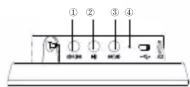
Controls
-
Increase volume / Next track
-
On / Off,
Play / Pause,
Answer / End / Reject call ▶
-
Volume down / Previous track
-
Bluetooth LED
-
Micro USB slot
-
AUX output
-
Microphone

Turning on the headphones
To turn on the headphones, press and hold the multi-function button ▶. A flashing blue LED indicates that the headphones are turned on.
Shutdown
To turn off the headphones, press and hold the multi-function button. When the headphones are off, the LED flashes.
Pairing
-
Make sure your device (phone, computer, or music player) is turned on. Bluetooth 4.1 allows you to play music up to 10 metres away.
-
Pairing with a new device
If you want to pair the headphones to a new device, hold the multi-function key until sounds, and the LED turns red and blue.
- Re-pairing
To re-pair the device, just hold the button. It will automatically connect to the previously paired device.
-
Hold the multi-function button for about 3 seconds until the blue LED flashes quickly.
-
Activate Bluetooth on your device to set up a new Bluetooth device.
-
Select LAMAX Muse1" from the list of found devices
-
If necessary, to pair the headphones, enter "0000" into your device.
-
Successful pairing of the device is indicated by a blue LED, blinking every few seconds.
Play / Control
- Press the multi-function button to start. Press again to pause a track.
2.Pressthe button to increase the volume. Press and hold the button to
skip to the next track.
- Press the ▶ button to decrease the volume. Pres and hold the button to return to the previous track.
Note: When charging, the controls are deactivated.
Calls
-
To answer an incoming call, press the multi-function button
-
To end the call, press the same button again.
-
To increase or decrease the volume during a call, press and hold or
Charging
To charge the headphones, plug the cable into the Micro USB port of the headphones and connect the other end of the cable to the USB power supply on your computer, or use a charging adapter designed for USB charging. The red LED indicates that the headphones are connected to the power supply and switches off when fully charged. The device must be charged under supervision. Only use power sources with a maximum voltage of 5V.
Using the headphones in passive mode
You can use headphones as wired headphones to save battery power. Just connect one end of a 3.5mm audio cable to the input connector at the bottom of the earpiece and connect the other end to your audio device (phone, computer, or music player). Audio cable connection interrupts wireless features.
Technical Parameters
| Battery: | 3.7 V / 520 mAh |
| Charging input: | 5 V / 1.0 A |
| Charging indicator: | The red LED lights continuously |
| Standby time: | About 350 hours |
| Playback time: | 18 - 22 hours |
| Charging time: | 2 - 3 hours |
| Storage temperature: | 0 - 40 °C |
| Working range: | 10 m |
| Bluetooth version: | 4.1 + CSR chip |
Speaker Parameters
| Speaker diameter: | 40 mm |
| Impedance: | 32 |
| Frequency Response: | 20 Hz - 20 000 Hz |
Safety Warnings
To avoid electronic interference, turn off the headphones in locations where signs and regulations prohibit the use of electronic products.
Hospital Environments
Do not use headphones in a hospital or near medical devices without permission. If you are using other personal medical equipment, such as a pacemaker, contact your device manufacturer. You can also check the possibility of using Bluetooth devices with your attending physician.
The current version of user guide can be downloaded from here:
https://beat.lamax-electronics.com/Muse1/manuals


LAMAX Muse1

natural_image
Black and teal headband headphones with a logo (no visible text or symbols)natural_image
Black and teal headband headphones with a logo (no visible text or symbols)natural_image
Black and teal headband headphones with a logo (no visible text or symbols)natural_image
Black and teal headband headphones with a logo (no visible text or symbols)natural_image
Black and teal headband headphones with a logo (no visible text or symbols)


Brand : Lamax
Model : Muse1
Category : Headphones