
RoboStar iQ600 - Vacuum Cleaner TESLA - Free user manual and instructions
Find the device manual for free RoboStar iQ600 TESLA in PDF.


| Type de produit | Robotic Vacuum Cleaner |
| Brand | TESLA |
| Model | RoboStar iQ600 |
| Power supply | Adapter: Input 100-240V AC, 50-60Hz; Output 20V DC, 1.8A, 36W |
| Battery | High-capacity Li-Ion (rechargeable) |
| Navigation | Laser and ultrasonic sensors, cliff sensors, wall following sensor |
| Filtration | HEPA filter (washable, replace every 6 months) |
| Mopping | 2-in-1 dust and water tank, removable mop cloth |
| Connectivity | WiFi, Bluetooth, GPS (for first pairing) |
| App | TESLA RoboStar iQ500/iQ600 (Google Play & Apple Store) |
| Smart features | Mapping, virtual walls, forbidden areas, scheduled cleaning |
| Charging | Automatic return to charging base |
| Safety | Anti-fall sensors (4 cliff sensors), laser class 1 (IEC 60825-1) |
| Maintenance | Clean dustbin after each use; HEPA filter weekly; sensors weekly; brushes weekly; front wheel weekly; charging contacts biweekly |
| Replaceable parts | HEPA filter, side brushes, main brush, battery |
| Package contents | Robot vacuum, charging dock, power adapter, side brushes, main brush, HEPA filter, mop cloth, 2-in-1 water tank, user manual |
| Compliance | EU Directive 2014/53/EU; RoHS |
Frequently Asked Questions - RoboStar iQ600 TESLA
User questions about RoboStar iQ600 TESLA
0 question about this device. Answer the ones you know or ask your own.
Ask a new question about this device
Download the instructions for your Vacuum Cleaner in PDF format for free! Find your manual RoboStar iQ600 - TESLA and take your electronic device back in hand. On this page are published all the documents necessary for the use of your device. RoboStar iQ600 by TESLA.
USER MANUAL RoboStar iQ600 TESLA
natural_image
Technical line drawing of a circular device with a labeled component 'A' and a rectangular housing (no text or symbols beyond label)natural_image
Line drawing of a robotic vacuum cleaner with lid and handle (no text or symbols)C
natural_image
Technical line drawing of a vacuum cleaner with labeled component A (no text or symbols beyond label)natural_image
Two technical line drawings of a mechanical component with mounting holes, showing top and side views (no text or symbols)B
natural_image
Line drawing of a robotic vacuum cleaner with a circular top and handle (no text or symbols)C
natural_image
Technical line drawing of a circular device with a labeled component 'A' and a rectangular housing (no text or symbols beyond label)natural_image
Line drawing of a robotic vacuum cleaner with lid and handle (no text or symbols)C
A Wylot powietrza
B Głośnik
natural_image
Technical line drawing of a robotic vacuum cleaner with labeled component A (no text or symbols beyond label)Fényjelzések:
natural_image
Line drawing of a circular device with a lid and handle, showing internal components (no text or symbols)C
natural_image
Simple line drawing of a bathroom interior with stairs, railing, and a circular object labeled 'Ano/Yes' (no other text or symbols)natural_image
Technical line drawing of a circular device with a labeled component 'A' and a rectangular housing (no text or symbols beyond label)natural_image
Line drawing of a robotic vacuum cleaner with lid and side ports (no text or symbols)C
VAŽNA SIGURNOSNA UPOZORENJA
natural_image
Technical line drawing of a circular device with a labeled component 'A' and a rectangular housing (no text or symbols beyond label)Crvena boja: napunjenost baterije ispod 20%
A Ventilacijski otvori
B Reproduktor
C Prijenosnik laserskog signala
D Ultrazvučni senzor za udaljenost
E Senzor za udarac
F Senzor udaljenosti od zida
G Senzori protiv pada
H Prednji kotačić za kretanje
I Bočna četka za čišćenje
J Poklopac baterije
K Glavna središnja četka
L Okvir glavne središnje četke
M Kotačić za kretanje
N Filtar zraka
natural_image
Interior corner view of a bathroom with stairs, railing, and a circular object (no text or symbols)natural_image
Technical line drawing of a circular device with a labeled component 'A' and a rectangular housing (no text or symbols beyond label)natural_image
Line drawing of a robotic vacuum cleaner with lid and handle (no text or symbols)C
Thank you for choosing the TESLA RoboStar iQ600.
Please, read the safety rules carefully and follow all common safety rules before using a robotic vacuum cleaner.
- Keep the user manual for future reference.
- Follow the rules stated in this manual to reduce the risk of damage to the robotic vacuum cleaner and possible injury.
IMPORTANT SAFETY WARNINGS
This device is a complex electromechanical device, please, pay attention to the following guidelines:
• The appliance is intended for indoor use only at room temperature (max. 40°C).
- Do not use this device on elevated, barrier-free areas (such as built-in floors, open terraces, or furniture surfaces).
• The appliance is not intended for outdoor use even in commercial or industrial environments.
• Use the vacuum cleaner as often as possible for the maximum cleaning effect.
• Before using, make sure that the dust bin and filter are installed correctly.
- Use only original accessories that are designed for this model.
- Only use the accessories provided by the robot vacuum cleaner to charge. Use of non-genuine accessories can damage the robotic vacuum cleaner, electric shock or fire.
- Do not touch the parts that are plugged into the mains if you have wet hands.
• Do not leave the appliance unattended in the presence of children, do not use it in the room where the baby is asleep.
- Do not allow children to use a robotic vacuum cleaner even under the supervision of an adult.
- Do not sit on a robotic vacuum cleaner or place other objects on it.
- Do not use the appliance if the power cord is damaged.
- Do not open or repair the unit, risking electric shock and loss of warranty.
- Do not use the device if you have wet hands or feet.
- Keep it out of the reach of flammable and volatile substances.
- Do not use the appliance in a warm, dusty or damp environment.
- Avoid heat radiation on the plastic surface of the device.
- Do not use it near objects with water that could damage it, for example by overflowing the water container.
- Avoid splashing the vacuum cleaner or its interior with liquid that could damage it.
- Do not clean the vacuum cleaner with water.
• The vacuum cleaner is not waterproof. - Do not use the vacuum cleaner on a wet floor.
- The robotic vacuum cleaner is not designed for use on elevated, barrier-free areas - built-in floor, staircase, balcony, furniture and more. The device is equipped with anti-fall sensors, but there may be circumstances where the control system evaluates the situation incorrectly (dirty sensor, current sensor failure, light reflection, dirt trap etc.) and does not prevent the fall (does not stop the robotic vacuum). In such cases, the Seller may not accept any Buyer's claims for damage caused to the robotic vacuum.
- Do not expose fluids, burning cigarettes, matches, combustible substances, shards, sharp objects, flour, cement, plaster, loose materials, larger pieces of paper, plastic bags or other items that can damage the vacuum cleaner.
• An electrostatic charge may occur when vacuuming can be dangerous to the user.
• Inform the roommate about the use of the vacuum cleaner to avoid injury. - Do not use a robotic vacuum cleaner if its dustbin is full.
- The manufacturer and importer to the European Union is not responsible for any damage caused by the operation of the device, such as injuries, scalding, fire, injury, damage to other things.
PACKAGE CONTENT
Carefully check you have unpacked all accessories, we recommend keeping the original paper box, user manual and packaging materials for the warranty period.
USER MANUAL - latest version
As the robotic vacuum cleaner is constantly evolving and improving, we reserve the right to modify the user manual.
You can always find the current version of the user manual at www.tesla-electronics.eu, or directly in the smartphone in TESLA application.
FIRST START
- Open the back lid of the charging station (A).
- Put the overlong part of the power cable into the cable channel and connect the power cable to the power (B).
- Place the charging station against a wall on a level ground and ensure there is enough space around the charging station (C).
- The condition is a flat surface, we recommend to glue it to the wall or floor with double-sided adhesive tape to fix its position. Position the power cord properly so that it does not get tangled in the side brushes.
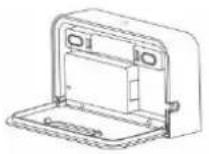
A
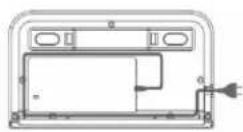
B
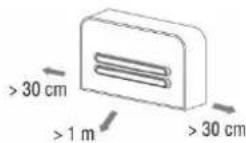
C
- Place the robotic vacuum cleaner on the charging station to lightly touch the charging contacts.
- The robotic vacuum cleaner battery will start charging automatically. We recommend charging the battery fully before first cleaning.
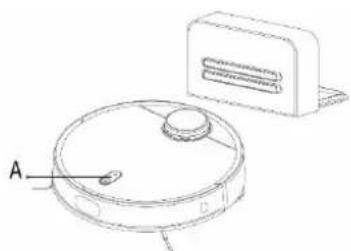
natural_image
Technical line drawing of a circular device with labeled component A, no text or symbols presentWhite color: battery charge level is higher than 20%
Red color: battery charge level is less than 20%
Slow blinking: battery is charging
Red colour, blinking: error
LED indicator (A)
Warning:
Make sure the charging station is within range of a high quality and strong WiFi signal from your WiFi router so that it can connect to a WiFi network while charging. The robotic vacuum cleaner also needs this WiFi connection during its charging to be properly oriented and available to start cleaning.
- How to operate and all advanced features of the robotic vacuum cleaner are described in the application (Settings > Help). Install an application on your smartphone for connection between your smartphone and robotic vacuum cleaner.
Android: search for "TESLA RoboStar iQ500/iQ600" in Google Play
Apple: search for "TESLA RoboStar iQ500/iQ600" in Apple Store
- For WiFi connection, enable WiFi, Bluetooth and GPS in your smartphone for the first pairing.
-
Make sure the WiFi signal coverage for your smartphone and robotic vacuum cleaner is good and strong enough. If possible, perform the first setup of the robotic vacuum cleaner near your WiFi router.
-
If you cannot connect to a robotic vacuum cleaner by smartphone to change the password or router settings, reset the WiFi in the robotic vacuum cleaner and pair it with your smartphone again.
- Reset of robotic vacuum cleaner:
Press the button ⏻ and ⏻ on the top panel at the same time for 3 seconds, then the blue LED will start to flash slowly.
- To start the cleaning, push the front panel button ⏻ or start cleaning in the smartphone application. The vacuum cleaner starts its first cleaning.
FIRST CLEANING
- Remove all obstacles that can prevent effective cleaning.
- Also remove objects that can damage the robotic vacuum cleaner.
- The carpet must be secured so the robot cannot get on it when mopping. If the mopping pad is installed on the vacuum cleaner, it may interrupt the cleaning process or cause unwanted soaking of the carpet.
- Direct sunlight may cause a reduced sensitivity of the sensors of the vacuum cleaner, please avoid direct sunlight light.
- Black furniture may not be properly detected due to the physical nature of sensors. This may cause a slight impact, which will be reduced by the front bumper.
WATER WIPING
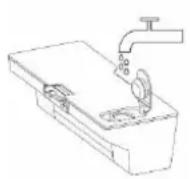
A
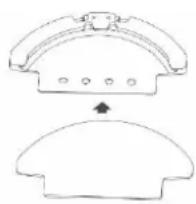
natural_image
Two technical line drawings of a mechanical component with mounting holes and a curved base (no text or symbols)B
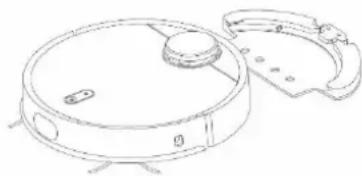
natural_image
Line drawing of a robotic vacuum cleaner with lid and mounting base (no text or symbols)C
Always draw water exclusively outside the body of the robotic vacuum cleaner!
Open the plastic cover, take the water into the tank and put it back in the appliance. When handling the water tank, there may be a slight leakage of eg residual water. In this case, wipe the spill immediately with a dry cloth. Avoid spilling water on the vacuum cleaner or its interior, the vacuum cleaner is not waterproof.
Lightly dampen the mop cloth with water and squeeze the water out of it so that it does not drip. Install the mop cloth on the mop module and attach it to the robotic vacuum cleaner.
- Remove the mop module after cleaning.
• Do not leave the vacuum cleaner standing still or with water residue in the water tank to prevent water from spilling on the floor. - Do not use wet wipe on the carpet. In the TESLA application, you can create a "Forbidden Area" or a "Virtual Wall" that the robotic vacuum cleaner will not clean / wipe with water.
• For safety reasons, drain the remaining water from the tank after the moping is completed.
• If the mop is dirty after cleaning, you can carefully wash it in lukewarm water. - We recommend wiping the floor with clean water, as the cleaning agent may cause foaming and thus worsen the dripping of water on the mop or cause smudges on the floor after it has dried.
CAUTION
Use the water mopping module only with the 2in1 dust and water tank inserted. If a dust tank is inserted while the mop module is fitted, cleaning will not start.
ROUTINE MAINTENANCE OF ROBOTIC VACUUM CLEANER
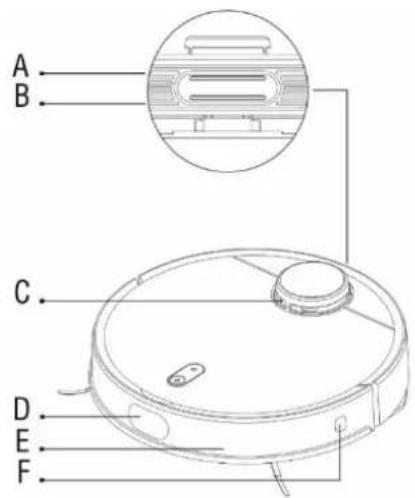

A Air outlet
B Loudspeaker
C Laser signal transmitter
D Ultrasonic range sensor
E Impact sensors
F Wall following sensor
G Cliff sensors
H Front wheel
I Side brush
J Battery cover
K Main central brush
L Frame of the main central brush
M Driving wheel
N Air filter
ATTENTION!
We recommend that you perform regular maintenance for the most efficient cleaning.
LACK OF MAINTENANCE MAY CAUSE DAMAGE TO ROBOTIC VACUUM CLEANER AND LOSS OF WARRANTY.
Turn off the vacuum cleaner before cleaning and maintenance. Wipe the top cover of the vacuum cleaner with a soft, dry or slightly damp cloth. Do not use cleaning agents to clean the surface of the robotic vacuum cleaner, as this may damage the surface.
DUST TANK/DUST TANK 2in1 - clean after every cleaning
- Empty the dust tank after each cleaning into the trash can.
• Filling the dust tank significantly affects the suction power of the robotic vacuum cleaner and the quality of cleaning.
• If you use water to clean the dust tank, dry it carefully before reinstalling it into the robotic vacuum cleaner body.
HEPA filter - cleaning at least once a week
- Clean the HEPA filter according to the need and frequency of vacuuming every week by tapping, using a dust brush or vacuuming with a standard vacuum cleaner.
• Vacuuming with a dirty HEPA filter or without a HEPA filter inserted can damage the robotic vacuum cleaner. - Do not clean the HEPA filter with your fingers or a brush, only with a stream of clean water (do not use cleaning agents).
- Allow the HEPA filter to dry thoroughly.
- Never install a wet HEPA filter in a robotic vacuum cleaner!
• We recommend replacing the HEPA filter every 6 months at the latest. If wear or dirt is detected, replace the HEPA filter sooner.
SENSORS - clean once a week
Clean once a week four cliff sensors (G) and a wall following sensor (F) with a soft, dry cloth. Verify that the front bumper below which the impact sensors (E) are located is not blocked. Also clean the laser range sensor (C).
MAIN CENTRAL CLEANING BRUSH AND SIDE CLEANING BRUSHES - clean once a week
Remove the main center cleaning brush by pressing both tabs on the brush cover. Use a cleaning tool to remove hair tangled in the main brush. Keep the center cleaning brush free of hair, dust, cotton, etc.
Check both side cleaning brushes together with the air intake opening at least once a week to remove hair and other debris from them.
FRONT WHEEL - clean once a week
Keep it free of hair and dust. Remove the center guide from the vacuum cleaner, also clean the wheel axis and then reinstall it into the robotic vacuum cleaner.
CHARGING CONTACTS AND CHARGING BASE - clean once every 14 days
Clean the contacts on the front of the robotic vacuum cleaner and the contacts on the charging base with a soft cloth.
Laser safety
The robotic vacuum laser sensor meets IEC 60825-1: 2014 (third edition) for Class I laser equipment.
Battery
TESLA RoboStar iQ600 is equipped with a modern high-capacity Li-Ion battery. If you do not use the device for a long time, charge the battery once every three months to avoid completely discharging the battery.
Robotic vacuum cleaner RESET
If there is no response after pressing the buttons on the robotic vacuum cleaner or the robotic vacuum cleaner behaves differently than it should, check that the battery is fully charged. You can also reset the robotic vacuum cleaner by pressing the reset button located under the top cover.
Robotic vacuum cleaner firmware update
The robotic vacuum cleaner firmware is continuously improved. If a new firmware version is available, TESLA application will offer you the option to download the update and install it on a robotic vacuum cleaner.
TROUBLESHOOTING
| Problem | Solution |
| How to add a robotic vacuum cleaner to TESLA app? | Move the robotic vacuum cleaner and smartphone near the WiFi router. Press both buttons on the top panel for 5 seconds until you hear a voice confirmation and the blue LED starts flashing. Enable Location (GPS) and Bluetooth on your smartphone. In the TESLA application select "Add robotic vacuum cleaner", select TESLA vacuum cleaner, press "Next" and enter the password to connect to the WiFi network. |
| Can't connect a robotic vacuum cleaner to TESLA app? | If the robotic vacuum cleaner cannot be detected:1. Make sure Bluetooth and GPS are turned on in your smartphone.2. Make sure that a third-party application (VPN, antivirus, firewall, etc.) does not block access to your smartphone and Bluetooth.3. Connect your smartphone near the robotic vacuum cleaner.4. Reset WiFi. |
| Can't connect to a robotic vacuum cleaner? | 1. Place the robotic vacuum cleaner and smartphone near the WiFi router.2. Make sure that you have correctly filled in the login details for your WiFi network.3. If the robotic vacuum cleaner is not a brand new device, reset the WiFi in the robotic vacuum cleaner. |
| The robotic vacuum cleaner behaves "chaotically". | Always place the vacuum cleaner in the charging station before you start cleaning. If this is the first cleaning, the vacuum cleaner must first map the surroundings. If furniture or other obstructions are relocated, a new mapping will occur, which may look like a robotic vacuum cleaner behaves abnormally. However, this phenomenon is only temporary, due to a new mapping around the robotic vacuum cleaner. |
| After installing the application and pairing the mobile phone with a robotic vacuum cleaner, the vacuum cleaner is "not connected". | Reset the vacuum cleaner and try pairing again. We recommend that you always be close to the WiFi router during pairing. |
| The robotic vacuum cleaner does not start cleaning. | 1. The robotic vacuum cleaner has a weak battery. Charge the battery to full capacity before cleaning.2. The battery is too hot. Use the robotic vacuum cleaner at 0°C ~ 40°C. |
| The robotic vacuum cleaner cannot be charged. | 1. The charging station is not connected to the mains. Make sure the power cord is properly connected.2. Charging electrodes have poor contact with robotic vacuum cleaner. Clean the electrodes on the robotic vacuum cleaner and on the charging base. |
| The robotic vacuum cleaner does not return to the charging base. | Make sure there is enough space around the charging station and the charging station's detection zone is clean. |
| The smartphone cannot detect a robotic vacuum cleaner. | Please reset the robotic vacuum cleaner (button under the top cover). Enable Bluetooth and GPS in your smartphone and keep your robotic vacuum cleaner near your smartphone for successful pairing. |
| The robotic vacuum cleaner does not pair with the TESLA application. | Make sure the charging station and robotic vacuum cleaner are within easy reach of a high-quality and strong WiFi signal from your WiFi router. Press the two buttons and on the top panel of the robotic vacuum cleaner for 3 seconds,the blue LED light starts flashing slowly - the robotic vacuum cleaner is ready for pairing with your mobile phone. Start the TESLA application on your smartphone and follow the instructions. |
| The robotic vacuum cleaner is offline (not connected to the WiFi router). | Make sure your WiFi network is set up and fully functional. The robotic vacuum cleaner should always be within easy reach of a high-quality and strong WiFi signal from your WiFi router. |
| Vacuuming is very loud. | Clean the main center brush, side brushes, wheels, front wheel, bottom of the robotic vacuum cleaner and front bumper. |
| A screech sounds while vacuuming. | Remove the front wheel and clean the centerline from hair and dust. If necessary, you can lubricate the wheel axis. |
| The robotic vacuum cleaner moves slowly. | Clean the ultrasonic sensor. Make sure the sensor front grill is clean and free of blocking obstacles. |
| Poor cleaning quality. | Empty the dust tank. Clean or replace the HEPA filter and clean the center cleaning brush. |
| The robotic vacuum cleaner is offline (not connected to the WiFi router). | 1. If the robotic vacuum cleaner battery is low, cleaning will not start. Please charge the battery to full capacity please.2. Scheduled cleaning will not be properly synchronized between the robotic vacuum cleaner and your mobile phone if the robotic vacuum cleaner is disconnected from the WiFi network. Therefore, keep the robotic vacuum cleaner always within easy reach of a high-quality and strong WiFi signal from your WiFi router. |
| Is it necessary to disconnect the charging station when the robotic vacuum battery is fully charged? | In standby mode, the robotic vacuum cleaner has very low power consumption, so we do not recommend turning off the power supply. If you do not use the robotic vacuum cleaner for an extended period of time, turn it off and disconnect the charging station from the power supply. However, you should fully charge the vacuum cleaner every three months to prevent the battery from being completely discharged. |
| Is the laser safe in the TESLA robotic vacuum cleaner? | The TESLA robotic vacuum cleaner uses an advanced and safe laser laser scanner.This laser belongs into Laser Safety Class I, which provides safety for humans and animals. |
WARRANTY REPAIR
For warranty repair, contact the dealer where you purchased the TESLA product.
The warranty DOES NOT APPLY to:
• using the device for other purposes than it was designed to
• normal wear and tear
- failure to observe the „IMPORTANT SAFETY WARNINGS“ stated in the user manual
• electrical or mechanical damage caused by improper use
- damage caused by natural elements such as water, fire, static electricity, power surges etcetera
• damage caused by an unauthorized repair
- unreadable serial number
- the battery capacity drops after 6 months of using (6-months battery life warranty)
DECLARATION OF CONFORMITY
We, INTER-SAT LTD, org. složka, declare that this device is in compliance with Directive 2014/53/EU. The full text of the EU Declaration of Conformity is available at www.tesla-electronics.eu.


This product complies with the requirements of the European Community.
When this crossed-out wheeled bin symbol is attached to a product it means that the product is covered by the European Directive 2002/96/EC. Please inform yourself about the local separate collection system for electrical and electronic products. Please act according to your local rules and do not dispose of your old products with your normal household waste. Correct disposal of your old product helps to prevent potential negative consequences for the environment and human health.
As the product develops and improves, we reserve the right to modify the user manual. The latest version of the user manual is always available at www.tesla-electronics.eu. Design and specification may be changed without prior notice, print errors reserved.
Adaptor information (EU) 2019/1782
| Manufacturer's name or trade mark, commercial registration number and address. | Yinli Electronics Industrial Company Limited Jiaren Industrial Zone, Shuinan, Shijie Town, Dong Guan City, Guangdong province, China |
| Model identifier | YLS0365-S200180 |
| Input voltage | 100 - 240 V |
| Input AC frequency | 50 - 60 Hz |
| Output voltage | 20 V |
| Output current | 1.8 A |
| Output power | 36 W |
| Average active efficiency | 87.4% |
| Efficiency at low load | ≥87.4% |
| No-load power consumption | ≤0.1W |
| Percentage of nameplate output current: | 72% |
| Load condition 1 | 100%±2% |
| Load condition 2 | 75%±2% |
| Load condition 3 | 50%±2% |
| Load condition 4 | 25%±2% |
| Load condition 5 | 10%±2% |
| Load condition 6 | 0% (no load condition) |
- Fényjelzések:
- VAŽNA SIGURNOSNA UPOZORENJA
- IMPORTANT SAFETY WARNINGS
- PACKAGE CONTENT
- USER MANUAL - latest version
- FIRST START
- Warning:
- FIRST CLEANING
- WATER WIPING
- Always draw water exclusively outside the body of the robotic vacuum cleaner!
- CAUTION
- ROUTINE MAINTENANCE OF ROBOTIC VACUUM CLEANER
- ATTENTION!
- DUST TANK/DUST TANK 2in1 - clean after every cleaning
- HEPA filter - cleaning at least once a week
- SENSORS - clean once a week
- MAIN CENTRAL CLEANING BRUSH AND SIDE CLEANING BRUSHES - clean once a week
- FRONT WHEEL - clean once a week
- CHARGING CONTACTS AND CHARGING BASE - clean once every 14 days
- Laser safety
- Battery
- Robotic vacuum cleaner RESET
- Robotic vacuum cleaner firmware update
- WARRANTY REPAIR
- The warranty DOES NOT APPLY to:
- DECLARATION OF CONFORMITY
Brand : TESLA
Model : RoboStar iQ600
Category : Vacuum Cleaner