
SSS 3600 KIDS - Hi-Fi System SENCOR - Free user manual and instructions
Find the device manual for free SSS 3600 KIDS SENCOR in PDF.


| Product Type | Hi-Fi System with Bluetooth, radio, USB/TF playback, microphone/guitar input |
| Output Power | 45 W |
| Power Supply | 100-240 V~ 60/50 Hz |
| DC Input | 9V and 12V charging sockets |
| Battery | Rechargeable Li-ion (2 x 1500 mAh) |
| Charging Time | Approximately 3 hours |
| Bluetooth Version | 5.0 + EDR |
| Bluetooth Range | 10 meters (direct line of sight) |
| FM Frequency Range | 87.5 – 108 MHz |
| Playback Media | USB flash drive, TF card, Bluetooth, AUX |
| Recording Format | WAV (saved to USB/TF in JL_REC folder) |
| Microphone Input | 6.3 mm jack and 3.5 mm jack |
| Guitar Input | 6.3 mm jack |
| AUX Input | 3.5 mm stereo jack |
| Display | LED display |
| Controls | Volume, treble, echo, microphone volume, mode, playback controls |
| Equalizer Presets | Square, home, hall, privacy (environment switching) |
| LED Lighting | Disco lighting (on/off) |
| Accessories Included | AC adapter, cable microphone, user manual |
| Cleaning Instruction | Disconnect power, clean with soft cloth only |
| Safety Features | Overheat protection, short-circuit protection (per safety instructions) |
| Disposal | Do not dispose as household waste; recycle per WEEE directive |
Frequently Asked Questions - SSS 3600 KIDS SENCOR
User questions about SSS 3600 KIDS SENCOR
0 question about this device. Answer the ones you know or ask your own.
Ask a new question about this device
Download the instructions for your Hi-Fi System in PDF format for free! Find your manual SSS 3600 KIDS - SENCOR and take your electronic device back in hand. On this page are published all the documents necessary for the use of your device. SSS 3600 KIDS by SENCOR.
USER MANUAL SSS 3600 KIDS SENCOR
natural_image
Black-and-white illustration of a Senco-branded portable electronic device with two large speakers and front-mounted screens (no text or symbols visible)EN ■User Manual Digital audio system with Bluetooth
Safety Instructions....2
Description of the power tool 4
Right side view 4
Getting started....5
POWER SOURCE....5
Instructions for use....5
BASIC FUNCTIONS ....5
USING THE RADIO 6
USING USB/TF CARDS 6
RECORDING....7
USING BLUETOOTH....8
USING THE LINE OUTPUT 8
USING THE MICROPHONE/GUITAR PLUG....8
Technical specifications....9
GENERAL INFORMATION 9
INSTRUCTIONS AND INFORMATION REGARDING THE DISPOSAL OF USED
PACKAGING MATERIALS....10
DISPOSAL OF USED ELECTRICAL AND ELECTRONIC APPLIANCES....10
Safety Instructions
This product has been designed with maximum safety in mind.
However, incorrect use may lead to electric shock or fire. Therefore, users must follow these instructions when using this device.
This device uses a semiconductor unit and contains no user serviceable parts. Do not disassemble this product, as you may be exposed to electric shock. If this product is damaged, have it repaired by a qualified service technician.
Power source
The power supply for this unit must match the specifications on the model name plate.
Heat source
Keep this unit away from heat sources such as stoves or direct sunlight.
Cleaning
Prior to cleaning, please disconnect power first. Do not use liquid cleaners or corrosive liquids for cleaning - only clean the unit with a soft cloth.
Heavy objects
Do not place heavy objects on the unit as this may damage the unit.
Connecting other devices
Before connecting other devices to this unit, please make sure to disconnect the power. Otherwise, you could damage your device.
Malfunctions requiring repair
If any of the following problems occurs, please disconnect power to the unit and contact a qualified service technician.
A. Power cord or plug is damaged.
B. Liquids or other foreign objects have penetrated inside the unit.
C. If the unit does not work even if it's being operated according to the instructions, don't press any buttons other than those described in these instructions. Doing so may damage the unit and increase the difficulty of repairing the unit.
D. This unit has been dropped from a great height.
E. Burns can be smelled from the product inside.
Maintenance
If you don't have enough technical knowledge necessary to maintain this unit, don't attempt to repair it by yourself. By removing the cover, you are exposed to a risk of electric shock. If needed, please contact a qualified service technician.
Replacement of parts
If you need to replace any part of this unit, ask your service technician to replace it with spare parts of the same model. If other replacement spare parts are used from a different model, this may result in electric shock or shorten the life of the unit.
Safety check
When done with the maintenance, ask your service technician to perform an on-site safety check to make sure that the unit's operation is safe.
Note:
Before using this product, read these instructions carefully and keep them for future reference.
Description of the power tool
Right side view
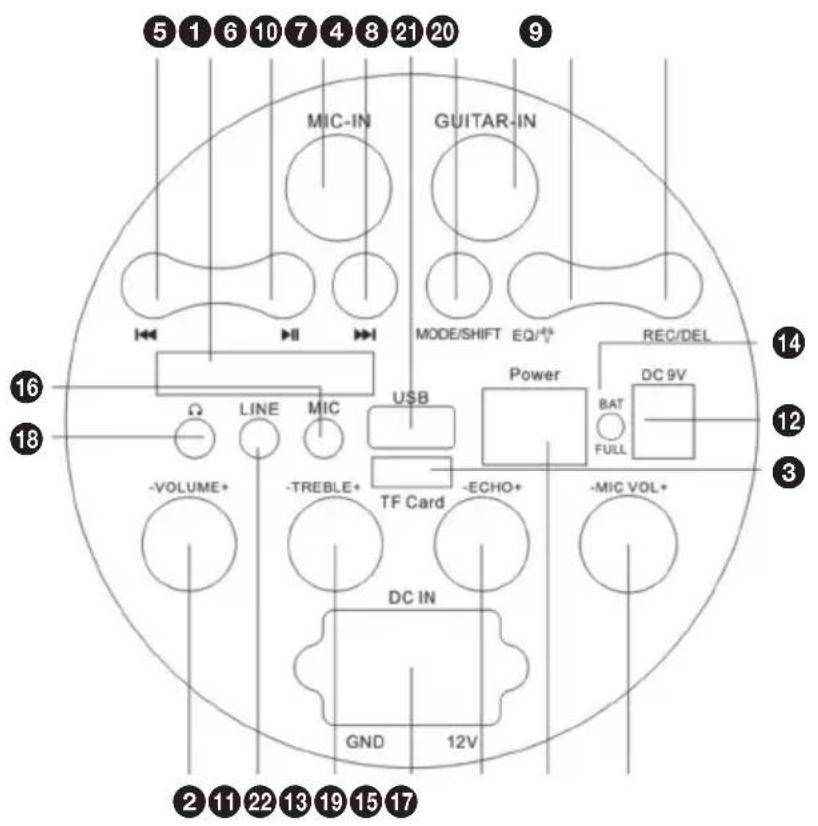
1 LED display
② VOLUME
③ TF card slot
4 USB connector
5 PREVIOUS
6 ▶ PLAY/PAUSE button
7 ➤ ➤ ➤ ➤ ➤ ➤ ➤ ➤ ➤ ➤ ➤ ➤ ➤ ➤ ➤ ➤ ➤ ➤ ➤ ➤ ➤ ➤ ➤ ➤ ➤ ➤ ➤ ➤ ➤ ➤ ➤ ➤ ➤ ➤ ➤ ➤ ➤ ➤ ➤ ➤ ➤ ➤ ➤ ➤ ➤ ➤ ➤ ➤ ➤ ➤ ➢
8 Mode/SHIFT
9 REC/DEL: Record/delete
10 MIC-IN: 6,3mm microphone connector
11 LINE: 3.5 mm line input
12 DC 9V: charging socket
13 DC IN: 12V charging socket
14 Charging indicator
$$ \text { " } - \text { " } - \text { ON } \text { " } \text { O } \text { " } - \text { OFF } $$
15 Power: switch:
16 MIC (microphone): headphone/MIC
(headphones/microphone) 3,5 mm
17 MIC VOL:
microphone volume button
18 Headphone connector
19 ECHO: Microphone echo control knob
20 EQ/ Changing the setting
21 GUITAR-IN:
6,3 mm connector for electric guitar
22 TREBLE
Getting started
POWER SOURCE
This device uses a rechargeable Li-ion battery (the battery capacity is 2 x 1500mAh). Allow the device to fully charge (for about 3 hours) before using it for the first time. Connecting the AC adapter will charge the battery, while the red LED will light while charging. Once the battery is fully charged the indicator will be blue. When the BT battery is low, the speaker will sound a low battery level with an acoustic signal.

Caution:
Do not replace the battery, this operation can only be performed by a highly qualified person.
Instructions for use
BASIC FUNCTIONS
SWITCHING ON / OFF
Press the power button to turn the device on or off.
SETTING A FUNCTION MODE
A short press of the MODE switches the TF card / USB / FM / Bluetooth input sequentially. Switching between modes is possible, provided peripherals (USB and TF) are connected. Long press to switch between recording folder (folder with files recorded by this unit) and MP3 folder.
VOLUME ADJUSTMENT/ ECHO LEVELS
- Turning the VOLUME button on the device, increases or decreases the music volume. A long press of the PREVIOUS / NEXT button decreases / increases the music volume.
- Turning the MIC VOL button on the device, increases or decreases the microphone volume.
- Turning the ECHO button on the device increases or decreases the echo of the microphone or guitar.
While reading from USB or TF, you can press Environment Switching vselect the type of environment (square, home, hall and privacy). A long press allows you to control the LED disco lighting (on or off).
USING THE RADIO
Listen to FM radio stations. Press the MODE/SHIFT button repeatedly on the unit until FM and broadcasting frequency appear on the display.
Note: For best reception, place the device in an open area where the FM band will not be inhibited.
AUTOMATIC SAVING STATIONS FOR PREFERENCES
To search for stations within range and store them automatically in the preset memory, long press the PLAY / PAUSE button in FM reception mode. We recommend that you perform a complete station search at least once before using the radio reception function. All stations found will remain in memory even after the power is turned off.
When the machine finishes searching, it automatically tunes in to preset number 1 (P01).
To tune in a preset station:
● To return to the next preset, press the NEXT button.
USING USB/TF CARDS
- Press the MODE/SHIFT button to select "USB" or "TF Card" on the device. When sliding into the slot, hold the TF card with the contacts facing up, and insert it fully into the device until you hear a click. To eject the TF card from your device, press the edge of the TF card with your fingernail or some blunt object and the card will pop out.
- Insert the USB memory or TF card into the corresponding port. Playback starts automatically from track 1.
- To pause playback, press the PLAY/PAUSE button. To resume playback, press the PLAY/PAUSE button again.
- A long press allows you to select one of the playback order modes (ALL - plays all tracks sequentially; FOLDER "FoLd" - plays tracks repeatedly in the folder; ONE - repeats one track; RANDOM "rAn" - plays tracks in random order).
- To select a track, briefly press the PREVIOUS/NEXT button repeatedly during playback until the desired track appears on the display. The unit will start playback automatically.

Important:
The USB port is designed for data transfer only. Other devices must not be connected to this port. The use of USB extension cables is not recommended. Do not disconnect the USB memory device while it is playing or loading.

Attention:
Due to a number of devices on the market, compatibility and playback support are not guaranteed for all media. The memory devices you want to connect should be tested in advance and/or formatted as FAT32. The playback of protected media, files or content stored inside them may fail. Playback tested and unprotected media and content.
Note:
Media that have greater power consumption than flash memory should only be connected if they have their own power sources.
RECORDING
This function is only available in the microphone mode.
Briefly press the REC/DEL button to start recording (a USB / TF memory card must already be connected to the unit), pressing again briefly stops recording. ECHO should be set to minimum during recording. A long press on the REC/DEL button deletes the recording file.
The recorded audio is saved in the JL_REC folder in WAV format.

Attention:
When recording in LINE IN mode, set your preferred input signal volume.
When recording in FM reception mode, place the equipment in the best reception location for quality recording.
When recording from an external microphone, minimize the ECHO knob. Make sure the microphone is far enough away from the speaker, otherwise there may be feedback.
Note:
The available recording time depends on the capacity of the memory device. All recordings will have the same recording date and time (the device does not allow you to enter the date and time). If the FM recording function does not start, connect the microphone and try the recording again.
USING BLUETOOTH
- Press the MODE/SHIFT button to select the BLUETOOTH function on the device. A flashing "BLUE" message (ready to pair) appears on the LCD.
- To turn on the Bluetooth function of the device, locate the "SSS3600" unit and enter 0000 if you are asked for a password. The status message "BLUE" appears on the LCD (the devices have successfully paired).
- Press PLAY to start playback.
- Changing the BT playback source mode disconnects the speaker from the existing device.
Note:
The Bluetooth function works best within a range of 10 meters with direct visibility.

Attention:
Some connected devices support common volume setting. If some of the connected devices do not support this feature, the volume setting will operate separately on each device.
USING THE LINE OUTPUT
- The function starts automatically by connecting LINE IN to the 3.5mm audio jack input.
- Control playback from the audio device.
- In the LINE IN mode, briefly press PLAY/PAUSE to mute playback and press again to restore the original volume.
Microphone input is available in all modes.
-
Connect the microphone to the 6.3mm jack MIC-IN or to the 3.5mm connector MIC. Connect the guitar to the 6.3mm GUITAR-IN connector.
-
Turning the MIC VOL button on the device, increases or decreases the guitar volume.
Note:
When connecting a guitar to the device, lower the TREBLE knob to the minimum.
Technical specifications
GENERAL INFORMATION
Power supply 100-240 V\~ 60/50 Hz
Power input 33 W
Output power 45 W
FM frequency 87,5-108 MHz
AUX IN connector 3,5 mm
Microphone connector 6,3 mm
Ambient temperature 5–40°C
Bluetooth
Communication system Bluetooth Standard version 5.0+EDR
Reception range 10 meters (in direct visibility)
Compatible Bluetooth profiles Advanced Audio Distribution Profile (A2DP)
ACCESSORIES
Instructions for use....1
AC power adapter....1
Cable microphone....1
Note:
The specifications are subject to change without prior notice due to continuous improvement.
INSTRUCTIONS AND INFORMATION REGARDING THE DISPOSAL OF USED PACKAGING MATERIALS
Dispose of packaging material at a public waste disposal site.
DISPOSAL OF USED ELECTRICAL AND ELECTRONIC APPLIANCES
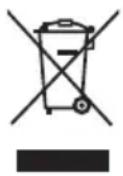
The meaning of the symbol on the product, its accessory or packaging indicates that this product shall not be treated as household waste. Please, dispose of this product at your applicable collection point for the recycling of electrical & electronic equipment waste. Alternatively in some states of the European Union or other European states you may return your products to your local retailer when buying an equivalent new product. The correct disposal of this product will help save valuable natural resources and help in preventing the potential negative impact on the environment and human health, which could be caused as a result of improper liquidation of waste. Please ask your local authorities or the nearest waste collection centre for further details. The improper disposal of this type of waste may fall subject to national regulations for fines.
For business entities in the European Union
If you wish to dispose of an electrical or electronic device, request the necessary information from your seller or supplier.
Disposal in other countries outside the European Union
If you wish to dispose of this product, request the necessary information about the correct disposal method from local government departments or from your seller.

The product meets EU requirements.
Hereby, FAST ČR, a.s. declares that the radio equipment type SSS 3600 KIDS is in compliance with Directive 2014/53/EU.
The full text of the EU declaration of conformity is available at the following internet address: www.sencor.eu
Changes in the text, design and technical specifications may be made without prior notice and we reserve the right to make such changes.
The original version is in the Czech language.
Address of the manufacturer: FAST ČR, a.s., U Sanitasu 1621, Říčany CZ-251 01
SENCOR®
EN Warranty conditions
Warranty card is not a part of the device packaging.
This product is warranted for the period of 24 months from the date of purchase to the end-user. Warranty is limited to the following conditions. Warranty is referred only to the customer goods using for common domestic use. The claim for service can be applied either at dealer's shop where the product was bought, or at below mentioned authorized service shops. The end-user is obligated to set up a claim immediately when the defects appeared but only till the end of warranty period. The end user is obligated to cooperate to certify the claiming defects. Only completed and clean (according to hygienic standards) product will be accepted. In case of eligible warranty claim the warranty period will be prolonged by the period from the date of claim application till the date of taking over the product by end-user, or the date the end-user is obligated to take it over. To obtain the service under this warranty, end-user is obligated to certify his claim with duly completed following documents: receipt, certificate of warranty, certificate of installation.
This warranty is void especially if apply as follows:
■ Defects which were put on sale.
■ Wear-out or damage caused by common use.
The product was damaged by unprofessional or wrong installation, used in contrary to the applicable instruction manual, used in contrary to legal enactment and common process of use or used for another purpose which has been designed for.
■ The product was damaged by uncared-for or insufficient maintenance.
■ The product was damaged by dirt, accident of force majeure (natural disaster, fire, and flood).
■ Defects on functionality caused by low duality of signal, electromagnetic field interference etc.
■ The product was mechanically damaged (e.g. broken button, fall).
■ Damage caused by use of unsuitable media, fillings, expendable supplies (batteries) or by unsuitable working conditions (e.g. high temperatures, high humidity, quakes).
■ Repair, modification or other failure action to the product by unauthorized person.
■ End-user did not prove enough his right to claim (time and place of purchase).
■ Data on presented documents differs from data on products.
Cases when the claiming product cannot be identified according to the presented documents (e.g. the serial number or the warranty seal has been damaged).
Authorized service centers
Visit www.sencor. for detailed information about authorized service centers. com
Notes
Obsah
Jótállási jegy
Fast Poland Sp. z o.o.
ul. Kwietniowa 36
05-090 Wypedy
tel. +48 22 102 16 90
Distributor details (FAST PL headquarter):
FAST POLAND SP. Z O.O.
ul. Kwietniowa 36
05-090 Wypedy
tel: +48 22 102 16 90
e-mail: biuro@fastpoland.pl
www.fastpoland.pl

- Safety Instructions
- Power source
- Heat source
- Cleaning
- Heavy objects
- Connecting other devices
- Malfunctions requiring repair
- Maintenance
- Replacement of parts
- Safety check
- Note:
- Description of the power tool
- Right side view
- Getting started
- Caution:
- Instructions for use
- BASIC FUNCTIONS
- SWITCHING ON / OFF
- SETTING A FUNCTION MODE
- VOLUME ADJUSTMENT/ ECHO LEVELS
- USING THE RADIO
- AUTOMATIC SAVING STATIONS FOR PREFERENCES
- USING USB/TF CARDS
- Important:
- Attention:
- RECORDING
- USING BLUETOOTH
- USING THE LINE OUTPUT
- Technical specifications
- GENERAL INFORMATION
- Bluetooth
- ACCESSORIES
- INSTRUCTIONS AND INFORMATION REGARDING THE DISPOSAL OF USED PACKAGING MATERIALS
- DISPOSAL OF USED ELECTRICAL AND ELECTRONIC APPLIANCES
- For business entities in the European Union
- Disposal in other countries outside the European Union
- SENCOR®
- EN Warranty conditions
- This warranty is void especially if apply as follows:
- Authorized service centers
- Notes
- Obsah
- Jótállási jegy
- Distributor details (FAST PL headquarter):
Brand : SENCOR
Model : SSS 3600 KIDS
Category : Hi-Fi System