
Trims1 - Headphones Lamax - Free user manual and instructions
Find the device manual for free Trims1 Lamax in PDF.


| Product Type | True wireless stereo (TWS) earbuds |
| Brand | Lamax |
| Model | Trims1 |
| Connectivity | Bluetooth 5.0 |
| Wireless Range | Up to 10 meters |
| Supported Codecs | AAC, SBC |
| Headphone Battery Capacity | 60 mAh |
| Charging Case Capacity | 400 mAh |
| Headphone Charging Time | Approx. 1.5 hours |
| Playback Time | Up to 6 hours |
| Weight (each earbud) | 4 g |
| Weight (including case) | 45 g |
| Charging Port | USB-C |
| Input Voltage | 5V (max) |
| Controls | Multifunction button (tap, double-tap, triple-tap, hold) |
| Call Functions | Accept, end, reject, redial |
| Voice Assistant | Activation via button hold |
| Auto Power On | When removed from charging case |
| Auto Power Off | When placed in charging case |
| LED Indicators | White and green for pairing, green for charging |
Frequently Asked Questions - Trims1 Lamax
User questions about Trims1 Lamax
0 question about this device. Answer the ones you know or ask your own.
Ask a new question about this device
Download the instructions for your Headphones in PDF format for free! Find your manual Trims1 - Lamax and take your electronic device back in hand. On this page are published all the documents necessary for the use of your device. Trims1 by Lamax.
USER MANUAL Trims1 Lamax
natural_image
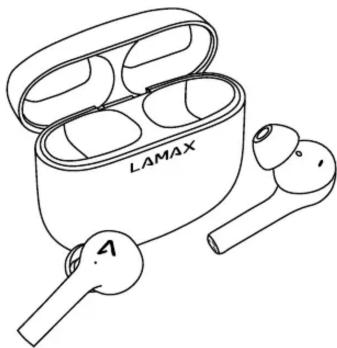
Line drawing of LAMAX wireless earbuds with open case (no text or symbols on devices)Controls
| Switch on | Hold down multifunction button for 3 seconds |
| Switch off | Hold down multifunction button for 5 seconds |
| Play / Pause | Press multifunction button |
| Next track | Double-tap multifunction button on the right earphone |
| Previous track | Double-tap multifunction button on the left earphone |
| Accept call | Tap multifunction button |
| End call | Double-tap multifunction button |
| Reject Call | Hold down multifunction button for 2 seconds |
| Redial last number | Triple-tap multifunction button |
| Activate mobile assistant | Hold down multifunction button for 2 seconds |
Switching on
The headphones turn on automatically when removed from the charging station. To switch on manually, hold down the multifunction button for 3 seconds. You must manually turn on both headphones separately. An alert is heard when the device is switched on.
Switching off
The headphones switch off automatically when docked in the charging station. To switch off manually, hold down the multifunction button on both headphones for 5 seconds. An alert is heard when the device is switched off.
Pairing
-
Remove the headphones from the charging station. The headphones will connect to each other automatically and an alert will sound. The headphones will be ready for pairing. This is indicated by the alternating flashing of the white and green LEDs.
-
Turn on Bluetooth on your device and search for LAMAX Trims1 in the list of available Bluetooth devices. An audio alert will sound once the device and headphones have been successfully paired.
If you encounter any problems while attempting to pair the headphones with a device, remove the headphones from the charging station. Remove the headphones from the list of paired devices on your phone. Then, insert the headphones into the charging station and pair according to point 1.
Charging
To recharge the charging station, connect the cable to the USB-C port on the back of the charging station and connect the other end of the cable to a USB power supply with a maximum voltage of 5V. When charging, the LED will flash green. It will show a steady green glow when fully charged.
To charge the headphones, dock them into the charged charging station. When charging, the LED in the headphones lights up green and the LED on the charging station lights up white. When the headphones are fully charged, the LEDs will deactivate.
Parameters
| Wireless technology | Bluetooth 5.0 |
| Maximum pairing distance | up to 10 meters |
| Supporting codecs | AAC, SBC |
| Headphone battery capacity | 60 mAh |
| Charging station capacity | 400 mAh |
| Headphone charging time | approx. 1,5 hours |
| Playback time | up to 6 hours |
| Weight of each headphone | 4 g |
| Weight including charging station | 45 g |
Printing errors reserved.
The current version of the user manual can be downloaded here:
https://www.lamax-electronics.com/downloads/lamax-trims1/
manual


CE
RoHS
LAMAX Trims1

natural_image
Line drawing of LAMAX wireless earbuds with open case (no text or symbols on devices)Bedienung
https://www.lamax-electronics.com/downloads/lamax-trims1/
manual


CE
RoHS
LAMAX Trims1
natural_image
Line drawing of a LAMAX wireless earbuds with open case (no text or symbols on devices)Ovládání
https://www.lamax-electronics.com/downloads/lamax-trims1/
manual

CE
RoHS
LAMAX Trims1

natural_image
Line drawing of two LAMAX wireless earbuds with open case (no text or symbols)Ovládanie
https://www.lamax-electronics.com/downloads/lamax-trims1/
manual


CE
RoHS
LAMAX Trims1
natural_image
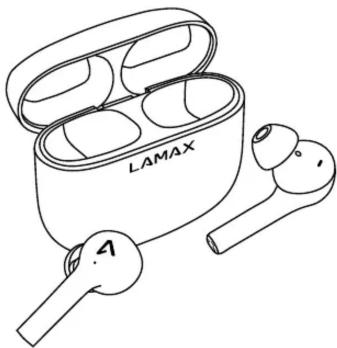
Line drawing of a LAMAX wireless earbuds with open case (no text or symbols on devices)Obsługa
natural_image
Line drawing of LAMAX wireless earbuds with open case (no text or symbols on devices)Vezérlés
natural_image
Line drawing of a LAMAX wireless earbuds with open case and two earbuds (no text or symbols)Upravljanje
natural_image
Line drawing of two LAMAX wireless earbuds with open case (no text or symbols)Upravljanje


Brand : Lamax
Model : Trims1
Category : Headphones