
HERMES P2A - Keyboard Gamdias - Free user manual and instructions
Find the device manual for free HERMES P2A Gamdias in PDF.


| Product Type | Mechanical Gaming Keyboard |
| Brand | Gamdias |
| Model | HERMES P2A |
| Connectivity | Wired USB 2.0 |
| Switches | Mechanical (Gamdias proprietary or compatible) |
| Backlighting | RGB per-key lighting |
| Key Rollover | N-Key Rollover (NKRO) |
| Onboard Memory | Yes (for profiles) |
| Software Support | Gamdias Hera or similar |
| Dimensions (approx.) | 440 x 135 x 35 mm |
| Weight (approx.) | 950 g |
| Cable Length | 1.8 m |
| Power Source | USB bus power (5V DC) |
| Operating Systems | Windows, macOS, Linux (basic) |
| Wrist Rest | Detachable (if included) |
| Media Keys | Dedicated or FN-combination |
| Polling Rate | 1000 Hz |
| Maintenance | Clean with soft dry cloth; remove keycaps for deep cleaning |
| Safety | Avoid liquids; unplug during cleaning |
| Spare Parts / Repairability | Keycaps may be replaceable; contact support for other parts |
Frequently Asked Questions - HERMES P2A Gamdias
User questions about HERMES P2A Gamdias
0 question about this device. Answer the ones you know or ask your own.
Ask a new question about this device
Download the instructions for your Keyboard in PDF format for free! Find your manual HERMES P2A - Gamdias and take your electronic device back in hand. On this page are published all the documents necessary for the use of your device. HERMES P2A by Gamdias.
USER MANUAL HERMES P2A Gamdias
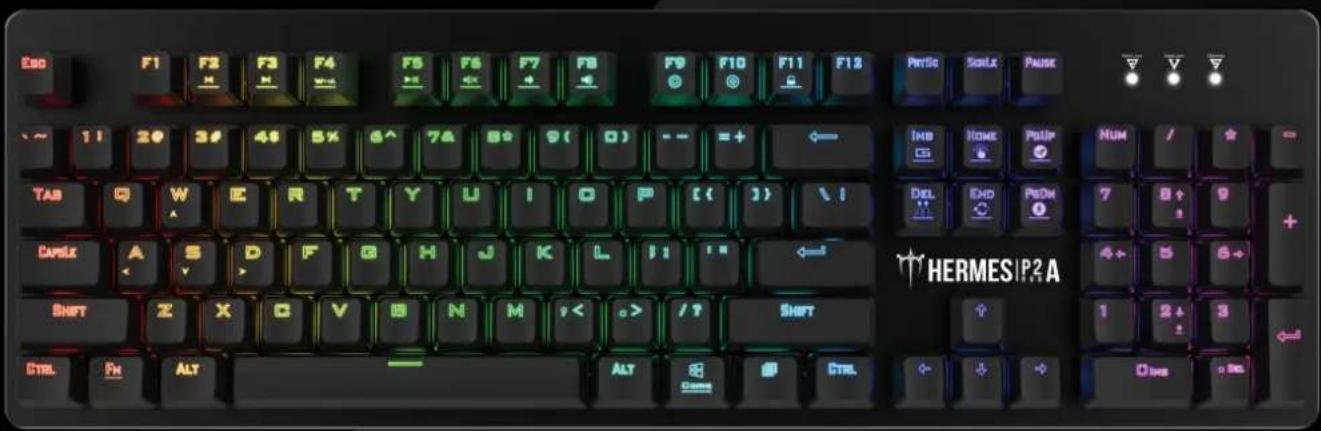
Optical Mechanical Gaming Keyboard
text_image
Esc F1 F2 F3 F4 F5 F6 F7 F8 F9 F10 F11 F12 PerSo Scale Pause ~ 11 20 3# 4# 5% 6^ 7# 8# 9( 0) -- =+ ← THB KORE POUP NUM / + TAB Q W E R T Y U I O P ( ( ) ) \ I DEL END POOM 7 8 + 9 + CAMEK A S D F G H J K L I I ← HERMESIP2A 4+ 5 6+ SHIFT Z X G V G N M ,< .> /? SHIFT 1 2 + 3 CTRL FN ALT ALT COME CTRL Other《English》
Thank you for purchasing the GAMDIASTM HERMES P2A mechanical keyboard. The HERMES P2A focuses on the basic features users demand and applies this to the distinct design elements of the HERMES series. This easy-to-use keyboard allows for extended use and flexibility. The turbo mode is compatible with the WASD direction keys to give you optimal gaming performance.
System Requirements
- Windows ^ XP/ Vista / 7 / 8 / 10
- PC with USB ports
Package Contents
• GAMDIAS™ HERMES P2A Mechanical Keyboard
• Key puller
Introduction to HERMES P2A Keyboard Configuration
A. Six multimedia shortcut keys: Previous track, next track, play/pause, mute, decrease volume, increase volume

text_image
Fn F2 H F3 H F6 H F8 H F7 H F8 HB. Four shortcut keys for switching among four keyboard light effects.( Marquees, Breathing, Responsive fade in, Static/Light off )

text_image
Fn + Ins Del Home EndC. Breathing speed adjustment of shortcut key: There are 5 breathing speed steps in existence.
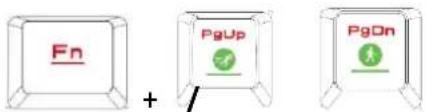
text_image
Fn PgUp PgOnD. Keyboard backlight brightness level adjustment: [Fn + Num8] increases brightness, [Fn + Num2] decreases brightness. There are 5 phases for brightness level adjustment; OFF / 25% / 50% / 75% / 100%
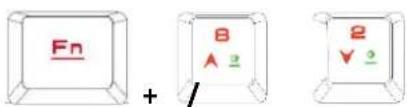
text_image
Fn + 8 A 2 2 V 2E. Game mode: Press [Fn + Win] once to lock the Windows key so there will be no response when it is pressed. Press again to unlock the key
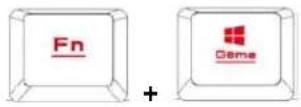
F. Lock keyboard keys: Press [Fn + F11] once to lock the keyboard keys so there will be no response when they are pressed. Press again to unlock the keys

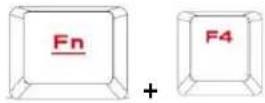
G. Swap between WASD and arrow key modes: Press [Fn + F4] once to enable swap mode. Press again to disable
H. Light direction from bottom to top / top to bottom / right to left / left to right (Only for some lighting effects.)

text_image
Fn + W S A DI. Under the breathing mode, use FN+F10 to switch to 7-color breathing modes. Under the constant light mode, use FN+F9 to switch to 7-color constant light modes.

chemical
Chemical reaction diagram showing Fn and F10 groups reacting to form Fn and F8 products
natural_image
Golden geometric logo with interlocking triangular shapes (no text or symbols)GAMDIAS
GAMING ART IN MOTION