
Pro MP242 - Screen MSI - Free user manual and instructions
Find the device manual for free Pro MP242 MSI in PDF.


Pick your language and provide your email: we'll send you a specifically translated version.
| Product Type | Monitor |
| Brand | MSI |
| Model | Pro MP242 |
| Screen Size | 23.8 inches |
| Display Resolution | 1920 x 1080 (Full HD) |
| Panel Type | IPS |
| Refresh Rate | 60 Hz |
| Response Time | 4 ms (GTG) |
| Brightness | 250 cd/m² |
| Contrast Ratio | 1000:1 (Static) |
| Viewing Angles | 178° / 178° |
| Connectivity | 1x HDMI 1.4, 1x VGA, 1x Audio Out |
| VESA Mount | 100 mm x 100 mm |
| Tilt Adjustment | -5° to 20° |
| Power Consumption (Typical) | 20 W |
| Weight (with Stand) | 4.5 kg |
| Dimensions (with Stand) | 540 x 400 x 200 mm |
| Features | Anti-Flicker, Low Blue Light |
| Security | Kensington Lock |
| What's in the Box | Monitor, Stand, Power Cable, HDMI Cable, Quick Start Guide |
Frequently Asked Questions - Pro MP242 MSI
How do I adjust the brightness and contrast on the MSI Pro MP242?
Use the On-Screen Display (OSD) menu accessed via the buttons on the bottom bezel. Navigate to the Brightness/Contrast settings and adjust as needed.
What is the maximum resolution supported by this monitor?
The native resolution is 1920 x 1080 (Full HD). It supports lower resolutions via scaling, but for best image quality, use 1080p.
Does the MSI Pro MP242 have built-in speakers?
No, this monitor does not include built-in speakers. Use the audio out port to connect external speakers or headphones.
Can I mount the monitor on a wall?
Yes, it supports VESA mounting with a 100mm x 100mm pattern. Use a compatible wall mount bracket.
What cables are included in the box?
The package includes a power cable and an HDMI cable. For VGA connection, you need to purchase a separate VGA cable.
How do I enable the Low Blue Light feature?
Access the OSD menu, go to Image settings, and select Low Blue Light. You can choose from multiple levels to reduce eye strain.
What is the refresh rate of this monitor?
The default refresh rate is 60 Hz, which is standard for office and general use. It is not designed for high-refresh gaming.
How do I clean the screen safely?
Turn off the monitor and unplug it. Use a soft, dry microfiber cloth to gently wipe the screen. Avoid using liquid cleaners directly on the screen.
Does this monitor support FreeSync or G-Sync?
No, the MSI Pro MP242 does not support adaptive sync technologies. It is a standard office monitor.
What is the power consumption of the MSI Pro MP242?
Typical power consumption is about 20 watts. In standby mode, it consumes less than 0.5 watts. Actual usage may vary.
User questions about Pro MP242 MSI
0 question about this device. Answer the ones you know or ask your own.
Ask a new question about this device
No questions yet. Be the first to ask one.
Download the instructions for your Screen in PDF format for free! Find your manual Pro MP242 - MSI and take your electronic device back in hand. On this page are published all the documents necessary for the use of your device. Pro MP242 by MSI.
USER MANUAL Pro MP242 MSI
natural_image
Technical line drawing of a mechanical device with labeled components (no text or symbols present)Nastavení monitoru
Nastavení OSD
Nabídky OSD
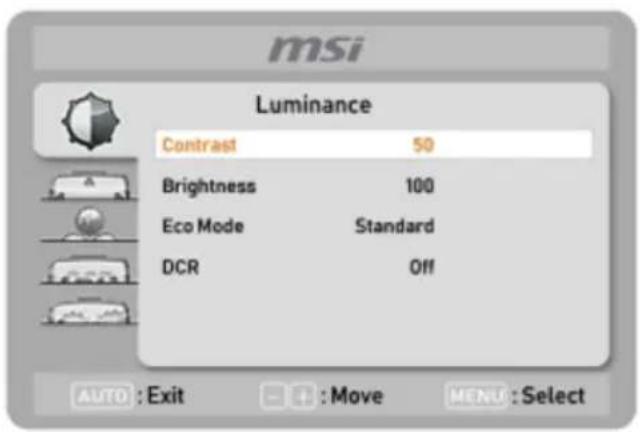
Lumunance (Jas)

Table of contents
Click a title to access it
Manual assistant
Powered by Anthropic
Waiting for your message
Product information
Brand : MSI
Model : Pro MP242
Category : Screen