DA44AU - Audio/video converter Blustream - Free user manual and instructions
Find the device manual for free DA44AU Blustream in PDF.


User questions about DA44AU Blustream
0 question about this device. Answer the ones you know or ask your own.
Ask a new question about this device
Download the instructions for your Audio/video converter in PDF format for free! Find your manual DA44AU - Blustream and take your electronic device back in hand. On this page are published all the documents necessary for the use of your device. DA44AU by Blustream.
USER MANUAL DA44AU Blustream
text_image
BLUSTREAM→ 4 Input + 4 Output Dante® Audio Converter ESC ENTER DA44AU Dante 1 2 RX TX - RS-232 OUTPUT CH 4 CH 3 CH 2 CH 1 + - ÷ + - ÷ + - ÷ + - ÷ INPUT CH D CH C CH B CH A + - ÷ + - ÷ + - ÷ + - ÷DA44AU
User Manual
Thank you for purchasing this product.
For optimum performance and safety, please read these instructions carefully before connecting, operating or adjusting this product. Please keep this manual for future reference.

Surge protection device recommended.
This product contains sensitive electrical components that may be damaged by electrical spikes, surges, electric shock, lightning strikes, etc. Use of surge protection systems is highly recommended in order to protect and extend the life of your equipment.
Contents
Introduction 03
Features 03
Panel Descriptions 04
Audio Input Settings 05
Dante ^® Controller 05 - 06
Advanced Dante® Settings 06
Product Schematic 07
RS-232 Control Port 08
Specifications 09
Packaging Contents 09
Acknowledgements 09
Installer Notes 10 - 11
Introduction
Our DA44AU is a four input / four output Dante® digital audio converter. The DA44AU allows any non-Dante® audio source such as mixing consoles, amplifiers, computers and Blustream Matrix products or distribution products to be connected as an audio source within a Dante® network, as well as converting a Dante® signal back to an analogue audio signal. The DA44AU supports both balanced and unbalanced audio as well as microphone line level inputs inc. 48V phantom power. The DA44AU supports AES67 RTP audio transport.
FEATURES:
- Features 4 x analogue audio inputs that are converted to a Dante® compatible signal
- Features conversion of Dante® signal to 4 x analogue audio outputs
- Analogue audio inputs support both balanced and unbalanced audio + MIC line level signals
• MIC line level supports 48V phantom power
• Supports 44.1, 48 & 96 KHz sample rates @ 24 Bit - Configurable Dante® device latency (supports 1, 2 or 5ms configurable using Dante® Controller)
- Independent input gain settings per channel
• Supports AES67 RTP audio transport
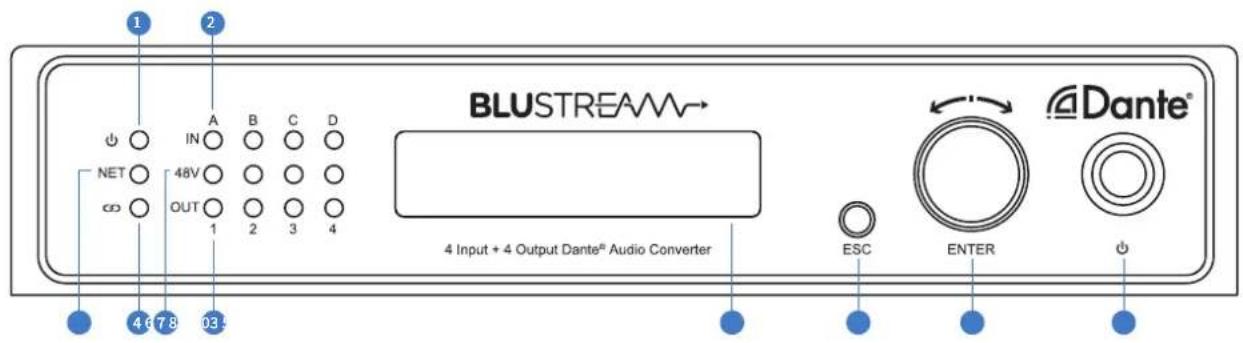
Front Panel
text_image
1 2 A B C D IN NET 48V OUT 1 2 3 4 BLUSTREAM→ 4 Input + 4 Output Dante® Audio Converter ESC ENTER Dante®1 Power Indicator LED - Illuminates when the unit is powered on
2 Input Indicator LED - Illuminates when an analogue audio signal is detected on the associated input into the unit
3 NET Indicator LED - Illuminates when the unit is receiving a Dante® network audio signal and audio is output
4 Link Indicator LED - Illuminates when the unit is connected to PC configuration software
5 48V Phantom Power Indicator LED - Illuminates when 48V phantom power is enabled on the associated input
6 Output Indiciator LED - Illuminates when a Dante® audio signal is being received and output via the associated output
7 LCD Display - Shows the status of network connection and menu selection
ESC Button - Escapes out of selected menu option
9 Rotary Dial / Enter Button - Rotate dial to scroll through selected menu item, press to select current menu item
10 Power Button - Press to turn the unit on or off
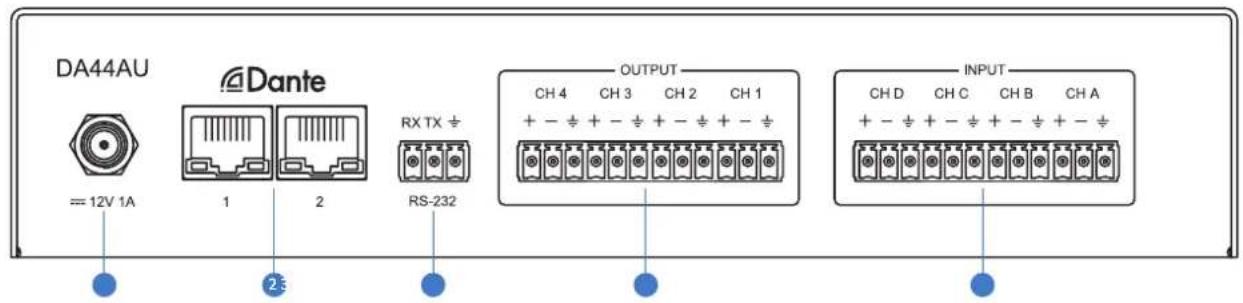
Rear Panel
text_image
DA44AU Dante == 12V 1A 1 2 RX TX ÷ RS-232 OUTPUT CH 4 CH 3 CH 2 CH 1 + - ÷ + - ÷ + - ÷ + - ÷ INPUT CH D CH C CH B CH A + - ÷ + - ÷ + - ÷ + - ÷1 Power Port – Use included 12V/1A DC adaptor to power the device
2 Dante® Network Ports - 2 x RJ45 sockets to connect to Dante® network, note the DA44AU will only allow 1 network connection at a time, the device does not have two independent network interfaces. The 2nd RJ45 is for redundancy but can also be cascaded to additional DA44AU units (up to 7 x devices)
3 RS-232 Port - 3-pin Phoenix connector for control of the device from a computer or 3rd party control processor
4ch Audio Outputs - 12-pin Phoenix connector to connect to audio amplifier or mixing device, supports both balanced and unbalanced audio output from devices connected to the Dante® network (Note: will not output audio connected to the input of the same DA44AU device due to limitations of the Dante® Ultimo chipset)
5 4ch Audio Inputs - 12-pin Phoenix connector to connect to microphone or source audio device to convert the input signal to Dante® audio, supports both balanced and unbalanced signals including 48V phantom power
Audio Input Settings
The DA44AU supports both line level input and microphone input including 48V phantom power. The input level sensitivity can also be adjusted to accommodate various source devices. This can be achieved through the front display menu, using the rotary dial, or via RS-232.
The Audio Input Settings are as follows:
| CHANNEL INPUT TYPE SENSITIVITY PHANTOM POWER | |||
| A | Microphone | 0dB | OnOff |
| 5dB | |||
| 10dB | |||
| 15dB | |||
| 25dB | |||
| 35dB | |||
| C | |||
| D | |||
| Line | -10dB | ||
| 0dB | |||
Dante ^® Controller
Dante® Controller software is required in order to setup and configure the DA44AU as well as control your Dante® network. Audinate provide extensive training videos and documentation on their website. This can be found here: http://www.audinate.com/products/software/dante-controller
Upon connecting your DA44AU to a compatible network, the Dante® Controller software should automatically discover the device. The DA44AU will appear in the Dante® Controller with a name "DA44AU". On the "Routing" screen you can create audio routing between Dante® transmitters and receivers in your system.
Please Note: It is not possible to route audio input into the DA44AU to an output within the same DA44AU due to limitation in the Dante® Ultimo chipset.

text_image
Dante Controller - Network View File Device View Help Grand Master Clock: DA44AU Routing Device Info Clock Status Network Status Events Clear All Device Lock Sample Rate Sync to External Latency Subscriptions Tx Multicast Flows AES67 Sample Rate Pull-up Filter Transmitters Filter Receivers DA44AU TX_1 TX_2 TX_3 TX_4 DZ-NB 01 02 03 04 05 06 07 DA44AU TX_1 TX_2 TX_3 TX_4 DZ-NB AVIOA02-501d0c CH1 CH2 DA44AU Rx_1 Rx_2 Rx_3 Rx_4 DZ-NB Unmanaged Multicast Bandwidth: 0 bps Event Log: Clock Status Monitor:Dante ^® Controller
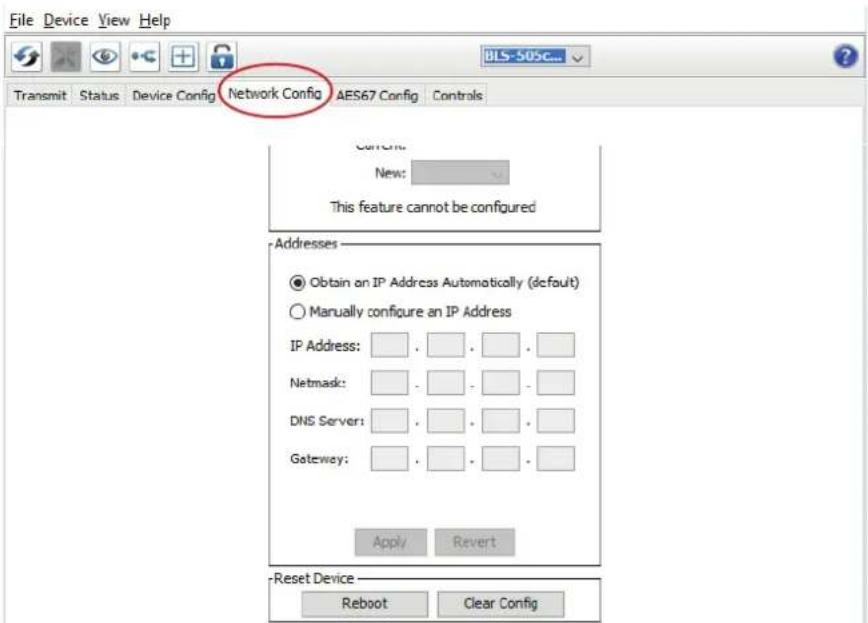
By default the DA44AU is shipped with its network settings set to obtain an IP Address automatically. This means that if a DHCP server is present on your network, it will provide the DA44AU with an IP Address. If no DHCP server is present then the DA44AU will receive a default IP Address in the 169.254.xxx.xxx range. To change the IP Address of the DA44AU, you must enter the "Network Config" menu in the "Device Info" screen of the Dante® Controller software.
text_image
File Device View Help Transmit Status Device Config Network Config AES67 Config Controls Current: New: This feature cannot be configured Addresses Obtain an IP Address Automatically (default) Manually configure an IP Address IP Address: Netmask: DNS Server: Gateway: Apply Revert Reset Device Reboot Clear ConfigAdvanced Dante® Settings
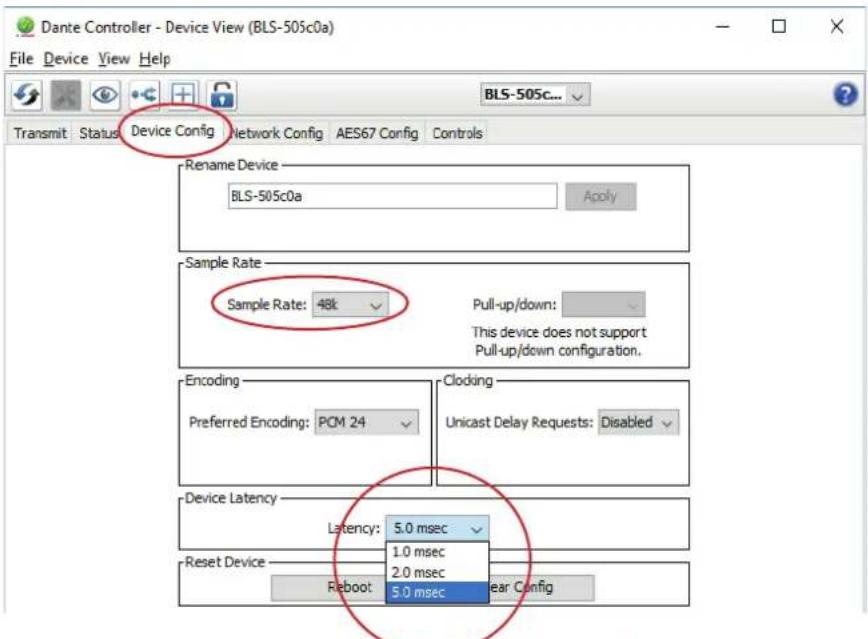
It is also possible to change various Dante® related settings of the DA44AU under the "Device Info" screen in the Dante® Controller software. To do so, select the "Device Config" menu.
Here we can adjust the sample rate of the DA44AU. Please Note: That Dante® products can only transmit or receive audio from other Dante® products that are set up with the same sample rate. A mismatch in sample rate may stop audio from transmitting.
Under the "Device Config" screen we can also adjust the latency of the DA44AU from 1, 2 or 5 milliseconds.
text_image
Dante Controller - Device View (BLS-505c0a) File Device View Help Transmit Status Device Config Network Config AES67 Config Controls BLS-505c... Rename Device BLS-505c0a Apply Sample Rate Sample Rate: 48k Pull-up/down: This device does not support Pull-up/down configuration. Encoding Preferred Encoding: PCM 24 Cloding Unicast Delay Requests: Disabled Device Latency Latency: 5.0 msec 1.0 msec 2.0 msec Reset Device Reboot 5.0 msec Clear Config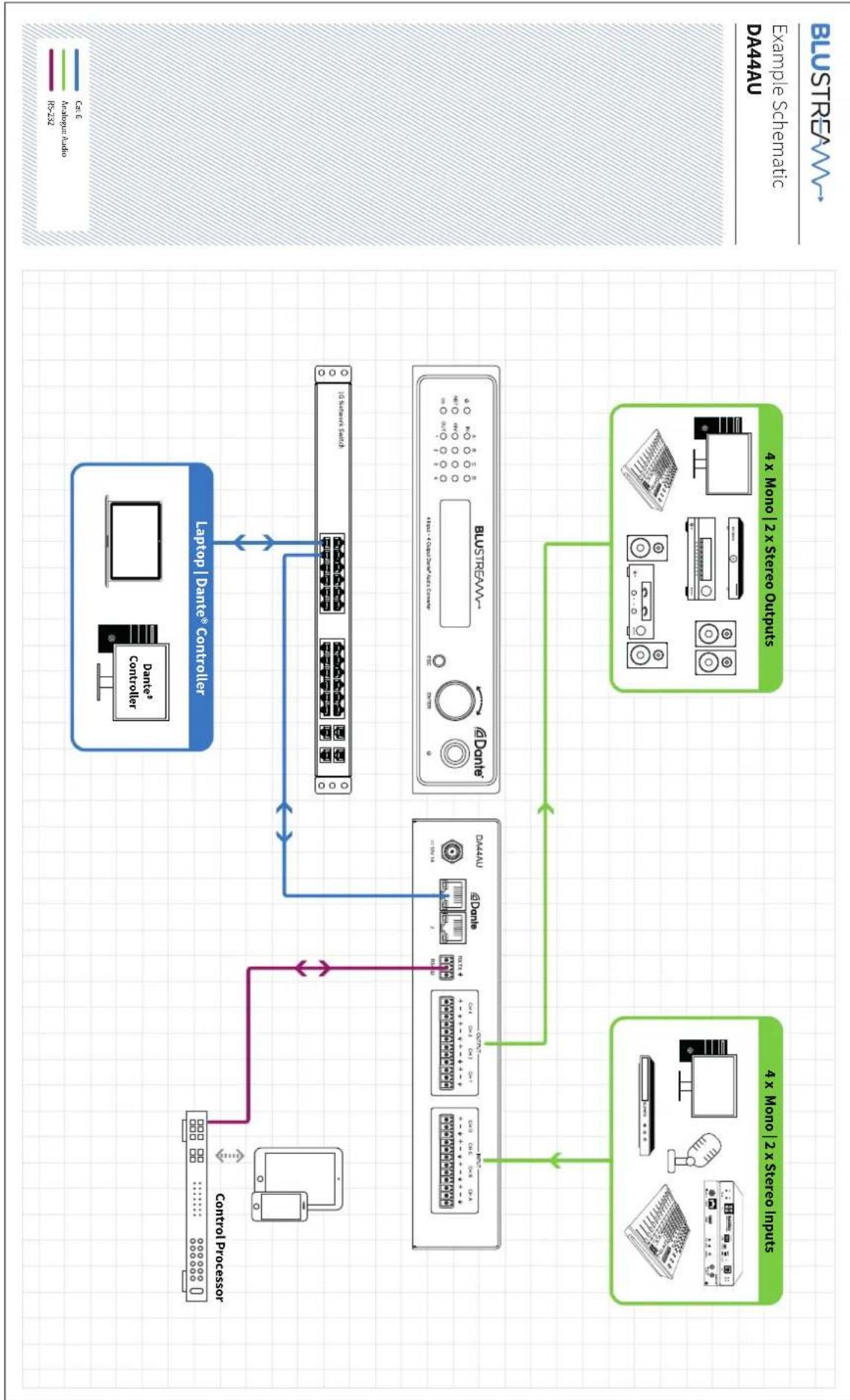
flowchart
graph TD
    A["Control Processor"] --> B["4x Mono | 2x Stereo Inputs"]
    A --> C["4x Mono | 2x Stereo Outputs"]
    D["Laptop | Dante Controller"] --> E["DataSet"]
    E --> F["10 Hertz Media"]
    E --> G["Busstream"]
    E --> H["8 Diamond"]
    E --> I["8 Diamond"]
    E --> J["8 Diamond"]
    E --> K["8 Diamond"]
    E --> L["8 Diamond"]
    E --> M["8 Diamond"]
    E --> N["8 Diamond"]
    E --> O["8 Diamond"]
    E --> P["8 Diamond"]
    E --> Q["8 Diamond"]
    E --> R["8 Diamond"]
    E --> S["8 Diamond"]
    E --> T["8 Diamond"]
    E --> U["8 Diamond"]
    E --> V["8 Diamond"]
    E --> W["8 Diamond"]
    E --> X["8 Diamond"]
    E --> Y["8 Diamond"]
    E --> Z["8 Diamond"]
    E --> AA["8 Diamond"]
    E --> AB["8 Diamond"]
    E --> AC["8 Diamond"]
    E --> AD["8 Diamond"]
    E --> AE["8 Diamond"]
    E --> AF["8 Diamond"]
    E --> AG["8 Diamond"]
    E --> AH["8 Diamond"]
    E --> AI["8 Diamond"]
    E --> AJ["8 Diamond"]
    E --> AK["8 Diamond"]
    E --> AL["8 Diamond"]
    E --> AM["8 Diamond"]
    E --> AN["8 Diamond"]
    E --> AO["8 Diamond"]
    E --> AP["8 Diamond"]
    E --> AQ["8 Diamond"]
    E --> AR["8 Diamond"]
    E --> AS["8 Diamond"]
    E --> AT["8 Diamond"]
    E --> AU["8 Diamond"]
    E --> AV["8 Diamond"]
    E --> AW["8 Diamond"]
    E --> AX["8 Diamond"]
    E --> AY["8 Diamond"]
    E --> AZ["8 Diamond"]
    E --> BA["8 Diamond"]
    E --> BB["8 Diamond"]
    E --> BC["8 Diamond"]
    E --> BD["8 Diamond"]
    E --> BE["8 Diamond"]
    E --> BF["8 Diamond"]
    E --> BG["8 Diamond"]
    E --> BH["8 Diamond"]
    E --> BI["8 Diamond"]
    E --> BJ["8 Diamond"]
    E --> BK["8 Diamond"]
    E --> BL["8 Diamond"]
    E --> BM["8 Diamond"]
    E --> BN["8 Diamond"]
    E --> BO["8 Diamond"]
    E --> BP["8 Diamond"]
    E --> BQ["8 Diamond"]
    E --> BR["8 Diamond"]
    E --> BS["8 Diamond"]
    E --> BT["8 Diamond"]
    E --> BU["8 Diamond"]
    E --> BV["8 Diamond"]
    E --> BW["8 Diamond"]
    E --> BX["8 Diamond"]
    E --> BY["8 Diamond"]
    E --> BZ["8 Diamond"]
RS-232 Control Port
The DA44AU can be controlled via a 3-pin Phoenix to serial RS-232 cable.
The communication settings and commands are as follows:
Baud Rate: 57600 bps
Data Bit: 8-bit
Parity: None
Stop Bit: 1-bit
Flow Control: None
| RS-232 COMMAND DESCRIPTION | |
| ? Print Help Information | |
| HELP | Print Help Information |
| STATUS Print System Status And Port Status | |
| RESET Reset System To Default Setting(Type "Yes" To Confirm, "No" To Discard) | |
| PRESET xx APPLY Apply Preset xx | |
| MUTE xx OUT yy Mute On/Off Output yyxx= On or Offyy=[00]: All Output Ports, [01...04]: Output Port | |
| IN xx AUD yy zz Set Mic/Line Input And Sensitivityxx=[00]: All Input Ports, [01...04]: Input Portyy=MIC or LINEzz=00: MIC: 00dB LINE: -10dBzz=01: MIC: 05dB LINE: 00dBzz=02: MIC: 10dBzz=03: MIC: 15dBzz=04: MIC: 25dBzz=05: MIC: 35dB | |
| IN xx PHA yy Set Input Phantom Power On/Offxx=[00]: All Input Ports, [01...04]: Input Portyy= ON or OFF | |
| RS232BAUD z | Set RS232 Baud Rate To zz = 1 2400, 2 4800, 3 9600, 4 19200, 5 38400, 6 57600 (default), 7 115200 |
| NET DHCP ON/OFF Set Auto IP (DHCP) On Or Off | |
| NET IP xxx.xxx.xxx.xxx Set IP Address | |
| NET GW xxx.xxx.xxx.xxx Set Gateway Address | |
| NET SM xxx.xxx.xxx.xxx Set Subnet Mask Address | |
| NET RB | Reboot Network And Apply Default Config |
Specifications
DA44AU
Audio Input Connectors: 12-pin Phoenix connector (4ch balanced / unbalanced analogue audio / MIC)
Audio Output Connectors: 2 x RJ45, female (1Gb Dante® network), 12-pin Phoenix connector (4ch balanced / unbalanced analogue audio / MIC)
Dante® Audio Technology: Dante® Ultimo
Casing Dimensions (W x H x D): 215mm x 145mm x 44mm without feet
Shipping Weight: 1.6 Kg
Operating Temperature: 32°F to 104°F (0°C to 40°C)
Storage Temperature: - 4°F to 140°F (- 20°C to 60°C)
Power Supply: 12V/1A DC
Package Contents
DA44AU
• 1 x DA44AU
- 1x User Manual
- 1x Mounting Kit
• 1 x 12V/1A DC Power Supply
NOTE: Specifications are subject to change without notice. Weights and dimensions are approximate.
Acknowledgements
Dante ^® is a registered trademark of Audinate Pty Ltd.
Certifications
FCC NOTICE
This equipment has been tested and found to comply with the limits for a Class B digital device, pursuant to part 15 of the FCC Rules. These limits are designed to provide reasonable protection against harmful interference in a residential installation. This equipment generates, uses, and can radiate radio frequency energy and, if not installed and used in accordance with the instructions, may cause harmful interference to radio communications. However, there is no guarantee that interference will not occur in a particular installation. If this equipment does cause harmful interference to radio or television reception, which can be determined by turning the equipment off and on, the user is encouraged to try to correct the interference by one or more of the following measures:
- Reorient or relocate the receiving antenna.
- Increase the separation between the equipment and receiver.
- Connect the equipment into an outlet on a circuit different from that to which the receiver is connected.
- Consult the dealer or an experienced radio/TV technician for help.
CAUTION - changes or modifications not expressly approved by the party responsible for compliance could void the user's authority to operate the equipment.
CANADA, INDUSTRY CANADA (IC) NOTICES
This Class B digital apparatus complies with Canadian ICES-003.
Operation is subject to the following two conditions: (1) this device may not cause interference, and (2) this device must accept any interference, including interference that may cause undesired operation of the device.
CORRECT DISPOSAL OF THIS PRODUCT
This marking indicates that this product should not be disposed with other household wastes. To prevent possible harm to the environment or human health from uncontrolled waste disposal, recycle it responsibly to promote the sustainable reuse of material resources. To return your used device, please use the return and collection systems or contact the retailer where the product was purchased. They can take this product for environmentally safe recycling.
Installer Notes:
Installer Notes:
BLUSTREA
www.blustream-us.com
www.blustream.com.au
www.blustream.co.uk