MX44KVM - Uncategorized Blustream - Free user manual and instructions
Find the device manual for free MX44KVM Blustream in PDF.


| Product Type | HDMI KVM Switch 4x4 |
| Dimensions | 280 x 120 x 40 mm |
| Weight | 1.2 kg |
| Power Supply | 5V DC, 2A |
| Video Resolution | Up to 4K@60Hz (4:4:4) |
| HDCP Support | HDCP 2.2 |
| Input Interfaces | 4x HDMI Type A, 4x USB-B |
| Output Interfaces | 4x HDMI Type A, 2x USB-A (peripheral sharing) |
| Control Interfaces | IR, RS-232, front panel buttons |
| Audio Support | Embedded audio passthrough |
| Switching Method | Front panel, IR remote, RS-232, auto-sensing |
| USB Compatibility | USB 2.0 for keyboard/mouse and HID devices |
| Operating Temperature | 0°C to 50°C |
| Storage Temperature | -20°C to 60°C |
| Humidity | 20% to 90% non-condensing |
| Housing Material | Metal chassis |
| Mounting | Rack-mountable (ears included) |
| Accessories Included | Power adapter, IR receiver, rack ears, user manual |
| Cleaning | Wipe with a soft, dry cloth. Do not use liquids. |
| Safety | Operate in a well-ventilated area; avoid moisture. |
| Repairability | Modular design; spare parts available upon request. |
Frequently Asked Questions - MX44KVM Blustream
User questions about MX44KVM Blustream
0 question about this device. Answer the ones you know or ask your own.
Ask a new question about this device
Download the instructions for your Uncategorized in PDF format for free! Find your manual MX44KVM - Blustream and take your electronic device back in hand. On this page are published all the documents necessary for the use of your device. MX44KVM by Blustream.
USER MANUAL MX44KVM Blustream
MX44KVM User Manual
Thank you for purchasing this product.
For optimum performance and safety, please read these instructions carefully before connecting, operating or adjusting this product. Please keep this manual for future reference.

Surge Protection Device Recommended
This product contains sensitive electrical components that may be damaged by electrical spikes, surges, electric shock, lightning strikes, etc. Use of surge protection systems is highly recommended in order to protect and extend the life of your equipment.
Contents
Introduction 03
Features 03
Front Panel Description 04
Rear Panel Description 04
Infrared (IR) Control 05
Web GUI Control 05 - 11
Remote Control Description 12
IR Commands 12 - 13
Specifications 14
Package Contents 14
Maintenance 14
RS-232 Config & Telnet Commands____15 - 16
Web-GUI Firmware Update ____ 17 - 18
Example Schematic 19
Certifications 20
Introduction
Our 4x4 USB 3.0 KVM Matrix offers unprecedented performance and value for the custom and commercial installation market. The MX44KVM is a USB 3.0 Matrix package allowing 4x USB peripheral devices to be shared between 4x host devices, supporting plug-and-play capabilities, and USB data transfer rates up to 5Gbps.
The Matrix provides advanced features including cascading of multiple MX44KVM units, GPIO functionality for 3rd party product triggers, an in-built web browser interface module for control and configuration of the Matrix, along with RS-232 for seamless control integration. An RS-232 loop-through connection allows for the MX44KVM to be intrinsically linked to any Blustream video matrix product for the addition of KVM support to our video-only switching products.
FEATURES:
- 4x4 USB KVM Matrix allowing up to 4x USB peripheral devices to be shared between 4x host devices
• USB 3.0 connectivity with data transfer rates up to 5Gbps - Backwards compatible with USB 2.0 and 1.1
- Plug-and-play with no drivers, downloads, or software required
• USB-A connections provide 5V 900mA - Features 4x configurable GPIO ports for integration with 3rd party products
- Features RS-232 loop-through for repetition of incoming RS-232 commands to additional Blustream products
- Assignable inputs and outputs allowing automated switching when used with existing Blustream Matrix products
- Web interface module for control and configuration of the MX44KVM
• Control via front panel, IR, RS-232, and TCP/IP
Front Panel Description

Power LED - Illuminates blue when the device is powered on. Illuminates red when the device is powered off
2 Selection LED – The illuminated number corresponds to the USB Host the selected USB Device is routed to
3 Select Button - Press to cycle the selected USB Device through each USB Host output
Rear Panel Description

USB Host - Connects to USB port of Host device
② USB Device - Connects to USB Devices or peripherals
3 TCP/IP - RJ45 connector for TCP/IP and Web-GUI control of the Matrix
4 IR Control Input - 3.5mm stereo connector to connect to Blustream IR receiver for IR control of the Matrix
5 RS-232 Port 1 - 3-pin Phoenix connector for direct RS-232 control of the Matrix
6 RS-232 Port 2 - 3-pin Phoenix connector for RS-232 pass-through to cascaded MX44KVM or a Blustream HDMI/HDBaseT Matrix
7 GPIO Port - 5-pin Phoenix connector for input sense/output relay/contact closure control of 3rd party devices
8 24V/1.25A DC power input 4-pin DIN connector
Infrared (IR) Control
The Blustream range of matrix products include Matrix control via IR.
IMPORTANT: Blustream Infrared products are all 5V and NOT compatible with alternative manufacturers Infrared solutions. When using third party 12V IR control solutions please use the Blustream IRCAB cable for IR conversion.
IR Receiver - IRR
Blustream 5V IR receiver to receive an IR signal for control of the matrix.
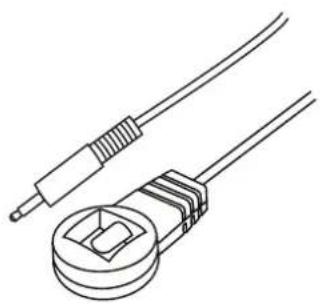
natural_image
Line drawing of two electrical connectors with wires (no text or symbols)IR Receiver - Stereo 3.5mm
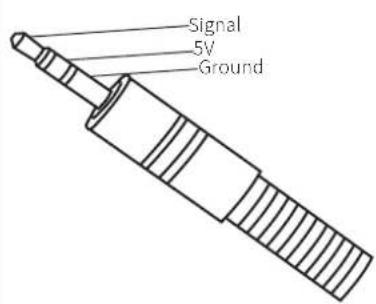
IR Control Cable - IRCAB (supplied)
Blustream IR Control cable 3.5mm Mono to 3.5mm Stereo for linking third party control solutions to Blustream products.
Compatible with 12V IR 3 party products.
Please Note: cable is directional as indicated.
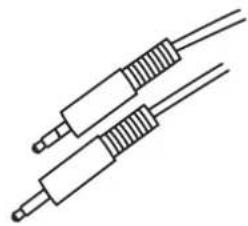
natural_image
Pure electrical circuit lines without any symbolsWeb-GUI Control
This following pages outlines the operation of the Matrix Web-GUI. Connect the TCP/IP RJ45 socket to the local network in order to access the products Web-GUI, or connect a PC directly to the TCP/IP port for initial configuration.
By default the Matrix is set to DHCP, however if a DHCP server (eg: network router) is not installed the matrix IP address will revert to the below details:
Default IP Address: 192.168.0.200
Default Username: blustream
Default Password: 1234
The Web-GUI supports multiple users along with multiple user permissions as follows:
Guest Account - This account does not require a user to login. The Guest account can only change sources for each zone. Guest access can be changed by the Admin, limiting inputs or outputs as necessary.
User Accounts - 7x User accounts can be utilised, each with individual login details. User accounts can be assigned permissions to specific areas and functions. A User must log in to make use of these functions.
Admin Account - This account allows full access to all functions of the Matrix, as well as assigning users with individual permissions.
Login Page
The Login Page allows a User or Admin to login and access additional functionality. This page displays the current firmware version of both the Matrix and Web-GUI.
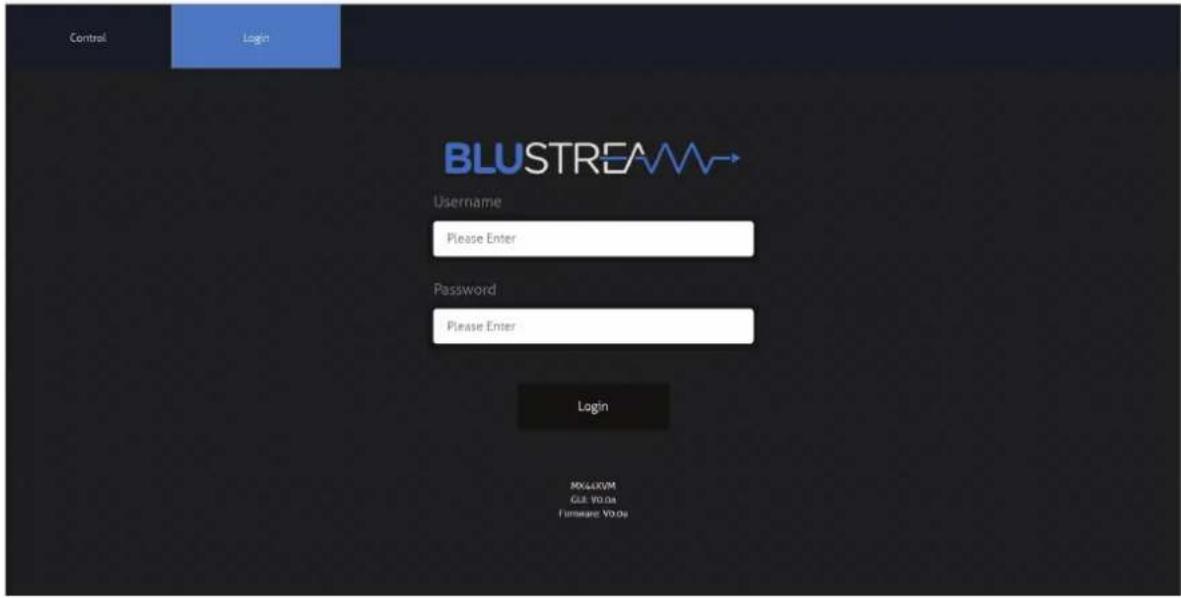
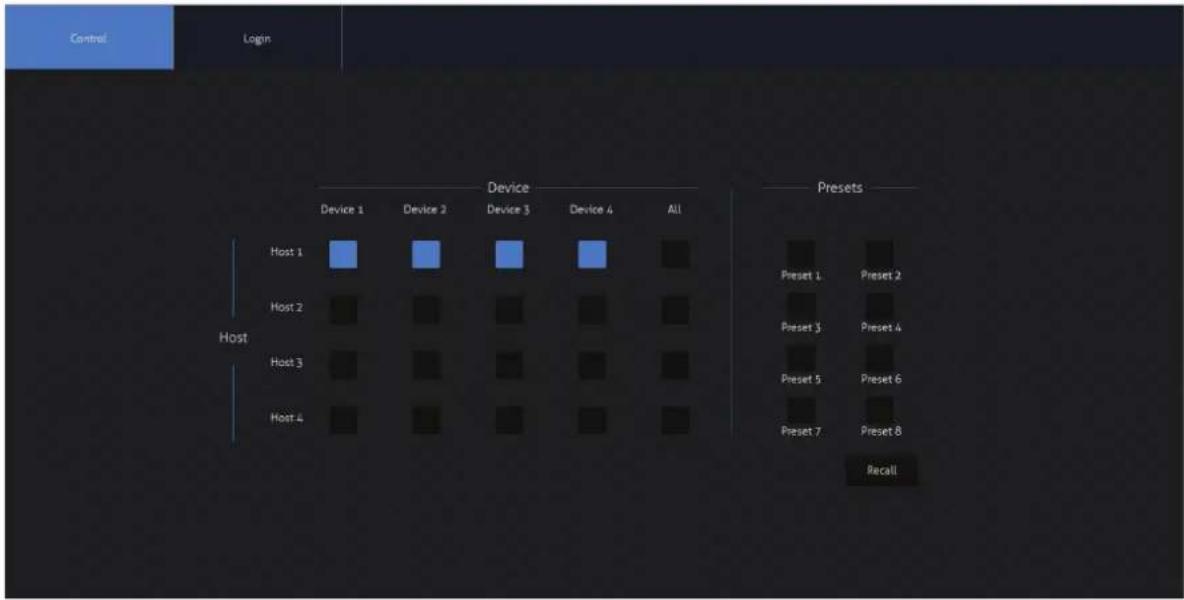
Guest Control Page
The Guest Control Page allows a guest to change inputs for each zone without needing to be logged into the matrix. Simply select the square that corresponds with the input and zone needing to be changed.
There is also a power button on the lower right corner to turn the Matrix on or off.
User Control Page
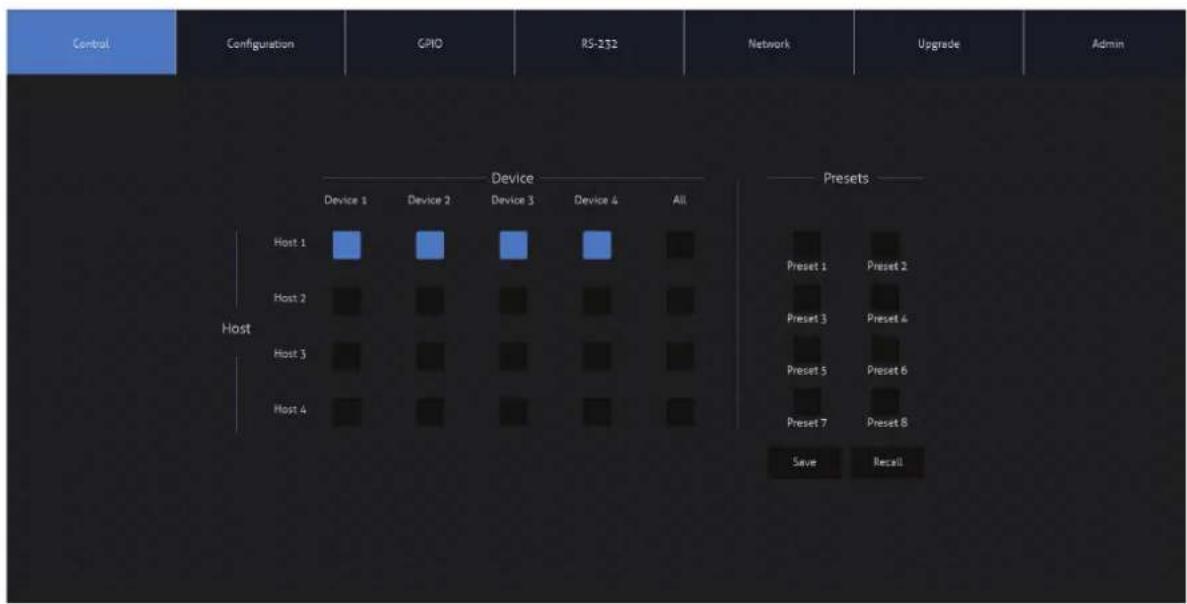
A logged in User, or Admin Control page allows a User to change inputs and/or presets for each Host. To change inputs, select the square that corresponds with the input and zone output needing to be changed. On the right, a preset can be recalled, or save the current input/output configuration into a specified preset slot.
There is also a power button on the lower right corner to turn the Matrix on or off.
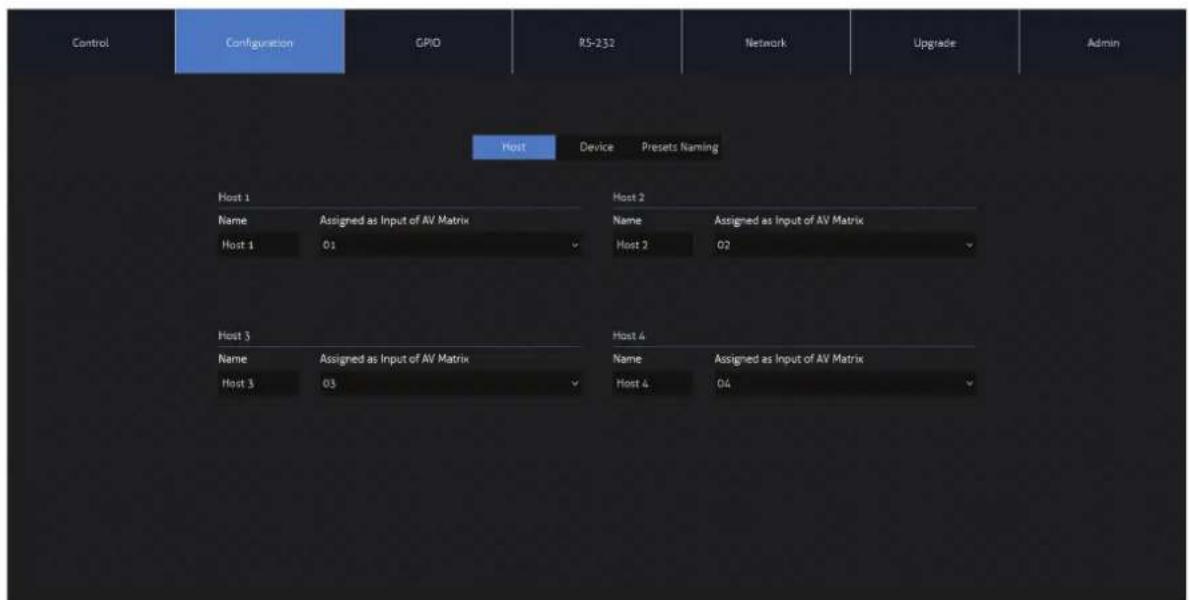
Host Configuration Page
The Host Configuration page allows each of the USB Host inputs to be assigned an ID associated with an input into a Blustream AV Matrix, as well as a name. This is particularly useful when being used in conjunction with a Blustream AV Matrix. The MX44KVM can be cascaded with multiple MX44KVM units, with each USB Host assigned a specific ID number to switch with the associated inputs on additional MX44KVM, or AV Matrix products.
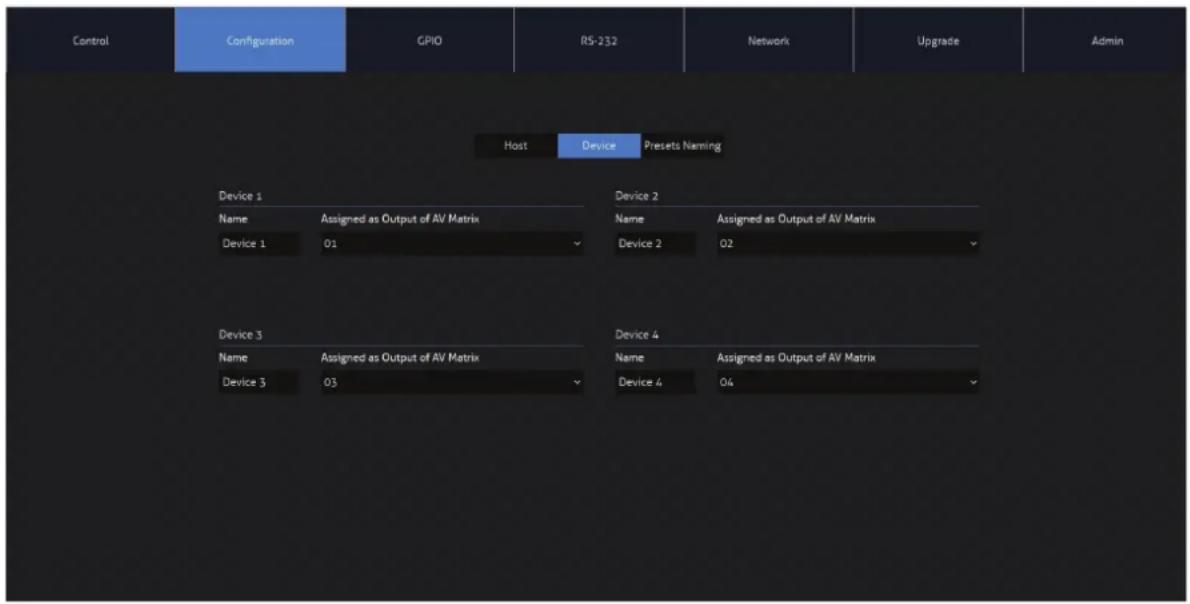
Device Configuration Page
The Device Configuration page allows each of the USB Device peripherals to be assigned an ID associated with an input into a Blustream AV Matrix, as well as a name. This is particularly useful when being used in conjunction with a Blustream AV Matrix. The MX44KVM can be cascaded with multiple MX44KVM units, with each USB Device assigned a specific ID number to switch with the associated output on additional MX44KVM, or AV Matrix products.
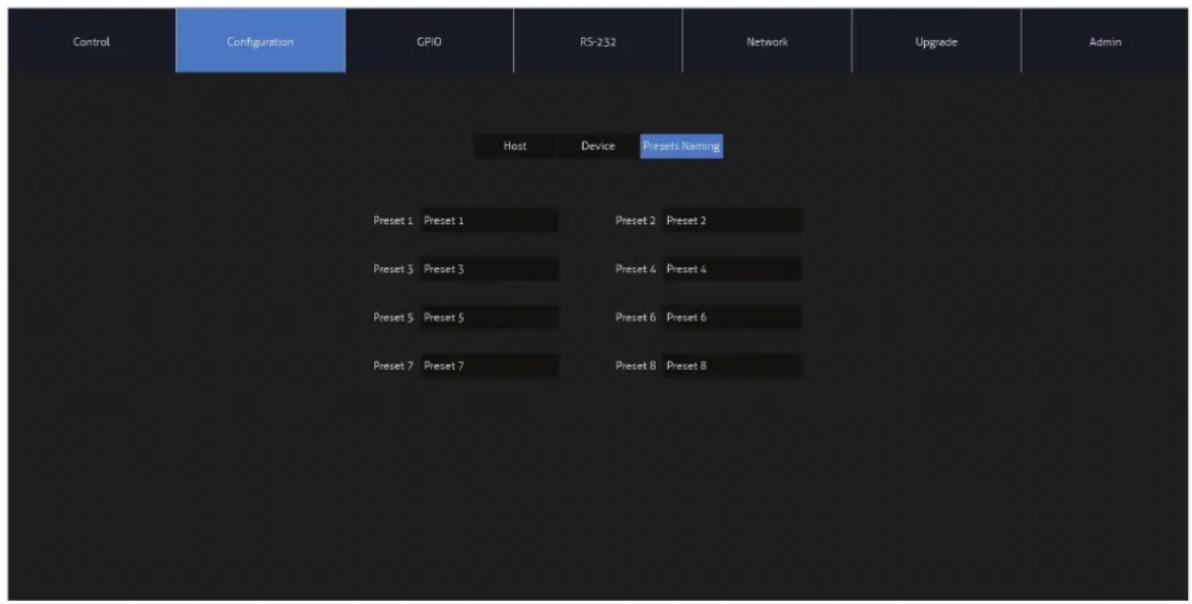
Preset Configuration Page
The Preset Configuration Page allows a User to change the naming of the presets on the Control Page of the Matrix for simpler navigation by additional users.
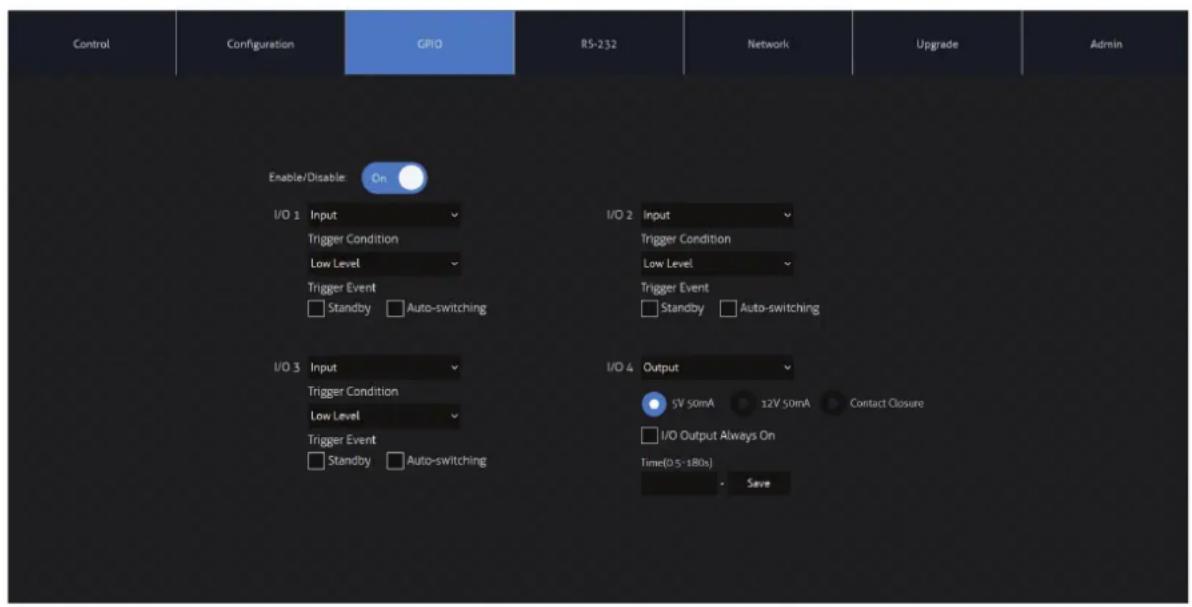
GPIO Page
The GPIO (General Purpose Input / Output) page allows for the configuration of the functionality of the GPIO ports on the MX44KVM.
Each of the MX44KVM's four I/O ports can be configured as either Inputs or Outputs, and have the following independent options available:
Input Triggers:
The MX44KVM can be triggered to carry out an action when a voltage is sensed from one of the GPIO's set to Input.
Trigger Conditions: Low Level (0-6V), or High Level (6-12V)
Trigger Event: Activate Standby, or Activate Auto Switching
Output Triggers:
The MX44KVM's outputs can be used as either a contact closure, or to output a 5V or 12V trigger for a set period of time.
Output type: 5V 50mA, 12V 50mA, or contact closure
Output duration: 1min to 60mins, or always on
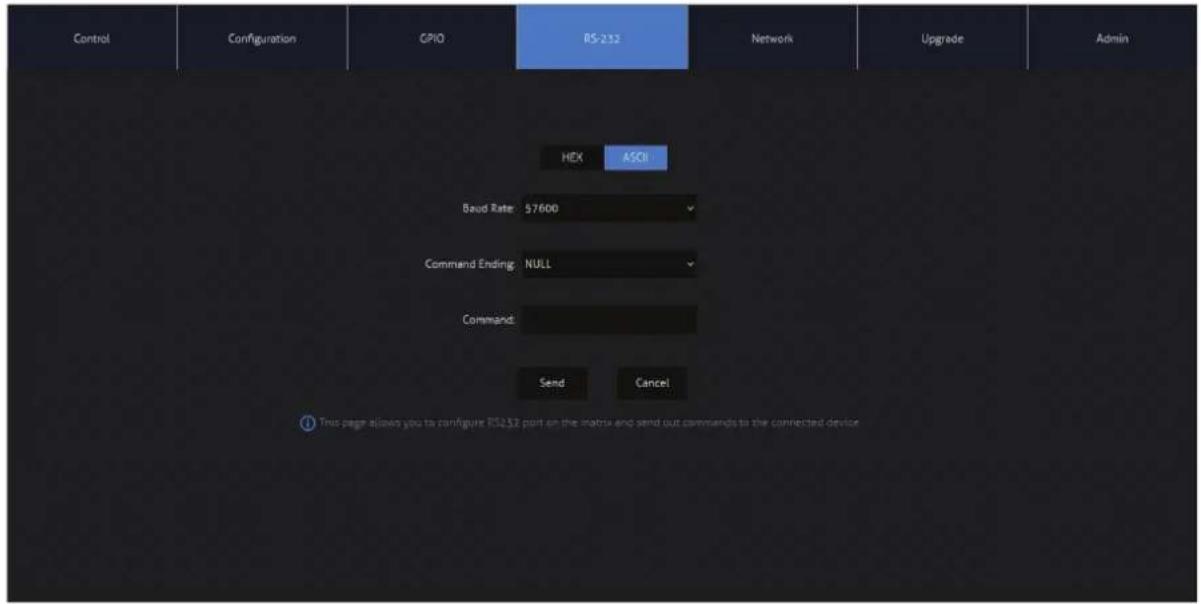
RS-232 Page
The RS-232 page allows for commands to be sent out of the local RS-232 port on the Matrix.
Baud rate and terminator command, as well as Hex or ASCII can be selected.
Sending an RS-232 command out via the Matrix can be useful in assisting with debugging and fault finding an RS-232 device connected to the Matrix.
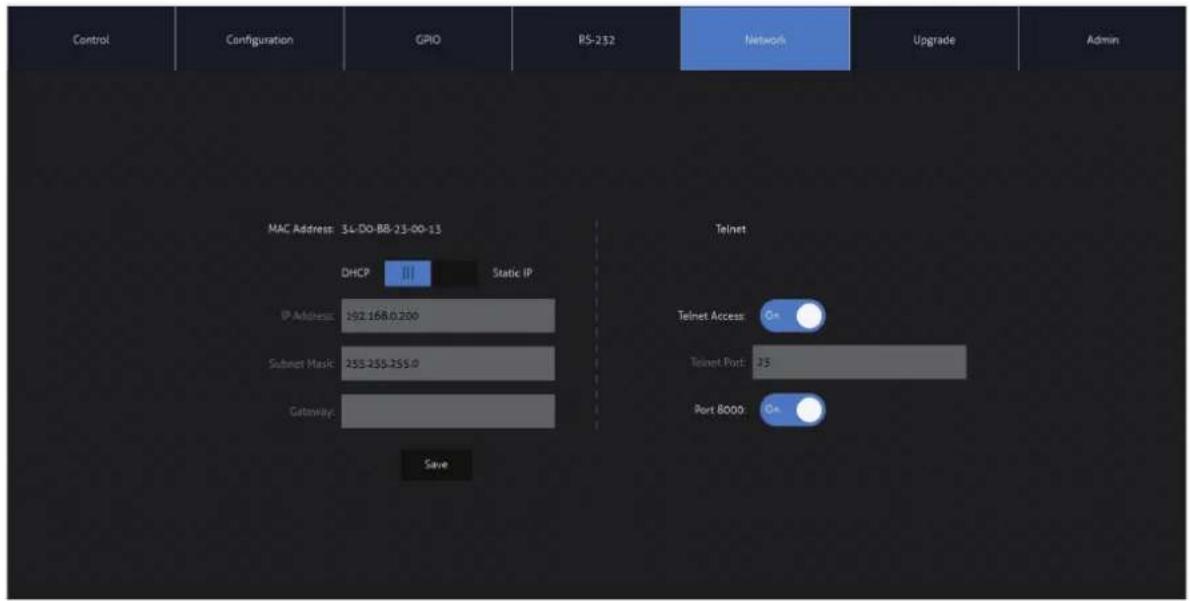
Network Page
The Network page allows the ability to specify the TCP/IP network port settings. Static IP or DHCP, can be selected as well as specification of a fixed IP Address, Subnet Mask and Gateway. The Telnet port can also be adjusted for individual control systems as required.
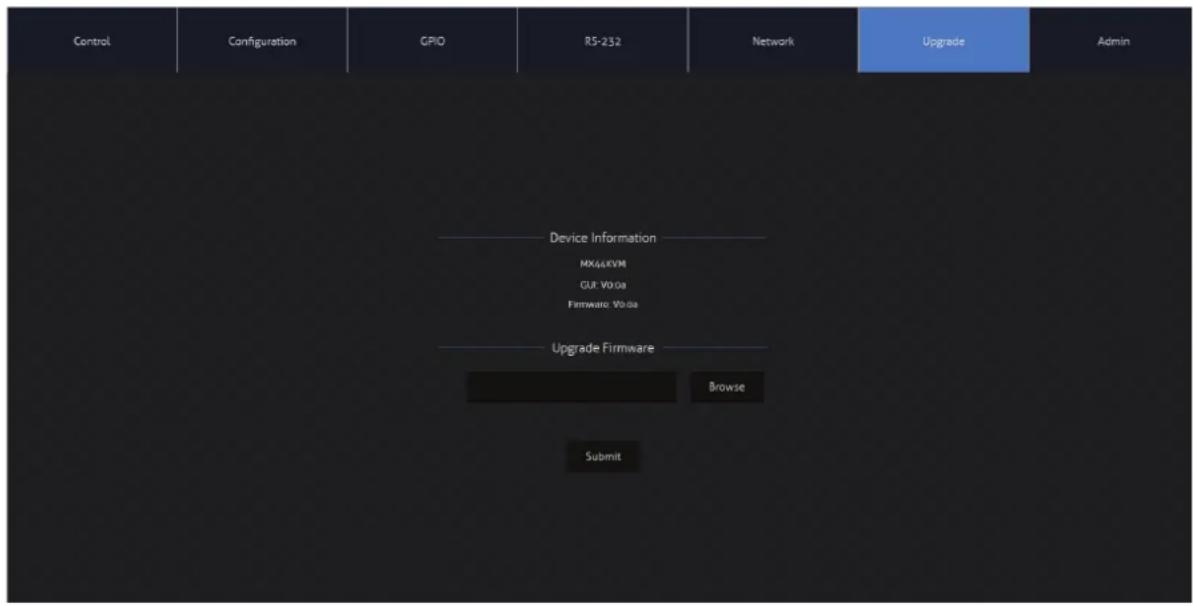
Upgrade Page
The Upgrade page shows the current firmware versions on the Matrix, this includes the Web-GUI version and MCU firmware versions. The Matrix (MCU) firmware can be uploaded from this page as required. Please refer to the instructions within the files on the Blustream website prior to undertaking a fiurmware update. To update the firmware of the unit, download the relevant file from the Blustream website, browse for the firmware update file on your PC, and press Submit. Do not un-plug or turn off the updating PC during the update process.
Admin Page
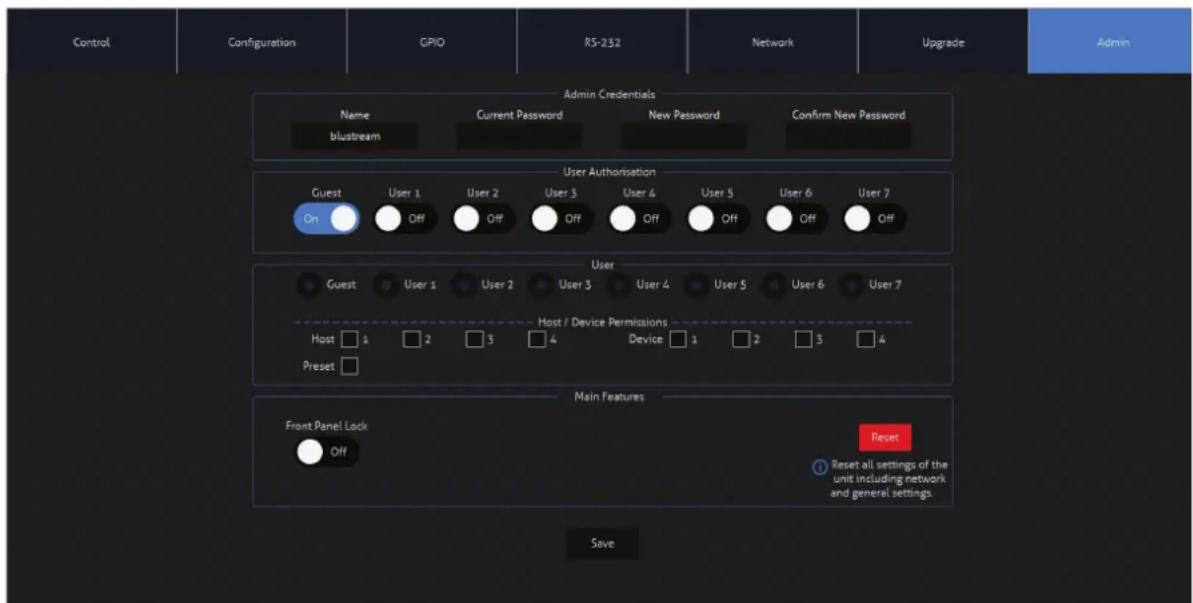
The Admin page allows the Admin user to configure up to 8x Users including a Guest user. Users have permission to update their own passwords as required, but can also be carried from this page by the Admin as required.
The Admin, or Users who have been given Admin permissions, are able to allocate permissions to Users. These permissions include allowing or disabling access to individual pagea within the Web-GUI, as well as access to each input or output of the Matrix.
The Admin page also allows for the front panel buttons, and front panel IR control to be locked or unlocked. The Matrix can be factory defaulted by clicking the Reset button. This resets the matrix back to factory settings - this includes naming, users, permissions and network settings.
Remote Control Description
IR Commands
OUTPUT AND INPUT SELECTION
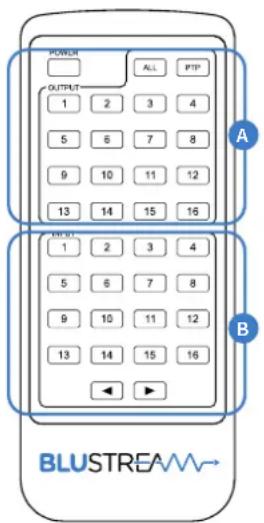
Please note the MX44KVM supports the Blustream REM16 (16x16) remote control.
A Select the zone Output you wish to change the source on (Numbers 1-16 correspond to the zone outputs 1-16, or All corresponds with all outputs).
Pressing the PTP button will mirror all inputs and outputs (Example - Input 1 to output 1, input 2 to output 2 etc).
B Select the source Input you wish to change the selected zone to (numbers 1-8 correspond to the source inputs 1-8m or All corresponds with all inputs)
NEC Customer Code = 1898
Advanced matrix features are not available via IR commands
| COMMAND NEC HEX | ||
| POWER TOGGLE | 0x14 | 0000 006e 0000 002c 0160 00b0 0016 0016 0016 0016 0016 0042 0016 0042 0016 0016 0016 0016 0016 0016 0016 0016 0016 0016 0016 0016 0016 0016 0016 0016 0016 0016 0016 0016 0015 0016 0016 0016 0016 0016 0016 0016 0016 0016 0016 0016 0016 0016 0016 0016 0016 0016 0016 0016 0013 0016 0016 0016 0016 0016 0016 0016 0016 0016 0016 0016 0016 0016 0016 0016 0016 0016 0016 0016 0014 0016 0016 0016 0016 0016 0016 0016 0016 0016 0016 0016 0016 0016 0016 0016 0016 0016 0016 0016 0018 0016 0016 0016 0016 0016 0016 0016 0016 0016 0016 0016 0016 0016 0016 0016 0016 0016 0016 0016 0017 0016 0016 0016 0016 0016 0016 0016 0016 0016 0016 0016 0016 0016 0016 0016 0016 0016 0016 0016 0019 0016 0016 0016 0016 0016 0016 0016 0016 0016 0016 0016 0016 0016 0016 0016 0016 0016 0016 0016 0012 0016 0016 0016 0016 0016 0016 0016 0016 0016 0016 0016 0016 0016 0016 0016 0016 0016 0016 0016 002 0016 0016 0016 0016 0016 0016 0016 0016 0016 0016 0016 0016 0016 0016 0016 0016 0016 0016 0016 003 0016 0016 0016 0016 0016 0016 0016 0016 0016 0016 0016 0016 0016 0016 0016 0016 0016 0016 0016 0022 0016 0016 0016 0016 0016 0016 0016 0016 0016 0016 0016 0016 0016 0016 0016 0016 0016 0016 0016 0042 0016 0016 0016 0016 0016 0016 0016 0016 0016 0016 0016 0016 0016 0016 0016 0016 0016 0018 0016 0018 0018 0018 0018 0018 0018 0018 0018 0018 0018 0018 0018 0018 0018 0018 0018 0022 0016 0016 0016 0016 0016 0016 0016 0016 0016 0016 0016 0016 0016 0016 0016 0016 0016 0016 0018 0018 0018 0018 0018 0018 0018 0018 0018 0018 0018 0018 0018 0018 0022 0016 0016 0016 0016 0018 0018 0018 0018 0018 0018 0018 0018 0018 0018 0018 0018 0022 0016 0016 0016 0016 0016 0016 0018 0018 0018 0018 0018 0018 0018 0018 0018 0022 0016 0016 0016 0016 0016 0016 0016 0016 0016 0018 0018 0018 0018 0018 0018 0018 0018 0022 0016 0016 0016 0016 0016 0016 0016 0016 0016 0016 0018 0018 0018 0018 0018 0018 0018 0018 0018 0022 0016 0016 0016 0018 0018 0018 0018 0018 0018 0018 0022 0016 0016 0016 0016 0016 0016 0016 0016 0016 0016 0016 0018 0018 0018 0018 0018 0018 0018 0018 0022 0016 0018 0018 0018 0018 0018 0018 0022 0016 0018 0018 0018 0018 0018 0022 0016 0018 0018 0018 0018 0018 0022 0016 0018 0018 0018 0018 0022 0016 0018 0018 0018 0018 0022 0016 0018 0018 0018 0018 0022 0016 0018 0019 0019 0019 0019 0019 0019 0019 0022 0016 0018 0019 0019 0019 0019 0022 0016 0018 0019 0019 0019 0022 0016 0018 0019 0019 0022 0016 0018 0019 0022 0016 0018 0019 0022 0016 0018 0019 0022 0016 0018 0019 0022 0022 0016 0018 0019 0022 0016 0018 0019 0022 0022 0016 0018 0019 0022 0022 0016 0018 0019 0022 0022 0016 0018 0019 0022 0022 0016 0018 0019 0023 0022 0022 0022 0022 0022 0022 0022 0022 0022 0022 0022 0022 0022 0022 0022 0022 0022 0022 0022 0022 0023 0022 0022 0022 0022 0022 0022 0022 0022 0022 0022 0022 0022 0022 0022 0022 0022 0022 0022 0023 0023 0023 0023 0023 0023 0023 0023 0023 0023 0023 0023 0023 0023 0023 0023 0023 0023 0023 0023 0024 0022 0022 0022 0022 0022 0022 0022 0022 0022 0022 0022 0022 0022 0022 0022 0022 0022 0022 0022 0024 0022 0022 0022 0022 0022 0022 0022 0022 0022 0022 0022 0022 0022 0022 0022 0022 0022 0022 0023 0024 0022 0022 0022 0022 0022 0022 0022 0022 0022 0022 0022 0022 0022 0022 0022 0022 0022 0023 0024 0023 0024 0023 0024 0023 0024 0023 0024 0023 0024 0023 0024 0023 0024 0023 0024 0023 0024 0023 0025 0025 0025 0025 0025 0025 0025 0025 0025 0025 0025 0025 0025 0025 0025 0025 0025 0025 0025 0025 0026 0025 0025 0025 0025 0025 0025 0025 0025 0025 0025 0025 0025 0025 0025 0025 0025 0025 0025 0025 0027 0025 0027 0027 0027 0027 0027 0027 0027 0027 0027 0027 0027 0027 0027 0027 0027 0027 0027 0027 0027 0027 0028 0028 0028 0028 0028 0028 0028 0028 0028 0028 0028 0028 0028 0028 0028 0028 0028 0028 0028 0028 0029 0029 0029 0029 0029 0029 0029 0029 0029 0029 0029 0029 0029 0029 0029 003 003 003 003 003 003 003 003 003 003 003 003 003 003 003 003 003 003 003 003 003 003 003 003 003 004 0. |
| OUTPUT 1 x x x x x x x x x x x x x x x x x x x x x x x x x x x x x x x x x x x x x x x x x x x x x x x x x x x x x x x x x x x x x x x x x x x x x x x x x x x x x x x x x x x x x x x x x x x x x x x x x x x x | OUTPUT 1 x x x x x x x x x x x x x x x x x x x x x x x x x x x x x x x x x x x x x x x x x x x x x x x x x x x x x x x x x x x x x x x x x x x x x x x x x x x x x x x x x x x x x x x x x x x x x x x | OUTPUT 1x x x x x x x x x x x x x x x x x x x x x x x x x x x x x x x x x x x x x x x x x x x x x x x x x x x x x x x x x x x x x x x x x x x x x x x x x x x x x x x x x x x x x x x x x x x x x x x x x x x x |
IR Commands
| COMMAND NEC HEX | ||
| OUTPUT 15 0x48 | 0000 006e 0000 002c 0160 0050 0016 0016 0016 0016 0016 0016 0016 0016 0016 0016 0016 0016 0016 0016 0016 0016 0016 0016 0016 0016 0015 0016 0016 0016 0016 0016 0016 0016 0016 0016 0016 0016 0016 0016 0016 0016 0016 0016 0016 0016 0013 0016 0042 0016 0042 0016 0016 0016 0016 0016 0016 0016 0016 0016 0016 0016 0016 0016 0016 0016 0016 0016 0016 0016 0014 0016 0042 0016 0042 0016 0016 0016 0016 0016 0016 0016 0016 0016 0016 0016 0016 0016 0016 0016 0015 0016 0016 0016 0015 0016 0016 0016 0016 0016 0016 0016 0016 0016 0016 0016 0016 0016 0016 0016 0015 0016 0016 0016 0014 0016 0042 0016 0042 0016 0016 0016 0016 0016 0016 0016 0016 0016 0016 0016 0015 0016 0016 0016 0016 0016 0016 0016 0015 0016 0016 0016 0016 0016 0016 0016 0016 0016 0016 0016 0015 0016 0016 0016 0016 0016 0016 0016 0017 0016 0016 0016 0016 0016 0016 0016 0016 0016 0016 0016 0016 0016 0016 0016 0016 0016 0016 0016 0017 0016 0016 0016 0016 0016 0016 0016 0016 0016 0016 0016 0017 0016 0016 0016 0016 0016 0016 0016 0017 0016 0016 0016 0016 0016 0016 0016 0016 0017 0016 0016 0016 0016 0016 0016 0016 0017 0016 0016 0017 0016 0017 0016 0017 0016 0017 0017 0017 0017 0017 0017 0017 0017 0017 0017 0017 0017 0017 0017 0017 0017 0017 0017 0017 0017 0018 0016 0016 0016 0016 0016 0016 0016 0016 0016 0016 0016 0016 0016 0016 0016 0016 0016 0016 0016 0018 0016 0016 0016 0016 0016 0016 0016 0016 0016 0016 0016 0016 0016 0016 0016 0016 0016 0016 0017 0017 0017 0017 0017 0017 0017 0017 0017 0017 0017 0017 0017 0017 0017 0017 0017 0017 0018 0017 0017 0017 0017 0017 0017 0017 0017 0017 0017 0017 0017 0017 0017 0017 0017 0017 0017 0017 0019 0018 0018 0018 0018 0018 0018 0018 0018 0018 0018 0018 0018 0018 0018 0018 0018 0018 0018 0018 0018 0019 0019 0019 0019 0019 0019 0019 0019 0019 0019 0019 0019 0019 0019 0022 0022 0022 0022 0022 0022 0022 0022 0022 0022 0022 0022 0022 0022 0022 0022 0022 0022 0022 0022 0023 0023 0023 0023 0023 0023 0023 0023 0023 0023 0023 0023 0023 0023 0023 0023 0023 0023 0023 0023 0024 0024 0024 0024 0024 0024 0024 0024 0024 0024 0024 0024 0024 0024 0024 0024 0024 0024 0024 0024 0025 0025 0025 0025 0025 0025 0025 0025 0025 0025 0025 0025 0025 0025 0025 0025 0025 0025 0025 0025 0026 0026 0026 0026 0026 0026 0026 0026 0026 0026 0026 0026 0026 0026 0026 0026 0026 0026 0026 0026 0027 0027 0027 0027 0027 0027 0027 0027 0027 0027 0027 0027 0027 0027 0027 0027 0028 0028 0028 0028 0028 0028 0028 0028 0028 0028 0028 0028 0028 0028 0028 0029 0029 0029 0029 0029 0029 0029 0029 0029 0029 0029 0029 0029 0029 0031 0031 0031 0031 0031 0031 0031 0031 0031 0031 0031 0031 0031 0031 0031 0031 0031 0031 0031 0031 0032 0032 0032 0032 0032 0032 0032 0032 0032 0032 0032 0032 0032 0032 0032 0032 0032 0032 0032 0032 0033 0033 0033 0033 0033 0033 0033 0033 0033 0033 0033 0033 0033 0033 0033 0033 0033 0033 0033 0033 0034 0034 0034 0034 0034 0034 0034 0034 0034 0034 0034 0034 0034 0034 0034 0034 0034 0034 0034 0034 0035 0035 0035 0035 0035 0035 0035 0035 0035 0035 0035 0035 0035 0035 0035 0035 0035 0035 0035 0035 0036 0036 0036 0036 0036 0036 0036 0036 0036 0036 0036 0036 0036 0036 0036 0036 0036 0036 0036 0036 0037 0037 0037 0037 0037 0037 0037 0037 0037 0037 0037 0037 0037 0037 0037 0038 0038 0038 0038 0038 0038 0038 0038 0038 0038 0038 0038 0038 0038 0039 0039 0039 0039 0039 0039 0039 0039 0039 0039 0039 0039 0039 0039 0041 0041 0041 0041 0041 0041 0041 0041 0041 0041 0041 0041 0041 0041 0041 0041 0041 0041 0041 0041 0042 0042 0042 0042 0042 0042 0042 0042 0042 0042 0042 0042 0042 0042 0042 0042 0042 0042 0042 0042 0043 0043 0043 0043 0043 0043 0043 0043 0043 0043 0043 0043 0043 0043 0043 0043 0043 0043 0043 0043 0044 0044 0044 0044 0044 0044 0044 0044 0044 0044 0044 0044 0044 0044 0044 0044 0044 0044 0044 0044 0045 0045 0045 0045 0045 0045 0045 0045 0045 0045 0045 0045 0045 0045 0045 0045 0045 0045 0045 0045 0046 0046 0046 0046 0046 0046 0046 0046 0046 0046 0046 0046 0046 0046 0046 0046 0046 0046 0046 0046 0047 0047 0047 0047 0047 0047 0047 0047 0047 0047 0047 0047 0047 0047 0047 0047 0048 0048 0048 0048 0048 0048 0048 0048 0048 0048 0048 0048 0048 0048 0048 0048 0048 0049 0049 0049 0049 0049 0049 0049 0049 0049 0049 0049 0051 0051 0051 0051 0051 0051 0051 0051 0051 0051 0051 0051 0051 0051 0051 0051 0051 0051 0051 0051 0151 1515 1515 1515 1515 1515 1515 1515 1515 1515 1515 1515 1515 1515 1515 1515 1515 1515 1515 1515 1515 1516 1516 1516 1516 1516 1516 1516 1516 1516 1516 1516 1516 1516 1516 1516 1516 1516 1516 1516 1516 1517 1517 1517 1517 1517 1517 1517 1517 1517 1517 1517 1517 1517 1517 1517 1517 1517 1517 1517 1518 1518 1518 1518 1518 1518 1518 1518 1518 1518 1518 1518 1518 1518 1518 1518 1518 1518 1518 1518 1519 1519 1519 1519 1519 1519 1519 1519 1519 1519 1519 1519 1519 1519 1519 1521 1521 1521 1521 1521 1521 1521 1521 1521 1521 1521 1521 1521 1521 1521 1521 1521 1521 1521 1521 1522 1522 1522 1522 1522 1522 1522 1522 1522 1522 1522 1522 1522 1522 1522 1522 1522 1522 1522 1522 1523 1523 1523 1523 1523 1523 1523 1523 1523 1523 1523 1523 1523 1523 1523 1523 1523 1523 1523 1523 1524 1524 1524 1524 1524 1524 1524 1524 1524 1524 1524 1524 1524 1524 1524 1524 1524 1525 1525 1525 1525 1525 1525 1525 1525 1525 1525 1525 1525 1525 1525 1525 1525 1525 1525 1525 1525 1526 1526 1526 1526 1526 1526 1526 1526 1526 1526 1526 1526 1526 1526 1526 1526 1526 1526 1526 1526 1527 1527 1527 1527 1527 1527 1527 1527 1527 1527 1527 1527 1527 1527 1527 1527 1528 1528 1528 1528 1528 1528 1528 1528 1528 1528 1528 1528 1528 1528 1528 1528 1529 1529 1529 1529 1529 1529 1529 1529 1529 1529 1529 1531 1531 1531 1531 1531 1531 1531 1531 1531 1531 1531 1531 1531 1531 1531 1531 1532 1532 1532 1532 1532 1532 1532 1532 1532 1532 1532 1532 1532 1532 1532 1533 1533 1533 1533 1533 1533 1533 1533 1533 1533 1533 1533 1533 1533 1533 1533 1534 1534 1534 1534 1534 1534 1534 1534 1534 1534 1534 1534 1534 1534 1534 1535 1535 1535 1535 1535 1535 1535 1535 1535 1535 1535 1535 1535 1535 1535 1536 1536 1536 1536 1536 1536 1536 1536 1536 1536 1536 1536 1536 1536 1536 1536 1537 1537 1537 1537 1537 1537 1537 1537 1537 1537 1537 1537 1537 1538 1538 1538 1538 1538 1538 1538 1538 1538 1538 1538 1538 1539 1539 1539 1539 1539 1539 1539 1539 15 | |
Specifications
• USB Device Connectors: 4 x USB Type A, female
• USB Host Connectors: 4 x USB Type B, female
• RS-232 Serial Port: 2 x 3-pin Phoenix connector
• IR Input Ports: 1 x 3.5mm stereo jack
• TCP/IP Control Port: 1 x RJ45, female
• GPIO Port: 1 x 5-pin Phoenix connector
• Casing Dimensions (W x H x D): 273mm x 168mm x 25mm
• Shipping Weight: 0.8kg (TBC)
- Operating Temperature: 32°F to 104°F (-5°C to +55°C)
• Storage Temperature: -4°F to 140°F (-25°C to +70°C)
• Power Supply: 24V/1.25A DC, 4-pin DIN connector
NOTE: Specifications are subject to change without notice. Weights and dimensions are approximate.
Package Contents
- 1×MX44KVM
- 1x Mounting kit
- 1 x USB-A to USB-B cable
- 1x IRR receiver
- 1 x IRCAB control cable - 3.5mm-3.5mm cable
- 2 x 3-pin Phoenix connector
- 1 x 5-pin Phoenix connector
- 1 x 24V/1.25A DC power supply
• 1 x Quick Reference Guide
Maintenance
Clean this unit with a soft, dry cloth. Never use alcohol, paint thinner or benzene to clean this unit.
RS-232 Configuration and Telnet Commands
The Blustream matrix can be controlled via serial and TCP/IP.
RS-232 port 1 is used for configuration and control of the product. RS-232 port 2 is used for cascading multiple MX44KVM units together to create a larger I/O KVM matrix system, or when used in conjunction with a Bustream AV matrix to add KVM switching to a larger system.
The default RS-232 communication settings for both ports are:
Baud rate: 57600
Data bit: 8
Stop bit: 1
Parity bit: none
The following pages list all available serial commands for RS-232 port 1:
Commonly used Serial Commands
There are several commands that are commonly used for control and testing:
STATUS Status will give feedback on matrix such as zones on, type of connection etc...
PON Power on
POFF Power off
USBOUTxxFRyy (xx is the Host / zone out, yy is the USB Device input)
Example:- USBOUT01FR04 (This would switch host 1 to device 4)
Common Mistakes
- Carriage return – Some programs do not require the carriage return, where others will not work unless included after / within the string. In the case of some Terminal software the token
- Spaces – Blustream commands do not require space between commands unless specified. There may be some programs that require spacing in order to work.
- How the string should look is as follows USBOUT01FR02
- How the string may look if spaces are required: USBOUT{Space}01{Space}FR{Space}02
- Baud rate or other serial protocol settings are not correct
RS-232 Configuration and Telnet Commands
COMMAND ACTION
| ? / HELP Print System Status And Port Status | |
| STATUS Print All Input Status | |
| INSTA Print All Output Status | |
| OUTSTA Print All GPIO Input Status | |
| GPOUTSTATUS Print All GPIO Output Status | |
| GPINSTATUS Print All Preset Configurations | |
| PRESETSTATUS Print All Cascade Status | |
| CASCADESTATUS Set System Power On Or Off | |
| PON/OFF Set System Key Control On Or Off | |
| KEY ON/OFF Reset System To Default Setting | |
| RESET | Set System Front Panel IR Control On Or Off(Type 'Yes' To Confirm, Or Send Other Command To Discard) |
| USBOUT xx FR yy | Set USB HOST From DEVICE:yyxx = [01-04] : USB HOST 1 - 4yy = [01-04] : USB DEVICE 1 - 4yy = 00 : All USB DEVICE |
| PRESET pp SAVE | Save Current Output Connections To Preset pp Configpp = [01-09] : Presets 1 - 9 |
| PRESET pp CLR | Delete Preset pp Configpp = [00-09] : 00 : All Presets, pp = [01-09] : Preset 1 - 9 |
| PRESET pp APPLY | Apply Preset pp Config To Output Connectionpp = [01-09] : Presets 1 - 9 |
| GPIOENABLE x | Set GPIO Enable/Disablex = [0-1] 0 : Disable, 1 : Enable |
| AUTO-SWITCHING ON/OFF | Set Auto-Switching Mode On/Off |
| HOST xx FR yy | Sets Correspondence Between Input And Input Cascadesxx = [01-04] : USB HOST 1 - 4yy = [01-16] : AV INPUT 1 - 16 |
| DEVICE xx OUT yy | Sets The Correspondence Of The Output Cascadesxx = [01-04] : USB DEVICE 1 - 4yy = [01-16] : AV OUTPUT 1 - 16 |
| OUTPIN xx MODE yyTIME zzzz | Set GPIOOUTpin: xx Mode: yy Time: zzzzxx = 00 : GPIO Allxx = [01-04] : GPIO 1 - 4yy = 00 : Close Output Modeyy = [01-03] : Mode 1 - 3 (1: output 5v 50mA, 2: output 12v 50mA, 3: Contact Closure)zzzz = [0005-1800] : time 0.5s - 180s |
| INPIN xx MODE yySN z | Set GPIOINpin: xx Mode: yy Sign: zxx = 00 : GPIO Allxx = [01-04] : GPIO 1 - 4yy = [00-02] : Mode 0 - 2 (0-Turn Off All Detection Modes,1-Turn On Standby Mode Detection,2-Turn On Auto-Switching Mode Detection)z = [0-1] : SN 0 - 1 (Trigger Level: 0 - Low Level Valid, 1 - High Level Valid) |
COMMAND ACTION
| RS232BAUD z | Set RS232 Baud Rate To xxz = 1 - 2400, 2 - 4800, 3 - 9600, 4 - 19200, 5 - 38400, 6 - 57600 (Default), 7 - 115200 |
| RS232ONOUT z:a:b | Command a Whose Baud Rate Is z On Output RS232-2z = a ASCII, h HEXa = 1 - 2400, 2 - 4800, 3 - 9600, 4 - 19200, 5 - 38400, 6 - 57600 (Default), 7 - 115200b = RS231 Command |
| NET DHCP ON/OFF | Set Auto IP{DHCP} On Or Off |
| NET IP xxx.xxx.xxx.xxx | Set IP Address |
| NET GW xxx.xxx.xxx.xxx | Set Gateway Address |
| NET SM xxx.xxx.xxx.xxx | Set Subnet Mask Address |
| NET RB | Set Network Reboot And Apply New Config!!! |
| NET TN xxxx Set Telnet | Port |
| NET TN ON/OFF | Set Telnet Port On Or Off |
| NET TN8000 ON/OFF | Set Telnet Port 8000 On Or Off |
Web-GUI Firmware Update
The Web-GUI of the Matrix is used to configure and control the product through a web portal. The Matrix can be accessed on any internet connected device including: tablets, smart phones and laptops that are on the same network.
As the Web-GUI is used to update the main matrix firmware it is important to ensure that the Web-GUI firmware is the latest version PRIOR to updating the main MCU firmware. Please check the current firmware version against the version available to download from the Blustream website.
To update the Web-GUI firmware:
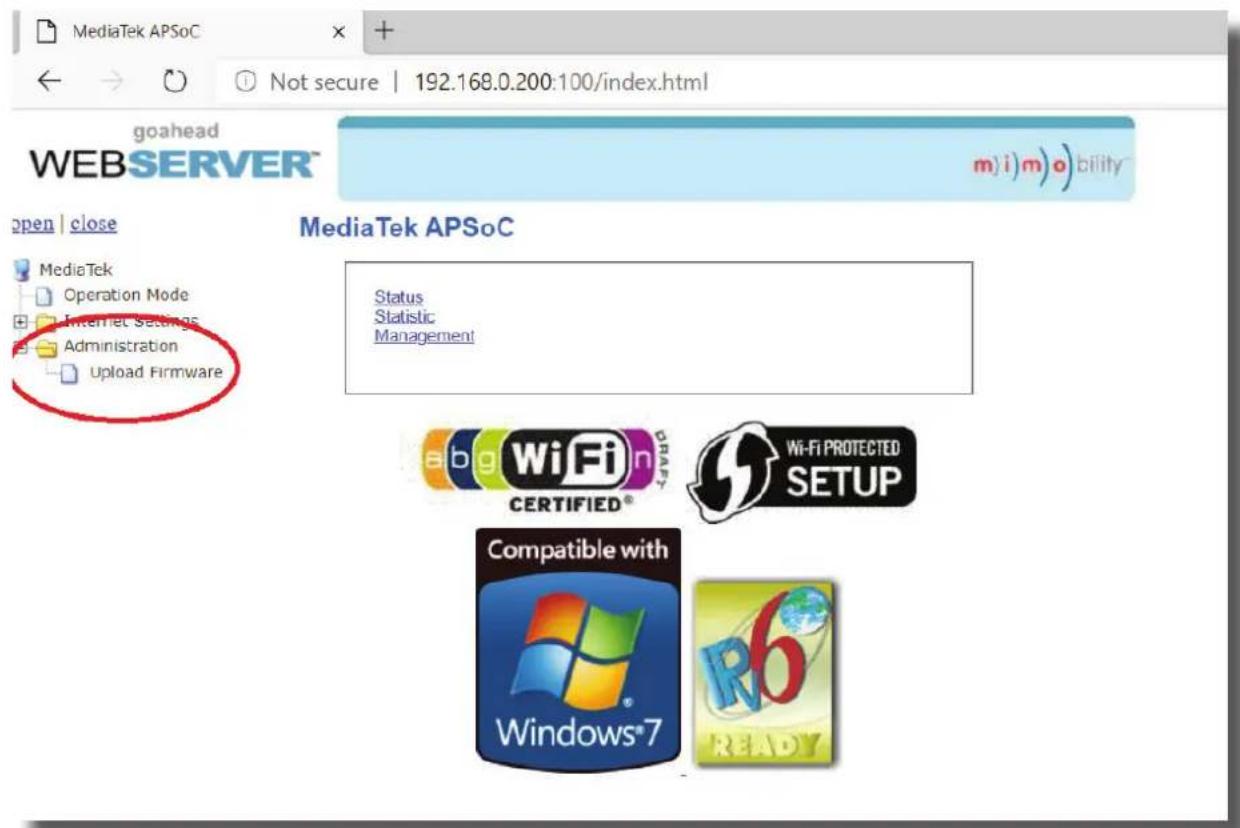
1) Login to the Web-GUI update menu:
Default IP Address: 192.168.0.200:100
Default Username: blustream Default Password: 1234
Please note: the IP address may differ if default network settings have been updated. If this is the case, please replace the following with the products current IP address:
XXX.XXX.XXX.XXX:100
2) When the Web-GUI menu interface has been accessed, expand the 'Administration' file in the menu tree by clicking the small '+' icon next to the file.
3) Select 'Upload Firmware':
4) Click 'Choose File' and select the Web-GUI/MediaTek firmware file downloaded in advance from the Blustream website. This will be a .bin file:
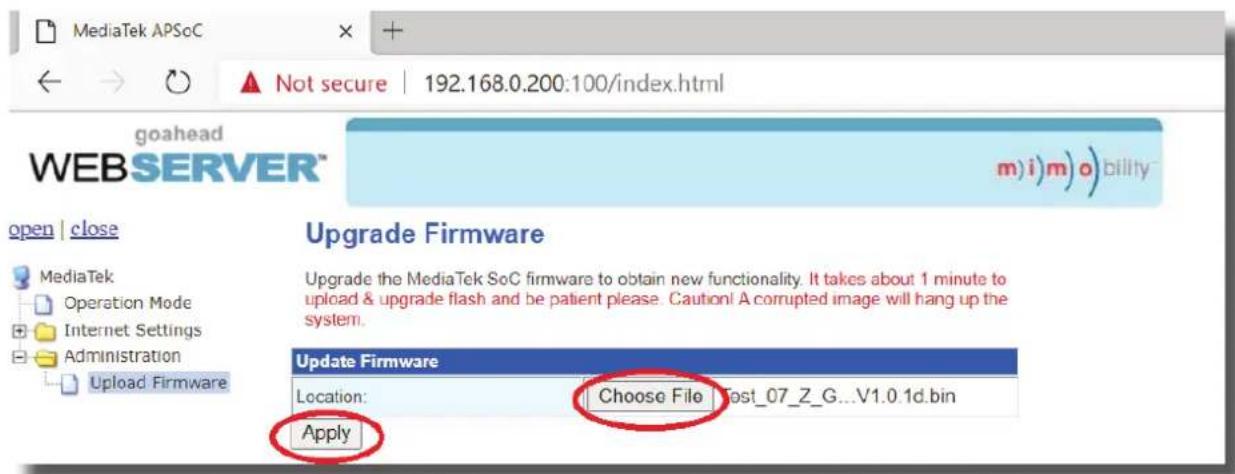
5) Press 'Apply' to begin the firmware update process.
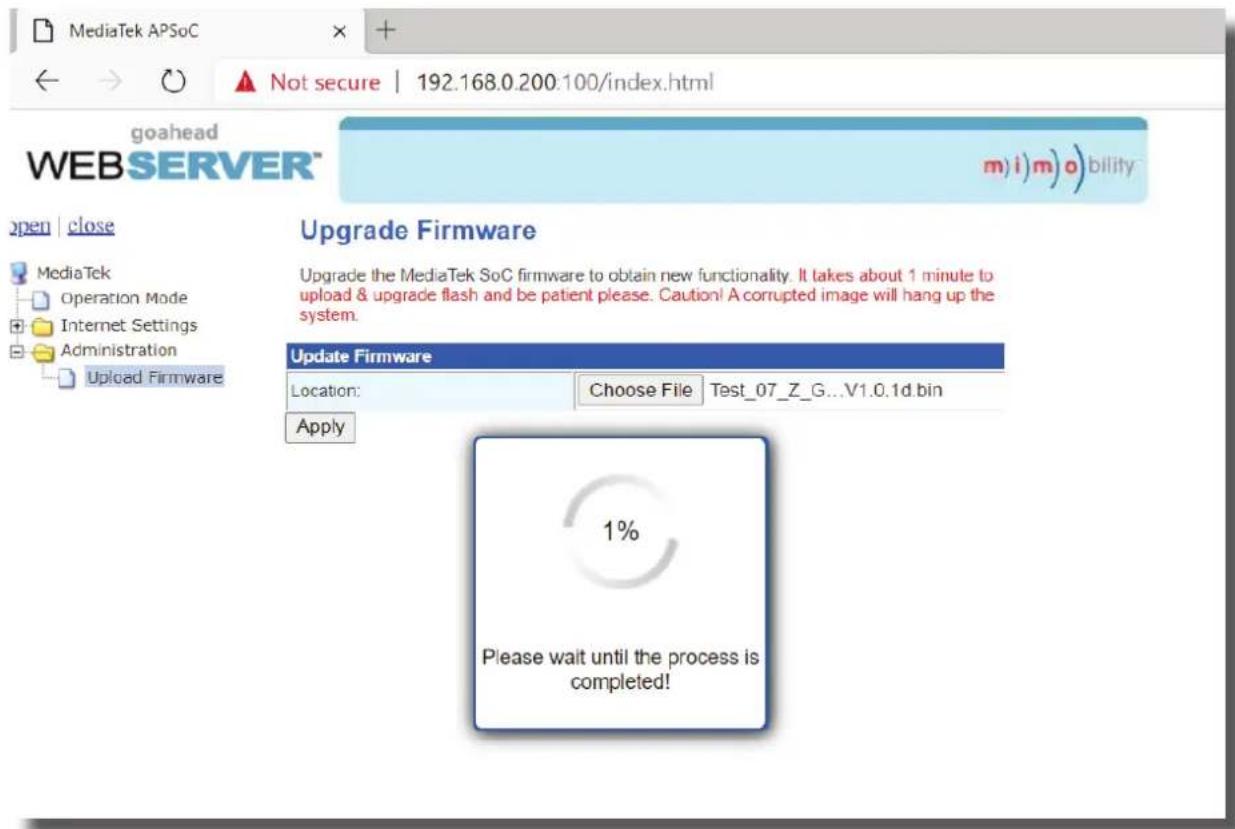
The update process will take up to 1 minute to complete. Do not refresh or navigate away from this page, or disconnect the matrix from the PC until the update process has completed.
Example Schematic
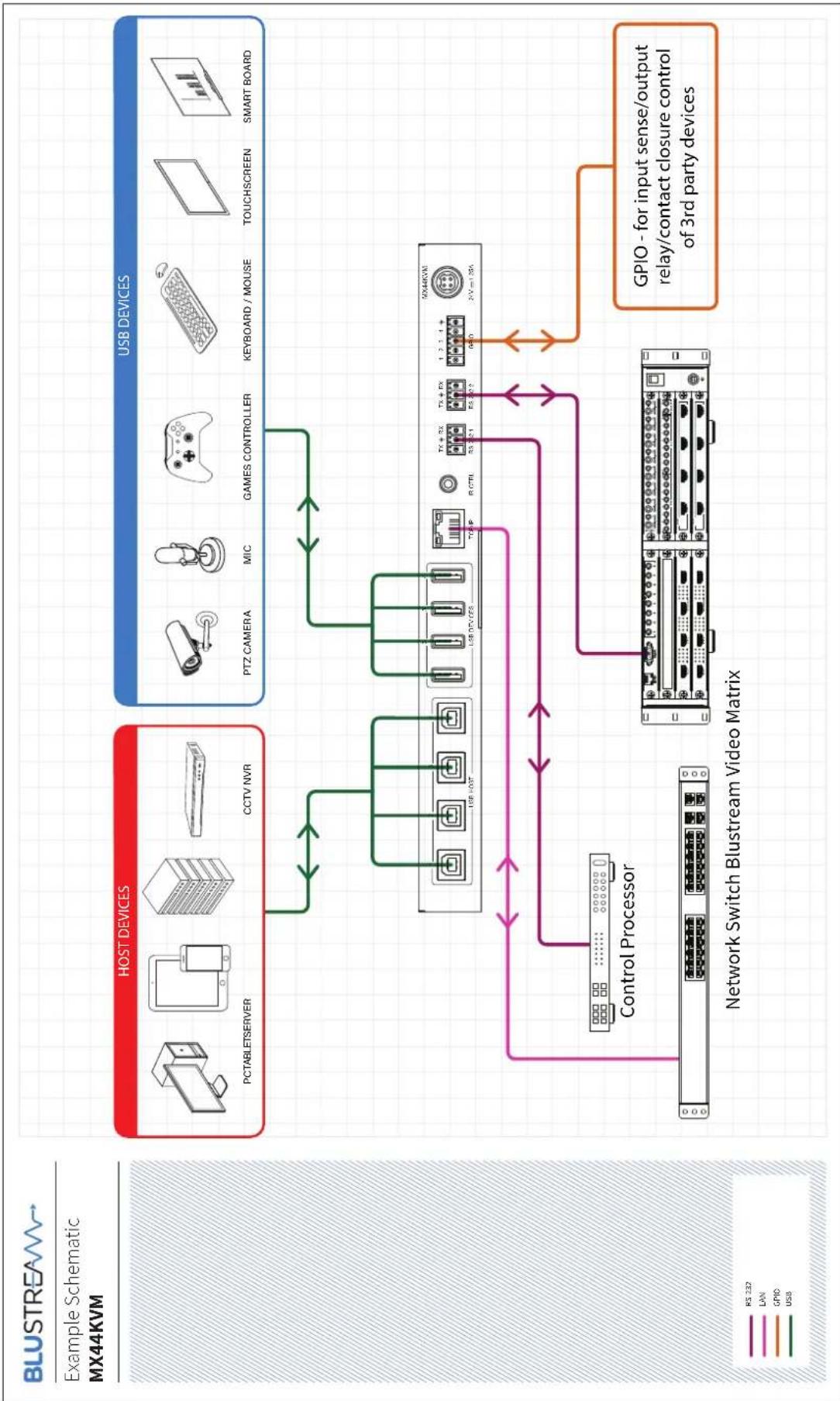
flowchart
graph TD
    A["HOST DEVICES"] --> B["Host Devices"]
    B --> C["USB DEVICES"]
    C --> D["Control Processor"]
    D --> E["Network Switch Bluestream Video Matrix"]
    E --> F["GPIO - for input sense/output relay/contact closure control of 3rd party devices"]
    style A fill:#f9f,stroke:#333
    style B fill:#bbf,stroke:#333
    style C fill:#bfb,stroke:#333
    style D fill:#ffb,stroke:#333
    style E fill:#fff,stroke:#333
Certifications
FCC Notice
This equipment has been tested and found to comply with the limits for a Class B digital device, pursuant to part 15 of the FCC Rules. These limits are designed to provide reasonable protection against harmful interference in a residential installation. This equipment generates, uses, and can radiate radio frequency energy and, if not installed and used in accordance with the instructions, may cause harmful interference to radio communications. However, there is no guarantee that interference will not occur in a particular installation. If this equipment does cause harmful interference to radio or television reception, which can be determined by turning the equipment off and on, the user is encouraged to try to correct the interference by one or more of the following measures:
• Reorient or relocate the receiving antenna.
- Increase the separation between the equipment and receiver.
- Connect the equipment into an outlet on a circuit different from that to which the receiver is connected.
- Consult the dealer or an experienced radio/TV technician for help.
CAUTION - changes or modifications not expressly approved by the party responsible for compliance could void the user's authority to operate the equipment.
CANADA, INDUSTRY CANADA (IC) NOTICES
This Class B digital apparatus complies with Canadian ICES-003.
Operation is subject to the following two conditions: (1) this device may not cause interference, and (2) this device must accept any interference, including interference that may cause undesired operation of the device.
CANADA, AVIS D'INDUSTRY CANADA (IC)
CORRECT DISPOSAL OF THIS PRODUCT
This marking indicates that this product should not be disposed with other household wastes. To prevent possible harm to the environment or human health from uncontrolled waste disposal, recycle it responsibly to promote the sustainable reuse of material resources. To return your used device, please use the return and collection systems or contact the retailer where the product was purchased. They can take this product for environmentally safe recycling.

BLUSTREA
www.blustream.com.au
www.blustream-us.com
www.blustream.co.uk
- MX44KVM User Manual
- Thank you for purchasing this product.
- Surge Protection Device Recommended
- Contents
- Introduction
- FEATURES:
- Front Panel Description
- Rear Panel Description
- Infrared (IR) Control
- IR Receiver - IRR
- IR Receiver - Stereo 3.5mm
- IR Control Cable - IRCAB (supplied)
- Web-GUI Control
- Login Page
- Guest Control Page
- User Control Page
- Host Configuration Page
- Device Configuration Page
- Preset Configuration Page
- GPIO Page
- Input Triggers:
- Output Triggers:
- RS-232 Page
- Network Page
- Upgrade Page
- Admin Page
- Remote Control Description
- OUTPUT AND INPUT SELECTION
- Specifications
- Package Contents
- Maintenance
- RS-232 Configuration and Telnet Commands
- Commonly used Serial Commands
- Common Mistakes
- Web-GUI Firmware Update
- Example Schematic
- Certifications
- FCC Notice
- CANADA, INDUSTRY CANADA (IC) NOTICES
- CANADA, AVIS D'INDUSTRY CANADA (IC)
- CORRECT DISPOSAL OF THIS PRODUCT
- BLUSTREA
Brand : Blustream
Model : MX44KVM
Category : Uncategorized