
Dots2 - Headphones Lamax - Free user manual and instructions
Find the device manual for free Dots2 Lamax in PDF.


| Product Type | True Wireless Earbuds |
| Brand | Lamax |
| Model | Dots2 |
| Dimensions (Earbuds) | Approx. 4.5 x 2.5 x 2.5 cm each |
| Dimensions (Charging Case) | Approx. 6 x 4 x 3 cm |
| Weight (Earbuds) | Approx. 4 g each |
| Weight (Charging Case) | Approx. 35 g |
| Battery Capacity (Earbuds) | 40 mAh |
| Battery Capacity (Case) | 400 mAh |
| Charging Port | USB-C |
| Battery Life | Up to 4 hours per charge (earbuds) | Extra 16 hours with case |
| Bluetooth Version | 5.0 |
| Wireless Range | Up to 10 m |
| Touch Controls | Yes (play/pause, track skip, volume, answer calls) |
| Microphone | Built-in for calls |
| Water Resistance | IPX4 (sweat and splash resistant) |
| Noise Reduction | Passive noise isolation |
| Ear Tips Included | S, M, L silicone tips |
| Charging Cable Included | USB-C to USB-A |
| Maintenance | Clean with a soft, dry cloth. Do not use liquids. |
| Safety | Keep away from children under 3 years. Do not disassemble. |
| Spare Parts | Replacement ear tips available. Charging cable standard. |
| Repairability | Not user-serviceable. Contact Lamax support for issues. |
| Compatible Devices | Smartphones, tablets, laptops with Bluetooth |
Frequently Asked Questions - Dots2 Lamax
User questions about Dots2 Lamax
0 question about this device. Answer the ones you know or ask your own.
Ask a new question about this device
Download the instructions for your Headphones in PDF format for free! Find your manual Dots2 - Lamax and take your electronic device back in hand. On this page are published all the documents necessary for the use of your device. Dots2 by Lamax.
USER MANUAL Dots2 Lamax
natural_image
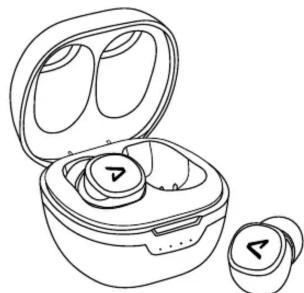
Line drawing of a wireless earbuds with open case and two separate earbuds (no text or symbols)Controls
| Turn On | Hold down the multifunction button for 3 seconds |
| Turn Off | Hold down the multifunction button for 3 seconds |
| Play / Pause | Press the multifunction button |
| Next Track | Press the multifunction button 2 times |
| Previous Track | Press the multifunction button 3 times |
| Answer/End Call | Press the multifunction button |
| Reject Call | Hold the multifunction button for 1 second |
| Last Number Redial | Press the multifunction button 4 times |
| Activate Mobile Assistant | Hold the multifunction button for 2 second |
The Ground Truth image displays a single, solid horizontal line. According to Rule 2 (UNDERSCORE & LINE RULES), if the GT contains lines used for stylistic emphasis or as background elements (like ruled paper), the OCR result must ignore them. The line in the GT is clearly a stylistic or background line, not a placeholder for text. Therefore, the OCR should not have output any underscores. Outputting `____` constitutes an error under Rule 2, as it hallucinates placeholder symbols where none are semantically intended. Hence, the OCR result is inconsistent with the Ground Truth.
Switching On
The earphones turn on automatically when removed from the charging station. To switch on manually, press and hold the multifunction button for 3 seconds. You must manually turn on both earphones separately. When switched on, there is an audible sound and the white LED flashes.
Switching Off
The earphones turn off automatically when inserted into the charging station. To turn off manually, hold the multifunction button on one of the earphones for 3 seconds. When switched off, an audible notification sounds and the red LED flashes.
Pairing
-
Remove the earphones from the charging station. The earphones will automatically connect to each other and an audible notification will sound. The left earphone is the main one, and ready for pairing is indicated by alternating blinking of white and red LEDs.
-
Turn on Bluetooth on your device and look for LAMAX Dots2 in the list of available Bluetooth devices. After successful pairing you will hear an audible notification.
For pairing problems, remove the earphones from the paired devices list on your phone. Turn off the earphones manually and hold the multifunction button for 5 seconds until both earphones blink alternately red and white, then insert them into the charging station and pair as described in 1.
Charging
To charge the charging station, connect the cable to the USB-C port on the back and the end of the cable into a USB power supply with a maximum voltage of 5V. When charging, the LEDS will light up gradually according to the charge status. When fully charged, all 4 LEDs will be lit.
You can also charge the charging station with a Qi-compatible wireless charger.
To charge the earphones, insert them into a charged charging station. The LED light in the headphones flashes twice and then turns red during charging. When fully charged, it goes out.
Parameters
| Wireless technology | Bluetooth 5.0 |
| Max. pairing distance | up to 10 metres |
| Supported codecs | AAC, SBC |
| Earphone battery capacity | 50 mAh |
| Charging station capacity | 550 mAh |
| Earphone charging time | approx. 2 hours |
| Playback time | up to 6 hours |
| Weight of one earphone | 3 g |
| Weight with charging station | 42 g |
Subject to printing errors.
The latest version of the user guide can be downloaded here: https://www.lamax-electronics.com/downloads/lamax-dots2/manual


CE
RoHS
LAMAX Dots2

natural_image
Line drawing of a wireless earbuds with open case and two detached earbuds (no text or symbols)Steuerung
https://www.lamax-electronics.com/downloads/lamax-dots2/manual


CE RoHS
LAMAX Dots2

natural_image
Line drawing of an open wireless earbuds with two earphones (no text or symbols)Ovládání
https://www.lamax-electronics.com/downloads/lamax-dots2/manual


CE RoHS
LAMAX Dots2

natural_image
Line drawing of an open wireless earbuds with two charging case (no text or symbols)Ovládanie
m = 311
■
https://www.lamax-electronics.com/downloads/lamax-dots2/manual


CE
RoHS
LAMAX Dots2
natural_image
Line drawing of an open wireless earbuds with two earbuds (no text or symbols)Obstuga
natural_image
Line drawing of a wireless earbuds with open case and two detached earbuds (no text or symbols)Vezérlés
natural_image
Line drawing of an open wireless earbuds with two earphones (no text or symbols)Upravljanje
| Viklop | Podržite večnamensko tipko 3 sekunde |
| Izklop | Podržite večnamensko tipko 3 sekunde |
| Igrati / Premor | Pritisnite večnamensko tipko |
| Naslednja skladba | 2× pritisnite večnamensko tipko |
| Prejinja skladba | 3× pritisnite večnamensko tipko |
| Sprejem / konćanje klica | Pritisnite večnamensko tipko |
| Zavrnitev klica | Podržite večnamensko tipko eno sekundo |
| Klicati zadnjo klicano stevilko | 4× pritisnite večnamensko tipko |
| Aktiviranje mobilnega asistent | Podržite večnamensko tipko 2 sekundi |
Vklop
natural_image
Line drawing of an open wireless earbuds with two earphones (no text or symbols)Upravljanje
| Uključi | Držite višenamjenski gumb 3 sekunde |
| Isključi | Držite višenamjenski gumb 3 sekunde |
| Reproduciraj / Stanka | Pritisnite višenamjenski gumb |
| Sljedeća pjesma | 2× pritisnite višenamjenski gumb |
| Prethodna pjesma | 3× pritisnite višenamjenski gumb |
| Prihvat / Završi poziv | Pritisnite višenamjenski gumb |
| Odbij poziv | Držite višenamjenski gumb 1 sekundu |
| Pozovi zadnji pozvani broj | 4× pritisnite višenamjenski gumb |
| Aktivacija mobilnog asistenta | Držite višenamjenski gumb 2 sekunde |
Uključenje


Brand : Lamax
Model : Dots2
Category : Headphones