
CR 106 - Scale CAMRY - Free user manual and instructions
Find the device manual for free CR 106 CAMRY in PDF.


User questions about CR 106 CAMRY
0 question about this device. Answer the ones you know or ask your own.
Ask a new question about this device
Download the instructions for your Scale in PDF format for free! Find your manual CR 106 - CAMRY and take your electronic device back in hand. On this page are published all the documents necessary for the use of your device. CR 106 by CAMRY.
USER MANUAL CR 106 CAMRY
natural_image
Simple line drawing of a U-shaped connector or switch (no text or symbols)
text_image
A 4 C B D 631 2560 1682.4Wa
text_image
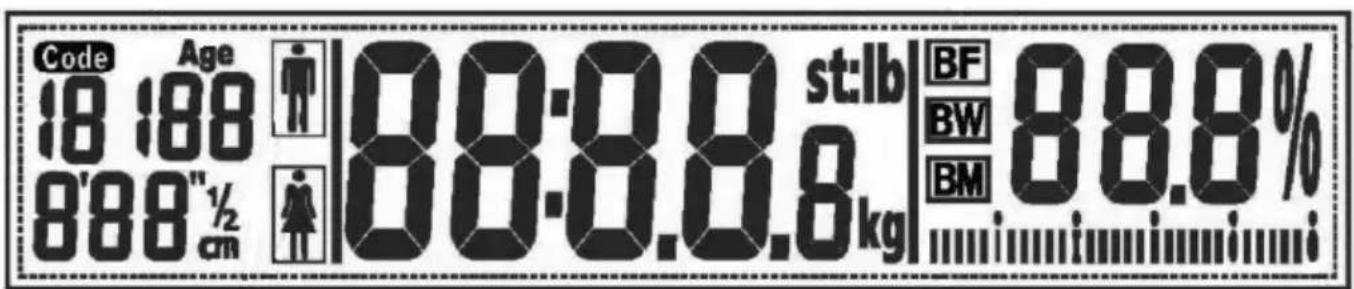
Code Age 18:88 888"½cm 80:8.8.6 st:lb BF BW BM 88.8%FAT/ HYDRATION CONTENT FITNESS ASSESSMENT CHART
After weighting you can use the fallowing chart:

natural_image
Pure symbolic representation of human figures and dots with no text or symbols| Age | Fat(F) | Hydration(F) | Fat(M) | Hydration(M) | Status | Key Line Indication |
| ≤30 | 4.0-16.0% | 66.0-57.8% | 4.0-11.0% | 66.0-61.2% | Too lean | IIIi |
| 16.1-20.5% | 57.7-54.7% | 11.1-15.5% | 61.1-58.1% | Lean | IIIi IIIi | |
| 20.6-25.0% | 54.6-51.6% | 15.6-20.0% | 58.0-55.0% | Normal | IIIi IIIi IIIi | |
| 25.1-30.5% | 51.5-47.8% | 20.1-24.5% | 54.9-51.9% | Fat | IIIi IIIi IIIi IIIi | |
| 30.6-60.0% | 47.7-27.5% | 24.6-60.0% | 51.8-27.5% | Too fat | IIIi IIIi IIIi IIIi IIIi | |
| >30 | 4.0-20.0% | 66.0-55.0% | 4.0-15.0% | 66.0-58.4% | Too lean | IIIi |
| 20.1-25.0% | 54.9-51.6% | 15.1-19.5% | 58.3-55.3% | Lean | IIIi IIIi | |
| 25.1-30.0% | 51.5-48.1% | 19.6-24.0% | 55.2-52.3% | Normal | IIIi IIIi IIIi | |
| 30.1-35.0% | 48.0-44.7% | 24.1-28.5% | 52.2-49.2% | Fat | IIIi IIIi IIIi IIIi | |
| 35.1-60.0% | 44.6-27.5% | 28.6-60.0% | 49.1-27.5% | Too fat | IIIi IIIi IIIi IIIi IIIi | |
M.- Male
F- Female
ENGLISH
GENERAL SAFETY CONDITIONS
IMPORTANT INSTRUCTIONS ON SAFETY OF USE PLEASE READ CAREFULLY AND KEEP FOR FUTURE REFERENCE
-
Before using the product please read carefully and always comply with the following instructions. The manufacturer is not responsible for any damages due to any misuse.
-
The product is only to be used indoors. Do not use the product for any purpose that is not compatible with its application.
-
Please be cautious when using around children. Do not let the children to play with the product. Do not let children or people who do not know the device to use it without supervision.
-
This appliance is not intended use by persons (including children) with reduced physical, sensory or mental capabilities, or instruction concerning use of the appliance by a Person responsible for their safety.
-
WARNING: This device may be used by children over 8 years of age and persons with reduced physical, sensory or mental capabilities, or persons without experience or knowledge of the device, only under the supervision of a person responsible for their safety, or if they were instructed on the safe use of the device and are aware of the dangers associated with its operation. Children should not play with the device. Cleaning and maintenance of the device should not be carried out by children, unless they are over 8 years of age and these activities are carried out under supervision.
-
Never use the product if it was dropped or damaged in any other way or if it does not work properly. Do not try to repair the defected product yourself because it can lead to electric shock. Damaged device always turn to a professional service location in order to repair it. All the repairs can be done only by authorized service professionals. The repair that was done incorrectly can cause hazardous situations for the user.
-
Never put the product on or close to the hot or warm surfaces or the kitchen appliances like the electric oven or gas burner.
-
Never use the product close to combustibles.
-
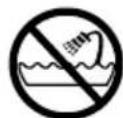
Never use this device close to water, e.g.: Under shower, in bathtub or above sink filled with water.
-
Do not touch the device with wet hands.
-
The batteries may leak if they are flat or were not used for an extended period of time. To protect the device and your health, replace them regularly and avoid skin contact with leaking batteries.
-
Do not use the device near water e.g.: in the shower, bath or basin with water.
-
Do not hold the device with wet hands.
-
The device should be turned off each time it is put aside.
-
Please use the device on a stable and flat surface.
-
Please keep the device away from the influence of strong electromagnetic fields.
-
Please ensure that the surface on which the device is used is not damp or slippery.
-
Please ensure that heavy objects do not fall on the display and glass part of the scales.
- If the scales are not used for an extended period, please remove the battery.
- DO NOT strike, DO NOT shake and DO NOT drop the scales.
- Stand still on the scales while the measurement is being taken.
- Do not use for commercial or medical purposes.
- It is recommended that you weigh yourself at the same time each day.
- The measurements given by the scales can be misleading if you weigh yourself after intense exercise, during a strict diet or if you are dehydrated.
- Children under 10 years of age and the elderly may use only the weight measurement option. The results of measurement options (amount of water, fat or muscle) can be misleading for people over 70 years of age and people who practise bodybuilding.
- The device is not intended for pregnant women, people undergoing dialysis, people with heart pacemakers and other medical implants.
- If your measurements differ from the norm, consult a physician.
DESCRIPTION OF THE DEVICE (Fig. 4)
4A. LCD display
4B. Glass platform
4C. Function keys
4D. Measurement plates
FUNCTION KEYS (4C)
SET - on button/parameter change button
LCD DISPLAY (Fig. a):
USER PARAMETERS:

- user code

- gender
cm
- height
AGE
- age
MEASUREMENT:

- fat %

- water %

- muscle %
- fat level
st:lb kg
- weight unit
ERROR MESSAGES
Lo- low battery, replace the battery
ErrL- low fat level
C - error
Err - maximum load exceeded
Errh - high fat level
0000
- during measurement
CHANGING WEIGHT UNITS (Fig. 2)
You can change the units that the weight is displayed in using the switch found under the scales, next to the battery container or under the cover of the container. Available units: kilograms (kg) and pounds (lb).
BATTERY REPLACEMENT
Before use remove the isolating layer from the battery contact plate (Fig. 1). Note the polarity.
-
Open the battery cover at the bottom of the scales. Remove the old battery.
-
Insert the new battery by sliding one end of the battery into the contact plate and pressing the other side in. Close the cover.
WEIGHING
STEP 1. Place the scales on a hard and flat surface (avoid carpets and soft surfaces).
STEP 2. Gently step on the scales. Stand on the scales evenly distributing your weight and do not move until your weight reading shown on the display stops changing and gets blocked.
SETTING MEASUREMENT PARAMETERS
STEP 1. Place the scales on a hard and flat surface (avoid carpets and soft surfaces)
STEP 2. Press the scale, the device will switch on automatically. Press the SET button. An option to set the user code will appear.
STEP 3. Use the ▲ and ▼ buttons to choose a user code.
STEP 4. Press SET to confirm.
Repeat steps 3 to 4 to set the gender, height and age. After approximately 7 seconds from the last press of the SET button the scales will switch to the weighing and measuring mode.
WEIGHING WITH MEASUREMENT
STEP 1. Press the scale, the device will switch on automatically.
STEP 2. Press the SET button. The last user's parameters will appear. If you want to change the user or parameters use the ▲ and buttons. Wait until the display shows "0".
STEP 3. Gently step on the scales with bare feet. Both feet should touch the measurement plates (4d). Stand on the scales evenly distributing your weight and do not move until your weight reading shown on the display stops changing and the measurement sign: oooo appears.
Next a sequence of fat, water and muscle measurements results will appear. They will be repeated three times and saved to the scales memory.
MEASUREMENT CONTROL
The results of the previous measurement can be retrieved using the SET button after turning the scales on. Next, select the user code and wait several seconds until the scales display the results.
AUTOMATIC OFF FUNCTION
When you step off the scales, the device will automatically switch off. The scales automatically switch off when the display shows '0.0' or the same weight reading for approximately 8 seconds.
CLEANING AND MAINTENANCE
- Clean the scales with a damp cloth. Wipe dry.
DO NOT use chemical/caustic cleaning agents. - Store the scales in a cool and dry place.
- The scales should always be in a horizontal position.
TECHNICAL DATA
Power source:
battery type: CR2032 3 V
Maximum load:
150 kg
Device is made in class III of insulation.
Device is compliant with EU directives:
Electromagnetic compatibility (EMC)
Device marked CE mark on rating label

To protect your environment: please separate carton boxes and plastic bags and dispose them in corresponding waste bins. Used appliance should be delivered to the dedicated collecting points due to hazarsous components, which may effect the environment. Do not dispose this appliance in the common waste bin.
DEUTSCH
ÜLDISED OHUTUSJUHISED
LUGEGE SEADME KASUTUSOHUTUST PUUDUTAVAD JUHISED TÄHELEPANELIKULT LÄBI JA HOIDKE ALLES
natural_image
Symbol of a trash bin crossed with no text or numbers, representing waste sorting or restriction (no text present)natural_image
Black vintage radio with a mesh grille and two buttons (no visible text or symbols)Retro radio CR1103
natural_image
Close-up of a small kitchen appliance with a lid and glass casing (no visible text or symbols)Halogen oven CR6305
natural_image
Close-up of a decorative card with black floral patterns and small spheres (no text or symbols visible)Bathroom scale CR106
natural_image
Black digital kitchen appliance with a digital display (no visible text or symbols)Kitchen scale Cr107
Ionic hair brush
CR2017
Hair clipper
CR2811
Shaver CR104
Shaver CR102
natural_image
White plastic electronic device with a circular top and base (no visible text or symbols)Manicure set CR2151
natural_image
Black and white photo of a modern kitchen blender with a glass lid (no visible text or symbols)Citrus juicer CR 4001
natural_image
Exterior view of a modern electric cooktop oven with control knobs and a tray (no visible text or symbols)Electric oven CR111
natural_image
Product photo of a kitchen blender with stand mixer and side dish (no text or symbols visible)Hand blender CR4606
natural_image
Exterior view of a medical or laboratory device with open lid and internal compartments (no visible text or symbols)Foot spa CR2150
natural_image
Exterior view of a stainless steel oven with open glass door (no visible text or symbols)Mini-fridge CR8062
natural_image
Black and white photo of a modern juicer with chopsticks and a side dish (no visible text or symbols)Juice extractor CR110
Steam mop
CR7004
natural_image
Close-up of a black and silver juice brush with a handle and control knob (no visible text or symbols)Juice extractor CR4105