
EB9062 - Scale CAMRY - Free user manual and instructions
Find the device manual for free EB9062 CAMRY in PDF.


| Product Type | Glass Electronic Personal Scale |
| Brand | CAMRY |
| Model | EB9062 |
| Series | EB9-6 Series |
| Capacity | 180 kg / 400 lb |
| Division | 0.1 kg / 0.2 lb |
| Weight Units | kg/lb convertible via switch at back |
| Power Source | 1 x 3V lithium battery (CR2032) |
| Auto On/Off | Yes |
| Memory Storage | Up to 80 records |
| Weight Comparison | Automatic comparison to most similar stored record |
| Display | LCD (no backlight) |
| Low Battery Indication | Yes |
| Overload Indication | Yes |
| Platform Material | Glass |
| Care Instructions | Clean with damp cloth; avoid water ingress; do not use chemical/abrasive cleaners |
| Operating Surface | Flat, solid surface (avoid carpet or soil) |
| Storage | Keep in cool, dry place; store horizontally |
| Battery Replacement | Open battery cover; for Type A, bend tab outwards; for Type B, use sharp object; note polarity |
| Safety Precautions | Do not strike, shock, or drop; keep dry; not for commercial use |
| Re-test Function | If 'C' appears, step on scale again |
| Certifications | CE, RoHS |
Frequently Asked Questions - EB9062 CAMRY
User questions about EB9062 CAMRY
0 question about this device. Answer the ones you know or ask your own.
Ask a new question about this device
Download the instructions for your Scale in PDF format for free! Find your manual EB9062 - CAMRY and take your electronic device back in hand. On this page are published all the documents necessary for the use of your device. EB9062 by CAMRY.
USER MANUAL EB9062 CAMRY
■ To convert weight unit
If your scale is with both measuring system of Metric (kilograms) and Imperial (pounds), you can pull up and down the unit switch at the back of scale to convert scale unit between kg-lb.

ADVISE FOR USE & CARE
- The platform will be slippery when it is wet. Keep it dry!
- Keep standing still during the course of weighing.
- DO NOT strike, shock or drop the scale.
- Treat the scale with care as it is a precise instrument.
- Clean the scale with a damp cloth and avoid water getting inside the scale. DO NOT use chemical/abrasive cleaning agents.
- Keep the scale in cool place with dry air.
- Always keep your scale in horizontal position.
- If failed to turn on the scale, check whether battery is installed, or battery power is low. Insert or replace new battery.
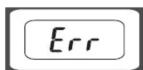
- If there is error on display or can not turn off the scale for a long time, please take off the battery for about 3 seconds, then install it again to re move soft-fault. If you can not resolve the problem, please contact your dealer for consultation.
- Do not use it for commercial purpose.
05EB-006E Ro
CAMRY®
GLASS ELECTRONIC PERSONAL SCALE
INSTRUCTIONS FOR USE
CE
EB9-6 SERIES
FEATURES
- Auto on/Auto off
- Store last weight reading and compare current reading to similar record
• LCD with blue backlight (for EB9008H only) - Two weight unit systems: kg/lb convertible
• Max. capacity=180kg/400lb, Division=0.1kg/0.2lb - Low battery/overload indication
Power
- 1X3V lithium battery (CR2032). Please remove isolation foil from battery contact before use.
- 2X1.5V AAA batteries (not included) for EB9008H
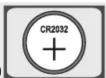

■ To replace battery
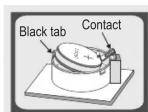
Open battery case cover at the back of scale and replace battery as follow:
Type A: Bend the small black tab outwards and the battery will come out. Take note not to bend the contact.
Type B: Take out used batteries, with the aid of a sharp object if needed.
Install new batteries by putting one side of the battery down first and press down the other side. (Please take note to the polarity)

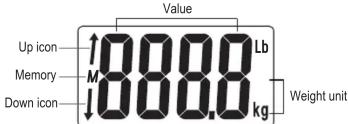
■ LCD icons illustration:
■ Overload indication
Scale overloaded (max. capacity is indicated on the scale). Please step off to avoid damage to the scale.
■ Low battery indication
Low battery power. Please replace new battery.
■ To operate
Step 1: Place the scale on a flat and solid surface. Avoid carpet or soft surface.
Step 2: Step onto the scale gently (auto-on) and wait a moment until LCD shows your weight.


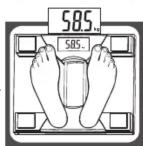
■ To store weight reading

The scale will store weight reading into memory automatically. The scale can store 80 records in maximum.
■ To Compare current reading to the most similar record
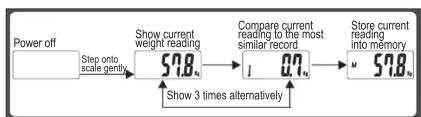
flowchart
graph LR
    A["Power off"] --> B["Step onto scale gently"]
    B --> C["Show current weight reading 57.8μs"]
    C --> D["Compare current reading to the most similar record 0.7μs"]
    D --> E["Store current reading into memory 57.8μs"]
    E --> F["Show 3 times alternatively"]
The scale can automatically search the most similar weight record in memory and compare current weight reading to the most similar record. But if you do not step off, or the difference between current weight and the searched record is more than 5kg, the scale will not make comparison.
■ Re-test
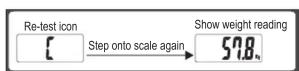
Weighing error appears if LCD shows "C". Please step onto the scale and test again.
Brand : CAMRY
Model : EB9062
Category : Scale