
EF932 - Scale CAMRY - Free user manual and instructions
Find the device manual for free EF932 CAMRY in PDF.


| Product Type | Digital Bathroom Scale |
| Brand | CAMRY |
| Model | EF932 |
| Weighing Capacity | 180 kg / 400 lb / 28 st |
| Graduation | 0.1 kg / 0.2 lb |
| Display | Large LCD screen with blue backlight |
| Platform Material | Tempered safety glass |
| Power Source | 2 x AAA batteries (included) |
| Auto On | Step-on activation |
| Auto Off | Automatic shut-off after 10 seconds |
| Low Battery Indicator | Display shows low battery symbol |
| Overload Indicator | Display shows 'Err' when capacity exceeded |
| Units | kg / lb / st (switchable) |
| Dimensions | 30 x 30 x 3.5 cm |
| Product Weight | 1.5 kg |
| Surface | Non-slip mat on platform |
| Standby Power | Less than 0.1 W |
| Cleaning | Wipe with a damp cloth; do not submerge |
| Safety | Anti-slip feet, rounded corners |
| Included in Box | Scale, 2 AAA batteries, user manual |
| Warranty | 1 year limited manufacturer warranty |
Frequently Asked Questions - EF932 CAMRY
User questions about EF932 CAMRY
0 question about this device. Answer the ones you know or ask your own.
Ask a new question about this device
Download the instructions for your Scale in PDF format for free! Find your manual EF932 - CAMRY and take your electronic device back in hand. On this page are published all the documents necessary for the use of your device. EF932 by CAMRY.
USER MANUAL EF932 CAMRY
Body Fat/Hydration Monitor Scale (Infrared Transmission Body Fat Scale)
Instructions for Use
CE
ISO 9001:2008 CERTIFIED BY SGS
EF-8 SERIES
09EF-016E R0
EF932 EF933
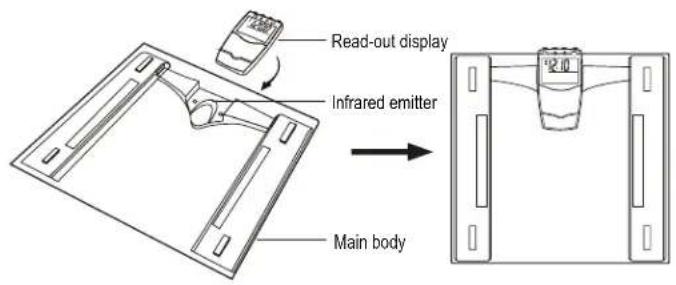

Note: 1. Please take out the read-out display when setting time and alarm
2. Please do not cover the infrared emitter and receiver when weighing under wireless transmission mode.
·1-


Note: 1. Please take out the read-out display when setting time and alarm
2. Please do not cover the infrared emitter and receiver when weighing under wireless transmission mode.
·2·
Dear Customer,
Welcome to use CAMRY Body Fat/Hydration Monitor Scale.
This product is specially designed to test body fat/hydration/muselp/bone keep a close eye on the daily change of your body fat, hydrationmuscle, bone and weight, providing information for your reference. Base on the analysis of your height,weight and age etc., it tells your daily energy requirement, and helps control your weight. Please read this instruction carefully before use.
■ User-friendly Tips
1. During Measuring
A. The device is designed to allow auto step on. Please always ignore the first reading and only start taking effective record from the second time weighing.
B. Always remove your shoes, stops clean your feet before using.
C. Step on the weighing platform gently.
D. It is advisable to take measurement at the same time of the day.
E. Measured result could be misleading after intensive exercise, excessive dieting or under extreme dehydration condition.
F. Always weigh/use the scale on a hard and flat surface. When you are measuring, please keep still.
G. The measured data of the following people may have deviation:
- Children under 7 or adult over 99 (can only use the device under normal weighing mode)
- Adult over 70
• Body building athletes or other occupational athletes.
H. People with the following conditions should not use the device:
- Pregnant women
• Those with symptom of edema
• Those on dialysis treatment - Those who use heart pacemaker or with other implanted medical device.
·3·
2. Safety Warning
A. The Fat% Hydration% content evaluated by the Fat Monitor Scale is only for reference (not for medical purpose). If your Fat% Hydration% content is over/below normal level, please consult your doctor for more advice.
B. Keep away from strong electro-magnetic field when using the scale.
C. ifIt could be slippery if you weigh on a wet surface. Moreover, the weighing platform surface is glazed, never step on the edge of the scale and do keep balance during your weighing.
■ Features/Specifications
- Infrared transmission
- Dual display feature: wired red-out display or wireless read-out display
- Auto return to real time clock if no operation
- Multifunction: test body fat %, body hydration %, body muscle%, body bone% and suggest calorie intake requirement.
- Five activity levels selectable
- Built-in memorizer for 12 family users and 1 guest user
- Optional normal weighing mode (bypassing parameter setting): Auto step on weighing and consecutive add-on weighings
- Low battery and overload indication
- Last immediate memory recall; compare current weight reading to the last record
- Keypad tone
■ Performance Index
| Index\Item | Weighing Capacity | Fat% | Hydration% | Muscle% | Bone% | Calorie |
| Index Range | 180kg400lb | 4.0%~60.0% | 27.5%~66.0% | 20.0%~56.0% | 2.0%~20.0% | |
| Division | 0.1kg0.2lb | 0.1% | 0.1% | 0.1% | 0.1% | 1KCAL |
·4·
■ LCD Display

■ To install battery

- Powered by 4x1.5V AAA batteries. 2 for scale, 2 for read-out display
- Take out used batteries, with the aid of a sharp object if needed. Install new batteries by putting one side of the battery down first and press down the other side. (Observe the polarity)
■ To set real time clock

flowchart
graph LR
    A["0:00"] --> B["Hour setting"]
    B --> C["Minute setting"]
    C --> D["Real time clock"]
    B -->|Press* SET for 3 seconds| E["Hour setting"]
    C -->|Press* SET| F["Minute setting"]
    D -->|Press* SET| G["Real time clock"]
    style A fill:#f9f,stroke:#333
    style B fill:#f9f,stroke:#333
    style C fill:#f9f,stroke:#333
    style D fill:#f9f,stroke:#333
    style E fill:#ccf,stroke:#333
    style F fill:#ccf,stroke:#333
    style G fill:#ccf,stroke:#333
When scale displays real time, press 'SET' for 3 seconds to set time.
·5·
■ To set alarm

flowchart
graph TD
    A["To set alarm: 600"] -->|Press 'SET' for 3 seconds| B["Hour setting: 600"]
    B -->|Press 'SET' Increase or Decrease| C["Minute setting: 700"]
    C -->|Press 'SET' Increase or Decrease| D["Back to real time clock (without alarm icon)"]
    D --> E["To delete alarm: 716"]
    E -->|Press 'SET'| F["Back to real time clock (with alarm icon)"]
    F --> G["Alarm time set: 700"]
    G -->|Press 'SET' Increase or Decrease| H["Minute setting: 700"]
When scale displays real time, press to start setting alarm."
■ To set weight unit(Under normal weighing mode)
If your scale is available (or applicable) in kgfb/st, you can set to the one you prefer .as follow

flowchart
graph LR
    A["-7:15"] -->|Press'| B["0.0"]
    B -->|Press*SET* for 3 seconds| C["0.0"]
    C -->|Press'| D["0:0.0"]
    D -->|Press'| E["Back to real time clock"]
    E --> F["Back to real time clock"]
·6·
After selecting the preferred unit, the scale will be auto-off after 3 seconds. Selected weight unit will be activated when the scale is turned on again.
- When setting lb/st as weight unit, the default height unit is feet/inch;
- When setting kg as weight unit, the default height unit is cm.
Remark: The unit system of scale depends on sales destination or the requirement of distributor.
■ To weigh
- Wired transmission mode
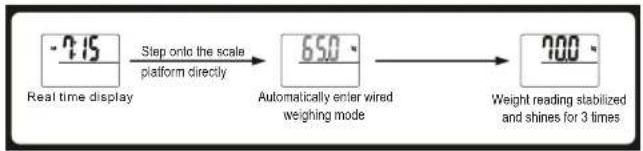
flowchart
graph LR
    A["Real time display"] -->|Step onto the scale platform directly| B["650° Automatically enter wired weighing mode"]
    B --> C["Weight reading stabilized and shines for 3 times"]
2. Wireless transmission mode
A. To weigh under wireless transmission mode(Take EF932 as example)

natural_image
Line drawing of a woman standing on a balance scale (no text or symbols)
flowchart
graph TD
    A["7:15"] --> B["Press left X enter wireless weighting mode"]
    B --> C["9:00"]
    C --> D["Step only the 'snow platform'"]
    D --> E["6:50"]
    E --> F["Weight reading stabilized and shines for 3 times."]
    F --> G["Show instable weight reading"]
·7-

B. You can weigh with read-out display adsorbed to metal surface.

C. You can weigh with read-out display hanged on a nail on the wall.
■ Fat/Hydration/Muscle/Bone/Calorie Measuring Mode
(1) Setting personal parameters
① At the first time when you install battery and switch on, all default parameter are set as follow:
| Gender | Height Age | Activity level | |
| Female | 165cm 25 |
② Parameters can be set in the following range:
| Memory Gender | Height | Age | Activity level | |
| 1~12 and VIP | male/female | 100~250cm3'03.5"~8'02.5" | 7~99岁 | |
·8·
③ Parameter setting
Example: the 5th user, female, 166cm, 26 years old, can set her parameters as follow:
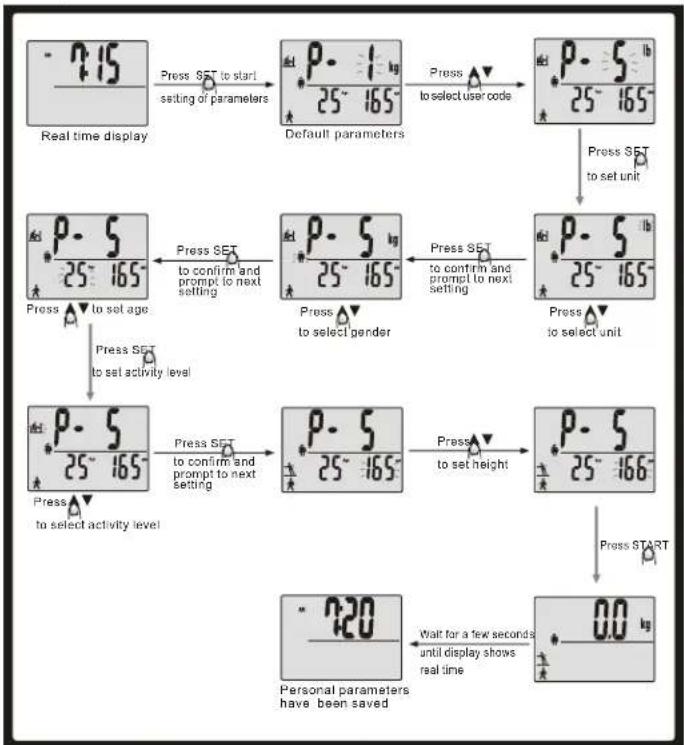
flowchart
graph TD
    A["Real time display"] --> B["Press SET to start setting of parameters"]
    B --> C["Default parameters"]
    C --> D["Press to select user code"]
    D --> E["Press SET to set unit"]
    E --> F["Press SET to confirm and prompt to next setting"]
    F --> G["Press SET to confirm and prompt to next setting"]
    G --> H["Press to select gender"]
    H --> I["Press SET to confirm and prompt to next setting"]
    I --> J["Press SET to select unit"]
    J --> K["Press SET to set age"]
    K --> L["Press SET to set activity level"]
    L --> M["Press SET to confirm and prompt to next setting"]
    M --> N["Press SET to confirm and prompt to next setting"]
    N --> O["Press SET to set height"]
    O --> P["Press SET to set height"]
    P --> Q["Press START"]
    Q --> R["0.0 kg"]
    R --> S["Wait for a few seconds until display shows real time"]
    S --> T["Personal parameters have been saved"]
Note:
*When setting parameters, please take out the read-out display
During the parameter-setting, you can always tap on the weighing platform any time to set the scale
to zero-point. You can start measuring based on the parameters just set-updated into the scale.
- It has 12 user codes for family users, and 1 user code for guest user. The personal data of guest user can not be memorized.
The setting range of age should be from 7 to 98. Forchild aged from 7 to 17. LCD will display the icon of Child. For adult aged from 18 to 99, LCD will display the icon of Adult.
•Activity level: Sedentary/very inactive: little or no exercise
Moderate activity: always standor walk


Light activity: Mental workers
Very active: manual workers


(2) To Start Measuring
To ensure accuracy, please remove your & before stepping on.shoes socks. Example: the 5th user, female, 166cm, 26 years old can measure as follow:

flowchart
graph TD
    A["Real time display"] --> B["Press SET to start setting of parameters"]
    B --> C["Show parameters of the last user or default parameters"]
    C --> D["Press to select user code or reset parameters"]
    D --> E["Press START"]
    E --> F["LCD shows 0.0 °C"]
    F --> G["Step onto weighing platform gently"]
    G --> H["Measuring..."]
    H --> I["Measured results (Repeal for 3 times and saved. The reading will re-appear at next measuring for users' reference):<br>    Fat status***: Feb 28.8%, Hydration 52.3%, Muscle 37.2%, Bone 13%, Calorie 1840.<br>    Your conditions are good. Keep your shape!"]
    I --> J["Back to real time clock automatically"]
    J --> K["Real time display"]
■ To recall test record

flowchart
graph TD
    A["Real time display"] --> B["Press START to enter Recall mode"]
    B --> C["Show parameters of the last user or default parameters"]
    C --> D["Press to select user code"]
    D --> E["Display record and repeat 3 times"]
    F["Real time display"] --> G["Back to real time clock automatically after reselling or press SET to return real time display"]
    G --> H["Display record and repeat 3 times"]
Remark: no record for guest user
■ To compare test result (for family users only)
After body fat measuring, LCD shows current test result. Meanwhile you can press START to view current test result and last test result. Last result will be displayed in the real time display zone and flash. Press ▲ or ▼ to view current and last body fat, body hydration, body bone, and body muscle result respectively. Press SET to return real time display.

flowchart
graph TD
    A["55.8 kg 230, ~52.3"] -->|Press START to compare test result| B["23.9 kg 238"]
    B -->|Press| C["55.8 kg 52.3"]
    C -->|Press| D["34.0 kg 37.2"]
    D -->|Press SET to return real time display| E["140 kg 130"]
    E -->|Press| F["220"]
·11·
■ Warning Indications

Low battery power for read-out display. Please replace battery.

Low battery power for main unit. Please replace battery.

Over-load Indication The weighing subject on the platform exceeds the maximum capability of scale. Please step off to avoid damage.
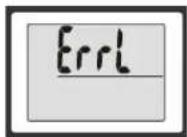
High Fat% Indication The Fat% is too high. Please watch your diet and do more exercise.
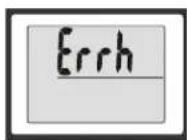
Re-test Error exists, please re-test to get the correct result.
·12·
■ About Fat
1. About Fat%
- Fat% is an index % of fat content in human body.
- The fat content in human body is of a certain level, overabundance of fat will bring bad effects on metabolism, thereby, various illnesses may invade. Here goes an old saying, Obesity is hotbed of illness."
2. Working Principles
As electrical signal of certain frequency transmits through human body, the impedance of fat is stronger than that of muscle or other human tissues. Through the use of biological resistance analysis, this product will pass a safe frequency of low voltage electrical current through human body, thus, the Fat% will be reflected according to the resistance differences when the electrical signal transmitting through human body.
3. Fat/Hydration Content Fitness Assessment Chart
After your weighing, you can use the following Assessment Chart for reference:
| Status | Too lean | Lean Normal Fat | Too fat | |
| Key Line Indication | ...... | ...... ...... | ...... ...... ...... | ...... ...... ...... |
• The above information is only for reference
■ About Calorie
1. Calorie & Energy Consumption
Calorie: Energy Unit The data reading indicates the energy you need to sustain the daily metabolism and ordinary activities required for your weight, height, age and sex.
2. Calorie & Losing Weight
Control the calorie intake combined with proper exercise is an effective way to lose weight. This is a very simple theory. As the daily energy intake can not support the energy consumption of the human body, the saccharide and fat stored inside will decompose and provide energy to human body. That leads to weight loss.
·13·
⚠️ Cleaning & Maintenance
- Use a slightly damp soft fabric to wipe clean the scale. DO NOT immerse it into water. Any use of chemical or corrosive detergent is not acceptable.
- If the plastic components of the scale contacts with grease, spicy sauce, vinegar or other irritating substance, please clean it at once (Please keep the scale away from any fruit juice).
- Always weight/use the scale on a hard and flat surface. DO NOT use on carpets or mats.
• The actual item may vary from the photographs/illustrations.
-14+
- Body Fat/Hydration Monitor Scale (Infrared Transmission Body Fat Scale)
- Instructions for Use
- ■ User-friendly Tips
- During Measuring
- Safety Warning
- ■ Features/Specifications
- ■ Performance Index
- ■ To set weight unit(Under normal weighing mode)
- ■ To weigh
- Wireless transmission mode
- ■ Fat/Hydration/Muscle/Bone/Calorie Measuring Mode
- ■ To compare test result (for family users only)
- ■ About Fat
- About Fat%
- Working Principles
- Fat/Hydration Content Fitness Assessment Chart
- ■ About Calorie
- Calorie & Energy Consumption
- Calorie & Losing Weight
- ⚠️ Cleaning & Maintenance
Brand : CAMRY
Model : EF932
Category : Scale