
CR 8125 - Scale CAMRY - Free user manual and instructions
Find the device manual for free CR 8125 CAMRY in PDF.


| Product Type | Digital Body Composition Scale |
| Brand | Camry |
| Model | CR 8125 |
| Maximum Weight Capacity | 150 kg (330 lb) |
| Weight Accuracy | 0.1 kg |
| Body Fat Measurement Range | 4% - 60% (0.1% resolution) |
| Body Water Measurement Range | 21.5% - 66% (0.1% resolution) |
| Muscle Mass Measurement Range | 20% - 56% (0.1% resolution) |
| Bone Mass Measurement Range | 2% - 20% (0.1% resolution) |
| Measurement Technology | Bioelectrical Impedance Analysis (BIA) via foot electrodes |
| Display Type | LCD with graphical obesity indicator |
| Mass Units | Kilograms (kg) or Pounds (lb) |
| Height Units | Centimeters (cm) or Feet/Inches |
| User Memory | Up to 12 users |
| Power Source | Batteries (type not specified, typically 2 x 1.5V AAA) |
| Auto-Off | Yes, after a few seconds of inactivity |
| Low Battery Indicator | Yes (symbol 6A) |
| Overload Warning | Yes (symbol 6D) |
| Child Weighing Mode | Yes (subtractive weighing) |
| Cleaning Instructions | Wipe with damp cloth; do not immerse in water |
| Safety Features | Not for use by pregnant women, persons with pacemakers, or during dialysis; keep away from strong electromagnetic fields |
| Compliance | CE marked, EMC directive |
Frequently Asked Questions - CR 8125 CAMRY
User questions about CR 8125 CAMRY
0 question about this device. Answer the ones you know or ask your own.
Ask a new question about this device
Download the instructions for your Scale in PDF format for free! Find your manual CR 8125 - CAMRY and take your electronic device back in hand. On this page are published all the documents necessary for the use of your device. CR 8125 by CAMRY.
USER MANUAL CR 8125 CAMRY
CR 8125
(GB) user manual
(F) mode d'emploi
| AGE | BF | BW | BF | BW | 5A | 5G |
| ≤30 | 4.0-16.0% | 66.0-57.8% | 4.0-11.0% | 66.0-61.2% | 5B | iii |
| 16.1-20.5% | 57.7-54.7% | 11.1-15.5% | 61.1-58.1% | 5C | iiiiii | |
| 20.6-25.0% | 54.6-51.6% | 15.6-20.0% | 58.0-55.0% | 5D | iiiiiiiii | |
| 25.1-30.5% | 51.5-47.8% | 20.1-24.5% | 54.9-51.9% | 5E | iiiiiiiiiiii | |
| 30.6-60.0% | 47.7-27.5% | 24.6-60.0% | 51.8-27.5% | 5F | iiiiiiiiiiiiiii | |
| >30 | 4.0-20.0% | 66.0-55.0% | 4.0-15.0% | 66.0-58.4% | 5B | iii |
| 20.1-25.0% | 54.9-51.6% | 15.1-19.5% | 58.3-55.3% | 5C | iiiiii | |
| 25.1-30.0% | 51.5-48.1% | 19.6-24.0% | 55.2-52.3% | 5D | iiiiiiiii | |
| 30.1-35.0% | 48.0-44.7% | 24.1-28.5% | 52.2-49.2% | 5E | iiiiiiiiiiii | |
| 35.1-60.0% | 44.6-27.5% | 28.6-60.0% | 49.1-27.5% | 5F | iiiiiiiiiiiiiii | |
6

6A

6D

6B

6E
6C
ENGLISH
SAFETY RULES
!. Before using the product please read carefully and always comply with the following instructions. The manufacturer is not responsible for any damages due to any misuse.
2. The product is only to be used indoors. Do not use the product for any purpose that is not compatible with its application.
3. The appliacable voltage is 230V, \~50Hz with grounding. For safety reasons it is not appropriate to connect multiple devices to one power outlet.
4. Please be cautious when using around children. Do not let the children to play with the product. Do not let children or people who do not know the device to use it without supervision.
5. This appliance is not intended use by persons (including children) with reduced physical, sensory or mental capabilities, or instruction concerning use of the appliance by a Person responsible for their safety.
6. After you are finished using the product always remember to gently remove the plug from the power outlet holding the outlet with your hand. Never pull the power cable!!!
7. Never leave the product connected to the power source without supervision.
8. Never put the power cable, the plug or the whole device into the water. Never expose the product to the atmospheric conditions such as direct sun light or rain, etc.. Never use the product in humid conditions.
9. Periodically check the power cable condition. If the power cable is damaged the product should be turned to a professional service location to be replaced in order to avoid hazardous situations.
10. Never use the product with a damaged power cable or if it was dropped or damaged in any other way or if it does not work properly. Do not try to repair the defected product yourself because it can lead to electric shock. Damaged device always turn to a professional service location in order to repair it. All the repairs can be done only by authorized service professionals. The repair that was done incorrectly can cause hazardous situations for the user.
11. Never put the product on or close to the hot or warm surfaces or the kitchen appliances like the electric oven or gas burner.
12. Never use the product close to combustibles.
13. Do not let cord hang over edge of counter.
14. Always unplug the device after using and before cleaning.
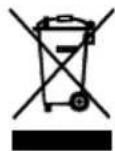
To protect your environment: please separate carton boxes and plastic bags and dispose them in corresponding waste bins. Used appliance should be delivered to the dedicated collecting points due to hazarsous components, which may effect the environment. Do not dispose this appliance in the common waste bin.
DEUTSCH
natural_image
Symbol of a trash bin crossed with a diagonal line, no text or numbers presentDETAILED SAFETY CONDITIONS
- Weight indication can be confusing, if the measurement was made after intensive exercise, during strict diet or in the body dehydration conditions.
- Use the device on stable and flat surface.
- Children below 10 and elders can use only weight measurement function.
- Body fat, body hydration and muscle tissue indications can be confusing for:
- Elders above 70
-
Active bodybuilders
-
The device is not intended for use by
- Pregnant women
- Persons during dialysis
- Persons with pacemakers and other implants.
-
Body fat, muscle tissue and body hydration indications provide only general information. (This information is not enough for medical purposes). Consult your physician if your indications deviate from standards.
-
Keep the device away from influence of strong electromagnetic fields.
-
Make sure that the surface, on which the device is used, is not wet or slippery.
-
Be careful not to drop heavy objects on the scale display or the glass part.
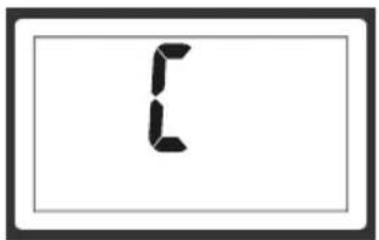
WARNING MESSAGES - fig 6
The warning messages may appear on LCD display. Please pay attention to following symbols.
6A - Batteries almost exhausted. Replace the used batteries with new ones.
6B – Body fat of the user is too low. Please take care of your health by using more nourishing diet.
6C - An error occurred. Repeat the weighing, if the problem persists - contact warranty service.
6D - Weight limit exceeded. This device is intended to weigh persons up to 150kg (330lb).
6E – Body fat of the user is too high. Please adjust your diet and increase physical activity.
BATTERY REPLACEMENT – fig 10
1) Remove battery compartment cover
2) Pry and remove used batteries
3) Insert new battery under the cover, then press lightly
MASS UNIT CHANGE
The mass units cam be changed using unit switch located at the bottom of the scale. Press the switch when the scale is switched off. The LCD display will show currently used mass unit. In order to change the unit press the switch again. Available units: kilograms (kg), pounds (lb)
Setting mass unit to kilograms automatically adjusts the height to be shown in centimetres. Accordingly, if pounds are set then the height is indicated in feet and inch.
LCD DISPLAY INDICATIONS - fig 1
| 1A – symbol of the sex | 1B – activity level indication. |
| 1C – user number | 1D – body fat indication |
| 1E [BF] – fat % | 1F [BW] – water % |
| 1G – height unit indication | 1H – mass unit |
| 1I [AGE] – Age | 1J – calorific value indication |
| 1K [BONE] – bone % | 1L [BM] – muscle % |
PERFORMING REGULAR WEIGHT MEASUREMENT – fig 2
Take off your shoes and socks and clean your feet before weighing.
It is recommended to perform each weighing at the same time of day.
2A - Place the scale on flat, stable surface
2B - Stand on the weighing platform
2C - Your weigh will appear
2D - The result will stabilise (digits will stop changing and will flash) and the scale will lock for a moment
SETTING THE PARAMETERS
1 - Scale is switched off.
2 - Press ON/SET button (3B) to switch the scale on.
3 - Factory defaults will be displayed
4 - First highlighted value is the user number 1C. Select user code [1 to 12] using arrow buttons (3A, 3C)
5 - Confirm by pressing ON/SET button (3B) in order to change other parameters
6 - Select sex 1A using 3A, 3C buttons.
7 - Press ON/SET button (3B) to confirm sex and proceed to next parameter.
8 – Select activity level 1B using 3A, 3C buttons.
9 - Press ON/SET button (3B) to confirm chosen activity level and proceed to next parameter.
10 - Set height 1G using 3A, 3C buttons.
11 - Confirm height value by pressing ON/SET button (3B) in order to proceed to next parameter.
12 – Select age 1L using 3A, 3C buttons.
13 - Confirm age by pressing ON/SET button (3B) in order to proceed to next parameter.
14 - Set destination body weight using 3A, 3C buttons.
15 – Save the weight by pressing ON/SET button (3B)
16 – The display will show „0.0"
17 - The device will switch off automatically after a few seconds
18 – User settings have been saved
BODY FAT, WATER, MUSCLE AND BONE PERCENTAGE MEASUREMENT
In order to begin the measurement take off your shoes and socks and clean your feet before stepping on the scale.
1 - Scale is switched off.
2 - Press ON/SET button (3B) to switch the scale on.
3 - The scale will show the parameters saved by last user or default parameters.
4 - Set user code using arrow buttons (3A, 3C).
5 - After few seconds the display will show "0.0".
6 - Gently step on the scale. Both feet should touch metal electrodes on the sides of the scale.
7 – Wait until the indications stabilize.
8 - Weight indication will be locked and the display will blink once.
9 - A message will inform that the measurement is made.
10 – Measurement results will be shown three times and will be saved in memory. User weight will be shown first. Then, following values will be shown in sequence: Weight difference since last measurement, body fat % with graphical obesity indication, body water %, muscle %, bone %. The daily calorie amount recommended for the user will be shown at the end.
11 - The scale will switch off automatically after a few seconds
WEIGHING A CHILD
If you want to weigh your child, you can first weigh yourself, read the result, then without stepping off the scale take your child in your hands and read the result again. Weight of your child is the difference between two measurements. Weight measurement will be possible if child weighs more than 2 kg [4.4 lb]
1 - step on the scale and wait until indicated weight stabilizes
2 - Take the child on your hands
3 – Read the weight again
BODY FAT LEVEL/WATER LEVEL IN RELATION TO STANDARDS – fig 5
| AGE – Age | 5A – Figure |
| 5B – Too slim | 5C – Slim |
| 5D – Normal | 5E – Obese |
| 5F – Very obese | 5G – Graphical obesity indicator |
| BW – Body water percentage | BF – Body fat percentage |
READING PREVIOUSLY SAVED RESULTS
-
Scale is switched off
-
Press ON/SET button (3B)
-
The scale will show the parameters saved by last user or default parameters
-
Choose user code using arrow buttons (3A, 3C)
-
Wait 6 seconds (count: 101, 102, 103, 104, 105, 106)
-
Press up arrow button to switch to result reading mode
-
The results of last measurement will be shown in sequence. Use arrow buttons (3A, 3C) to scroll the results.
-
The results will be displayed 3 times, and then the device will switch off automatically.
TECHNICAL DATA
Maximum load: 150kg, weighing accuracy: 0,1kg
Body fat measurement range: 4%-60%, accuracy 0,1%
Body water measurement range: 21,5% - 66%, accuracy 0,1%
Muscle tissue measurement range: 20-56%, accuracy 0,1%
Bones measurement range: 2% to 20%, accuracy 0,1%
Device is made in class II of isolation.
Device is compliant with EU directives:
- Electromagnetic compatibility (EMC)
Device marked CE mark on rating label
DEUTSCH
REEMPLACEMENT DES PILES - image 10
- CR 8125
- ENGLISH
- SAFETY RULES
- DEUTSCH
- DETAILED SAFETY CONDITIONS
- WARNING MESSAGES - fig 6
- BATTERY REPLACEMENT – fig 10
- MASS UNIT CHANGE
- PERFORMING REGULAR WEIGHT MEASUREMENT – fig 2
- SETTING THE PARAMETERS
- BODY FAT, WATER, MUSCLE AND BONE PERCENTAGE MEASUREMENT
- WEIGHING A CHILD
- READING PREVIOUSLY SAVED RESULTS
- TECHNICAL DATA
- REEMPLACEMENT DES PILES - image 10
Brand : CAMRY
Model : CR 8125
Category : Scale