
MKW-04 - Coffee maker MPM - Free user manual and instructions
Find the device manual for free MKW-04 MPM in PDF.


| Product Type | Coffee Maker |
| Brand | MPM |
| Model | MKW-04 |
| Capacity | 1.25 L (approx. 10 cups) |
| Power | 800 W |
| Dimensions (H x W x D) | 30 x 24 x 20 cm |
| Weight | 1.5 kg |
| Housing Material | Plastic with stainless steel accents |
| Water Tank | Removable, transparent with level markings |
| Filter Type | Permanent mesh filter (reusable) or paper filter (size #4) |
| Carafe | Glass carafe with handle and pouring spout, 1.25 L |
| Functions | Brewing, automatic keep-warm plate |
| Controls | Single on/off button with indicator light |
| Safety Features | Auto shut-off after 40 minutes, boil-dry protection |
| Cleaning | Descaling every 3 months using vinegar or descaling solution |
| Spare Parts Available | Carafe, filter basket, permanent filter |
| Repairability | User-replaceable carafe and filter; internal repairs by service center |
| Warranty | 2 years |
| Compliance | CE, RoHS |
| Manual Languages | EN, DE, PL, RU |
Frequently Asked Questions - MKW-04 MPM
User questions about MKW-04 MPM
0 question about this device. Answer the ones you know or ask your own.
Ask a new question about this device
Download the instructions for your Coffee maker in PDF format for free! Find your manual MKW-04 - MPM and take your electronic device back in hand. On this page are published all the documents necessary for the use of your device. MKW-04 by MPM.
USER MANUAL MKW-04 MPM
natural_image
Black MPM air fryer with control panel and jar display (no visible text or symbols on main body)KAWIARKA PRZELEWOWA Z MŁYNKIEM MKW-04
Read carefully this manual before using the appliance.
Do not immerse the appliance, its cord and plug in water or any other liquids!
- Close supervision is necessary when using the appliance near children!
Fill the container only with cold water.
Do not use the appliance if it is damaged, also if the power cord or plug is damaged - return the appliance for repair to an authorized service centre.
To avoid the risk of damage, fire or injury, always use the attachments recommended by the manufacturer.
Do not hang the power cord over sharp edges and do not allow the power cord to touch hot surfaces.
Do not use the appliance outdoors.
Before cleaning, pull out the plug from the outlet and allow the appliance to cool down completely.
▶ Never leave the plugged appliance unattended.
Do not exceed the maximum filling capacity indicated on the appliance.
Do not switch on the appliance without water.
Do not place the appliance in vicinity of electric and gas cookers, burners, ovens, etc.
Do not pour water into the container after switching on the appliance.
Do not touch the heating plate when the appliance in on and immediately after finishing its operation - this may result in severe burn.
▶ Always unplug the appliance when it is not in use or before cleaning.
After finishing operation the appliance should be unplugged!
Do not use the appliance for the purposes different than it was designed for.
This coffee maker is designed for domestic use only.
The appliance shall be plugged to an outlet with a protective earth pin.
This appliance can be used by persons with reduced physical, sensory or mental capabilities or lack of experience and knowledge if they have been given supervision or instruction concerning use of the appliance in a safe way and if they understand the hazards involved.
Children shall not play with the appliance (including the accessories).
This appliance shall not be used by children. Keep the appliance and its cord out of reach of children (including the accessories).
The temperature of surfaces may be higher when the appliance is in use.
▶ Use the appliance on a flat and stable surface.
Do not pull the plug by holding the power cord.
Do not connect the power plug with wet hands.
In order to ensure your children's safety, please keep all packaging (plastic bags, boxes, polystyrene etc.) out of their reach.
Before disassembly wait until the motor stops completely.
WARNING! Do not allow small children to play with the foil as there is a danger of suffocation!
WARNING! The cutting blades are very sharp, avoid touching them while emptying or cleaning the appliance - it may result in serious injury.
Fill the water tank with cold water only.
Do not exceed the maximum fill level mark.
Do not turn on the coffee maker with the water tank empty.
Do not fill the water tank if the coffee maker is turned on.
Do not touch the coffee jug heat plate when the coffee maker is turned on and directly after use: sever burn hazard.
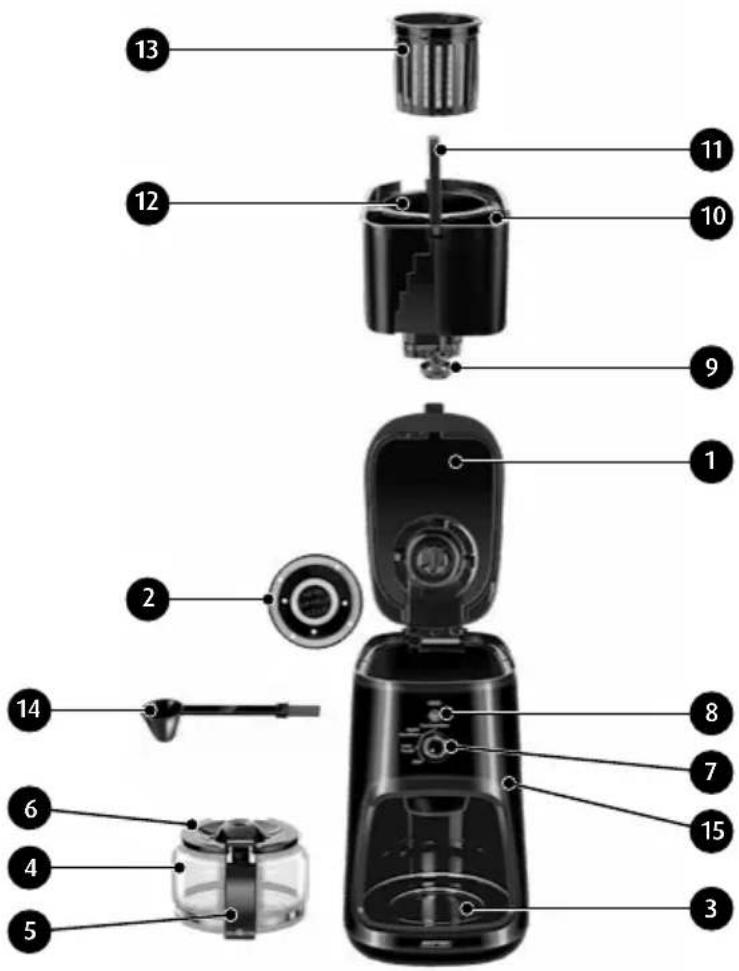
APPLIANCE OVERVIEW
- Top lid
- Coffee grinder cover
- Coffee jug heat plate
- Glass coffee jug
- Jug handle
- Jug lid
- Coffee maker mode selector
- Fine Grind + Brew
- Coarse Grind + Brew
- Coffee Powder
-
Stop
-
Backlit power switch (START)
-
Drip stop valve
-
Water tank
-
Water tank handle
-
Coffee grinder chamber
-
Coffee grinder filter cage
-
Coffee spoon and brush
-
Housing
BEFORE FIRST USE
- Remove the coffee maker from the packaging. Remove all plastic bags, fillers, safety locks and packaging labels.
- Inspect the coffee maker for damage which may have been caused in transport. If you suspect that the coffee maker is damaged, do not use it. Consult the seller.
- Verify that your power mains match the nameplate ratings of the coffee maker.
- Wash the coffee maker and do a brewing cycle with water only. Follow Section "CLEANING AND MAINTENANCE".
- Place the coffee maker on a firm, dry, stable, flat and level surface.
USING THE APPLIANCE
- Open the top lid and pour as much cold potable water into the water tank (10) as you need. Check the filling level with the graduated water level gauge on the water tank. The marks 1, 2, 3, and 4 (MAX) correspond to the number of standard coffee cups (ca. 150, 300, 450, and 600 ml , respectively).
CAUTION! Do not exceed the maximum water level of the tank (the MAX mark). Do not pour any water into the coffee grinder chamber (12).
- Install the filter cage (13) in the coffee grinder chamber (12). The filter cage has a handle to facilitate installation in and removal from the coffee grinder chamber.
- Put the required quantity of coffee into the filter cage – you can use ground coffee or whole coffee beans. For a medium strong coffee, add 1 teaspoon (6-7 g) per one coffee cup. Adjust the quantity of coffee to your preferences and/or the coffee variety.
- Make sure that the coffee grinder cover (2) is properly attached to the inner side of the top lid (1) and close the top lid (1).
CAUTION! The coffee maker will not work unit the top lid is fully closed.
- Put the glass coffee jug (4) on the heat plate (3). Make sure that the drip stop valve (9) is fully engaged in the centre of the coffee jug lid (6) and open.
CAUTION! Do not add water to the coffee jug. While the coffee maker is brewing, the coffee jug will be slowly filled with the brew.
- Plug the power cord to a mains outlet. The connection with the power mains will be indicated by the backlit power switch (8) which will turn on green.
- Set the coffee maker mode with the selector (7):
- Fine Grind + Brew -- to grind coffee beans fine
- Coarse Grind + Brew -- to grind coffee beans rough
- Coffee Powder -- to brew the ground or granulated coffee in the coffee grinder chamber
- Start brewing by pressing the backlit power switch (8) – the backlight will turn red. Depending on the mode set with the selector, the coffee maker will either start brewing or start grinding first and then proceed to brewing. The fresh-brewed coffee will start flowing slowly to the coffee jug (4). The drip stop valve (9) stops the brew from flowing when released from the coffee jug lid, so you can serve the coffee while the appliance is still brewing, and prevents spilling the brew on the heat plate. Replacing the coffee jug back on the heat plate opens the drip stop valve and resumes filling with the brew.
CAUTION! Do not open the top lid when brewing. Otherwise the brewing process will be stopped. Never open the top lid when the coffee grinder is running.
CAUTION! The brewed coffee is hot. Do not remove the glass jug (4) for more than 30 seconds when the coffee maker is on. Keep at least a little of brewed coffee in the coffee jug (4) so that the heat plate (3) does not overheat the empty coffee jug. The heat plate is hot when in use – hazard of burns.
-
To stop brewing at any time, press the backlit power button (8) again or turn the mode selector (7) to "Stop". You can resume brewing only when you open and close the top lid (1) again.
-
Once the coffee has been brewed with all the water from the water tank, the coffee maker will stop automatically, and the backlit power switch (8) will turn green again. However, the coffee maker will continue to keep the coffee in the jug (4) at 75 ^ ± 2 ^ with the heat plate (3) for about 40 minutes. When the coffee maker heats up again, the backlit power switch is red. If you serve out all the coffee from the jug before the coffee maker stops warming after brewing, immediately power off the coffee maker.
-
Before brewing a fresh jug of coffee, remove the spent coffee, add fresh coffee and refill the water tank (10). Next, set the desired mode and start brewing.
-
When done using the coffee maker, unplug it from the mains outlet and clean the coffee maker.
CAUTION! Do not use the coffee maker if the water tank is empty!
GENERAL COFFEE BREWING HINTS AND TIPS
- The volume of coffee is always be slightly lower than the volume of water it has been brewed with. The missing water is absorbed by the coffee from which you brew.
- Keep your coffee beans or ground or granulated coffee in a sealed container and in a dry and cold place.
- Grinding coffee beans in the coffee grinder right before brewing helps the brew develop its full aroma. Coffee may require coarse or fine grinding, depending on the variety. Do not put more than 36 g of coffee (6 teaspoons) into the coffee maker. Overfilling the coffee grinder may overload its motor and result in failure of the appliance.
- Do not rebrew the spent coffee. The best and fullest aroma can only be achieved with the first brewing.
- Keep the appliance clean. Dirt, grime, residues of spent coffee and coffee oil produced by grinding and brewing will spoil the overall aroma of the brew and reduce the operating life of the coffee maker.
CLEANING AND MAINTENANCE
CAUTION! Before cleaning, always unplug the coffee maker from the mains outlet and wait until it has completely cooled down.
CAUTION! Do not immerse the appliance housing (15) in water!
- Remove the water tank (10) with the coffee grinder chamber (12) by pulling up the handle (11) with the top lid (1) open. Remove the filter cage (13) from the coffee grinder chamber (12). Rinse the water tank (10) with the coffee grinder chamber (12) and the filter cage (13) with water to remove all residues of coffee. Next, thoroughly wash the parts with lukewarm water and a mild detergent. Rinse clean with water and leave to dry. The filter in the cage (13) and the coffee grinder chamber (12) can also be cleaned with the brush (14) included in the product. Always keep the drip stop valve (9) clean. Press the drip stop valve 3 to 4 times to remove the remaining water and brew.
- Remove the coffee grinder cover (2) from the top lid (1) by gently turning the cover counter-clockwise and pulling towards you. Wash the coffee grinder cover (2) with warm water with a detergent, rinse it clean and leave to dry. Reinstall the coffee grinder cover (2) by aligning the four bosses between the cover (2) and the inside of the top lid (1) and then twisting the cover clockwise.
- Gently wash the glass coffee jug (4) with its handle (5) and lid (6) like any other glassware.
- Gently wipe clean the coffee maker housing (15), the water tank receptacle interior and the coffee jug niche with a damp cloth. Next, wipe dry.
- After prolonged storage and before using the coffee maker for the first time, do a brewing cycle with water only -- do not add coffee. This will help thoroughly clean the inner tubing of the appliance. The procedure: fill the water tank to MAX with 600 ml of water, put the empty coffee jug (4) on the heat plate (3), and start the Coffee Powder mode brewing. Once the coffee maker passes all water from the water tank, repeat the cycle with fresh water.
- Descale the coffee maker periodically to restore its optimum performance. Descaling is similar to the water-only brewing procedure (without adding coffee) in item 5; instead of water, use a dedicated coffee and espresso maker descaling agent by adding it to the water tank. Remove the coffee grinder filter cage (13) before descaling. Repeat as necessary. Once done
descaling, thoroughly wash all parts of the coffee maker per items 1 to 4. Next, do the water-only brewing procedure at least twice, see item 5.
- Keep the appliance in a dry place, away from sunlight.
CAUTION! Rough cleaning cloths or sponges may scratch the outer finish of the coffee maker.
SPECIFICATIONS
See the product's nameplate for technical specifications.
Power cord length: 0.9 m
Capacity: 4 coffee cups (600 ml)

NOTE! MPM agd S.A. reserves its right to modify the technical data!
PROPER DISPOSAL OF THE PRODUCT (waste electrical and electronic equipment)
This symbol on the product indicates that the product, after its lifetime, should not be disposed with other household wastes. To avoid harmful influence on the environment and human health due to uncontrolled waste disposal, dispose the waste device to the service point of waste household appliances or report collecting it from home. In order to obtain detailed information about the location and how to dispose the waste electrical and electronic equipment in a safe way, contact your retailer or local Department of Environmental Protection. Do not dispose the device with other municipal waste.
VOR ERSTEM GEBRAUCH
We wish you satisfaction from using the product and invite you to check a wide range of other MPM appliances
- KAWIARKA PRZELEWOWA Z MŁYNKIEM MKW-04
- APPLIANCE OVERVIEW
- BEFORE FIRST USE
- USING THE APPLIANCE
- GENERAL COFFEE BREWING HINTS AND TIPS
- CLEANING AND MAINTENANCE
- CAUTION! Do not immerse the appliance housing (15) in water!
- SPECIFICATIONS
- PROPER DISPOSAL OF THE PRODUCT (waste electrical and electronic equipment)
- VOR ERSTEM GEBRAUCH
Brand : MPM
Model : MKW-04
Category : Coffee maker