
VP-9143 - Vacuum Cleaner Concept - Free user manual and instructions
Find the device manual for free VP-9143 Concept in PDF.


User questions about VP-9143 Concept
0 question about this device. Answer the ones you know or ask your own.
Ask a new question about this device
Download the instructions for your Vacuum Cleaner in PDF format for free! Find your manual VP-9143 - Concept and take your electronic device back in hand. On this page are published all the documents necessary for the use of your device. VP-9143 by Concept.
USER MANUAL VP-9143 Concept
natural_image
Black concept vacuum cleaner with attached hose and control panel (no visible text or symbols on body)VP9141, 9143
CZ EN DESK PL LV
PODĚKOVÁNÍ
natural_image
Black plastic mechanical component with threaded end (no visible text or symbols)A
B
text_image
Labeled diagram of a vacuum cleaner with numbered parts for identificationNÁVOD K OBSLUZE - SESTAVOVÁNÍ VYSAVAČE
UPOZORNĚNÍ
natural_image
Close-up of a hand holding a black cylindrical device with two arrows pointing to it, no visible text or symbols.Obr. 1
natural_image
Close-up of a black mechanical component with a black arrow pointing to a specific part (no text or symbols visible)Obr. 2
PŘÍSLUŠENSTVÍ
natural_image
Close-up of a mechanical component with an arrow indicating upward motion (no visible text or symbols)Obr. 3
natural_image
Close-up of a mechanical component with an arrow pointing to a specific part (no visible text or symbols)Obr. 4
natural_image
Close-up of a black plastic device interior with a grid pattern and an arrow pointing to it (no text or symbols visible)Obr. 5

natural_image
Close-up of a black industrial device with a grid-patterned front panel and metallic buttons (no visible text or symbols)Obr. 6
ČISTĚNÍ A ÚDRŽBA
natural_image
Black plastic mechanical component with a curved handle and flange (no visible text or symbols)A
B
text_image
Labeled diagram of a vacuum cleaner with numbered parts for identificationNÁVOD NA OBSLUHU - ZLOŽENIE VYSÁVAČA
UPOZORNENIE
natural_image
Close-up of a hand holding a black cylindrical device with two arrows pointing to it, no visible text or symbols.Obr. 1
natural_image
Close-up of a black mechanical component with a black arrow pointing to a specific part (no text or symbols visible)Obr. 2
PRÍSLUŠENSTVO
- Štrbinová hubica s kefou
natural_image
Close-up of a mechanical component with an arrow indicating upward motion (no visible text or symbols)Obr. 3
natural_image
Close-up of a mechanical component with an arrow pointing to a specific part (no visible text or symbols)Obr. 4
natural_image
Close-up of a black electronic device casing with a grid pattern and an arrow pointing to it (no text or symbols visible)Obr. 5
natural_image
Close-up of a black industrial fan or device with a grid-patterned grille and metallic buttons (no visible text or symbols)Obr. 6
ČISTENIE A ÚDRŽBA
natural_image
Black plastic mechanical component with a flanged end (no visible text or symbols)A

B
text_image
Labeled diagram of a vacuum cleaner with numbered parts for identificationINSTRUKCJA OBSŁUGI - MONTAŻ ODKURZACZA
UWAGA
natural_image
Close-up of a hand holding a black cylindrical device with two arrows pointing to it, no visible text or symbols.Rys. 1
natural_image
Close-up of a black vacuum cleaner component with a black arrow pointing to the handle (no text or symbols visible)Rys. 2
AKCESORIA
natural_image
Close-up of a mechanical component with an arrow indicating upward motion (no visible text or symbols)Rys. 3
natural_image
Close-up of a mechanical component with a black arrow pointing to a component (no visible text or symbols)Rys. 4
natural_image
Close-up of a black electronic device interior with a grid pattern and an arrow pointing to it (no text or symbols visible)Rys. 5
natural_image
Close-up of a black and silver industrial air vent with a grid-patterned grille (no visible text or symbols)Rys. 6
CZYSZCZENIE I WYMIANA FILTRA WYDMUCHU POWIETRZA
natural_image
Black plastic hose component with attached strap (no text or symbols visible)A
B
text_image
Labeled diagram of a vacuum cleaner with numbered parts for identificationEKSPLUATĀCIJAS NORĀDĪJUMI - PUTEKŁU SŪCĒJA MONTĀŽA
PIEZIME
natural_image
Close-up of a hand holding a black cylindrical device with two arrows pointing to it, no visible text or symbols.Att. 1
natural_image
Close-up of a black rubber vacuum cleaner component with a black arrow pointing to the handle (no text or symbols visible)Att. 2
PIEDERUMI
- Rievota sprausla ar birsti
natural_image
Close-up of a mechanical component with an arrow indicating upward motion (no visible text or symbols)Att. 3
natural_image
Close-up of a mechanical component with a black arrow pointing to a component (no visible text or symbols)Att. 4
natural_image
Close-up of a black electronic device interior with a grid pattern and an arrow pointing to it (no text or symbols visible)Att. 5
natural_image
Close-up of a black and silver industrial air vent with a grid-patterned grille (no visible text or symbols)Att. 6
IZPLÜDES GAISA FILTRA TİRİŞANA UN MAIŞA
Thank you for purchasing a Concept product. We hope you will be satisfied with our product throughout its service life.
Please study the entire Operating Manual carefully before you start using the product. Keep the manual in a safe place for future reference. Make sure that any persons handling the vacuum cleaner are also familiar with this Operating Manual.
| TECHNICAL PARAMETERS | |
| Voltage 220 - 240 V ~ 50/60 Hz | |
| Power input nom. 1600 W, max. 1800 W | |
| Noise level 77 dB(A) | |
| Suction power 23,5 kPa | |
IMPORTANT SAFETY PRECAUTIONS:
- Use the unit only as described in this operating manual.
• Make sure the mains voltage corresponds to the values on the rating plate. - Do not leave the unit unattended while it is turned on, or even only plugged into the wall outlet.
- Unplug the appliance from the wall outlet if not in use.
- When disconnecting the unit from the wall outlet, never pull the power cord. Grasp the plug and disconnect it by pulling.
- Do not allow children or unskilled people to handle the unit. Use the unit out of the reach of these individuals.
• Take extra care when using the unit near children. - Don't let anyone use the appliance as a toy.
- Do not use the product outdoors or on wet surfaces. Electric shock hazard!
- Use only accessories recommended by the manufacturer.
- Never use an appliance with a damaged power cord or plug. Contact an authorized service center immediately to have defective components repaired or replaced.
- Do not run the floor attachment or the unit over the power cord.
- Danger may occur if the unit is fitted with a rotary brush, and you run the unit over the power cord.
- It is forbidden to pull or move the product using the power cord.
- Keep the vacuum cleaner away from heat sources such as radiators, ovens, etc. Do not expose the unit to direct sunlight or moisture.
- Do not touch the unit with wet or damp hands.
- Do not insert any objects into the openings. Do not use the vacuum cleaner if any openings are obstructed.
- When unplugging the unit from the wall outlet, turn the main switch off, then disconnect the plug from the wall outlet.
- Extra care should be taken while vacuuming on stairs.
- If the suction inlet of the unit is obstructed, turn off the vacuum cleaner and remove the blockage before resuming operation.
- Hold the power cord while winding to avoid uncontrolled movement.
- Turn off the product and disconnect the plug from the mains outlet before installing accessories, performing maintenance, or in the case of any failure.
- Unwind the necessary length of power cord before using the vacuum cleaner. The ideal length of the power cord is marked by a yellow dot on the cord. Do not unwind the power cord past the red mark.
- The unit is suitable for domestic use only. It is not designed for commercial operation.
-
Do not vacuum any burning objects, such as cigarettes, matches, or hot ash.
-
Do not use the product in wet rooms. Do not vacuum wet objects, liquids, or flammable fluids such as gasoline. Do not use the vacuum cleaner in areas where such substances may be located.
- Never use the vacuum cleaner without dust bags or filters. Before each use make sure that the dust bag and filters of the vacuum cleaner are installed properly.
- Do not immerse the power cord, plug, or appliance into water or any other liquid.
- Check the appliance and the power cord for damage regularly. Do not switch on a damaged unit.
- Turn off the unit, unplug the power cord from the wall outlet, and let the unit cool down before cleaning and after use.
- Prior to vacuuming, it is necessary to remove any large or sharp objects that could damage the dust filter, from the surface to be cleaned.
- Do not use the product if the filters are fouled.
- Do not repair the appliance yourself. Contact an authorized service center.
Failure to follow the manufacturer's instructions may lead to refusal of warranty repair.
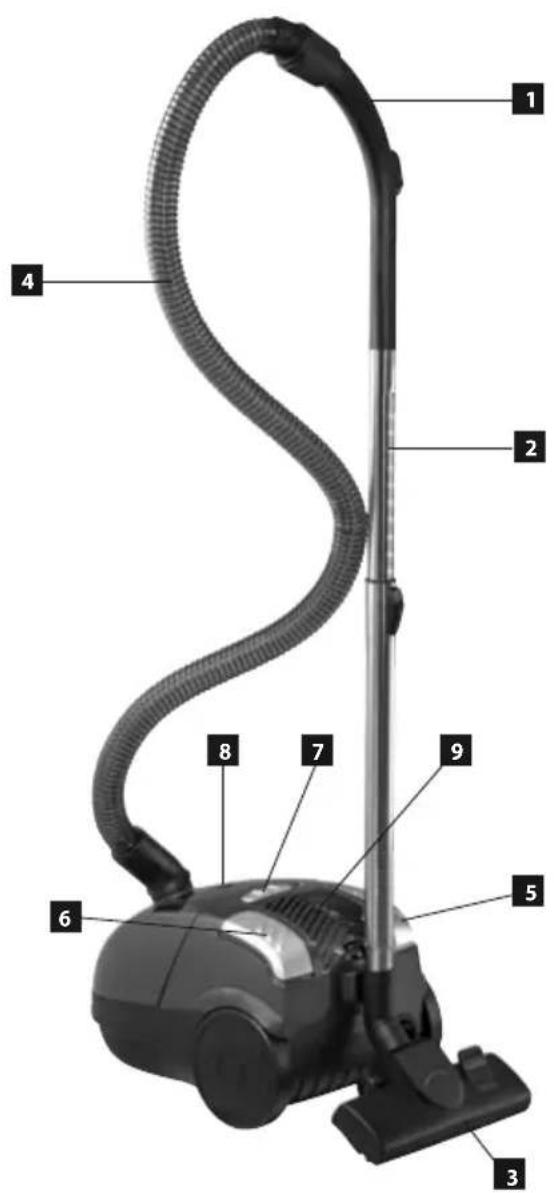
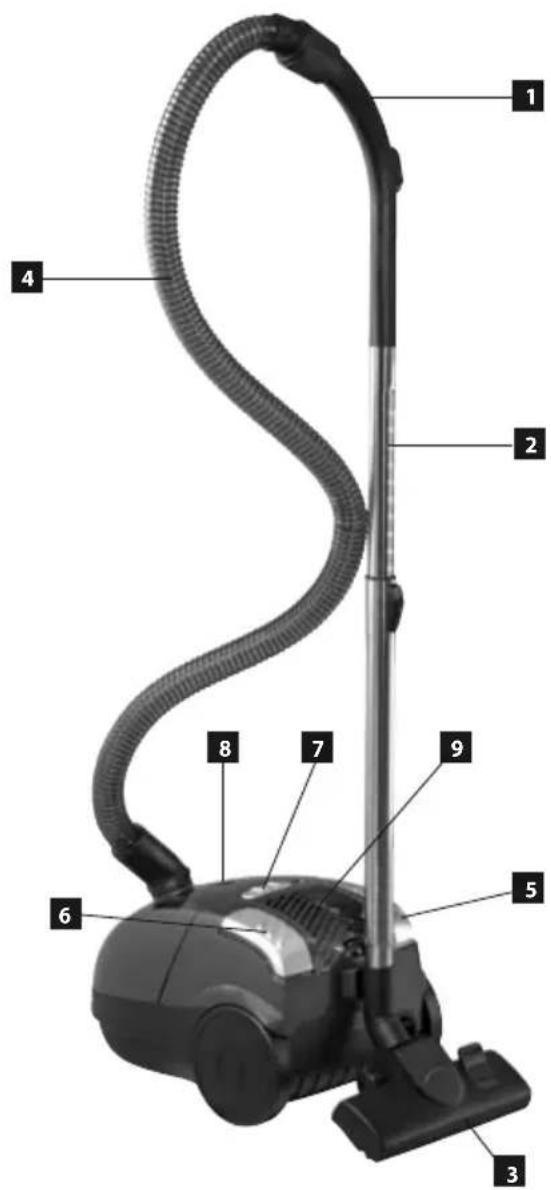
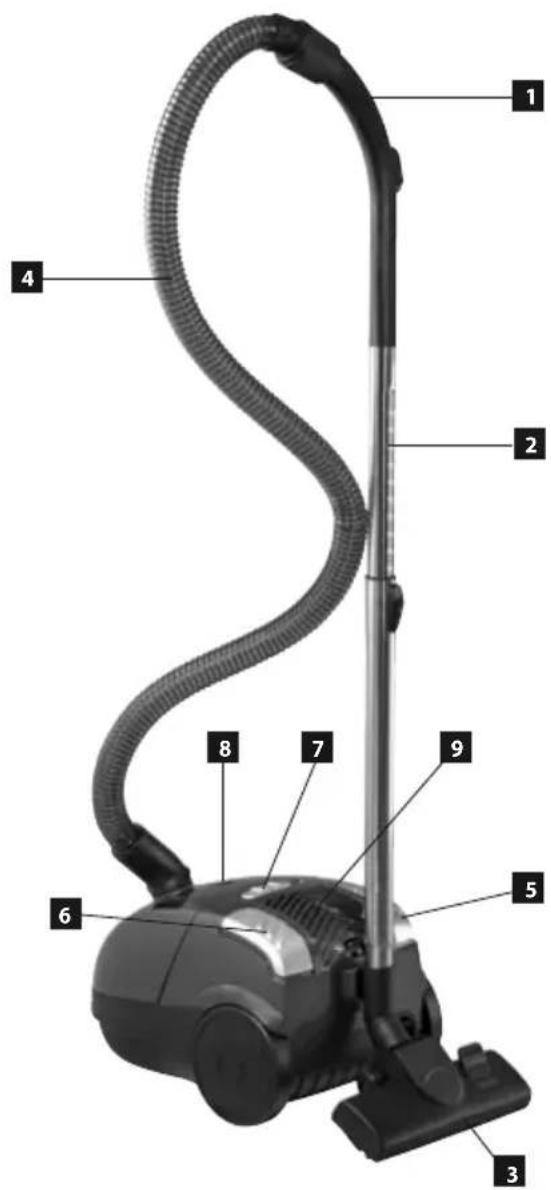
PRODUCT DESCRIPTION
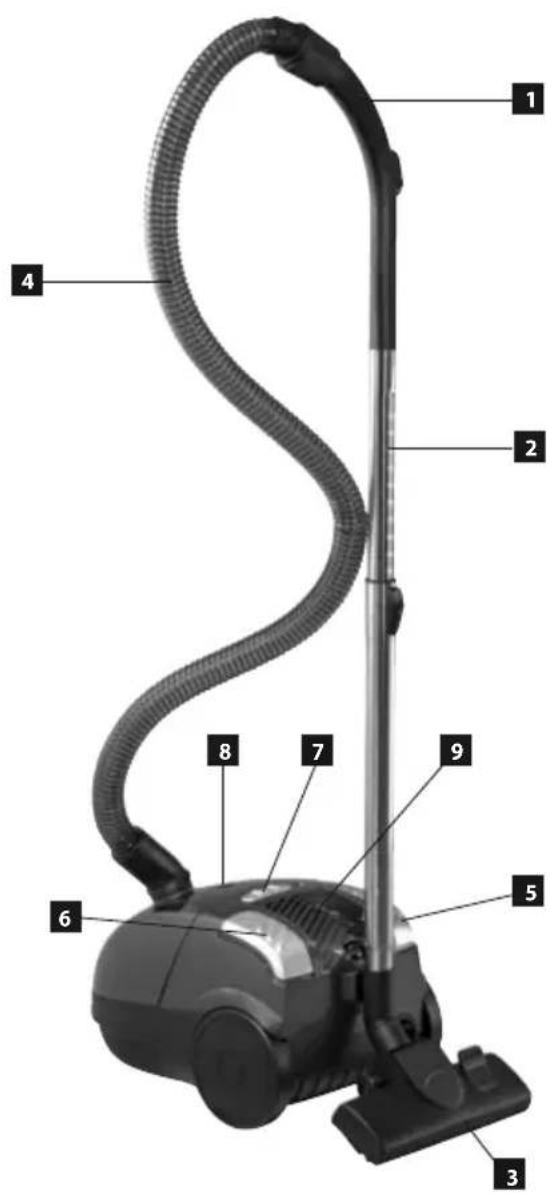
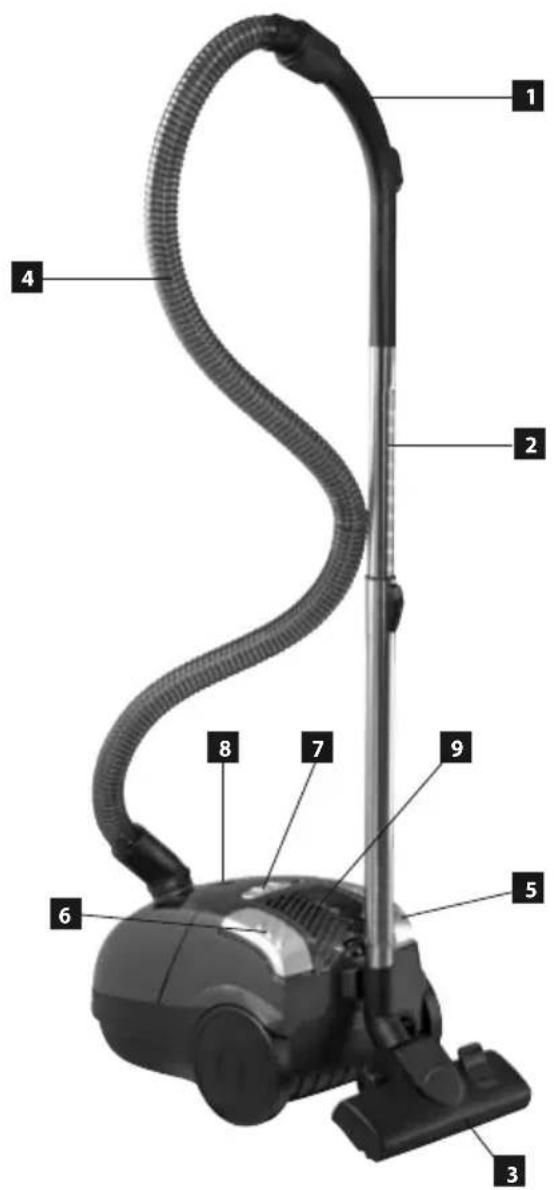
- Hose holder
- Telescopic tube
- Floor attachment
- Flexible hose
- Power cord winding button
- ON/OFF button
- Power controller
- Dust bag content level indicator
- Air discharge filter
Accessories
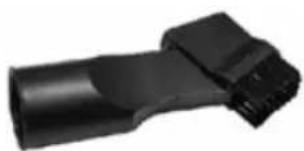
A Slotted nozzle with a brush
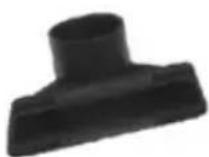
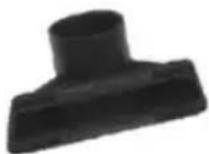
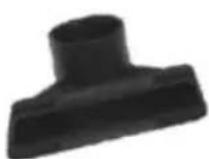
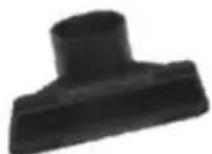
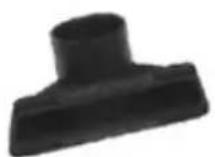
B Upholstery nozzle
natural_image
Black plastic mechanical component with a cylindrical shaft and flange (no visible text or symbols)A
B
text_image
Labeled diagram of a vacuum cleaner with numbered parts for identificationOPERATING INSTRUCTIONS - ASSEMBLING THE VACUUM CLEANER
NOTE
Always disconnect the plug from the mains outlet prior to mounting or removing accessories!
-
Connecting the flexible hose to the vacuum cleaner
Insert the flexible hose into the air suction inlet of the vacuum cleaner.
Continue pushing until you hear a clicking sound, which indicates that the correct position has been reached.
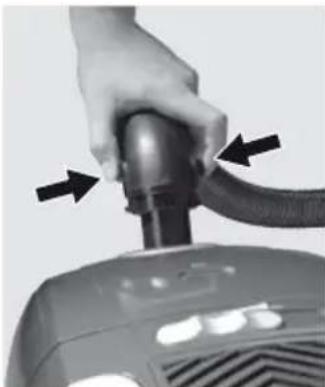
To remove the flexible hose push both safety buttons and remove the hose (Fig. 1).
The suction power can be controlled on the hose handle.
Slide controller in closed position – stronger air flow.
Slide controller in open position – weaker air flow. -
Attaching the telescopic tube to the hose adapter Place the telescopic tube on the hose adapter and turn slightly.
-
Extending the telescopic tube Press the plastic latch and extend the smaller tube outwards.
-
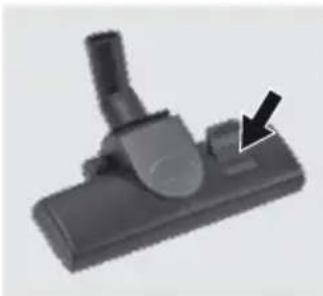
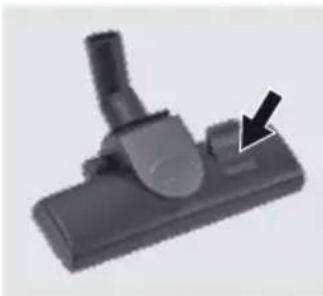
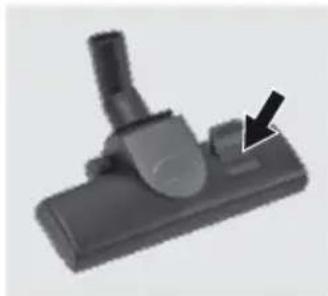
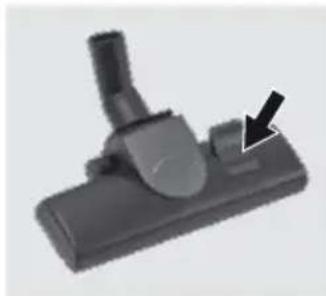
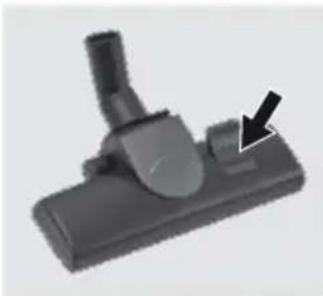
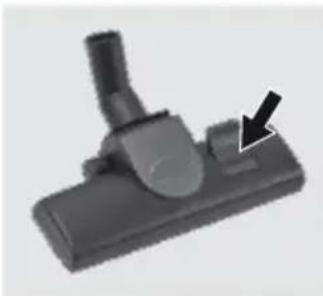
Putting the floor attachment on the telescopic tube Insert the telescopic tube into the floor attachment and turn slightly. The flap (Fig. 2) allows setting the floor attachment to brushing (for flat floors) or to smooth vacuuming (for carpets).
natural_image
Close-up of a hand holding a black cylindrical device with two arrows pointing to it, no visible text or symbols.Fig. 1
natural_image
Close-up of a black vacuum cleaner component with a black arrow pointing to a button (no text or symbols visible)Fig. 2
ACCESSORIES
-
Slotted nozzle with a brush The combined slotted adapter is designed for vacuuming areas difficult to access, such as radiators, slots, corners, pedestals, spaces between upholstery, and so on.
-
Upholstery nozzle This nozzle is used to clean smaller upholstered surfaces.
USING THE VACUUM CLEANER
NOTE
Prior to using the vacuum cleaner, please make sure that the filters and the dust bag have been placed and installed properly. Unwind the necessary length of the power cord. The ideal length of power cord is marked by a yellow dot on the cord. Do not unwind the power cord past the red mark!
- Adjust the power controller to the minimum setting.
- Insert the plug into the mains outlet.
- Press the main switch on the vacuum cleaner.
-
Set the required suction power using the controller.
-
After vacuuming, turn off the product and unplug from the mains outlet.
-
Press the winding button to wind the power cord. Use the other hand to hold the power cord to avoid uncontrolled movement.
CHECKING THE DUST BAG CONTENT LEVEL
As soon as the bag level indicator turns red, replace the dust bag immediately.
NOTE: If the bag level indicator remains red after replacing the dust bag, check for the following:
- one of the air passages is obstructed (hoses, telescopic tube, suction inlet, brush adapter, or other adapters)
- Motor protective filter is clogged
- Air outlet filter is fouled
Check for each of the above possible causes and eliminate the problem before you resume vacuuming. If the cause of the problem cannot be identified, hand over the product to the nearest service center. Never use the vacuum cleaner if the bag level indicator is completely red. The motor could be damaged irreparably.
MAINTENANCE
REPLACING THE DUST BAG
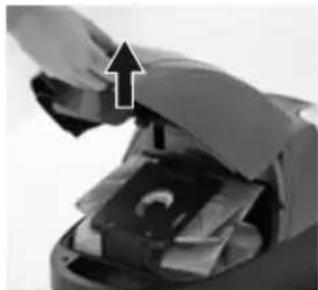
- Unplug the product from the mains. Disconnect the hose from the suction inlet and open the vacuum cleaner cover (see Fig. 3).
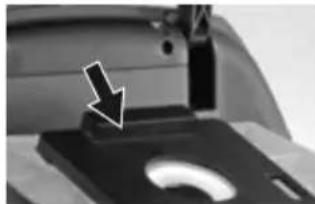
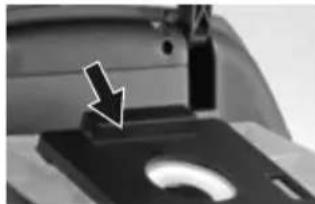
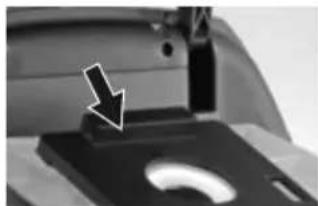
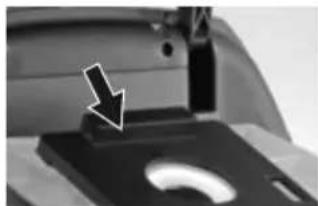
- Remove the holder with the dust bag from the vacuum cleaner. Push the safety flap on the dust bag holder (Fig. 4), take out the used dust bag and dispose of it. Be careful not to tear the bag when handling.
- Install a new bag. Slide the pasteboard disk into the holder, and insert the holder in the unit. The bag opening should be aligned with the hole in the vacuum cleaner cover (see Fig. 4).
- Never use the vacuum cleaner without the dust bag installed! The cover cannot be closed completely if you forget to insert the dust bag, or if the bag is installed incorrectly.
- Close the cover. Continue pressing until you hear a clicking sound.
REPLACING FILTERS
- The filters should be cleaned or replaced whenever they are visibly fouled, or when the suction power decreases. The filters should be checked after each use of the vacuum cleaner.
- Never use the vacuum cleaner without properly installed filters, to avoid damage to the appliance.
- Unplug the vacuum cleaner from the mains outlet before replacing filters.
- Suitable filter types are available at your local retailer, or they can be ordered from the manufacturer.
CLEANING AND REPLACING THE MOTOR FILTER
- Disconnect the flexible hose and open the vacuum cleaner cover.
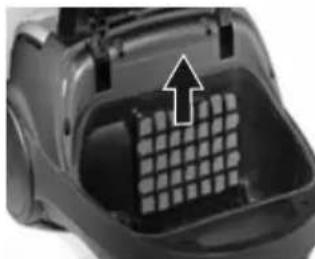
- Pull the dust bag out of its holder to have better access to the motor filter.
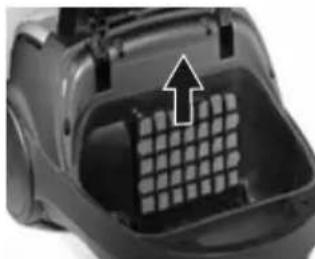
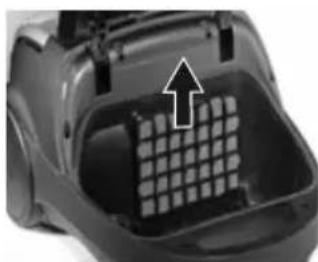
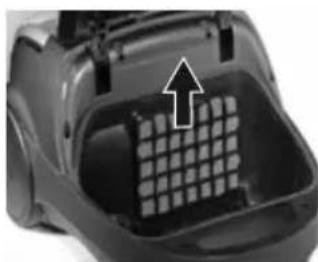
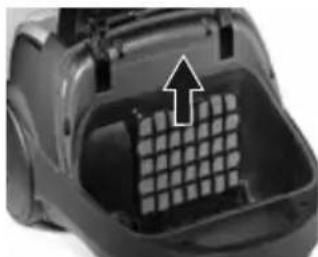
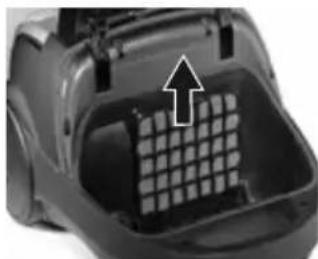
- Remove the motor filter (see Fig. 5). The filter can be cleaned by tapping or shaking it. If the filter is extremely dirty, it can be washed in lukewarm water. Let the filter dry completely before using it again.
- Insert a cleaned or new motor filter into the vacuum cleaner and close the cover.
CLEANING AND REPLACING THE AIR OUTLET FILTER
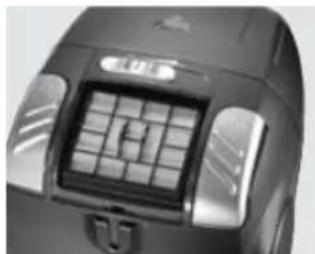
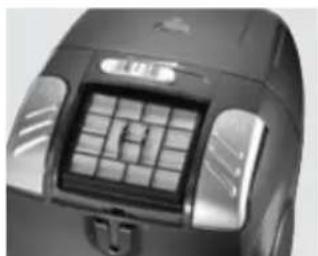
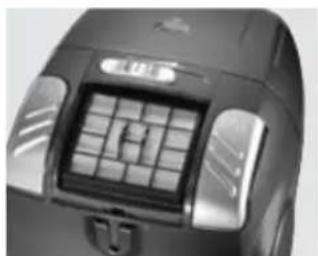
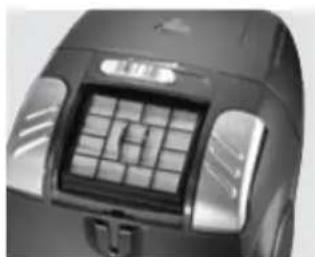
- Open the air outlet grid at the rear section of the vacuum cleaner (see Fig. 6).
- Remove the air outlet filter. This type of vacuum cleaner is equipped with an H.E.P.A. filter at the outlet, which catches even very light dust particles. This filter can be cleaned by mechanical shaking and cleaning with a soft brush.
- Insert a cleaned or new air outlet filter, and close the air outlet grid.
natural_image
Close-up of a mechanical component with an arrow pointing to a stack of papers or documents (no visible text or symbols)Fig. 3

natural_image
Close-up of a mechanical device with a black arrow pointing to a component (no visible text or symbols)Fig. 4
natural_image
Close-up of a black plastic container with a grid pattern and an arrow pointing upward (no text or symbols visible)Fig. 5
natural_image
Close-up of a black industrial device with a grid-patterned lid and handle (no visible text or symbols)Fig. 6
CLEANING AND MAINTENANCE
The vacuum cleaner and its accessories can be cleaned with a wet cloth.
Never put the unit under water!
Do not use aggressive substances for cleaning, such as solvents or abrasives!
TROUBLESHOOTING
| Problem Cause Solution | ||
| Motor does not run. | Plug inserted into the mains outlet incorrectly or insufficiently. | Check the plug connection. |
| The mains outlet is not live. | Check for voltage, e.g. by connecting another appliance. | |
| Motor has stopped operating. | Improper or insufficient air flow.Motor overheating fuse activated. | Disconnect the cable from the socket.Check and release the air suction and discharge holes; check the filter's cleanliness and/or replace the dust bag.Let the vacuum cleaner cool down. |
| Front cover cannot be closed | Dust bag inserted incorrectly. Check the dust filter installation. | |
| Reduced suction power | Dust bag full or clogged. Replace the dust bag. | |
| Obstructed filter. | Clean or replace the filter. | |
| Clogged nozzle, tube, or hose. | Check and clear the air passage on the suction and discharge sides. | |
| Vacuum cleaner heats up | Slight heating of the vacuum cleaner is normal and cannot be considered a failure. | |
ACCESSORIES
The following accessories can be bought with the unit:
Paper dust bags
(5 bags + 1 motor filter) Ord. No. ns9140 Price: See price list
Textile dust bag - 1 bag |ts9140, Ord. No. Price: See price list
Motor filter |44291322, Ord. No. Price: See price list
H.E.P.A. air outlet filter |44291323, Ord. No. Price: See price list
SERVICE
Any larger maintenance or repairs requiring intervention into the internal parts of the product shall only be performed by an authorized service
ENVIRONMENTAL PROTECTION
- Packaging materials and obsolete appliances should be recycled.
- The transport box may be disposed of as sorted waste.
- Polyethylene bags shall be handed over for recycling.
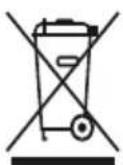
Recycling the product at the end of its service life
The symbol affixed to the product or its packaging indicates that the product may not be disposed of as household waste. It must be taken to the collection facility authorized for recycling electric and electronic waste. By ensuring that this product is disposed of correctly, you will help prevent potential negative consequences for the environment and human health, which could otherwise be caused by inappropriate waste handling of this product. For more detailed information about the treatment, recovery and recycling of this product, please contact your local city office, your household waste disposal service or the shop where you purchased the product.
DANKSAGUNG
natural_image
Black plastic electrical plug component (no visible text or symbols)A
B

text_image
Labeled diagram of a vacuum cleaner with numbered parts for identificationnatural_image
Close-up of a hand holding a black cylindrical device with two arrows pointing to it, next to a control panel (no visible text or symbols)Abb. 1
natural_image
Close-up of a black mechanical component with a black arrow pointing to a specific part (no text or symbols visible)Abb. 2
ZUBEHÖR
natural_image
Close-up of a mechanical component with an arrow pointing to a stack of papers or documents (no visible text or symbols)Abb. 3

natural_image
Close-up of a mechanical device with a black arrow pointing to a component (no visible text or symbols)Abb. 4
natural_image
Close-up of a black plastic container with a grid pattern and an arrow pointing upward (no text or symbols visible)Abb. 5

natural_image
Close-up of a black electronic device with a grid-patterned panel and control buttons (no visible text or symbols)Abb. 6