RC-CT001 - Toaster Royal Catering - Free user manual and instructions
Find the device manual for free RC-CT001 Royal Catering in PDF.
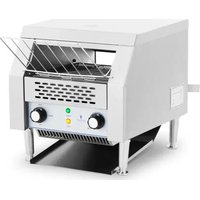


| Product type | Chain toaster |
| Model | RC-CT001 |
| Rated voltage | 230 V ~ / 50 Hz |
| Rated power | 2200 W |
| Protection class | I (grounded) |
| IP protection rating | IPX3 |
| Dimensions (L x D x H) | 750 x 370 x 390 mm |
| Weight | 14.5 kg |
| Main material | Stainless steel |
| Operating modes | Bread (BREAD), Buns (BUNS), Standby (STBY) |
| Speed adjustment | 3 levels (I, II, III) – affects cooking time |
| Indicator lights | Power indicator (green), heating indicator (orange) |
| Preheating time | Approximately 10-12 minutes |
| Capacity | For bread and buns (continuous grilling) |
| Included accessories | Inlet rack, crumb tray, lower and rear trays, adjustable feet (with wrench) |
| Cleaning | Removable crumb tray; clean surface with damp cloth and mild detergent |
| Safety | Hot surface (caution burns), manual stop (OFF position), indoor use only |
| Minimum distance to walls | 10 cm on each side |
| Operating conditions | Flat, stable, fireproof, dry surface; ambient temperature ≤ 40°C, humidity < 85% |
| Warranty and after-sales service | Repairs exclusively by the manufacturer's service center; original spare parts |
Frequently Asked Questions - RC-CT001 Royal Catering
User questions about RC-CT001 Royal Catering
0 question about this device. Answer the ones you know or ask your own.
Ask a new question about this device
Download the instructions for your Toaster in PDF format for free! Find your manual RC-CT001 - Royal Catering and take your electronic device back in hand. On this page are published all the documents necessary for the use of your device. RC-CT001 by Royal Catering.
USER MANUAL RC-CT001 Royal Catering
Safety & Operating Instructions
This User Manual has been translated using machine translation. We have made every effort to ensure the translation is accurate, but please note that automated translations are not perfect and are not meant to replace human translators. The official version of the User Manual is in English. Any differences between the translated version and the original English are not legally binding. If you have any questions about the accuracy of the translation, please refer to the English version, which is the official reference. More language versions are available upon request via info@expondo.com.
Technical data
| Parameter description | Parameter value |
| Product name | Chain toaster |
| Model | RC-CT001 |
| Rated voltage [V~] / frequency [Hz] | 230 / 50 |
| Rated power [W] | 2200 |
| Protection class | | |
| Protection rating IP | IPX3 |
| Dimensions [width x depth x height, mm] | 750x370x390 |
| Weight [kg] | 14.5 |
1. General description
The user manual is designed to assist in the safe and trouble-free use of the device. The product is designed and manufactured in accordance with strict technical guidelines, using state-of-the-art technologies and components. Additionally, it is produced in compliance with the most stringent quality standards.
DO NOT USE THE DEVICE UNLESS YOU HAVE THOROUGHLY READ AND UNDERSTOOD THIS USER MANUAL.
To increase the product life of the device and to ensure trouble-free operation, use it in accordance with this user manual and regularly perform maintenance tasks. The technical data and specifications in this user manual are up to date. The manufacturer reserves the right to make changes associated with quality improvement. The device is designed to reduce noise emission risks to a minimum, taking into account technological progress and noise reduction opportunities.
Legend
| CE | The product satisfies the relevant safety standards. |
 | Read instructions before use. |
 | The product must be recycled. |
 | WARNING! or CAUTION! or REMEMBER! Applicable to the given situation.(general warning sign) |
 | ATTENTION! Electric shock warning! |
 | ATTENTION! Rotating parts, entanglement hazard! | ||
 | Protection Class 1. Grounding required, basic insulation. | ||
 | ATTENTION! Hot surface, risk of burns! | ||
 | Only use indoors. |

PLEASE NOTE! Drawings in this manual are for illustration purposes only and in some details may differ from the actual product.
2. Usage safety

ATTENTION! Read all safety warnings and all instructions. Failure to follow the warnings and instructions may result in electric shock, fire and/or serious injury or even death.
The terms "device" or "product" are used in the warnings and instructions to refer to:
Chain toaster.
2.1. Electrical safety
a) The plug must fit the socket. Do not modify the plug in any way. Using original plugs and matching sockets reduces the risk of electric shock. b) Avoid touching earthed elements such as pipes, heaters, boilers and refrigerators. There is an increased risk of electric shock if the earthed device is exposed to rain, comes into direct contact with a wet surface or is operating in a damp environment. Water getting into the device increases the risk of damage to the device and of electric shock. c) Do not touch the device with wet or damp hands. d) Use the cable only for its designated use. Never use it to carry the device or to pull the plug out of a socket. Keep the cable away from heat sources, oil, sharp edges or moving parts. Damaged or tangled cables increase the risk of electric shock. e) Do not use the device if the power cord is damaged or shows obvious signs of wear. A damaged power cord should be replaced by a qualified electrician or the manufacturer's service centre. f) To avoid electric shock, do not immerse the cord, plug or device in water or other liquids. Do not use the device on wet surfaces. g) ATTENTION! DANGER TO LIFE! While cleaning, never immerse the device in water or other liquids. h) Do not use in very humid environments or in the direct vicinity of water tanks. i) Prevent the device from getting wet. Risk of electric shock!
2.2. Safety in the workplace
a) Make sure the workplace is clean and well lit. A messy or poorly lit workplace may lead to accidents. Try to think ahead, observe what is going on and use common sense when working with the device. b) Do not use the device in a potentially explosive environment, for example in the presence of flammable liquids, gases or dust. The device generates sparks which may ignite dust or fumes.
c) If you discover damage or irregular operation, immediately switch the device off and report it to a supervisor without delay.
d) If you are unsure about whether the product is operating correctly or if you find damage, please contact the manufacturer's service centre.
e) Only the manufacturer's service centre may make repairs to the product. Do not attempt to make repairs yourself!
f) In case of fire, use a powder or carbon dioxide (CO2) fire extinguisher (one intended for use on live electrical devices) to put it out.
g) Use the device in a well-ventilated space.
h) Regularly inspect the condition of the safety labels. If the labels are illegible, they must be replaced.
i) Please keep this manual available for future reference. If this device is passed on to a third party, the manual must be passed on with it.
i) Keep packaging elements and small assembly parts in a place not available to children.
k) Keep the device away from children and animals.
I) If this device is used together with another equipment, the remaining instructions for use shall also be followed.

Remember! When using the device, protect children and other bystanders.
2.3. Personal safety
a) Do not use the device when tired, ill, or under the influence of alcohol, narcotics, or medication that can significantly impair the ability to operate the device.
b) The device is not designed to be handled by persons (including children) with limited mental and sensory functions or persons lacking relevant experience and/or knowledge unless they are supervised by a person responsible for their safety or they have received instruction on how to operate the device.
c) When working with the device, use common sense and stay alert. Temporary loss of concentration while using the device may lead to serious injuries.
d) To prevent the device from accidentally switching on, make sure the switch is in the OFF position before connecting to a power source.
e) Do not overestimate your abilities. When using the device, keep your balance and remain stable at all times. This will ensure better control over the device in unexpected situations.
f) Do not wear loose clothing or jewellery. Keep hair, clothes, and gloves away from moving parts. Loose clothing, jewellery, or long hair may get caught in moving parts.
g) Remove all adjusting tools or spanners before turning the device on. A tool or spanner left in the revolving part of the device may cause injury.
h) The device is not a toy. Children must be supervised to ensure that they do not play with the device.
i) Do not put your hands or other items inside the device while it is in use!
2.4. Safe device use
a) Do not overload the device. Use the appropriate tools for the given task. A correctly-selected device will perform the task for which it was designed better and in a safer manner.
b) Do not use the device if the "ON/OFF" switch does not function properly (does not switch the device on and off). Devices which cannot be switched on and off using the "ON/OFF" switch are hazardous, should not be operated, and must be repaired.
c) Make sure the plug is disconnected from the socket before attempting any adjustments, accessory replacements, or before putting the device aside. Such precautions will reduce the risk of accidentally activating the device.
d) Disconnect the device from the power supply before commencement of adjustment, cleaning, and maintenance. Such a preventive measure reduces the risk of accidental activation.
e) Make sure the pressure line is disconnected before attempting any adjustments, accessory replacements, or doing any work on the device. Such a preventive measure reduces the risk of an accident. f) When not in use, store in a safe place, away from children and people not familiar with the device who have not read the user manual. The device may pose a hazard in the hands of inexperienced users. g) Keep the device in perfect technical condition. Before each use, check for general damage, especially check moving components for cracked parts or elements, and for any other conditions which may impact the safe operation of the device. If damage is discovered, hand over the device for repair before use. h) Keep the device out of the reach of children. i) Device repair or maintenance should be carried out by qualified persons, only using original spare parts. This will ensure safe use. j) To ensure the operational integrity of the device, do not remove factory-fitted guards and do not loosen any screws. k) Avoid situations where the device stops working during use due to excessive loading. This may result in overheating of the drive elements and damage to the device. l) Do not touch articulated parts or accessories unless the device has been disconnected from the power source. m) Do not move, adjust, or rotate the device in the course of work. n) Do not leave this appliance unattended while it is in use. o) Clean the device regularly to prevent stubborn grime from accumulating. p) The device is not a toy. Cleaning and maintenance may not be carried out by children without supervision by an adult person. q) It is forbidden to interfere with the structure of the device in order to change its parameters or construction. r) Keep the device away from sources of fire and heat. s) Do not cover the ventilation openings! t) Do not use this unit to dry, heat, or dehumidify objects. u) Clean the drawer regularly to prevent permanent dirt build-up. v) The unit emits high temperatures during operation. Do not place the unit on flammable or combustible surfaces or near flammable materials.

ATTENTION! Despite the safe design of the device and its protective features, and despite the use of additional elements protecting the operator, there is still a slight risk of accident or injury when using the device. Stay alert and use common sense when using the device.
3. Use guidelines
The unit is intended for toasting bread and rolls. It is not allowed to toast bread sprinkled with e.g. sugar, cheese, or to bake raw dough.
The user is liable for any damage resulting from unintended use of the device.
3.1. Device description
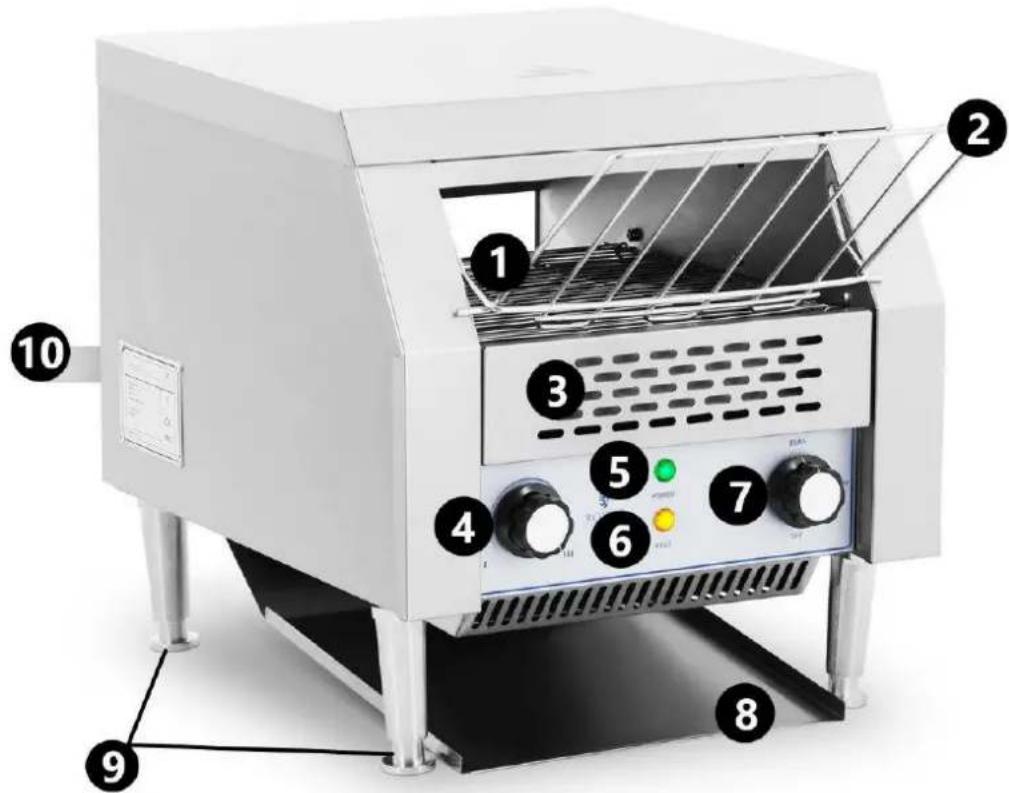
- Feeder
- Mode selector knob
- Grid tray
- Bottom tray
- Crumb drawer
- Adjustable feet
- Feeder speed adjustment knob
- Rear tray
- Power light
- Heating indicator light
3.2 Preparing for use
APPLIANCE LOCATION
The temperature of the environment must not be higher than 40°C and the relative humidity should be less than 85%. Ensure good ventilation in the room in which the device is being used. There should be at least 10 cm distance between each side of the device and the wall or other objects. The device should always be used when positioned on an even, stable, clean, fireproof and dry surface, and be out of the reach of children and persons with limited mental and sensory functions. Position the device such that you always have access to the power plug. The power cord connected to the appliance must be properly grounded and correspond to the technical details on the product label.
Use the unit only in a horizontal position. Do not shake the unit. Before using the unit for the first time, disassemble all parts and wash them as well as the entire unit.
3.3. Assembling the device
Caution: Do not assemble or disassemble the unit while it is connected to the power supply or while it is still hot.
- Screw the feet into the holes in the bottom of the unit. Adjust the preferred height, making sure that the feet are at the same level and the unit stands evenly and steadily. Tighten the feet using the wrench provided.
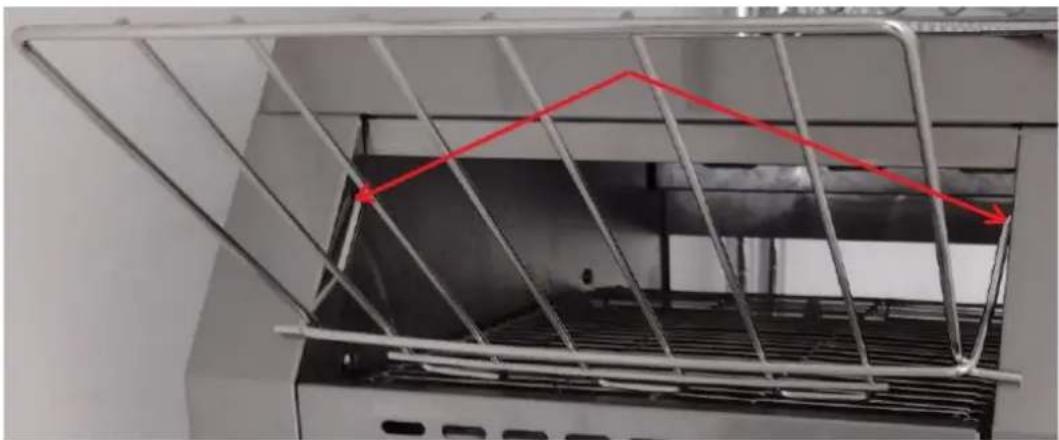
- Attach the feeder grid by hooking the hooks into the holes on the inside of the unit:
- Replace the bottom tray and the rear tray. Note: Always attach one of the trays before using the machine.
3.4. Device use
NOTE: a burning smell may be detected during first use. This is normal and should disappear after a short time. Ensure that the room is well ventilated.
- Before connecting the machine to the power supply, always verify that the mode selector is in the "OFF" position.
- Connect the unit to the power source using the power cord. The green power light will illuminate.
- Select the operation mode with the knob:
a) BREAD - upper and lower heaters are on. b) BUNS - only the upper heater is on. c) STBY - standby mode.
- Set the speed of the feeder (it affects how long the bread stays in the toaster, and thus how well it is baked). Mode "I" - the lowest baking degree, the fastest feeder speed. Mode "III" has the highest degree of toasting and the slowest tray speed.
- After starting the machine, wait about 10-12 minutes until it reaches a high enough temperature. Always bake two slices of bread as a test to ensure that the baking mode and speed have been properly selected.
- The orange heating light illuminates while the unit is heating up. Caution: The heating elements may cause a small amount of smoke to appear during initial operation.
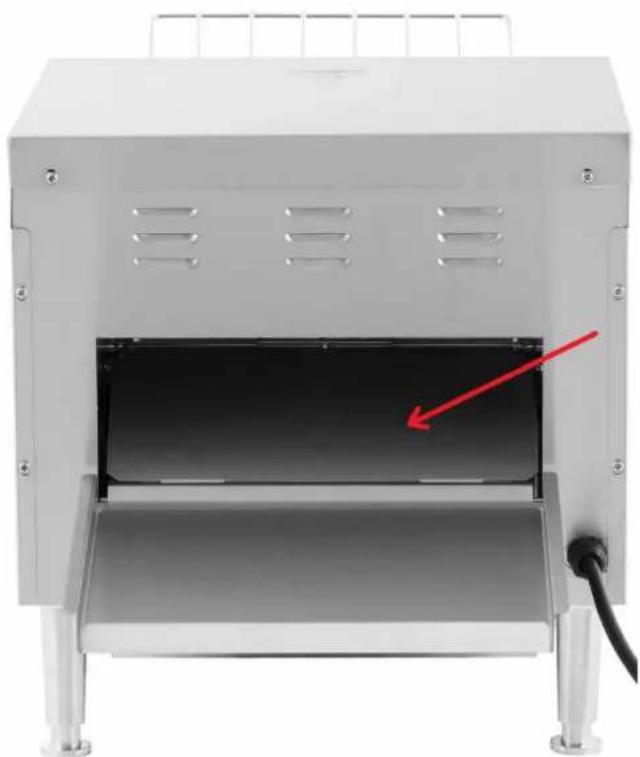
- Place the bread to be toasted on the feeder grid and wait for it to pass through the interior of the toaster. The toasted bread can be placed on the rear tray or on the bottom tray – the choice is made by moving the plate indicated by the arrow in the picture below:
- Be careful when using the toaster as it heats up to high temperatures.
- When you have finished using the unit, turn the mode selector knob to the "OFF" position, and then unplug the unit from the power source.
3.5. Cleaning and maintenance
a) Pull the mains plug and let the unit cool down completely before cleaning, adjusting or replacing accessories and when the unit is not in use.
b) Use only non-corrosive cleaning agents for cleaning the surfaces.
c) Only mild detergents designed for cleaning food contact surfaces may be used to clean the unit.
d) After each cleaning, all the parts should be dried well before the unit is used again.
e) Store the unit in a dry and cool place protected from moisture and direct sunlight.
f) Do not spray the unit with a stream of water or immerse it in water.
g) Make sure that no water enters through the ventilation openings in the casing.
h) Clean the ventilation openings with a brush and compressed air.
i) Perform regular inspections of the unit checking technical fitness and any damages.
i) Use a soft, damp cloth for cleaning.
k) I) Do not use sharp and/or metal objects (e.g. a wire brush or metal spatula) for cleaning, as these may damage the surface of the material from which the unit is made.
I) m) Do not clean the unit with acidic substances, medical products, diluent, fuel, oil or other chemicals as this may cause damage to the unit.
m) Clean the crumb drawer regularly to prevent ignition or mold.
DISPOSING OF USED DEVICES:
Do not dispose of this device in municipal waste systems. Hand it over to an electric and electrical device recycling and collection point. Check the symbol on the product, instruction manual and packaging. The plastics used to construct the device can be recycled in accordance with their markings. By choosing to recycle you are making a significant contribution to the protection of our environment.
Contact local authorities for information on your local recycling facility.

- Material
- Grid tray
- Crumb tray
- Feed rate adjustment knob
- Power indicator light
- Heating indicator light
- Mode selector button
- Bottom tray
- Adjustable feet
- Rear tray
APPLIANCE PLACEMENT
- Hopper
- Grid tray
- Crumb tray
- Feeder speed adjustment button
- Power light
- Heating indicator
- Mode selection button
- Lower tray
- Adjustable feet
- Rear tray
3.2. Preparation for use
APPLIANCE POSITION
The ambient temperature must not exceed 40°C, and the relative air humidity must be less than 85%. Ensure good ventilation in the room where the appliance is used. The distance between each side of the appliance and the wall or other objects must be at least 10 cm. The appliance should always be used on a flat, stable, clean, fire-resistant, and dry surface, and out of reach of children and persons with limited mental and sensory functions. Position the appliance so that you always have access to the plug. The power cord connected to the appliance must be properly grounded and match the technical specifications on the product label.
- Be careful when using the toaster as it heats up to high temperatures.
- When you have finished using the unit, turn the mode selector knob to the "OFF" position, and then unplug the unit from the power source.
3.5. Cleaning and Maintenance
a) Unplug the power cord and allow the unit to cool completely before cleaning, adjusting, or replacing accessories, and when the unit is not in use.
b) Use only non-corrosive cleaning agents to clean the surfaces.
- When using the iron, be careful, as it heats up to high temperatures.
- When you have finished using the unit, turn the mode selector knob to the "OFF" position, and then unplug the unit from the power source.
Environmental and disposal information
Producer to customer
Dear Sir or Madam,
Let's take care of the environment! The product you own should not be disposed of with household waste. According to applicable regulations (Directive 2012/19/EU and other local regulations), used equipment must be taken to designated collection points for proper disposal and recycling.
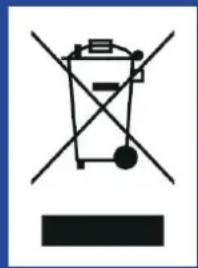
How to Handle the Product at the End of Its Lifecycle?
- Electrical and Electronic Equipment: Products marked with the crossed-out wheeled bin symbol must not be disposed of with household waste. You can:
Take it to your local collection point for electrical and electronic equipment. Use the “one-for-one” system (returning the old device when purchasing a new one, if available in your region).
- Batteries and Accumulators: If the product contains batteries, remove them before recycling and take them to designated battery collection points.
- Packaging Materials: Packaging, such as cardboard or plastic, should be sorted and placed in recycling bins.
Why is This Important?
Proper disposal of equipment and packaging materials:
- Protects the environment from harmful substances.
- Enables the recovery of valuable resources.
- Reduces the amount of waste sent to landfills.
Where to Find Information?
Information about waste collection points can be found on local authorities' websites or through your recycling service provider. If needed, contact our customer service team, who will gladly provide further details.
Thank you for your care for the environment and commitment to recycling!
Contact
expondo Polska sp. z o.o. sp. k.
- SAFETY & OPERATING INSTRUCTIONS
- GENERAL DESCRIPTION
- DO NOT USE THE DEVICE UNLESS YOU HAVE THOROUGHLY READ AND UNDERSTOOD THIS USER MANUAL
- USAGE SAFETY
- ELECTRICAL SAFETY
- SAFETY IN THE WORKPLACE
- PERSONAL SAFETY
- SAFE DEVICE USE
- USE GUIDELINES
- DEVICE DESCRIPTION
- PREPARING FOR USE
- APPLIANCE LOCATION
- ASSEMBLING THE DEVICE
- DEVICE USE
- CLEANING AND MAINTENANCE
- DISPOSING OF USED DEVICES
- APPLIANCE PLACEMENT
- PREPARATION FOR USE
- APPLIANCE POSITION
- ENVIRONMENTAL AND DISPOSAL INFORMATION
- HOW TO HANDLE THE PRODUCT AT THE END OF ITS LIFECYCLE
- WHY IS THIS IMPORTANT
- WHERE TO FIND INFORMATION
- CONTACT
Brand : Royal Catering
Model : RC-CT001
Category : Toaster