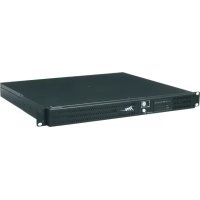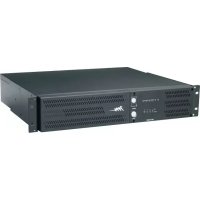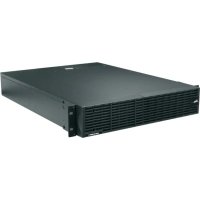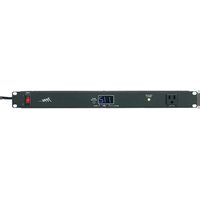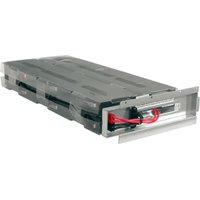
UPS-OLRBP-1 - Uninterruptible power supply Middle Atlantic - Free user manual and instructions
Find the device manual for free UPS-OLRBP-1 Middle Atlantic in PDF.


User questions about UPS-OLRBP-1 Middle Atlantic
0 question about this device. Answer the ones you know or ask your own.
Ask a new question about this device
Download the instructions for your Uninterruptible power supply in PDF format for free! Find your manual UPS-OLRBP-1 - Middle Atlantic and take your electronic device back in hand. On this page are published all the documents necessary for the use of your device. UPS-OLRBP-1 by Middle Atlantic.
USER MANUAL UPS-OLRBP-1 Middle Atlantic
natural_image
Four technical line drawings of a multi-chamber electronic device housing (no text or symbols)THANK YOU
Thank you for purchasing a replacement battery for your Online UPS series product. The Online UPS replacement battery is a hot-swappable (for qualified service personnel) replacement battery pack for your Online Series Rackmount UPS. Please read this manual thoroughly before installing this product.
PRODUCT FEATURES
- Replace batteries in your Online UPS or Online Expansion Battery Pack.

text_image
Middle Atlantic Products1-00793
Rev
IMPORTANT SAFETY INSTRUCTIONS
Replacement Battery Compatibility Table
The following table shows UPS-OLRBP 1 – 4 in the last 4 column headings. An X is marked on a specific row indicating the replacement battery's compatibility with a particular Online UPS (UPS-OLxxxxR) or Online Expansion Battery Pack (UPS-OLEBPR) model.
| MAP UPS or EBPR Part Number | Description | Compatible Expansion Battery Packs | UPS-OLRBP-1 | UPS-OLRBP-2 | UPS-OLRBP-3 | UPS-OLRBP-4 |
| UPS-OL1500R | 1500VA UPS | UPS-OLEBPR-2 | X | |||
| UPS-OL2200R | 2200VA UPS | UPS-OLEBPR-1 | X | |||
| UPS-OL3000R | 3000VA UPS | UPS-OLEBPR-1 | X | |||
| UPS-OLEBPR-1 | 2200/3000VA UPS Expansion Battery | NA X (2 each) | ||||
| UPS-OLEBPR-2 | 1500VA UPS Expansion Battery | NA X (Left) X (Right) | ||||
Replacement Battery Specifications
| Model Specifications | |
| UPS-OLRBP-1 | 12V, 9AH, 35.3 lbs. (16KG) |
| UPS-OLRBP-2 | |
| UPS-OLRBP-3 | 12V, 9AH, 17.6 lbs. (8KG) |
| UPS-OLRBP-4 |

CAUTION: Risk of explosion if battery is replaced by an incorrect type. See the compatibility and specification tables for more information.

CAUTION: Risk of Energy Hazard, 36 – 72 V, maximum 9 Ampere-hour batteries. Before replacing batteries, remove conductive jewelry such as chains, wrist watches, and rings. High energy through conductive materials could cause severe burns.

CAUTION: The battery is heavy. Use caution when removing.
CONSIGNES DE SÉCURITÉ IMPORTANTES
CAUTION! Make sure everything is turned off and AC power is disconnected completely before conducting any maintenance, battery replacement, repairs, or shipment.
CAUTION! Only use replacement batteries which are certified by Middle Atlantic Products. Use of incorrect battery type is an electrical hazard that could lead to explosion, fire, electric shock, or short circuit.
CAUTION! Batteries contain an electrical charge that can cause severe burns. Before servicing batteries, please remove any conductive materials such as jewelry, chains, wrist watches, and rings.
CAUTION! Do not open or mutilate the batteries. Electrolyte fluid is harmful to the skin/eyes and may be toxic.
CAUTION! To avoid electric shock, turn off and unplug the UPS from the wall receptacle before servicing the battery.
CAUTION! Only use tools with insulated handles. Do not lay tools or metal parts on top of the UPS or battery terminals.
Please read and follow the Safety Precautions before servicing the battery. Battery replacement should be performed by trained personnel who are familiar with the procedures and safety precautions. Make a note of the replacement Battery tray number.
NOTE:
- For qualified service personnel, the battery is hot swappable. Non-qualified service personnel are strongly urged to follow the first step to power off the unit and disconnect it from its AC power source.
- Batteries are considered hazardous waste and must be disposed of properly. Contact your local government for more information about proper disposal and recycling of batteries. Do not dispose of batteries in fire.
- Middle Atlantic Products encourages environmentally sound methods for disposal and recycling of its UPS products. Please dispose and/or recycle your UPS and batteries in accordance to the local regulations of your state.
-
Contact technical support at 1-800-266-7225 for more information about Middle Atlantic Product's Battery Replacement Program.
-
Power off the unit and disconnect it from its AC power source.
natural_image
Technical line drawing of a modular server or rack unit with internal components and mounting brackets (no text or symbols)-
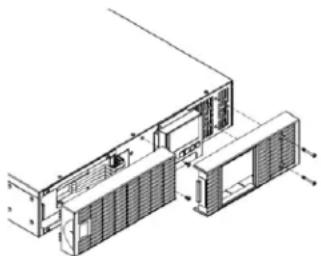
Remove the front panels.
-
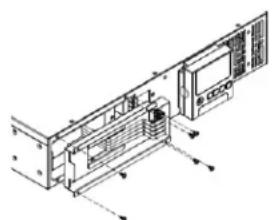
Remove the retaining screws from the cable protection cover and then remove the cover itself.
natural_image
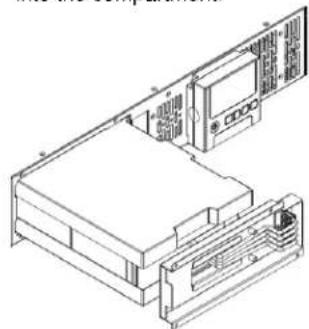
Technical line drawing of an internal electronic device with labeled components and directional arrows (no text or symbols)- Pull the battery tray out slowly and then put the new battery tray back into the compartment.
natural_image
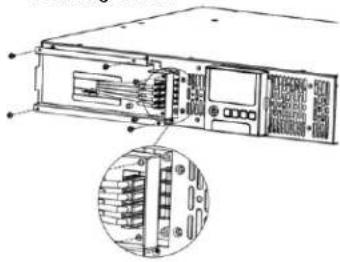
Isometric line drawing of a computer rack with monitor, tower, and ventilation unit (no text or labels)- Fasten back the connectors on the battery retaining cover. Then insert the battery connectors and tighten the screws of battery retaining cover.
natural_image
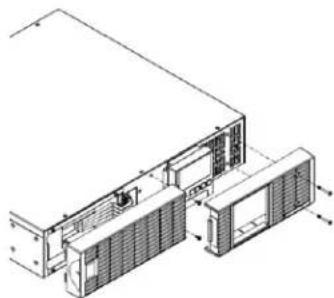
Technical line drawing of a server rack with internal components and an inset view showing internal connectors (no text or labels)- Reinstall the front panels.
natural_image
Technical line drawing of a server rack with ventilation ducts and mounting bracket (no text or symbols)UPS-OLEBPR BATTERY REPLACEMENT
Safety Precautions
CAUTION! Make sure everything is turned off and AC power is disconnected completely before conducting any maintenance, battery replacement, repairs, or shipment.
CAUTION! Only use replacement batteries which are certified by Middle Atlantic Products. Use of incorrect battery type is an electrical hazard that could lead to explosion, fire, electric shock, or short circuit.
CAUTION! Batteries contain an electrical charge that can cause severe burns. Before servicing batteries, please remove any conductive materials such as jewelry, chains, wrist watches, and rings.
CAUTION! Do not open or mutilate the batteries. Electrolyte fluid is harmful to the skin/eyes and may be toxic.
CAUTION! To avoid electric shock, turn off and unplug the UPS from the wall receptacle and allow the equipment to fully discharge before servicing the battery.
CAUTION! Only use tools with insulated handles. Do not lay tools or metal parts on top of the UPS or battery terminals.
Please read and follow the Safety Precautions before servicing the battery. Battery replacement should be performed by trained personnel who are familiar with the procedures and safety precautions. Make a note of the replacement Battery tray number.
NOTE:
- For qualified service personnel, the battery is hot swappable. Non-qualified service personnel are strongly urged to follow the first step to power off the unit and disconnect it from its AC power source.
- Batteries are considered hazardous waste and must be disposed of properly. Contact your local government for more information about proper disposal and recycling of batteries. Do not dispose of batteries in fire.
- Middle Atlantic Products encourages environmentally sound methods for disposal and recycling of its UPS products. Please dispose and/or recycle your UPS and batteries in accordance to the local regulations of your state.
-
Contact technical support at 1-800-266-7225 for more information about Middle Atlantic Product's Battery Replacement Program.
-
Power off the unit and disconnect it from its AC power source.
natural_image
Technical line drawing of a modular device with internal components and mounting brackets (no text or symbols)- Remove the front panels.
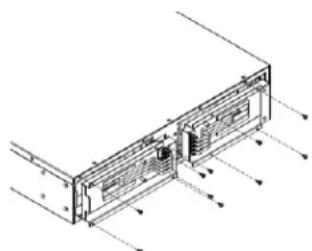
natural_image
Technical line drawing of a computer monitor rear panel with ventilation ducts and indicator arrows (no text or labels)- Remove the retaining screws from the cable protection cover and then remove the cover itself.
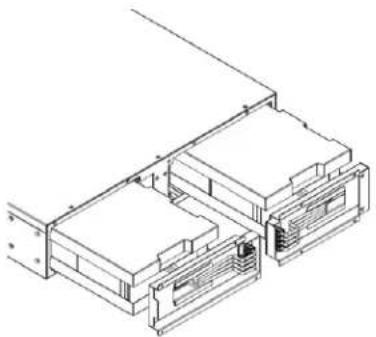
natural_image
Isometric line drawing of a multi-level electronic or mechanical assembly (no text or symbols)- Pull the battery tray out slowly and then put the new battery tray back into the compartment.
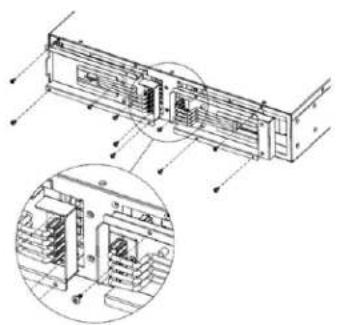
natural_image
Technical line drawing of a server rack with internal components and an inset close-up view (no text or symbols)- Fasten back the connectors on the battery retaining cover. Then insert the battery connectors and tighten the screws of battery retaining cover.
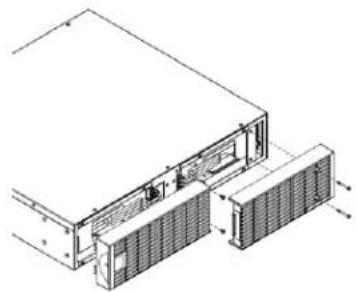
natural_image
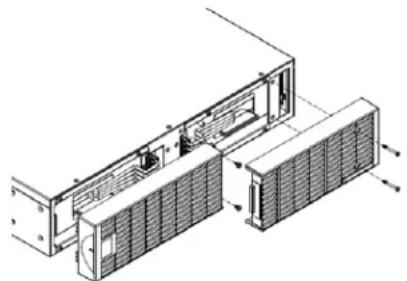
Technical line drawing of a server rack with ventilation ducts and cooling unit (no text or symbols)- Reinstall the front panels.
WARRANTY
For warranty information, refer to www.middleatlantic.com/terms.
Corporate Headquarters
Corporate Voice: 973-839-1011 – Fax: 973-839-1976 / International Voice: +1 973-839-8821 – Fax: +1 973-839-4982
www.middleatlantic.com - info@middleatlantic.com
Middle Atlantic Canada
Voice: 613-836-2501 – Fax: 613-836-2690 / www.middleatlantic.ca - customerservicecanada@middleatlantic.ca
Factory Distribution
USA: NJ - CA - IL Canada: ON - BC
At Middle Atlantic Products we are always listening. Your comments are welcome.
Middle Atlantic Products is an ISO 9001 and ISO 14001 Registered Company.