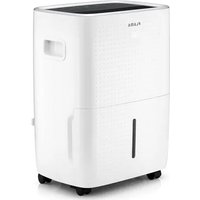
1332FL - Dehumidifier Flama - Free user manual and instructions
Find the device manual for free 1332FL Flama in PDF.


| Product type | Dehumidifier |
| Brand | Flama |
| Model | 1332FL |
| Power supply | 220-240 V~, 50 Hz |
| Dehumidification capacity | 30 L/day (at 30 °C / 80 % RH) |
| Rated power | 460 W |
| Refrigerant | R290 (90 g) |
| Tank capacity | 4.0 L |
| Dimensions (L × D × H) | 352 × 272 × 499 mm |
| Net weight | 14.5 kg |
| Operating temperature range | 7 °C to 35 °C |
| Dehumidification modes | Bedroom (55 %), Living room (50 %), Basement (45 %), Laundry drying (continuous) |
| Fan speeds | Quiet, High, Low |
| Timer | 0.5 to 24 hours (delayed start/stop) |
| Child lock | Yes |
| Air filter | Washable, clean every 250 h (light indicator) |
| Continuous drainage | Yes (tube inner diameter 10 mm) |
| Noise level | < 70 dB(A) |
| Safety | Auto shut-off when tank full, 3 min delayed restart, compressor protection |
| Maintenance | Clean the air filter regularly, clean the exterior with a dry cloth |
Frequently Asked Questions - 1332FL Flama
User questions about 1332FL Flama
0 question about this device. Answer the ones you know or ask your own.
Ask a new question about this device
Download the instructions for your Dehumidifier in PDF format for free! Find your manual 1332FL - Flama and take your electronic device back in hand. On this page are published all the documents necessary for the use of your device. 1332FL by Flama.
USER MANUAL 1332FL Flama
natural_image
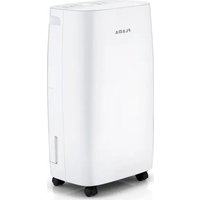
White FLAMA water purifier device with perforated lid and wheels (no visible text or symbols on body)1332FL
PT DESUMIDIFICADOR DIGITAL 30 LT 1
ES DESHUMIDIFICADOR DIGITAL 30 LT 10
EN 30LT DIGITAL DEHUMIDIFIER 20
FR DÉSHUMIDIFICATEUR DIGITAL 30LT 29
DESUMIDIFICADOR DIGITAL 30 LT
ADVERTÊNCIAS
These symbols are present in the appliance:
| SYMBOL DESCRIPTION | ||
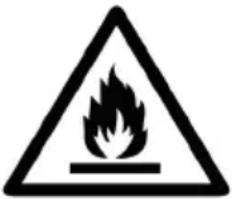 | WARNING(Risk of fire) | This appliance contains R290 propane gas.This appliance uses a flammable refrigerant gas. If the refrigerant gas leaks and comes into contact with a source of heat or ignition, it generates harmful gases and can cause a fire. |
 | Strictly follow the instructions in this manual regarding operation and maintenance. | |
 | Before using the appliance, carefully read the whole instruction manual. | |
 | Do not install, operate, or store the appliance in a space smaller than 4 m2. | |
SAFETY INSTRUCTIONS
Please read these instructions carefully before using the appliance for the first time and keep them for future reference. Use that does not comply with the instructions releases FLAMA from all responsibilities.
After transport or cleaning and maintenance, let the unit rest for 12 hours before connecting the unit to the power supply.
Check that the power supply voltage of the installation corresponds to that stated on the rating plate of the appliance.
This appliance must be connected to an earthed socket.
This appliance is intended to be used by specialists or trained shop users. In light industry and on farms, or for commercial use by lay people.
Do not install this appliance near sources of heat, water, windows or doors leading to the outside.
This appliance is designed to dehumidify areas with excess moisture.
As with any appliance, its use by children must be properly supervised.
This appliance can be used by children aged 8 years and over and by persons with limited physical, sensory or mental capabilities or lack of experience and knowledge, if they are supervised or have received instructions concerning use of the appliance in a safe way and understand the risks involved.
Children must not play with the appliance.
Cleaning and user maintenance must not be carried out by children without supervision.
The appliance must be installed in compliance with national installation regulations.
Do not use the appliance in a potentially explosive environment containing combustible liquids, gases or dust. Do not use paint, cleaning sprays, anti-insect sprays or the like near the appliance.
Do not pull the plug out of the socket by pulling the power cord.
Avoid using "T" sockets or extension cords.
Disconnect the appliance from the power supply after each use.
Unplug the appliance from the electrical socket whenever cleaning or maintenance is carried out.
When switching off the appliance, always wait at least 3 minutes before switching it on again.
Clean the air filter at least once a week.
This appliance must be transported in an upright position. Always empty the water tank before transporting.
It is important to leave a surrounding space of approximately 50 cm for good air circulation, away from combustible objects.
Do not use the appliance if it is not working properly or if it is damaged in any way. Any intervention other than cleaning must be carried out at an Authorized Flama Technical Assistance Service.
Do not attempt to replace the power cord or plug, as this is a dangerous operation. If the power cord is damaged, it must be replaced by Authorized Flama Technical Assistance Service or similarly qualified personnel.
The weighted sound pressure level is less than 70 dB.
This product complies with the Electromagnetic Compatibility and Low Voltage Directives.
This instruction manual is also available in PDF format at www.flama.pt.
SAFETY ADVICE REGARDING REFRIGERANT R290
Read the warnings carefully.
This appliance contains 90g of R290 refrigerant gas.
R290 is a gas compliant with European environmental directives. Do not pierce any components of the refrigeration circuit.
For defrosting and cleaning the appliance, use only the instruments recommended in the manual (Maintenance and cleaning).
The appliance must be positioned in an environment free of continuous ignition sources (e.g., open flames, gas or electric appliances in operation).
Do not puncture or burn.
Refrigerant gases can be odorless.
The appliance must be installed, used, and maintained in an environment with a surface area greater than 4 m^2 .
If the appliance is installed, operated, or maintained in an unventilated area, ensure that refrigerant leaks do not accumulate, which could cause a fire or explosion hazard due to the ignition of the refrigerant by electric heaters, ovens, or other ignition sources.
The appliance must be maintained in a way that prevents mechanical damage.
Personnel working on or intervening in a refrigeration circuit must have appropriate certification issued by an accredited entity, certifying competence in handling refrigerants in accordance with specific assessments recognized by industry associations.
Repair services must be carried out based on the manufacturer's recommendations.
Maintenance and repair operations requiring the assistance of more qualified personnel must be performed under the supervision of a specialist in the use of flammable refrigerants.
GENERAL INFORMATION
To achieve optimal performance from your dehumidifier:
Place the dehumidifier on a firm, level surface in an area with at least 50 cm of free space around it to allow adequate air circulation.
Do not place it near a radiator or any other heat source.
Ensure all windows are closed for maximum efficiency.
Keep the filter clean. This prevents unnecessary electricity consumption and ensures optimal efficiency.
Do not position the appliance on a soft or uneven surface while in operation to avoid noise or vibrations.
Never insert any rod or other object, soft or hard, into the appliance structure to prevent damage or malfunction.
The dehumidifier's capacity depends on the temperature and humidity in the room.
At lower temperatures, less moisture will be removed.
If the power supply is interrupted, the dehumidifier will restart after three minutes (depending on the model).
The automatic interval period protects the compressor.
CAUTION:
The dehumidifier must be placed in an upright position for at least 12 hours before operation.
DESCRIPTION
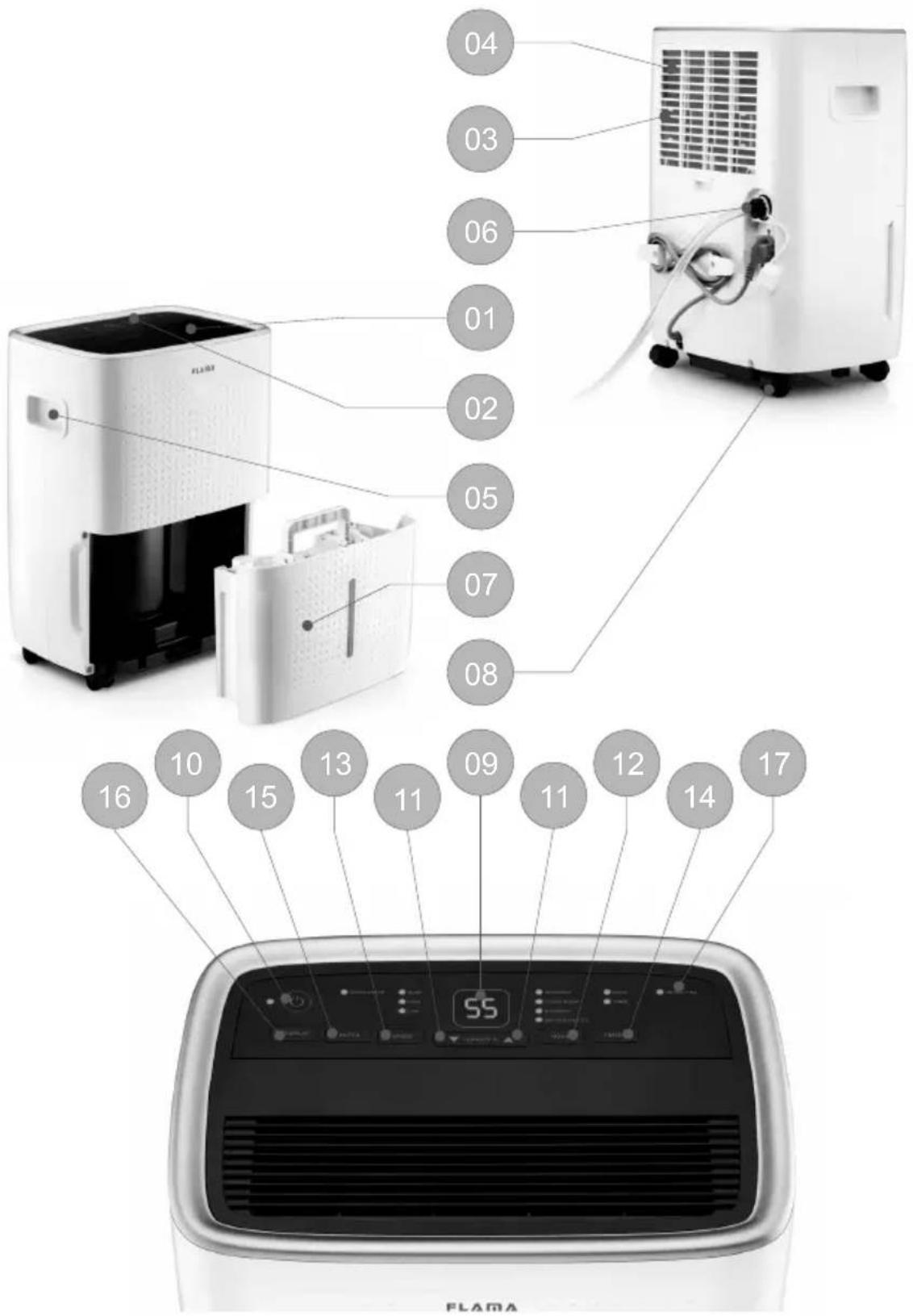
- Grille
- Control panel
- Filter compartment
- Filter
- Handle
- Continuous drainage plug
- Water tank
- Wheels
- Display
- ON/OFF button
- HUMIDITY adjustment button
- MODE selection button
- Fan speed button SPEED
- Timer and Lock button TIMER
- Filter reset button
- Front display control button
- Water full indicator
OPERATION
CONTROL PANEL
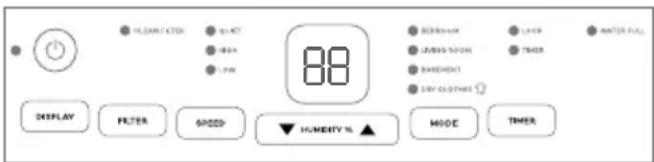
Display (9)
Humidity Level and Timer
The display has 3 indications:
When the appliance is connected to power, it will indicate the humidity level of the room.
When setting the humidity, it will indicate the selected humidity level.
When programming the timer for the appliance to turn on and off, it will show the hours.
Notes:
When the ambient humidity is below 20%, it will show “20”.
When the ambient humidity is above 90%, it will show “90”.
Usage
ON/OFF button (10) - turn the appliance on and off
Press the ON/OFF button once to start operation. Press again to stop operation.
MODE selection button (12)
Press the MODE button to set the desired humidity level in the room:
BEDROOM - 55%
LIVING ROOM - 50%
BASEMENT - 45%
DRY CLOTHES – constant dehumidification. Display shows CO.
Fan speed button SPEED (13)
Press the SPEED button to set the desired fan speed. It can be adjusted between Quiet mode (QUIET), high speed (HIGH), and low speed (LOW).
Press the HUMIDITY button to enter free dehumidification operation. Humidity can be adjusted between 35% and 80%, increasing or decreasing by 5% RH at a time.
Timer button TIMER (14)
In STANDBY mode, press the TIMER button to set the delayed start function. The TIMER light will turn on, and the display will initially show 0.5 hours. Press the HUMIDITY button to adjust the desired time. The TIMER light will remain on when the timer function is
active. During the timer process, press the TIMER button again to cancel the function.
With the appliance operating, press the TIMER button to set the delayed shutdown function. The display will initially show 0.5 hours. Press the HUMIDITY button to adjust the desired time.
The timer function interval is from 0.5 to 24 hours.
To activate the lock function, press the TIMER button for 3 seconds. The LOCK light will turn on, and the buttons will become inactive.
To cancel the lock function, press the TIMER button again for 3 seconds. The LOCK light will turn off, and the buttons will resume normal operation.
Filter reset button FILTER (15)
After the appliance has operated for 250 hours, the FILTER light will turn on, reminding that the filter needs to be cleaned.
After cleaning the filter, press the FILTER button to reset the hour counter, and the light will turn off.
Front display button DISPLAY (16)
Press the DISPLAY button to view the front display of the appliance.
Press again to turn off the front display.
The front display information is identical to the control panel display information.
Water full indicator WATER FULL (17)
When the water tank is full, the WATER FULL light will turn on, the appliance will automatically stop, and an audible alert will sound to notify the user that the water needs to be emptied from the tank.
Emptying the Water Tank
Gently press the sides of the tank with both hands and pull it out slowly.
Discard the collected water.
Place the water tank back in place.
NOTE - Do not remove the float from the water tank. The water full sensor cannot detect the water level correctly without the float, and water may leak from the tank.
If the water tank is dirty, wash it with cold or warm water. Do not use detergents, scrubbing brushes, chemically treated cloths, gasoline, benzene, thinners, or other solvents, as they can scratch and damage the tank and cause water leakage.
When replacing the water tank, press firmly in place with both hands. If the tank is not correctly positioned, the “WATER FULL” sensor will be activated, and the dehumidifier will not operate.
Continuous Water Drainage
The appliance has a continuous drainage port. Using a plastic tube (with an internal diameter of 10 mm), insert it into the drainage hole (in the intermediate plate), pull it out from the side of the water tank, install it in place, and arrange the drainage tube.
The water in the water tank can be continuously drained through the continuous drainage port on the appliance.
CLEANING AND MAINTENANCE
IMPORTANT: Before cleaning or maintenance, turn off the dehumidifier and unplug it from the electrical outlet.
Cleaning the exterior of the dehumidifier
Clean the exterior with a dry, clean cloth.
If the dehumidifier is very dirty, clean it with a neutral detergent and then wipe off the detergent with a damp cloth.
Do not wash the appliance with a hose as this will cause electric shock hazards.
Cleaning the air filter
Dust accumulates in the filter and restricts airflow. Restricted airflow reduces system efficiency and, if blocked, can damage the dehumidifier.
The air filter requires regular cleaning. The air filter is removable for easy cleaning.
Do not operate the dehumidifier without the air filter, or the dehumidifier may be contaminated.
Remove the filter from the filter compartment.
Use a vacuum cleaner to gently absorb dust on the surface.
If the filter is very dirty, wash it with water and a mild detergent and dry it well afterward.
Reinstall the filter.
PRECAUTIONS AND WARNINGS
Empty the water tank when it is full or when the water full indicator appears on the panel. After emptying the removable water tank, place it back in its original position. The appliance will resume operation.
Whenever the appliance stops, you must wait at least 3 minutes before restarting it to prevent compressor damage.
If the appliance does not start or stops intermittently for unknown reasons, check the extension cord and power outlet. If these are in normal condition, unplug the appliance from the power outlet and wait 10 minutes before restarting the appliance.
If after 10 minutes the appliance does not restart, contact FLAMA (consumer support line) or an Authorized Service Center.
While the appliance is operating, the compressor generates heat, which may increase the room temperature. This is a normal situation and does not affect the appliance's operation.
STORAGE
If you will not use the appliance for a long time, follow these steps:
Unplug the power cord from the electrical outlet and empty the water tank. Allow the water tank and dehumidifier to dry completely.
Clean the air filter.
Store the appliance in an upright position in a dust-free location, preferably covered with a plastic cover.
TROUBLESHOOTING
| Problem Possible cause Solution | ||
| The unit does not work | Has the power cord been unplugged? | Plug the power cord into the power outlet. |
| Is the indicative tank lamp flashing? (The tank is full or in a wrong position.) | Empty the water into the drain tank, then reposition the tank. | |
| Is the room temperature above 35°C or below 5°C? | The protection device is activated and the unit cannot be turned on. | |
| The dehumidification function does not work | Is the air filter clogged? | Clean the air filter according to the instructions under "Cleaning and Maintenance". |
| Is the intake duct or discharge duct clogged? | Remove the obstruction from the discharge duct or intake duct. | |
| No air is discharged Is the air filter clogged? | Clean the air filter according to the instructions under "Cleaning and Maintenance". | |
| The operation is noisy | Is the unit tilted or unstable? | Move the unit to a stable, sturdy location. |
| Is the air filter clogged? | Clean the air filter according to the instructions in "Cleaning the Dehumidifier". | |
REQUIRED INFORMATION
| Power supply 220V-240V~, 50Hz | |
| Dehumidification capacity (30°C/RH80%) 30L/day | |
| Nominal input power 460W (30°C/80%) | |
| Refrigerant / Load R290 / 0.090 kg | |
| Operating temperature 7°C- 35°C | |
| Tank capacity 4.0 L | |
| Dimensions (L x D x H) mm 352x272x499mm | |
| Net weight 14.5kg |
ANOMALIES AND REPAIR
In case of malfunction, please take the appliance to an authorized Technical Assistance Service. Do not attempt to disassemble or repair the appliance, as this may be dangerous.
PROTECTING THE ENVIRONMENT
natural_image
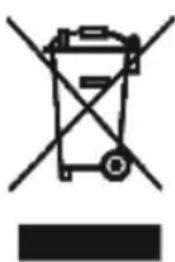
Symbol of a trash bin with crossed lines and a solid black rectangle below (no text or labels)This symbol indicates the separate collection of electrical and electronic equipment.
The main objective of the separate collection of this waste is to reduce the quantity to be disposed of, promote re-
use, recycling and other forms of recovery in order to reduce its negative effects on the environment.
When it is no longer in use, this appliance must not be disposed of together with other unsorted municipal waste.
The user is responsible for delivering it free of charge to the selective collection facilities available for that purpose.
Pieces of equipment that are no longer in use can also be taken back at points of sale, by purchasing new pieces of equipment that are equivalent and have the same functions.
For more detailed information on collection points, please contact your City Council or a point of sale for this equipment.
DÉSHUMIDIFICATEUR DIGITAL 30LT
AVERTISSEMENTS
DYSFONCTIONNEMENTS ET RÉPARATIONS
natural_image
Symbol of a trash bin with crossed lines indicating no waste, above a solid black rectangle (no text or labels)This page has been deliberately left blank
- Keep the proof of purchase (receipt) for this product carefully. When a repair is made under these conditions, the technician will require proof of purchase. This assistance can only be provided once you have proven, with the proof of purchase, that your appliance is within the warranty period.
- The warranty period for this appliance is defined by the respective EU Directive in force on the date of purchase/delivery.
- Within the guarantee period, we will repair or replace, free of charge, any parts which, during the normal use of the appliance, have deteriorated as a result of a proven material or manufacturing defect.
- This warranty does not cover consumable items, light bulbs, easily breakable parts made of glass or plastic, or any other defects that do not impair its proper functioning.
- We accept no liability for damage caused by incorrect or careless use of the appliance, by its connection to an electrical current other than that indicated on the appliance's rating plate, by faulty electrical installation, or by atmospheric, chemical or electrochemical causes. Other claims or demands for compensation relating to objects which are not an integral part of the appliance will be denied.
- The provision of assistance under warranty does not extend the warranty period. Only within this period will assistance be provided under warranty. The right to assistance is only granted to the first purchaser of the device and cannot be transferred to a third party.
- The warranty expires when unauthorized persons have attempted to repair, modify or replace parts of the appliance.
- All expenses and risks of transportation to our factory or vice versa will always be borne by the buyer.
WARRANTY CONDITIONS
To benefit from the Technical Assistance service during the 36-month warranty period after the date of purchase, you will need to:
Present the Invoice/Proof of Purchase, stating the model and the manufacturing number of the product (whenever possible).
Note: Failure to present the aforementioned documents will be grounds for not providing services under warranty.
CONDITIONS DE GARANTIE
CONDITIONS DE GARANTIE
- DESUMIDIFICADOR DIGITAL 30 LT
- ADVERTÊNCIAS
- SAFETY INSTRUCTIONS
- SAFETY ADVICE REGARDING REFRIGERANT R290
- GENERAL INFORMATION
- DESCRIPTION
- OPERATION
- CONTROL PANEL
- Display (9)
- Usage
- ON/OFF button (10) - turn the appliance on and off
- MODE selection button (12)
- Fan speed button SPEED (13)
- Timer button TIMER (14)
- Filter reset button FILTER (15)
- Front display button DISPLAY (16)
- Water full indicator WATER FULL (17)
- Emptying the Water Tank
- Continuous Water Drainage
- CLEANING AND MAINTENANCE
- PRECAUTIONS AND WARNINGS
- STORAGE
- ANOMALIES AND REPAIR
- PROTECTING THE ENVIRONMENT
- DÉSHUMIDIFICATEUR DIGITAL 30LT
- AVERTISSEMENTS
- DYSFONCTIONNEMENTS ET RÉPARATIONS
- WARRANTY CONDITIONS
- CONDITIONS DE GARANTIE
Brand : Flama
Model : 1332FL
Category : Dehumidifier