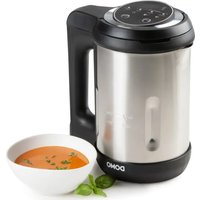
DO732BL - Electric blender DOMO - Free user manual and instructions
Find the device manual for free DO732BL DOMO in PDF.


User questions about DO732BL DOMO
0 question about this device. Answer the ones you know or ask your own.
Ask a new question about this device
Download the instructions for your Electric blender in PDF format for free! Find your manual DO732BL - DOMO and take your electronic device back in hand. On this page are published all the documents necessary for the use of your device. DO732BL by DOMO.
USER MANUAL DO732BL DOMO
natural_image
Modern black and silver water heater with 'DOMO' branding (no visible text or symbols on body)DO732BL
| Handleiding Soepmaker | |
| Mode d'emploi Mixeur à soupe | |
| Gebrauchsanleitung Suppen-Kocher | |
| Instruction booklet Soup maker | |
| Manual de instrucciones Máquina para elaborar sopa | |
| Istruzioni per l'uso Soup maker | |
| Návod k použití Vařič polévky | |
| Návod na použitie Vařič polievky | |
natural_image
Two symbolic icons: a warning triangle with an exclamation mark and an open book, both without any text or labels.⚠PRODUCTSPECIFIEKE WAARSCHUWINGEN
natural_image
Diagram of a cable inserted into a plug socket, showing internal components and a directional arrow (no text or symbols)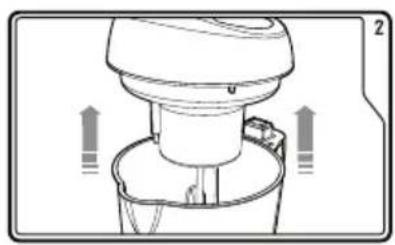
natural_image
Diagram of a kitchen appliance with directional arrows indicating movement or flow (no text or symbols)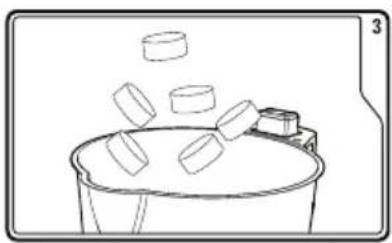
natural_image
Simple line drawing of a bucket with floating objects, no text or symbols present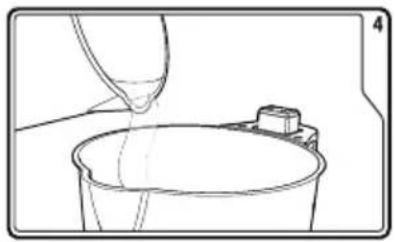
natural_image
Line drawing of a bucket being poured into a container with a small mechanical component nearby (no text or symbols)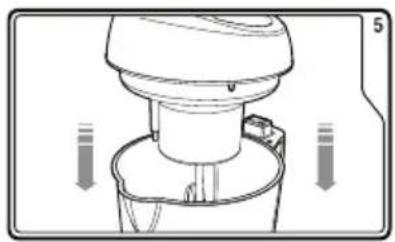
natural_image
Diagram of a kitchen mixer with directional arrows indicating motion (no text or symbols)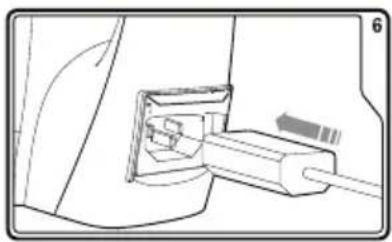
natural_image
Diagram of a cable connector inserted into a housing (no text or symbols visible)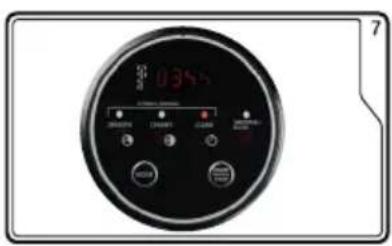
text_image
0.355 7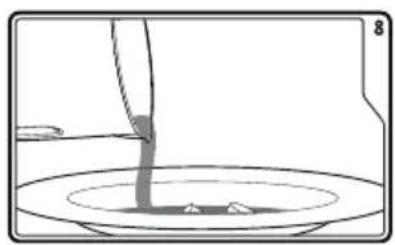
natural_image
Simple line drawing of a container with liquid being poured into it, no text or symbols presentGEHEUGENFUNCTIE
text_image
Prohibition sign depicting a trash bin crossed out by a diagonal line, with a blank rectangular base below.natural_image
Recycling symbol icon with three chasing arrows forming a triangle (no text or labels)⚠ AVERTISSEMENTS SPÉCIFIQUES AU PRODUIT
natural_image
Diagram of a cable inserted into a connector, showing internal components and cable ends (no text or symbols)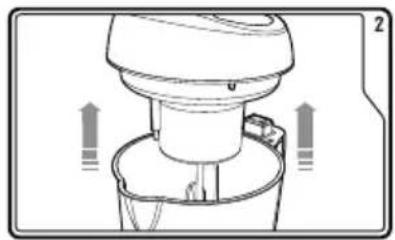
natural_image
Diagram of a kitchen mixer with directional arrows indicating flow or movement (no text or symbols)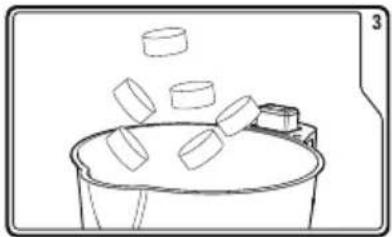
natural_image
Simple line drawing of a bucket with three blocks falling from above, next to a small container (no text or symbols)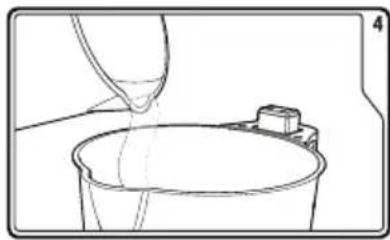
natural_image
Line drawing of a bucket being poured into a container with a small object nearby (no text or symbols)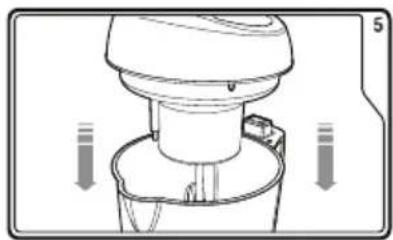
natural_image
Diagram of a kitchen mixer with directional arrows indicating motion (no text or symbols)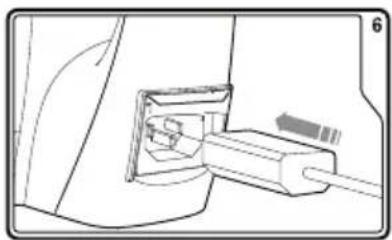
natural_image
Technical line drawing of a mechanical component with a cable inserted into a housing (no text or symbols)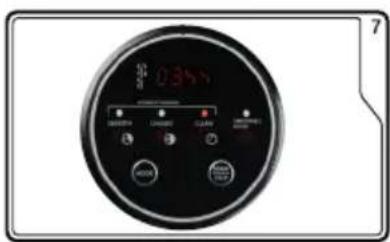
text_image
035℃ 7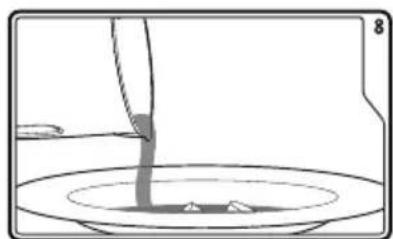
natural_image
Simple line drawing of a container with liquid being poured into it, no text or symbols presentFONCTION MÉMOIRE
text_image
Prohibition sign depicting a trash bin crossed with a diagonal line, indicating no waste or discharge.natural_image
Recycling symbol icon with three chasing arrows forming a triangle (no text or labels)natural_image
Diagram of a cable inserted into a plug socket, showing internal components and wiring (no text or symbols)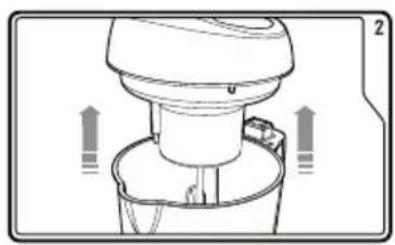
natural_image
Diagram of a kitchen appliance with directional arrows indicating motion (no text or symbols)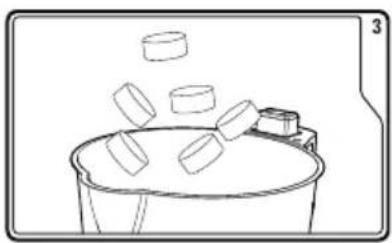
natural_image
Simple line drawing of a bucket with floating objects, no text or symbols present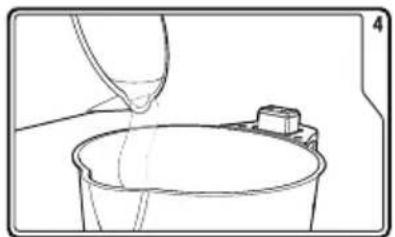
natural_image
Line drawing of a bucket being poured into a container with a small object on top (no text or symbols)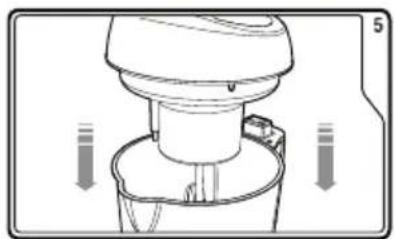
natural_image
Diagram of a kitchen mixer with directional arrows indicating motion (no text or symbols)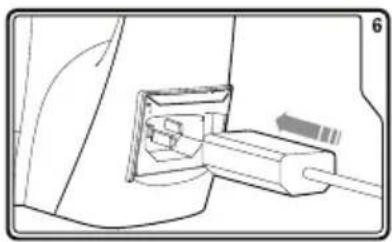
natural_image
Diagram of a cable connector inserted into a housing (no text or symbols visible)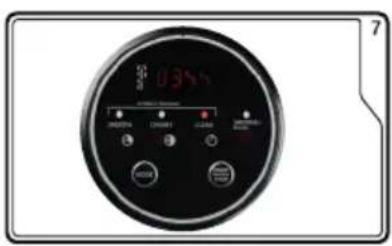
text_image
0.35V OK Cancel Finish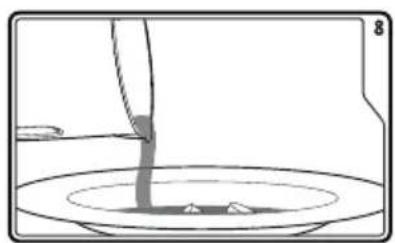
natural_image
Simple line drawing of a container with liquid being poured into it, no text or symbols presentSPEICHERFUNKTION
text_image
Prohibition sign with crossed-out trash bin and no text, indicating no waste or disposal restrictionnatural_image
Recycling symbol icon with three chasing arrows forming a triangle (no text or labels)All of our products are always submitted to a strict quality control before they are sold to you.
Should you nevertheless experience problems with your device, we sincerely regret this.
In that case, we kindly request you to contact our customer service.
Our staff will gladly assist you.

+32 14 21 71 91

info@linea2000.be
Monday – Thursday: 8.30 – 12.00 and 13.00 – 17.00
Friday: 8.30 - 12.00 and 13.00 - 16.30
This appliance has a two year warranty period. During this period the manufacturer is responsible for any failures that are the direct result of construction failure. When these failures occur the appliance will be repaired or replaced if necessary. The warranty will not be valid when the damage to the appliance is caused by wrong use, not following the instructions or repairs executed by a third party. The guarantee is issued with the original till receipt. All parts, which are subject to wear, are excluded from the warranty. If your device breaks down within the 2-year warranty period, you can return the device together with your receipt to the shop where you purchased it.
The guarantee on accessories and components that are liable to wear-and-tear is only 6 months.
The guarantee and responsibility of the supplier and manufacturer lapse automatically in the following cases:
- If the instructions in this manual have not been followed.
· In case of incorrect connection, e.g. electrical voltage that is too high.
· In case of incorrect, rough or abnormal use.
· In case of insufficient or incorrect maintenance.
• In case of repairs or alterations to the device by the consumer or non-authorised third parties. - If the customer used parts or accessories that are not recommended or provided by the supplier / manufacturer.
SAFETY INSTRUCTIONS
When using electrical appliances, basic safety precautions should always be taken, including the following:
- Read all instructions carefully. Keep this manual for future reference.
- Make sure all packaging materials and promotional stickers have been removed before using the appliance for the first time. Make sure children cannot play with the packaging materials.
- This appliance is intended to be used in household and similar applications such as:
· staff kitchen areas in shops, offices and other working environments;
· farm houses;
- by clients in hotels, motels and other residential type environments;
- bed and breakfast type environments.
- Children should be supervised to ensure that they do not play with the appliance.
- This appliance can be used by children aged from 16 years and above and persons with reduced physical, sensory or mental capabilities or lack of experience and knowledge if they have been given supervision or instruction concerning use of the appliance in a safe way and understand the hazards involved.
· Children shall not play with the appliance.
- Cleaning and user maintenance shall not be made by children unless they are older than 16 or supervised.
- Keep the appliance and its cord out of reach of children younger than 16 years.
- All repairs should be carried out by the manufacturer or its aftersales service.
- Any injury or damage caused by failure to comply with these rules are at your own risk. Neither the manufacturer, importer, or the supplier may be held liable.
▲ELECTRICAL WARNINGS
- In order to avoid a hazard this appliance must not be supplied through an external switching device, such as a timer or a separate remote control, or connected to a circuit that is regularly switched on and off by the utility.
- The appliance must be disconnected from its power source when not in use, during service and when replacing parts. Allow to cool before putting on or taking off parts, and before cleaning the appliance. To disconnect, turn controls to “OFF” or “o” position, then remove the plug from the wall. Never pull the cord or appliance to remove the plug from the socket.
- Before use, check carefully that the electric tension and frequency of the power net at your home match the indications on the rating label of the appliance.
- The appliance must be plugged into an appropriate outlet that is installed and grounded in accordance with local installation regulations.
- Do not let the power supply cord hang over the edge of a counter, or touch hot surfaces.
- Keep the power cord away from hot parts and don't cover the appliance.
- Unwrap the cord completely to prevent overheating of the cord. Do not allow the power cord supply to run underneath or around the unit.
- The appliance may not be used with an extension lead or a multiple socket.
- Do not operate this appliance with a damaged cord or plug or in the event the appliance malfunctions or has been damaged in any manner. Return the appliance to the DOMO Service Department or its service agent for examination, repair, or electrical or mechanical adjustment. Do not try to repair the appliance yourself.
⚠️INSTALLATION
- Do not place near flammable materials, gases or explosives.
· Do not use or store this appliance outdoors.
· Always use the appliance on a steady, dry and level surface. - Never place this appliance near a gas stove or electrical stove or in a place where it may come into contact with a warm appliance.
⚠ USE
· Do not use this appliance for other than intended use.
- Only use the appliance for domestic use. The manufacturer cannot be held responsible for accidents that result from improper use of the appliance or not following the instructions described in this manual.
· Never leave the appliance unattended while it is functioning.
· Do not operate the appliance with wet hands.
- The use of accessories that are not recommended or sold by the manufacturer can cause fire, electrical shock or injuries.
Only use the utensils delivered with the appliance.
⚠ CLEANING AND MAINTENANCE
- To protect against electrical shock or burns, do not immerse unit, cord, or plug in water or other liquid.
- Failure to maintain this appliance in a clean condition could adversely affect the life of the appliance and possibly result in a hazardous situation.
I PRODUCT-SPECIFIC WARNINGS
· Do not use the appliance without ingredients.
- Handle with great care when using sharp accessories like knives. Only touch the accessories when they stopped moving inside the appliance.
- The surfaces of the appliance are likely to get hot during use. It is advised not to touch the surfaces of the appliance other than the handles to avoid burns.
· Always use the soup maker with the lid on.
- Do not use the appliance to grind, chop, or powder dry ingredients. Always fill with enough liquid during use.
· Always use the appliance on a flat, stable, dry surface. Place the appliance at least 10 cm back from the edge of the table or kitchen counter.
- Do not place the device in a damp room or use it near a fire or heat source. The distance should be at least 30 cm.
- Do not remove the lid until the blades have come to a complete stop.
SAVE THESE INSTRUCTIONS FOR FUTURE REFERENCE
PARTS
- Control panel
- Lid
- Overfill sensor
- Blade
- Jug
- Handgrip
- Power socket
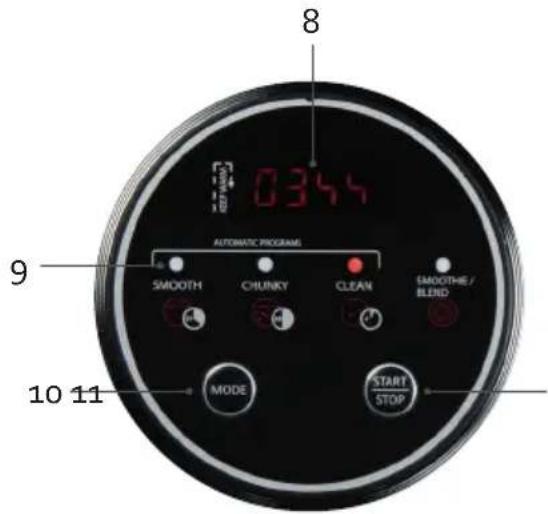
CONTROL PANEL
- Display
- Indicator lights programme
- Setting button 'MODE'
- On-off button 'START/STOP'
text_image
0344 8 9 AUTOMATIC PROGRAM SMOOTH CHUNKY CLEAN SMOOTHIE / BLENID MODE START STOP 10 11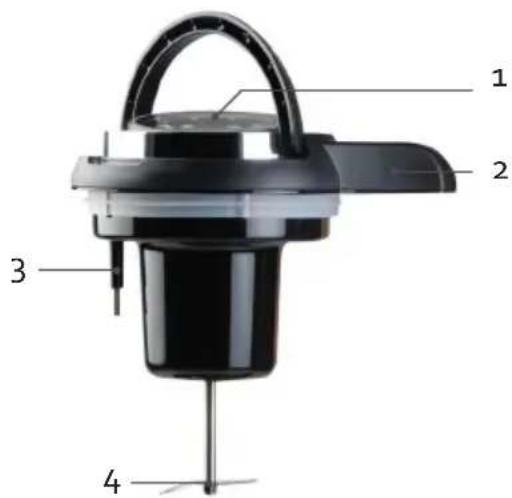
text_image
1 2 3 4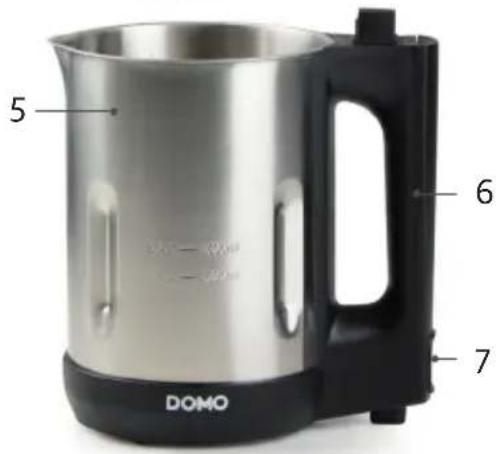
text_image
5 6 7 DOMOBEFORE THE FIRST USE
- Make sure all packaging materials and promotional stickers have been removed before using the appliance for the first time.
· Before using the device, clean it with a moist cloth.
USE
- Ensure the soup maker is unplugged before adding the ingredients.
- Remove the lid. Be careful not to touch the blade.
- Place all the ingredients in the soup maker.
- Add the water or broth last, filling it up to between the min and max indication lines. Make sure there is enough liquid so that the starch in the ingredients cannot burn. Take into account a ratio of 40% vegetables to 60% moisture.
- Place the lid back onto the jug. Ensure it is securely in place.
-
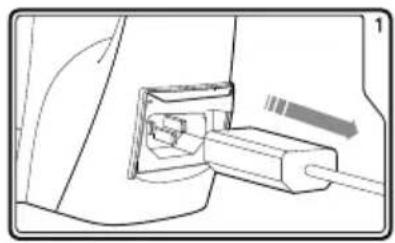
Plug the cable in the power socket at the bottom of the handle and plug the plug into an electrical socket. The indicator lights will blink one by one.
-
Select the required program by pressing the setting button 'MODE'. Confirm with the start button 'START/STOP'.
⚠ Attention: the jug will heat up.
- When the programme is finished, a signal will sound for one minute. After one minute, the appliance will turn itself off automatically. Be careful when you pour out the soup!
Caution: if you want to turn the appliance off during the programme or want to change the programme, press and hold the on/off button for a few seconds.
⚠ Do not use the appliance without ingredients.
natural_image
Diagram of a cable connector inserted into a housing (no text or symbols visible)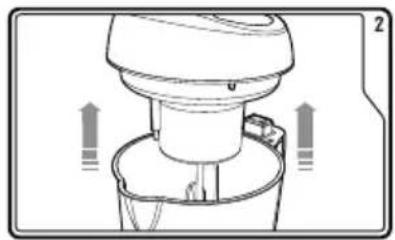
natural_image
Diagram of a blender with directional arrows indicating flow or movement (no text or symbols)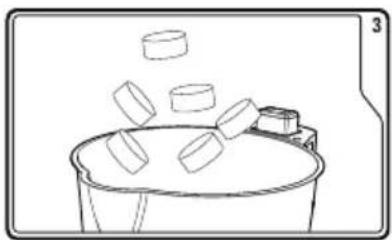
natural_image
Simple line drawing of a bucket with floating blocks, no text or symbols present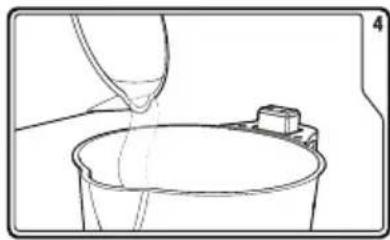
natural_image
Line drawing of a bucket being poured into a container with a small object nearby (no text or symbols)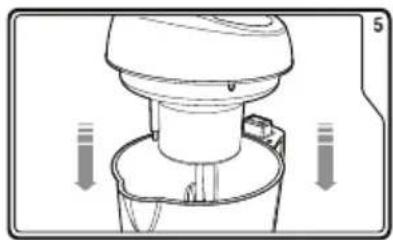
natural_image
Diagram of a kitchen mixer with directional arrows indicating motion (no text or symbols)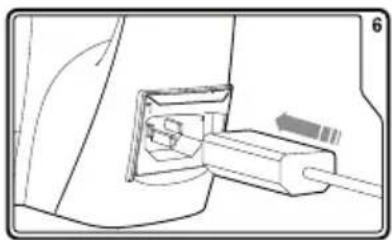
natural_image
Technical line drawing of a mechanical component with a cable inserted into a housing (no text or symbols)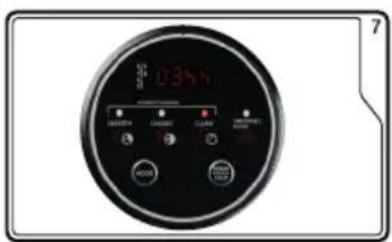
text_image
0350 OK Cancel SOLD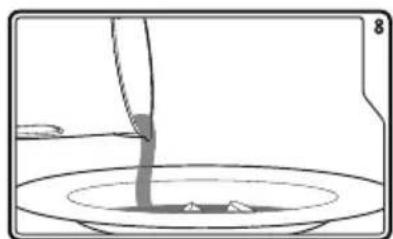
natural_image
Simple line drawing of a container with liquid being poured into it, no text or symbols presentMEMORY FUNCTION
If you have forgotten to add an ingredient, you can still do this while the appliance is running by just removing the lid from the appliance. The soup maker will remember the current programme for 2 minutes. Add the forgotten ingredients and replace the lid. The programme will continue.
SETTINGS
Smooth: smooth soup
The smooth-function is perfect for a soup with a smooth consistency. The program lasts for 21 minutes. The appliance will alternately heat up and mix.
Chunky: soup with chunks
The chunky-function is perfect for soups requiring a chunkier consistency. For chunky soup there is no blending process, just heating. It is therefore recommended that you cut the vegetables into the desired size. The device does not mix the soup but only cooks it. The program lasts for 28 minutes. If you are not satisfied with the consistency of your soup; you can use the blend-function afterwards.
Cleaning
After use, you can clean it using the clean function. Fill the jug with clean water up to the maximum mark. The appliance will alternately mix and gently heat for 4 minutes. Afterwards, empty the jug, rinse with clean water, and clean thoroughly as described under 'cleaning and maintenance'.
Smoothie/blend
If your soup does not have the desired consistency, you can continue to mix the soup with this function. This feature also allows you to use your appliance as a blender to make smoothies, for example. Select the 'Blend' programme and confirm by pressing the start button. Press and hold the start button until you have the desired consistency. The blender does not heat with this programme. We advise you not to use the blend function for longer than 20 seconds at a time. Do not use this feature to mix hard (e.g. ice cubes) or dry ingredients to prevent damaging the blades.
CLEANING AND MAINTENANCE
Do not place the appliance in the dishwasher.
⚠️ Do not immerse the appliance in water.
- Fill the blender with clean water after use. Clean your appliance using the Clean function (see Usage chapter).
- Remove the lid and clean with a damp cloth.
⚠️ Be careful when cleaning the blade. - Clean the blender with a soft sponge and mild detergent. Do not use scouring pads that can scratch the bottom. If food is burnt on the bottom, fill the jug with soapy water and let it soak for 15 minutes, and then continue to clean as usual.
- After cleaning, dry all parts thoroughly.
PROBLEM AND SOLUTION
| Problem Causse Solution | ||
| The lights on the display are off | There is a problem with the connection | Check if the power cord is properly connected |
| There are too many ingredients in the jug, the lid is not in place | Remove some of the ingredients. Ensure the lid is in place | |
| The light of the chosen setting is on, but the appliance doesn’t work | You didn’t confirm the setting with the start button | Press the start button |
| The appliance stops working | There is not enough liquid in the jug | The appliance has a boil dry protection. The appliance will shut down when there is not enough liquid used |
| The appliance has overheated. This can happen when you make soup several times in a row or if you use the blend function for longer than 20 seconds. Empty the blender and let it cool for about half an hour. | ||
| You can hear several beeps and the light of the chosen program blinks | There is too much liquid in the appliance | The appliance has sensor to make sure it doesn’t overflow. Pour some of the liquid from the jug. |
| The overfill sensor is dirty Clean the sensor with a damp cloth | ||
| The error message ‘E1’ or ‘E4’ appears on the display. | There is too much liquid in the appliance | The appliance has sensor to make sure it doesn’t overflow. Pour some of the liquid from the jug. |
| The overfill sensor is dirty Clean the sensor with a damp cloth | ||
| The food is burned The jug w | wasn’t filled between the min and max indication lines. | Ensure the base is always covered with liquid, between the min and max indication. |
| Make sure there is enough liquid so that the starch in the ingredients cannot burn. | Take into account a ratio of 40% vegetables to 60% moisture. | |
FREQUENTLY ASKED QUESTIONS
Can I make cold soups like Gazpacho in my soup maker?
Yes. First cook the soup using the chunky or smooth setting. Then simply let the soup cool or refrigerate.
Does the appliance work when I remove the lid?
The appliance has a memory function for two minutes. This means that you have two minutes to, for example, add additional ingredients. Replace the lid on the appliance within the two minutes and the programme will simply continue.
Can I change the times for the settings?
No. These times are preset and should give the best results.
Can I put the jug in the dishwasher?
The jug must not be placed in the dishwasher and must not be immersed in water.
Can I use frozen vegetables in the soup maker?
Defrost the vegetables before adding them to the soup maker.
ENVIRONMENTAL GUIDELINES
text_image
Prohibition sign depicting a trash bin crossed with a diagonal line, indicating no waste or discharge.This symbol on the product or on its packaging indicates that this product may not be treated as household waste. Instead it must be brought to the applicable collection point for recycling of electrical and electronic equipment. By ensuring this product is disposed of correctly, you will help prevent potential negative consequences for the environment and human health, which could otherwise be caused by inappropriate waste handling of this product. For more detailed information about recycling of this product, please contact your local city office, your household waste disposal service or the shop where you purchased the product.
natural_image
Recycling symbol icon with three chasing arrows forming a triangle (no text or labels)The packaging is recyclable. Please treat the packaging ecologically.
GARANTIA
natural_image
Diagram of a cable inserted into a connector, showing internal components and a directional arrow (no text or symbols)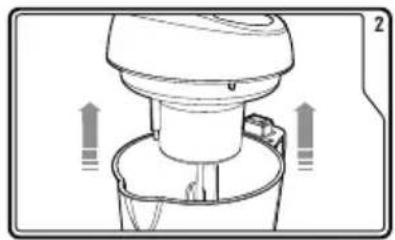
natural_image
Diagram of a kitchen mixer with directional arrows indicating motion (no text or symbols)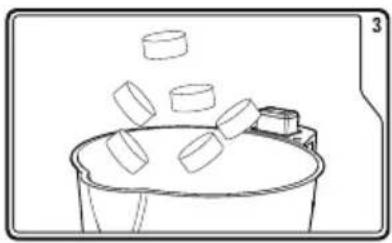
natural_image
Simple line drawing of a bucket with three blocks and an attached container (no text or symbols)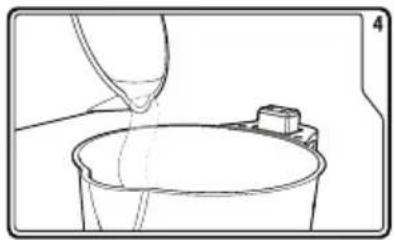
natural_image
Line drawing of a bucket being poured into a container with a small object nearby (no text or symbols)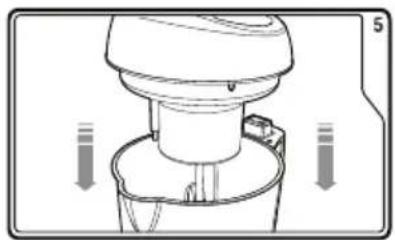
natural_image
Diagram of a kitchen mixer with directional arrows indicating motion (no text or symbols)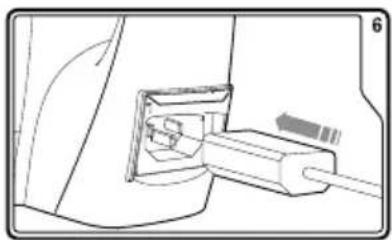
natural_image
Technical line drawing of a mechanical component with a cable inserted (no text or symbols)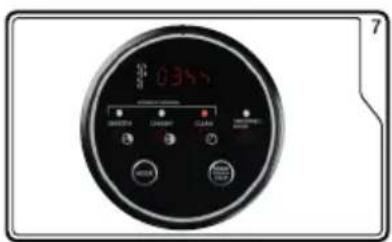
text_image
0350 7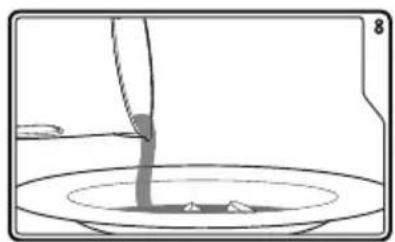
natural_image
Simple line drawing of a container with liquid being poured into it (no text or symbols)FUNCIÓN DE MEMORIA
text_image
Prohibition sign depicting a trash bin crossed with a diagonal line, indicating no waste or discharge.natural_image
Recycling symbol icon with three chasing arrows forming a triangle (no text or labels)text_image
0344 8 9 SMOOTH CHUNKY CLEAN SMOOTHIE / BLEND MODE START STOP 10 11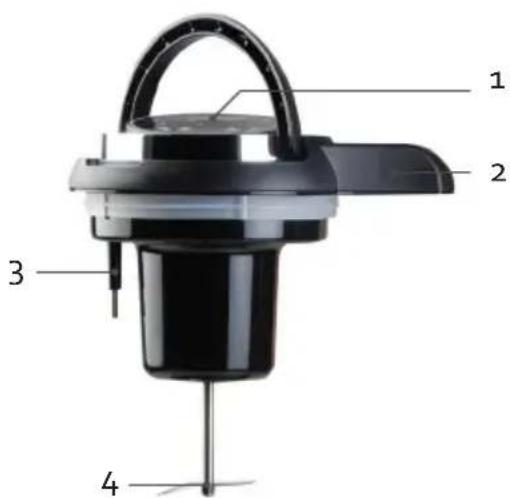
text_image
1 2 3 4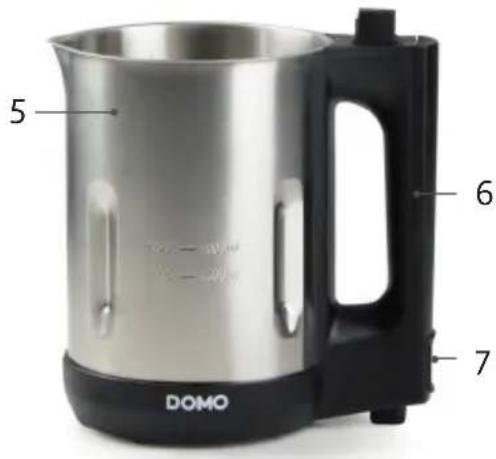
text_image
5 6 7 DOMOPRIMA DELL'USO
natural_image
Diagram of a cable inserted into a connector with a directional arrow indicating motion (no text or symbols present)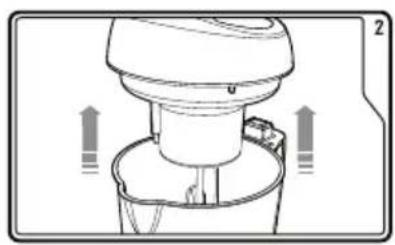
natural_image
Diagram of a kitchen mixer with directional arrows indicating flow or movement (no text or symbols)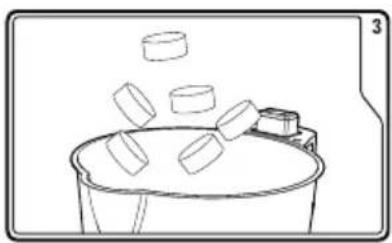
natural_image
Simple line drawing of a bucket with floating blocks, no text or symbols present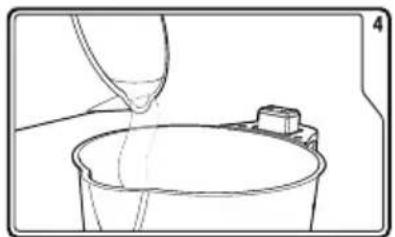
natural_image
Line drawing of a bucket being poured into a container with a small object nearby (no text or symbols)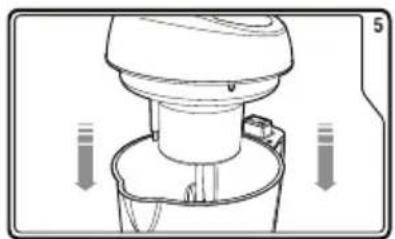
natural_image
Diagram of a kitchen mixer with directional arrows indicating motion (no text or symbols)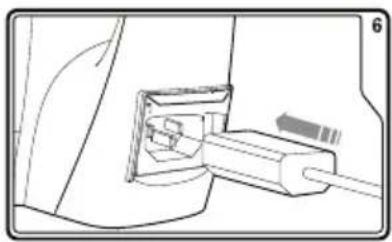
natural_image
Diagram of a cable connector inserted into a housing (no text or symbols visible)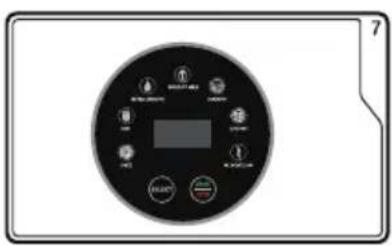
text_image
Control panel display with buttons and display screen, labeled with Chinese text and icons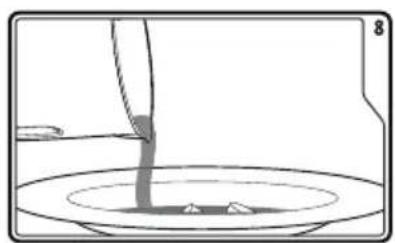
natural_image
Simple line drawing of a container with liquid being poured into a bowl (no text or symbols)text_image
Prohibition sign with crossed-out trash bin and no text, indicating no waste disposal or recycling.natural_image
Recycling symbol icon with three chasing arrows forming a triangle (no text or labels)text_image
0344 8 9 SMOOTH CHUNKY CLEAN SMOOTHIE / BLEND MODE START STOP 10 11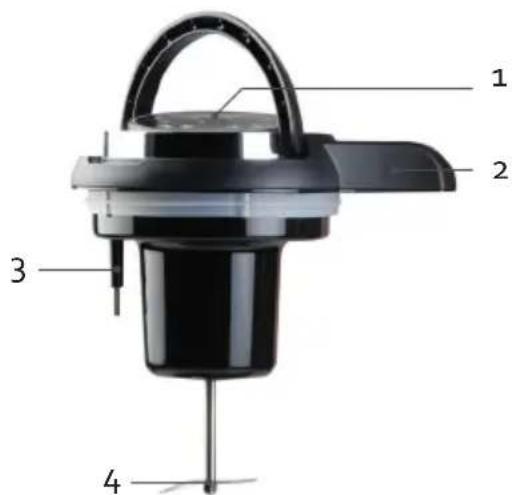
text_image
1 2 3 4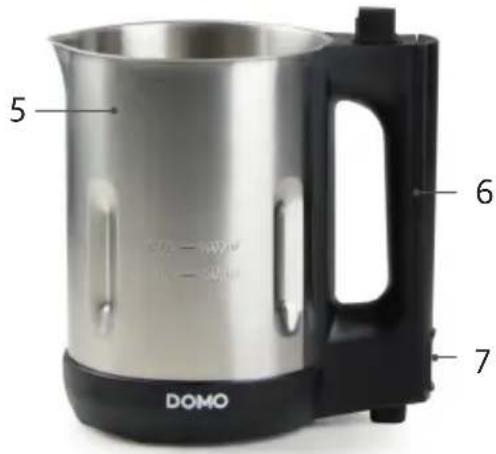
text_image
5 6 7 DOMOPŘED PRVNÍM POUŽITÍM
natural_image
Diagram of a cable inserted into a connector, showing internal components and a directional arrow (no text or symbols)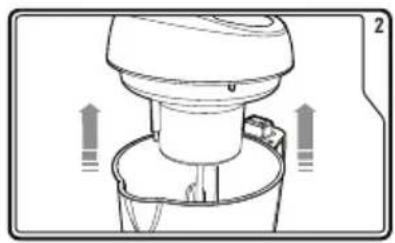
natural_image
Diagram of a kitchen mixer with directional arrows indicating motion (no text or symbols)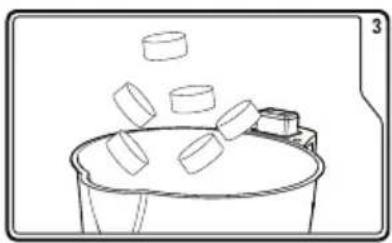
natural_image
Simple line drawing of a bucket with floating objects, no text or symbols present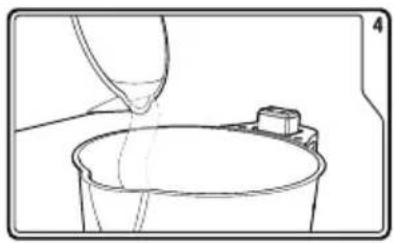
natural_image
Line drawing of a bucket being poured into a container with a small inset component (no text or symbols)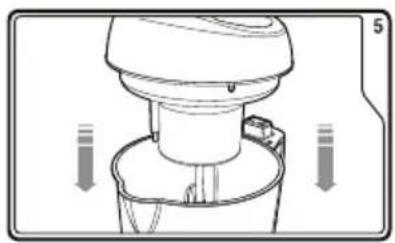
natural_image
Diagram of a kitchen mixer with directional arrows indicating motion (no text or symbols)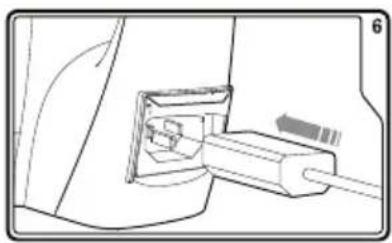
natural_image
Diagram of a cable inserted into a socket with a connector (no text or symbols visible)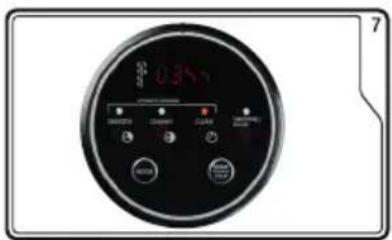
text_image
0.34V OK Cancel SOLD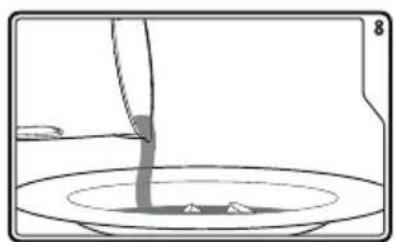
natural_image
Simple line drawing of a container with liquid being poured into it, no text or symbols presentPAMĚTOVÁ FUNKCE
OHLED NA ŽÍVOTNÍ PROSTŘEDÍ
text_image
Prohibition sign with crossed-out trash bin and no text, indicating no waste disposal or recycling.natural_image
Recycling symbol icon with three chasing arrows forming a triangle (no text or labels)natural_image
Diagram of a plug inserted into a socket, showing internal components and wiring (no text or symbols)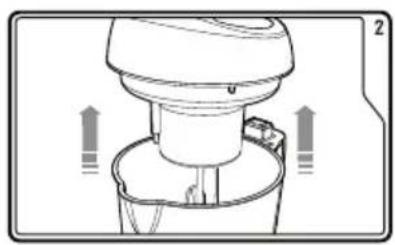
natural_image
Diagram of a kitchen appliance with directional arrows indicating movement or flow (no text or symbols)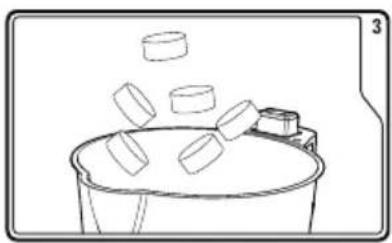
natural_image
Simple line drawing of a bucket with floating objects, no text or symbols present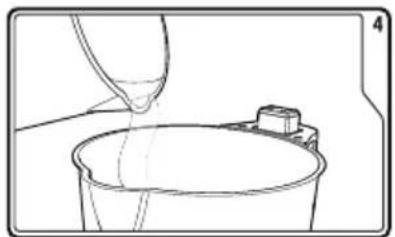
natural_image
Line drawing of a bucket being poured into a container with a small object nearby (no text or symbols)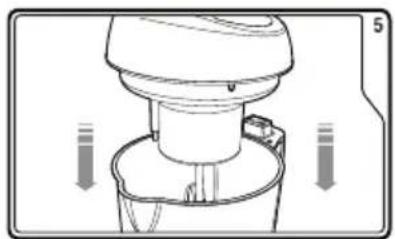
natural_image
Diagram of a kitchen mixer with directional arrows indicating motion (no text or symbols)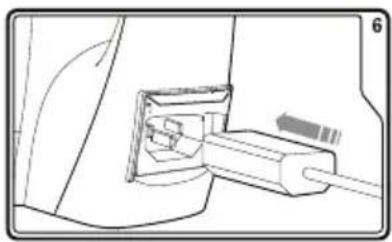
natural_image
Diagram of a cable inserted into a socket with a plug inserted (no text or symbols visible)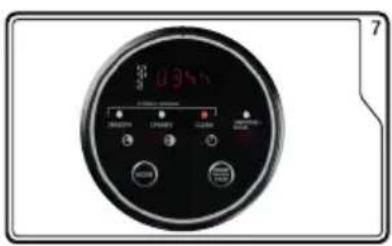
text_image
0.35V 7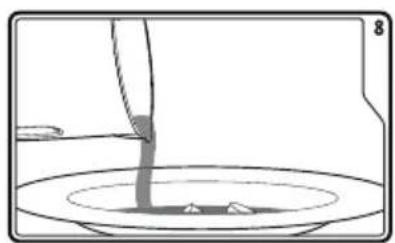
natural_image
Simple line drawing of a container with liquid being poured into it, no text or symbols presentPAMÄTOVÉ FUNKCIE
text_image
Prohibition sign depicting a trash bin crossed with a diagonal line, indicating no waste or discharge.natural_image
Recycling symbol icon with three chasing arrows forming a triangle (no text or labels)natural_image
Two cylindrical white objects with transparent caps, possibly milk or similar beverage (no text or symbols visible)
natural_image
Three product photos: square tiles, a clear glass coffee maker, and a rectangular container (no text or symbols visible)of scan hier:
ou scannez ici:
oder hier scannen:
or scan here: