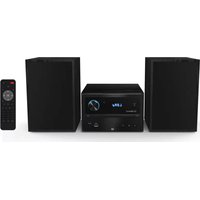
EBMSBTH01 - Hi-fi system Essentiel B - Free user manual and instructions
Find the device manual for free EBMSBTH01 Essentiel B in PDF.


| Product type | Hi-fi micro system with CD player, FM radio, Bluetooth, USB and auxiliary input |
| Brand | Essentiel B |
| Model | EBMSBTH01 |
| Dimensions (micro system) | 180 x 115.6 x 220.4 mm |
| Dimensions (speakers) | 150 x 240 x 126.5 mm each |
| Total weight | 4.600 kg |
| Power supply | 220-240 V ~ 50 Hz |
| Maximum power consumption | 30 W |
| Standby power consumption | < 0.5 W |
| Power consumption in stop mode | < 0.3 W |
| Automatic standby | After 15 minutes without audio signal (except radio) |
| Bluetooth | Version 5.1, range up to 10 m, transmitted power 8 dB |
| FM tuner | 87.5 - 108 MHz, 30 presets |
| Sound power | 2 x 10 W RMS |
| Bandwidth | 20 Hz - 20 kHz |
| Connections | 1 auxiliary input 3.5mm jack, 1 USB port (max 32 GB), 2 RCA cables for speakers |
| USB output | 5 V = 500 mA |
| CD player | CD audio, CD-R, CD-RW (MP3) |
| Remote control | 2 LR03 AAA batteries (supplied), range 5 m, angle ±30° |
| Care and cleaning | Unplug before cleaning; soft dry cloth; do not use liquids or aerosols |
| Safety | Do not use damaged discs; do not move during playback; observe battery polarities |
| Spare parts and repairability | Contact after-sales service or the store; warranty valid upon presentation of receipt |
Frequently Asked Questions - EBMSBTH01 Essentiel B
User questions about EBMSBTH01 Essentiel B
0 question about this device. Answer the ones you know or ask your own.
Ask a new question about this device
Download the instructions for your Hi-fi system in PDF format for free! Find your manual EBMSBTH01 - Essentiel B and take your electronic device back in hand. On this page are published all the documents necessary for the use of your device. EBMSBTH01 by Essentiel B.
USER MANUAL EBMSBTH01 Essentiel B
Micro sound BT system
Micro sound BT-systeem
EBMSBTH01
natural_image
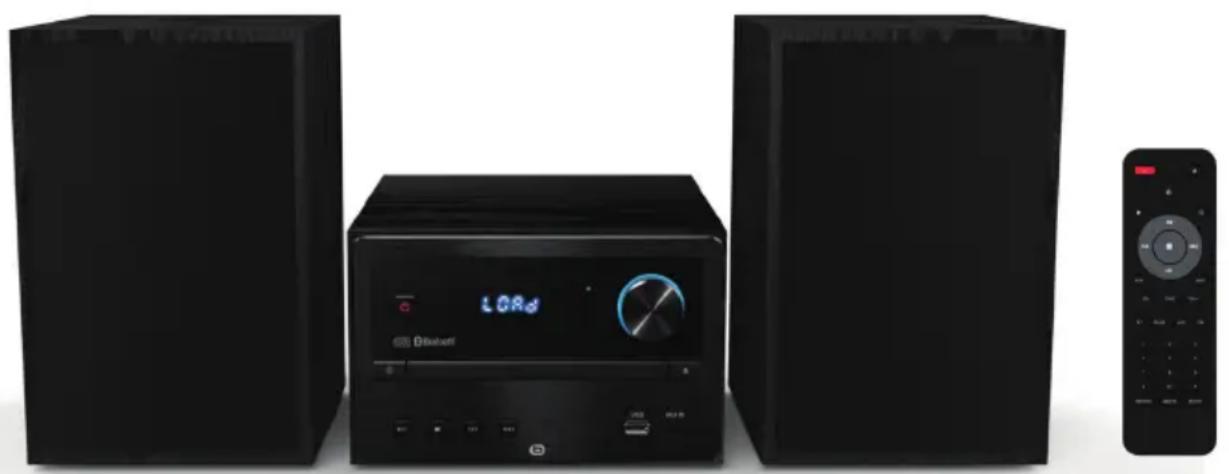
Three black audio equipment units: two front speakers and one remote control, with no visible text or symbols on the devices themselves.Notice d'utilisation / User guide / Bedienungsanleitung / Gebruiksaanwijzing
| FR EN DE NL | ||||
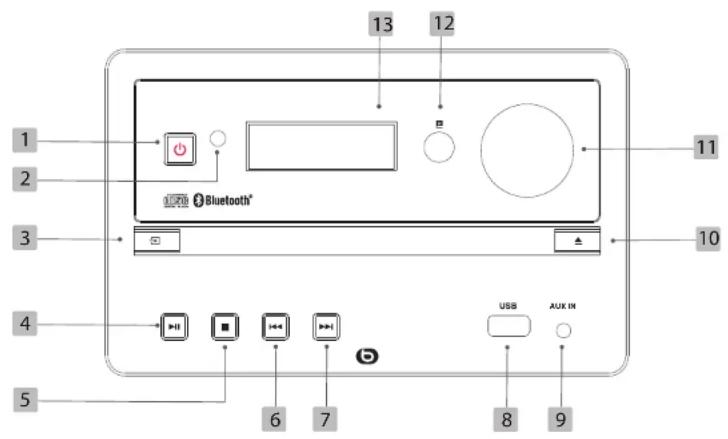
| 1 | Bouton ON/OFF : allumer ou mettre en veille l'appareil | ON/OFF button: switch the device on or put it on standby | ON/OFF-Taste: Gerät ein- oder ausschalten. | ON/OFF-knop: schakelt het apparaat in of uit |
| 2 | Témoin lumineux Indicator light Kontrolleuchte Signaallampje | |||
| 3 | Bouton SOURCE : sélectionner la source de lecture : CD, USB, RADIO, AUX, BLUETOOTH | SOURCE button: selects the playback source: CD, USB, RADIO, AUX, BLUETOOTH | QUELLE-Taste: Auswahl der Wiedergabequelle: CD, USB, RADIO, AUX, BLUETOOTH | SOURCE-knop: selecteert de afspeelbron: CD, USB, RADIO, AUX, BLUETOOTH |
| 4 | Bouton LECTURE : débuter ou mettre en pause la lecture | PLAY button:start or pause playback | PLAY-Taste:Wiedergabe starten oder anhalten | PLAY-knop: start of pauzeert het afspelen |
| 5 | Bouton STOP : arrêter la lecture | STOP button: stop playback | STOPP-Taste: Wiedergabe stoppen | STOP-knop: stopt het afspelen |
| 6 | Bouton PRÉCÉDENT : en mode USB ou CD, accéder à la piste précédente (appui court) / Lire à rebours en vitesse accélérée (appui long). En mode FM, sélectionner une station de radio pré-enregistrée. | PREVIOUS button: in USB or CD mode, go to the previous track (press briefy y) / Play backward at accelerated speed (press and hold). In FM mode, select a pre-recorded radio station. | Taste ZURÜCK: Im USB- oder CD-Modus zum vorherigen Titel springen (kurz drücken)/ Schnellrücklauf (lange drücken). Im FM(UKW)-Modus: Auswahl eines vorab gespeicherten Radiosenders. | VORIGE-knop: in de USB- of CD-modus naar de vorige track gaan (kort drukken) / Achteruit versneld afspelen (lang drukken). In de FM-modus een vooraf opgenomen radiozender kiezen. |
| 7 | Bouton SUIVANT : en mode USB ou CD, accéder à la piste suivante (appui court) / Lire en vitesse accélérée (appui long). En mode FM, sélectionner une station de radio pré-enregistrée. | NEXT button: in USB or CD mode, go to the next track (press briefy y) / Play forward at accelerated speed (press and hold). In FM mode, select a pre-recorded radio station. | Taste VORWÄRTS: Im USB- oder CD-Modus zum nächsten Titel springen (kurz drücken)/Schnellvorlauf (lange drücken). Im FM(UKW)-Modus: Auswahl eines vorab gespeicherten Radiosenders. | VOLGENDE-knop: in de USB- of CD-modus naar de volgende track gaan (kort drukken) / Versneld afspelen (lang drukken). In de FM-modus een vooraf opgenomen radiozender kiezen. |
| 8 | Port USB USB port USB-Anschluss USB-poort | |||
| 9 | Entrée auxiliaire jack 3,5 mm | Auxiliary input 3,5 mm jack | AUX-Eingang 3,5-mm-Klinkenbuchse | Aux-ingang jack 3,5 mm |
| 10 | Bouton ÉJECTION : ouvrir le compartiment à disque | RELEASE button: open the disc compartment | AUSWURFTASTE: Öffnen des CD-Fachs | EJECT-knop: De disclade openen |
| 11 | Molette de réglage du volume | Volume control knob | Einstellungsregler für die Lautstärke | Regelknop van het volume |
| 12 | Capteur infrarouge Infrared sensor Infrarotsensor | Infraroodsensor | ||
| 13 | Écran LCD | LCD screen | LCD-Display | LCD-schem |
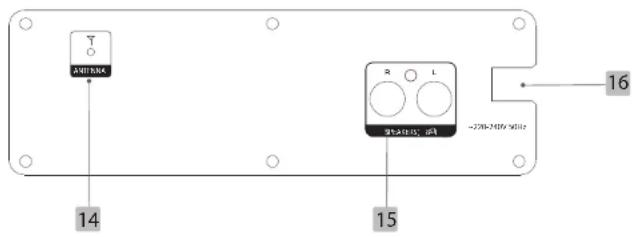
| 14 | Prise d'antenne FM | FM antenna socket | FM-Antennenbuchse | Aansluiting FM-antenne |
| 15 | Connecteurs des haut-parleurs droit et gauche | Right and left speaker connectors | Anschlüsse für den linken und rechten Lautspracher | Aansluitingen van de rechter en linker luidsprekers |
| 16 | Prise d'alimentation | Power supply socket | Anschlusssteckdose | Voedingskabel |
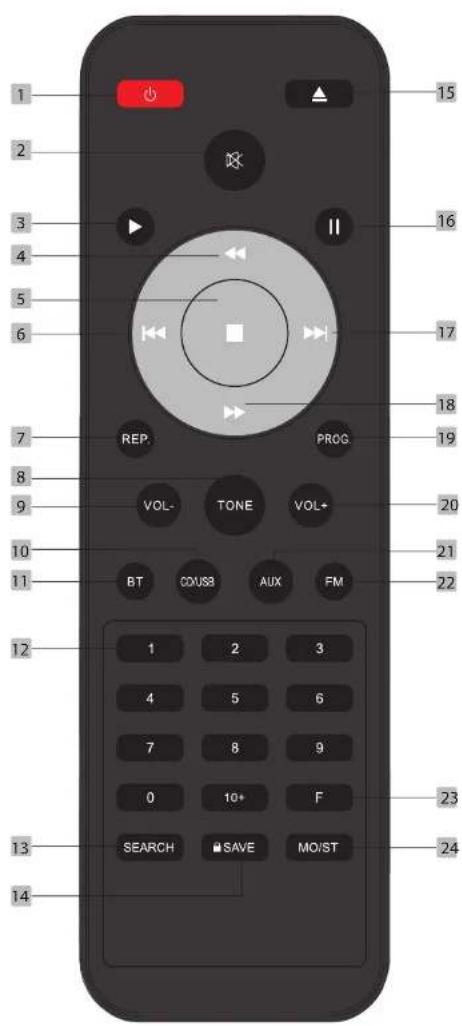
| FR EN DE NL | ||||
| 1 | Marche/arrêt / Veille On/Off | Standby Ein/Aus/Stand-by Aan/Uit / Stand-by | ||
| 2 | Mise en sourdine Muting Stummschalten Geluid dempen | |||
| 3 | Lecture Playback Wiedergabe Afspelen | |||
| 4 | Lecture à rebours en accéléré | Accelerated backward playback | Schnellrücklauf | Versneld achteruit afspelen |
| 5 | Stop | Stop | Stopp | Stop |
| 6 | Précédent | Previous | Zurück | Vorige |
| 7 | Répétition | Repeat | Wiederholen | Repeat |
| 8 | Réglages sonores (algus et basses) | Sound settings (treble and bass) | Klangeinstellungen (Höhen und Bässe) | Geluidsinstellingen (hoge en lage tonen) |
| 9 | Diminution du volume | Decrease in volume | Verringem der Lautstärke | Volumevermindering |
| 10 | Source CD/USB | CD/USB source | Quelle CD/USB | CD/USB-bron |
| 11 | Source Bluetooth* Source Bluetooth* Quelle Bluetooth* Bluetooth*-bron | |||
| 12 | Touches 0-10+ | 0-10+ buttons | Tasten 0-10+ | Toetsen 0-10+ |
| 13 | Recherche de stations | Scanning for stations | Sendersuchlauf | Zoeken naar zenders |
| 14 | Enregistrement | Recording | Speichern Registralie | |
| 15 | Éjection du compartiment à disque | Releasing the disc compartment | Auswurf des CD-Fachs | Disc uit de lade werpen |
| 16 | Mise en pause Pausing | Unterbrechung | Op pauze zetten | |
| 17 | Suivant | Next | Weiter | Volgende |
| 18 | Lecture en accéléré | Accelerated playback | Schnellvorlauf | Versneld afspelen |
| 19 | Programmation de l'ordre de lecture | Programming the playback order | Programmieren der Wiedergabereihenfolge | De afspeelvolgorde programmeren |
| 20 | Augmentation du volume | Increase in volume | Erhöhen der Lautstärke | Volume verhogen |
| 21 | Source auxiliaire | Auxiliary source | Quelle AUX | Hulpbron |
| 22 | Source radio FM | FM radio source | Quelle UKW-Radio | FM-radiobron |
| 23 | Fréquence radio | Radio frequency Radio frequency | Radio frequency | |
| 24 | Son mono/stéréo | Mono/stereo sound | Mono/Stereo-Ton | Mono/stereogeluid |
natural_image
Illustration of electronic devices including a laptop, tablet, smartphone, and CD-ROM (no text or symbols present)SYMPTÕMES CAUSES POSSIBLES SOLUTIONS
Thank you for purchasing an Essential brand product. We pay special attention to the RELIABILITY, EASE OF USE and DESIGN of our products.
We hope you will be fully satisfied with this mini stereo.
your product
Contents of the box
• 1 EBMSBTH01 mini-stereo
• 2 speakers
• 2-metre RCA cables
• 1 remote control (2 LR03 AAA batteries included)
- 1 user guide
Technical features
| Brand Essentiel b | |
| Model EBMSBTH01 | |
| Supply voltage 220-240 V - 50 Hz | |
| USB output voltage | 5 V = 500 mA |
| Bluetooth* profil Version 5.1 | |
| Emitted power 8dB | |
| Frequency bands 2402 MHz - 2483 MHz | |
| Tuner | Frequency range: 87.5 MHz - 108 MHzStoring of stations (30 presets) |
| Noise characteristics Bandwidth: 20 Hz - 20 KHz | |
| Consumption (max) 30 W | |
| Max. standby power consumption : 0.5 W | |
| Sound output 2 x 10 W RMS | |
| Connectors | Bluetooth+1 x 3.5 mm jack auxiliary input1 USB port for playback |
| Dimensions (L x D x H) | Mini-stereo: 180 x 115.6 x 220.4 mmSpeakers: 150 x 240 x126.5 mm |
| Weight (mini-stereo and speakers) 4.600 kg | |
*This Essential b product is compatible with the brands listed (belonging to third parties with no links to Sourcing & Creation).
| Product Information for power consumption and maximum time to reach applicable low power mode | |
| Power consumption in off mode | < 0.3 W |
| Power consumption in standby | < 0.5 W |
| The maximum time needed to automatically reach the applicable low power mode or condition | 15 min |
| Power consumption in network standby if all wired network ports are connected and all wireless network ports are activated | NA |
Remote control
INSERTING BATTERIES INTO THE REMOTE CONTROL
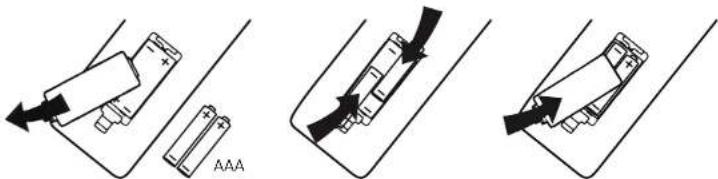
- Open the cover on the back of the remote control.
- Place the batteries in the compartment provided, taking care to observe the indicated + and - polarity.
- Replace the cover.
• The remote control works with 2 x AAA LR03 1.5 V batteries.
• We recommend using only alkaline batteries. - Remove the batteries from the remote control if you are not going to use it for a while (more than a month).
- Used batteries must be disposed of safely. Place them in environmentally-friendly collection bins.
USING THE REMOTE CONTROL
- Aim the remote control at the infrared sensor on the front of the mini-stereo at an angle of +/-30^ so that the mini-stereo receives the transmitted information.
• The range of the remote control is 5 metres. - Make sure that there are no obstacles between the remote control and the infrared sensor and that sunlight or other light sources do not reflect on it.
connecting the speakers
Before using your mini-stereo, you must connect the speakers to the main unit.
- Connect the cable of each speaker. Insert the white cable end into the white socket.
- Insert the red cable end into the red socket.
- Check that the cables are correctly inserted.

Use only the supplied speakers. Using other speakers may damage the appliance or affect the sound quality.
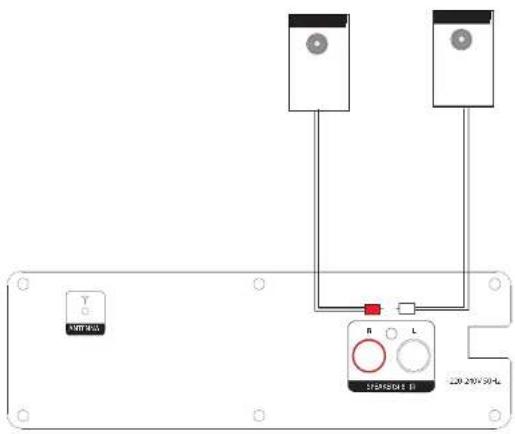
The position of the speakers affects the sound quality. Please keep a distance between the speakers and the wall of 30 cm to 1m and 100 cm to 120 cm between the two speakers depending on your own environment.
basic use
Switching the appliance on or off
- To turn on the mini-stereo, plug the end of the power cord into a wall outlet.
- Press the button ⏻ on the remote control or on the appliance. The mini-stereo lights up on the last active source.
- To turn off the mini-stereo, press the button ⏻ on the remote control or on the appliance again.
NOTE: your device has an automatic standby function. If no audio signal is detected within 15 minutes (excluding FM radio), it will automatically go into standby mode.
Selecting an audio source
On the device: select your playback source by pressing the ➕ button until you get the desired source: CD, USB, AUX, BLUETOOTH*, RADIO.
On the remote control: select your playback source by pressing directly on the button corresponding with the source of your choice: BT, CD/USB, AUX or FM.
Adjusting the volume
- To increase or decrease the volume, turn the volume dial on the front of the mini-stereo or press the VOL + and VOL - buttons on the remote control.
- To mute the volume, press the button on the remote control. To reactivate the sound, press the button again, press the VOL + and VOL - buttons on the remote control or turn the knob on the front of the device.
Change sound settings
Press the TONE button on the remote control once or twice to enter TRE or BASS adjustment mode. Press the VOL + and VOL - buttons on the remote control to set the desired value.
Basic functions
| Main unit Remote control | ||
| ▶II | ▶ / II | Starts, pauses or resumes playback of a CD, USB or Bluetooth device. |
| Stops playback of a CD, USB or Bluetooth device. | ||
| |◀◀ | Moves to the previous track on a CD, USB or Bluetooth device. (On the main unit, press and hold |◀ play backward at accelerated speed)Accesses the previous stored radio station. | |
| ▶▶I | Accesses the next track on a CD, USB or Bluetooth device. (On the main unit, press and hold ▶ play at accelerated speed)Accesses the previous stored radio station. | |
| / | ◀ | Plays backward at accelerated speed.Scans radio frequencies. |
| / | ▶ | Plays at accelerated speed.Scans radio frequencies. |
| / | REP | Repeats a track on a CD, an entire CD/MP3 album, an entire USB device or deactivates repeat. |
playing an audio CD
Your mini-stereo can play audio CDs as well as MP3s recorded on CD-R or CD-RW.
- Turn on the player using the button on the device or remote control.
- Select the CD source by pressing 📋 or the CD/USB button on the remote control: "CD" appears on screen when an audio CD is detected and "MP3" when a CD-R or CR-RW containing MP3 tracks is detected.
- Press ▲ to open the disc compartment, then insert a disc (label side up).
- Close the compartment. The device loads the disc, and displays information about the content, such as the total time and number of tracks, on screen. Playback then starts automatically.
- For CDs containing audio files in MP3 format, the mini-stereo starts playback with the first track of the first album in alphabetical order. To go directly to another track, briefly press the and buttons.
Programming a playlist
Your mini-stereo allows you to programme a playback order of audio CD tracks.
- When the mini-stereo is stopped, press the PROG button and the screen displays P 01, indicating the first position of the playback programme.
- Select the track number you want to listen to first using the numeric keys on the remote control.
• Example:
- Press PROG and the screen will display P 01,
- Press key 3 to position track 3 in 1st position
- Next, press the PROG button again to save your choice and move on to the second position in the playback programme, at which point the display will show P 02.
- Select the track number you want to listen to in second position.
Example:
- Press PROG and the screen will display P 02,
- Press key 7 to position track 7 in 2nd position
-
Repeat the operation as often as necessary (until FULL appears on screen, indicating that the programme is complete).
-
Next, press ▶ to▶tart playback. Playback is in the order you have defi ned.
- Press ■o end programming.
listening to the radio
- Fully extend the antenna cable on the back of the mini-stereo.
- Tum on the mini-stereo and select the RADIO source by pressing the ➕ button on the device several times or directly pressing the FM button on the remote control.
Performing a full scan on the FM band
- With the radio on, press the SEARCH button on the remote control to perform a full scan on the FM band. The stations found are stored.
Search for a radio station automatically
- Press and hold the 🔊 buttons on the remote control to perform an automatic scan.
- FM scanning stops when a radio station has been found.
- You can then briefly press the ◀ or ▶ buttons on the remote control to refine your search, as described in the next paragraph.
Searching for a radio station manually
- Briefly press the ◀ or ▶ buttons on the remote control until the optimal reception frequency is reached.
- Each time the of buttons are pressed, the frequency decreases/increases by 0.05 MHz.
- If reception is poor, adjust the FM antenna position or change the frequency.
NOTE: if you know the frequency of the radio station you want to listen to, you can also press F on the remote control and enter the numbers: for example, to listen to 102.3 Mhz, press F, then 1-0-2-3-0.
Storing radio stations
- With the radio on, tune to the FM station of your choice as described above.
- Press SAVE. The memory number P01 appears on screen. Use the buttons ◀◀ and ▶▶ to select the desired memory number. Press SAVE again to confirm that the FM station has been saved to the selected number.
-
Repeat as often as necessary.
-
The programmed stations remain stored in the memory, even after the mini-stereo is switched off.
- Programming a new station to an already assigned number automatically deletes the previously saved station.
Listening to a saved frequency
Use the 🔊 and 🔒 buttons to select the memory number of your choice, or enter the numbers directly using the numeric buttons on the remote control (e.g. enter 1-2 to listen to station 12).
NOTE: In the event of interference, press the MO/ST button on the remote control to reduce background noise.
establishing a Bluetooth\* connection
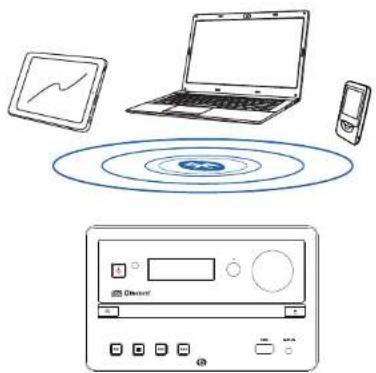
If you have a Bluetooth audio device (smartphone, tablet, laptop, etc.), you can pair it to the mini-stereo. The Bluetooth connection enables you to play back music recorded on your audio device without using a cable.
natural_image
Illustration of electronic devices including a laptop, smartphone, and CD-ROM with no visible text or symbolsTurn on the mini-stereo and select the Bluetooth ^® source by pressing the button on the device several times or directly pressing the BT button on the remote control.
- BT flashes on screen, indicating that the pairing mode is active.
- Then please refer to the user manual of your Bluetooth audio device for pairing with the mini-stereo. It is called Essb_EBMSBTH01 in the list of detected Bluetooth devices.
NOTE: if a password is required, enter 0000. - Pairing is successful when the BT indication becomes fixed on screen.
- Start playback on your audio device.
- Use the controls on the device, the remote control or your smartphone to pause, stop, start playback or switch between tracks. Or change the playback source on the mini-stereo or remote control.
- This mini-stereo can be paired to all devices equipped with Bluetooth wireless technology.
- After pairing has been completed, the last stored Bluetooth ^® audio device will automatically reconnect as soon as the Bluetooth ^® source is selected.
- For optimum connection, the distance between the mini-stereo and your Bluetooth* device should not exceed 10 metres.
- The speaker can only be paired to one Bluetooth device at a time. To pair another device, cancel the pairing of your Bluetooth device and then repeat the previous steps 1 to 4 with the new device.
Incoming call detection
- When a call is received or dialled, the smartphone pauses music playback. The transmission of music from your phone to the mini-stereo is paused.
- When the call ends, the phone resumes playback from the point where it was paused, and the music is once again played through the mini-stereo speakers.
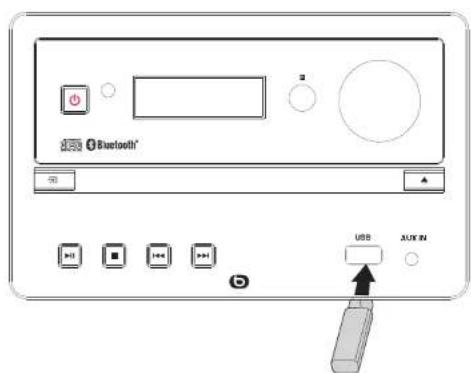
connecting a USB removable media
- Turn on the mini-stereo. Select the USB source by pressing the button on the device several times or directly pressing the CD/USB button on the remote control.
- Playback starts automatically. To go directly to another track, use the and barons.
NOTE: the mini-stereo supports USB sticks with a maximum capacity of 32 GB.
connecting the mini-stereo to an auxiliary source
The 3.5 mm jack plug enables you to connect an audio player, and play music from this player to the mini-stereo speakers.
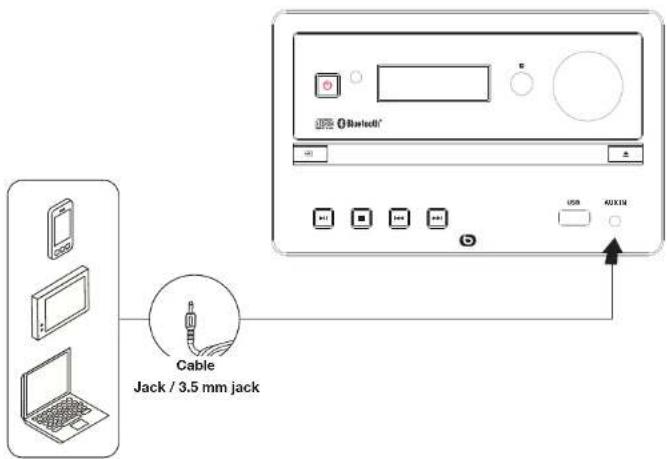
- Plug the end of a 3.5mm jack/3.5mm jack cable (not supplied) into the auxiliary input located on the front of the device.
- Plug the other end into the audio output jack of your media player. Refer to the player supplier's operating manual for more information.
- Select the AUX source by pressing the ☐ button on the device several times or directly pressing the AUX button on the remote control.
- Begin playback on your auxiliary source; the sound travels through the mini-stereo speakers.
maintenance and cleaning
Cleaning the device
- Always unplug the appliance from the mains before cleaning.
- Clean the device with a soft, dry cloth only.
- Do not use liquid cleaners or aerosol cleaners.
Notes on the discs
DISK HANDLING


Hold the disc by the ends and make sure that your fingers do not touch the playing surface. Do not glue paper or put stickers on the discs.
CLEANING THE DISCS
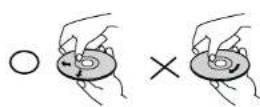
Fingerprints and dust on a disc can cause poor quality sound and sound distortion. Before playing, clean the disc with a clean, dry cloth from the centre to the ends.
Never use alcohol, benzene, thinner, cleaning fluid or other chemicals.
Do not use compressed air to clean dust.
STORING THE DISCS
Store the discs in their case after use.
Do not expose the discs to very cold, humid or hot environments.
Never leave them in a parked vehicle in direct sunlight.
DISCS THAT ARE DAMAGED AND OUT OF SHAPE
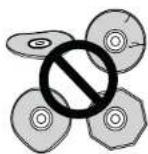
Do not use cracked, chipped, warped, or otherwise damaged discs as they may damage the player.
This player is designed to be used only with traditional, fully circular discs. Do not use discs of any other shape.
Never lift or move the appliance during playback: discs rotate at high speed and may be damaged.
troubleshooting guide
Before contacting the service department, please carry out the checks listed below. If you cannot solve the problem by following the instructions below, contact your store.
SYMPTOMS POSSIBLE CAUSES SOLUTIONS
| The mini-stereo does not switch on. | The device is not plugged in. Plug the device into a mains socket. | |
| There is no power at the mains plug. | Connect another device to the same power outlet to cross-check the outlet. | |
| No sound. | The volume is set to minimum or is muted. | Adjust the volume.Briefly press the button or the VOL or VOL- buttons to turn the volume back on. |
| The selected source is not correct. | Select the appropriate audio source by pressing the button several times. | |
| Malfunction. | The mini-stereo works abnormally, or emits an unusual sound. | Unplug the appliance for 30 minutes. After 30 minutes, turn the mini-stereo back on. |
| The remote control is not working. | The distance between the remote control and the mini-stereo is too great. | Bring the remote control closer to the appliance. |
| There is an obstacle between the remote control and the appliance. | Remove any obstacles between the two objects. | |
| The batteries are flat. | Replace the batteries. See the "Remote control - Inserting the batteries" section. | |
| There is no playback on the USB media. | The selected source is not correct. | Select the USB source by repeatedly pressing the button. |
| The playback format is incorrect. | Check that the playback formats are compatible with this device. | |
| Removable media is not detected. | Unplug the removable media and plug it in again. | |
| The Bluetooth connection cannot be established. | Your audio source is not in pairing mode. | Refer to the user manual of your audio source for more details. |
| Make sure that the mini-stereo and your Bluetooth device are less than 8 metres apart and that no walls or electronic devices are obstructing the transmission. | ||
simplifi ed EU declaration of conformity
The undersigned, Sourcing & Creation hereby declares that the Essentiel b EBMSBTH01 Bluetooth* mini-stereo type radio electric device complies with directive 2014/53/EU.
The full text of the EU declaration of conformity is available from the following Internet address:
natural_image
Illustration of electronic devices including a laptop, tablet, smartphone, and CD-ROM (no text or symbols present)natural_image
Illustration of electronic devices including a laptop, smartphone, and CD-ROM with no visible text or symbolsAll information, designs, drawings and pictures in this document are the property of SOURCING & CREATION. SOURCING & CREATION reserves all rights to its brands, designs and information. Any copy and reproduction through any means shall be deemed and considered as counterfeiting.
Protection of the environment
This symbol attached to the product means that it is an appliance whose disposal is subject to the directive on waste from electrical and electronic equipment (WEEE). This appliance may not in any way be treated as household waste and must be subject to a specific type of removal for this type of waste. Recycling and
recovery systems are available in your area (waste removal) and by distributors. By taking your appliance at its end of life to a recycling facility, you will contribute to environmental conservation and prevent any harm to your health.

Umweltschutz
\* Tested in our laboratories
Warranty valid from the date of purchase (receipt as proof of purchase). This warranty does not cover defects or damage caused by improper set up, incorrect use, or normal wear and tear of this product.
\* In unseren Labors getestet
essentiel
SERVICE RELATION CLIENTS /
Customer Relations Department / Kundenservice / Klantenafdeling
Avenue de la Motte
CS 80137
59811 Lesquin cedex
Art. 8011966
Ref. EBMSBTH01